audio Peugeot 308 SW BL 2011 Workshop Manual
[x] Cancel search | Manufacturer: PEUGEOT, Model Year: 2011, Model line: 308 SW BL, Model: Peugeot 308 SW BL 2011Pages: 336, PDF Size: 21.26 MB
Page 310 of 336
308
33
44
11
55
22
PEUGEOT CONNECT USB
USING THE PEUGEOT CONNECT USB
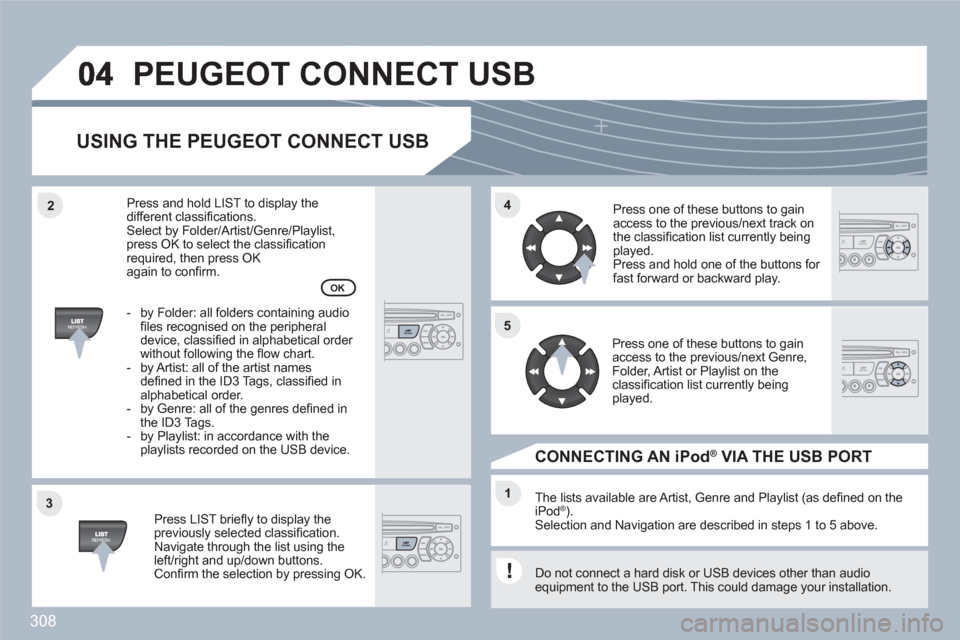
Press LIST briefl y to display thepreviously selected classifi cation.Navigate through the list using theleft/right and up/down buttons. Confi rm the selection by pressing OK.
The lists available are Artist, Genre and Playlist (as defi ned on theiPod ®). ®
Selection and Navigation are described in steps 1 to 5 above.
Do not connect a hard disk or USB devices other than audio equipment to the USB port. This could damage your installation.
CONNECTING AN iPod ®VIA THE USB PORT ®
Press one of these buttons to gainaccess to the previous/next track on the classifi cation list currently beingplayed.
Press and hold one of the buttons for fast forward or backward play.
Press one of these buttons to gainaccess to the previous/next Genre,Folder, Artist or Playlist on the classifi cation list currently beingplayed.
Press and hold LIST to display thedifferent classifi cations. Select by Folder/Artist/Genre/Playlist, press OK to select the classifi cation required, then press OK again to confi rm.
- by Folder: all folders containing audiofi les recognised on the peripheraldevice, classifi ed in alphabetical order without following the fl ow chart.
- by Artist: all of the artist namesdefi ned in the ID3 Tags, classifi ed in alphabetical order.
- by Genre: all of the genres defi ned inthe ID3 Tags.
- by Playlist: in accordance with the playlists recorded on the USB device.
OK
Page 311 of 336
309
11
22
22
11
The controls are displayed and managed via the portable equipment.
First adjust the volume of your portable equipment.
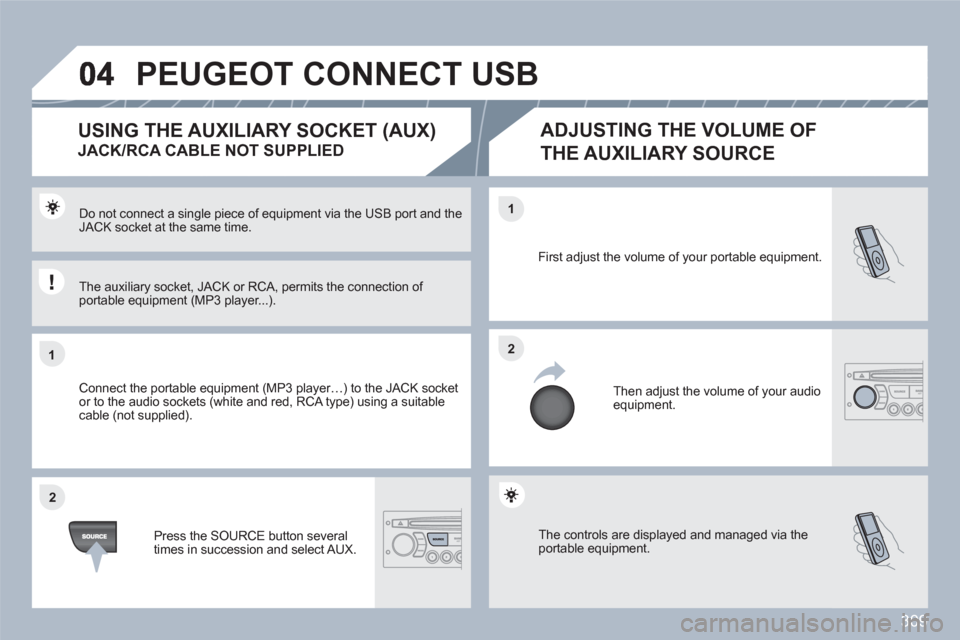
Then adjust the volume of your audioequipment.
Do not connect a single piece of equipment via the USB port and the JACK socket at the same time.
Connect the portable equipment (MP3 player…) to the JACK socket or to the audio sockets (white and red, RCA type) using a suitable cable (not supplied).
Press the SOURCE button several times in succession and select AUX.
USING THE AUXILIARY SOCKET (AUX)
JACK/RCA CABLE NOT SUPPLIED
ADJUSTING THE VOLUME OF
THE AUXILIARY SOURCE
The auxiliary socket, JACK or RCA, permits the connection of portable equipment (MP3 player...).
PEUGEOT CONNECT USB
Page 312 of 336
310
11
66
22
77
44
99
55
101
33
88
Saisir code authentification
01
OK Del23456789 _
05BLUETOOTH
For safety reasons and because they require prolonged attention on the part of the driver, the operations for pairing of the Bluetooth mobile telephone with the Bluetooth hands-free system of your audioequipment must be carried out with the vehicle stationary and the ignition on.
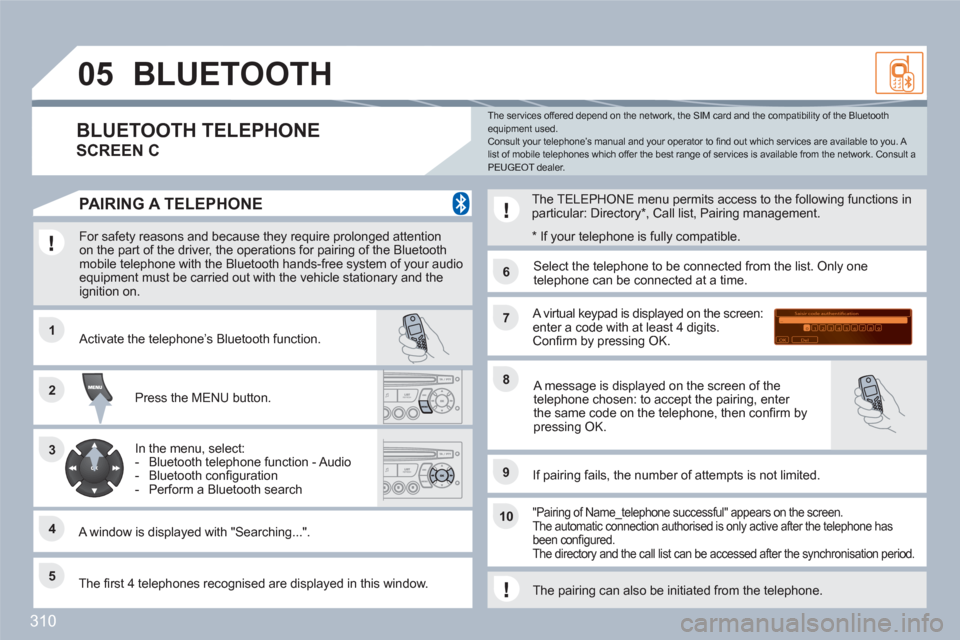
Press the MENU button.
A window is displayed with "Searching...".
Activate the telephone’s Bluetooth function.
In the menu, select:
- Bluetooth telephone function - Audio
- Bluetooth confi guration
- Perform a Bluetooth search
The services offered depend on the network, the SIM card and the compatibility of the Bluetooth equipment used. Consult your telephone’s manual and your operator to fi nd out which services are available to you. A list of mobile telephones which offer the best range of services is available from the network. Consult a PEUGEOT dealer.
BLUETOOTH TELEPHONE
SCREEN C
The TELEPHONE menu permits access to the following functions inparticular: Directory *
, Call list, Pairing management.
The fi rst 4 telephones recognised are displayed in this window.
A virtual keypad is displayed on the screen:enter a code with at least 4 digits. Confi rm by pressing OK.
If pairing fails, the number of attempts is not limited.
Select the telephone to be connected from the list. Only onetelephone can be connected at a time.
A message is displayed on the screen of thetelephone chosen: to accept the pairing, enter the same code on the telephone, then confi rm bypressing OK.
"Pairing of Name_telephone successful" appears on the screen.The automatic connection authorised is only active after the telephone has been confi gured. The directory and the call list can be accessed after the synchronisation period.
PAIRING A TELEPHONE
*
If your telephone is fully compatible.
The pairing can also be initiated from the telephone.
Page 313 of 336
311
05
11
22
11
22
33
22
11
RECEIVING A CALL
An incoming call is announced by a ring and a superimposed display on the multifunction screen. Initiate the pairing between the telephone and the vehicle. This pairing can be initiated fromthe vehicle's telephone function menu or via the telephone's keypad. See steps 1 to 10 on theprevious pages. During the pairing phase, the vehiclemust be stationary with the key in the ignition.
Select the telephone to be connected from the telephone function menu. The audio system connects to a newly paired telephone automatically.
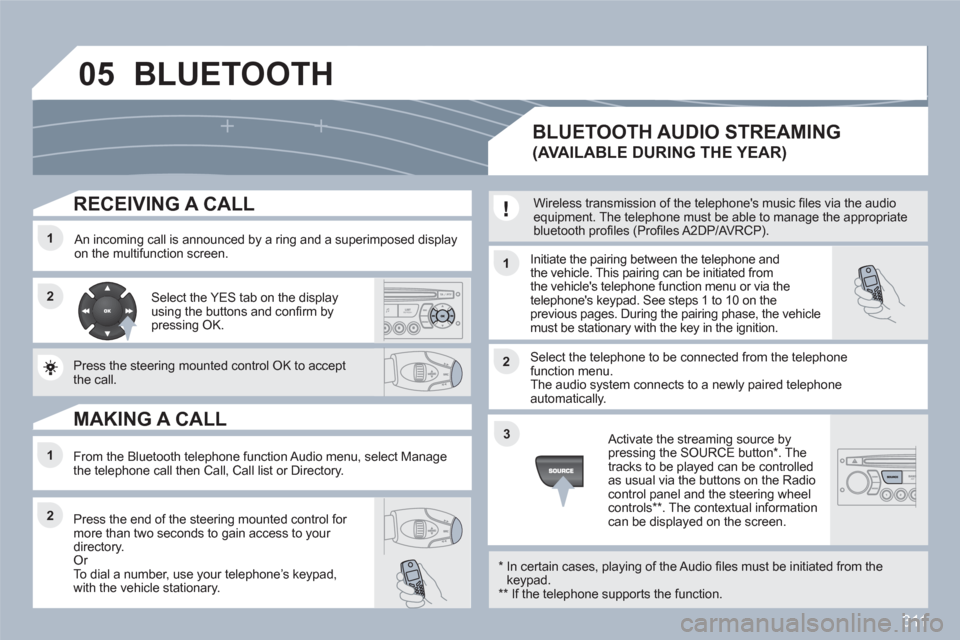
Select the YES tab on the display using the buttons and confi rm bypressing OK.
Press the steering mounted control OK to accept the call.
From the Bluetooth telephone function Audio menu, select Manage the telephone call then Call, Call list or Directory.
Press the end of the steering mounted control for more than two seconds to gain access to your directory. Or
To dial a number, use your telephoneís keypad, with the vehicle stationary.
MAKING A CALL
BLUETOOTH AUDIO STREAMING
(AVAILABLE DURING THE YEAR)
Wireless transmission of the telephone's music fi les via the audio equipment. The telephone must be able to manage the appropriatebluetooth profi les (Profi les A2DP/AVRCP).
*
In certain cases, playing of the Audio fi les must be initiated from thekeypad. **
If the telephone supports the function.
Activate the streaming source bypressing the SOURCE button * . Thetracks to be played can be controlled as usual via the buttons on the Radio control panel and the steering wheel controls
** . The contextual information can be displayed on the screen.
BLUETOOTH
Page 317 of 336
315
1
1
2
3
4
3
4
3
4
2
3
4
3
4
2
3
4
2
4
4
3
3
4
4
1
2
2
08
3
4
4
1
2
3
3
3
4
4
4
2
3
4
2
3
3
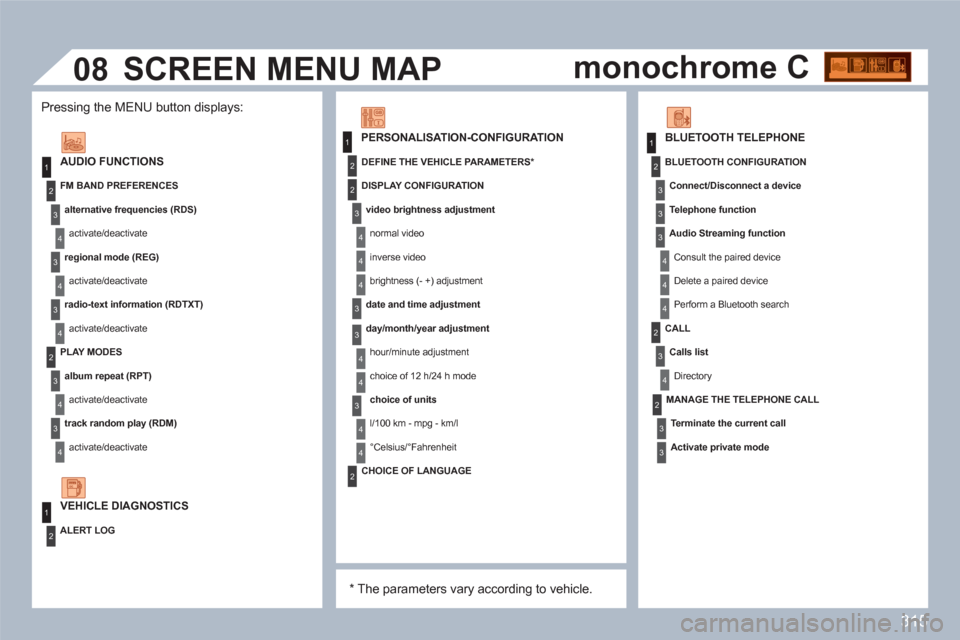
AUDIO FUNCTIONS
FM BAND PREFERENCES
alternative frequencies (RDS)
activate/deactivate
regional mode (REG)
activate/deactivate
radio-text information (RDTXT)
activate/deactivate
PLAY MODES
album repeat (RPT)
activate/deactivate
track random play (RDM)
activate/deactivate
ALERT LOG
PERSONALISATION-CONFIGURATION
DEFINE THE VEHICLE PARAMETERS *
DISPLAY CONFIGURATION
video brightness adjustment
normal video
inverse video
brightness (- +) adjustment
date and time adjustment
day/month/year adjustment
hour/minute adjustment
choice of 12 h/24 h mode
choice of units
l/100 km - mpg - km/l
°Celsius/°Fahrenheit
*
The parameters vary according to vehicle.
CHOICE OF LANGUAGE
BLUETOOTH TELEPHONE
MANAGE THE TELEPHONE CALL
Terminate the current call
Activate private mode
BLUETOOTH CONFIGURATION
Connect/Disconnect a device
Te l ephone function
Audio Streaming function
Consult the paired device
Delete a paired device
Perform a Bluetooth search
CALL
Calls list
Directory
SCREEN MENU MAP
VEHICLE DIAGNOSTICS
Pressing the MENU button displays:
monochrome C
Page 318 of 336
316
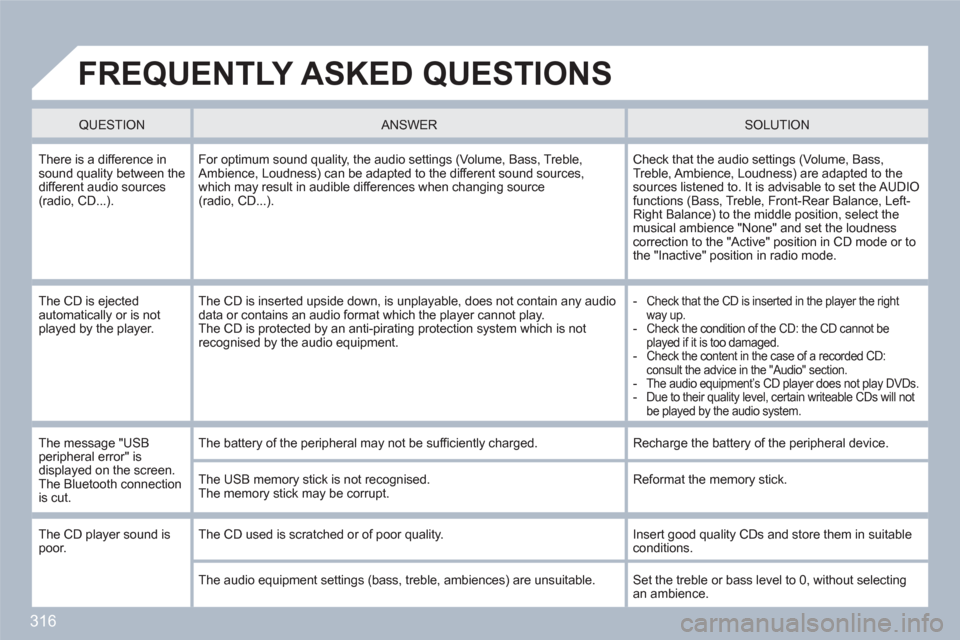
FREQUENTLY ASKED QUESTIONS
QUESTION
ANSWER SOLUTION
There is a difference insound quality between thedifferent audio sources (radio, CD...).
For optimum sound quality, the audio settings (Volume, Bass, Treble,Ambience, Loudness) can be adapted to the different sound sources,which may result in audible differences when changing source(radio, CD...).
Check that the audio settings (Volume, Bass, Treble, Ambience, Loudness) are adapted to the sources listened to. It is advisable to set the AUDIOfunctions (Bass, Treble, Front-Rear Balance, Left-Right Balance) to the middle position, select themusical ambience "None" and set the loudness correction to the "Active" position in CD mode or tothe "Inactive" position in radio mode.
The CD is ejected automatically or is not played by the player.
The CD is inserted upside down, is unplayable, does not contain any audio data or contains an audio format which the player cannot play. The CD is protected by an anti-pirating protection system which is not recognised by the audio equipment.
-
Check that the CD is inserted in the player the right way up.-
Check the condition of the CD: the CD cannot be played if it is too damaged.-
Check the content in the case of a recorded CD:consult the advice in the "Audio" section. -
The audio equipment’s CD player does not play DVDs.-
Due to their quality level, certain writeable CDs will not be played by the audio system.
The message "USBperipheral error" is displayed on the screen. The Bluetooth connection is cut.
The battery of the peripheral may not be suffi ciently charged.
Recharge the battery of the peripheral device.
The USB memory stick is not recognised.The memory stick may be corrupt.
Reformat the memory stick.
The CD player sound is poor. The CD used is scratched or of poor quality.
Insert good quality CDs and store them in suitableconditions.
The audio equipment settings (bass, treble, ambiences) are unsuitable.
Set the treble or bass level to 0, without selectingan ambience.
Page 319 of 336
317
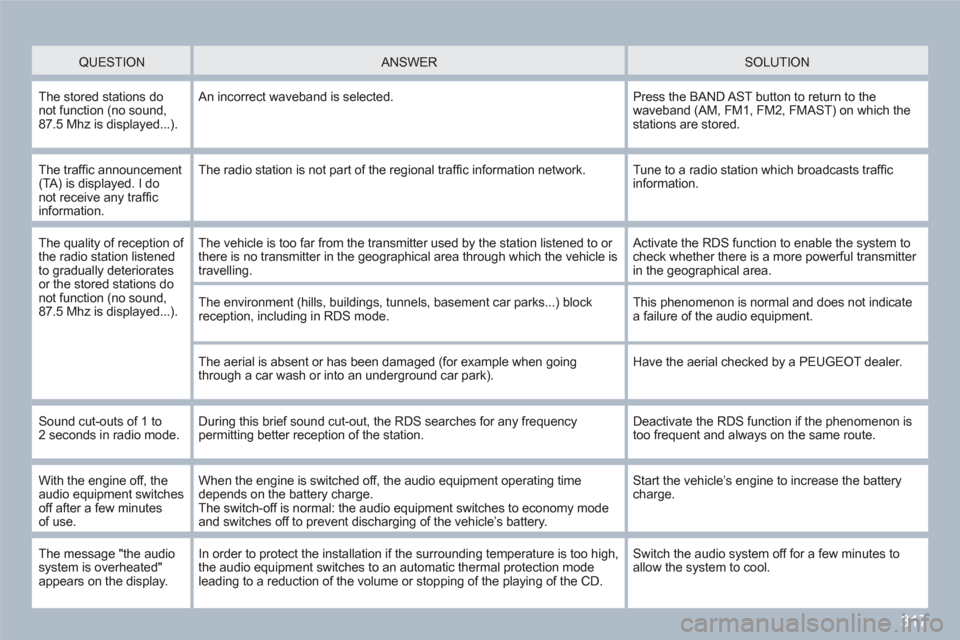
QUESTION
ANSWER
SOLUTION
The stored stations do not function (no sound,87.5 Mhz is displayed...).
An incorrect waveband is selected.
Press the BAND AST button to return to thewaveband (AM, FM1, FM2, FMAST) on which the stations are stored.
The traffi c announcement(TA) is displayed. I do not receive any traffi c information.
The radio station is not part of the regional traffi c information network.
Tune to a radio station which broadcasts traffi c information.
The quality of reception of the radio station listened to gradually deterioratesor the stored stations donot function (no sound,87.5 Mhz is displayed...).
The vehicle is too far from the transmitter used by the station listened to or there is no transmitter in the geographical area through which the vehicle is travelling.
Activate the RDS function to enable the system tocheck whether there is a more powerful transmitter in the geographical area.
The environment (hills, buildings, tunnels, basement car parks...) block reception, including in RDS mode.
This phenomenon is normal and does not indicate a failure of the audio equipment.
The aerial is absent or has been damaged (for example when goingthrough a car wash or into an underground car park).
Have the aerial checked by a PEUGEOT dealer.
Sound cut-outs of 1 to 2 seconds in radio mode. During this brief sound cut-out, the RDS searches for any frequencypermitting better reception of the station.
Deactivate the RDS function if the phenomenon istoo frequent and always on the same route.
With the engine off, theaudio equipment switches off after a few minutesof use.
When the engine is switched off, the audio equipment operating time depends on the battery charge.The switch-off is normal: the audio equipment switches to economy modeand switches off to prevent discharging of the vehicleís battery.
Start the vehicleís engine to increase the batterycharge.
The message "the audio system is overheated" appears on the display.
In order to protect the installation if the surrounding temperature is too high,the audio equipment switches to an automatic thermal protection mode leading to a reduction of the volume or stopping of the playing of the CD.
Switch the audio system off for a few minutes to allow the system to cool.
Page 327 of 336
A
ABS and EBFD systems................130Accessories ....................................199Accessories socket, 12 volt....105,116Access to the 3rd row.......................69Additional seats ................................71Adjusting headlamps..................96,97Adjusting head restraints ..................65Adjusting seat belt height ...............132Adjusting the steering wheel............77Air conditioning (digital) ..............57,61Air conditioning (manual)............57,58Air filter...........................................r162Air vents ...........................................56Alarm................................................82Anti-lock braking system (ABS) ......130Anti-pinch....................................84,90Anti-theft steering lock......................79Ashtray ...........................................105Assistance call................130,230, 231Athermic windscreen......................104Audible warning..............................128Audio/video sockets.......................255Audio streaming (Bluetooth) ...........311Audio systems.........................217-233Automatic gearbox.................147,163Automatic illumination ofheadlamps..............................93,95Automatic operation of hazard warning lamps............128Automatic rain sensitivewindscreen wipers ................98,100Auxiliary socket..............................289Auxiliary sockets.....................255,309
B
Capacity, fuel tank............................91CD..................................................306CD changer............................r289, 306CD MP3 ..................251,288,305, 306Central locking ............................78, 87Changing a bulb......................179-185Changing a fuse......................186-191Changing a wheel...................172, 174Changing a wiper blade .........100, 194Changing the date ..........260,292, 313Changing the remotecontrol battery..............................80Changing the time ..........260,292, 313CHECK .............................................38Checking levels......................161,162Checking the engine oil level...........35
Checking tyre pressures(using the kit).............................168Checks.....................................157-163Child lock........................................127Children .....................85, 118-127, 138Child seats..............................118-126Child seats, conventional ........119-122Child seats, Isofix ....................123-126Closing the boot ...................78,88,89Closing the doors .......................78,86Cold climate screen ........................199Connectors,audio..................105,289,307,309Control for panoramicsunroof blind .................................90Control stalk, wipers ...........98,99,100Coolant level .............................34,161Coolant temperature.........................34Coolant temperature indicator..........r34Courtesy lamps..............................101Courtesy mirror...............................r104Cruise control.................................152Cup holder......................................r103Curtain airbags .......................139,140
Battery....................................162, 192Battery, remote control...............80, 81Battery recharge.............................193Blind for panoramic sunroof.............f90Bluetooth (hands-free)......256,290, 310Bluetooth (telephone).....256,290, 310Bonnet............................................157Boot............................................88, 89Boot lamp...............................102, 117Boot storage trays...........................111Brake discs.....................................163Brake lamps...........................182, 184Brake pads.....................................163Brakes............................................163Braking assistance system.............130
C
D
Dashboard fusebox ........................187Date (display).................260,292, 313Daytime running lamps.....95,179,180Deactivating the passenger airbag......138Deadlocking ......................................79Defrosting.........................................60Dials and gauges.........................22-24Diesel additive level........................162
Page 328 of 336
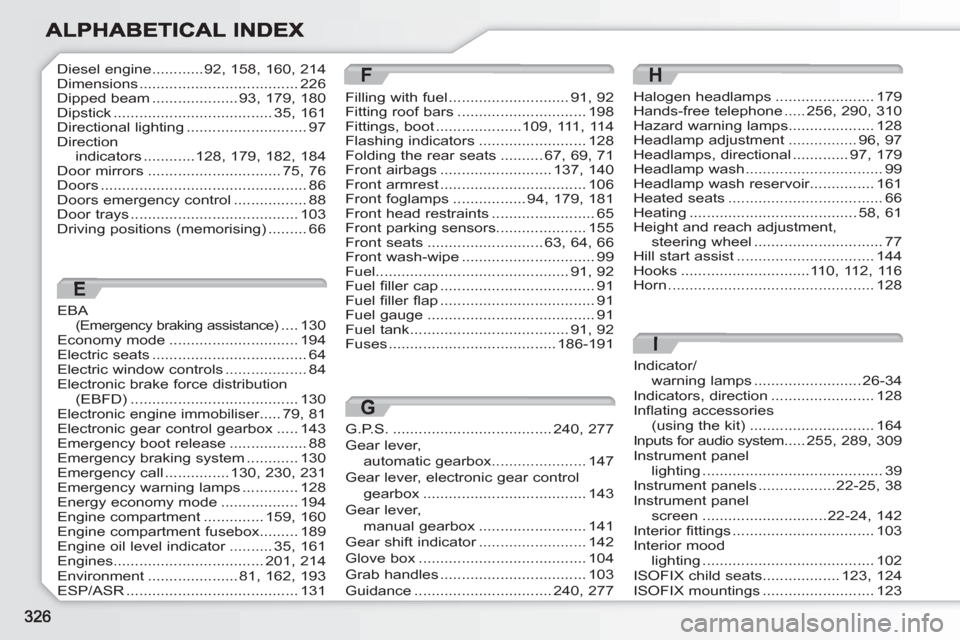
Indicator/warning lamps.........................26-34Indicators, direction........................128Inflating accessories(using the kit).............................164Inputs for audio system.....255,289,309Instrument panel lighting..........................................39Instrument panels ..................22-25,38Instrument panel screen .............................22-24,142Interior fittings.................................103Interior moodlighting ........................................102ISOFIX child seats..................123,124ISOFIX mountings..........................123
I
E
EBA(Emergency braking assistance)....130Economy mode..............................194Electric seats....................................64Electric window controls ...................84Electronic brake force distribution(EBFD).......................................130Electronic engine immobiliser.....79,81Electronic gear control gearbox.....143Emergency boot release ..................88Emergency braking system............130Emergency call ...............130,230,231Emergency warning lamps.............128Energy economy mode..................194Engine compartment..............159,160Engine compartment fusebox.........189Engine oil level indicator..........r35,161Engines...................................201,214Environment.....................81, 162, 193ESP/ASR........................................131
F
Filling with fuel............................91, 92Fitting roof bars..............................198Fittings, boot....................109,111, 114Flashing indicators.........................128Folding the rear seats..........67, 69, 71Front airbags..........................137, 140Front armrest..................................106Front foglamps.................94,179,181Front head restraints........................65Front parking sensors.....................155Front seats...........................63, 64, 66Front wash-wipe...............................99Fuel.............................................91, 92Fuel filler cap....................................91Fuel filler flap....................................91Fuel gauge.......................................91Fuel tank.....................................91, 92Fuses.......................................186-191
Halogen headlamps.......................179Hands-free telephone.....256,290,310Hazard warning lamps....................128Headlamp adjustment................96,97Headlamps, directional.............97,179Headlamp wash................................99Headlamp wash reservoir...............161Heated seats....................................66Heating.......................................58, 61Height and reach adjustment,steering wheel..............................77Hill start assist................................144Hooks..............................110,112,116Horn................................................128
HDiesel engine ............92, 158,160,214Dimensions .....................................226Dipped beam ....................93,179,180Dipstick.....................................35,161Directional lighting ............................97Directionindicators............128, 179,182,184Door mirrors...............................75,76Doors ................................................86Doors emergency control .................88Door trays .......................................103Driving positions (memorising) .........66
G.P.S......................................240, 277
Gear lever,
automatic gearbox......................147
Gear lever, electronic gear control
gearbox ......................................143
Gear lever,
manual gearbox .........................141
Gear shift indicator.........................r142
Glove box.......................................104
Grab handles..................................103
Guidance................................240, 277
G
Page 329 of 336
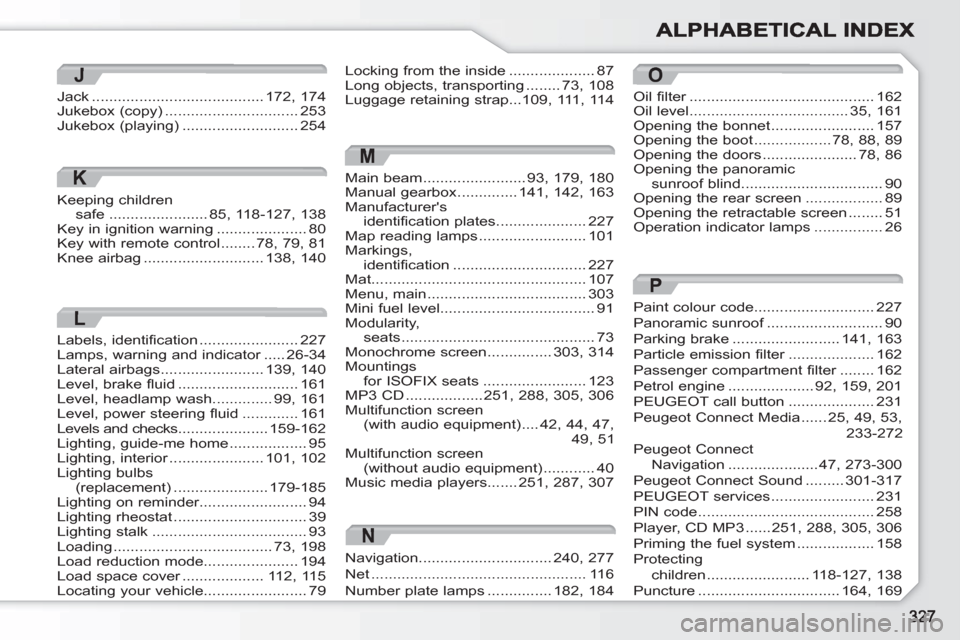
M
Main beam........................93,179, 180Manual gearbox..............141,142, 163Manufacturer'sidentification plates .....................227Map reading lamps .........................101Markings, identification ...............................227Mat..................................................107Menu, main .....................................303Mini fuel level....................................91Modularity,seats.............................................73Monochrome screen ...............303, 314Mountings for ISOFIX seats ........................123MP3 CD ..................251,288,305, 306Multifunction screen(with audio equipment)....42, 44,47,49, 51Multifunction screen(without audio equipment)............40Music media players.......251,287, 307
O
Oil filter...........................................r162Oil level.....................................35,161Opening the bonnet........................157Opening the boot..................78,88,89Opening the doors......................78,86Opening the panoramicsunroof blind.................................90Opening the rear screen..................89Opening the retractable screen........51Operation indicator lamps................26
Paint colour code............................227Panoramic sunroof...........................f90Parking brake.........................141,163Particle emission filter....................r162Passenger compartment filter........r162Petrol engine....................92,159,201PEUGEOT call button....................231Peugeot Connect Media......25,49, 53,233-272Peugeot Connect Navigation.....................47,273-300Peugeot Connect Sound .........301-317PEUGEOT services........................231PIN code .........................................258Player, CD MP3......251, 288,305,306Priming the fuel system..................158Protectingchildren ........................118-127, 138Puncture.................................164,169
P
Locking from the inside ....................87Long objects, transporting ........73, 108Luggage retaining strap...109,111, 114
K
Keeping childrensafe.......................85, 118-127, 138Key in ignition warning.....................80Key with remote control........78,79,81Knee airbag............................138,140
J
Jack........................................172,174Jukebox (copy)...............................253Jukebox (playing)...........................254
L
Labels, identification .......................227Lamps, warning and indicator.....r26-34Lateral airbags........................139,140Level, brake fluid............................161Level, headlamp wash..............99,161Level, power steering fluid.............161Levels and checks.....................159-162Lighting, guide-me home..................95Lighting, interior......................r101,102Lighting bulbs(replacement)......................179-185Lighting on reminder.........................94Lighting rheostat...............................39Lighting stalk....................................93Loading.....................................73,198Load reduction mode......................194Load space cover...................r112,115Locating your vehicle........................79
N
Navigation...............................240, 277
Net..................................................116
Number plate lamps...............182, 184