phone PEUGEOT 308 SW BL 2012 User Guide
[x] Cancel search | Manufacturer: PEUGEOT, Model Year: 2012, Model line: 308 SW BL, Model: PEUGEOT 308 SW BL 2012Pages: 382, PDF Size: 17.71 MB
Page 252 of 382
250
02
SETUP2ABC3DEF5JKL4GHI6MNO8TUV7PQRS9WXYZ0*#
1NAV ESC TRAFFICADDR
BOOKSETUP
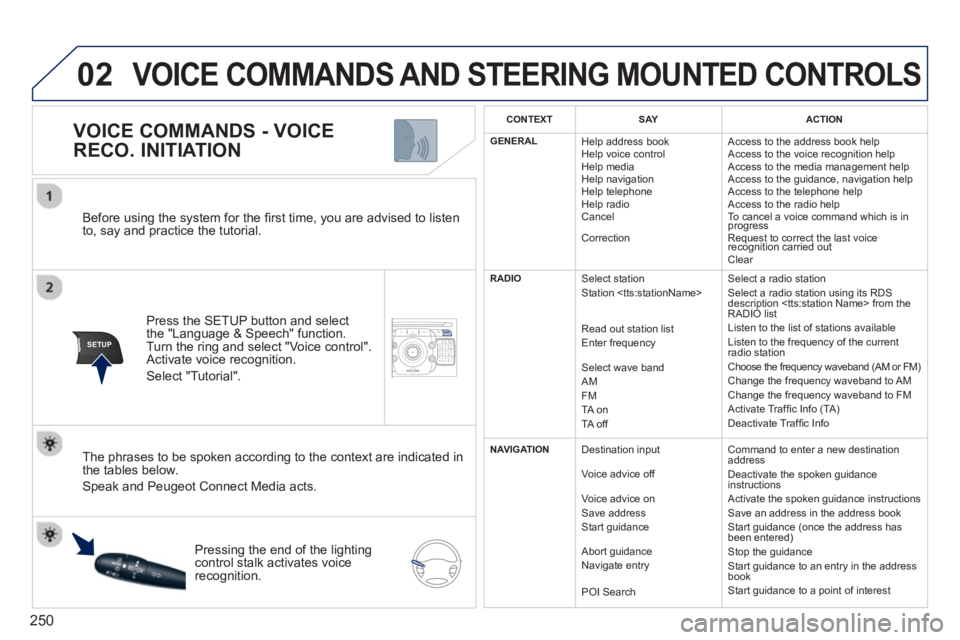
Before using the system for the fi rst time, you are advised to listen
to, say and practice the tutorial.
Press the
SETUP button and select
the "Language & Speech" function.Turn the ring and select "Voice control". Activate voice recognition.
Select "Tutorial".
VOICE COMMANDS - VOICE
RECO. INITIATION
The phrases to be spoken according to the context are indicated in
the tables below.
Speak and Peugeot Connect Media acts.
Pressing the end o
f the lightingcontrol stalk activates voice
recognition.
CONTEXTSAYACTION
GENERAL
Help address book
Help voice control
Help media
Help navi
gation
Help telephone
Help radio
Cancel
Correction Access to the address book help
Access to the voice reco
gnition help
Access to the media management help
Access to the guidance, navigation help
Access to the telephone help Access to the radio help To cancel a voice command which is inprogress
Request to correct the last voice recognition carried outq
Clear
RADIO
Select station
Station
R
ead out station list
Enter frequency
Select wave band AMFM
TA on
TA off Select a radio station
Select a radio station usin
g its RDS
description
Listen to the list of stations available
Listen to the frequency of the current
radio station Choose the frequency waveband (AM or FM) Change the frequency waveband to AM
Change the frequency waveband to FM
Activate Traffi c Info (TA)
D
eactivate Traffi c Info
NAVIGATION
Destination input
V
oice advice off
Voice advice on
Save address
Start
guidance
Abort
guidance
Navigate entry
POI Search Command to enter a new destination
address
Deactivate the spoken guidance instructions
Activate the spoken guidance instructions
Save an address in the address book
Start
guidance (once the address has
been entered)
Stop the guidance
Start guidance to an entry in the address
book
Start guidance to a point of interest
VOICE COMMANDS AND STEERING MOUNTED CONTROLS
Page 253 of 382
251
02
VOICE COMMANDS - VOICE
RECO. INITIATION
VOICE COMMANDS AND STEERING MOUNTED CONTROLS
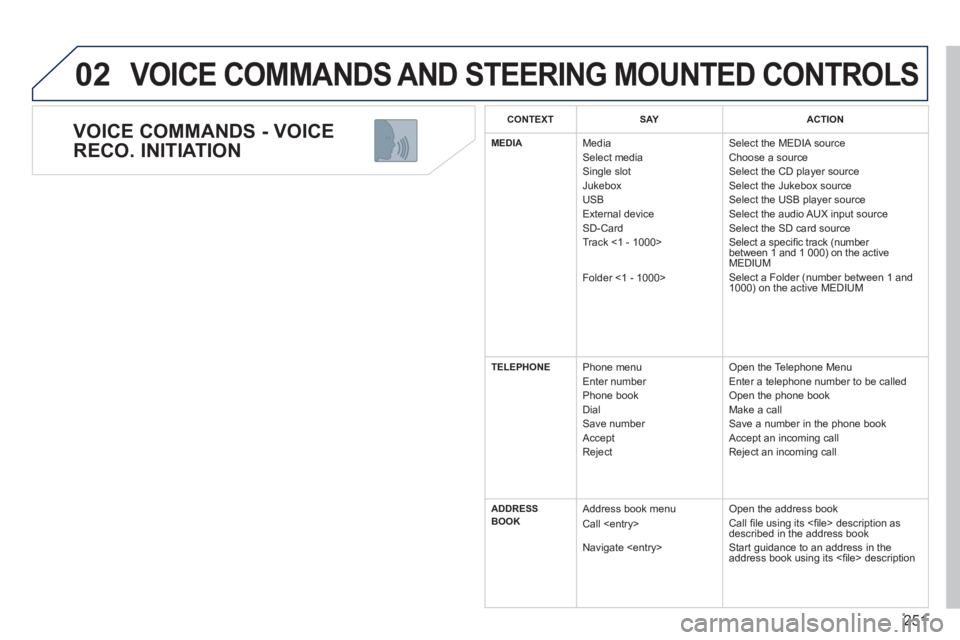
CONTEXTSAYACTION
MEDIAMedia
Select media
Single slot
Jukebox
USB
Ext
ernal device SD-Card
Track <1 - 1000>
Folder <
1 - 1000>
Select the MEDIA source
Choose a source
Select the CD player source
Select the Jukebox source Select the USB player source
Select the audio AUX input source
Select the SD card source
Select a specifi c track (number
between 1 and 1 000) on the active MEDIUM
Select a Folder (number between 1 and
1000) on the active MEDIUM
TELEPHONEPhone menu Enter number
Phone book
Dial
Save number
Accept
Re
ject Open the Telephone Menu
Enter a telephone number to be called
Open the phone book
Make a call
Save a number in the phone book
Accept an incomin
g call
Reject an incoming call
ADDRESS
BOOK Address book menu
Call
Navigate
Open the address book
Call fi le using its <fi le> description asdescribed in the address book
Start guidance to an address in the
address book using its <fi le> description
Page 254 of 382
252
02 VOICE COMMANDS AND STEERING MOUNTED CONTROLS
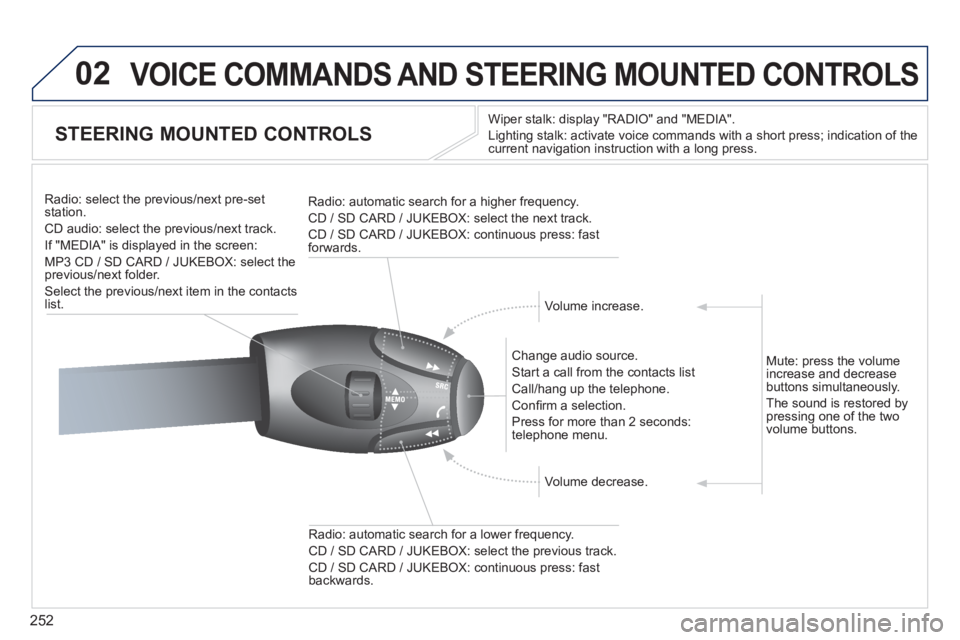
STEERING MOUNTED CONTROLS
Wiper stalk: display "RADIO" and "MEDIA".
Li
ghting stalk: activate voice commands with a short press; indication of the current navigation instruction with a long press
.
Change audio source.
Start a call from the contacts list
Call/han
g up the telephone.
Confi rm a selection.
Pr
ess for more than 2 seconds:
telephone menu.
Radio: automatic search for a lower frequenc
y.
CD / SD CARD / JUKEBOX: select the previous track.
CD / SD CARD / JUKEBOX: continuous press: fast backwards. Radio: select the previous
/next pre-setstation.
CD audio: select the previous/next track .
If "MEDIA" is displa
yed in the screen:
MP
3 CD / SD CARD / JUKEBOX: select the
previous/next folder.
Select the previous/next item in the contacts list.
Radio: automatic search
for a higher frequency.
CD / SD CARD / JUKEBOX: select the next track.
CD / SD CARD / JUKEBOX: continuous press: fast
forwards.
Volume increase.
Volume decrease. Mute: press the volume
increase and decreasebuttons simultaneously.
The sound is restored b
y pressing one of the two
volume buttons.
Page 255 of 382
253
03
SETUP
TRAFFIC
MEDIA
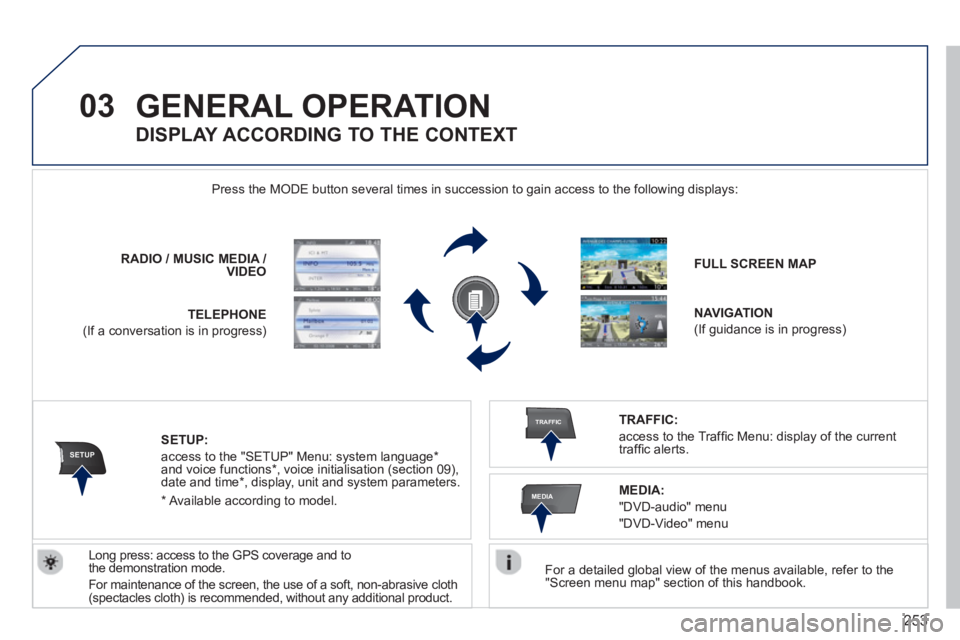
GENERAL OPERATION
For a detailed global view of the menus available, refer to the "Screen menu map" section of this handbook.
Press the M
ODE button several times in succession to gain access to the following displays:
Lon
g press: access to the GPS coverage and to
the demonstration mode.
For maintenance o
f the screen, the use of a soft, non-abrasive cloth (spectacles cloth) is recommended, without any additional product. RADIO
/MUSICMEDIA / VIDEO
TELEPHONE
(If a conversation is in progress)
FULL SCREEN MAP
NAVIGATION
(If guidance is in progress)
SETUP:
access to the "SETUP" Menu: system language *
and voice functions * , voice initialisation (section 09),
date and time * , display, unit and system parameters.
TRAFFIC:
access to the Traffi c Menu: display of the current
traffi c alerts.
DISPLAY ACCORDING TO THE CONTEXT
MEDIA:
"DVD-audio" menu
"DVD-Video" menu
*
Available accordin
g to model.
Page 256 of 382
254
03 GENERAL OPERATION
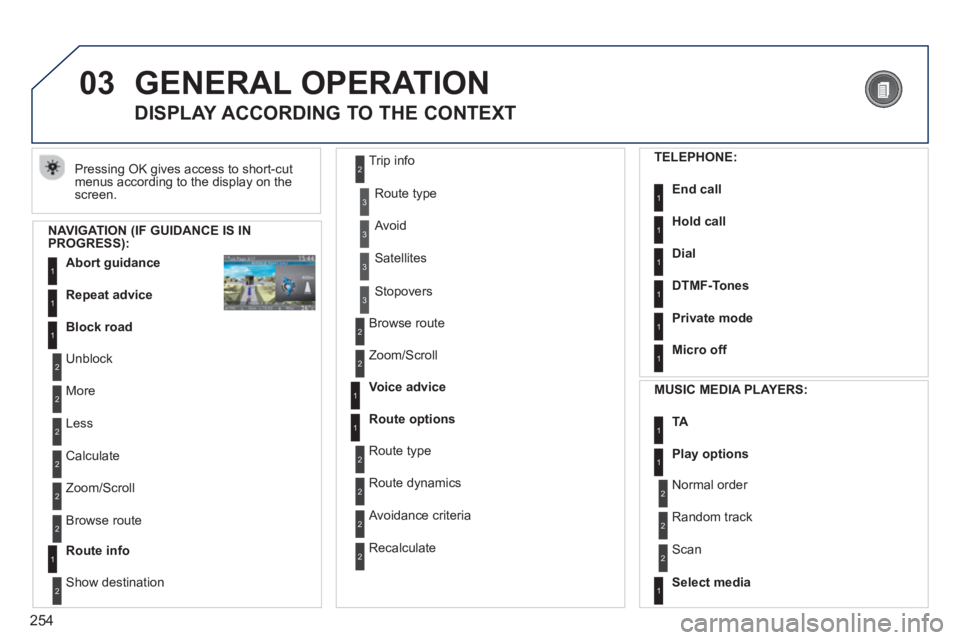
Pressing OK gives access to short-cut
menus according to the display on the screen.
DISPLAY ACCORDING TO THE CONTEXT
NAVIGATION (IF GUIDANCE IS IN PROGRESS):
Abort guidanc
e1
1
1
Repeat advice
Block road
2
2
Unblock
M
ore
2
Less
3
3
Route type
Avoid
3 Satellites
2
2
Calculate
Z
oom/Scroll
2
Browse route
1Route info
2
2
Show destination Trip in
fo
3
Stopovers
2
2
Browse route
Zoom/Scroll
1
1
Voice advice
Route options
2
2
Route type
Route dynamics
2 Avoidance criteria
2
Recalculate
TELEPHONE:
End call1
1
1
1
Hold call
Dial
DTMF-Tones
1Private mode
1Micro off
MU
SIC MEDIA PLAYERS:
TA1
1Play options
1Select media
2
2
Normal order
R
andom track
2 Scan
Page 277 of 382
275
08
2ABC3DEF5JKL4GHI6MNO8TUV7PQRS9WXYZ0*#
1RADIO MEDIANAV ESC TRAFFIC
SETUPADDR
BOOK
2ABC3DEF5JKL4GHI6MNO8TUV7PQRS9WXYZ0*#
1RADIO MEDIANAV ESC TRAFFIC
SETUPADDR
BOOK
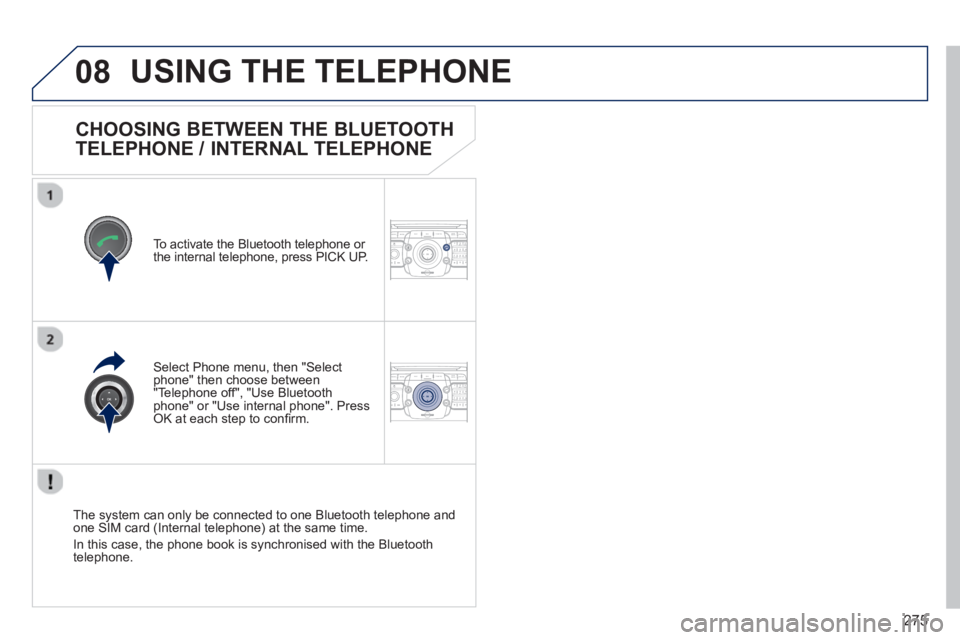
CHOOSING BETWEEN THE BLUETOOTH
TELEPHONE / INTERNAL TELEPHONE
To activate the Bluetooth telephone or
the internal telephone, press PICK UP.
USING THE TELEPHONE
Select Phone menu, then "Selectphone" then choose between"Telephone off", "Use Bluetoothphone" or "Use internal phone". Press OK at each step to confi rm.
The system can only be connected to one Bluetooth telephone and one SIM card (Internal telephone) at the same time.
In this case, the phone book is synchronised with the Bluetooth
telephone.
Page 278 of 382
276
08
2ABC3DEF5JKL4GHI6MNO8TUV7PQRS9WXYZ0*#
1RADIO MEDIANAV ESC TRAFFIC
SETUPADDR
BOOK
2ABC3DEF5JKL4GHI6MNO8TUV7PQRS9WXYZ0*#
1RADIO MEDIANAV ESC TRAFFIC
SETUPADDR
BOOK
2ABC3DEF5JKL4GHI6MNO8TUV7PQRS9WXYZ0*#
1RADIO MEDIANAV ESC TRAFFIC
SETUPADDR
BOOK
2ABC3DEF5JKL4GHI6MNO8TUV7PQRS9WXYZ0*#
1RADIO MEDIANAV ESC TRAFFIC
SETUPADDR
BOOK
2ABC3DEF5JKL4GHI6MNO8TUV7PQRS9WXYZ0*#
1RADIO MEDIANAV ESC TRAFFIC
SETUPADDR
BOOK2ABC3DEF5JKL4GHI6MNO8TUV7PQRS9WXYZ0*#
1RADIO MEDIANAV ESC TRAFFIC
SETUPADDR
BOOK
*
The services available via the telephone depend on the network, the SIMcard and the compatibility of the Bluetooth equipment used. Refer to your
telephone's manual and your operator to check which services you haveaccess to.
USING THE TELEPHONE
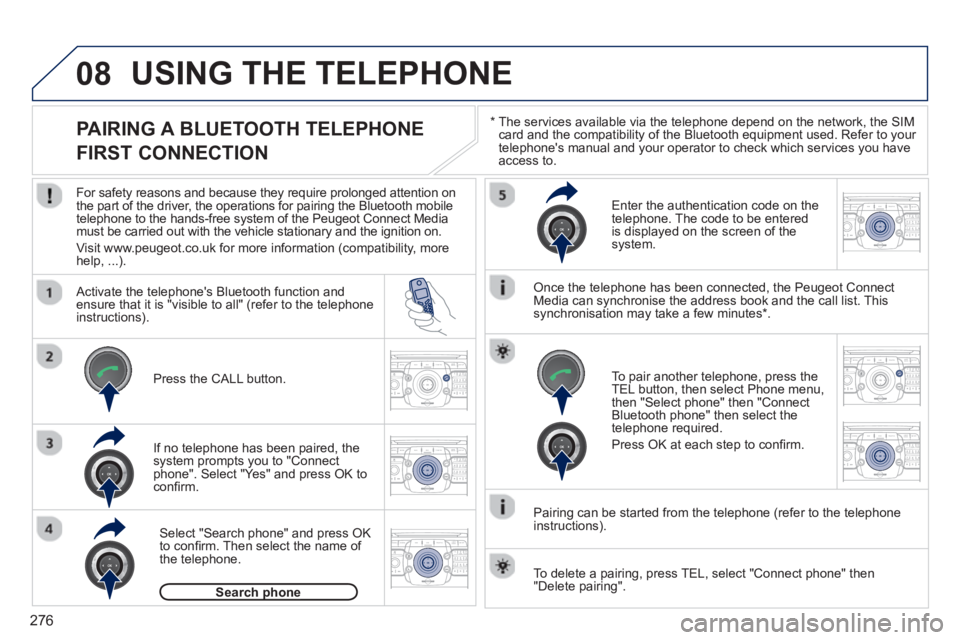
PAIRING A BLUETOOTH TELEPHONE
FIRST CONNECTION
For safety reasons and because they require prolonged attention on
the part of the driver, the operations for pairing the Bluetooth mobile
telephone to the hands-free system of the Peugeot Connect Media must be carried out with the vehicle stationary and the ignition on.
Visit www.peu
geot.co.uk for more information (compatibility, morehelp, ...).
Activate the tele
phone's Bluetooth function andensure that it is "visible to all" (refer to the telephone
instructions).
If no tele
phone has been paired, the
system prompts you to "Connect
phone". Select "Yes" and press OK to confi rm.
Ent
er the authentication code on thetelephone. The code to be entered
is displayed on the screen of the system.
To pair another telephone, press the
TEL button, then select Phone menu,then "Select phone" then "Connect Bluetooth phone" then select the
telephone required.
Press
OK at each step to confi rm.
Once the telephone has been connected, the Peugeot ConnectMedia can synchronise the address book and the call list. This
synchronisation may take a few minutes * .
Pairin
g can be started from the telephone (refer to the telephone
instructions). Press the
CALL button.
Select "Search phone" and press OK
to confi rm. Then select the name of
the telephone.
Search phonep
To delete a pairing, press TEL, select "Connect phone" then"Delete pairing".
Page 279 of 382
277
08
2ABC3DEF5JKL4GHI6MNO8TUV7PQRS9WXYZ0*#
1RADIO MEDIANAV ESC TRAFFIC
SETUPADDR
BOOK
*
The services available via the telephone depend on the network, the SIM card and the compatibility of the Bluetooth equipment used. Refer toyour telephone's manual and your operator to check which services you have access to. A list of mobile telephones which offer the best range of services is available from dealers.
USING THE TELEPHONE
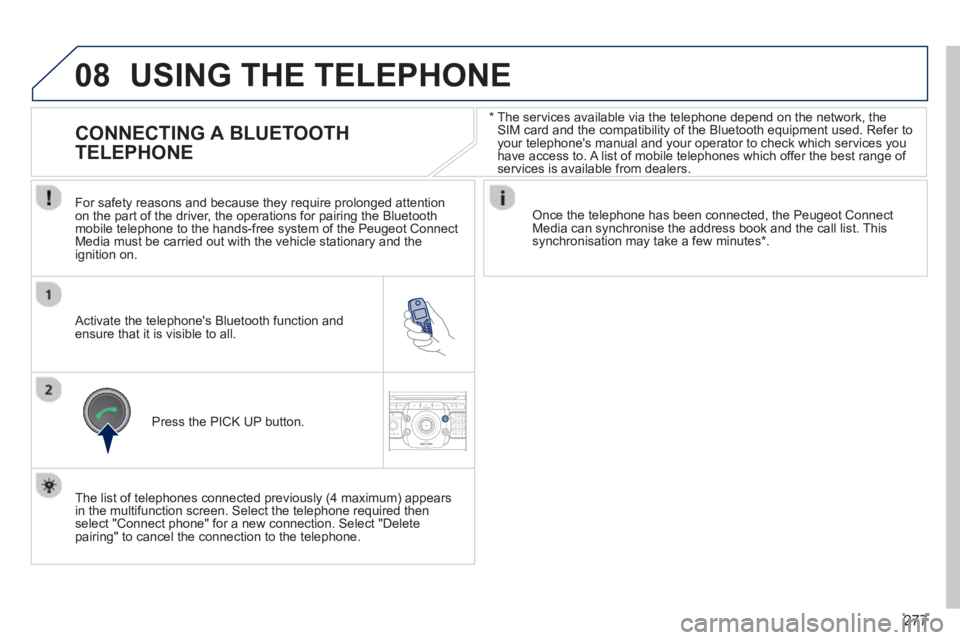
CONNECTING A BLUETOOTH
TELEPHONE
For safety reasons and because they require prolonged attention
on the part of the driver, the operations for pairing the Bluetoothmobile telephone to the hands-free system of the Peugeot ConnectMedia must be carried out with the vehicle stationary and the
ignition on.
Activate the telephone's Bluetooth function and ensure that it is visible to all.
Once the telephone has been connected, the Peugeot Connect Media can synchronise the address book and the call list. This synchronisation may take a few minutes * .
Press the PI
CK UP button.
The list of telephones connected previousl
y (4 maximum) appears
in the multifunction screen. Select the telephone required then
select "Connect phone" for a new connection. Select "Delete pairing" to cancel the connection to the telephone.
Page 280 of 382
278
08
2ABC3DEF5JKL4GHI6MNO8TUV7PQRS9WXYZ0*#
1
2ABC3DEF5JKL4GHI6MNO8TUV7PQRS9WXYZ0*#
1RADIO MEDIANAV ESC TRAFFIC
SETUPADDR
BOOK
2ABC3DEF5JKL4GHI6MNO8TUV7PQRS9WXYZ0*#
1NAV ESC TRAFFICADDR
BOOKSETUP2ABC3DEF5JKL4GHI6MNO8TUV7PQRS9WXYZ0*#
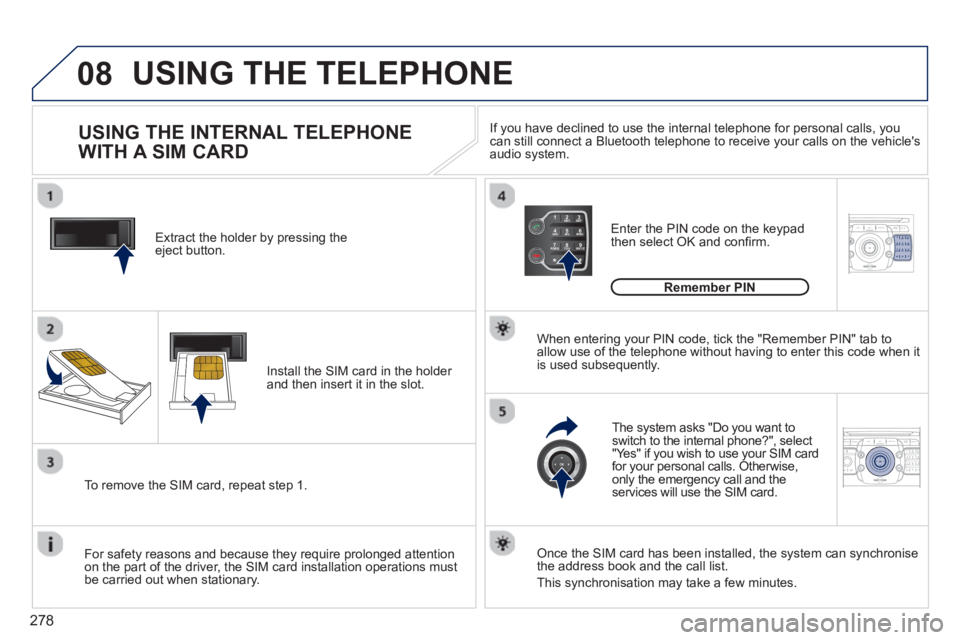
1Extract the holder by pressing theeject button.
Install the
SIM card in the holder and then insert it in the slot.
To remove the
SIM card, repeat step 1.
For safet
y reasons and because they require prolonged attention
on the part of the driver, the SIM card installation operations must
be carried out when stationary.
Enter the PIN code on the keypad
then select OK and confi rm.
The system asks "Do you want to switch to the internal phone?", select
"Yes" if you wish to use your SIM cardfor your personal calls. Otherwise,only the emergency call and the services will use the SIM card.
Remember PIN
When enterin
g your PIN code, tick the "Remember PIN" tab toallow use of the telephone without having to enter this code when itis used subsequently.
USING THE INTERNAL TELEPHONE
WITH A SIM CARD
USING THE TELEPHONE
Once the SIM card has been installed, the system can synchronise
the address book and the call list.
This synchronisation may take a
few minutes. I
f you have declined to use the internal telephone for personal calls, you can still connect a Bluetooth telephone to receive your calls on the vehicle's audio system.
Page 281 of 382
279
08
2ABC3DEF5JKL4GHI6MNO8TUV7PQRS9WXYZ0*#
1RADIO MEDIANAV ESC TRAFFIC
SETUPADDR
BOOK
2ABC3DEF5JKL4GHI6MNO8TUV7PQRS9WXYZ0*#
1RADIO MEDIANAV ESC TRAFFIC
SETUPADDR
BOOK
2ABC3DEF5JKL4GHI6MNO8TUV7PQRS9WXYZ0*#
1RADIO MEDIANAV ESC TRAFFIC
SETUPADDR
BOOK
2ABC3DEF5JKL4GHI6MNO8TUV7PQRS9WXYZ0*#
1RADIO MEDIANAV ESC TRAFFIC
SETUPADDR
BOOK
2ABC3DEF5JKL4GHI6MNO8TUV7PQRS9WXYZ0*#
1RADIO MEDIANAV ESC TRAFFIC
SETUPADDR
BOOK
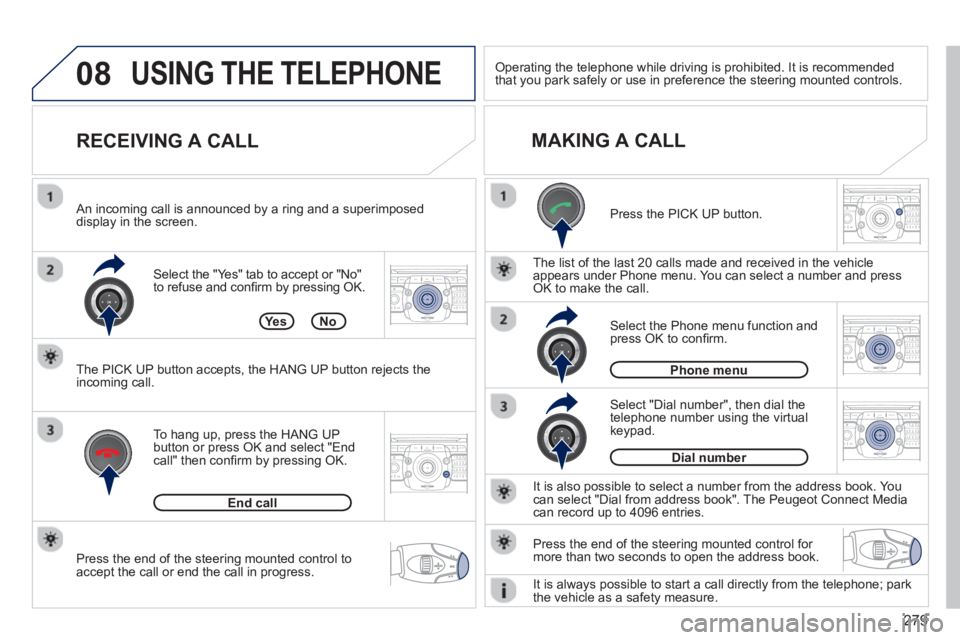
Press the end of the steering mounted control to
accept the call or end the call in progress. Select the "Yes" tab to accept or "No"
to re
fuse and confi rm by pressing OK.
RECEIVING A CALL
MAKING A CALL
An incoming call is announced by a ring and a superimposed
display in the screen.
To han
g up, press the HANG UP
button or press OK and select "Endcall" then confi rm by pressing OK.
End call
Press the PICK UP button.
It is also possible to select a number
from the address book. Youcan select "Dial from address book". The Peugeot Connect Mediacan record up to 4096 entries.
Select "Dial number", then dial the
telephone number using the virtualkeypad.
Select the Phone menu function and press OK to confi rm.
Dial number
Phone menu
Th
e list of the last 20 calls made and received in the vehicle
appears under Phone menu. You can select a number and pressOK to make the call.
YesNo
The PICK UP button accepts, the HANG UP button rejects the
incoming call.
USING THE TELEPHONE
Press the end of the steering mounted control for more than two seconds to open the address book.
Operating the telephone while driving is prohibited. It is recommended
that you park safely or use in preference the steering mounted controls.
It is alwa
ys possible to start a call directly from the telephone; park
the vehicle as a safety measure.