navigation PEUGEOT 308 SW BL 2012 Owner's Guide
[x] Cancel search | Manufacturer: PEUGEOT, Model Year: 2012, Model line: 308 SW BL, Model: PEUGEOT 308 SW BL 2012Pages: 382, PDF Size: 17.71 MB
Page 269 of 382
267
05
TRAFFIC
2ABC3DEF5JKL4GHI6MNO8TUV7PQRS9WXYZ0*#
1RADIO MEDIANAV ESC TRAFFIC
SETUPADDR
BOOK
2ABC3DEF5JKL4GHI6MNO8TUV7PQRS9WXYZ0*#
1RADIO MEDIANAV ESC TRAFFIC
SETUPADDR
BOOK
2ABC3DEF5JKL4GHI6MNO8TUV7PQRS9WXYZ0*#
1RADIO MEDIANAV ESC TRAFFIC
SETUPADDR
BOOK
2ABC3DEF5JKL4GHI6MNO8TUV7PQRS9WXYZ0*#
1RADIO MEDIANAV ESC TRAFFIC
SETUPADDR
BOOK
2ABC3DEF5JKL4GHI6MNO8TUV7PQRS9WXYZ0*#
1RADIO MEDIANAV ESC TRAFFIC
SETUPADDR
BOOK
TRAFFIC INFORMATION
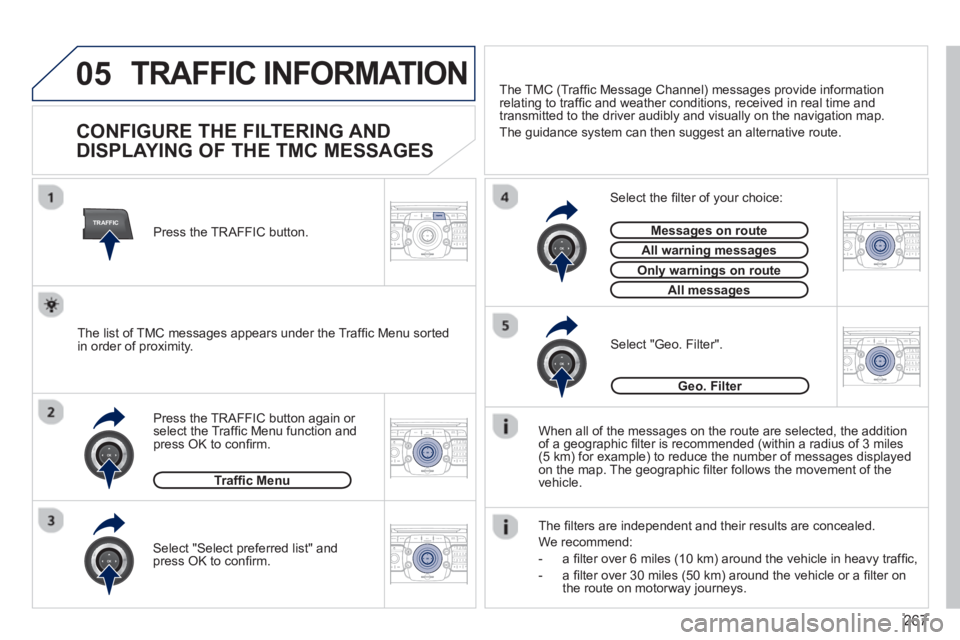
CONFIGURE THE FILTERING AND
DISPLAYING OF THE TMC MESSAGES
When all of the messages on the route are selected, the addition
of a geographic fi lter is recommended (within a radius of 3 miles(5 km) for example) to reduce the number of messages displayed
on the map. The geographic fi lter follows the movement of the
vehicle.
The
fi lters are independent and their results are concealed.
W
e recommend:
- a
fi lter over 6 miles (10 km) around the vehicle in heavy traffi c,
- a
fi lter over 30 miles (50 km) around the vehicle or a fi lter on
the route on motorway journeys. Press the TRAFFI
C button again or select the Traffi c Menu function andpress OK to confi rm.
Select "Geo. Filter".
The list of TMC messages appears under the Traffi c Menu sorted
in order of proximity.
Select the fi lter of your choice:
Messages on routeg
All warning messagesgg
Only warnings on routeyg
All messagesg
Traffi c Menu
Select "Select preferred list" andpress OK to confi rm.
The TM
C (Traffi c Message Channel) messages provide information
relating to traffi c and weather conditions, received in real time and
transmitted to the driver audibly and visually on the navigation map.
The
guidance system can then suggest an alternative route.
Pr
ess the TRAFFIC button.
Geo. Filter
Page 283 of 382
281
NAV
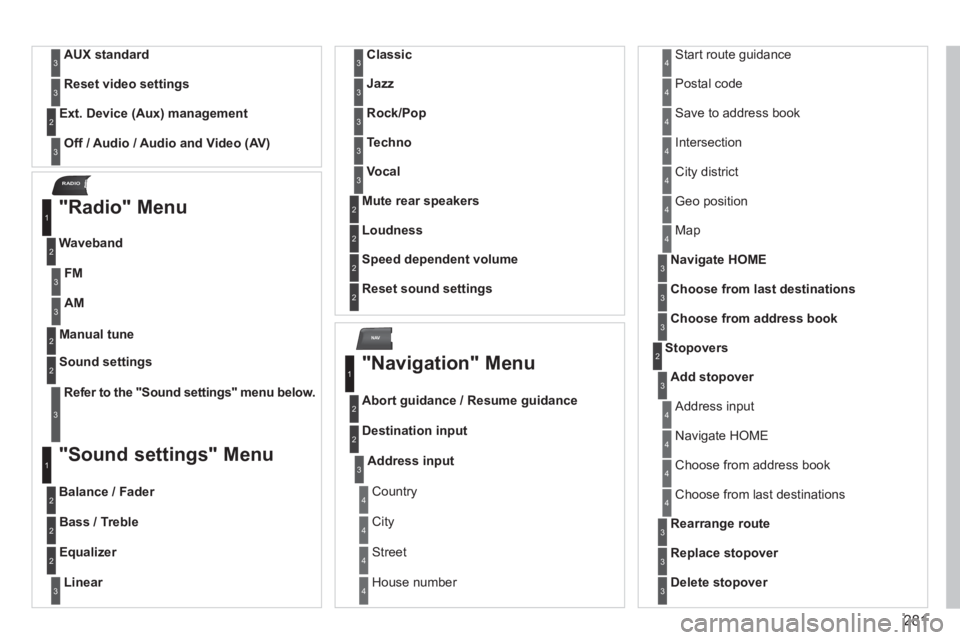
RADIO
AUX standard3
Reset video settings3
Off / Audio / Audio and Video (AV)
Ext. Device (Aux) management2
3
"Radio" Menu
Waveband
1
2
Manual tune 2
Refer to the "Sound settings" menu below.
Sound settings2
3
"Sound settings" Menu
Balance / Fader
1
2
Bass / Treble2
Equalizer 2
Linear3
Classic3
Jazz3
Rock/Pop3
Techno3
Vocal3
Mute rear speakers2
Loudness 2
Speed dependent volume2
Reset sound settings
2
"Navigation" Menu
Abort guidance / Resume guidance
1
2
Destination input2
Address input3
Country4
City 4
Street4
House number 4
Start route guidance4
Postal code4
Save to address book4
Intersection4
City district4
Geo position4
Map4
Navigate HOME3
Choose from last destinations3
Choose from address book3
Stopovers 2
Add stopover3
Address input4
Navigate HOME 4
Choose from address book4
Choose from last destinations 4
Rearrange route3
Replace stopover3
Delete stopover3
FM3
AM3
Page 289 of 382
287
QUESTIONANSWERSOLUTION
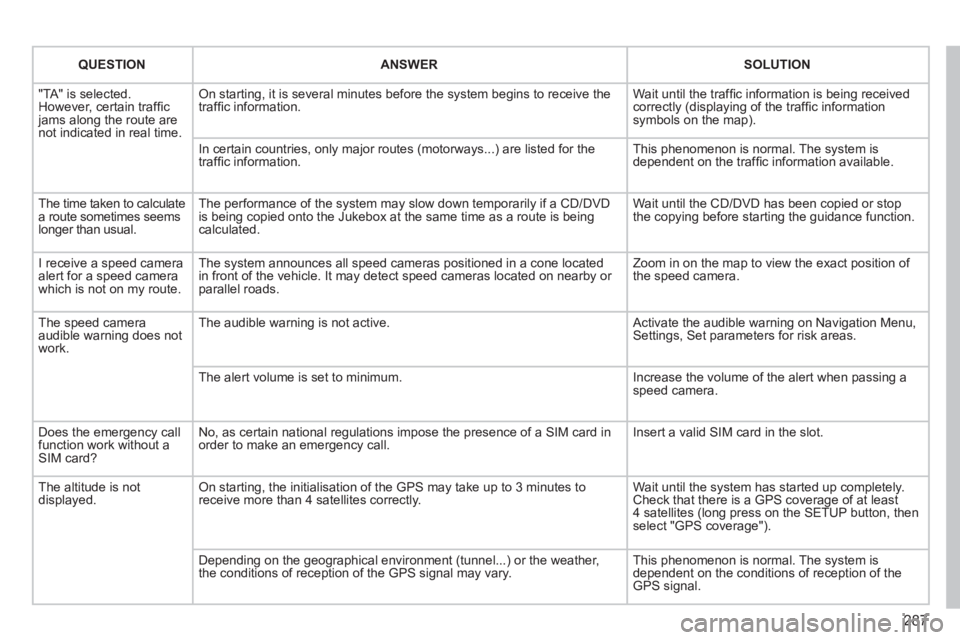
"TA" is selected. However, certain traffi c jams along the route arenot indicated in real time.
On starting, it is several minutes before the system begins to receive thetraffi c information.
Wait until the traffi c information is being received correctly (displaying of the traffi c information symbols on the map).
In certain countries, only major routes (motorways...) are listed for thetraffi c information.
This phenomenon is normal. The system isdependent on the traffi c information available.
The time taken to calculate a route sometimes seems longer than usual.
The performance of the system may slow down temporarily if a CD/DVDis being copied onto the Jukebox at the same time as a route is being calculated.
Wait until the CD/DVD has been copied or stop the copying before starting the guidance function.
I receive a speed camera alert for a speed camera which is not on my route.
The system announces all speed cameras positioned in a cone located in front of the vehicle. It may detect speed cameras located on nearby or parallel roads.
Zoom in on the map to view the exact position of the speed camera.
The speed camera audible warning does not work.
The audible warning is not active. Activate the audible warning on Navigation Menu,Settings, Set parameters for risk areas.
The alert volume is set to minimum.
Increase the volume of the alert when passing aspeed camera.
Does the emergency call function work without a SIM card?
No, as certain national regulations impose the presence of a SIM card inorder to make an emergency call.
Insert a valid SIM card in the slot.
The altitude is not displayed. On starting, the initialisation of the GPS may take up to 3 minutes toreceive more than 4 satellites correctly.
Wait until the system has started up completely. Check that there is a GPS coverage of at least4 satellites (long press on the SETUP button, then select "GPS coverage").
Depending on the geographical environment (tunnel...) or the weather, the conditions of reception of the GPS signal may vary.
This phenomenon is normal. The system isdependent on the conditions of reception of the GPS signal.
Page 290 of 382
288
QUESTIONANSWERSOLUTION
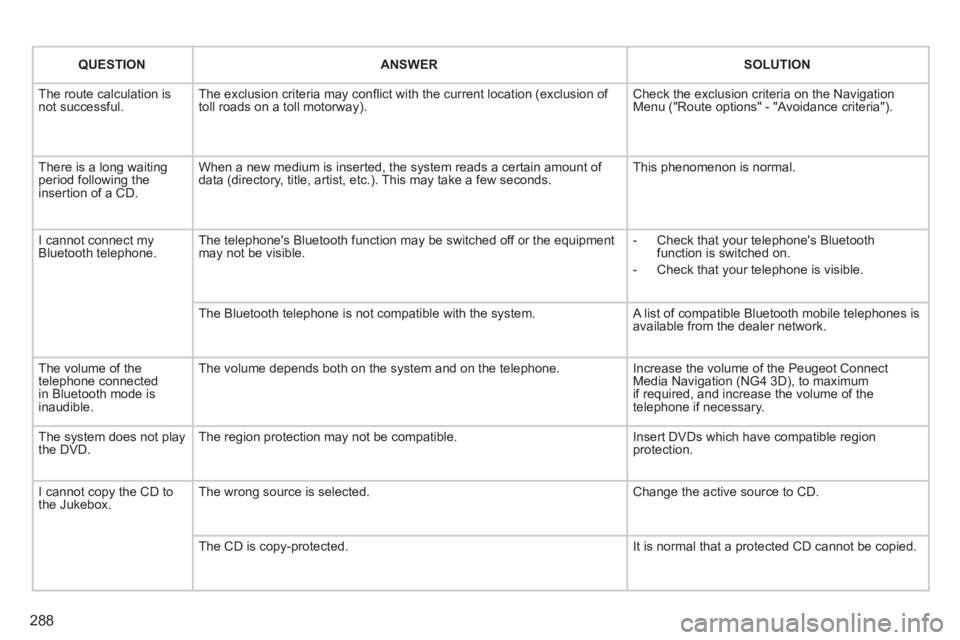
The route calculation is not successful. The exclusion criteria may confl ict with the current location (exclusion of toll roads on a toll motorway). Check the exclusion criteria on the NavigationMenu ("Route options" - "Avoidance criteria").
There is a long waiting period following theinsertion of a CD.
When a new medium is inserted, the system reads a certain amount of data (directory, title, artist, etc.). This may take a few seconds. This phenomenon is normal.
I cannot connect myBluetooth telephone.The telephone's Bluetooth function may be switched off or the equipmentmay not be visible.
- Check that your telephone's Bluetoothfunction is switched on.
- Check that your telephone is visible.
The Bluetooth telephone is not compatible with the system. A list of compatible Bluetooth mobile telephones is available from the dealer network.
The volume of thetelephone connectedin Bluetooth mode isinaudible.
The volume depends both on the system and on the telephone.
Increase the volume of the Peugeot Connect Media Navigation (NG4 3D), to maximumif required, and increase the volume of thetelephone if necessary.
The system does not play the DVD. The region protection may not be compatible. Insert DVDs which have compatible region protection.
I cannot copy the CD tothe Jukebox. The wrong source is selected.
Change the active source to CD.
The CD is copy-protected.
It is normal that a protected CD cannot be copied.
Page 291 of 382
289
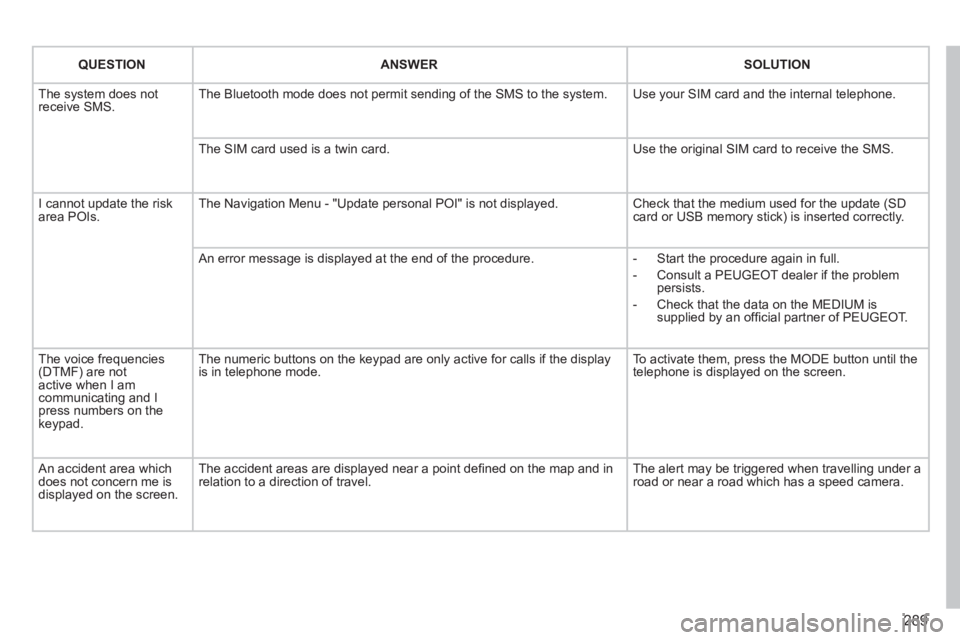
QUESTIONANSWERSOLUTION
The system does notreceive SMS. The Bluetooth mode does not permit sending of the SMS to the system.
Use your SIM card and the internal telephone.
The SIM card used is a twin card.
Use the original SIM card to receive the SMS.
I cannot update the risk area POIs. The Navigation Menu - "Update personal POI" is not displayed. Check that the medium used for the update (SDcard or USB memory stick) is inserted correctly.
An error message is displayed at the end of the procedure.
- Start the procedure again in full.
- Consult a PEUGEOT dealer if the problempersists.
- Check that the data on the MEDIUM issupplied by an offi cial partner of PEUGEOT.
The voice frequencies(DTMF) are not active when I am communicating and I press numbers on thekeypad.
The numeric buttons on the keypad are only active for calls if the display is in telephone mode.
To activate them, press the MODE button until the telephone is displayed on the screen.
An accident area which does not concern me isdisplayed on the screen.
The accident areas are displayed near a point defi ned on the map and inrelation to a direction of travel.
The alert may be triggered when travelling under a road or near a road which has a speed camera.
Page 293 of 382
291
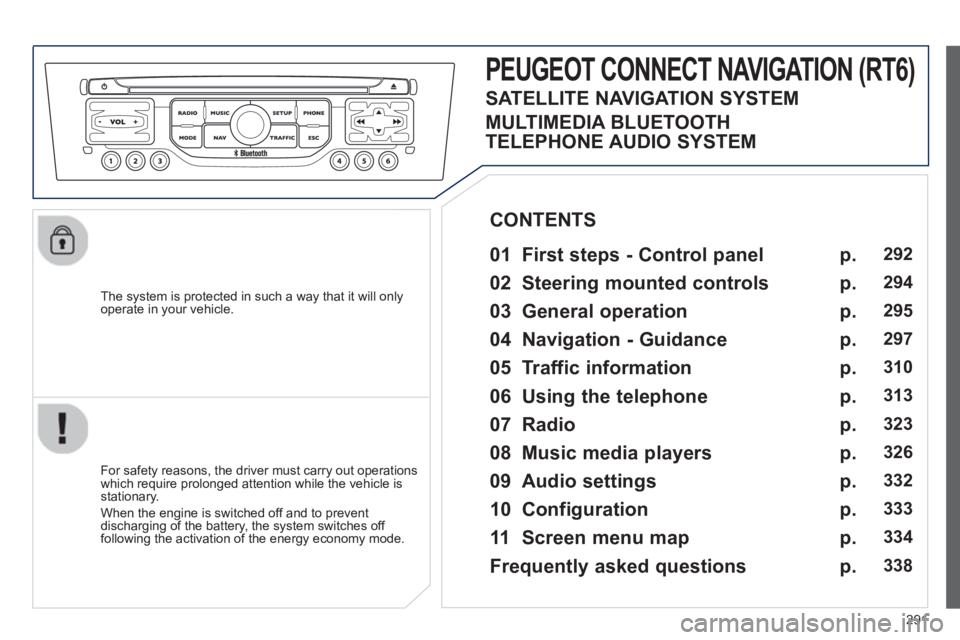
The system is protected in such a way that it will onlyoperate in your vehicle.
PEUGEOT CONNECT NAVIGATION (RT6)
01 First steps - Control panel
For safety reasons, the driver must carry out operations
which require prolonged attention while the vehicle is stationary.
When the en
gine is switched off and to prevent
discharging of the battery, the system switches off following the activation of the energy economy mode.
CONTENTS
02 Steerin
g mounted controls
03 General o
peration
04 Navi
gation - Guidance
05 Traffic information
06 Usin
g the telephone
07 Radio
08 Music media pla
yers
09 Audio settin
gs
10 Confi
guration
11 Screen menu ma
p
Frequentl
y asked questions
p.
p.
p.
p.
p.
p.
p.
p.
p.
p.
p.
p.
292
294
295
297
3
10
3
13
323
326
332
333
334
338
SATELLITE NAVIGATION SYSTEM
MULTIMEDIA BLUETOOTH
TELEPHONE AUDIO SYSTEM
Page 294 of 382
292
01
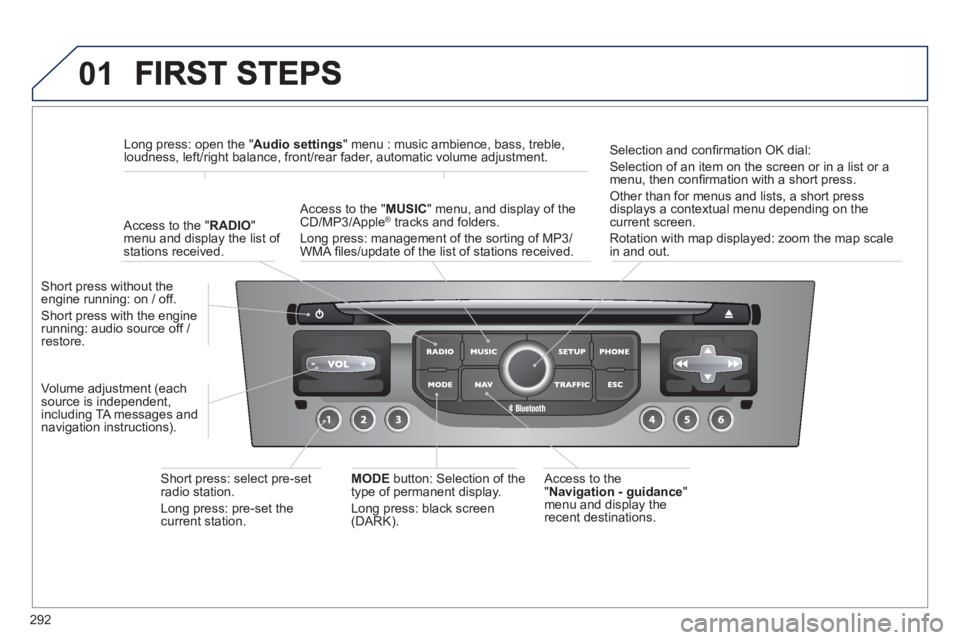
Access to the" Navigation - guidance"
menu and display the
recent destinations. Short
press without the engine running: on / off.
Short press with the enginerunning: audio source off / restore.
Short press: select pre-set radio station.
Lon
g press: pre-set thecurrent station.
MODE
button: Selection of the
type of permanent display.
Lon
g press: black screen(DARK).
A
ccess to the " MUSIC
" menu, and display of the CD/MP3/Apple®
tracks and folders. ®
Long press: management of the sorting of MP3/
WMA fi les/update of the list of stations received.
Lon
g press: open the " Audio settings" menu : music ambience, bass, treble,
loudness, left/right balance, front/rear fader, automatic volume adjustment.
A
ccess to the " RADIO"
menu and display the list of stations received.
Selection and confi rmation OK dial:
Selection of an item on the screen or in a list or a
menu, then confi rmation with a short press.
Other than for menus and lists, a short press
displays a contextual menu depending on the current screen.
Rotation with map displa
yed: zoom the map scalein and out.
Volume ad
justment (each
source is independent,
includin
g TA messages and
navigation instructions).
Page 295 of 382
293
01
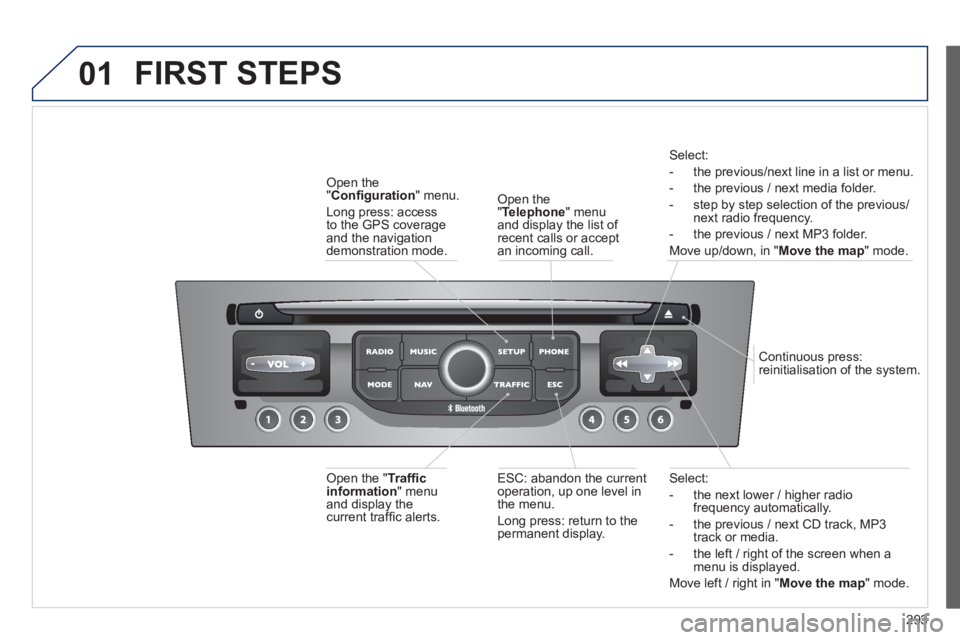
Select:
- the next lower / hi
gher radiofrequency automatically.
- the previous
/ next CD track, MP3
track or media.
- the le
ft / right of the screen when a menu is displayed.
Move left / ri
ght in "Move the map
" mode.
E
SC: abandon the current
operation, up one level in
t
he menu.
Long press: return to the permanent display.
Continuous
press:
reinitialisation of the system.
Open the" Telephone" menu
and display the list of recent calls or accept
an incoming call.
Open the
"Confi guration
" menu.
Lon
g press: access
to the GPS coverageand the navigation demonstration mode.
Open the "Traffi c information " menuand display thecurrent traffi c alerts.
Select:
- the previous
/next line in a list or menu.
- the previous
/ next media folder.
- step b
y step selection of the previous/next radio frequency.
- the previous / next MP3 folder.
Move up/down, in "
Move the map " mode.
FIRST STEPS
Page 297 of 382
295
03
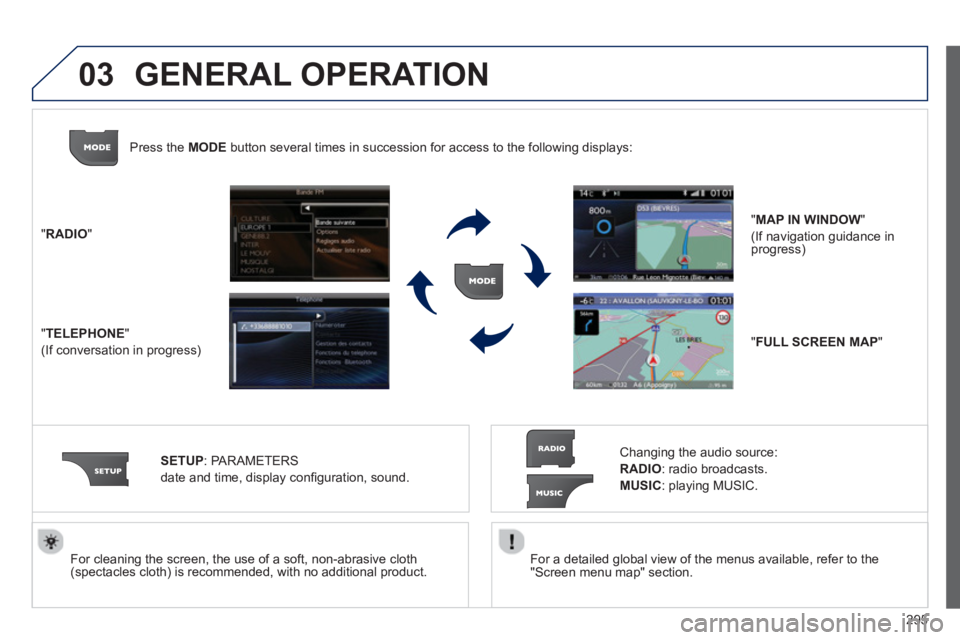
For a detailed global view of the menus available, refer to the
"Screen menu map" section.
For cleaning the screen, the use of a soft, non-abrasive cloth (spectacles cloth) is recommended, with no additional product. "RADIO
"
"
TELEPHONE"
(If conversation in progress)
SETUP:
PARAMETER
S
date and time, display con
fi guration, sound.
Changing the audio source:
RADIO:
radio broadcasts.
MUSIC: playing MUSIC. Pr
ess the MODE button several times in succession for access to the following displays:
GENERAL OPERATION
"FULL SCREEN MAP"
"MAP IN WINDOW"
(If navigation guidance in progress)
Page 299 of 382
297
04
""""""""""""ggggggggggNavigation guidanceNavigation guidanceNavigation guidanceNavigation guidanceNavigation guidanceNavigation - guidanceNavigation - guidanceNavigation - guidanceNavigation - guidanceNavigation guidanceNavigation guidanceNavigation guidanceNavigation guidanceN i ti idN i ti idN i ti idN i ti idN i ti idN i ti idN i ti idN i ti idN i ti idNi i id""""""""""""
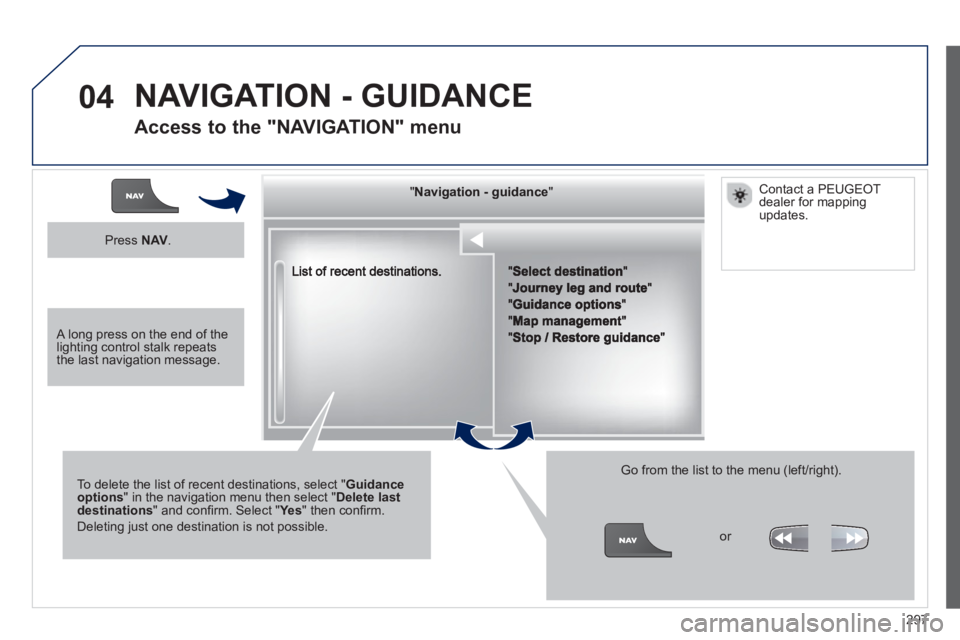
To delete the list of recent destinations, select "Guidance options" in the navigation menu then select "Delete last destinations" and confi rm. Select "Ye s" then confi rm.
Deleting just one destination is not possible.
Go from the list to the menu (left/right).
NAVIGATION - GUIDANCE
Access to the "NAVIGATION" menu
Press NAV.
or
Contact a PEUGEOT
dealer for mappingupdates.
A long press on the end of the lighting control stalk repeats the last navigation message.