lock PEUGEOT 308 SW BL 2012 Workshop Manual
[x] Cancel search | Manufacturer: PEUGEOT, Model Year: 2012, Model line: 308 SW BL, Model: PEUGEOT 308 SW BL 2012Pages: 382, PDF Size: 17.71 MB
Page 218 of 382
11
216
PRACTICAL INFORMATION
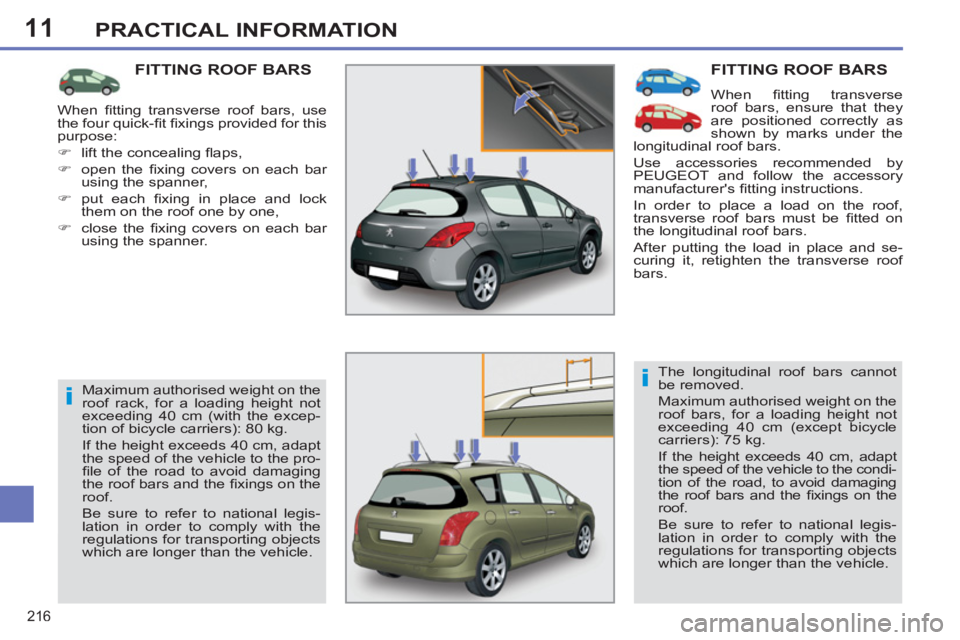
FITTING ROOF BARS
When fi tting transverse
roof bars, ensure that they
are positioned correctly as
shown by marks under the
longitudinal roof bars.
Use accessories recommended by
PEUGEOT and follow the accessory
manufacturer's fi tting instructions.
In order to place a load on the roof,
transverse roof bars must be fi tted on
the longitudinal roof bars.
After putting the load in place and se-
curing it, retighten the transverse roof
bars.
The longitudinal roof bars cannot
be removed.
Maximum authorised weight on the
roof bars, for a loading height not
exceeding 40 cm (except bicycle
carriers): 75 kg.
If the height exceeds 40 cm, adapt
the speed of the vehicle to the condi-
tion of the road, to avoid damaging
the roof bars and the fi xings on the
roof.
Be sure to refer to national legis-
lation in order to comply with the
regulations for transporting objects
which are longer than the vehicle.
FITTING ROOF BARS
Maximum authorised weight on the
roof rack, for a loading height not
exceeding 40 cm (with the excep-
tion of bicycle carriers): 80 kg.
If the height exceeds 40 cm, adapt
the speed of the vehicle to the pro-
fi le of the road to avoid damaging
the roof bars and the fi xings on the
roof.
Be sure to refer to national legis-
lation in order to comply with the
regulations for transporting objects
which are longer than the vehicle. When fi tting transverse roof bars, use
the four quick-fi t fi xings provided for this
purpose:
)
lift the concealing fl aps,
)
open the fi xing covers on each bar
using the spanner,
)
put each fi xing in place and lock
them on the roof one by one,
)
close the fi xing covers on each bar
using the spanner.
Page 219 of 382
11
217
PRACTICAL INFORMATION
"Protection":
mats * , mud fl aps, seat covers compat-
ible with lateral airbags, vehicle covers,
door sill protectors, translucent bumper
protectors.
*
To avoid any risk of jamming of the
pedals:
- ensure that the mat is positioned
and secured correctly,
- never fi t one mat on top of another.
ACCESSORIES
A wide range of accessories and genu-
ine parts is available from the PEUGEOT
dealer network.
These accessories and parts have been
tested and approved for reliability and
safety.
They are all adapted to your vehicle and
benefi t from PEUGEOT's recommenda-
tion and warranty.
"Comfort":
parking sensors, side and rear blinds,
door defl ectors, isotherm module, head
restraint-mounted coat hanger, front
centre armrest, reading lamp, scented
air freshener...
Conversion kits
You can obtain an "Enterprise" kit to
convert a trade vehicle to a private car
and vice-versa.
"Transport solutions":
boot liner, boot mat, boot spacers, stor-
age under parcel shelf, transverse roof
bars, bicycle carrier, ski carrier, roof
box, towbars, wiring harnesses...
"Style":
leather steering wheel, aluminium gear
lever knob, alloy wheels, wheel trims,
body styling kit...
"Security and safety":
anti-theft alarm, wheel security locks,
vehicle tracking system, child seats and
booster cushions, breathalyser, fi rst aid
kit, warning triangle, high visibility vest,
dog guard, front foglamp kit, temporary
puncture repair kit, snow chains, anti-
skid covers.
Where the towbar and its wiring har-
ness are not fi tted by a PEUGEOT
dealer, they must be fi tted in line with
the vehicle manufacturer's recom-
mendations.
Page 256 of 382
254
03 GENERAL OPERATION
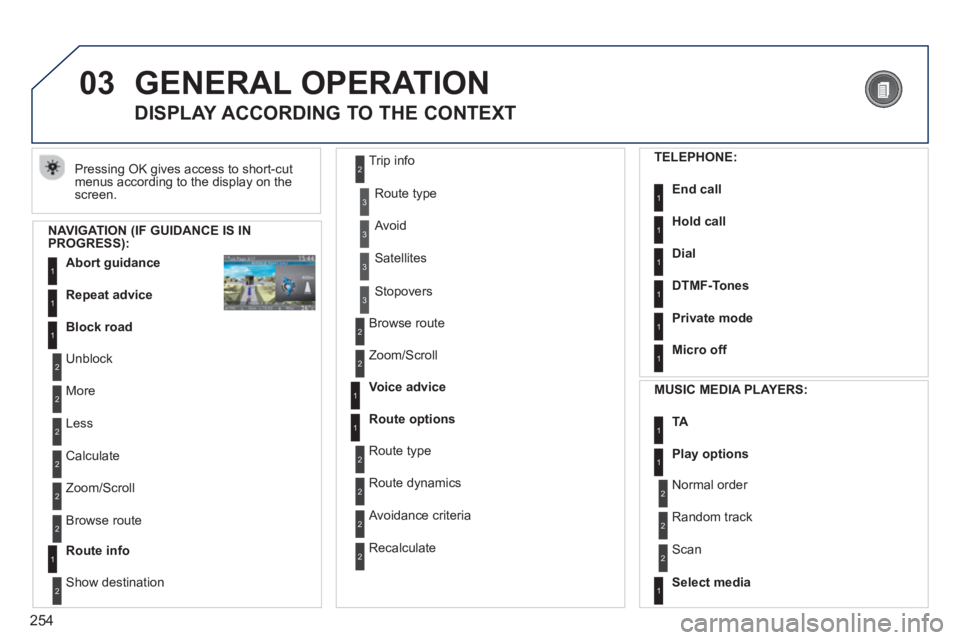
Pressing OK gives access to short-cut
menus according to the display on the screen.
DISPLAY ACCORDING TO THE CONTEXT
NAVIGATION (IF GUIDANCE IS IN PROGRESS):
Abort guidanc
e1
1
1
Repeat advice
Block road
2
2
Unblock
M
ore
2
Less
3
3
Route type
Avoid
3 Satellites
2
2
Calculate
Z
oom/Scroll
2
Browse route
1Route info
2
2
Show destination Trip in
fo
3
Stopovers
2
2
Browse route
Zoom/Scroll
1
1
Voice advice
Route options
2
2
Route type
Route dynamics
2 Avoidance criteria
2
Recalculate
TELEPHONE:
End call1
1
1
1
Hold call
Dial
DTMF-Tones
1Private mode
1Micro off
MU
SIC MEDIA PLAYERS:
TA1
1Play options
1Select media
2
2
Normal order
R
andom track
2 Scan
Page 288 of 382
286
QUESTIONANSWERSOLUTION
The stored stations donot function (no sound, 87.5 Mhz is displayed...).
An incorrect waveband is selected.
Press RADIO, select Radio Menu then"Waveband" to return to the waveband on which the stations are stored.
The quality of receptionof the radio station listened to graduallydeteriorates or the stored stations do not function(no sound, 87.5 Mhz is displayed...).
The vehicle is too far from the transmitter used by the station listenedto or there is no transmitter in the geographical area through which the vehicle is travelling.
Activate the "RDS" function by means of theshort-cut menu to enable the system to check whether there is a more powerful transmitter in thegeographical area.
The environment (hills, buildings, tunnels, basement car parks...) block reception, including in RDS mode.
This phenomenon is normal and does not indicate a failure of the audio equipment.
The aerial is absent or has been damaged (for example when goingthrough a car wash or into an underground car park).
Have the aerial checked by a PEUGEOT dealer.
Sound cut-outs of 1 to2 seconds in radio mode.During this brief sound cut-out, the RDS searches for any frequency permitting better reception of the station.
Deactivate the "RDS" function by means of the short-cut menu if the phenomenon is too frequentand always on the same route.
With the engine off, the system switches off after a few minutes of use.
When the engine is switched off, the system's operating time depends on the battery charge.
The switch-off is normal: the system switches to economy mode and switches off to prevent discharging of the vehicle's battery.
Start the vehicle's engine to increase the batterycharge.
Page 343 of 382
341
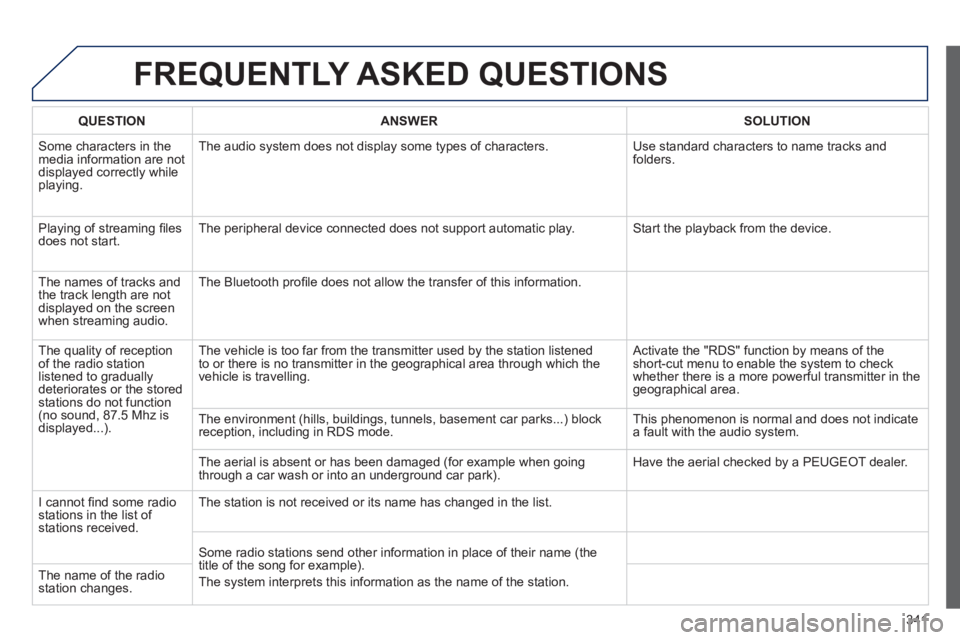
FREQUENTLY ASKED QUESTIONS
QUESTIONANSWERSOLUTION
Some characters in themedia information are not
displayed correctly while playing. The audio system does not display some types o
f characters. Use standard characters to name tracks andfolders.
Pla
ying of streaming fi lesdoes not start. The peripheral device connected does not support automatic play. Start the playback from the device.
Th
e names of tracks and
the track length are notdisplayed on the screen
when streaming audio. The Bluetooth profi le does not allow the transfer of this information.
The qualit
y of receptionof the radio station
listened to graduallydeteriorates or the stored stations do not function(no sound, 87.5 Mhz is
displayed...). The vehicle is too
far from the transmitter used by the station listened
to or there is no transmitter in the geographical area through which the
vehicle is travelling.
Activate the "RDS" function by means of theshort-cut menu to enable the system to check
whether there is a more powerful transmitter in the
geographical area.
The environment
(hills, buildings, tunnels, basement car parks...) block reception, including in RDS mode. This phenomenon is normal and does not indicate
a fault with the audio system.
The aerial is absent or has been dama
ged (for example when goingthrough a car wash or into an underground car park). Have the aerial checked by a PEUGEOT dealer.
I
cannot fi nd some radiostations in the list of stations received.The station is not received or its name has chan
ged in the list.
Some radio stations send other information in place of their name
(the
title of the song for example).
The s
ystem interprets this information as the name of the station. The name of the radio station changes.
Page 351 of 382
349
04 AUDIO
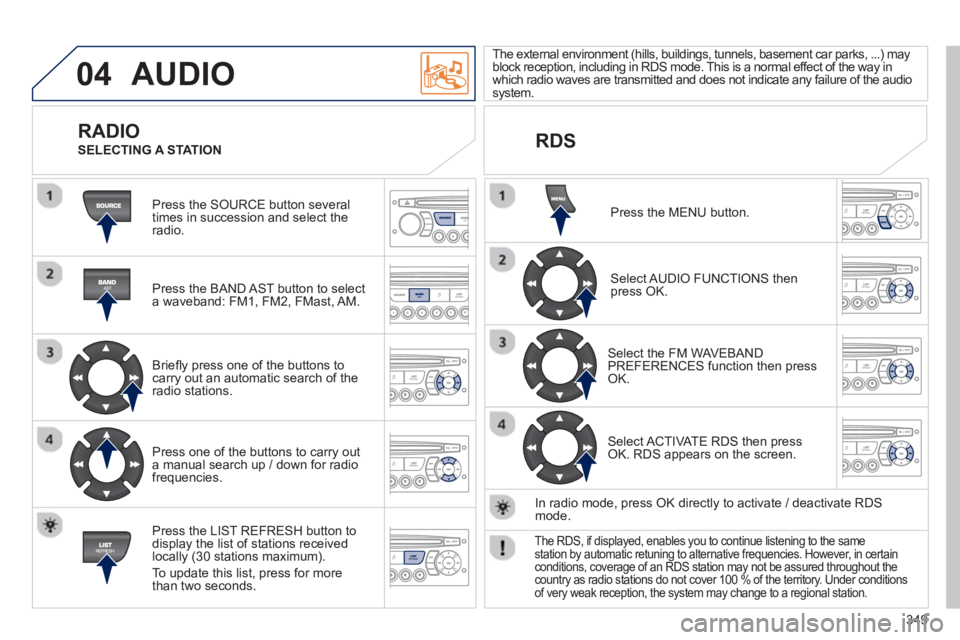
Press the SOURCE button several
times in succession and select theradio.
Press the BAND A
ST button to select
a waveband: FM1, FM2, FMast, AM.
Briefl
y press one of the buttons tocarry out an automatic search of theradio stations.
Press one o
f the buttons to carry out
a manual search up / down for radiofrequencies.
Press the LI
ST REFRESH button to
display the list of stations received
locally (30 stations maximum).
To update this list, press for more
t
han two seconds.
The external environment
(hills, buildings, tunnels, basement car parks, ...) may
block reception, including in RDS mode. This is a normal effect of the way in
which radio waves are transmitted and does not indicate any failure of the audiosystem.
RDS
RADIO
SELECTING A STATION
Press the MENU button.
Select AUDIO FUNCTIONS thenpress OK.
Select the FM WAVEBANDPREFERENCES function then pressOK.
Select ACTIVATE RDS then pressOK. RDS appears on the screen.
In radio mode, press
OK directly to activate / deactivate RDSmode.
The RDS, if displayed, enables you to continue listening to the samestation by automatic retuning to alternative frequencies. However, in certainconditions, coverage of an RDS station may not be assured throughout thecountry as radio stations do not cover 100 % of the territory. Under conditionsof very weak reception, the system may change to a regional station.
Page 366 of 382
364
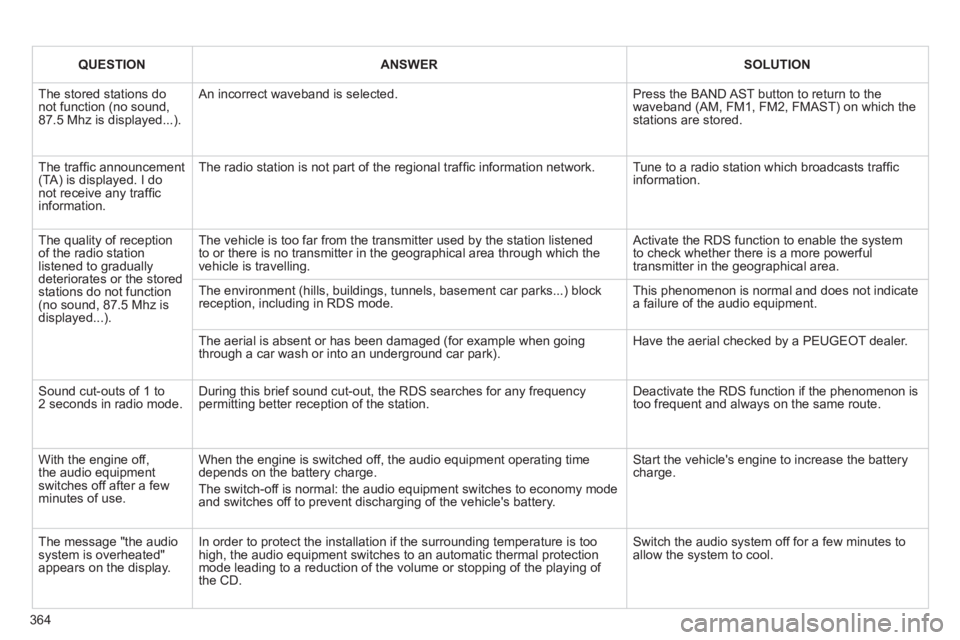
QUESTIONANSWERSOLUTION
The stored stations donot function (no sound, 87.5 Mhz is displayed...).
An incorrect waveband is selected.
Press the BAND AST button to return to the waveband (AM, FM1, FM2, FMAST) on which thestations are stored.
The traffi c announcement(TA) is displayed. I donot receive any traffi c information.
The radio station is not part of the regional traffi c information network.
Tune to a radio station which broadcasts traffi c information.
The quality of receptionof the radio station listened to graduallydeteriorates or the stored stations do not function(no sound, 87.5 Mhz is displayed...).
The vehicle is too far from the transmitter used by the station listenedto or there is no transmitter in the geographical area through which the vehicle is travelling.
Activate the RDS function to enable the system to check whether there is a more powerful transmitter in the geographical area.
The environment (hills, buildings, tunnels, basement car parks...) block reception, including in RDS mode. This phenomenon is normal and does not indicate a failure of the audio equipment.
The aerial is absent or has been damaged (for example when goingthrough a car wash or into an underground car park).
Have the aerial checked by a PEUGEOT dealer.
Sound cut-outs of 1 to2 seconds in radio mode.During this brief sound cut-out, the RDS searches for any frequency permitting better reception of the station.
Deactivate the RDS function if the phenomenon is too frequent and always on the same route.
With the engine off, the audio equipment switches off after a few minutes of use.
When the engine is switched off, the audio equipment operating timedepends on the battery charge.
The switch-off is normal: the audio equipment switches to economy mode and switches off to prevent discharging of the vehicle's battery.
Start the vehicle's engine to increase the batterycharge.
The message "the audio system is overheated" appears on the display.
In order to protect the installation if the surrounding temperature is toohigh, the audio equipment switches to an automatic thermal protectionmode leading to a reduction of the volume or stopping of the playing of the CD.
Switch the audio system off for a few minutes toallow the system to cool.
Page 367 of 382
365
VISUAL SEARCH
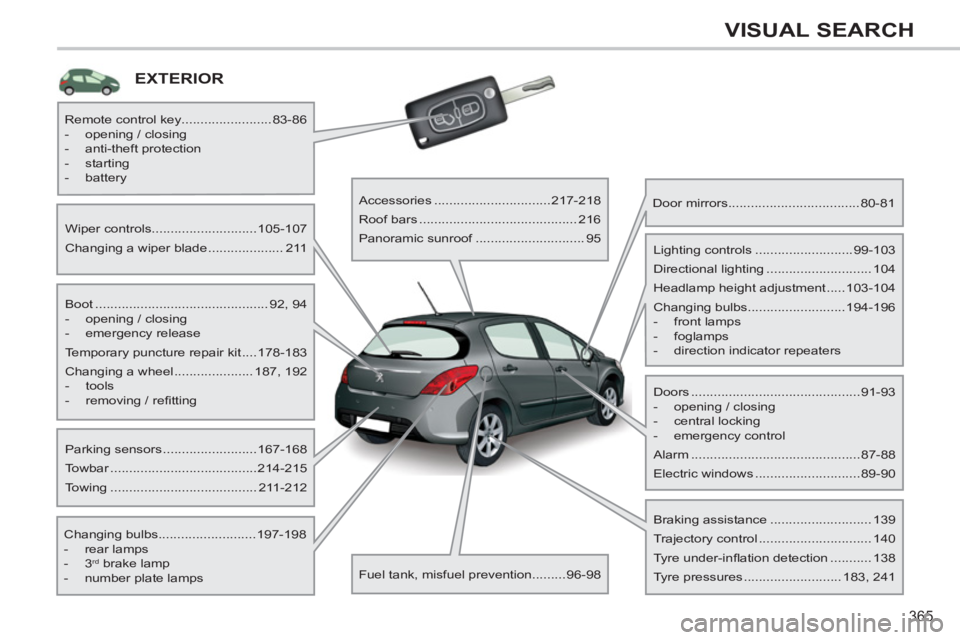
EXTERIOR
Boot .............................................. 92, 94
- opening / closing
- emergency release
Temporary puncture repair kit ....178-183
Changing a wheel ..................... 187, 192
- tools
- removing / refi tting
Wiper controls............................105-107
Changing a wiper blade .................... 211
Changing bulbs..........................197-198
- rear lamps
- 3
rd brake lamp
- number plate lamps
Parking sensors .........................167-168
Towbar .......................................214-215
Towing ....................................... 211-212
Remote control key........................83-86
- opening / closing
- anti-theft protection
- starting
- battery
Accessories ...............................217-218
Roof bars .......................................... 216
Panoramic sunroof ............................. 95
Fuel tank, misfuel prevention.........96-98
Door mirrors ...................................80-81
Doors .............................................91-93
- opening / closing
- central locking
- emergency control
Alarm .............................................87-88
Electric windows ............................89-90
Lighting controls ..........................99-103
Directional lighting ............................ 104
Headlamp height adjustment .....103-104
Changing bulbs..........................194-196
- front lamps
- foglamps
- direction indicator repeaters
Braking assistance ........................... 139
Trajectory control .............................. 140
Tyre under-infl ation detection ........... 138
Tyre pressures .......................... 183, 241
Page 368 of 382
366
VISUAL SEARCH
EXTERIOR
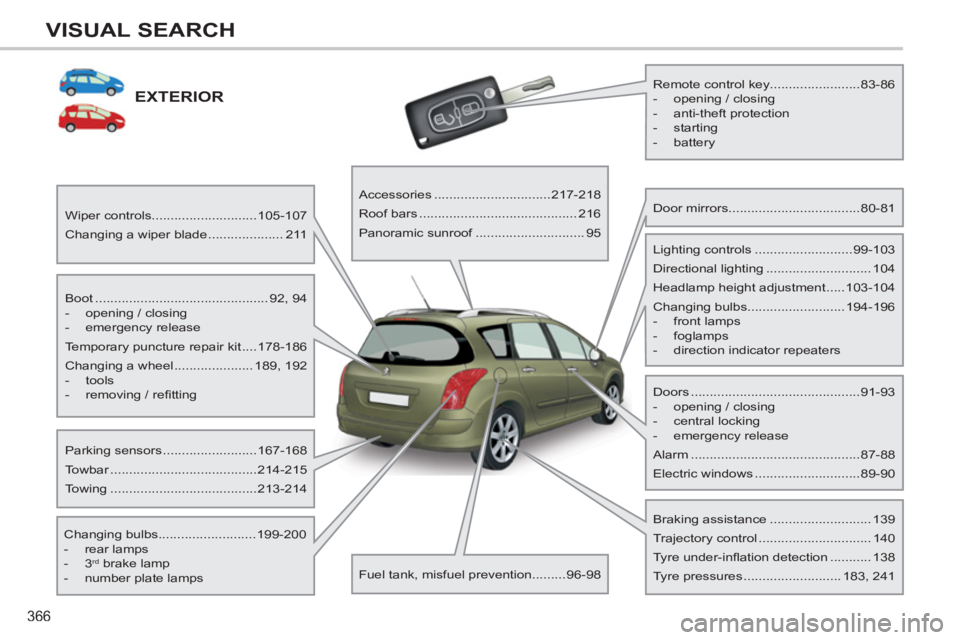
Boot .............................................. 92, 94
- opening / closing
- emergency release
Temporary puncture repair kit ....178-186
Changing a wheel ..................... 189, 192
- tools
- removing / refi tting
Wiper controls............................105-107
Changing a wiper blade .................... 211
Changing bulbs..........................199-200
- rear lamps
- 3
rd brake lamp
- number plate lamps
Parking sensors .........................167-168
Towbar .......................................214-215
Towing .......................................213-214
Remote control key........................83-86
- opening / closing
- anti-theft protection
- starting
- battery
Accessories ...............................217-218
Roof bars .......................................... 216
Panoramic sunroof ............................. 95
Fuel tank, misfuel prevention.........96-98
Door mirrors ...................................80-81
Doors .............................................91-93
- opening / closing
- central locking
- emergency release
Alarm .............................................87-88
Electric windows ............................89-90
Lighting controls ..........................99-103
Directional lighting ............................ 104
Headlamp height adjustment .....103-104
Changing bulbs..........................194-196
- front lamps
- foglamps
- direction indicator repeaters
Braking assistance ........................... 139
Trajectory control .............................. 140
Tyre under-infl ation detection ........... 138
Tyre pressures .......................... 183, 241
Page 369 of 382
367
VISUAL SEARCH
INTERIOR
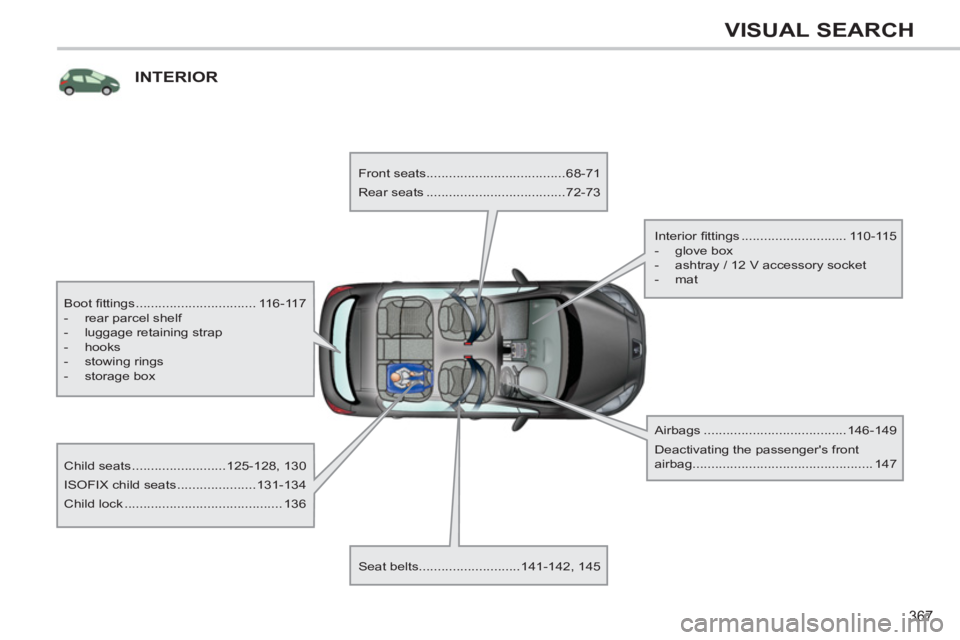
Boot fi ttings ................................ 116-117
- rear parcel shelf
- luggage retaining strap
- hooks
- stowing rings
- storage box
Child seats .........................125-128, 130
ISOFIX child seats .....................131-134
Child lock .......................................... 136
Front seats.....................................68-71
Rear seats .....................................72-73
Seat belts...........................141-142, 145
Airbags ......................................146-149
Deactivating the passenger's front
airbag................................................ 147
Interior fi ttings ............................ 110-115
- glove box
- ashtray / 12 V accessory socket
- mat