light PEUGEOT 308 SW BL 2012 Repair Manual
[x] Cancel search | Manufacturer: PEUGEOT, Model Year: 2012, Model line: 308 SW BL, Model: PEUGEOT 308 SW BL 2012Pages: 382, PDF Size: 17.71 MB
Page 240 of 382
12
238
TECHNICAL DATA
* The weight of the braked trailer can be increased, within the GTW limit, if the GVW of the towing vehicle is reduced by an
equal amount; warning, towing using a lightly loaded towing vehicle may have an adverse effect on its road holding.
The GTW and towed load values indicated are valid up to a maximum altitude of 1000 metres; the towed load mentioned must
be reduced by 10 % for each additional 1000 metres of altitude.
The speed of a towing vehicle must not exceed 60 mph (100 km/h) (comply with the legislation in force in your country).
High ambient temperatures may result in a reduction in the performance of the vehicle to protect the engine; if the ambient
temperature is above 37 °C, limit the towed load.
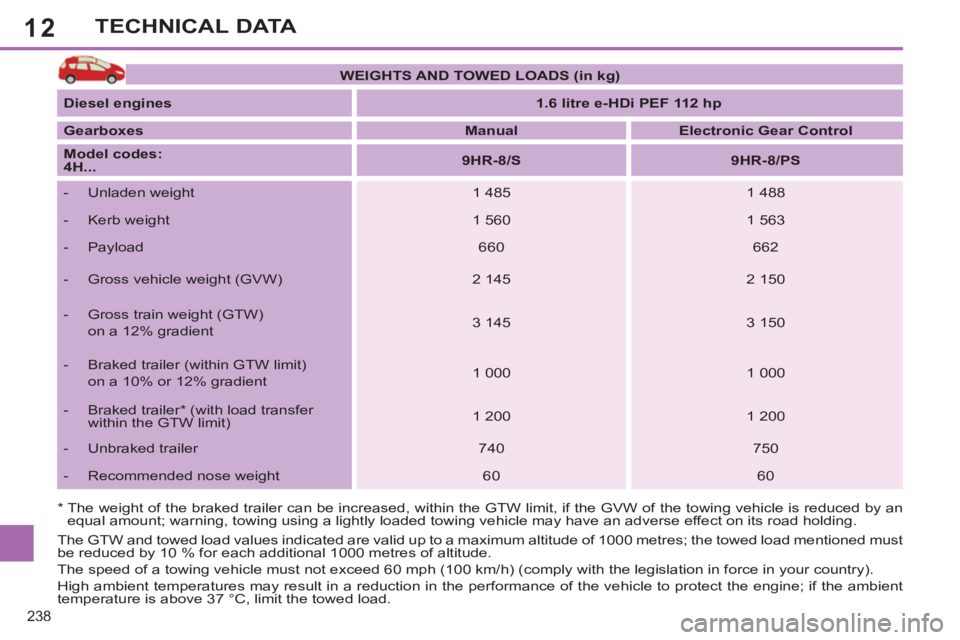
WEIGHTS AND TOWED LOADS (in kg)
Diesel
engines
1.6 litre e-HDi PEF 112 hp
Gearboxes
Manual
Electronic Gear Control
Model codes:
4H...
9HR-8/S
9HR-8/PS
- Unladen weight
1 485
1 488
- Kerb weight
1 560
1 563
- Payload
660
662
- Gross vehicle weight (GVW)
2 145
2 150
- Gross train weight (GTW)
on a 12% gradient
3 145
3 150
- Braked trailer (within GTW limit)
on a 10% or 12% gradient
1 000
1 000
- Braked trailer * (with load transfer
within the GTW limit)
1 200
1 200
- Unbraked trailer
740
750
- Recommended nose weight
60
60
Page 241 of 382
12
239
TECHNICAL DATA
* The weight of the braked trailer can be increased, within the GTW limit, if the GVW of the towing vehicle is reduced by an
equal amount; warning, towing using a lightly loaded towing vehicle may have an adverse effect on its road holding.
The GTW and towed load values indicated are valid up to a maximum altitude of 1000 metres; the towed load mentioned must
be reduced by 10 % for each additional 1000 metres of altitude.
The speed of a towing vehicle must not exceed 60 mph (100 km/h) (comply with the legislation in force in your country).
High ambient temperatures may result in a reduction in the performance of the vehicle to protect the engine; if the ambient
temperature is above 37 °C, limit the towed load.
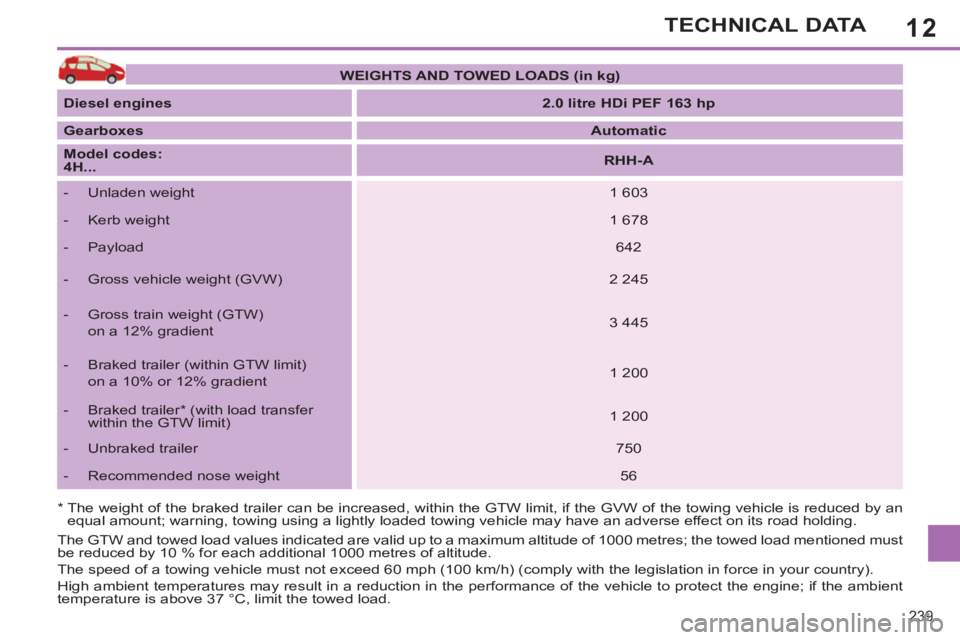
WEIGHTS AND TOWED LOADS (in kg)
Diesel engines
2.0 litre HDi PEF 163 hp
Gearboxes
Automatic
Model codes:
4H...
RHH-A
- Unladen weight
1 603
- Kerb weight
1 678
- Payload
642
- Gross vehicle weight (GVW)
2 245
- Gross train weight (GTW)
on a 12% gradient
3 445
- Braked trailer (within GTW limit)
on a 10% or 12% gradient
1 200
- Braked trailer * (with load transfer
within the GTW limit)
1 200
- Unbraked trailer
750
- Recommended nose weight
56
Page 251 of 382
249
01FIRST STEPS
Peugeot Connect Media Navigation (NG4 3D) NAVIGATOR
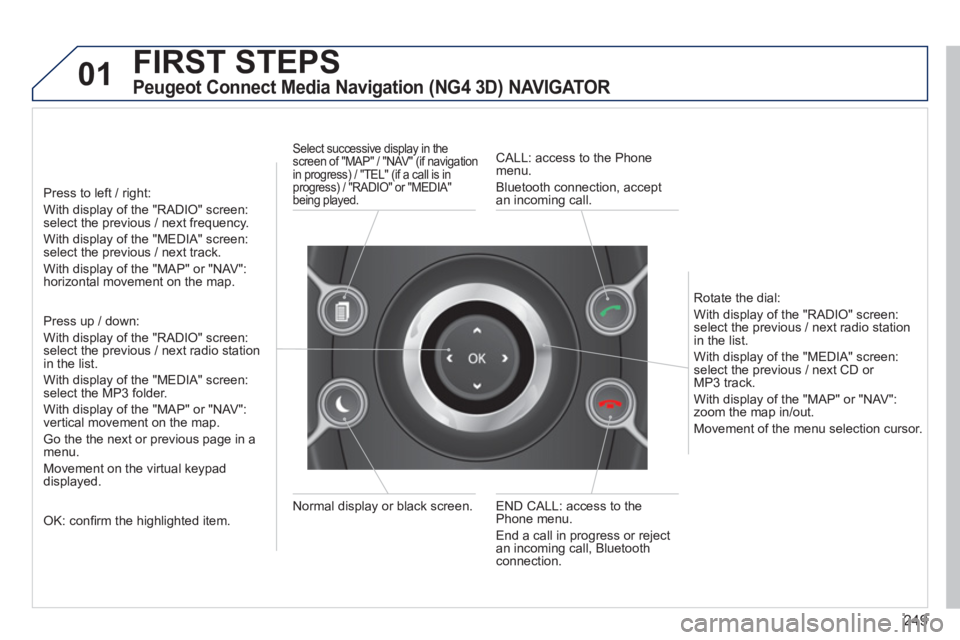
Press to left / right:
With display of the "RADIO" screen: select the previous / next frequency.
With display of the "MEDIA" screen: select the previous / next track.
With display of the "MAP" or "NAV":horizontal movement on the map.
Press up / down:
With display of the "RADIO" screen: select the previous / next radio stationin the list.
With display of the "MEDIA" screen: select the MP3 folder.
With display of the "MAP" or "NAV":
vertical movement on the map.
Go the the next or previous pa
ge in a menu.
Movement on the virtual keypad
displayed.
OK: confi rm the highlighted item.
END CALL: access to the Phone menu.
End a call in pro
gress or reject
an incoming call, Bluetooth connection. Normal displa
y or black screen.
Select successive display in the screen of "MAP" / "NAV" (if navigation
in progress) / "TEL" (if a call is in
progress) / "RADIO" or "MEDIA"
being played.
CALL: access to the Phonemenu.
Bluetooth connection, accept
an incomin
g call.
R
otate the dial:
With displa
y of the "RADIO" screen: select the previous / next radio station
in the list.
With displa
y of the "MEDIA" screen: select the previous / next CD or MP3 track.
With displa
y of the "MAP" or "NAV":zoom the map in/out.
M
ovement of the menu selection cursor.
Page 252 of 382
250
02
SETUP2ABC3DEF5JKL4GHI6MNO8TUV7PQRS9WXYZ0*#
1NAV ESC TRAFFICADDR
BOOKSETUP
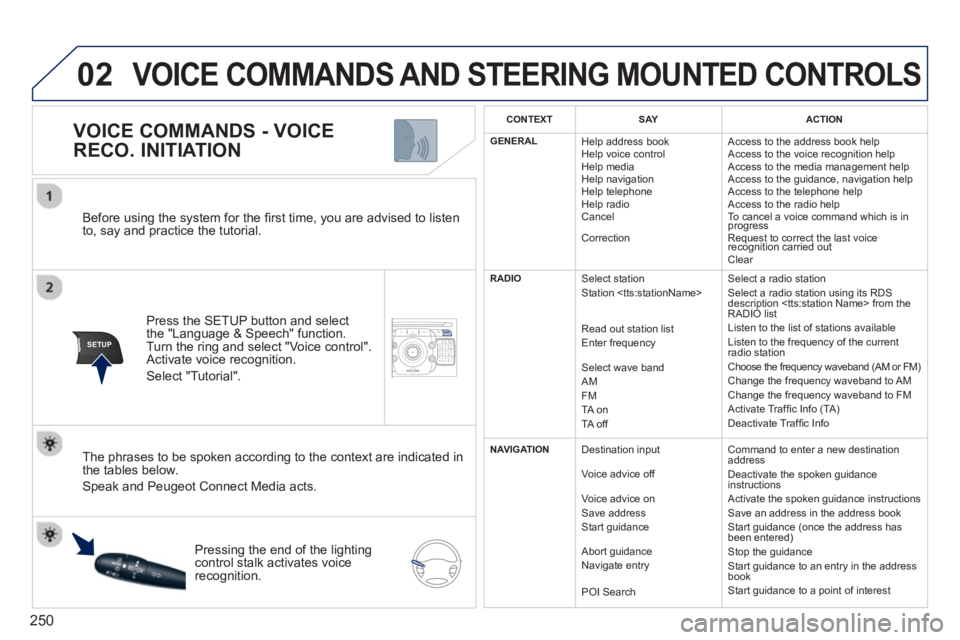
Before using the system for the fi rst time, you are advised to listen
to, say and practice the tutorial.
Press the
SETUP button and select
the "Language & Speech" function.Turn the ring and select "Voice control". Activate voice recognition.
Select "Tutorial".
VOICE COMMANDS - VOICE
RECO. INITIATION
The phrases to be spoken according to the context are indicated in
the tables below.
Speak and Peugeot Connect Media acts.
Pressing the end o
f the lightingcontrol stalk activates voice
recognition.
CONTEXTSAYACTION
GENERAL
Help address book
Help voice control
Help media
Help navi
gation
Help telephone
Help radio
Cancel
Correction Access to the address book help
Access to the voice reco
gnition help
Access to the media management help
Access to the guidance, navigation help
Access to the telephone help Access to the radio help To cancel a voice command which is inprogress
Request to correct the last voice recognition carried outq
Clear
RADIO
Select station
Station
R
ead out station list
Enter frequency
Select wave band AMFM
TA on
TA off Select a radio station
Select a radio station usin
g its RDS
description
Listen to the list of stations available
Listen to the frequency of the current
radio station Choose the frequency waveband (AM or FM) Change the frequency waveband to AM
Change the frequency waveband to FM
Activate Traffi c Info (TA)
D
eactivate Traffi c Info
NAVIGATION
Destination input
V
oice advice off
Voice advice on
Save address
Start
guidance
Abort
guidance
Navigate entry
POI Search Command to enter a new destination
address
Deactivate the spoken guidance instructions
Activate the spoken guidance instructions
Save an address in the address book
Start
guidance (once the address has
been entered)
Stop the guidance
Start guidance to an entry in the address
book
Start guidance to a point of interest
VOICE COMMANDS AND STEERING MOUNTED CONTROLS
Page 260 of 382
258
04
NAV2ABC3DEF5JKL4GHI6MNO8TUV7PQRS9WXYZ0*#
1RADIO MEDIANAV ESC TRAFFIC
SETUPADDR
BOOK
2ABC3DEF5JKL4GHI6MNO8TUV7PQRS9WXYZ0*#
1RADIO MEDIANAV ESC TRAFFIC
SETUPADDR
BOOK
2ABC3DEF5JKL4GHI6MNO8TUV7PQRS9WXYZ0*#
1RADIO MEDIANAV ESC TRAFFIC
SETUPADDR
BOOK
2ABC3DEF5JKL4GHI6MNO8TUV7PQRS9WXYZ0*#
1RADIO MEDIANAV ESC TRAFFIC
SETUPADDR
BOOK
2ABC3DEF5JKL4GHI6MNO8TUV7PQRS9WXYZ0*#
1RADIO MEDIANAV ESC TRAFFIC
SETUPADDR
BOOK
2ABC3DEF5JKL4GHI6MNO8TUV7PQRS9WXYZ0*#
1RADIO MEDIANAV ESC TRAFFIC
SETUPADDR
BOOK
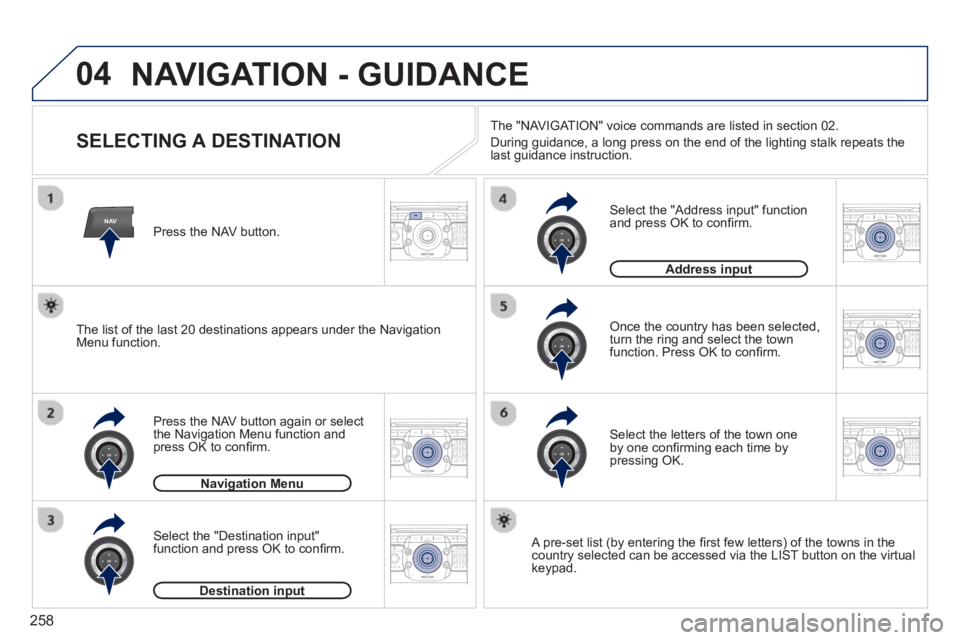
NAVIGATION - GUIDANCE
SELECTING A DESTINATION
Press the NAV button again or select
the Navigation Menu function and
press OK to confi rm.
Select the "Destination input" function and press OK to confi rm. Pr
ess the NAV button.
Select the letters of the town oneby one confi rming each time by pressing OK.
Once the country has been selected,
turn the ring and select the town
function. Press OK to confi rm.
Navigation Menug
Destination inputp
A pre-set list (by entering the fi rst few letters) of the towns in thecountry selected can be accessed via the LIST button on the virtual
keypad.
Select the "Address input" function
and press OK to confi rm.
Address inputp
The list of the last 20 destinations appears under the NavigationMenu function.The "NAVI
GAT ION" voice commands are listed in section 02.
Durin
g guidance, a long press on the end of the lighting stalk repeats the last guidance instruction.
Page 286 of 382
284
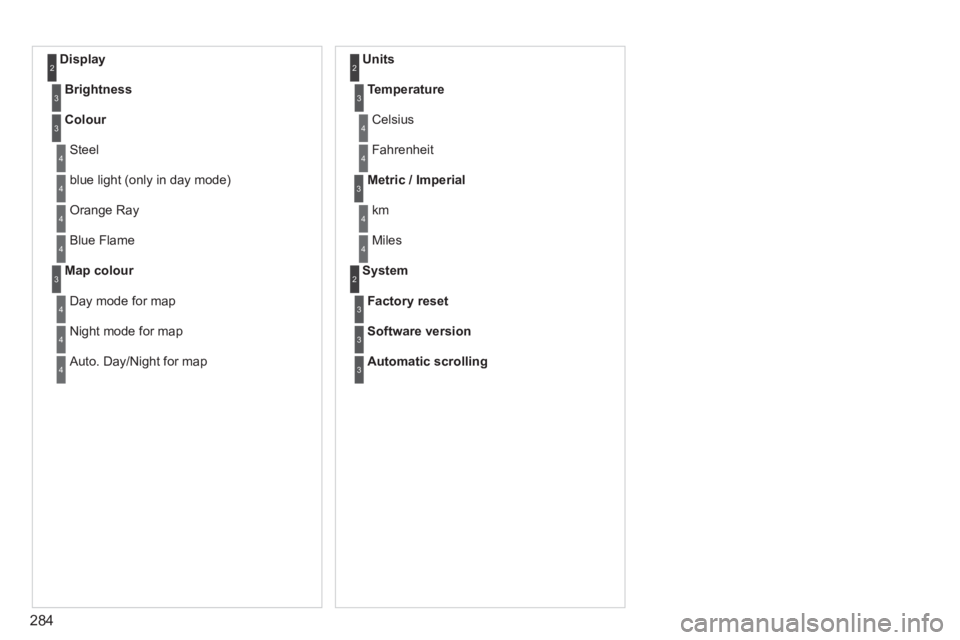
Display 2
Brightness3
Colour3
Steel4
blue light (only in day mode) 4
Orange Ray 4
Blue Flame4
Map colour3
Day mode for map4
Night mode for map4
Auto. Day/Night for map4
Units 2
Temperature3
Celsius 4
Fahrenheit 4
Metric / Imperial3
km4
Miles4
System 2
Factory reset3
Software version3
Automatic scrolling3
Page 299 of 382
297
04
""""""""""""ggggggggggNavigation guidanceNavigation guidanceNavigation guidanceNavigation guidanceNavigation guidanceNavigation - guidanceNavigation - guidanceNavigation - guidanceNavigation - guidanceNavigation guidanceNavigation guidanceNavigation guidanceNavigation guidanceN i ti idN i ti idN i ti idN i ti idN i ti idN i ti idN i ti idN i ti idN i ti idNi i id""""""""""""
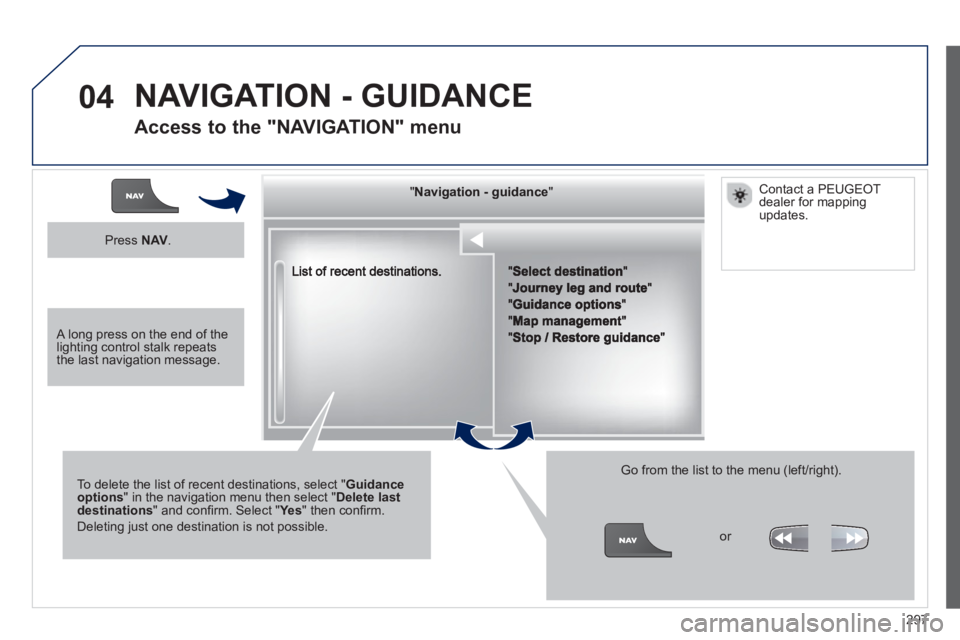
To delete the list of recent destinations, select "Guidance options" in the navigation menu then select "Delete last destinations" and confi rm. Select "Ye s" then confi rm.
Deleting just one destination is not possible.
Go from the list to the menu (left/right).
NAVIGATION - GUIDANCE
Access to the "NAVIGATION" menu
Press NAV.
or
Contact a PEUGEOT
dealer for mappingupdates.
A long press on the end of the lighting control stalk repeats the last navigation message.
Page 339 of 382
337
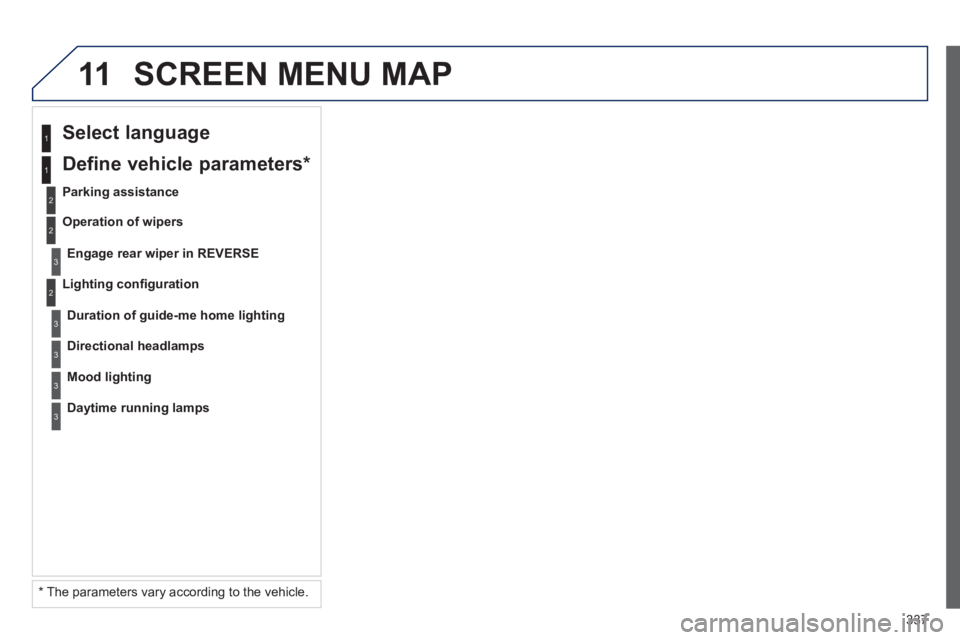
11 SCREEN MENU MAP
2
3
3
1
2
1
2
3
3
3
*
The parameters vary according to the vehicle.
Li
ghting confi guration
Select language
Parking assistance
En
gage rear wiper in REVERSE
Duration of guide-me home lighting
Define vehicle parameters *
Operation of wipers
Directional headlamps
Mood lighting
Daytime running lamps
Page 367 of 382
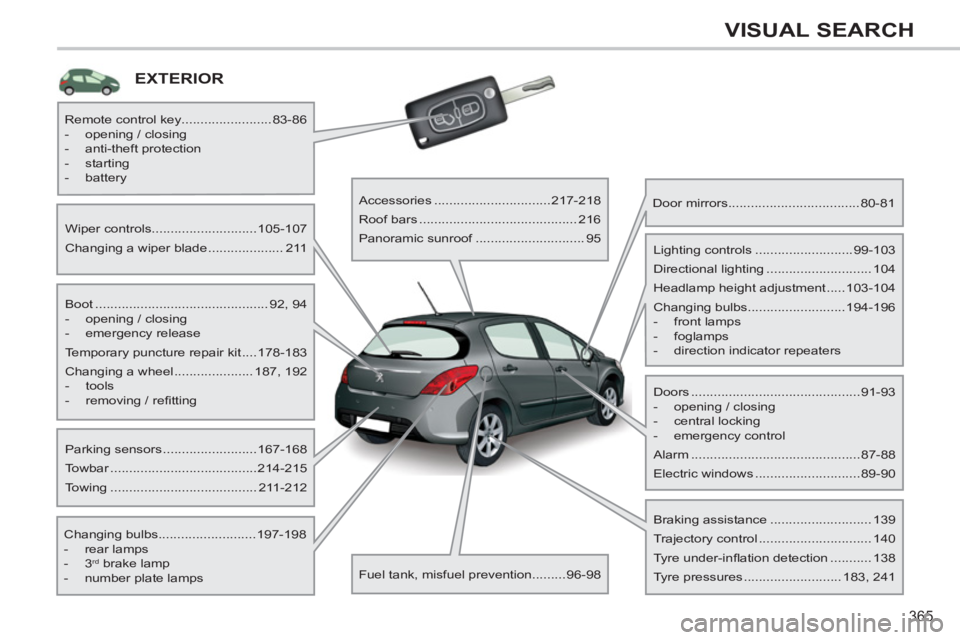
365
VISUAL SEARCH
EXTERIOR
Boot .............................................. 92, 94
- opening / closing
- emergency release
Temporary puncture repair kit ....178-183
Changing a wheel ..................... 187, 192
- tools
- removing / refi tting
Wiper controls............................105-107
Changing a wiper blade .................... 211
Changing bulbs..........................197-198
- rear lamps
- 3
rd brake lamp
- number plate lamps
Parking sensors .........................167-168
Towbar .......................................214-215
Towing ....................................... 211-212
Remote control key........................83-86
- opening / closing
- anti-theft protection
- starting
- battery
Accessories ...............................217-218
Roof bars .......................................... 216
Panoramic sunroof ............................. 95
Fuel tank, misfuel prevention.........96-98
Door mirrors ...................................80-81
Doors .............................................91-93
- opening / closing
- central locking
- emergency control
Alarm .............................................87-88
Electric windows ............................89-90
Lighting controls ..........................99-103
Directional lighting ............................ 104
Headlamp height adjustment .....103-104
Changing bulbs..........................194-196
- front lamps
- foglamps
- direction indicator repeaters
Braking assistance ........................... 139
Trajectory control .............................. 140
Tyre under-infl ation detection ........... 138
Tyre pressures .......................... 183, 241
Page 368 of 382
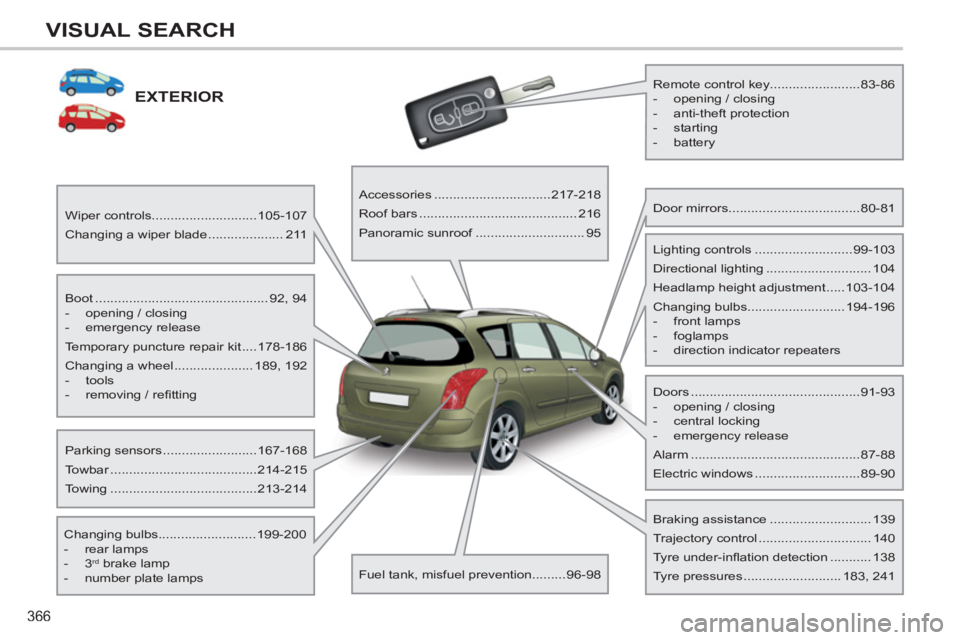
366
VISUAL SEARCH
EXTERIOR
Boot .............................................. 92, 94
- opening / closing
- emergency release
Temporary puncture repair kit ....178-186
Changing a wheel ..................... 189, 192
- tools
- removing / refi tting
Wiper controls............................105-107
Changing a wiper blade .................... 211
Changing bulbs..........................199-200
- rear lamps
- 3
rd brake lamp
- number plate lamps
Parking sensors .........................167-168
Towbar .......................................214-215
Towing .......................................213-214
Remote control key........................83-86
- opening / closing
- anti-theft protection
- starting
- battery
Accessories ...............................217-218
Roof bars .......................................... 216
Panoramic sunroof ............................. 95
Fuel tank, misfuel prevention.........96-98
Door mirrors ...................................80-81
Doors .............................................91-93
- opening / closing
- central locking
- emergency release
Alarm .............................................87-88
Electric windows ............................89-90
Lighting controls ..........................99-103
Directional lighting ............................ 104
Headlamp height adjustment .....103-104
Changing bulbs..........................194-196
- front lamps
- foglamps
- direction indicator repeaters
Braking assistance ........................... 139
Trajectory control .............................. 140
Tyre under-infl ation detection ........... 138
Tyre pressures .......................... 183, 241