buttons PEUGEOT 4007 2008 User Guide
[x] Cancel search | Manufacturer: PEUGEOT, Model Year: 2008, Model line: 4007, Model: PEUGEOT 4007 2008Pages: 226, PDF Size: 13.63 MB
Page 183 of 226
11
AUDIO EQUIPMENT and TELEMATICS
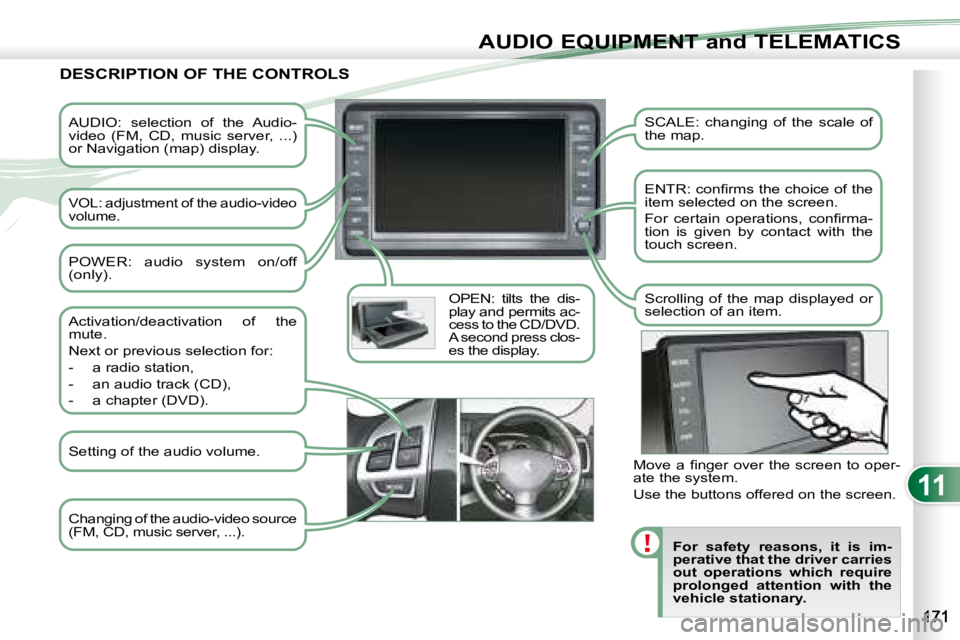
AUDIO: selection of the Audio-
video (FM, CD, music server, ...)
or Navigation (map) display.
VOL: adjustment of the audio-video
volume. OPEN: tilts the dis-
play and permits ac-
cess to the CD/DVD.
A second press clos-
es the display. SCALE: changing of the scale of
the map.
ENTR: confi rms the choice of the
item selected on the screen.
For certain operations, confi rma-
tion is given by contact with the
touch screen.
Scrolling of the map displayed or
selection of an item.
For safety reasons, it is im-
perative that the driver carries
out operations which require
prolonged attention with the
vehicle stationary.
DESCRIPTION OF THE CONTROLS
Changing of the audio-video source
(FM, CD, music server, ...).
Activation/deactivation of the
mute.
Next or previous selection for:
- a radio station,
- an audio track (CD),
- a chapter (DVD).
Move a fi nger over the screen to oper-
ate the system.
Use the buttons offered on the screen.
POWER: audio system on/off
(only).
Setting of the audio volume.
Page 192 of 226
![PEUGEOT 4007 2008 User Guide 11
/
AUDIO EQUIPMENT and TELEMATICS
Entering an address and activating guidance (2/2) Press Explanations Result
Press [Street] and enter the name of a street using the touch keypad.
When a](/img/29/58328/w960_58328-191.png "PEUGEOT 4007 2008 User Guide 11
/
AUDIO EQUIPMENT and TELEMATICS
Entering an address and activating guidance (2/2) Press Explanations Result
Press [Street] and enter the name of a street using the touch keypad.
When a")
11
/
AUDIO EQUIPMENT and TELEMATICS
Entering an address and activating guidance (2/2) Press Explanations Result
Press [Street] and enter the name of a street using the touch keypad.
When a character of the name of the street is entered, if 5 streets or fewer
are recognised, you can select a street from a list which is displa yed or
press [List].
Press [House #] and enter the number of the house using the touch keypad.
You can enter the name of a junction instead of the numb er
of the street. Press [Junction] and select the name from a
list which is displayed.
This is what you obtain once all of the information has b een entered:
If you agree with the information press [Set], otherwise press one of the
buttons to correct.
Press [Start] to start the navigation.
Page 205 of 226
11
AUDIO EQUIPMENT and TELEMATICS
Explanations Result
Playing a track or a playlist on the Music Se
rver
Press
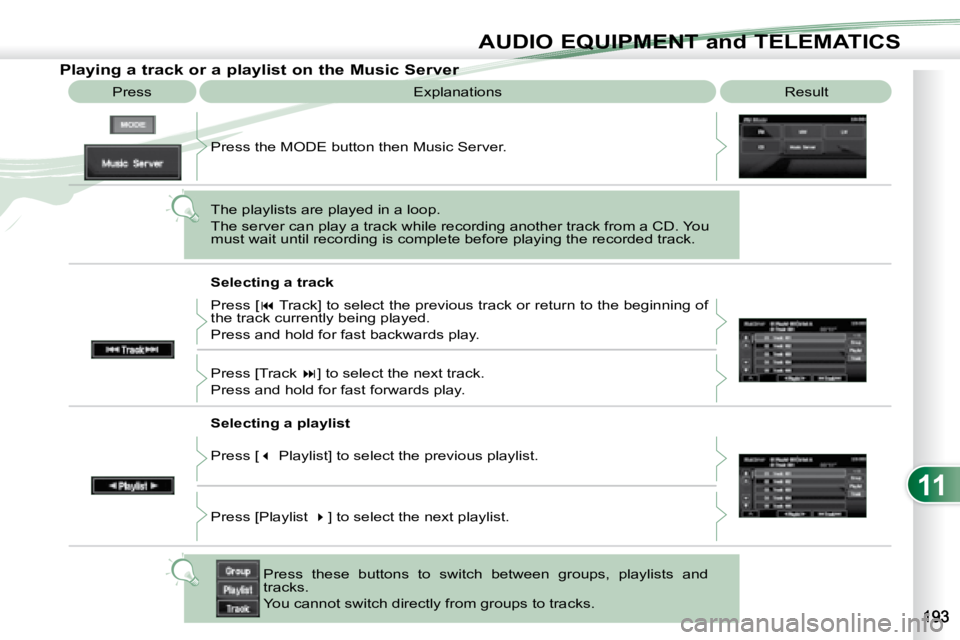
Press the MODE button then Music Server.
The playlists are played in a loop.
The server can play a track while recording another track from a CD. You
must wait until recording is complete before playing the recorde d track.
Selecting a track
Press these buttons to switch between groups, playlists and
tracks.
You cannot switch directly from groups to tracks.
Press [
Track] to select the previous track or return to the beginning of
the track currently being played.
Press and hold for fast backwards play.
Press [Track ] to select the next track.
Press and hold for fast forwards play.
Selecting a playlist
Press [ Playlist] to select the previous playlist.
Press [Playlist ] to select the next playlist.
Page 223 of 226
11
i
AUDIO EQUIPMENT and TELEMATICS
Making a telephone call using a number, phone book
A Bluetooth® compatible mobile telephone
must be matched with the system.
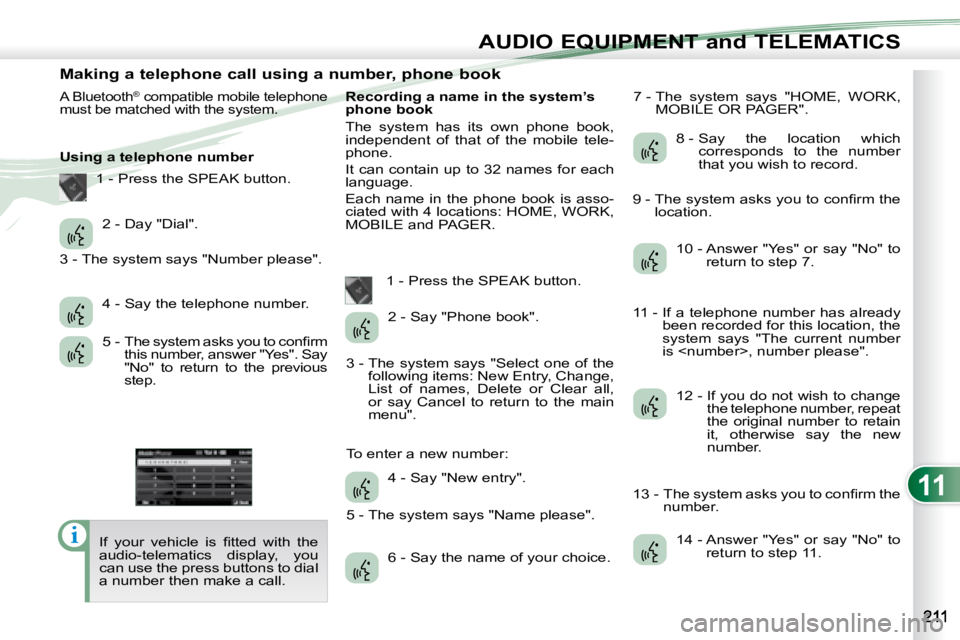
Using a telephone number
If your vehicle is fi tted with the
audio-telematics display, you
can use the press buttons to dial
a number then make a call. Recording a name in the system’s
phone book
The system has its own phone book,
independent of that of the mobile tele-
phone.
It can contain up to 32 names for each
language.
Each name in the phone book is asso-
ciated with 4 locations: HOME, WORK,
MOBILE and PAGER.
1 - Press the SPEAK button. 7 - The system says "HOME, WORK,
MOBILE OR PAGER".
2 - Day "Dial".
4 - Say the telephone number.
5 - The system asks you to confi rm this number, answer "Yes". Say
"No" to return to the previous
step. 2 - Say "Phone book".
4 - Say "New entry".
6 - Say the name of your choice. 8 - Say the location which
corresponds to the number
that you wish to record.
10 - Answer "Yes" or say "No" to return to step 7.
12 - If you do not wish to change the telephone number, repeat
the original number to retain
it, otherwise say the new
number.
14 - Answer "Yes" or say "No" to return to step 11.
1 - Press the SPEAK button.
3 - The system says "Number please".
3 - The system says "Select one of the following items: New Entry, Change,
List of names, Delete or Clear all,
or say Cancel to return to the main
menu".
5 - The system says "Name please".
To enter a new number: 9 - The system asks you to confi rm the
location.
11 - If a telephone number has already been recorded for this location, the
system says "The current number
is
13 - The system asks you to confi rm the number.