light PEUGEOT 4007 2008 User Guide
[x] Cancel search | Manufacturer: PEUGEOT, Model Year: 2008, Model line: 4007, Model: PEUGEOT 4007 2008Pages: 226, PDF Size: 13.63 MB
Page 36 of 226
1
i
INSTRUMENTS and CONTROLS
Restoring the manufacturer’s
parameters (REINITIALISE)
You can restore all of the manufacturer’s
settings for all of the functions.
On the menus screen:
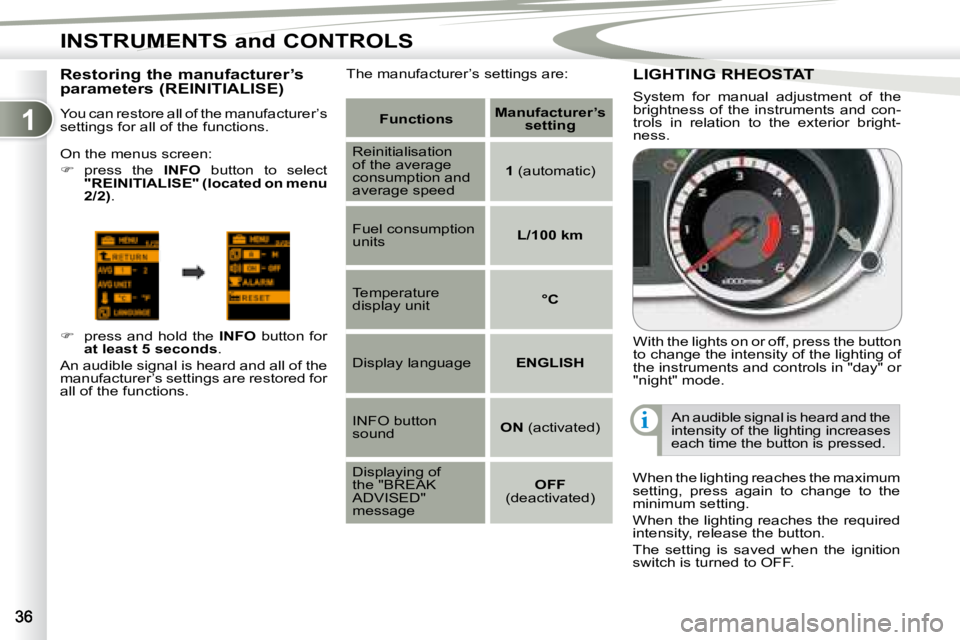
press the INFO button to select
"REINITIALISE" (located on menu
2/2) .
press and hold the INFO button for
at least 5 seconds .
An audible signal is heard and all of the
manufacturer’s settings are restored for
all of the functions. The manufacturer’s settings are: LIGHTING RHEOSTAT LIGHTING RHEOSTAT
With the lights on or off, press the button
to change the intensity of the lighting of
the instruments and controls in "day" or
"night" mode.
When the lighting reaches the maximum
setting, press again to change to the
minimum setting.
When the lighting reaches the required
intensity, release the button.
The setting is saved when the ignition
switch is turned to OFF. An audible signal is heard and the
intensity of the lighting increases
each time the button is pressed.
System for manual adjustment of the
brightness of the instruments and con-
trols in relation to the exterior bright-
ness.
Functions
Manufacturer’s
setting
Reinitialisation
of the average
consumption and
average speed
1 (automatic)
Fuel consumption
units
L/100 km
Temperature
display unit
°C
Display language ENGLISH
INFO button
sound
ON (activated)
Displaying of
the "BREAK
ADVISED"
message
OFF
(deactivated)
Page 39 of 226
1
i
INSTRUMENTS and CONTROLS
COLOUR DISPLAY COLOUR DISPLAY
This permits displaying of the following
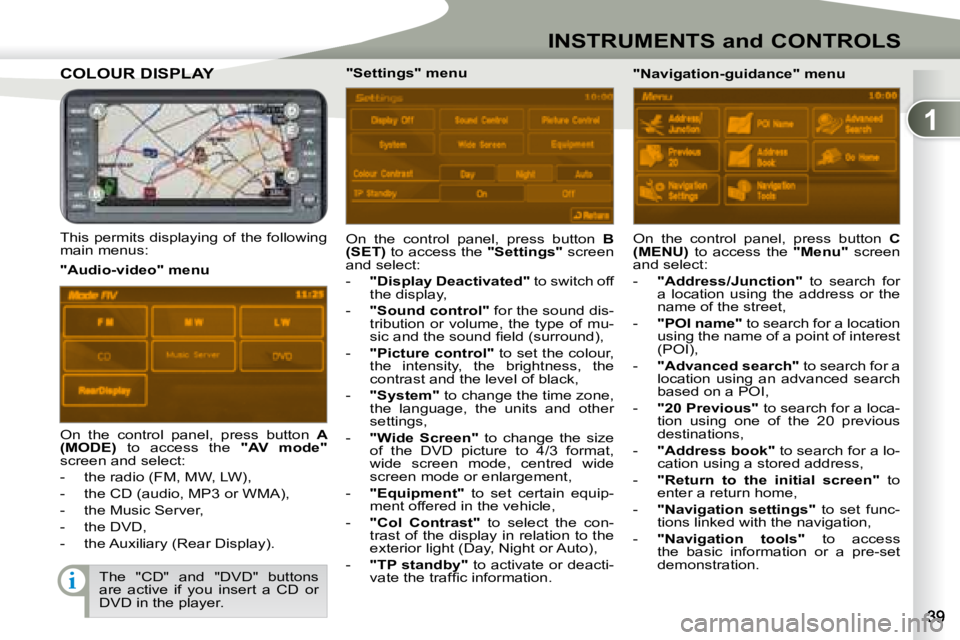
main menus: On the control panel, press button
B
(SET) to access the "Settings" screen
and select:
- "Display Deactivated" to switch off
the display,
- "Sound control" for the sound dis-
tribution or volume, the type of mu-
sic and the sound fi eld (surround),
- "Picture control" to set the colour,
the intensity, the brightness, the
contrast and the level of black,
- "System" to change the time zone,
the language, the units and other
settings,
- "Wide Screen" to change the size
of the DVD picture to 4/3 format,
wide screen mode, centred wide
screen mode or enlargement,
- "Equipment" to set certain equip-
ment offered in the vehicle,
- "Col Contrast" to select the con-
trast of the display in relation to the
exterior light (Day, Night or Auto),
- "TP standby" to activate or deacti-
vate the traffi c information.
"Audio-video" menu
"Navigation-guidance" menu
On the control panel, press button A
(MODE) to access the "AV mode"
screen and select:
- the radio (FM, MW, LW),
- the CD (audio, MP3 or WMA),
- the Music Server,
- the DVD,
- the Auxiliary (Rear Display). "Settings" menu
On the control panel, press button C
(MENU) to access the "Menu" screen
and select:
- "Address/Junction" to search for
a location using the address or the
name of the street,
- "POI name" to search for a location
using the name of a point of interest
(POI),
- "Advanced search" to search for a
location using an advanced search
based on a POI,
- "20 Previous" to search for a loca-
tion using one of the 20 previous
destinations,
- "Address book" to search for a lo-
cation using a stored address,
- "Return to the initial screen" to
enter a return home,
- "Navigation settings" to set func-
tions linked with the navigation,
- "Navigation tools" to access
the basic information or a pre-set
demonstration.
The "CD" and "DVD" buttons
are active if you insert a CD or
DVD in the player.
Page 48 of 226
2
i
i
COMFORT
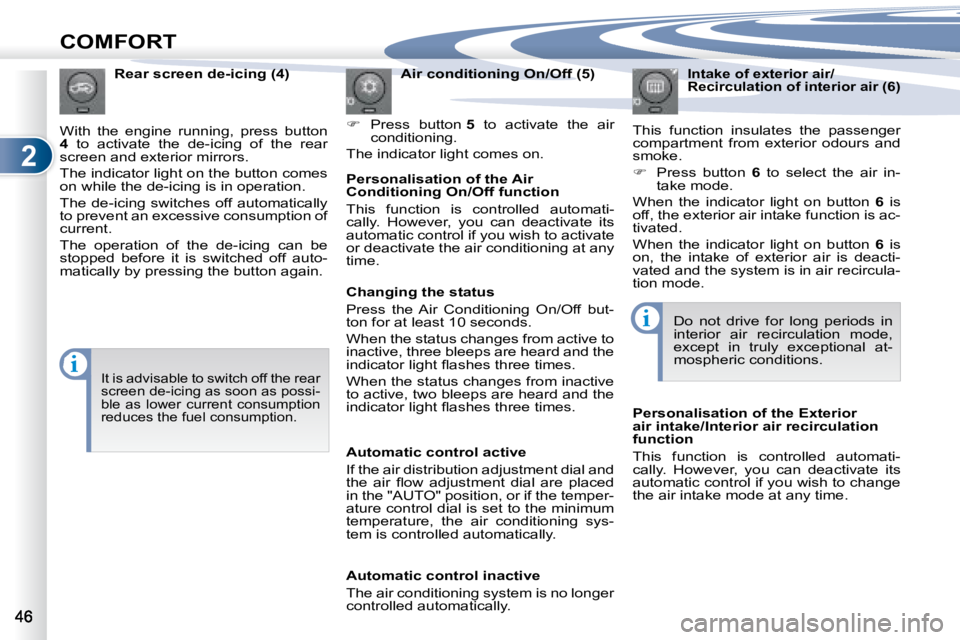
Air conditioning On/Off (5)
Press button 5 to activate the air
conditioning.
The indicator light comes on.
Rear screen de-icing (4)
With the engine running, press button
4 to activate the de-icing of the rear
screen and exterior mirrors.
The indicator light on the button comes
on while the de-icing is in operation.
The de-icing switches off automatically
to prevent an excessive consumption of
current.
The operation of the de-icing can be
stopped before it is switched off auto-
matically by pressing the button again. Personalisation of the Air
Conditioning On/Off function
This function is controlled automati-
cally. However, you can deactivate its
automatic control if you wish to activate
or deactivate the air conditioning at any
time. Intake of exterior air/
Recirculation of interior air (6)
This function insulates the passenger
compartment from exterior odours and
smoke.
Press button 6 to select the air in-
take mode.
When the indicator light on button 6 is
off, the exterior air intake function is ac-
tivated.
When the indicator light on button 6 is
on, the intake of exterior air is deacti-
vated and the system is in air recircula-
tion mode.
Do not drive for long periods in
interior air recirculation mode,
except in truly exceptional at-
mospheric conditions.
It is advisable to switch off the rear
screen de-icing as soon as possi-
ble as lower current consumption
reduces the fuel consumption.
Changing the status
Press the Air Conditioning On/Off but-
ton for at least 10 seconds.
When the status changes from active to
inactive, three bleeps are heard and the
indicator light fl ashes three times.
When the status changes from inactive
to active, two bleeps are heard and the
indicator light fl ashes three times.
Automatic control active
If the air distribution adjustment dial and
the air fl ow adjustment dial are placed
in the "AUTO" position, or if the temper-
ature control dial is set to the minimum
temperature, the air conditioning sys-
tem is controlled automatically.
Automatic control inactive
The air conditioning system is no longer
controlled automatically. Personalisation of the Exterior
air intake/Interior air recirculation
function
This function is controlled automati-
cally. However, you can deactivate its
automatic control if you wish to change
the air intake mode at any time.
Page 51 of 226
2
COMFORT
FRONT SEATS
Manual mode
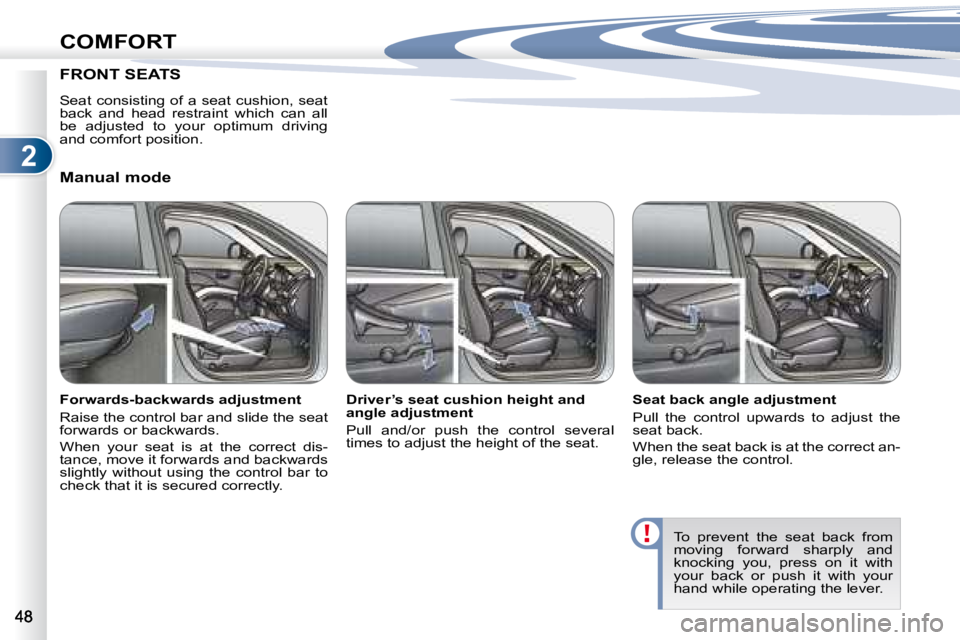
Forwards-backwards adjustment
Raise the control bar and slide the seat
forwards or backwards.
When your seat is at the correct dis-
tance, move it forwards and backwards
slightly without using the control bar to
check that it is secured correctly. Driver’s seat cushion height and
angle adjustment
Pull and/or push the control several
times to adjust the height of the seat.
Seat back angle adjustment
Pull the control upwards to adjust the
seat back.
When the seat back is at the correct an-
gle, release the control.
To prevent the seat back from
moving forward sharply and
knocking you, press on it with
your back or push it with your
hand while operating the lever.
Seat consisting of a seat cushion, seat
back and head restraint which can all
be adjusted to your optimum driving
and comfort position.
Page 53 of 226
2
i
COMFORT
Head restraint height adjustment Front armrest
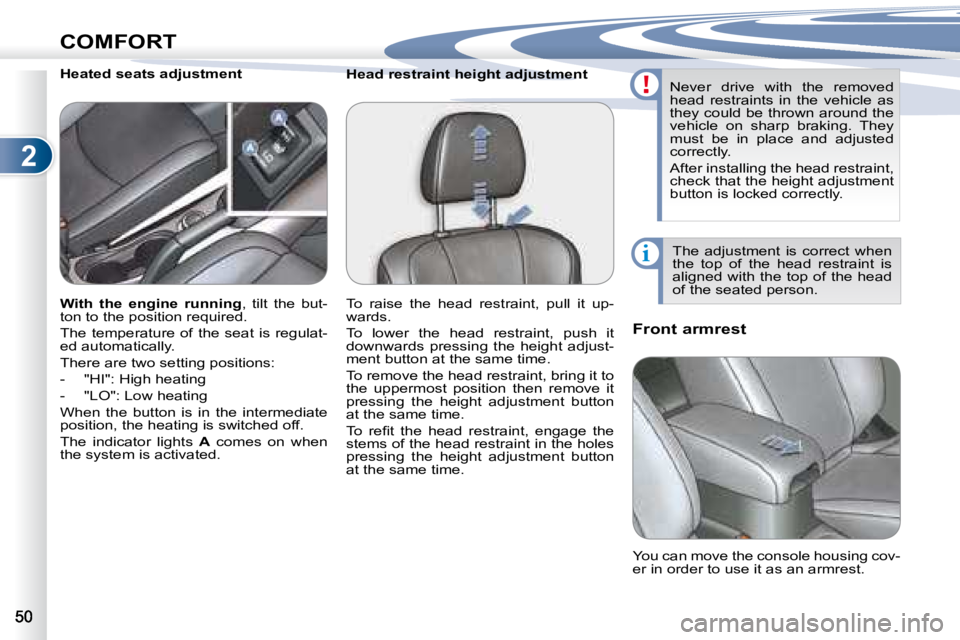
Heated seats adjustment
The adjustment is correct when
the top of the head restraint is
aligned with the top of the head
of the seated person.
Never drive with the removed
head restraints in the vehicle as
they could be thrown around the
vehicle on sharp braking. They
must be in place and adjusted
correctly.
After installing the head restraint,
check that the height adjustment
button is locked correctly.
You can move the console housing cov-
er in order to use it as an armrest.
With the engine running , tilt the but-
ton to the position required.
The temperature of the seat is regulat-
ed automatically.
There are two setting positions:
- "HI": High heating
- "LO": Low heating
When the button is in the intermediate
position, the heating is switched off.
The indicator lights A comes on when
the system is activated. To raise the head restraint, pull it up-
wards.
To lower the head restraint, push it
downwards pressing the height adjust-
ment button at the same time.
To remove the head restraint, bring it to
the uppermost position then remove it
pressing the height adjustment button
at the same time.
To refi t the head restraint, engage the
stems of the head restraint in the holes
pressing the height adjustment button
at the same time.
Page 57 of 226
2
i
COMFORT
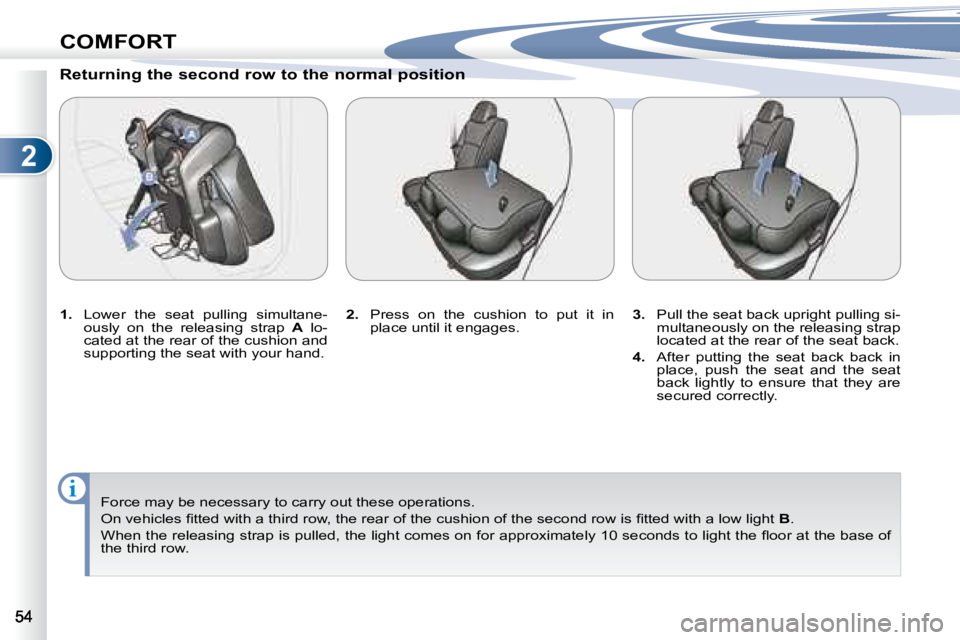
Returning the second row to the normal position
1. Lower the seat pulling simultane-
ously on the releasing strap A lo-
cated at the rear of the cushion and
supporting the seat with your hand.
Force may be necessary to carry out these operations.
On vehicles fi tted with a third row, the rear of the cushio n of the second row is fi tted with a low light B .
When the releasing strap is pulled, the light comes on for approximately 10 seconds to light the fl oor at the base of
the third row.
2. Press on the cushion to put it in
place until it engages.
3. Pull the seat back upright pulling si-
multaneously on the releasing strap
located at the rear of the seat back.
4. After putting the seat back back in
place, push the seat and the seat
back lightly to ensure that they are
secured correctly.
Page 65 of 226
2
COMFORT
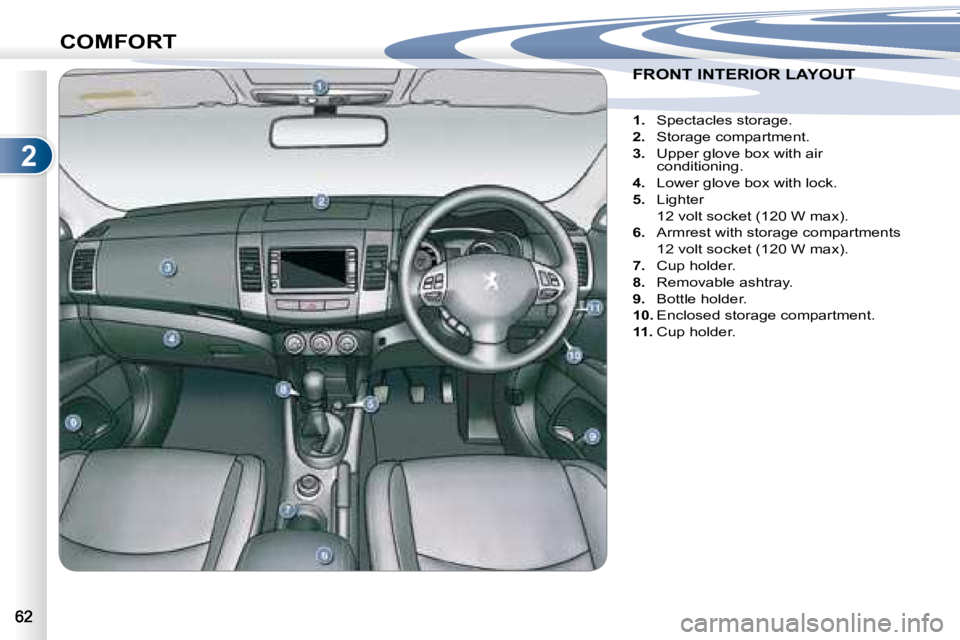
FRONT INTERIOR LAYOUT FRONT INTERIOR LAYOUT
1. Spectacles storage.
2. Storage compartment.
3. Upper glove box with air
conditioning.
4. Lower glove box with lock.
5. Lighter
12 volt socket (120 W max).
6. Armrest with storage compartments
12 volt socket (120 W max).
7. Cup holder.
8. Removable ashtray.
9. Bottle holder.
10. Enclosed storage compartment.
11. Cup holder.
Page 67 of 226
2
COMFORT
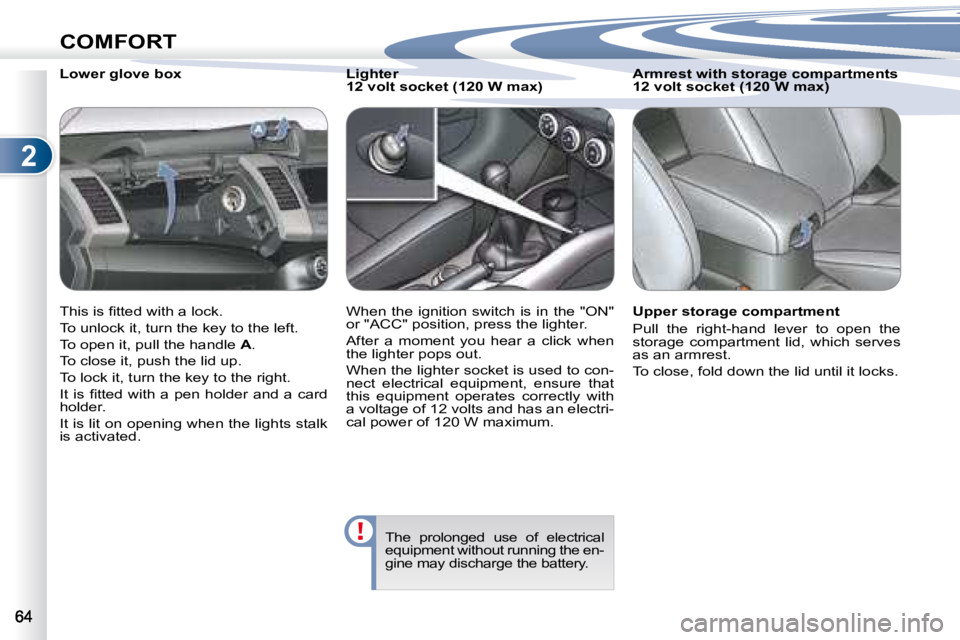
Lower glove box
This is fi tted with a lock.
To unlock it, turn the key to the left.
To open it, pull the handle A .
To close it, push the lid up.
To lock it, turn the key to the right.
It is fi tted with a pen holder and a card
holder.
It is lit on opening when the lights stalk
is activated. Lighter
12 volt socket (120 W max)
When the ignition switch is in the "ON"
or "ACC" position, press the lighter.
After a moment you hear a click when
the lighter pops out.
When the lighter socket is used to con-
nect electrical equipment, ensure that
this equipment operates correctly with
a voltage of 12 volts and has an electri-
cal power of 120 W maximum.
The prolonged use of electrical
equipment without running the en-
gine may discharge the battery.
Armrest with storage compartments
12 volt socket (120 W max)
Upper storage compartment
Pull the right-hand lever to open the
storage compartment lid, which serves
as an armrest.
To close, fold down the lid until it locks.
Page 75 of 226
3
i
ACCESS
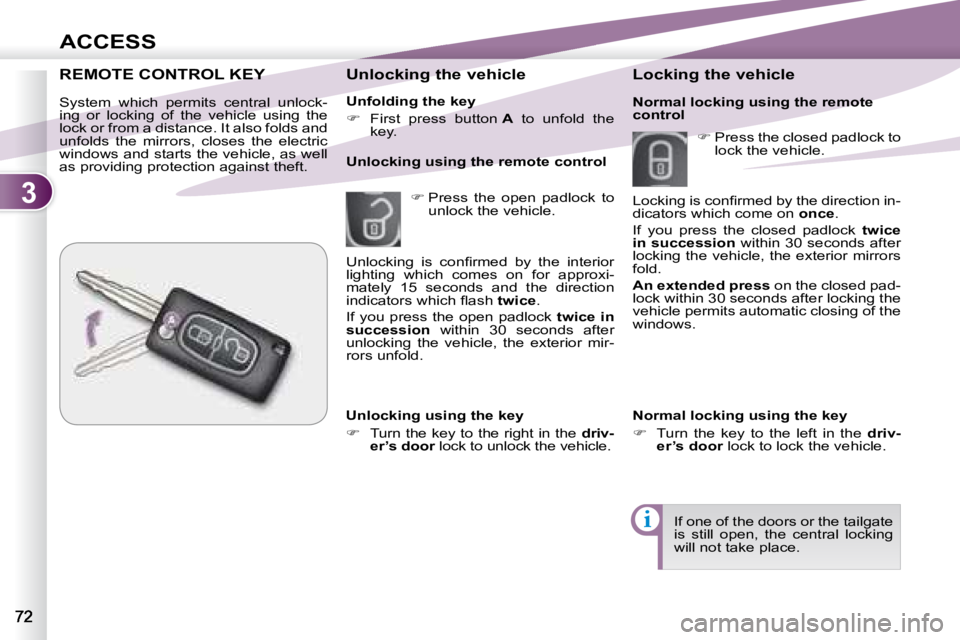
Unfolding the key
First press button A to unfold the
key.
Unlocking the vehicle
Press the open padlock to
unlock the vehicle.
Unlocking using the remote control
REMOTE CONTROL KEY REMOTE CONTROL KEY
System which permits central unlock-
ing or locking of the vehicle using the
lock or from a distance. It also folds and
unfolds the mirrors, closes the electric
windows and starts the vehicle, as well
as providing protection against theft. Locking the vehicle
Unlocking using the key
Turn the key to the right in the driv-
er’s door lock to unlock the vehicle.
Press the closed padlock to
lock the vehicle.
If one of the doors or the tailgate
is still open, the central locking
will not take place.
Unlocking is confi rmed by the interior
lighting which comes on for approxi-
mately 15 seconds and the direction
indicators which fl ash
twice .
If you press the open padlock twice in
succession within 30 seconds after
unlocking the vehicle, the exterior mir-
rors unfold.
Normal locking using the key
Turn the key to the left in the driv-
er’s door lock to lock the vehicle.
Locking is confi rmed by the direction in-
dicators which come on
once .
If you press the closed padlock twice
in succession within 30 seconds after
locking the vehicle, the exterior mirrors
fold.
An extended press on the closed pad-
lock within 30 seconds after locking the
vehicle permits automatic closing of the
windows.
Normal locking using the remote
control
Page 84 of 226
3
i
ACCESS
DOORS
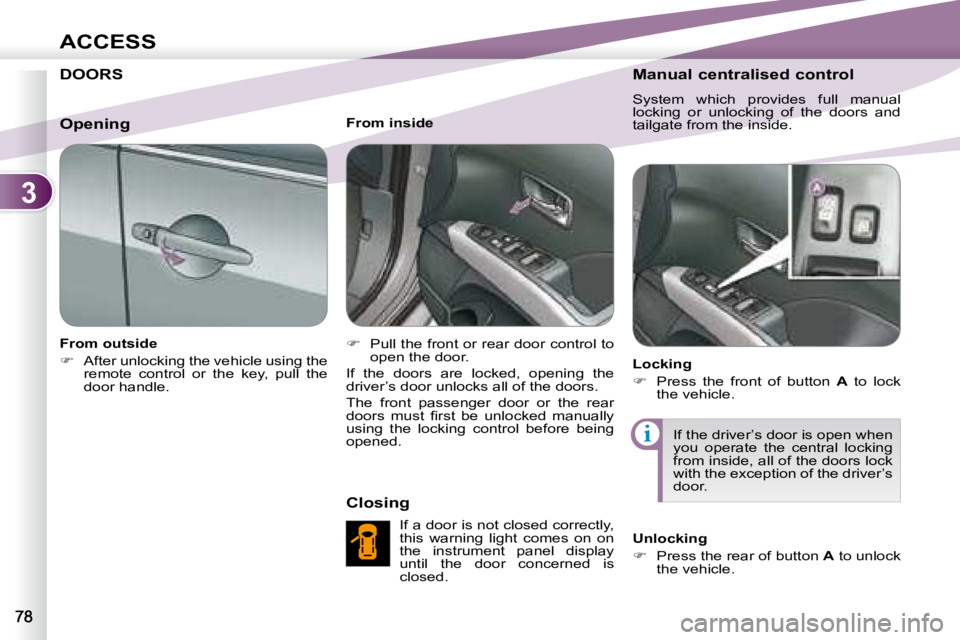
From outside
After unlocking the vehicle using the
remote control or the key, pull the
door handle. From inside
Pull the front or rear door control to
open the door.
If the doors are locked, opening the
driver’s door unlocks all of the doors.
The front passenger door or the rear
doors must fi rst be unlocked manually
using the locking control before being
opened.
Closing
If a door is not closed correctly,
this warning light comes on on
the instrument panel display
until the door concerned is
closed. Manual centralised control
System which provides full manual
locking or unlocking of the doors and
tailgate from the inside.
Locking
Press the front of button A to lock
the vehicle.
If the driver’s door is open when
you operate the central locking
from inside, all of the doors lock
with the exception of the driver’s
door.
Unlocking
Press the rear of button A to unlock
the vehicle.
Opening