steering PEUGEOT 4007 2008 User Guide
[x] Cancel search | Manufacturer: PEUGEOT, Model Year: 2008, Model line: 4007, Model: PEUGEOT 4007 2008Pages: 226, PDF Size: 13.63 MB
Page 121 of 226
7
DRIVING
Gear lever positions
N : neutral.
With your foot on the brake, select this
position to start.
R : reverse gear.
With the vehicle stationary, keep your
foot on the brake pedal and push the
gear lever upwards.
D : automated mode.
Move the lever downwards to select
this mode.
+/-: sequential mode with manual gear
changing. Functions of the steering wheel
controls
+ :
manual gear changing in sequential
mode.
Press behind the "+" steering wheel
control to change up.
- : manual gear changing in sequential
mode.
Press behind the "-" steering wheel
control to change down. Stopping - Starting on a slope
Do not use the accelerator pedal to
immobilise the vehicle on a slope,
apply the handbrake instead.
When starting on a slope, accelerate
gradually while releasing the handbrake.
Switching to sequential mode
Once you have moved off, you can
switch to sequential mode by selecting
position +/-.
"D" disappears and the gears engaged
appear in succession on the instrument
panel display.
The gear change requests are only car-
ried out if the engine speed permits it.
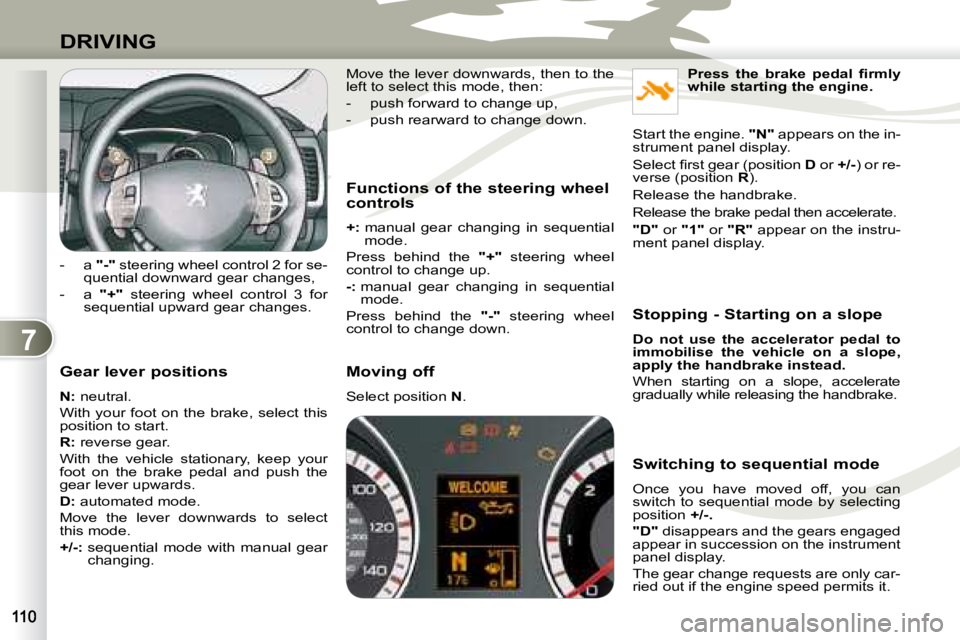
- a
"-" steering wheel control 2 for se-
quential downward gear changes,
- a "+" steering wheel control 3 for
sequential upward gear changes.
Press the brake pedal fi rmly
while starting the engine.
Start the engine. "N" appears on the in-
strument panel display.
Select fi rst gear (position D or +/-) or re-
verse (position R ).
Release the handbrake.
Release the brake pedal then accelerate.
"D" or "1" or "R" appear on the instru-
ment panel display.
Move the lever downwards, then to the
left to select this mode, then:
- push forward to change up,
- push rearward to change down.
Moving off
Select position
N .
Page 122 of 226
7
DRIVING
Switching to automated mode
Automated mode
After using the sequential mode, you
can return to the automated mode by
selecting position D .
"D" appears on the instrument panel
display.
The gearbox then operates in auto-ac-
tive mode, without any action on the
part of the driver.
It continuously selects the gear most
suited to the following parameters:
- driving style,
- road characteristics,
- vehicle load.
To optimise driving comfort and obtain the
most suitable gear, avoid sharp variations
in the pressure on the accelerator pedal. "Auto sequential" mode
In the automated mode, you can resume
control temporarily at any time using the
steering wheel controls.
The use of these controls permits man-
ual selection of the gears in situations
which require a faster changedown than
that offered in automated mode (arrival
at a roundabout, exit from a car park
with a steep gradient, overtaking...).
The gearbox engages the gear requested
if the engine speed permits it. The gear
engaged appears.
To return to the automated mode, press
the back of the
"+/OFF" control for ap-
proximately 2 seconds.
Stopping the vehicle
Before switching off the engine, you
can:
- move to position N to leave the
gearbox in neutral.
- leave a gear engaged, such as fi rst or reverse.
In both cases, it is imperative that you
apply the handbrake to immobilise the
vehicle. Operating anomaly
With the ignition on, if the message
"Slow down" or "Maintenance re-
quired" appears on the multifunction dis-
play, this indicates a gearbox malfunction.
When a message is displayed, carry
out the following operations:
- slow down and stop your vehicle in a safe place,
- place the lever in position N and let
the engine run,
- open the bonnet to allow the engine to cool.
If the message disappears for a long
period, you can set off again.
If the message remains displayed or ap-
pears frequently, contact a PEUGEOT
dealer without delay.
Take your foot off the accelerator pedal
gently to engage the gear.
At low speeds, when approaching a
stop or traffi c lights for example, the
gearbox changes down to fi rst gear au-
tomatically.
Page 125 of 226
7
i
DRIVING
Programming
Press button 1 .
Set the programmed speed by ac-
celerating to the required speed, then
press button 2 "COAST SET" .
CRUISE CONTROL
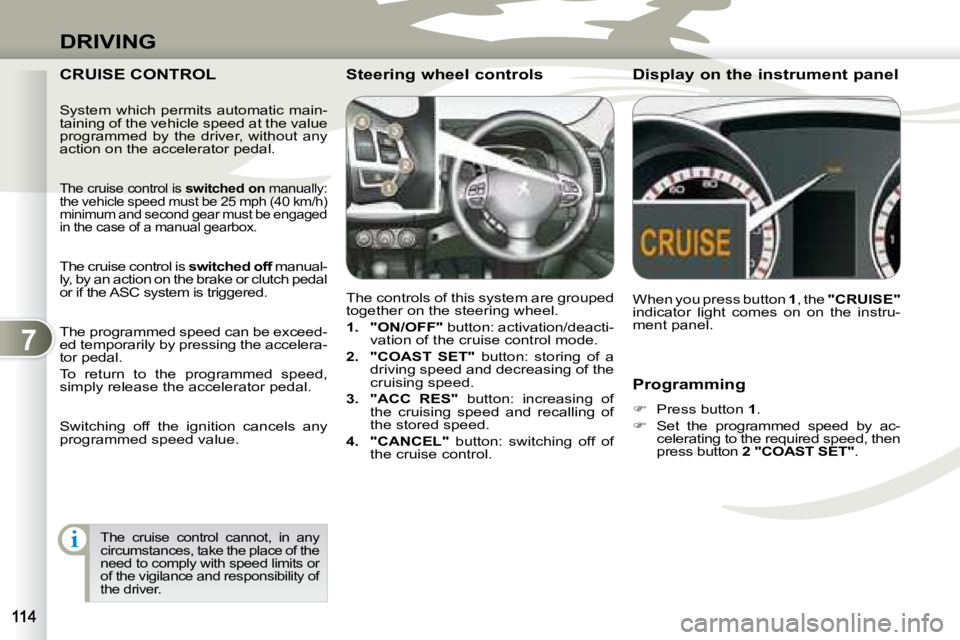
The controls of this system are grouped
together on the steering wheel.
1. "ON/OFF" button: activation/deacti-
vation of the cruise control mode.
2. "COAST SET" button: storing of a
driving speed and decreasing of the
cruising speed.
3. "ACC RES" button: increasing of
the cruising speed and recalling of
the stored speed.
4. "CANCEL" button: switching off of
the cruise control. When you press button
1 , the "CRUISE"
indicator light comes on on the instru-
ment panel.
Steering wheel controls Display on the instrument pan
el
The cruise control cannot, in any
circumstances, take the place of the
need to comply with speed limits or
of the vigilance and responsibility of
the driver.
System which permits automatic main-
taining of the vehicle speed at the value
programmed by the driver, without any
action on the accelerator pedal.
The cruise control is
switched on manually:
the vehicle speed must be 25 mph (40 km/h)
minimum and second gear must be engaged
in the case of a manual gearbox.
The cruise control is switched off manual-
ly, by an action on the brake or clutch pedal
or if the ASC system is triggered.
The programmed speed can be exceed-
ed temporarily by pressing the accelera-
tor pedal.
To return to the programmed speed,
simply release the accelerator pedal.
Switching off the ignition cancels any
programmed speed value.
Page 133 of 226
8
CHECKS
CHECKING LEVELS CHECKING LEVELS Brake fluid level To avoid any risk of scalding, unscrew
the cap by two turns to allow the pres-
sure to drop. When the pressure has
dropped, remove the cap and top up
the level.
Oil level The reading will only be correct
if the vehicle is on level ground
and the engine has been off for
more than 15 minutes.
The check is carried out either when
the ignition is switched on using the oil
level indicator on the instrument panel,
or using the dipstick.
Between two oil changes, the con-
sumption should not exceed 0.5 litre
per 600 miles (1,000 km). The brake fl uid level should be
between the "MAX" and "MIN"
marks.
If it is not, check the brake pad
wear.
Draining the circuit
Refer to the servicing booklet for details
of the interval for this operation.
Coolant level
The coolant level must be
measured when the engine is
cold and should be between
the "LOW" and "FULL" marks.
When the engine is warm, the
temperature of the coolant is regulated
by the fan. This can operate with the
ignition off.
On vehicles which are fi tted with a
particle emission fi lter, the fan may
operate after the vehicle has been
switched off, even if the engine is
cold.
In addition, as the cooling system is
pressurised, wait at least one hour after
switching off the engine before carrying
out any work. Wash-wipe and headlamp
wash * fluid
Check the fl uid level regularly,
using the gauge.
* According to country.
Draining the engine
Refer to the servicing booklet for details
of the interval for this operation.
In order to maintain the reliability of the
engine and emission control system,
the use of additives in the engine oil is
prohibited.
Oil specifi cation
The oil must correspond to your engine
and conform to the manufacturer’s
recommendations. Fluid specifi cation
The brake fl uid must conform to the
manufacturer’s recommendations and
fulfi l the DOT4 standards.
Draining the circuit
Refer to the servicing booklet for details
of the interval for this operation.
Fluid specifi cation
The coolant must conform to the manu-
facturer’s recommendations.
Fluid specifi cation
This fl uid must conform to the manufac-
turer’s recommendations for optimum
cleaning.
Power steering fluid level
Check the fl uid level with the engine at
idle.
Check that the power steering fl uid
level is always between the "MAX" and
"MIN" marks and top up if necessary.
Fluid specifi cation
This fl uid must conform to the manufac-
turer’s recommendations.
Check all of these levels regularly and
top them up if necessary, unless other-
wise indicated.
If a level drops signifi cantly, have the
corresponding circuit checked by a
PEUGEOT dealer.
Page 150 of 226
9
PRACTICAL INFORMATION
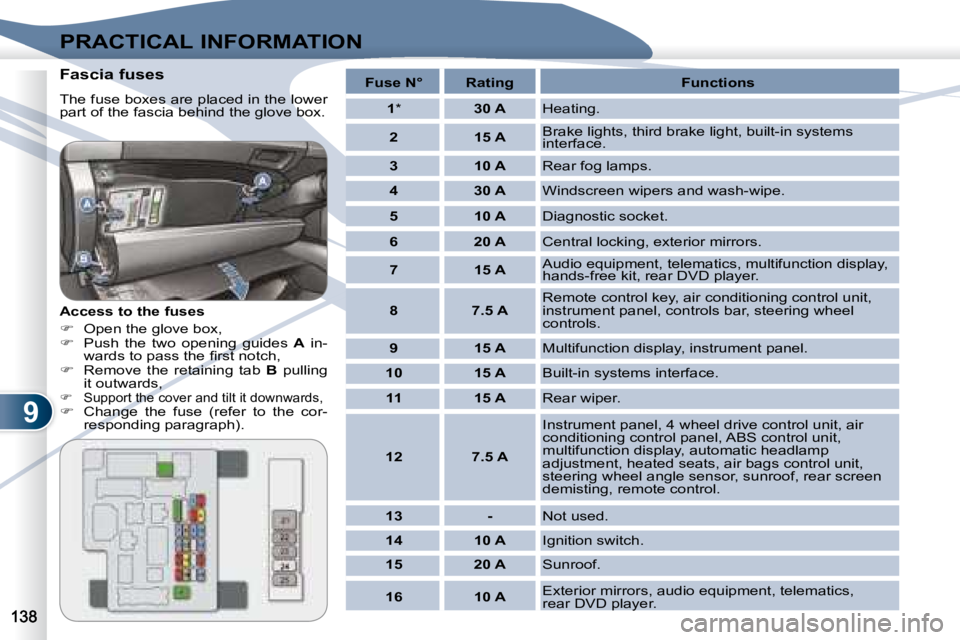
Fascia fuses
The fuse boxes are placed in the lower
part of the fascia behind the glove box.
Access to the fuses
Open the glove box,
Push the two opening guides A in-
wards to pass the fi rst notch,
Remove the retaining tab B pulling
it outwards,
Support the cover and tilt it downwards,
Change the fuse (refer to the cor-
responding paragraph).
Fuse N° Rating Functions
1 * 30 A Heating.
2 15 A Brake lights, third brake light, built-in systems
interface.
3 10 A Rear fog lamps.
4 30 A Windscreen wipers and wash-wipe.
5 10 A Diagnostic socket.
6 20 A Central locking, exterior mirrors.
7 15 A Audio equipment, telematics, multifunction display,
hands-free kit, rear DVD player.
8 7.5 A Remote control key, air conditioning control unit,
instrument panel, controls bar, steering wheel
controls.
9 15 A Multifunction display, instrument panel.
10 15 A Built-in systems interface.
11 15 A Rear wiper.
12 7.5 A Instrument panel, 4 wheel drive control unit, air
conditioning control panel, ABS control unit,
multifunction display, automatic headlamp
adjustment, heated seats, air bags control unit,
steering wheel angle sensor, sunroof, rear screen
demisting, remote control.
13 - Not used.
14 10 A Ignition switch.
15 20 A Sunroof.
16 10 A Exterior mirrors, audio equipment, telematics,
rear DVD player.
Page 157 of 226
9
i
PRACTICAL INFORMATION
TOWING TOWING
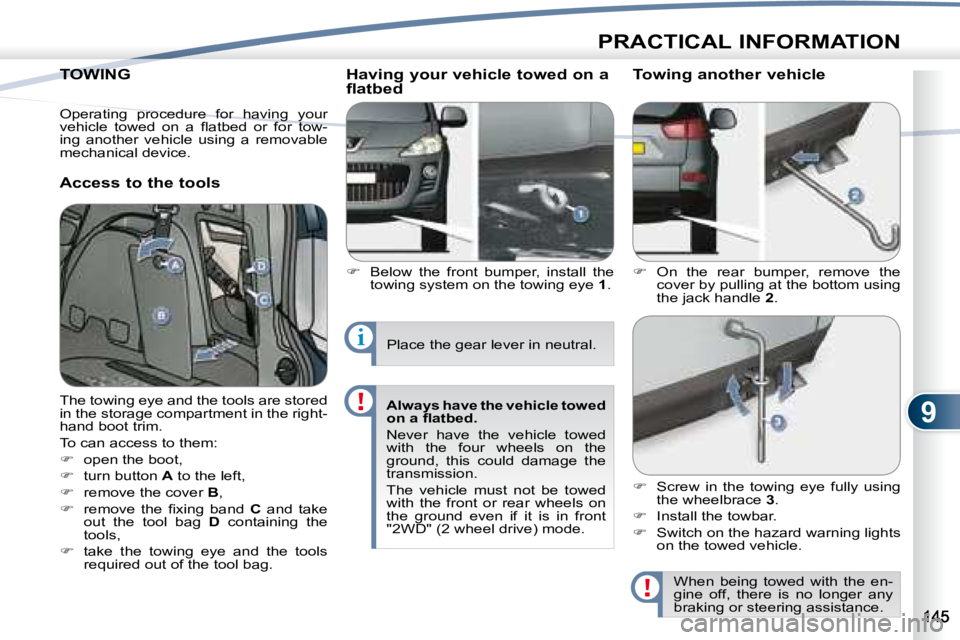
Access to the tools Having your vehicle towed on a
flatbed
Below the front bumper, install the
towing system on the towing eye 1 .
On the rear bumper, remove the
cover by pulling at the bottom using
the jack handle 2 .
Towing another vehicle
The towing eye and the tools are stored
in the storage compartment in the right-
hand boot trim.
To can access to them:
open the boot,
turn button A to the left,
remove the cover B ,
remove the fi xing band C and take
out the tool bag D containing the
tools,
take the towing eye and the tools
required out of the tool bag.
When being towed with the en-
gine off, there is no longer any
braking or steering assistance.
Place the gear lever in neutral.
Always have the vehicle towed
on a fl atbed.
Never have the vehicle towed
with the four wheels on the
ground, this could damage the
transmission.
The vehicle must not be towed
with the front or rear wheels on
the ground even if it is in front
"2WD" (2 wheel drive) mode.
Screw in the towing eye fully using
the wheelbrace 3 .
Install the towbar.
Switch on the hazard warning lights
on the towed vehicle.
Operating procedure for having your
vehicle towed on a fl atbed or for tow-
ing another vehicle using a removable
mechanical device.
Page 166 of 226
11
i
AUDIO EQUIPMENT and TELEMATICS
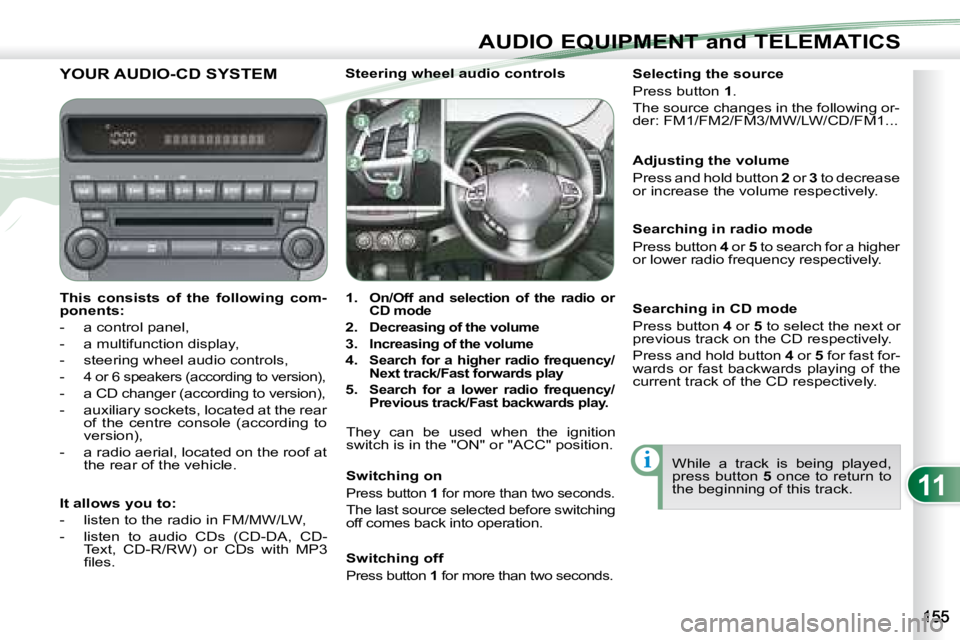
YOUR AUDIO-CD SYSTEM
This consists of the following com-
ponents:
- a control panel,
- a multifunction display,
- steering wheel audio controls,
-
4 or 6 speakers (according to version),
- a CD changer (according to version),
- auxiliary sockets, located at the rear of the centre console (according to
version),
- a radio aerial, located on the roof at the rear of the vehicle. Steering wheel audio controls
1.
On/Off and selection of the radio or
CD mode
2.
Decreasing of the volume
3.
Increasing of the volume
4.
Search for a higher radio frequency/
Next track/Fast forwards play
5. Search for a lower radio frequency/
Previous track/Fast backwards play.
They can be used when the ignition
switch is in the "ON" or "ACC" position.
Switching on
Press button 1 for more than two seconds.
The last source selected before switching
off comes back into operation. Selecting the source
Press button
1 .
The source changes in the following or-
der: FM1/FM2/FM3/MW/LW/CD/FM1...
Searching in radio mode
Press button 4 or 5 to search for a higher
or lower radio frequency respectively.
While a track is being played,
press button 5 once to return to
the beginning of this track.
Adjusting the volume
Press and hold button
2 or 3 to decrease
or increase the volume respectively.
It allows you to:
- listen to the radio in FM/MW/LW,
- listen to audio CDs (CD-DA, CD- Text, CD-R/RW) or CDs with MP3
fi les. Switching off
Press button
1 for more than two seconds.
Searching in CD mode
Press button 4 or 5 to select the next or
previous track on the CD respectively.
Press and hold button 4 or 5 for fast for-
wards or fast backwards playing of the
current track of the CD respectively.
Page 182 of 226
11
i
AUDIO EQUIPMENT and TELEMATICS
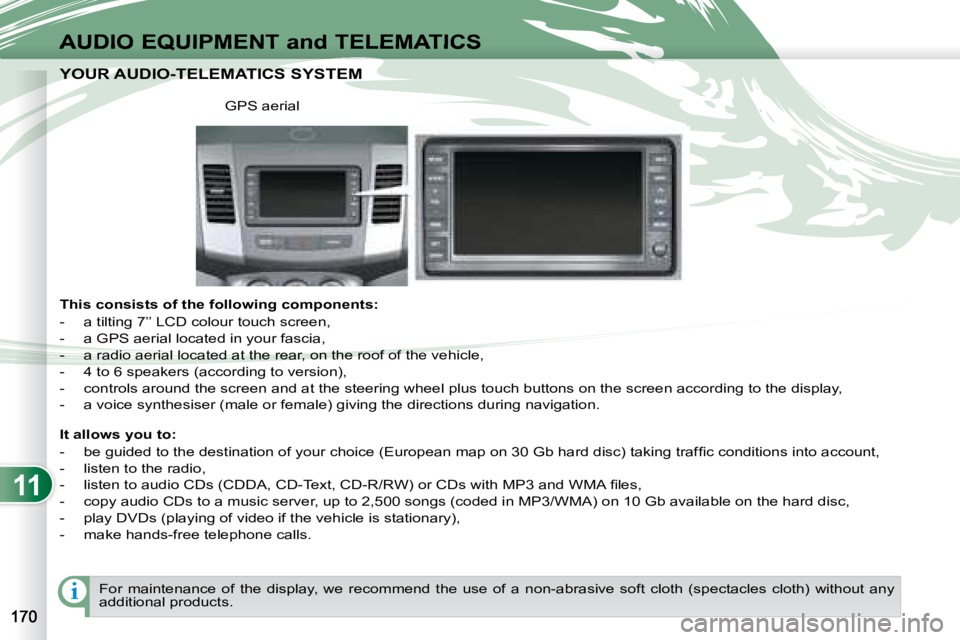
YOUR AUDIO-TELEMATICS SYSTEM YOUR AUDIO-TELEMATICS SYSTEM
This consists of the following components:
- a tilting 7’’ LCD colour touch screen,
- a GPS aerial located in your fascia,
- a radio aerial located at the rear, on the roof of the vehicle,
- 4 to 6 speakers (according to version),
- controls around the screen and at the steering wheel plu s touch buttons on the screen according to the display,
- a voice synthesiser (male or female) giving the directions duri ng navigation.
GPS aerial
It allows you to:
- be guided to the destination of your choice (European map on 30 Gb hard disc) taking traffi c conditions into account,
- listen to the radio,
- listen to audio CDs (CDDA, CD-Text, CD-R/RW) or CDs with MP3 and WMA fi les,
- copy audio CDs to a music server, up to 2,500 songs (coded i n MP3/WMA) on 10 Gb available on the hard disc,
- play DVDs (playing of video if the vehicle is stationary),
- make hands-free telephone calls.
For maintenance of the display, we recommend the use of a n on-abrasive soft cloth (spectacles cloth) without any
additional products.
Page 219 of 226
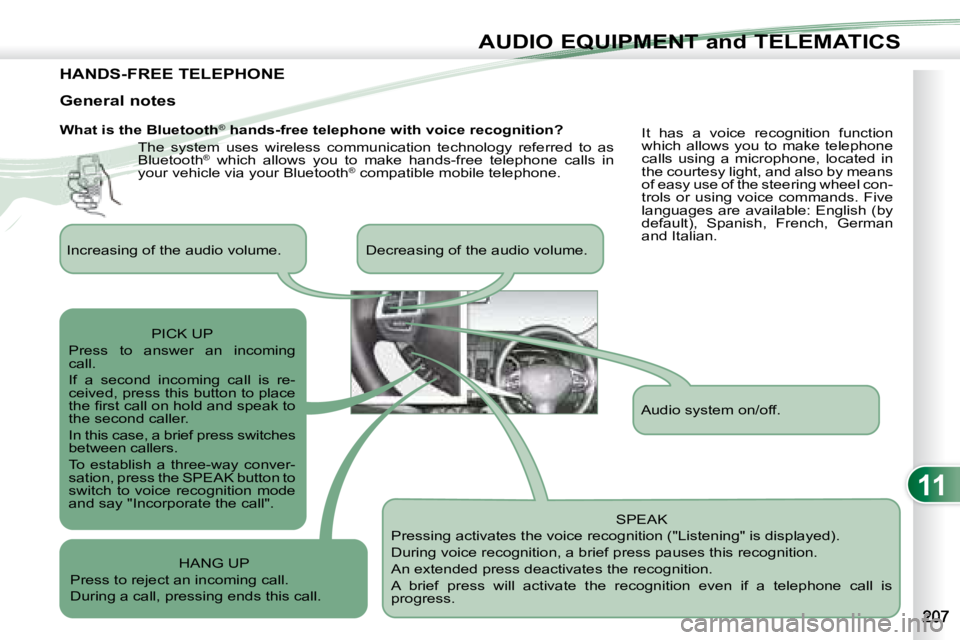
11
AUDIO EQUIPMENT and TELEMATICS
HANDS-FREE TELEPHONE
What is the Bluetooth®
hands-free telephone with voice recognition?
The system uses wireless communication technology referred to as
Bluetooth ®
which allows you to make hands-free telephone calls in
your vehicle via your Bluetooth ®
compatible mobile telephone.
SPEAK
Pressing activates the voice recognition ("Listening" is displayed).
During voice recognition, a brief press pauses this recognition.
An extended press deactivates the recognition.
A brief press will activate the recognition even if a telep hone call is
progress.
General notes
It has a voice recognition function
which allows you to make telephone
calls using a microphone, located in
the courtesy light, and also by means
of easy use of the steering wheel con-
trols or using voice commands. Five
languages are available: English (by
default), Spanish, French, German
and Italian.
Audio system on/off.
Increasing of the audio volume. Decreasing of the audio vo
lume.
PICK UP
Press to answer an incoming
call.
If a second incoming call is re-
ceived, press this button to place
the fi rst call on hold and speak to
the second caller.
In this case, a brief press switches
between callers.
To establish a three-way conver-
sation, press the SPEAK button to
switch to voice recognition mode
and say "Incorporate the call".
HANG UP
Press to reject an incoming call.
During a call, pressing ends this call.