wheel PEUGEOT 4007 2008 Owner's Guide
[x] Cancel search | Manufacturer: PEUGEOT, Model Year: 2008, Model line: 4007, Model: PEUGEOT 4007 2008Pages: 226, PDF Size: 13.63 MB
Page 162 of 226
10
TECHNICAL DATA
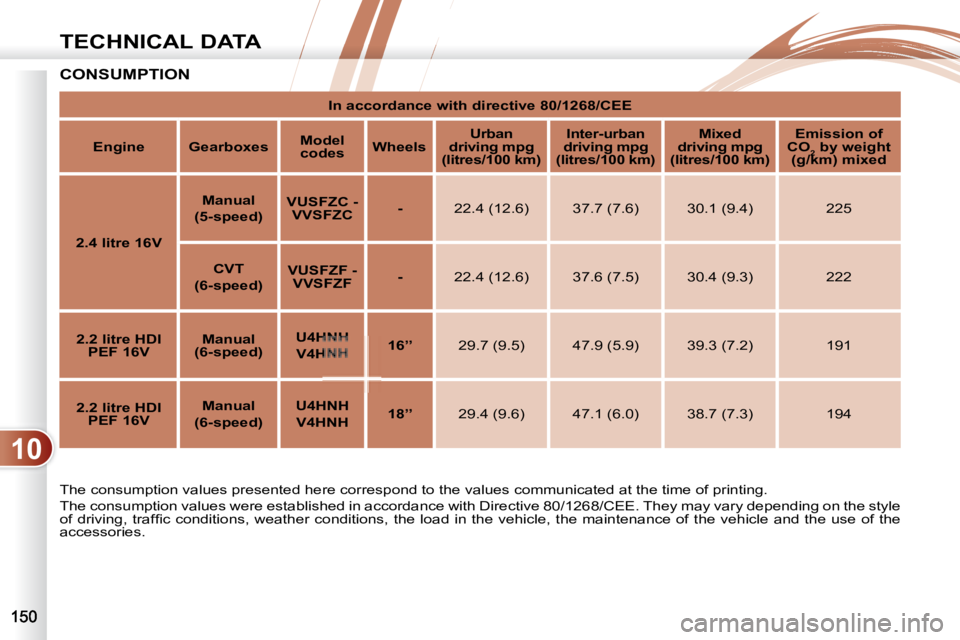
CONSUMPTION
The consumption values presented here correspond to the values communicated at the time of printing.
The consumption values were established in accordance with Dire ctive 80/1268/CEE. They may vary depending on the style
of driving, traffi c conditions, weather conditions, the load in the vehicle, the maintenance of the vehicle and the u se of the
accessories.
In accordance with directive 80/1268/CEE
Engine Gearboxes
Model
codes
Wheels
Urban
driving mpg
(litres/100 km)
Inter-urban
driving mpg
(litres/100 km)
Mixed
driving mpg
(litres/100 km)
Emission of
CO 2 by weight
(g/km) mixed
2.4 litre 16V
Manual
(5-speed)
VUSFZC -
VVSFZC
- 22.4 (12.6) 37.7 (7.6) 30.1 (9.4) 225
CVT
(6-speed)
VUSFZF -
VVSFZF
- 22.4 (12.6) 37.6 (7.5) 30.4 (9.3) 222
2.2 litre HDI
PEF 16V
Manual
(6-speed)
U4HNH
V4HNH
16’’ 29.7 (9.5) 47.9 (5.9) 39.3 (7.2) 191
2.2 litre HDI
PEF 16V
Manual
(6-speed)
U4HNH
V4HNH
18’’ 29.4 (9.6) 47.1 (6.0) 38.7 (7.3) 194
Page 165 of 226
10
i
TECHNICAL DATA
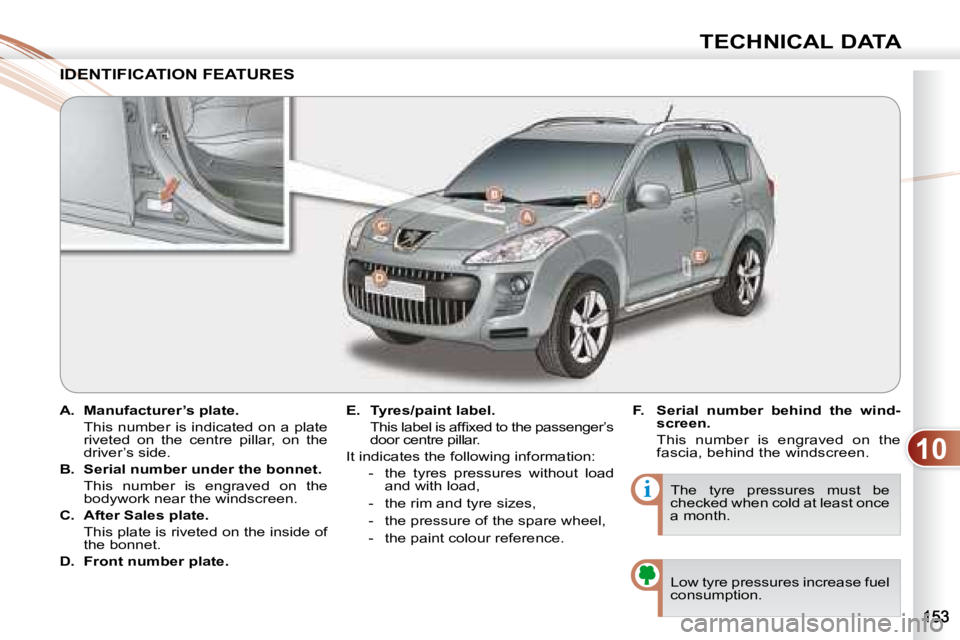
A. Manufacturer’s plate.
This number is indicated on a plate riveted on the centre pillar, on the
driver’s side.
B. Serial number under the bonnet.
This number is engraved on the bodywork near the windscreen.
C. After Sales plate.
This plate is riveted on the inside of the bonnet.
D. Front number plate.
E. Tyres/paint label.
This label is affi xed to the passenger’s door centre pillar.
It indicates the following information: - the tyres pressures without load and with load,
- the rim and tyre sizes,
- the pressure of the spare wheel,
- the paint colour reference. The tyre pressures must be
checked when cold at least once
a month.
IDENTIFICATION FEATURES IDENTIFICA
Low tyre pressures increase fuel
consumption.
F. Serial number behind the wind-
screen.
This number is engraved on the fascia, behind the windscreen.
Page 166 of 226
11
i
AUDIO EQUIPMENT and TELEMATICS
YOUR AUDIO-CD SYSTEM
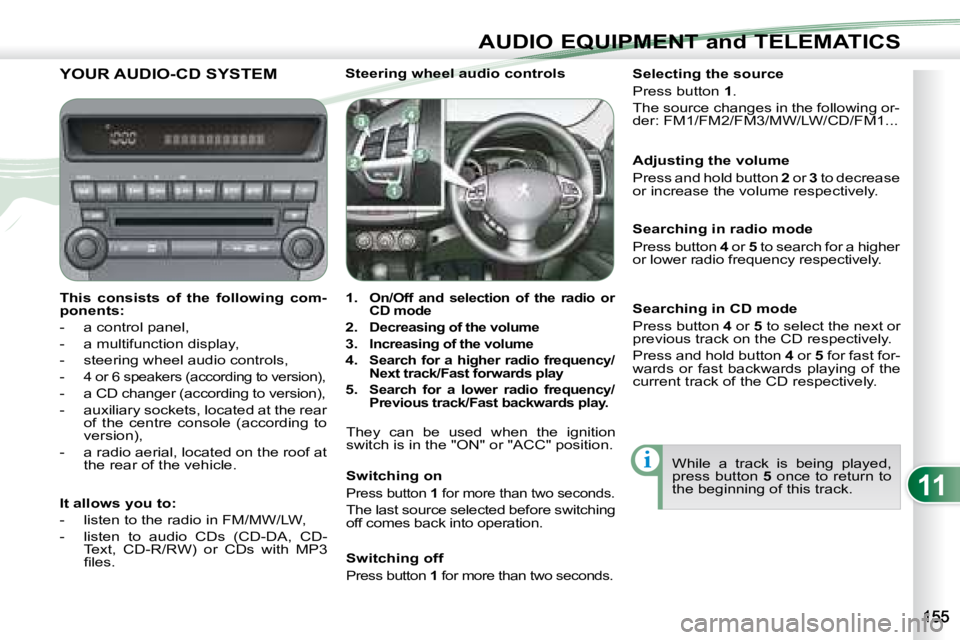
This consists of the following com-
ponents:
- a control panel,
- a multifunction display,
- steering wheel audio controls,
-
4 or 6 speakers (according to version),
- a CD changer (according to version),
- auxiliary sockets, located at the rear of the centre console (according to
version),
- a radio aerial, located on the roof at the rear of the vehicle. Steering wheel audio controls
1.
On/Off and selection of the radio or
CD mode
2.
Decreasing of the volume
3.
Increasing of the volume
4.
Search for a higher radio frequency/
Next track/Fast forwards play
5. Search for a lower radio frequency/
Previous track/Fast backwards play.
They can be used when the ignition
switch is in the "ON" or "ACC" position.
Switching on
Press button 1 for more than two seconds.
The last source selected before switching
off comes back into operation. Selecting the source
Press button
1 .
The source changes in the following or-
der: FM1/FM2/FM3/MW/LW/CD/FM1...
Searching in radio mode
Press button 4 or 5 to search for a higher
or lower radio frequency respectively.
While a track is being played,
press button 5 once to return to
the beginning of this track.
Adjusting the volume
Press and hold button
2 or 3 to decrease
or increase the volume respectively.
It allows you to:
- listen to the radio in FM/MW/LW,
- listen to audio CDs (CD-DA, CD- Text, CD-R/RW) or CDs with MP3
fi les. Switching off
Press button
1 for more than two seconds.
Searching in CD mode
Press button 4 or 5 to select the next or
previous track on the CD respectively.
Press and hold button 4 or 5 for fast for-
wards or fast backwards playing of the
current track of the CD respectively.
Page 182 of 226
11
i
AUDIO EQUIPMENT and TELEMATICS
YOUR AUDIO-TELEMATICS SYSTEM YOUR AUDIO-TELEMATICS SYSTEM
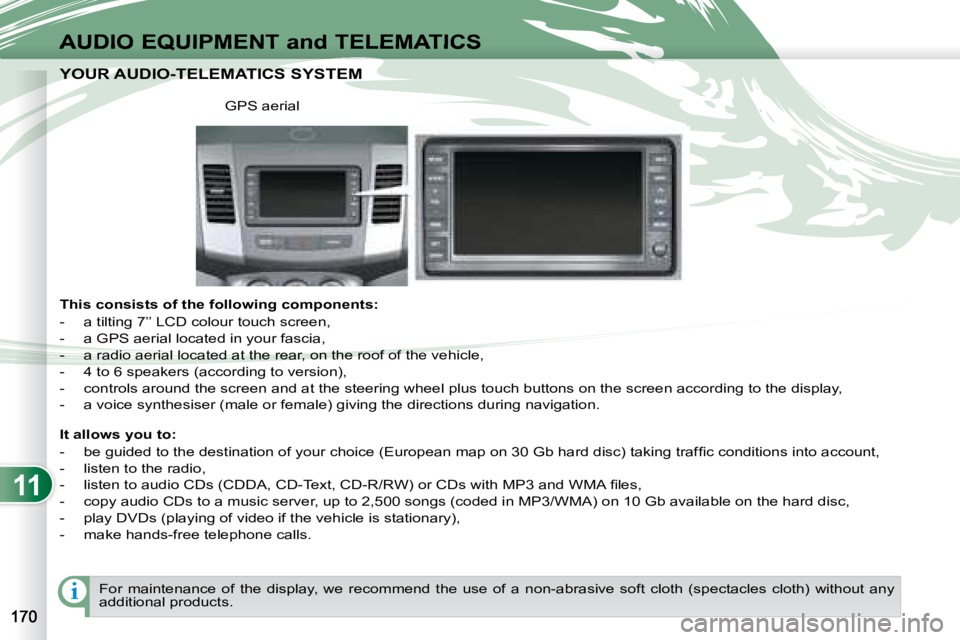
This consists of the following components:
- a tilting 7’’ LCD colour touch screen,
- a GPS aerial located in your fascia,
- a radio aerial located at the rear, on the roof of the vehicle,
- 4 to 6 speakers (according to version),
- controls around the screen and at the steering wheel plu s touch buttons on the screen according to the display,
- a voice synthesiser (male or female) giving the directions duri ng navigation.
GPS aerial
It allows you to:
- be guided to the destination of your choice (European map on 30 Gb hard disc) taking traffi c conditions into account,
- listen to the radio,
- listen to audio CDs (CDDA, CD-Text, CD-R/RW) or CDs with MP3 and WMA fi les,
- copy audio CDs to a music server, up to 2,500 songs (coded i n MP3/WMA) on 10 Gb available on the hard disc,
- play DVDs (playing of video if the vehicle is stationary),
- make hands-free telephone calls.
For maintenance of the display, we recommend the use of a n on-abrasive soft cloth (spectacles cloth) without any
additional products.
Page 219 of 226
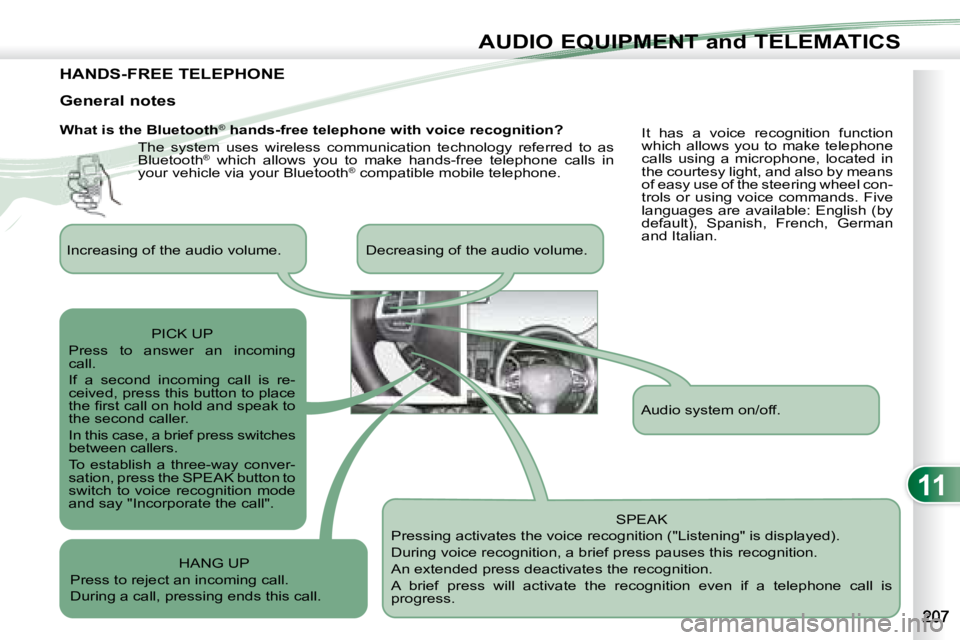
11
AUDIO EQUIPMENT and TELEMATICS
HANDS-FREE TELEPHONE
What is the Bluetooth®
hands-free telephone with voice recognition?
The system uses wireless communication technology referred to as
Bluetooth ®
which allows you to make hands-free telephone calls in
your vehicle via your Bluetooth ®
compatible mobile telephone.
SPEAK
Pressing activates the voice recognition ("Listening" is displayed).
During voice recognition, a brief press pauses this recognition.
An extended press deactivates the recognition.
A brief press will activate the recognition even if a telep hone call is
progress.
General notes
It has a voice recognition function
which allows you to make telephone
calls using a microphone, located in
the courtesy light, and also by means
of easy use of the steering wheel con-
trols or using voice commands. Five
languages are available: English (by
default), Spanish, French, German
and Italian.
Audio system on/off.
Increasing of the audio volume. Decreasing of the audio vo
lume.
PICK UP
Press to answer an incoming
call.
If a second incoming call is re-
ceived, press this button to place
the fi rst call on hold and speak to
the second caller.
In this case, a brief press switches
between callers.
To establish a three-way conver-
sation, press the SPEAK button to
switch to voice recognition mode
and say "Incorporate the call".
HANG UP
Press to reject an incoming call.
During a call, pressing ends this call.