buttons PEUGEOT 4007 2009 User Guide
[x] Cancel search | Manufacturer: PEUGEOT, Model Year: 2009, Model line: 4007, Model: PEUGEOT 4007 2009Pages: 230, PDF Size: 16.57 MB
Page 196 of 230
![PEUGEOT 4007 2009 User Guide 11
AUDIO EQUIPMENT and TELEMATICS
Entering an address and activating guidance (2/2) Press Explanations Result
Press [Street] and enter the name of a street using the touch keypad.
When a c](/img/29/58325/w960_58325-195.png "PEUGEOT 4007 2009 User Guide 11
AUDIO EQUIPMENT and TELEMATICS
Entering an address and activating guidance (2/2) Press Explanations Result
Press [Street] and enter the name of a street using the touch keypad.
When a c")
11
AUDIO EQUIPMENT and TELEMATICS
Entering an address and activating guidance (2/2) Press Explanations Result
Press [Street] and enter the name of a street using the touch keypad.
When a character of the name of the street is entered, if 5 streets or fewer
are recognised, you can select a street from a list which is displa yed or
press [List].
Press [House #] and enter the number of the house using the touch keypad.
You can enter the name of a junction instead of the numb er
of the street. Press [Junction] and select the name from a
list which is displayed.
This is what you obtain once all of the information has b een entered:
If you agree with the information press [Set], otherwise press one of the
buttons to correct.
Press [Start] to start the navigation.
/
Page 209 of 230
11
AUDIO EQUIPMENT and TELEMATICS
Explanations Result
Playing a track or a playlist on the Mus
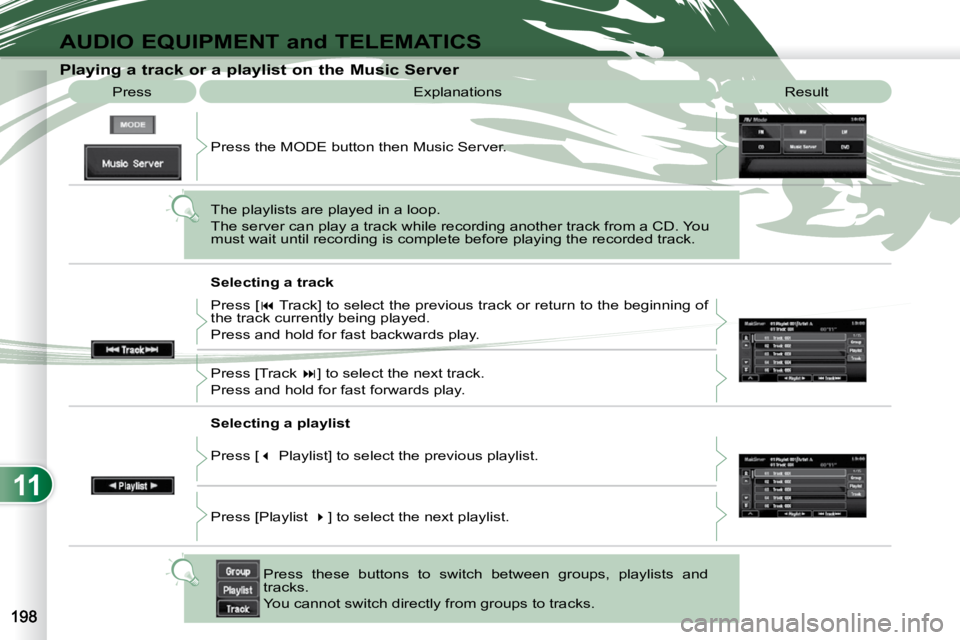
ic Server
Press
Press the MODE button then Music Server.
The playlists are played in a loop.
The server can play a track while recording another track from a CD. You
must wait until recording is complete before playing the recorde d track.
Selecting a track
Press these buttons to switch between groups, playlists and
tracks.
You cannot switch directly from groups to tracks.
Press [
Track] to select the previous track or return to the beginning of
the track currently being played.
Press and hold for fast backwards play.
Press [Track ] to select the next track.
Press and hold for fast forwards play.
Selecting a playlist
Press [ Playlist] to select the previous playlist.
Press [Playlist ] to select the next playlist.
Page 227 of 230
11
AUDIO EQUIPMENT and TELEMATICS
Making a telephone call using a number, phone book
A Bluetooth ®
compatible mobile telephone
must be matched with the system.
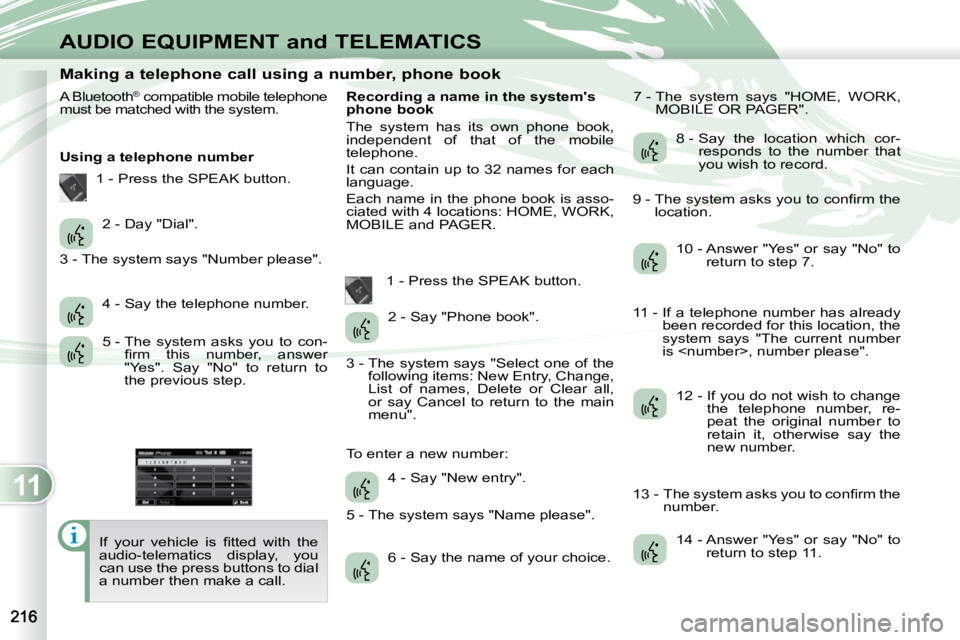
Using a telephone number
If your vehicle is fi tted with the
audio-telematics display, you
can use the press buttons to dial
a number then make a call. Recording a name in the system's
phone book
The system has its own phone book,
independent of that of the mobile
telephone.
It can contain up to 32 names for each
language.
Each name in the phone book is asso-
ciated with 4 locations: HOME, WORK,
MOBILE and PAGER.
1 - Press the SPEAK button. 7 - The system says "HOME, WORK,
MOBILE OR PAGER".
2 - Day "Dial".
4 - Say the telephone number.
5 - The system asks you to con- fi rm this number, answer
"Yes". Say "No" to return to
the previous step. 2 - Say "Phone book".
4 - Say "New entry".
6 - Say the name of your choice. 8 - Say the location which cor-
responds to the number that
you wish to record.
10 - Answer "Yes" or say "No" to return to step 7.
12 - If you do not wish to change the telephone number, re-
peat the original number to
retain it, otherwise say the
new number.
14 - Answer "Yes" or say "No" to return to step 11.
1 - Press the SPEAK button.
3 - The system says "Number please".
3 - The system says "Select one of the following items: New Entry, Change,
List of names, Delete or Clear all,
or say Cancel to return to the main
menu".
5 - The system says "Name please".
To enter a new number: 9 - The system asks you to confi rm the
location.
11 - If a telephone number has already been recorded for this location, the
system says "The current number
is
13 - The system asks you to confi rm the number.