radio PEUGEOT 4007 2009 User Guide
[x] Cancel search | Manufacturer: PEUGEOT, Model Year: 2009, Model line: 4007, Model: PEUGEOT 4007 2009Pages: 230, PDF Size: 16.57 MB
Page 180 of 230
11
AUDIO EQUIPMENT and TELEMATICS
CD PLAYER CD PLAYER
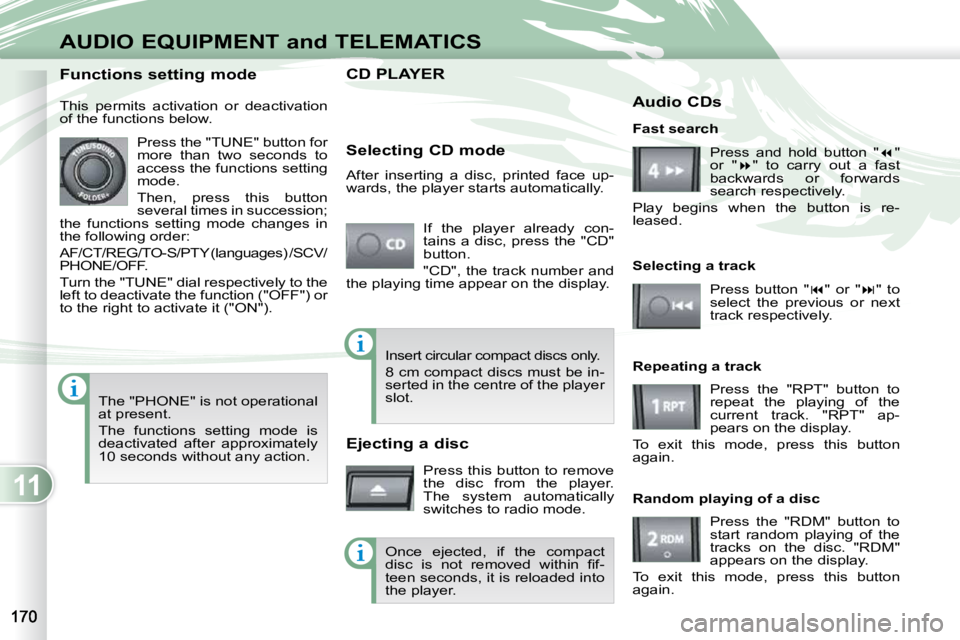
If the player already con-
tains a disc, press the "CD"
button.
"CD", the track number and
the playing time appear on the display.
Functions setting mode
This permits activation or deactivation
of the functions below.
Press the "TUNE" button for
more than two seconds to
access the functions setting
mode.
Then, press this button
several times in succession;
the functions setting mode changes in
the following order:
AF/CT/REG/TO-S/PTY (languages) /SCV/
PHONE/OFF.
Turn the "TUNE" dial respectively to the
left to deactivate the function ("OFF") or
to the right to activate it ("ON").
The "PHONE" is not operational
at present.
The functions setting mode is
deactivated after approximately
10 seconds without any action. Selecting CD mode
After inserting a disc, printed face up-
wards, the player starts automatically.
Ejecting a disc
Press this button to remove
the disc from the player.
The system automatically
switches to radio mode. Fast search
Press and hold button " "
or " " to carry out a fast
backwards or forwards
search respectively.
Play begins when the button is re-
leased.
Selecting a track
Press button " " or " " to
select the previous or next
track respectively.
Repeating a track Press the "RPT" button to
repeat the playing of the
current track. "RPT" ap-
pears on the display.
To exit this mode, press this button
again.
Random playing of a disc
Press the "RDM" button to
start random playing of the
tracks on the disc. "RDM"
appears on the display.
To exit this mode, press this button
again.
Insert circular compact discs only.
8 cm compact discs must be in-
serted in the centre of the player
slot.
Once ejected, if the compact
disc is not removed within fi f-
teen seconds, it is reloaded into
the player. Audio CDs
Page 181 of 230
11
AUDIO EQUIPMENT and TELEMATICS
CD PLAYER CD PLAYER
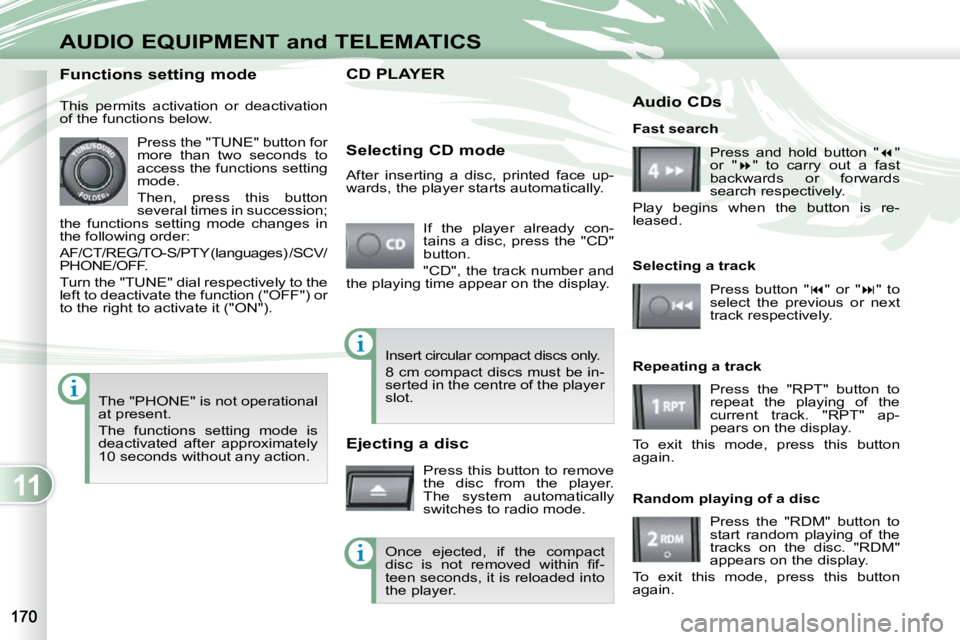
If the player already con-
tains a disc, press the "CD"
button.
"CD", the track number and
the playing time appear on the display.
Functions setting mode
This permits activation or deactivation
of the functions below.
Press the "TUNE" button for
more than two seconds to
access the functions setting
mode.
Then, press this button
several times in succession;
the functions setting mode changes in
the following order:
AF/CT/REG/TO-S/PTY (languages) /SCV/
PHONE/OFF.
Turn the "TUNE" dial respectively to the
left to deactivate the function ("OFF") or
to the right to activate it ("ON").
The "PHONE" is not operational
at present.
The functions setting mode is
deactivated after approximately
10 seconds without any action. Selecting CD mode
After inserting a disc, printed face up-
wards, the player starts automatically.
Ejecting a disc
Press this button to remove
the disc from the player.
The system automatically
switches to radio mode. Fast search
Press and hold button " "
or " " to carry out a fast
backwards or forwards
search respectively.
Play begins when the button is re-
leased.
Selecting a track
Press button " " or " " to
select the previous or next
track respectively.
Repeating a track Press the "RPT" button to
repeat the playing of the
current track. "RPT" ap-
pears on the display.
To exit this mode, press this button
again.
Random playing of a disc
Press the "RDM" button to
start random playing of the
tracks on the disc. "RDM"
appears on the display.
To exit this mode, press this button
again.
Insert circular compact discs only.
8 cm compact discs must be in-
serted in the centre of the player
slot.
Once ejected, if the compact
disc is not removed within fi f-
teen seconds, it is reloaded into
the player. Audio CDs
Page 187 of 230
11
AUDIO EQUIPMENT and TELEMATICS
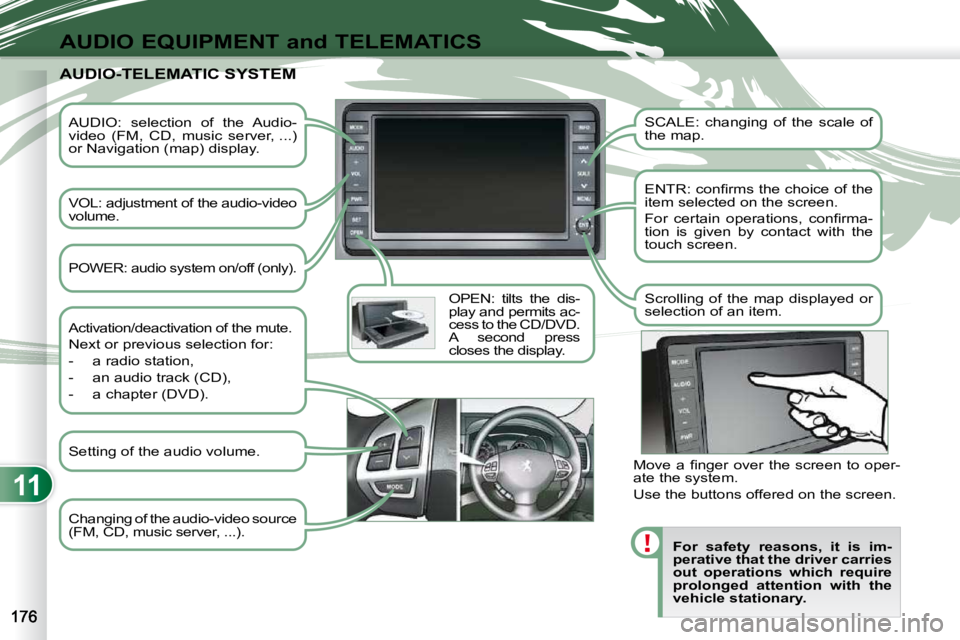
AUDIO: selection of the Audio-
video (FM, CD, music server, ...)
or Navigation (map) display.
VOL: adjustment of the audio-video
volume. OPEN: tilts the dis-
play and permits ac-
cess to the CD/DVD.
A second press
closes the display. SCALE: changing of the scale of
the map.
ENTR: confi rms the choice of the
item selected on the screen.
For certain operations, confi rma-
tion is given by contact with the
touch screen.
Scrolling of the map displayed or
selection of an item.
For safety reasons, it is im-
perative that the driver carries
out operations which require
prolonged attention with the
vehicle stationary.
AUDIO-TELEMATIC SYSTEM AUDIO-TELEMATIC SYSTEM
Changing of the audio-video source
(FM, CD, music server, ...).
Activation/deactivation of the mute.
Next or previous selection for:
- a radio station,
- an audio track (CD),
- a chapter (DVD).
Move a fi nger over the screen to oper-
ate the system.
Use the buttons offered on the screen.
POWER: audio system on/off (only).
Setting of the audio volume.
Page 188 of 230
11
AUDIO EQUIPMENT and TELEMATICS
DESCRIPTION OF THE CONTROLS - MENUS DESCRIPTION OF THE CONTROLS - MENUS
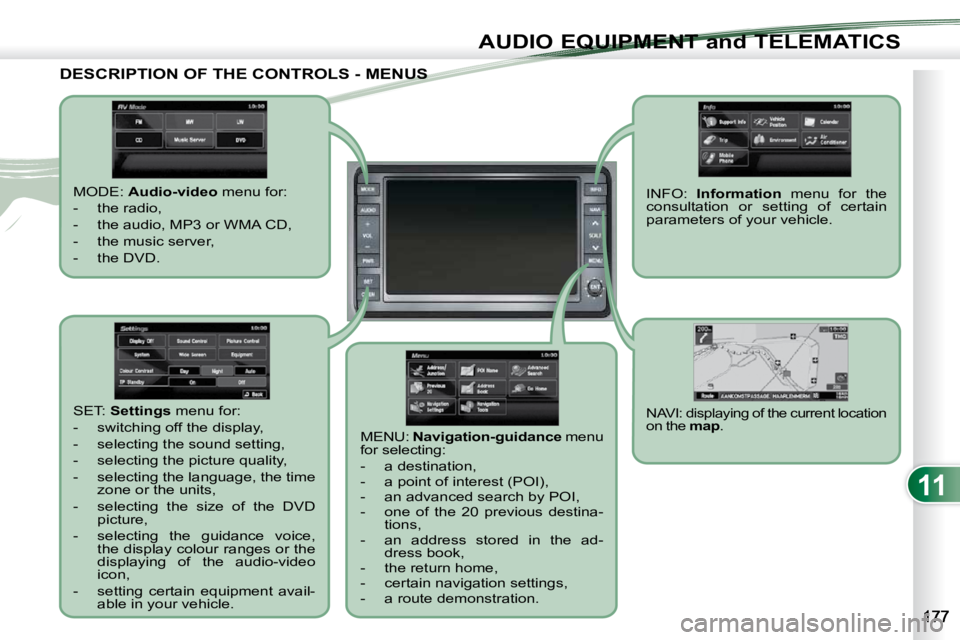
MODE: Audio-video menu for:
- the radio,
- the audio, MP3 or WMA CD,
- the music server,
- the DVD.
MENU: Navigation-guidance menu
for selecting:
- a destination,
- a point of interest (POI),
- an advanced search by POI,
- one of the 20 previous destina- tions,
- an address stored in the ad- dress book,
- the return home,
- certain navigation settings,
- a route demonstration.
NAVI: displaying of the current location
on the map . SET: Settings menu for:
- switching off the display,
- selecting the sound setting,
- selecting the picture quality,
- selecting the language, the time zone or the units,
- selecting the size of the DVD picture,
- selecting the guidance voice, the display colour ranges or the
displaying of the audio-video
icon,
- setting certain equipment avail- able in your vehicle. INFO:
Information menu for the
consultation or setting of certain
parameters of your vehicle.
Page 197 of 230
11
AUDIO EQUIPMENT and TELEMATICS
AUDIO-VIDEO AUDIO-VIDEO
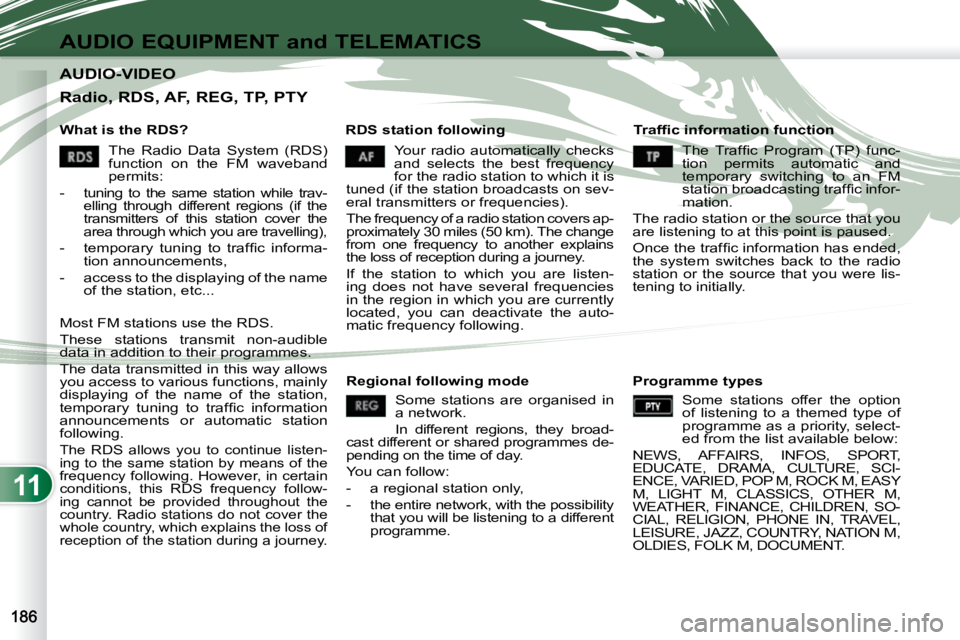
What is the RDS? RDS station following Traffi c information function
Your radio automatically checks
and selects the best frequency
for the radio station to which it is
tuned (if the station broadcasts on sev-
eral transmitters or frequencies).
The frequency of a radio station covers ap-
proximately 30 miles (50 km). The change
from one frequency to another explains
the loss of reception during a journey.
If the station to which you are listen-
ing does not have several frequencies
in the region in which you are currently
located, you can deactivate the auto-
matic frequency following.
Radio, RDS, AF, REG, TP, PTY
The Radio Data System (RDS)
function on the FM waveband
permits:
-
tuning to the same station while trav-
elling through different regions (if the
transmitters of this station cover the
area through which you are travelling),
- temporary tuning to traffi c informa- tion announcements,
- access to the displaying of the name of the station, etc...
Most FM stations use the RDS.
These stations transmit non-audible
data in addition to their programmes.
The data transmitted in this way allows
you access to various functions, mainly
displaying of the name of the station,
temporary tuning to traffi c information
announcements or automatic station
following.
The RDS allows you to continue listen-
ing to the same station by means of the
frequency following. However, in certain
conditions, this RDS frequency follow-
ing cannot be provided throughout the
country. Radio stations do not cover the
whole country, which explains the loss of
reception of the station during a journey.
The Traffic Program (TP) func-
tion permits automatic and
temporary switching to an FM
station broadcasting traffi c infor-
mation.
The radio station or the source that you
are listening to at this point is paused.
Once the traffi c information has ended,
the system switches back to the radio
station or the source that you were lis-
tening to initially.
Regional following mode Some stations are organised in
a network.
In different regions, they broad-
cast different or shared programmes de-
pending on the time of day.
You can follow:
- a regional station only,
- the entire network, with the possibility that you will be listening to a different
programme. Programme types
Some stations offer the option
of listening to a themed type of
programme as a priority, select-
ed from the list available below:
NEWS, AFFAIRS, INFOS, SPORT,
EDUCATE, DRAMA, CULTURE, SCI-
ENCE, VARIED, POP M, ROCK M, EASY
M, LIGHT M, CLASSICS, OTHER M,
WEATHER, FINANCE, CHILDREN, SO-
CIAL, RELIGION, PHONE IN, TRAVEL,
LEISURE, JAZZ, COUNTRY, NATION M,
OLDIES, FOLK M, DOCUMENT.
Page 198 of 230
11
AUDIO EQUIPMENT and TELEMATICS
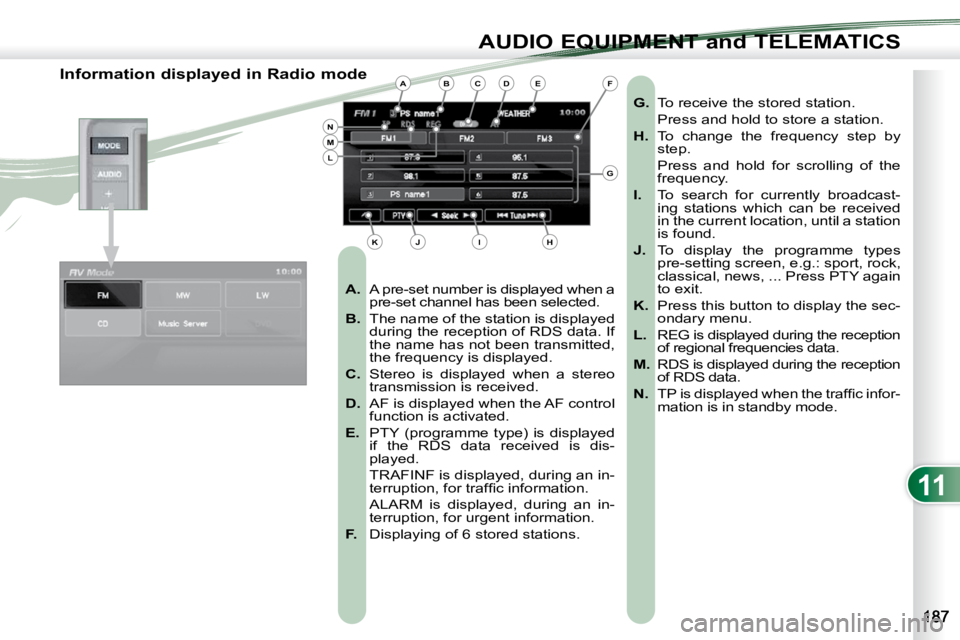
Information displayed in Radio mode
A. A pre-set number is displayed when a
pre-set channel has been selected.
B. The name of the station is displayed
during the reception of RDS data. If
the name has not been transmitted,
the frequency is displayed.
C. Stereo is displayed when a stereo
transmission is received.
D. AF is displayed when the AF control
function is activated.
E. PTY (programme type) is displayed
if the RDS data received is dis-
played.
TRAFINF is displayed, during an in- terruption, for traffi c information.
ALARM is displayed, during an in- terruption, for urgent information.
F. Displaying of 6 stored stations.
G. To receive the stored station.
Press and hold to store a station.
H. To change the frequency step by
step.
Press and hold for scrolling of the frequency.
I. To search for currently broadcast-
ing stations which can be received
in the current location, until a station
is found.
J. To display the programme types
pre-setting screen, e.g.: sport, rock,
classical, news, ... Press PTY again
to exit.
K. Press this button to display the sec-
ondary menu.
L. REG is displayed during the reception
of regional frequencies data.
M. RDS is displayed during the reception
of RDS data.
N. TP is displayed when the traffi c infor-
mation is in standby mode. ABCDE
G
HIJK
LMN
F
Page 199 of 230
![PEUGEOT 4007 2009 User Guide 11
AUDIO EQUIPMENT and TELEMATICS
Radio, selecting an FM station and storing Press the MODE button.
Press
Explanations Result
You can select [ Seek] or [Seek ] to](/img/29/58325/w960_58325-198.png "PEUGEOT 4007 2009 User Guide 11
AUDIO EQUIPMENT and TELEMATICS
Radio, selecting an FM station and storing Press the MODE button.
Press
Explanations Result
You can select [ Seek] or [Seek ] to")
11
AUDIO EQUIPMENT and TELEMATICS
Radio, selecting an FM station and storing Press the MODE button.
Press
Explanations Result
You can select [ Seek] or [Seek ] to start a continuous
search until the stations which can be received in the current
location are detected.
Press FM. By default the display shows the FM1 stations.
Press [
Tune] to decrease the frequency or [Tune ] to increase the
frequency. The frequency is changed in steps of 0.1 MHz.
Continue to press to tune to a station automatically.
Once the frequency has been selected, a maintained press on t he station
(e.g. 3) will store it.
The name of the station (e.g. PS name 1) is displayed if it is available.
You can start automatic storing on FM3 for 6 stations, which
can be received in the current location, by pressing [^] then
[Auto-Store]. You can also start a search by type of programme by pressing
[PTY].
Page 200 of 230
![PEUGEOT 4007 2009 User Guide 11
AUDIO EQUIPMENT and TELEMATICS
Radio, RDS settings Press Explanations Result
Press the MODE button.
Press FM. By default the display shows the stations on FM1.
Press [^].
Press [R](/img/29/58325/w960_58325-199.png "PEUGEOT 4007 2009 User Guide 11
AUDIO EQUIPMENT and TELEMATICS
Radio, RDS settings Press Explanations Result
Press the MODE button.
Press FM. By default the display shows the stations on FM1.
Press [^].
Press [R")
11
AUDIO EQUIPMENT and TELEMATICS
Radio, RDS settings Press Explanations Result
Press the MODE button.
Press FM. By default the display shows the stations on FM1.
Press [^].
Press [RDS Settings].
Press [On] or [Off] to activate or deactivate the functions:
- AF: automatic search for the best frequency,
- REG: switch to the regional frequencies,
- TP: automatic selection of stations broadcasting traffi c in formation.
Page 228 of 230
11
AUDIO EQUIPMENT and TELEMATICS
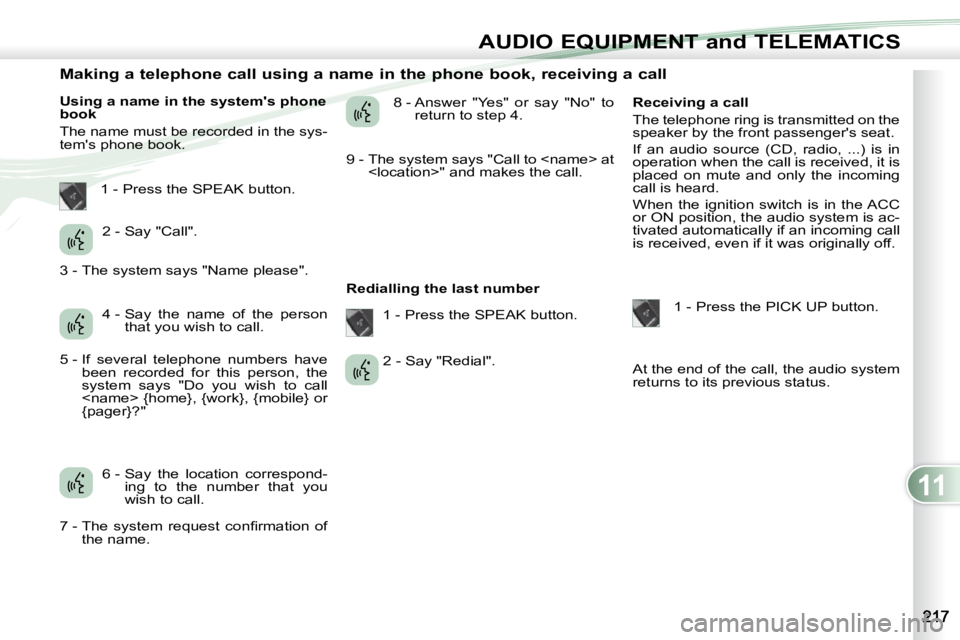
Making a telephone call using a name in the phone book, receiving a call
Using a name in the system's phone
book
The name must be recorded in the sys-
tem's phone book. 8 - Answer "Yes" or say "No" to
return to step 4.
Redialling the last number Receiving a call
The telephone ring is transmitted on the
speaker by the front passenger's seat.
If an audio source (CD, radio, ...) is in
operation when the call is received, it is
placed on mute and only the incoming
call is heard.
When the ignition switch is in the ACC
or ON position, the audio system is ac-
tivated automatically if an incoming call
is received, even if it was originally off.
1 - Press the PICK UP button.
At the end of the call, the audio system
returns to its previous status.
1 - Press the SPEAK button.
2 - Say "Call".
4 - Say the name of the person that you wish to call.
6 - Say the location correspond- ing to the number that you
wish to call. 1 - Press the SPEAK button.
2 - Say "Redial".
3 - The system says "Name please".
5 - If several telephone numbers have
been recorded for this person, the
system says "Do you wish to call
{pager}?"
7 - The system request confi rmation of the name. 9 - The system says "Call to