key PEUGEOT 4007 2010.5 Owner's Manual
[x] Cancel search | Manufacturer: PEUGEOT, Model Year: 2010.5, Model line: 4007, Model: PEUGEOT 4007 2010.5Pages: 215, PDF Size: 15.37 MB
Page 178 of 215
![PEUGEOT 4007 2010.5 Owners Manual 11
AUDIO EQUIPMENT and TELEMATICS
Entering an address and starting guidance (2/2) Press Explanations Result
Press [Street] and enter the name of a street using the touch keypad.
When a cha](/img/29/76799/w960_76799-177.png "PEUGEOT 4007 2010.5 Owners Manual 11
AUDIO EQUIPMENT and TELEMATICS
Entering an address and starting guidance (2/2) Press Explanations Result
Press [Street] and enter the name of a street using the touch keypad.
When a cha")
11
AUDIO EQUIPMENT and TELEMATICS
Entering an address and starting guidance (2/2) Press Explanations Result
Press [Street] and enter the name of a street using the touch keypad.
When a character of the name of the street is entered, if 5 streets or fewer
are recognised, you can select a street from a list which is displa yed or
press [List].
Press [House #] and enter the number of the house using the touch keypad.
You can enter the name of a junction instead of the numb er
of the street. Press [Junction] and select the name from a
list which is displayed.
This is the result once all of the information has been en tered:
If you agree with the information press [Set], otherwise press one of the
buttons to correct.
Press [Start] to start the navigation.
/
Page 201 of 215
11
AUDIO EQUIPMENT and TELEMATICS
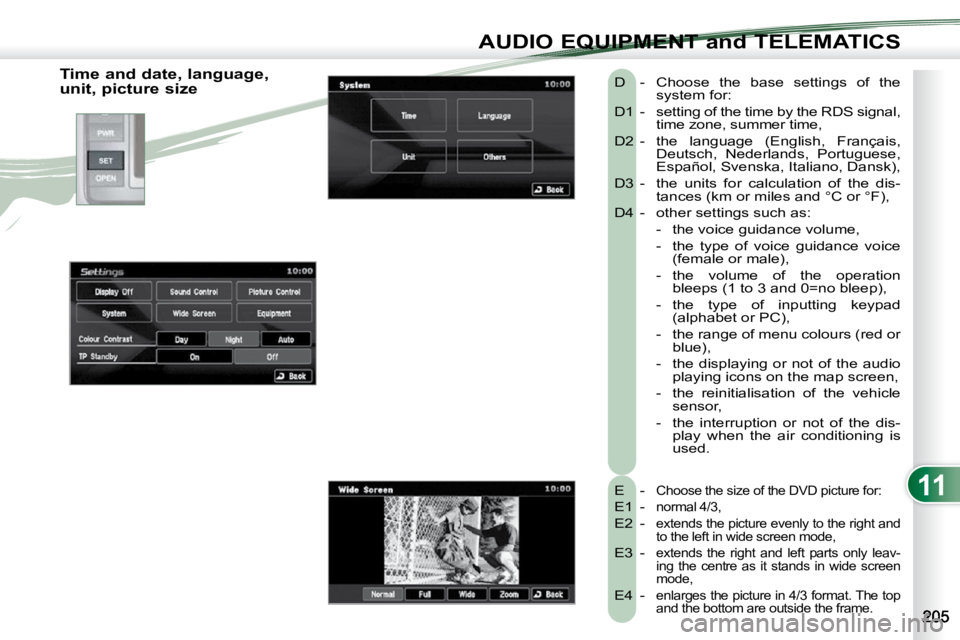
Time and date, language,
unit, picture size E -
Choose the size of the DVD picture for:
E1 - normal 4/3,
E2 - extends the picture evenly to the right and
to the left in wide screen mode,
E3 - extends the right and left parts only leav-
ing the centre as it stands in wide screen
mode,
E4 - enlarges the picture in 4/3 format. The top
and the bottom are outside the frame.
D - Choose the base settings of the system for:
D1 - setting of the time by the RDS signal, time zone, summer time,
D2 - the language (English, Français, Deutsch, Nederlands, Portuguese,
Español, Svenska, Italiano, Dansk),
D3 - the units for calculation of the dis- tances (km or miles and °C or °F),
D4 - other settings such as:
- the voice guidance volume,
- the type of voice guidance voice (female or male),
- the volume of the operation bleeps (1 to 3 and 0=no bleep),
- the type of inputting keypad (alphabet or PC),
- the range of menu colours (red or blue),
- the displaying or not of the audio playing icons on the map screen,
- the reinitialisation of the vehicle sensor,
- the interruption or not of the dis- play when the air conditioning is
used.
Page 204 of 215
11
AUDIO EQUIPMENT and TELEMATICS
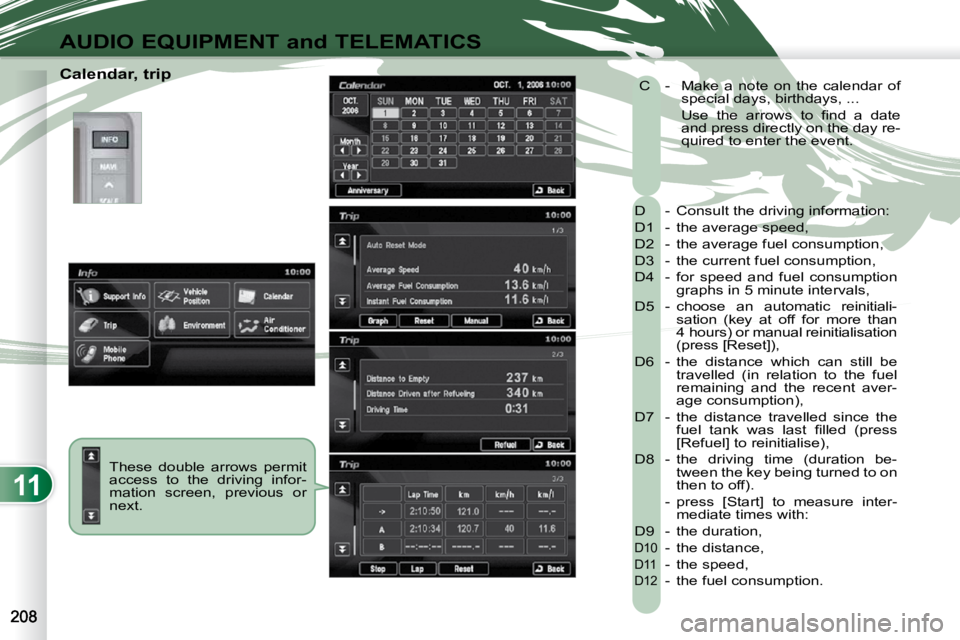
Calendar, trip These double arrows permit
access to the driving infor-
mation screen, previous or
next. D - Consult the driving information:
D1 - the average speed,
D2 - the average fuel consumption,
D3 - the current fuel consumption,
D4 - for speed and fuel consumption
graphs in 5 minute intervals,
D5 - choose an automatic reinitiali- sation (key at off for more than
4 hours) or manual reinitialisation
(press [Reset]),
D6 - the distance which can still be travelled (in relation to the fuel
remaining and the recent aver-
age consumption),
D7 - the distance travelled since the fuel tank was last fi lled (press
[Refuel] to reinitialise),
D8 - the driving time (duration be- tween the key being turned to on
then to off).
- press [Start] to measure inter- mediate times with:
D9 - the duration,
D10 - the distance,
D11 - the speed,
D12 - the fuel consumption.
C - Make a note on the calendar of
special days, birthdays, ...
Use the arrows to fi nd a date and press directly on the day re-
quired to enter the event.