change time PEUGEOT 4007 2011.5 Owner's Manual
[x] Cancel search | Manufacturer: PEUGEOT, Model Year: 2011.5, Model line: 4007, Model: PEUGEOT 4007 2011.5Pages: 236, PDF Size: 17.56 MB
Page 175 of 236
11
AUDIO EQUIPMENT and TELEMATICS
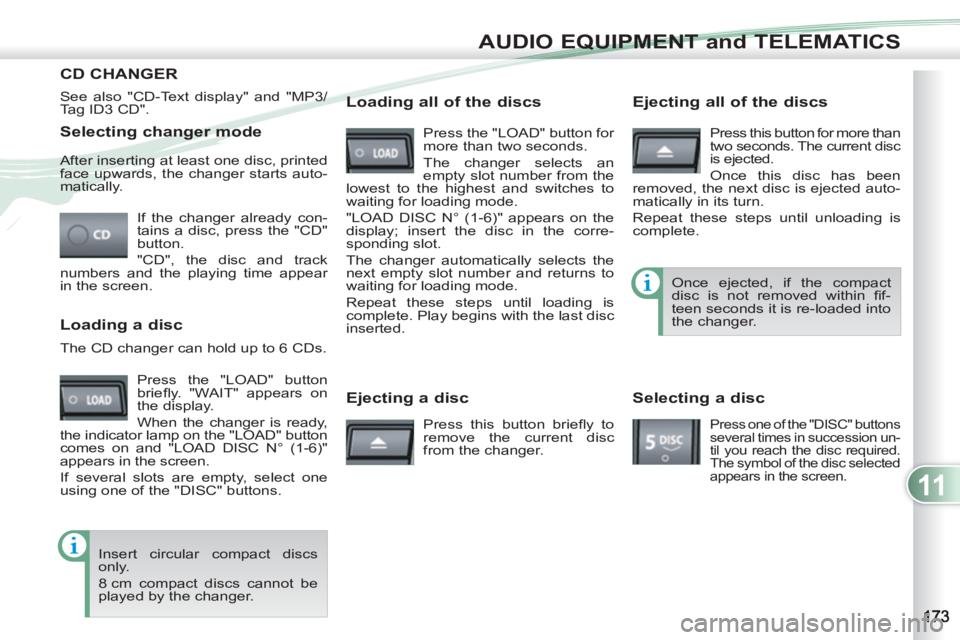
Selecting changer mode
If the changer already con-
tains a disc, press the "CD"
button.
"CD", the disc and track
numbers and the playing time appear
in the screen. After inserting at least one disc, printed
face upwards, the changer starts auto-
matically.
Ejecting a disc
Press this button briefl y to
remove the current disc
from the changer. Once ejected, if the compact
disc is not removed within fi f-
teen seconds it is re-loaded into
the changer.
Loading a disc
Press the "LOAD" button
briefl y. "WAIT" appears on
the display.
When the changer is ready,
the indicator lamp on the "LOAD" button
comes on and "LOAD DISC N° (1-6)"
appears in the screen.
If several slots are empty, select one
using one of the "DISC" buttons. The CD changer can hold up to 6 CDs.
Insert circular compact discs
only.
8 cm compact discs cannot be
played by the changer.
Loading all of the discs
Ejecting all of the discs
Press this button for more than
two seconds. The current disc
is ejected.
Once this disc has been
removed, the next disc is ejected auto-
matically in its turn.
Repeat these steps until unloading is
complete.
Selecting a disc
Press one of the "DISC" buttons
several times in succession un-
til you reach the disc required.
The symbol of the disc selected
appears in the screen.
See also "CD-Text display" and "MP3/
Tag ID3 CD".
Press the "LOAD" button for
more than two seconds.
The changer selects an
empty slot number from the
lowest to the highest and switches to
waiting for loading mode.
"LOAD DISC N° (1-6)" appears on the
display; insert the disc in the corre-
sponding slot.
The changer automatically selects the
next empty slot number and returns to
waiting for loading mode.
Repeat these steps until loading is
complete. Play begins with the last disc
inserted.
CD CHANGER
Page 181 of 236
11
AUDIO EQUIPMENT and TELEMATICS
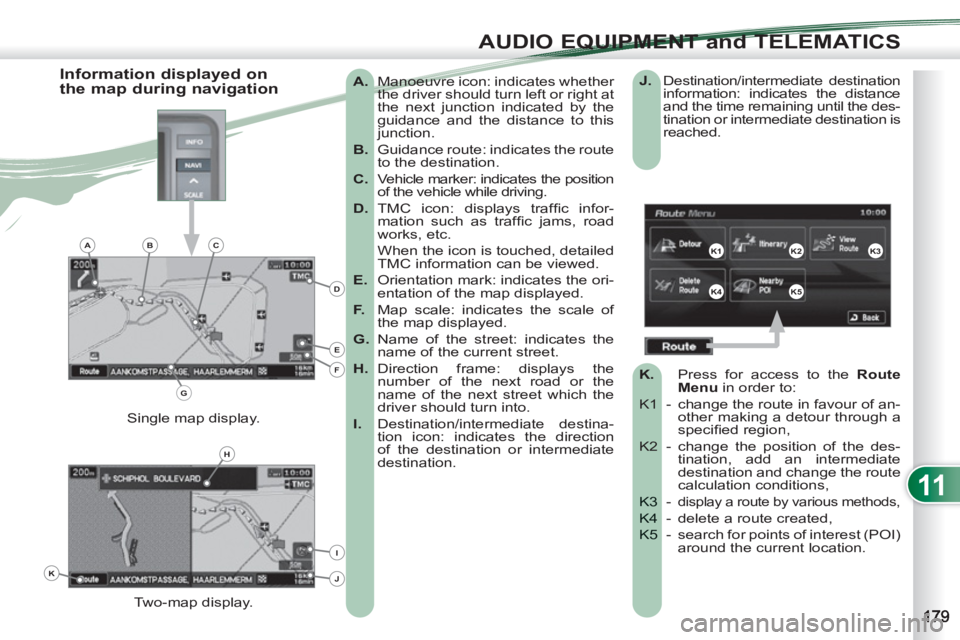
A.
Manoeuvre icon: indicates whether
the driver should turn left or right at
the next junction indicated by the
guidance and the distance to this
junction.
B.
Guidance route: indicates the route
to the destination.
C.
Vehicle marker: indicates the position
of the vehicle while driving.
D.
TMC icon: displays traffi c infor-
mation such as traffi c jams, road
works, etc.
When the icon is touched, detailed
TMC information can be viewed.
E.
Orientation mark: indicates the ori-
entation of the map displayed.
F.
Map scale: indicates the scale of
the map displayed.
G.
Name of the street: indicates the
name of the current street.
H.
Direction frame: displays the
number of the next road or the
name of the next street which the
driver should turn into.
I.
Destination/intermediate destina-
tion icon: indicates the direction
of the destination or intermediate
destination.
Two-map display. Single map display.
Information displayed on
the map during navigation
J.
Destination/intermediate destination
information: indicates the distance
and the time remaining until the des-
tination or intermediate destination is
reached.
K.
Press
for access to the RouteMenu
in order to:
K1 -
change the route in favour of an-other making a detour through aspecifi ed region,
K2 - cha
nge the position of the des-tination, add an intermediatedestination and change the routecalculation conditions,
- K3 display a route by various methods,
- delete a route created, K4
- search for points of interest (POI)K5 around the current location.
K1K2K3
K4K5
K
H
E
F
BCA
D
G
I
J
Page 184 of 236
11
AUDIO EQUIPMENT and TELEMATICS
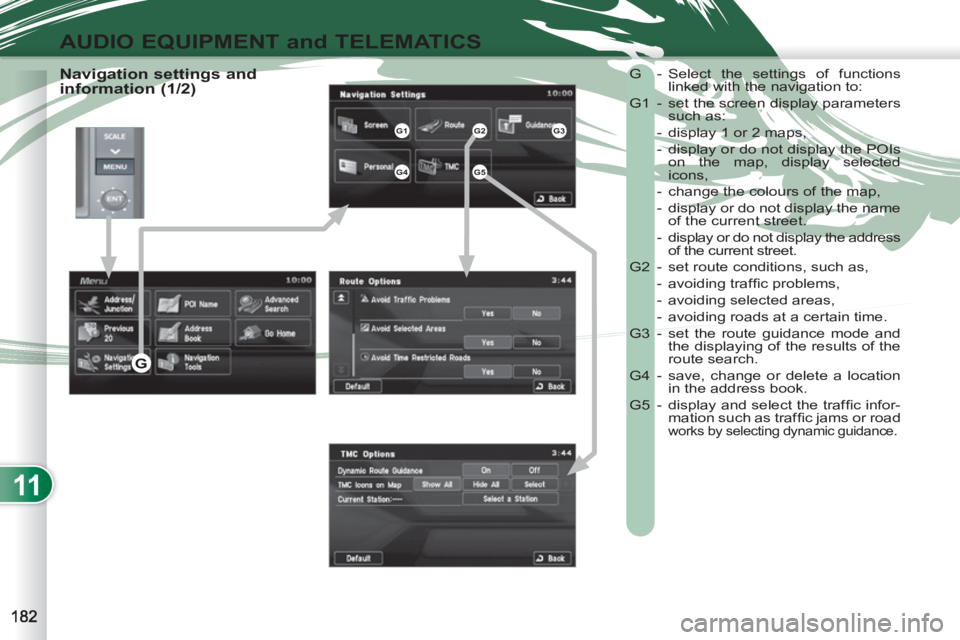
Navigation settings and
information (1/2) G - Select the settings of functions
linked with the navigation to:
G1 - set the screen display parameters
such as:
- display 1 or 2 maps,
- display or do not display the POIs
on the map, display selected
icons,
- change the colours of the map,
- display or do not display the name
of the current street.
- display or do not display the address
of the current street.
G2 - set route conditions, such as,
- avoiding traffi c problems,
- avoiding selected areas,
- avoiding roads at a certain time.
G3 - set the route guidance mode and
the displaying of the results of the
route search.
G4 - save, change or delete a location
in the address book.
G5 - display and select the traffi c infor-
mation such as traffi c jams or road
works by selecting dynamic guidance.
G1G2G3
G4G5
G
Page 190 of 236
11
AUDIO EQUIPMENT and TELEMATICS
AUDIO-VIDEO AUDIO-VIDEO
What is RDS?
RDS station following
Tr a ffi c information function
Your radio automatically checks
and selects the best frequency
for the radio station to which it is
tuned (if the station broadcasts on se-
veral transmitters or frequencies).
The frequency of a radio station covers ap-
proximately 30 miles (50 km). The change
from one frequency to another explains
the loss of reception during a journey.
If the station to which you are listening
does not have several frequencies in
the region in which you are currently
located, you can deactivate the auto-
matic frequency following.
Radio, RDS, AF, REG, TP, PTY
Radio Data System (RDS) function
on the FM waveband permits:
- tuning to the same station while
travelling through different regions
(if the transmitters of this station
cover the area through which you
are travelling),
- temporary tuning to traffi c information
announcements,
- display of the name of the station,
etc...
Most FM stations use RDS.
These stations transmit non-audible
data in addition to their programmes.
The data transmitted in this way allows
you access to various functions, mainly
displaying of the name of the station,
temporary tuning to traffi c information
announcements or automatic station
following.
RDS allows you to continue listening to
the same station by means of the fre-
quency following. However, in certain
conditions, this RDS frequency follo-
wing cannot be provided throughout
the country. Radio stations do not cover
the whole country, which explains the
loss of reception of the station during
a journey. The Traffic Program (TP) func-
tion permits automatic and tem-
porary switching to an FM station
broadcasting traffi c information.
The radio station or the source that you
are listening to at this point is paused.
Once the traffi c information has ended,
the system switches back to the radio
station or the source that you were lis-
tening to initially.
Regional following mode
Some stations are organised in
a network.
In different regions, they broad-
cast different or shared programmes de-
pending on the time of day.
You can follow:
- a regional station only,
- the entire network, with the possibility
that you will be listening to a different
programme.
Programme types
Some stations offer the option of
listening to a themed type of pro-
gramme as a priority, selected from
the list available below:
NEWS, AFFAIRS, INFOS, SPORT,
EDUCATE, DRAMA, CULTURE, SCIENCE,
VARIED, POP M, ROCK M, EASY M,
LIGHT M, CLASSICS, OTHER M,
WEATHER, FINANCE, CHILDREN,
SOCIAL, RELIGION, PHONE IN, TRAVEL,
LEISURE, JAZZ, COUNTRY, NATION M,
OLDIES, FOLK M, DOCUMENT.
Page 208 of 236
11
AUDIO EQUIPMENT and TELEMATICS
DVD MODVD MODE
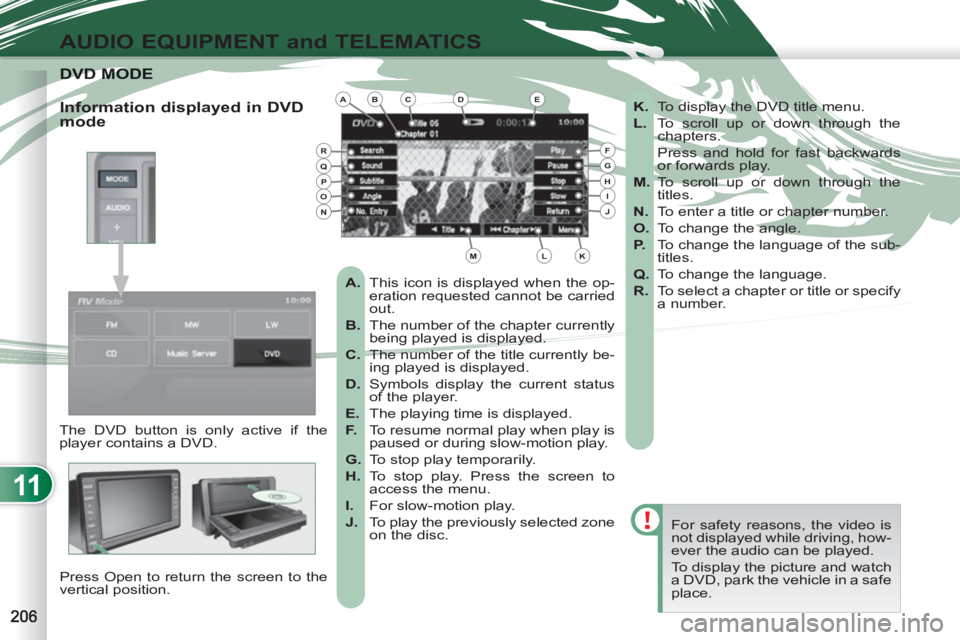
The DVD button is only active if the
player contains a DVD.
Press Open to return the screen to the
vertical position. For safety reasons, the video is
not displayed while driving, how-
ever the audio can be played.
To display the picture and watch
a DVD, park the vehicle in a safe
place.
K.
To display the DVD title menu.
L.
To scroll up or down through the
chapters.
Press and hold for fast backwards
or forwards play.
M.
To scroll up or down through the
titles.
N.
To enter a title or chapter number.
O.
To change the angle.
P.
To change the language of the sub-
titles.
Q.
To change the language.
R.
To select a chapter or title or specify
a number.
A.
This icon is displayed when the op-
eration requested cannot be carried
out.
B.
The number of the chapter currently
being played is displayed.
C.
The number of the title currently be-
ing played is displayed.
D.
Symbols display the current status
of the player.
E.
The playing time is displayed.
F.
To resume normal play when play is
paused or during slow-motion play.
G.
To stop play temporarily.
H.
To stop play. Press the screen to
access the menu.
I.
For slow-motion play.
J.
To play the previously selected zone
on the disc.
Information displayed in DVD
mode ABCDE
FGHIJ
KLM
RQPON
Page 231 of 236
ALPHABETICAL INDEX
A
ABS .............................................. 103
ABS and EBFD systems............... 103
Accessories .................................. 156
Accessory socket,
12 V ..................... 64, 66, 67, 70, 71
Access to bulbs ............................ 137
Access to the 3rd row ..................... 54
Adjusting headlamps ...................... 89
Adjusting seat belt height ............. 105
Adjusting the steering wheel........... 63
Airbags, curtain......................110, 111
Airbags, front ........................ 108, 111
Airbags, lateral.......................110, 111
Air conditioning ............................... 19
Air conditioning, digital.................... 46
Air flow ............................................ 19
Air intake......................................... 46
Air vents.......................................... 44
Anti-lock braking system (ABS) .... 103
Anti-pinch........................................ 82
Armrest, front ...................... 52, 64, 66
Armrest, rear ............................. 54, 69
ASC .............................................. 104
Ashtray, portable ....................... 64, 67
Athermic windscreen ...................... 63
Audible warning ............................ 102
Audio-CD ...... 167, 168, 170, 173, 175
Audio-telematics ...........176-180, 184,
188, 189, 192, 194, 195, 200-202,
206-208, 211, 214, 215, 218-220
Audio-telematics
system ............... 194, 195, 200, 201
Audio-video................................... 188
Audio system functions......... 176, 177
Audio systems ..... 162, 164, 165, 167,
168, 170, 171, 173, 175-180, 184,
188, 189, 192, 194, 195, 200-202,
206-208, 211, 214, 215, 218-220Automatic illumination
of headlamps ......................... 86, 88
Automatic operation
of hazard warning lamps ........... 102
Automatic rain sensitive
windscreen wipers ....................... 91
Automatic switching off of lighting ....... 88
Battery .......................................... 130
Battery, remote control ................... 76
Blind................................................ 83
Bluetooth (telephone) ............218-220
Boot lid............................................ 81
Bottle holder ............................. 64, 69
Brake discs ................................... 130
Brake lamps.................................. 141
Brake pads ................................... 130
Braking assistance system ........... 103
Bulbs (changing, type) .......... 137, 141Check, passenger
compartment filter ...................... 130
Checking the air filter .................... 130
Checking the oil filter .................... 130
Checks.......................................... 130
Child seats ................. 94, 95, 97, 101
Cigar lighter .................................... 66
Closing the boot........................ 80, 81
Colour screen ................. 41, 176, 177
Controls for air conditioning ............ 46
Coolant ..................................... 31, 32
Coolant level ................................. 129
Coolant temperature
warning lamp ............................... 32
Cooled glove box ...................... 64, 65
Courtesy lamp, front ....................... 92
Courtesy lamp, rear ........................ 92
Cruise control ............................... 121
Cup holder .......................... 64, 68, 69
CVT gearbox ................................ 113
B
Capacity, fuel tank .......................... 84
CD changer .......................... 173, 175
CD MP3 ........................................ 192
CD MP3 player ............................. 194
Changing a bulb ................... 137, 141
Changing a wheel ..................132-135
Changing a wiper blade ................ 151
Changing the time .................... 39, 41
Check, particle emission filter ....... 130
C
Deactivating ASC.......................... 104
Deactivating the passenger
airbag ........................................ 108
Defrosting ....................................... 46
Dials................................................ 21
Diesel............................................ 128
Diesel additive level ...................... 129
Dimensions ................................... 159
Dipped beam ................................ 137
Direction indicators ....... 102, 137, 141
Doors .............................................. 79
DVD (mode).......................... 206, 207
Dynamic stability control
(ASC) ......................................... 104
D