display PEUGEOT 4007 2011.5 Repair Manual
[x] Cancel search | Manufacturer: PEUGEOT, Model Year: 2011.5, Model line: 4007, Model: PEUGEOT 4007 2011.5Pages: 236, PDF Size: 17.56 MB
Page 210 of 236
11
AUDIO EQUIPMENT and TELEMATICS
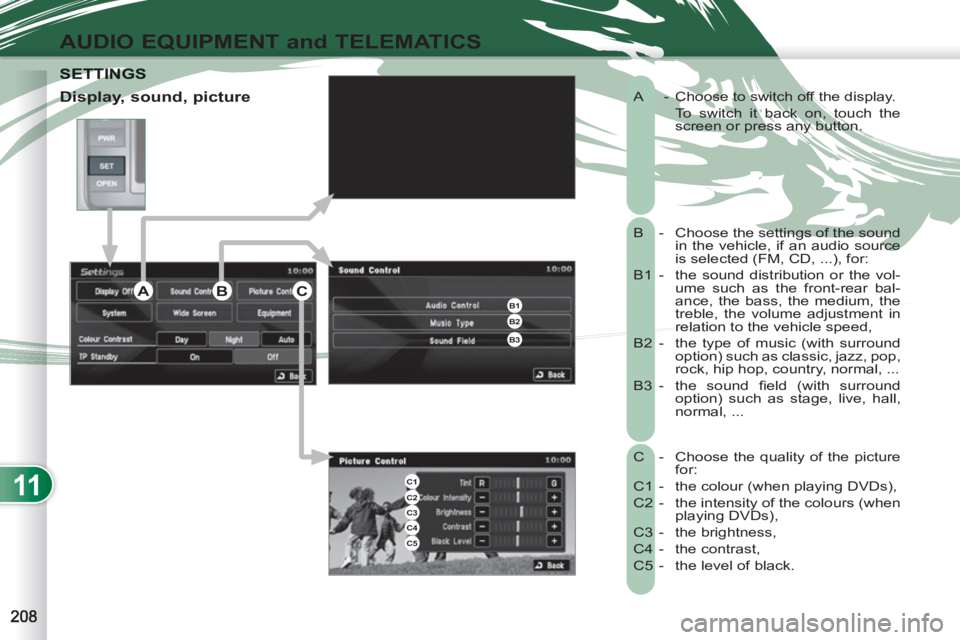
A - Choose to switch off the display.
To switch it back on, touch the
screen or press any button.
B - Choose the settings of the sound
in the vehicle, if an audio source
is selected (FM, CD, ...), for:
B1 - the sound distribution or the vol-
ume such as the front-rear bal-
ance, the bass, the medium, the
treble, the volume adjustment in
relation to the vehicle speed,
B2 - the type of music (with surround
option) such as classic, jazz, pop,
rock, hip hop, country, normal, ...
B3 - the sound fi eld (with surround
option) such as stage, live, hall,
normal, ...
C - Choose the quality of the picture
for:
C1 - the colour (when playing DVDs),
C2 - the intensity of the colours (when
playing DVDs),
C3 - the brightness,
C4 - the contrast,
C5 - the level of black.
SETTINGSETTINGS
Display, sound, picture
B1B2
B3
C1C2C3C4C5
ABC
Page 211 of 236
11
AUDIO EQUIPMENT and TELEMATICS
Time and date, language, unit,
picture size
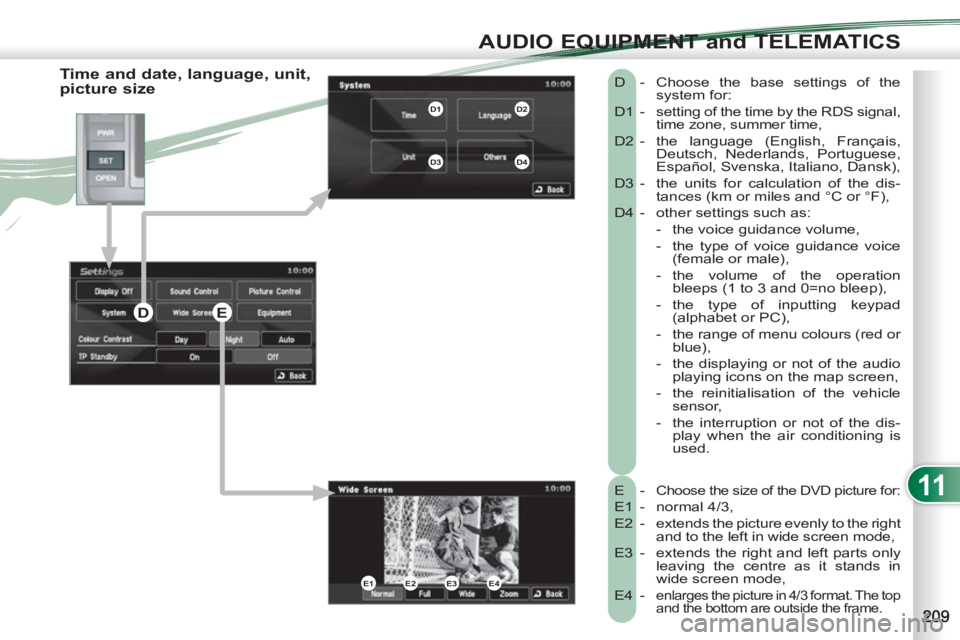
E - Choose the size of the DVD picture for:
E1 - normal 4/3,
E2 - extends the picture evenly to the right
and to the left in wide screen mode,
E3 - extends the right and left parts only
leaving the centre as it stands in
wide screen mode,
E4 -
enlarges the picture in 4/3 format. The top
and the bottom are outside the frame.
D - Choose the base settings of the
system for:
D1 - setting of the time by the RDS signal,
time zone, summer time,
D2 - the language (English, Français,
Deutsch, Nederlands, Portuguese,
Español, Svenska, Italiano, Dansk),
D3 - the units for calculation of the dis-
tances (km or miles and °C or °F),
D4 - other settings such as:
- the voice guidance volume,
- the type of voice guidance voice
(female or male),
- the volume of the operation
bleeps (1 to 3 and 0=no bleep),
- the type of inputting keypad
(alphabet or PC),
- the range of menu colours (red or
blue),
- the displaying or not of the audio
playing icons on the map screen,
- the reinitialisation of the vehicle
sensor,
- the interruption or not of the dis-
play when the air conditioning is
used.
E1E2E3E4
D1D2
D3D4
DE
Page 212 of 236
11
AUDIO EQUIPMENT and TELEMATICS
Equipment, contrast, traffic information (TP)
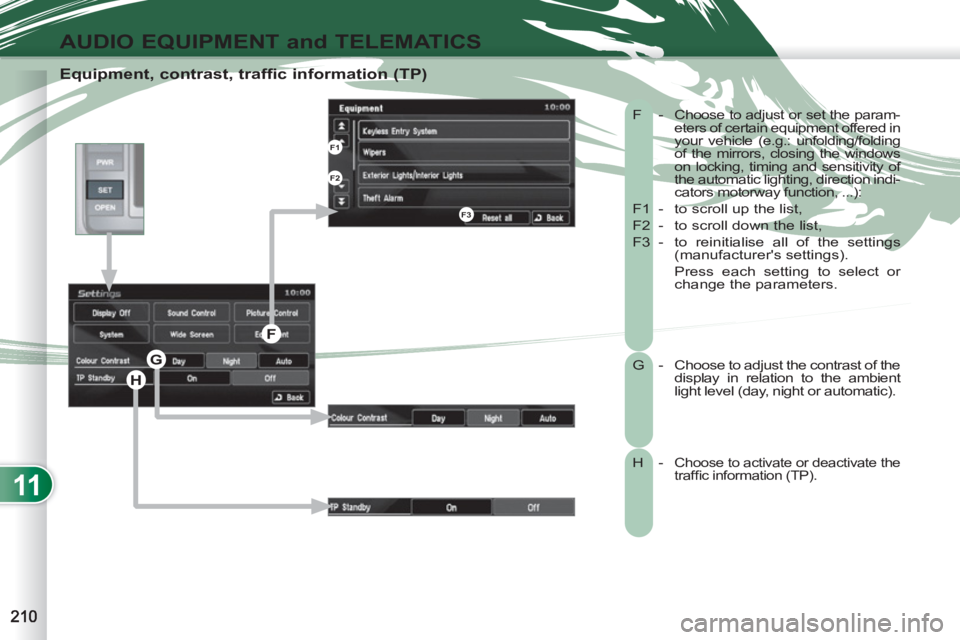
F - Choose to adjust or set the param-
eters of certain equipment offered in
your vehicle (e.g.: unfolding/folding
of the mirrors, closing the windows
on locking, timing and sensitivity of
the automatic lighting, direction indi-
cators motorway function, ...):
F1 - to scroll up the list,
F2 - to scroll down the list,
F3 - to reinitialise all of the settings
(manufacturer's settings).
Press each setting to select or
change the parameters.
G - Choose to adjust the contrast of the
display in relation to the ambient
light level (day, night or automatic).
H - Choose to activate or deactivate the
traffi c information (TP).
H
G
F
F1
F2
F3
Page 216 of 236
11
AUDIO EQUIPMENT and TELEMATICS
HANDS-FREE TELEPHONE HANDS-FREE TELEPHONE
What is the Bluetooth® hands-free telephone with voice recognition?
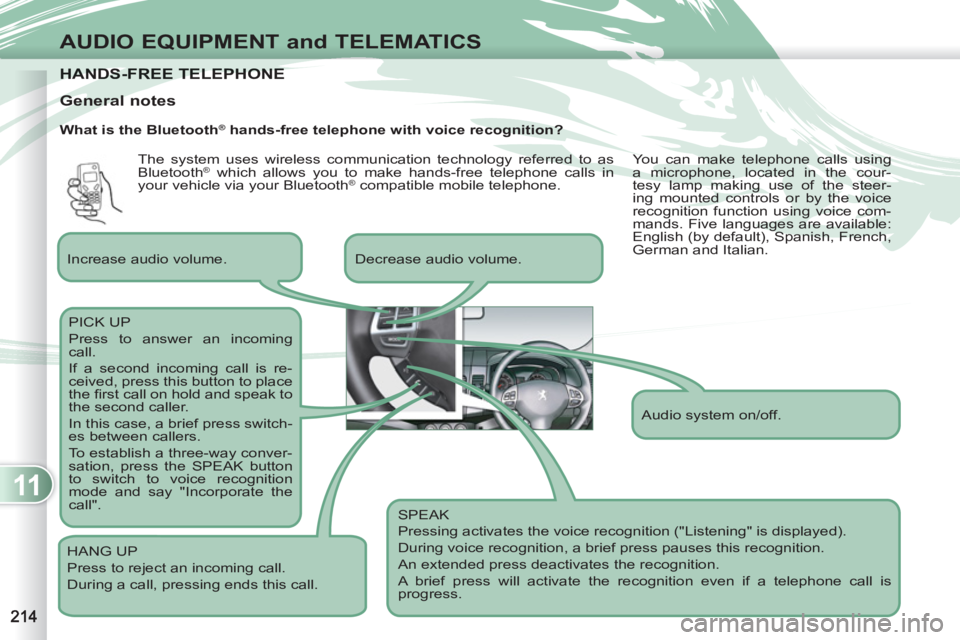
SPEAK
Pressing activates the voice recognition ("Listening" is displayed).
During voice recognition, a brief press pauses this recognition.
An extended press deactivates the recognition.
A brief press will activate the recognition even if a telephone call is
progress.
Decrease audio volume.
PICK UP
Press to answer an incoming
call.
If a second incoming call is re-
ceived, press this button to place
the fi rst call on hold and speak to
the second caller.
In this case, a brief press switch-
es between callers.
To establish a three-way conver-
sation, press the SPEAK button
to switch to voice recognition
mode and say "Incorporate the
call".
HANG UP
Press to reject an incoming call.
During a call, pressing ends this call.
General notes
Increase audio volume.
Audio system on/off. The system uses wireless communication technology referred to as
Bluetooth
® which allows you to make hands-free telephone calls in
your vehicle via your Bluetooth® compatible mobile telephone. You can make telephone calls using
a microphone, located in the cour-
tesy lamp making use of the steer-
ing mounted controls or by the voice
recognition function using voice com-
mands. Five languages are available:
English (by default), Spanish, French,
German and Italian.