ESP PEUGEOT 4007 2011 User Guide
[x] Cancel search | Manufacturer: PEUGEOT, Model Year: 2011, Model line: 4007, Model: PEUGEOT 4007 2011Pages: 236, PDF Size: 17.56 MB
Page 131 of 236
8
CHECKS
CHECKING LEVELS
Brake fluid level
To avoid any risk of scalding, unscrew
the cap by two turns to allow the pres-
sure to drop. When the pressure has
dropped, remove the cap and top up
the level.
Oil level
The reading will only be correct
if the vehicle is on level ground
and the engine has been off for
more than 15 minutes.
The check is carried out either
when the ignition is switched on using
the oil level indicator on the instrument
panel, or using the dipstick.
It is normal to top up the engine oil between
services. The manufacturer recommends
that the oil level be checked, and topped up
if necessary, every 3 000 miles (5 000 km).
The brake fl uid level should be
between the "MAX" and "MIN"
marks.
If it is not, check the brake pad
wear.
Changing the brake fl uid
Refer to the servicing booklet for details
of the interval for this operation.
Coolant level
The coolant level must be mea-
sured when the engine is cold
and should be between the
"LOW" and "FULL" marks.
When the engine is warm, the
temperature of the coolant is regulated
by the fan. This can operate with the ig-
nition off.
On vehicles which are fi tted with a
particle emission fi lter, the fan may
operate after the vehicle has been
switched off, even if the engine is
cold.
In addition, as the cooling system is
pressurised, wait at least one hour after
switching off the engine before carrying
out any work.
Screenwash and headlamp
wash
fluid*
Check the fl uid level regularly,
using the gauge.
*
According to country.
Changing the engine oil
Refer to the servicing booklet for details
of the interval for this operation.
In order to maintain the reliability of the
engine and emission control system,
the use of additives in the engine oil is
prohibited.
Oil specifi cation
The oil must correspond to your engine
and conform to the manufacturer's
recommendations.
Fluid specifi cation
The brake fl uid must conform to the
manufacturer's recommendations and
fulfi l the DOT4 standards.
Changing the coolant fl uid
Refer to the servicing booklet for details
of the interval for this operation.
Fluid specifi cation
The coolant must conform to the manu-
facturer's recommendations.
Fluid specifi cation
This fl uid must conform to the manufac-
turer's recommendations for optimum
cleaning.
Power steering fluid level
Check the fl uid level with the engine at
idle.
Check that the power steering fl uid
level is always between the "MAX" and
"MIN" marks and top up if necessary.
Fluid specifi cation
This fl uid must conform to the manufac-
turer's recommendations.
Check all of these levels regularly and
top them up if necessary, unless other-
wise indicated.
If a level drops signifi cantly, have the
corresponding system checked by a
PEUGEOT dealer or a qualifi ed work-
shop.
When working under the bonnet, take
care as certain areas of the engine may
be extremely hot (risk of burns).
Page 147 of 236
9
PRACTICAL INFORMATION
Dashboard fuses
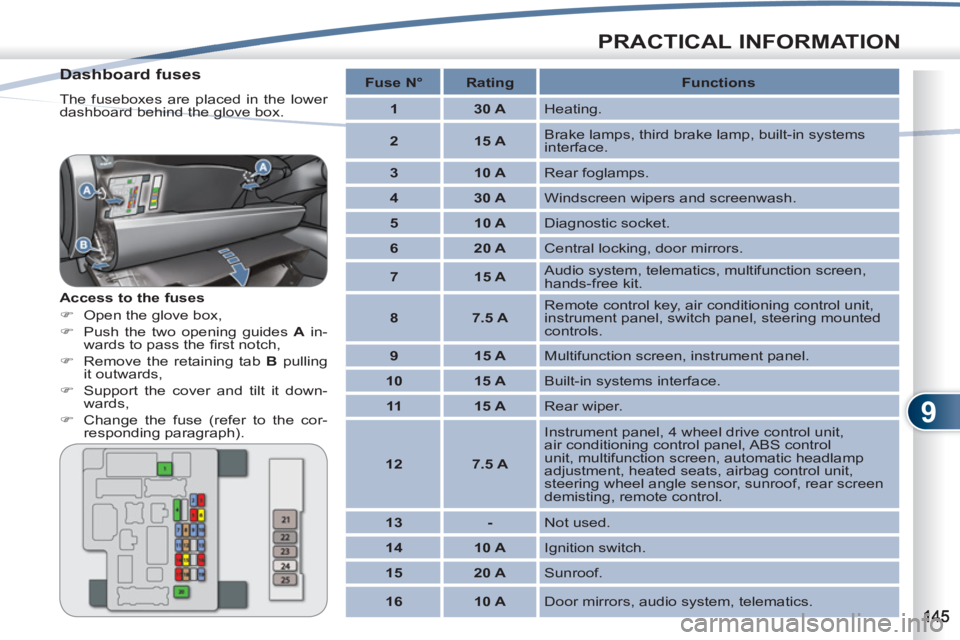
The fuseboxes are placed in the lower
dashboard behind the glove box.
Access to the fuses
)
Open the glove box,
)
Push the two opening guides A
in-
wards to pass the fi rst notch,
)
Remove the retaining tab B
pulling
it outwards,
)
Support the cover and tilt it down-
wards,
)
Change the fuse (refer to the cor-
responding paragraph).
Fuse N°
Rating
Functions
1
30 A
Heating.
2
15 A
Brake lamps, third brake lamp, built-in systems
interface.
3
10 A
Rear foglamps.
4
30 A
Windscreen wipers and screenwash.
5
10 A
Diagnostic socket.
6
20 A
Central locking, door mirrors.
7
15 A
Audio system, telematics, multifunction screen,
hands-free kit.
8
7.5 A
Remote control key, air conditioning control unit,
instrument panel, switch panel, steering mounted
controls.
9
15 A
Multifunction screen, instrument panel.
10
15 A
Built-in systems interface.
11
15 A
Rear wiper.
12
7.5 A
Instrument panel, 4 wheel drive control unit,
air conditioning control panel, ABS control
unit, multifunction screen, automatic headlamp
adjustment, heated seats, airbag control unit,
steering wheel angle sensor, sunroof, rear screen
demisting, remote control.
13
-
Not used.
14
10 A
Ignition switch.
15
20 A
Sunroof.
16
10 A
Door mirrors, audio system, telematics.
Page 148 of 236
9
PRACTICAL INFORMATION
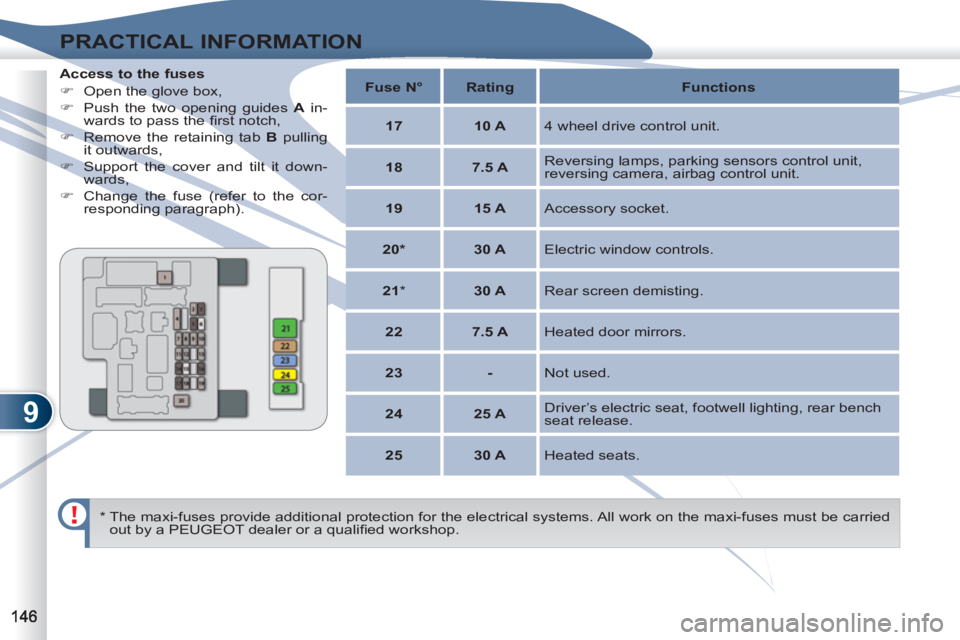
Access to the fuses
)
Open the glove box,
)
Push the two opening guides A
in-
wards to pass the fi rst notch,
)
Remove the retaining tab B
pulling
it outwards,
)
Support the cover and tilt it down-
wards,
)
Change the fuse (refer to the cor-
responding paragraph).
* The maxi-fuses provide additional protection for the electrical systems. All work on the maxi-fuses must be carried
out by a PEUGEOT dealer or a qualifi ed workshop.
Fuse N°
Rating
Functions
17
10 A
4 wheel drive control unit.
18
7.5 A
Reversing lamps, parking sensors control unit,
reversing camera, airbag control unit.
19
15 A
Accessory socket.
20*
30 A
Electric window controls.
21
*
30 A
Rear screen demisting.
22
7.5 A
Heated door mirrors.
23
-
Not used.
24
25 A
Driver’s electric seat, footwell lighting, rear bench
seat release.
25
30 A
Heated seats.
Page 149 of 236
9
PRACTICAL INFORMATION
Engine compartment fuses
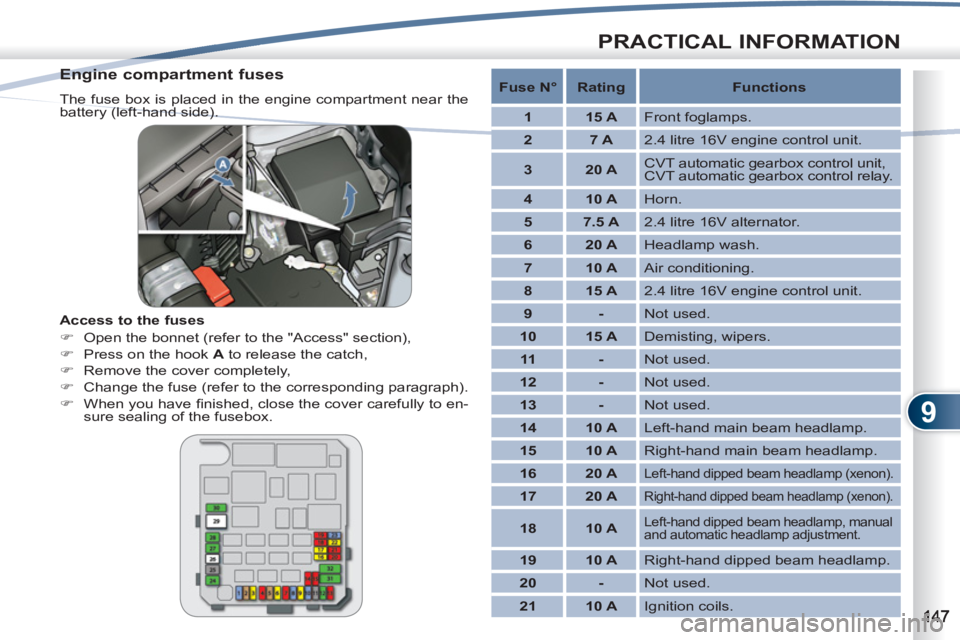
The fuse box is placed in the engine compartment near the
battery (left-hand side).
Access to the fuses
)
Open the bonnet (refer to the "Access" section),
)
Press on the hook A
to release the catch,
)
Remove the cover completely,
)
Change the fuse (refer to the corresponding paragraph).
)
When you have fi nished, close the cover carefully to en-
sure sealing of the fusebox.
Fuse N°
Rating
Functions
1
15 A
Front foglamps.
2
7 A
2.4 litre 16V engine control unit.
3
20 A
CVT automatic gearbox control unit,
CVT automatic gearbox control relay.
4
10 A
Horn.
5
7.5 A
2.4 litre 16V alternator.
6
20 A
Headlamp wash.
7
10 A
Air conditioning.
8
15 A
2.4 litre 16V engine control unit.
9
-
Not used.
10
15 A
Demisting, wipers.
11
-
Not used.
12
-
Not used.
13
-
Not used.
14
10 A
Left-hand main beam headlamp.
15
10 A
Right-hand main beam headlamp.
16
20 A
Left-hand dipped beam headlamp (xenon).
17
20 A
Right-hand dipped beam headlamp (xenon).
18
10 A
Left-hand dipped beam headlamp, manual
and automatic headlamp adjustment.
19
10 A
Right-hand dipped beam headlamp.
20
-
Not used.
21
10 A
Ignition coils.
Page 152 of 236
9
PRACTICAL INFORMATION
The batteries contain harmful
substances such as sulphuric
acid and lead. They must be
disposed of in accordance with
regulations and must not, in any
circumstances, be discarded
with household waste.
Take used remote control bat-
teries and vehicle batteries to a
special collection point.
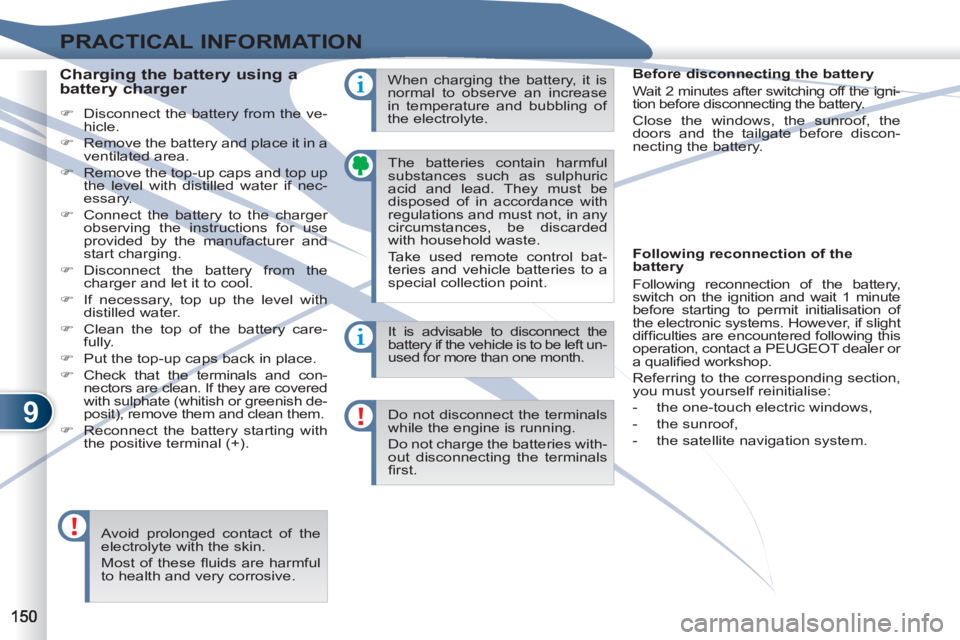
Charging the battery using a
battery charger
)
Disconnect the battery from the ve-
hicle.
)
Remove the battery and place it in a
ventilated area.
)
Remove the top-up caps and top up
the level with distilled water if nec-
essary.
)
Connect the battery to the charger
observing the instructions for use
provided by the manufacturer and
start charging.
)
Disconnect the battery from the
charger and let it to cool.
)
If necessary, top up the level with
distilled water.
)
Clean the top of the battery care-
fully.
)
Put the top-up caps back in place.
)
Check that the terminals and con-
nectors are clean. If they are covered
with sulphate (whitish or greenish de-
posit), remove them and clean them.
)
Reconnect the battery starting with
the positive terminal (+). It is advisable to disconnect the
battery if the vehicle is to be left un-
used for more than one month.
Do not disconnect the terminals
while the engine is running.
Do not charge the batteries with-
out disconnecting the terminals
fi rst.
Avoid prolonged contact of the
electrolyte with the skin.
Most of these fl uids are harmful
to health and very corrosive. When charging the battery, it is
normal to observe an increase
in temperature and bubbling of
the electrolyte.
Before disconnecting the battery
Wait 2 minutes after switching off the igni-
tion before disconnecting the battery.
Close the windows, the sunroof, the
doors and the tailgate before discon-
necting the battery.
Following reconnection of the
battery
Following reconnection of the battery,
switch on the ignition and wait 1 minute
before starting to permit initialisation of
the electronic systems. However, if slight
diffi culties are encountered following this
operation, contact a PEUGEOT dealer or
a qualifi ed workshop.
Referring to the corresponding section,
you must yourself reinitialise:
- the one-touch electric windows,
- the sunroof,
- the satellite navigation system.
Page 153 of 236
9
PRACTICAL INFORMATION
CHANGING A WIPER BLADECHANG
Removing a front or rear wiper
blade
)
Raise the corresponding wiper arm.
)
Remove the wiper blade, sliding it
towards the outside.
Fitting a front or rear wiper
blade
)
At the front, check the size of the
wiper blade as the shorter blade is
fi tted on the right-hand side of the
vehicle.
)
Put the corresponding new wiper
blade in place and fi x it.
)
Fold down the wiper arm carefully.
Page 160 of 236
10
TECHNICAL DATA
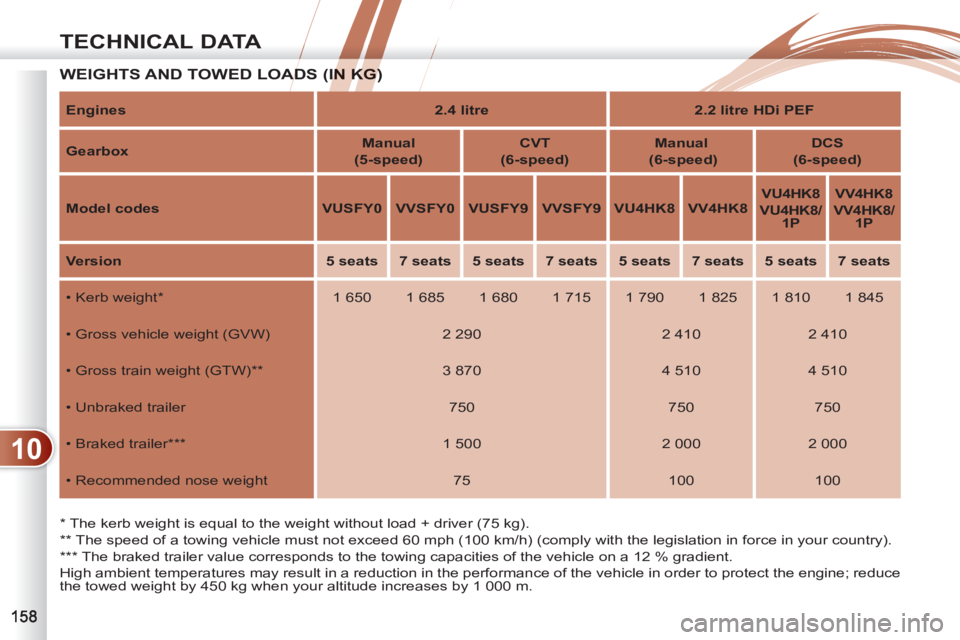
WEIGHTS AND TOWED LOADS (IN KG)ADS (IN KG)
*
The kerb weight is equal to the weight without load + driver (75 kg).
**
The speed of a towing vehicle must not exceed 60 mph (100 km/h) (comply with the legislation in force in your country).
***
The braked trailer value corresponds to the towing capacities of the vehicle on a 12 % gradient.
High ambient temperatures may result in a reduction in the performance of the vehicle in order to protect the engine; reduce
the towed weight by 450 kg when your altitude increases by 1 000 m.
Engines
2.4 litre
2.2 litre HDi PEF
Gearbox
Manual
(5-speed)
CVT
(6-speed)
Manual
(6-speed)
DCS
(6-speed)
Model codes
VUSFY0
VVSFY0
VUSFY9
VVSFY9
VU4HK8
VV4HK8
VU4HK8
VU4HK8/
1P
VV4HK8
VV4HK8/
1P
Version
5 seats
7 seats
5 seats
7 seats
5 seats
7 seats
5 seats
7 seats
• Kerb weight
*
1 650
1 685
1 680
1 715
1 790
1 825
1 810
1 845
• Gross vehicle weight (GVW)
2 290
2 410
2 410
• Gross train weight (GTW) **
3 870
4 510
4 510
• Unbraked trailer
750
750
750
• Braked trailer ***
1 500
2 000
2 000
• Recommended nose weight
75
100
100
Page 166 of 236
11
AUDIO EQUIPMENT and TELEMATICS
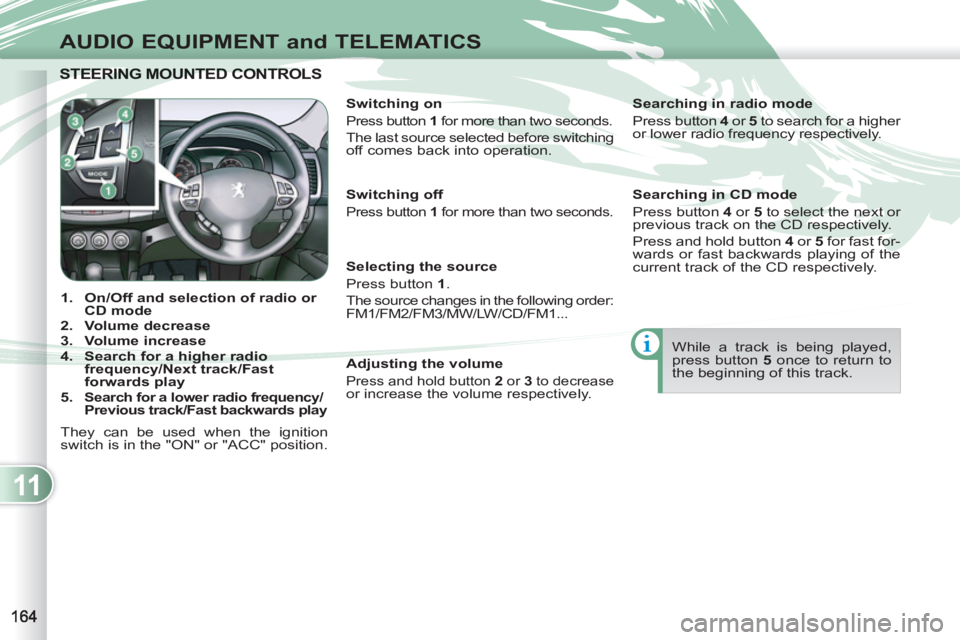
STEERING MOUNTED CONTROLS STEERING MOUNTED CONTRO
1.
On/Off and selection of
radio or
CD mode
2.
Volume decrease
3.
Volume increase
4.
Search for a higher radio
frequency/Next track/Fast
forwards play
5.
Search for a lower radio frequency/
Previous track/Fast backwards play
They can be used when the ignition
switch is in the "ON" or "ACC" position.
Switching on
Press button 1
for more than two seconds.
The last source selected before switching
off comes back into operation.
Selecting the source
Press button 1
.
The source changes in the following order:
FM1/FM2/FM3/MW/LW/CD/FM1...
Searching in radio mode
Press button 4
or 5
to search for a higher
or lower radio frequency respectively.
While a track is being played,
press button 5
once to return to
the beginning of this track.
Adjusting the volume
Press and hold button 2
or 3
to decrease or increase the volume respectively.
Switching off
Press button 1
for more than two seconds.
Searching in CD mode
Press button 4
or 5
to select the next or
previous track on the CD respectively.
Press and hold button 4
or 5
for fast for-
wards or fast backwards playing of the
current track of the CD respectively.
Page 167 of 236
11
AUDIO EQUIPMENT and TELEMATICS
GENERAL FUNCTIONS
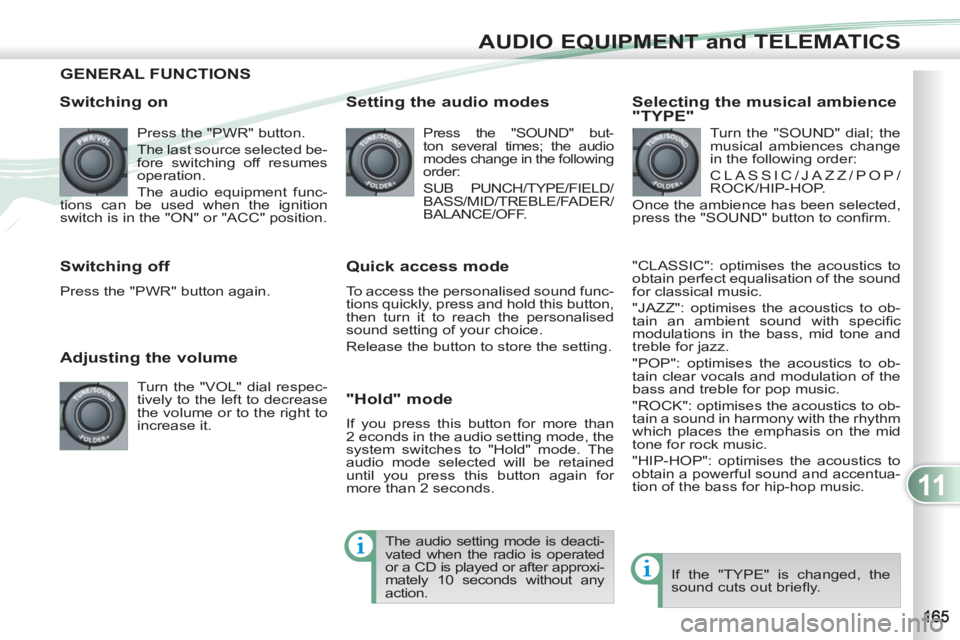
Switching on
Press the "PWR" button.
The last source selected be-
fore switching off resumes
operation.
The audio equipment func-
tions can be used when the ignition
switch is in the "ON" or "ACC" position.
Adjusting the volume
Turn the "VOL" dial respec-
tively to the left to decrease
the volume or to the right to
increase it.
Switching off
Press the "PWR" button again.
Setting the audio modes
Press the "SOUND" but-
ton several times; the audio
modes change in the following
order:
SUB PUNCH/TYPE/FIELD/
BASS/MID/TREBLE/FADER/
BALANCE/OFF.
Quick access mode
To access the personalised sound func-
tions quickly, press and hold this button,
then turn it to reach the personalised
sound setting of your choice.
Release the button to store the setting.
"Hold" mode
If you press this button for more than
2 econds in the audio setting mode, the
system switches to "Hold" mode. The
audio mode selected will be retained
until you press this button again for
more than 2 seconds.
Selecting the musical ambience
"TYPE"
Turn the "SOUND" dial; the
musical ambiences change
in the following order:
CLASSIC/JAZZ/POP/
ROCK/HIP-HOP.
Once the ambience has been selected,
press the "SOUND" button to confi rm.
"CLASSIC": optimises the acoustics to
obtain perfect equalisation of the sound
for classical music.
"JAZZ": optimises the acoustics to ob-
tain an ambient sound with specifi c
modulations in the bass, mid tone and
treble for jazz.
"POP": optimises the acoustics to ob-
tain clear vocals and modulation of the
bass and treble for pop music.
"ROCK": optimises the acoustics to ob-
tain a sound in harmony with the rhythm
which places the emphasis on the mid
tone for rock music.
"HIP-HOP": optimises the acoustics to
obtain a powerful sound and accentua-
tion of the bass for hip-hop music.
If the "TYPE" is changed, the
sound cuts out briefl y. The audio setting mode is deacti-
vated when the radio is operated
or a CD is played or after approxi-
mately 10 seconds without any
action.
Page 168 of 236
11
AUDIO EQUIPMENT and TELEMATICS
Selecting the surround effect
"FIELD"
Turn the "SOUND" dial; the
surround effects change in
the following order:
NORMAL/STAGE/LIVE/
HALL.
"NORMAL": produces a sound in which
the voices are at the front and the in-
struments surround the listener.
"STAGE": produces a sound in which
the voices are immediately facing the
listener, as on a stage.
"LIVE": produces a sound similar to
that of a live show, in which the sound
reaches the listener from all directions.
"HALL": produces a sound similar to
that of a concert hall with defl ection of
the sound.
Setting the bass "BASS"
Turn the "SOUND" dial to
set the required bass value.
Setting the mid tone "MID"
Turn the "SOUND" dial to set the re-
quired mid tone value.
Setting the treble "TREBLE"
Turn the "SOUND" dial to set the re-
quired treble value.
Setting the front/rear sound
distribution "FADER"
Turn the "SOUND" dial to set the bal-
ance of the volume of the front and rear
speakers.
Setting the right/left sound
distribution "BALANCE"
Turn the "SOUND" dial to set the bal-
ance of the volume of the right and left
speakers.
If the "FIELD" is changed, the
sound cuts out briefl y. If the value "0" is set, an audible
signal will be heard.
Automatic volume adjustment
"SCV"
This permits automatic adjustment of
the "VOLUME", "BASS", "MID" and
"TREBLE" settings in relation to the ve-
hicle speed.
Press the "SOUND" button
for more than two seconds
to gain access to the func-
tions setting mode.
Then, press this same but-
ton several times; the func-
tions setting mode changes in the fol-
lowing order:
AF/CT/REG/TP-S/PTY (languages)/
SCV/PHONE/OFF.
Turn the "SOUND" dial respectively to
the left to deactivate the function or to
the right to activate it. If the "SUB PUNCH" is changed,
the sound cuts out briefl y.
Setting the volume of the bass
unit "SUB PUNCH"
Turn the "SOUND" dial to set the volume
of the bass unit.
Only vehicles fi tted with the "Premium
Sound" system can offer the "SUB
PUNCH" setting.
Once the surround effect has been se-
lected, press the "SOUND" button to
confi rm.