light PEUGEOT 4007 2011 User Guide
[x] Cancel search | Manufacturer: PEUGEOT, Model Year: 2011, Model line: 4007, Model: PEUGEOT 4007 2011Pages: 236, PDF Size: 17.56 MB
Page 43 of 236
1
INSTRUMENTS and CONTROLS
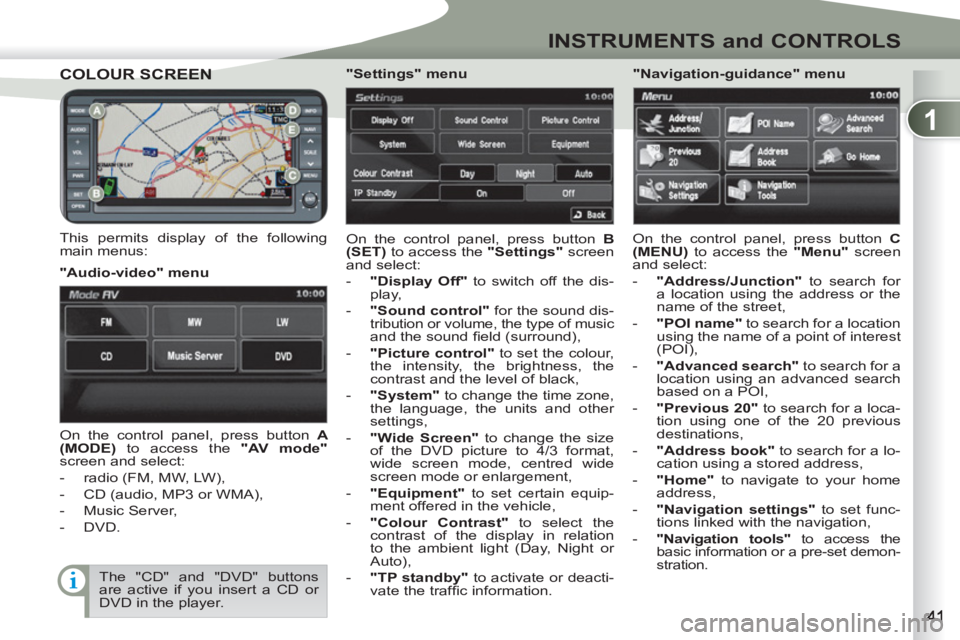
COLOUR SCREENCOLOUR SCREEN
This permits display of the following
main menus: On the control panel, press button B
(SET)
to access the "Settings"
screen
and select:
- "Display Off"
to switch off the dis-
play,
- "Sound control"
for the sound dis-
tribution or volume, the type of music and the sound fi eld (surround),
- "Picture control"
to set the colour,
the intensity, the brightness, the
contrast and the level of black,
- "System"
to change the time zone,
the language, the units and other
settings,
- "Wide Screen"
to change the size
of the DVD picture to 4/3 format,
wide screen mode, centred wide
screen mode or enlargement,
- "Equipment"
to set certain equip-
ment offered in the vehicle,
- "Colour Contrast"
to select the
contrast of the display in relation
to the ambient light (Day, Night or
Auto),
- "TP standby"
to activate or deacti-
vate the traffi c information.
"Audio-video" menu
"Navigation-guidance" menu
On the control panel, press button A
(MODE)
to access the "AV mode"
screen and select:
- radio (FM, MW, LW),
- CD (audio, MP3 or WMA),
- Music Server,
- DVD.
"Settings" menu
On the control panel, press button C
(MENU)
to access the "Menu"
screen
and select:
- "Address/Junction"
to search for
a location using the address or the
name of the street,
- "POI name"
to search for a location
using the name of a point of interest
(POI),
- "Advanced search"
to search for a
location using an advanced search
based on a POI,
- "Previous 20"
to search for a loca-
tion using one of the 20 previous
destinations,
- "Address book"
to search for a lo-
cation using a stored address,
- "Home"
to navigate to your home
address,
- "Navigation settings"
to set func-
tions linked with the navigation,
-
"Navigation tools"
to access the
basic information or a pre-set demon-
stration.
The "CD" and "DVD" buttons
are active if you insert a CD or
DVD in the player.
Page 45 of 236
1
INSTRUMENTS and CONTROLS
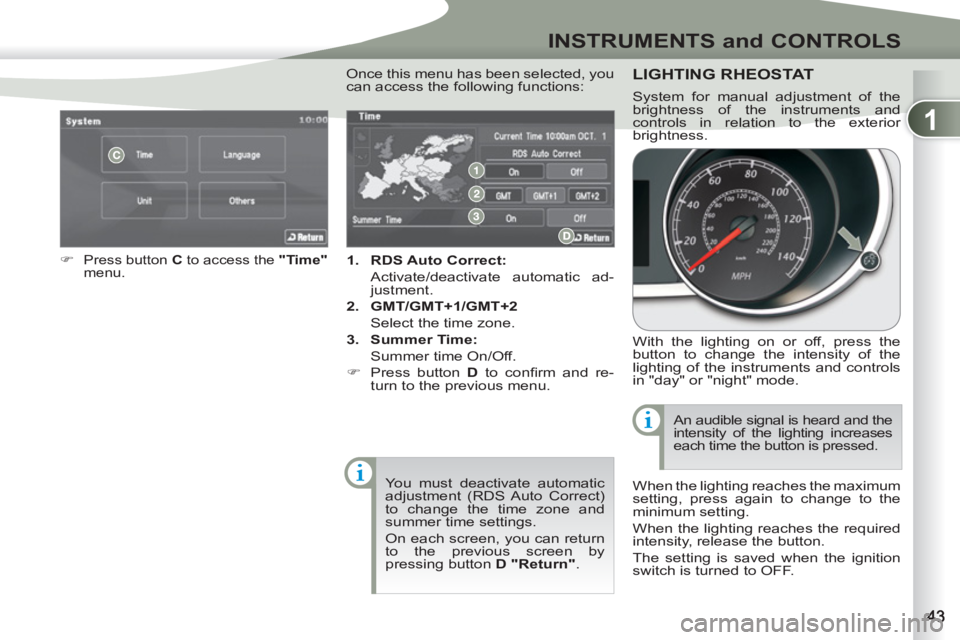
1.
RDS Auto Correct:
Activate/deactivate automatic ad-
justment.
2.
GMT/GMT+1/GMT+2
Select the time zone.
3.
Summer Time:
Summer time On/Off.
)
Press button D
to confi rm and re-
turn to the previous menu.
)
Press button C
to access the "Time"
menu .
You must deactivate automatic
adjustment (RDS Auto Correct)
to change the time zone and
summer time settings.
On each screen, you can return
to the previous screen by
pressing button D "Return"
.
Once this menu has been selected, you
can access the following functions: LIGHTING RHEOSTAT
With the lighting on or off, press the
button to change the intensity of the
lighting of the instruments and controls
in "day" or "night" mode.
When the lighting reaches the maximum
setting, press again to change to the
minimum setting.
When the lighting reaches the required
intensity, release the button.
The setting is saved when the ignition
switch is turned to OFF. An audible signal is heard and the
intensity of the lighting increases
each time the button is pressed.
System for manual adjustment of the
brightness of the instruments and
controls in relation to the exterior
brightness.
Page 52 of 236
2
COMFORT
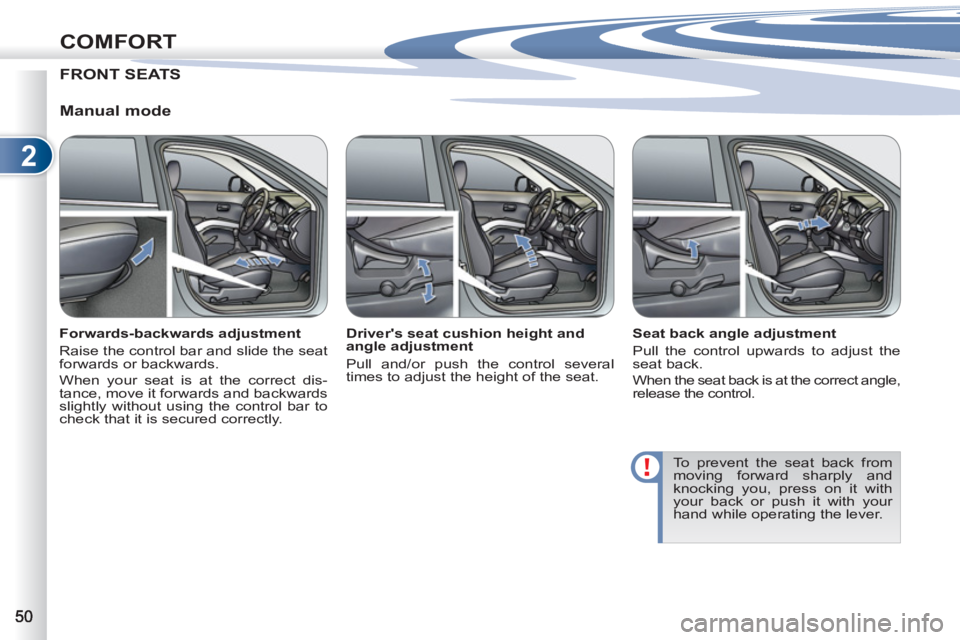
FRONT SEATS
Manual mode
Forwards-backwards adjustment
Raise the control bar and slide the seat
forwards or backwards.
When your seat is at the correct dis-
tance, move it forwards and backwards
slightly without using the control bar to
check that it is secured correctly.
Seat back angle adjustment
Pull the control upwards to adjust the
seat back.
When the seat back is at the correct angle,
release the control.
To prevent the seat back from
moving forward sharply and
knocking you, press on it with
your back or push it with your
hand while operating the lever.
Driver's seat cushion height and
angle adjustment
Pull and/or push the control several
times to adjust the height of the seat.
Page 55 of 236
2
COMFORT
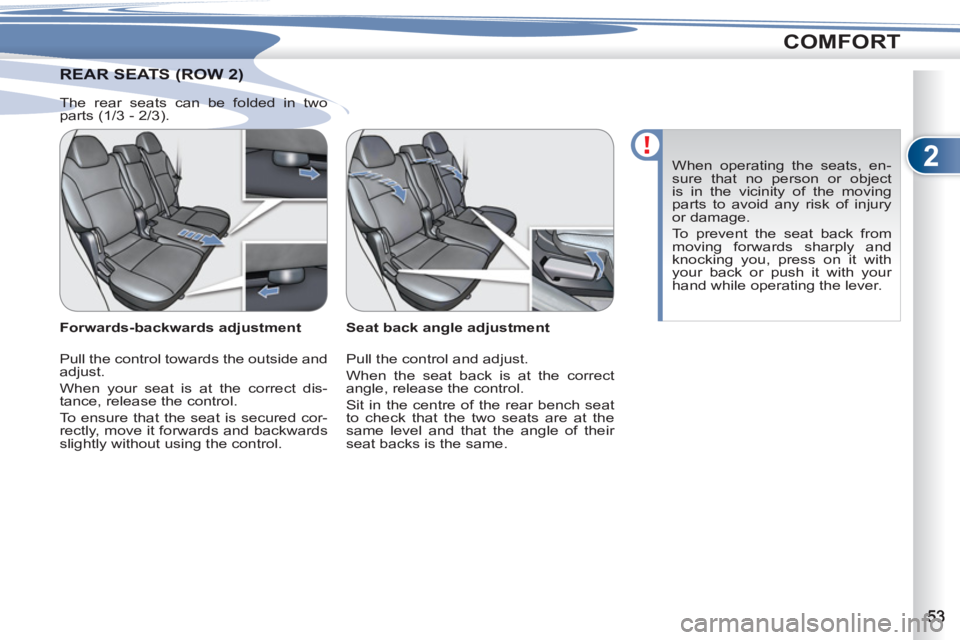
AR SEATS (ROW 2) REAR SEATS (ROW 2)
Seat back angle adjustment
Pull the control and adjust.
When the seat back is at the correct
angle, release the control.
Sit in the centre of the rear bench seat
to check that the two seats are at the
same level and that the angle of their
seat backs is the same.
Forwards-backwards adjustment
Pull the control towards the outside and
adjust.
When your seat is at the correct dis-
tance, release the control.
To ensure that the seat is secured cor-
rectly, move it forwards and backwards
slightly without using the control. When operating the seats, en-
sure that no person or object
is in the vicinity of the moving
parts to avoid any risk of injury
or damage.
To prevent the seat back from
moving forwards sharply and
knocking you, press on it with
your back or push it with your
hand while operating the lever.
The rear seats can be folded in two
parts (1/3 - 2/3).
Page 57 of 236
2
COMFORT
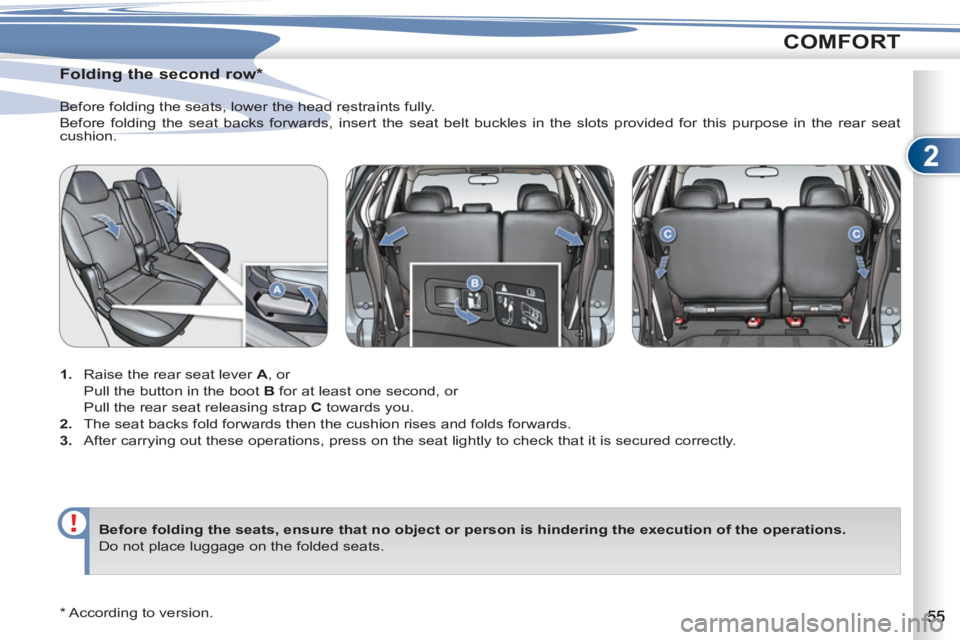
Folding the second row *
1.
Raise the rear seat lever A
, or
Pull the button in the boot B
for at least one second, or
Pull the rear seat releasing strap C
towards you.
2.
The seat backs fold forwards then the cushion rises and folds forwards.
3.
After carrying out these operations, press on the seat lightly to check that it is secured correctly. Before folding the seats, lower the head restraints fully.
Before folding the seat backs forwards, insert the seat belt buckles in the slots provided for this purpose in the rear seat
cushion.
Before
folding
the
seats
,
ensure that no object
or person is hindering
the execution of the operations.
Do not place luggage on the folded seats.
* According to version.
Page 58 of 236
2
COMFORT
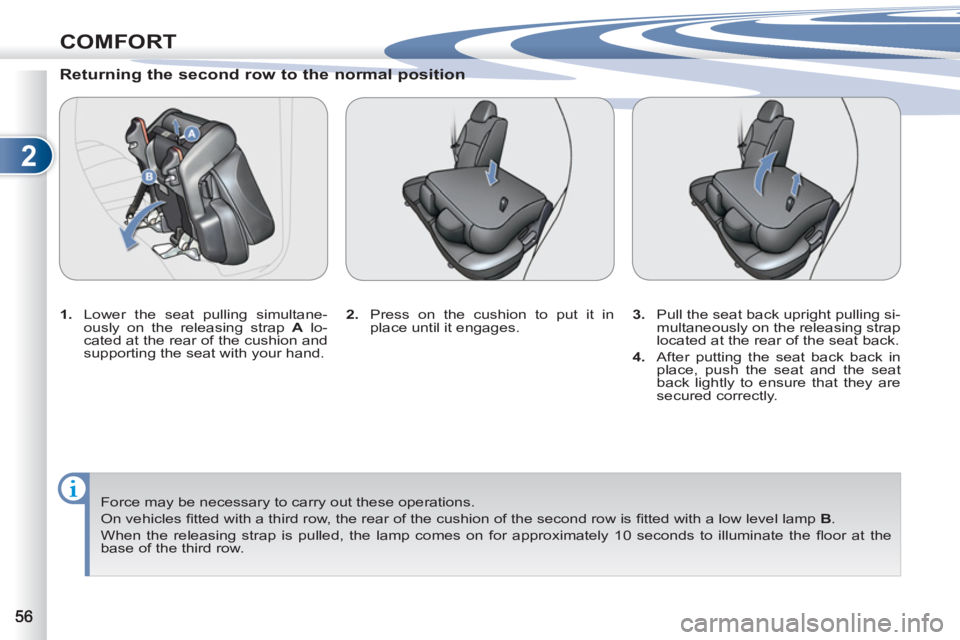
Returning the second row to the normal position
1.
Lower the seat pulling simultane-
ously on the releasing strap A
lo-
cated at the rear of the cushion and
supporting the seat with your hand.
Force may be necessary to carry out these operations.
On vehicles fi tted with a third row, the rear of the cushion of the second row is fi tted with a low level lamp B
.
When the releasing strap is pulled, the lamp comes on for approximately 10 seconds to illuminate the fl oor at the
base of the third row.
2.
Press on the cushion to put it in
place until it engages.
3.
Pull the seat back upright pulling si-
multaneously on the releasing strap
located at the rear of the seat back.
4.
After putting the seat back back in
place, push the seat and the seat
back lightly to ensure that they are
secured correctly.
Page 64 of 236
2
COMFORT
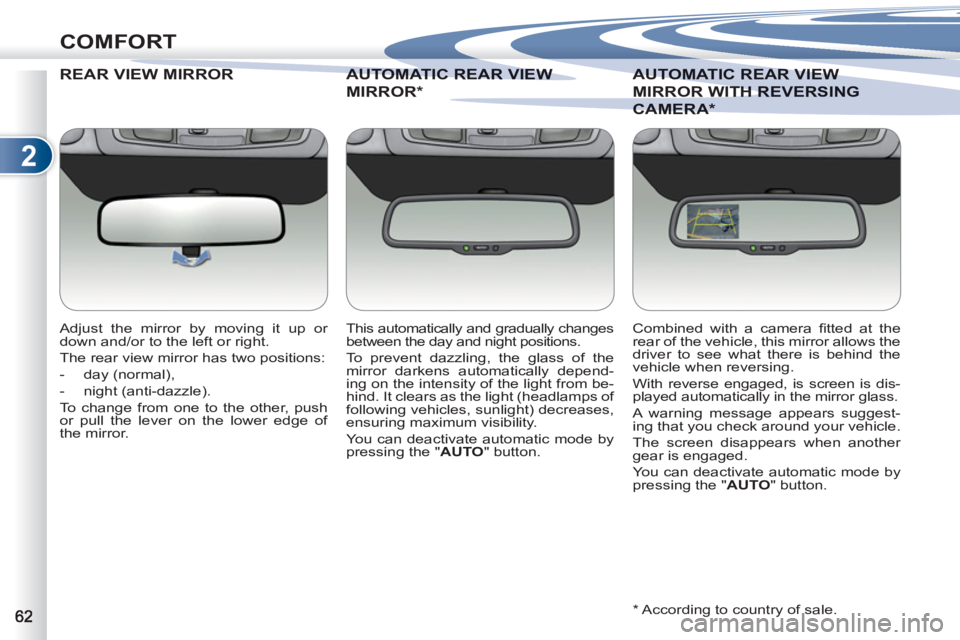
REAR VIEW MIRROR
Adjust the mirror by moving it up or
down and/or to the left or right.
The rear view mirror has two positions:
- day (normal),
- night (anti-dazzle).
To change from one to the other, push
or pull the lever on the lower edge of
the mirror.
* According to country of sale.
AUTOMATIC REAR VIEW
AUTOMATIC REAR VIEW
MIRROR *
This automatically and gradually changes
between the day and night positions.
To prevent dazzling, the glass of the
mirror darkens automatically depend-
ing on the intensity of the light from be-
hind. It clears as the light (headlamps of
following vehicles, sunlight) decreases,
ensuring maximum visibility.
You can deactivate automatic mode by
pressing the " AUTO
" button.
AUTOMATIC REAR VIEWAUTOMATIC REAR VIEW
MIRROR WITH RTH REVERSING
CAMERA CAMERA*
Combined with a camera fi tted at the
rear of the vehicle, this mirror allows the
driver to see what there is behind the
vehicle when reversing.
With reverse engaged, is screen is dis-
played automatically in the mirror glass.
A warning message appears suggest-
ing that you check around your vehicle.
The screen disappears when another
gear is engaged.
You can deactivate automatic mode by
pressing the " AUTO
" button.
Page 67 of 236
2
COMFORT
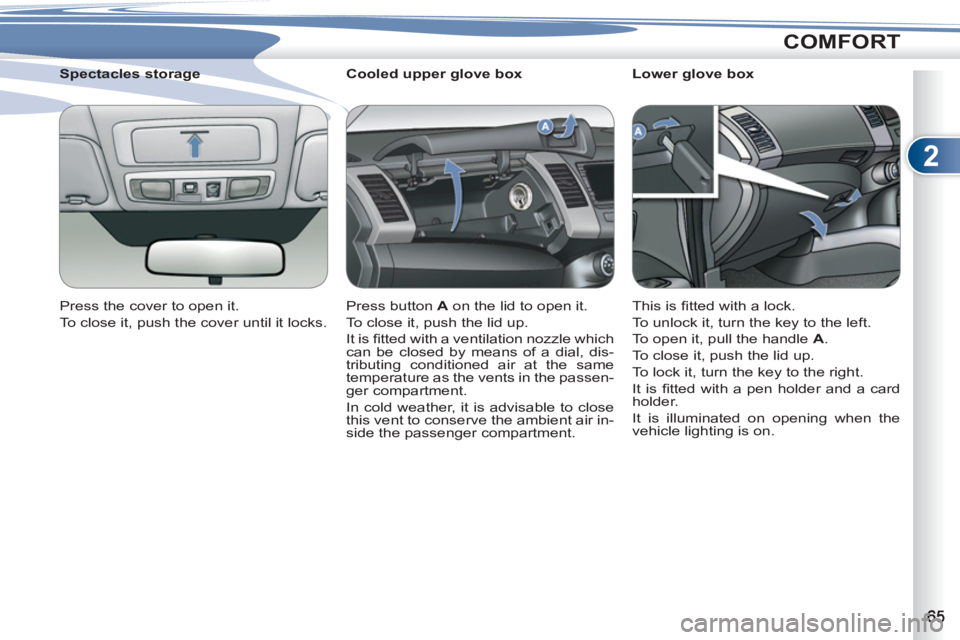
Cooled upper glove box
Press button A
on the lid to open it.
To close it, push the lid up.
It is fi tted with a ventilation nozzle which
can be closed by means of a dial, dis-
tributing conditioned air at the same
temperature as the vents in the passen-
ger compartment.
In cold weather, it is advisable to close
this vent to conserve the ambient air in-
side the passenger compartment.
Spectacles storage
Press the cover to open it.
To close it, push the cover until it locks.
Lower glove box
This is fi tted with a lock.
To unlock it, turn the key to the left.
To open it, pull the handle A
.
To close it, push the lid up.
To lock it, turn the key to the right.
It is fi tted with a pen holder and a card
holder.
It is illuminated on opening when the
vehicle lighting is on.
Page 75 of 236
3
ACCESS
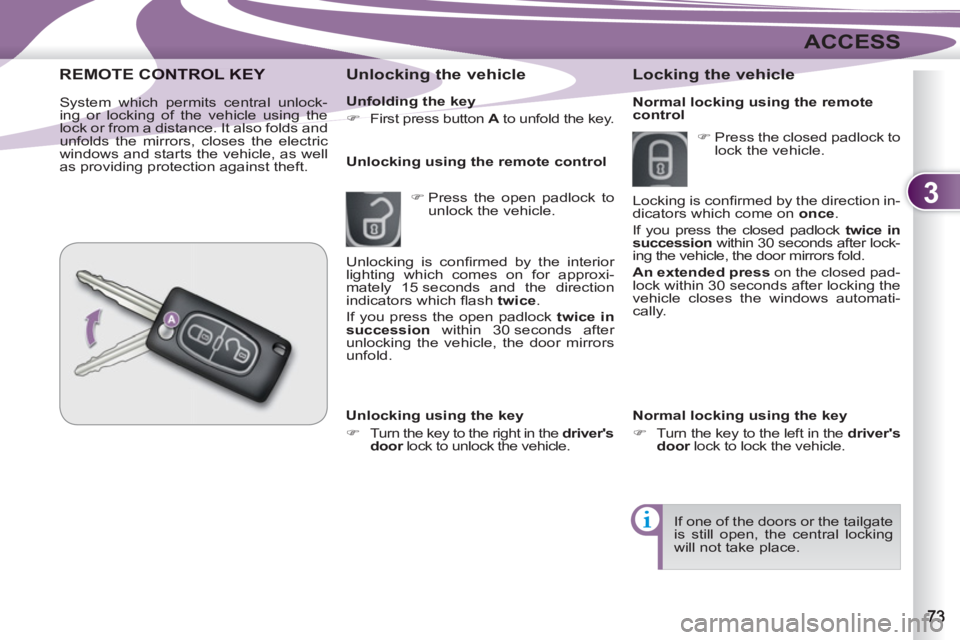
Unfolding the key
)
First press button A
to unfold the key.
Unlocking the vehicle
)
Press the open padlock to
unlock the vehicle.
Unlocking using the remote control
REMOTE COONTROL KEY
System which permits central unlock-
ing or locking of the vehicle using the
lock or from a distance. It also folds and
unfolds the mirrors, closes the electric
windows and starts the vehicle, as well
as providing protection against theft.
Locking the vehicle
Unlocking using the key
)
Turn the key to the right in the driver's
door
lock to unlock the vehicle.
)
Press the closed padlock to
lock the vehicle.
If one of the doors or the tailgate
is still open, the central locking
will not take place. Unlocking is confi rmed by the interior
lighting which comes on for approxi-
mately 15 seconds and the direction
indicators which fl ash twice
.
If you press the open padlock twice in
succession
within 30 seconds after
unlocking the vehicle, the door mirrors
unfold.
Normal locking using the key
)
Turn the key to the left in the driver's
door
lock to lock the vehicle. Locking is confi rmed by the direction in-
dicators which come on once
.
If you press the closed padlock twice in
succession
within 30 seconds after lock-
ing the vehicle, the door mirrors fold.
An extended press
on the closed pad-
lock within 30 seconds after locking the
vehicle closes the windows automati-
cally.
Normal locking using the remote
control
Page 88 of 236
4
VISIBILITY
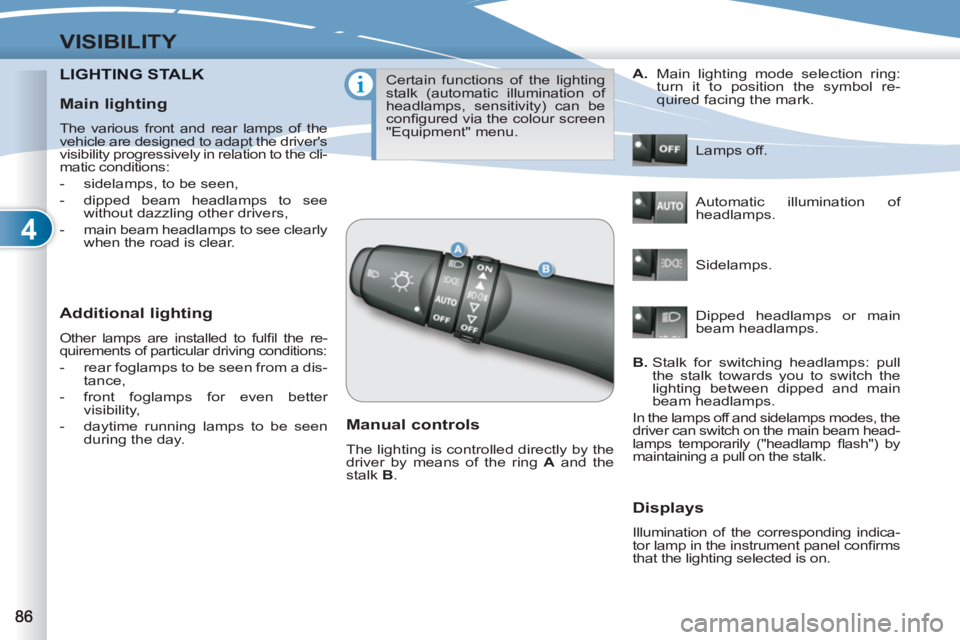
LIGHTING STALKNG STALK
Additional lighting
Other lamps are installed to fulfi l the re-
quirements of particular driving conditions:
- rear foglamps to be seen from a dis-
tance,
- front foglamps for even better
visibility,
- daytime running lamps to be seen
during the day.
Certain functions of the lighting
stalk (automatic illumination of
headlamps, sensitivity) can be
confi gured via the colour screen
"Equipment" menu.
Manual controls
The lighting is controlled directly by the
driver by means of the ring A
and the
stalk B
. Lamps off.
Automatic illumination of
headlamps.
Sidelamps.
B.
Stalk for switching headlamps: pull
the stalk towards you to switch the
lighting between dipped and main
beam headlamps.
In the lamps off and sidelamps modes, the
driver can switch on the main beam head-
lamps temporarily ("headlamp fl ash") by
maintaining a pull on the stalk.
Displays
Illumination of the corresponding indica-
tor lamp in the instrument panel confi rms
that the lighting selected is on.
A.
Main lighting mode selection ring:
turn it to position the symbol re-
quired facing the mark.
Dipped headlamps or main
beam headlamps.
Main lighting
The various front and rear lamps of the
vehicle are designed to adapt the driver's
visibility progressively in relation to the cli-
matic conditions:
- sidelamps, to be seen,
- dipped beam headlamps to see
without dazzling other drivers,
- main beam headlamps to see clearly
when the road is clear.