display PEUGEOT 4007 2012 User Guide
[x] Cancel search | Manufacturer: PEUGEOT, Model Year: 2012, Model line: 4007, Model: PEUGEOT 4007 2012Pages: 236, PDF Size: 17.59 MB
Page 36 of 236
1
INSTRUMENTS and CONTROLS
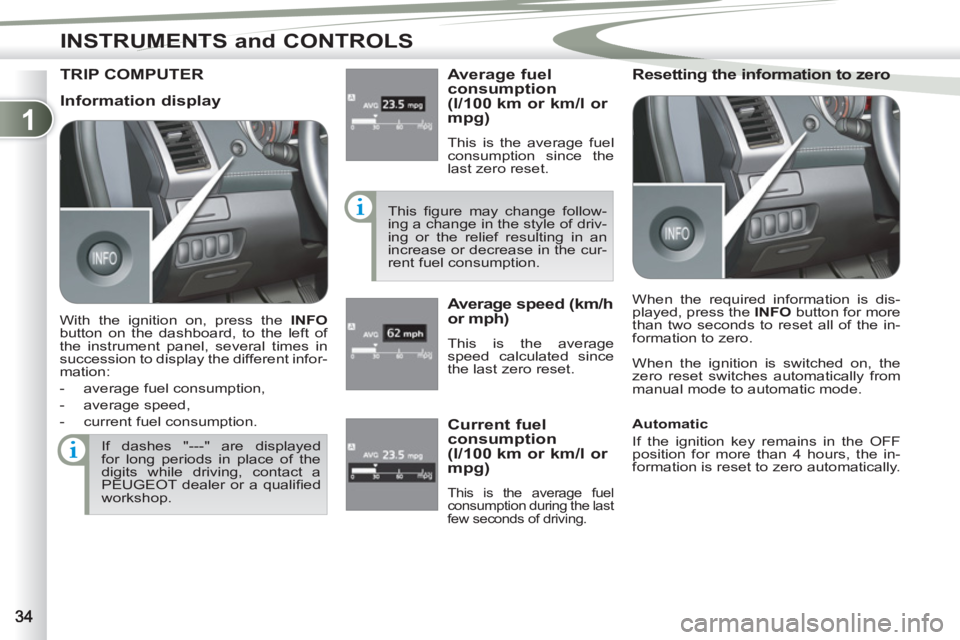
TRIP COMPUTER
Average fuel
consumption
(l/100 km or km/l or
mpg)
This is the average fuel
consumption since the
last zero reset.
This fi gure may change follow-
ing a change in the style of driv-
ing or the relief resulting in an
increase or decrease in the cur-
rent fuel consumption.
Average speed (km/h
or mph)
This is the average
speed calculated since
the last zero reset.
Resetting the information to zero
When the ignition is switched on, the
zero reset switches automatically from
manual mode to automatic mode.
If dashes "---" are displayed
for long periods in place of the
digits while driving, contact a
PEUGEOT dealer or a qualifi ed
workshop.
Current fuel
consumption
(l/100 km or km/l or
mpg)
This is the average fuel
consumption during the last
few seconds of driving.
Information display
With the ignition on, press the INFO
button on the dashboard, to the left of
the instrument panel, several times in
succession to display the different infor-
mation:
- average fuel consumption,
- average speed,
- current fuel consumption. When the required information is dis-
played, press the INFO
button for more
than two seconds to reset all of the in-
formation to zero.
Automatic
If the ignition key remains in the OFF
position for more than 4 hours, the in-
formation is reset to zero automatically.
Page 37 of 236
1
INSTRUMENTS and CONTROLS
When the vehicle is
stationary
, it allows the
user to change the fol-
lowing settings:
- the choice of the reini-
tialisation of the aver-
age fuel consumption
and average speed,
- the fuel consumption units,
- the temperature display unit,
- the display language,
- activation/deactivation of the INFO
button sound,
- the break (rest) reminder display in-
terval,
- restore the factory settings.
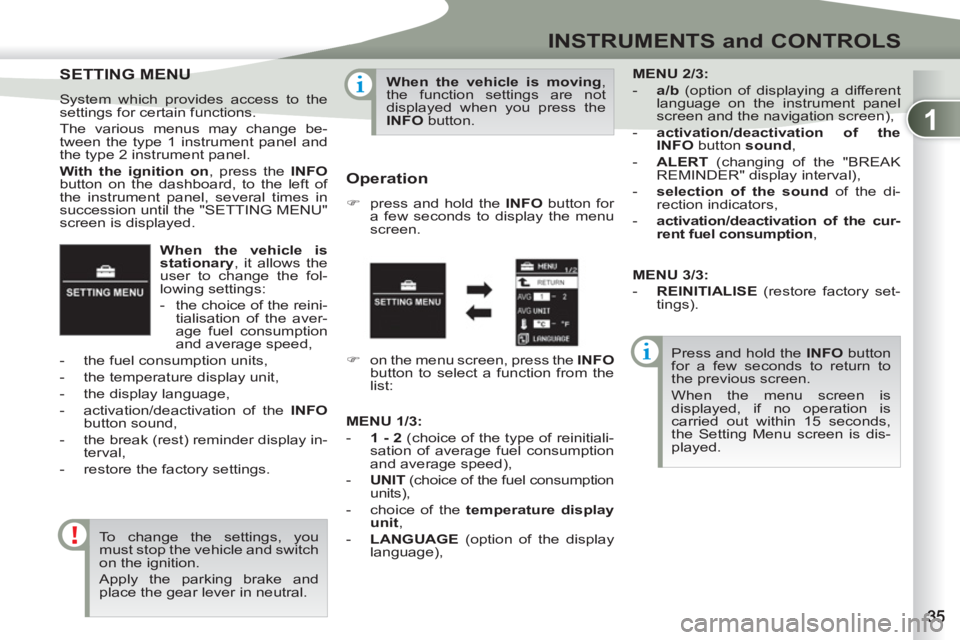
SETTING MENU
SETTING MENU
System which provides access to the
settings for certain functions.
The various menus may change be-
tween the type 1 instrument panel and
the type 2 instrument panel.
With the ignition on
, press the INFO
button on the dashboard, to the left of
the instrument panel, several times in
succession until the "SETTING MENU"
screen is displayed.
To change the settings, you
must stop the vehicle and switch
on the ignition.
Apply the parking brake and
place the gear lever in neutral.
When the vehicle is moving
,
the function settings are not
displayed when you press the
INFO
button.
Operation
)
press and hold the INFO
button for
a few seconds to display the menu
screen.
Press and hold the INFO
button
for a few seconds to return to
the previous screen.
When the menu screen is
displayed, if no operation is
carried out within 15 seconds,
the Setting Menu screen is dis-
played.
)
on the menu screen, press the INFO
button to select a function from the
list:
MENU
2/3:
- a/b
(option of displaying a different
language on the instrument panel
screen and the navigation screen),
- activation/deactivation of the
INFO
button sound
,
- ALERT
(changing of the "BREAK
REMINDER" display interval),
- selection of the sound
of the di-
rection indicators,
- activation/deactivation of the cur-
rent fuel consumption
,
MENU
1/3
:
- 1 - 2
(choice of the type of reinitiali-
sation of average fuel consumption
and average speed),
- UNIT
(choice of the fuel consumption
units),
- choice of the temperature display
unit
,
- LANGUAGE
(option of the display
language),
MENU 3/3:
- REINITIALISE
(restore factory set-
tings).
Page 38 of 236
1
INSTRUMENTS and CONTROLS
Choice of the fuel consumption
units
You can choose between different units
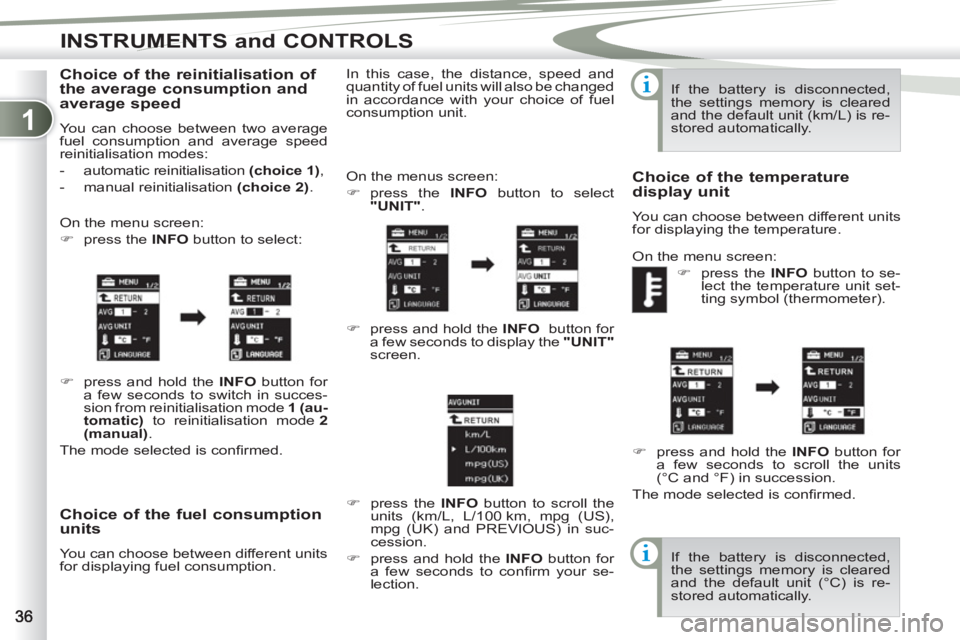
for displaying fuel consumption. On the menus screen:
)
press the INFO
button to select
"UNIT"
.
)
press and hold the INFO
button for
a few seconds to display the "UNIT"
screen.
)
press the INFO
button to scroll the
units (km/L, L/100 km, mpg (US),
mpg (UK) and PREVIOUS) in suc-
cession.
)
press and hold the INFO
button for
a few seconds to confi rm your se-
lection. In this case, the distance, speed and
quantity of fuel units will also be changed
in accordance with your choice of fuel
consumption unit. If the battery is disconnected,
the settings memory is cleared
and the default unit (km/L) is re-
stored automatically.
Choice of the temperature
display unit
You can choose between different units
for displaying the temperature.
On the menu screen:
)
press the INFO
button to se-
lect the temperature unit set-
ting symbol (thermometer).
)
press and hold the INFO
button for
a few seconds to scroll the units
(°C and °F) in succession.
The mode selected is confi rmed.
If the battery is disconnected,
the settings memory is cleared
and the default unit (°C) is re-
stored automatically.
Choice of the reinitialisation of
the average consumption and
average speed
You can choose between two average
fuel consumption and average speed
reinitialisation modes:
- automatic reinitialisation (
choice 1)
,
- manual reinitialisation (choice 2)
.
On the menu screen:
)
press the INFO
button to select:
)
press and hold the INFO
button for
a few seconds to switch in succes-
sion from reinitialisation mode 1
(au-
tomatic)
to reinitialisation mode 2
(manual)
.
The mode selected is confi rmed.
Page 39 of 236
1
INSTRUMENTS and CONTROLS
Choice of the display language
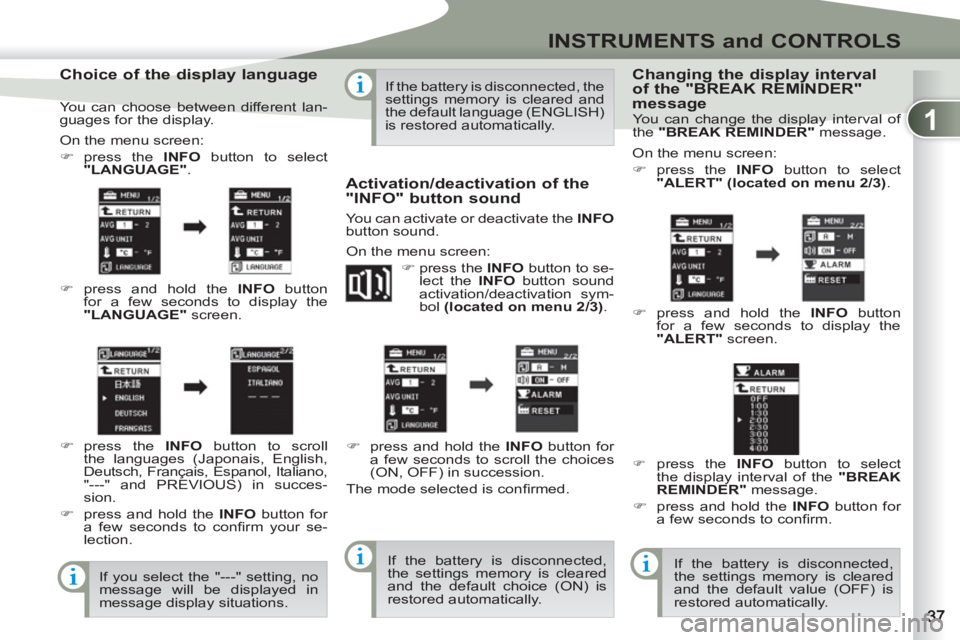
On the menu screen:
)
press the INFO
button to select
"LANGUAGE"
.
)
press and hold the INFO
button
for a few seconds to display the
"LANGUAGE"
screen.
)
press the INFO
button to scroll
the languages (Japonais, English,
Deutsch, Français, Espanol, Italiano,
"---" and PREVIOUS) in succes-
sion.
)
press and hold the INFO
button for
a few seconds to confi rm your se-
lection.
If you select the "---" setting, no
message will be displayed in
message display situations. If the battery is disconnected, the
settings memory is cleared and
the default language (ENGLISH)
is restored automatically.
Activation/deactivation of the
"INFO" button sound
You can activate or deactivate the INFO
button sound.
On the menu screen:
)
press the INFO
button to se-
lect the INFO
button sound
activation/deactivation sym-
bol (located on menu 2/3)
.
)
press and hold the INFO
button for
a few seconds to scroll the choices
(ON, OFF) in succession.
The mode selected is confi rmed.
If the battery is disconnected,
the settings memory is cleared
and the default choice (ON) is
restored automatically.
Changing the display interval
of the "BREAK REMINDER"
message
On the menu screen:
)
press the INFO
button to select
"ALERT" (located on menu 2/3)
.
)
press and hold the INFO
button
for a few seconds to display the
"ALERT"
screen.
)
press the INFO
button to select
the display interval of the "BREAK
REMINDER"
message.
)
press and hold the INFO
button for
a few seconds to confi rm.
If the battery is disconnected,
the settings memory is cleared
and the default value (OFF) is
restored automatically.
You can choose between different lan-
guages for the display. You can change the display interval of
the "BREAK REMINDER"
message.
Page 40 of 236
1
INSTRUMENTS and CONTROLS
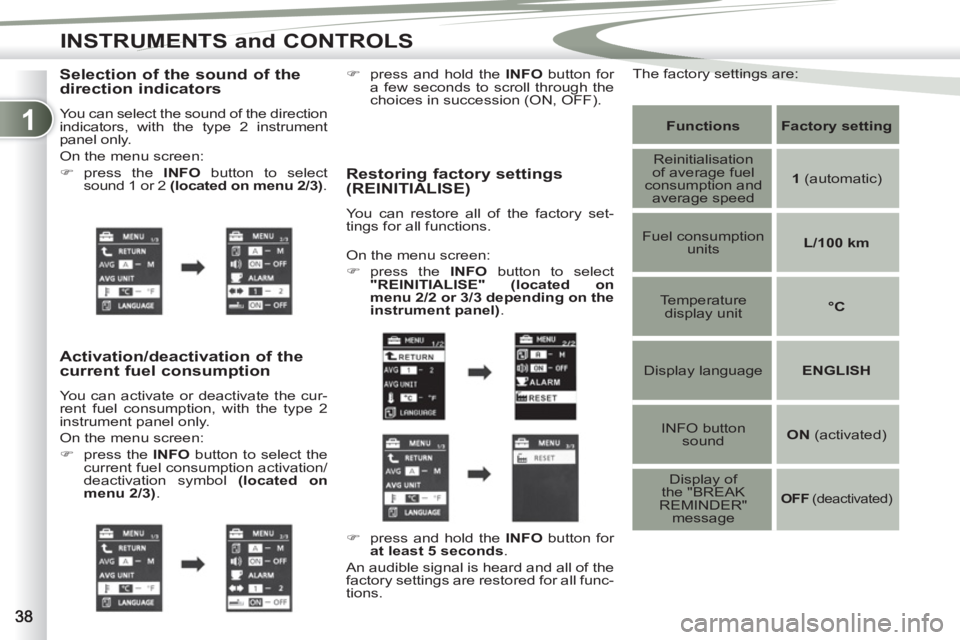
Selection of the sound of the
direction indicators
You can select the sound of the direction
indicators, with the type 2 instrument
panel only.
On the menu screen:
)
press the INFO
button to select
sound 1 or 2 (located on menu 2/3)
.
Activation/deactivation of the
current fuel consumption
You can activate or deactivate the cur-
rent fuel consumption, with the type 2
instrument panel only.
On the menu screen:
)
press the INFO
button to select the
current fuel consumption activation/
deactivation symbol (located on
menu 2/3)
.
Restoring factory settings
(REINITIALISE)
You can restore all of the factory set-
tings for all functions.
Functions
Factory
setting
Reinitialisation
of average fuel
consumption and
average speed
1
(automatic)
Fuel consumption
units
L/100 km
Temperature
display unit
°C
Display language
ENGLISH
INFO button
sound
ON
(activated)
Display of
the "BREAK
REMINDER"
message
OFF
(deactivated)
On the menu screen:
)
press the INFO
button to select
"REINITIALISE"
(located on
menu 2/2 or 3/3 depending on the
instrument panel)
.
)
press and hold the INFO
button for
at least 5 seconds
.
An audible signal is heard and all of the
factory settings are restored for all func-
tions.
)
press and hold the INFO
button for
a few seconds to scroll through the
choices in succession (ON, OFF).
The factory settings are:
Page 41 of 236
1
INSTRUMENTS and CONTROLS
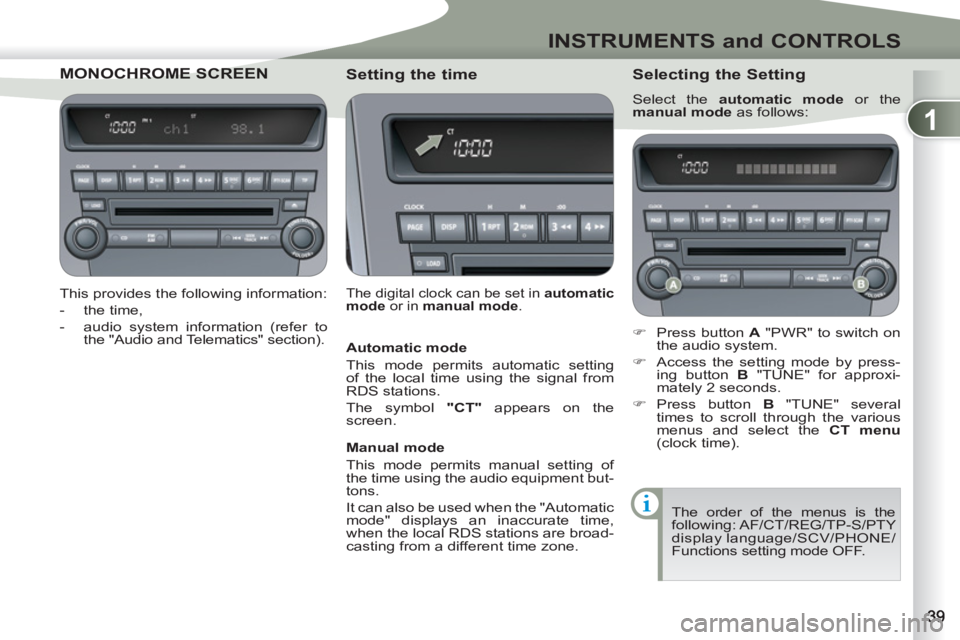
MONOCHROME SCRCHROME SCREEN
This provides the following information:
- the time,
- audio system information (refer to
the "Audio and Telematics" section).
Setting the time
The digital clock can be set in automatic
mode
or in manual mode
.
Selecting the Setting
Select the automatic mode
or the
manual mode
as follows:
)
Press button A
"PWR" to switch on
the audio system.
)
Access the setting mode by press-
ing button B
"TUNE" for approxi-
mately 2 seconds.
)
Press button B
"TUNE" several
times to scroll through the various
menus and select the CT menu
(clock time).
The order of the menus is the
following: AF/CT/REG/TP-S/PTY
display language/SCV/PHONE/
Functions setting mode OFF.
Automatic mode
This mode permits automatic setting
of the local time using the signal from
RDS stations.
The symbol "CT"
appears on the
screen.
Manual mode
This mode permits manual setting of
the time using the audio equipment but-
tons.
It can also be used when the "Automatic
mode" displays an inaccurate time,
when the local RDS stations are broad-
casting from a different time zone.
Page 42 of 236
1
INSTRUMENTS and CONTROLS
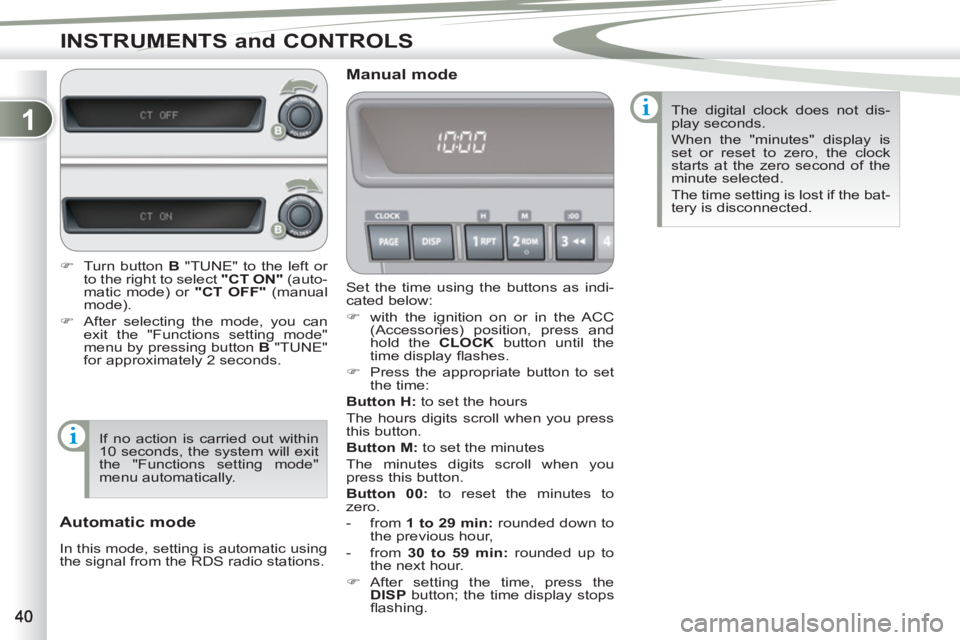
Set the time using the buttons as indi-
cated below:
)
with the ignition on or in the ACC
(Accessories) position, press and
hold the CLOCK
button until the
time display fl ashes.
)
Press the appropriate button to set
the time:
Button
H:
to set the hours
The hours digits scroll when you press
this button.
Button M:
to set the minutes
The minutes digits scroll when you
press this button.
Button 00:
to reset the minutes to
zero.
- from 1 to 29 min
:
rounded down to
the previous hour,
- from 30 to 59 min:
rounded up to
the next hour.
)
After setting the time, press the
DISP
button; the time display stops
fl ashing.
Manual mode
Automatic mode
In this mode, setting is automatic using
the signal from the RDS radio stations. The digital clock does not dis-
play seconds.
When the "minutes" display is
set or reset to zero, the clock
starts at the zero second of the
minute selected.
The time setting is lost if the bat-
tery is disconnected.
)
Turn button B
"TUNE" to the left or
to the right to select "CT ON"
(auto-
matic mode) or "CT OFF"
(manual
mode).
)
After selecting the mode, you can
exit the "Functions setting mode"
menu by pressing button B
"TUNE"
for approximately 2 seconds.
If no action is carried out within
10 seconds, the system will exit
the "Functions setting mode"
menu automatically.
Page 43 of 236
1
INSTRUMENTS and CONTROLS
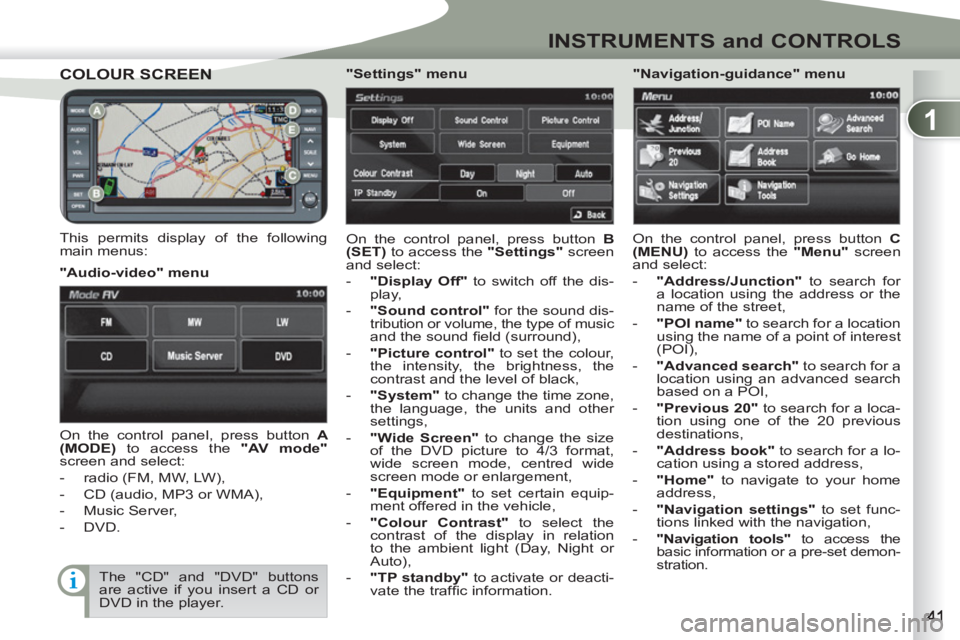
COLOUR SCREENCOLOUR SCREEN
This permits display of the following
main menus: On the control panel, press button B
(SET)
to access the "Settings"
screen
and select:
- "Display Off"
to switch off the dis-
play,
- "Sound control"
for the sound dis-
tribution or volume, the type of music and the sound fi eld (surround),
- "Picture control"
to set the colour,
the intensity, the brightness, the
contrast and the level of black,
- "System"
to change the time zone,
the language, the units and other
settings,
- "Wide Screen"
to change the size
of the DVD picture to 4/3 format,
wide screen mode, centred wide
screen mode or enlargement,
- "Equipment"
to set certain equip-
ment offered in the vehicle,
- "Colour Contrast"
to select the
contrast of the display in relation
to the ambient light (Day, Night or
Auto),
- "TP standby"
to activate or deacti-
vate the traffi c information.
"Audio-video" menu
"Navigation-guidance" menu
On the control panel, press button A
(MODE)
to access the "AV mode"
screen and select:
- radio (FM, MW, LW),
- CD (audio, MP3 or WMA),
- Music Server,
- DVD.
"Settings" menu
On the control panel, press button C
(MENU)
to access the "Menu"
screen
and select:
- "Address/Junction"
to search for
a location using the address or the
name of the street,
- "POI name"
to search for a location
using the name of a point of interest
(POI),
- "Advanced search"
to search for a
location using an advanced search
based on a POI,
- "Previous 20"
to search for a loca-
tion using one of the 20 previous
destinations,
- "Address book"
to search for a lo-
cation using a stored address,
- "Home"
to navigate to your home
address,
- "Navigation settings"
to set func-
tions linked with the navigation,
-
"Navigation tools"
to access the
basic information or a pre-set demon-
stration.
The "CD" and "DVD" buttons
are active if you insert a CD or
DVD in the player.
Page 44 of 236
1
INSTRUMENTS and CONTROLS
Setting the time
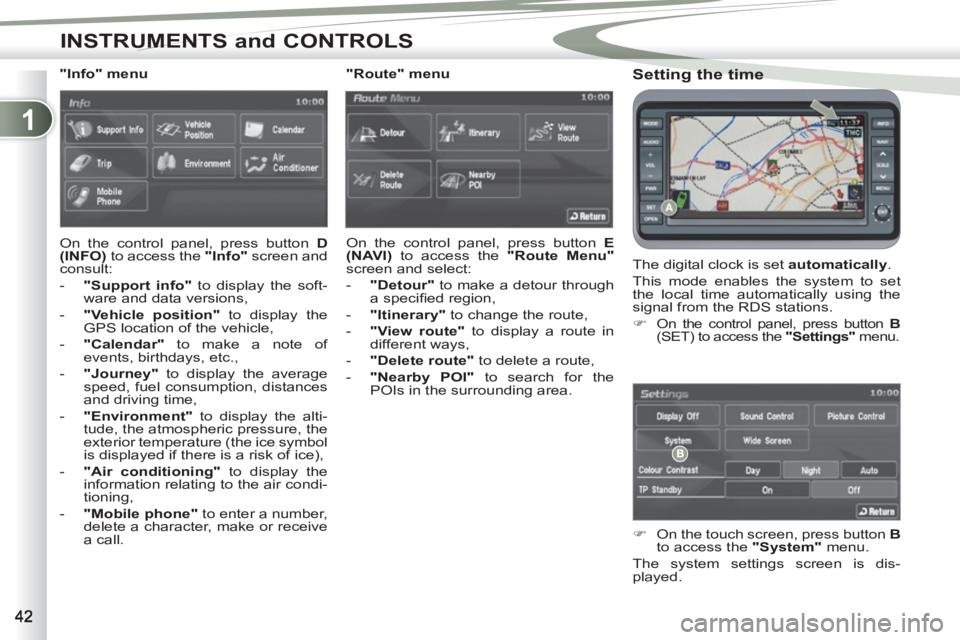
The digital clock is set automatically
.
This mode enables the system to set
the local time automatically using the
signal from the RDS stations.
)
On the control panel, press button B
(SET) to access the "Settings"
menu.
)
On the touch screen, press button B
to access the "System"
menu.
The system settings screen is dis-
played.
"Info" menu
On the control panel, press button D
(INFO)
to access the "Info"
screen and
consult:
- "Support info"
to display the soft-
ware and data versions,
- "Vehicle position"
to display the
GPS location of the vehicle,
- "Calendar"
to make a note of
events, birthdays, etc.,
- "Journey"
to display the average
speed, fuel consumption, distances
and driving time,
- "Environment"
to display the alti-
tude, the atmospheric pressure, the
exterior temperature (the ice symbol
is displayed if there is a risk of ice),
- "Air conditioning"
to display the
information relating to the air condi-
tioning,
- "Mobile phone"
to enter a number,
delete a character, make or receive
a call.
"Route" menu
On the control panel, press button E
(NAVI)
to access the "Route Menu"
screen and select:
- "Detour"
to make a detour through
a specifi ed region,
- "Itinerary"
to change the route,
- "View route"
to display a route in
different ways,
- "Delete route"
to delete a route,
-
"Nearby POI"
to search for the
POIs in the surrounding area.
Page 46 of 236
2
COMFORT
For even air distribution, take care not
to obstruct the exterior air intake grille
located at the bottom of the windscreen,
the vents, the air outlets under the front
seats and the air extractor located be-
hind the fl aps in the boot. The water formed by the air conditioning
condensation is discharged via an open-
ing provided for this purpose. Therefore,
a puddle of water may form underneath
the vehicle when stationary.
If the system does not produce cold air,
do not use it and have it checked by a
PEUGEOT dealer or a qualifi ed workshop.
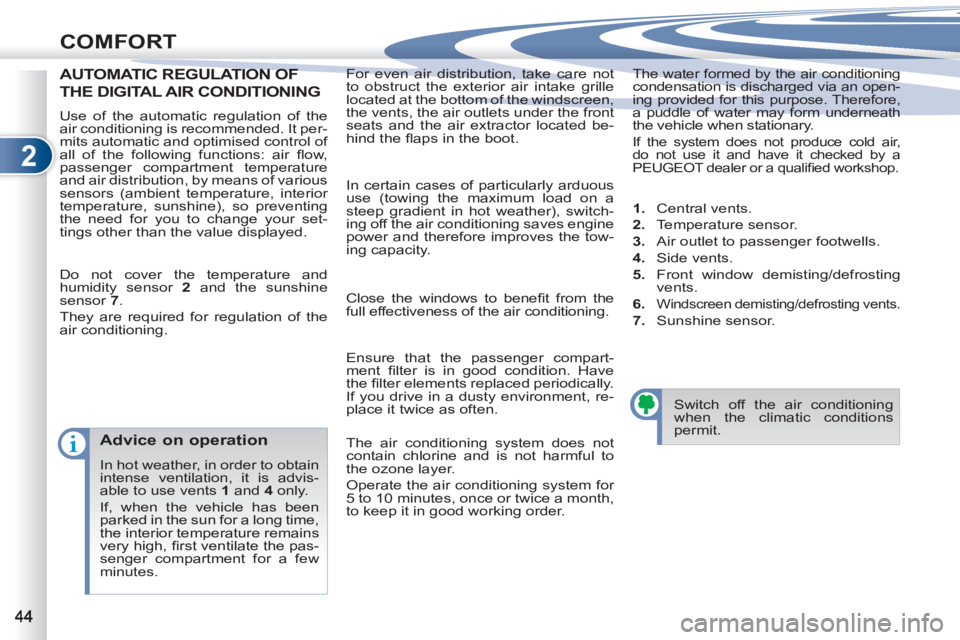
AUTOMATIC REGULATION OF ON OF
THE DIGITAL AIR CONDITIONING
Do not cover the temperature and
humidity sensor 2
and the sunshine
sensor 7
.
They are required for regulation of the
air conditioning.
Advice on operation
In hot weather, in order to obtain
intense ventilation, it is advis-
able to use vents 1
and 4
only.
If, when the vehicle has been
parked in the sun for a long time,
the interior temperature remains
very high, fi rst ventilate the pas-
senger compartment for a few
minutes. Switch off the air conditioning
when the climatic conditions
permit. Use of the automatic regulation of the
air conditioning is recommended. It per-
mits automatic and optimised control of
all of the following functions: air fl ow,
passenger compartment temperature
and air distribution, by means of various
sensors (ambient temperature, interior
temperature, sunshine), so preventing
the need for you to change your set-
tings other than the value displayed. In certain cases of particularly arduous
use (towing the maximum load on a
steep gradient in hot weather), switch-
ing off the air conditioning saves engine
power and therefore improves the tow-
ing capacity.
Close the windows to benefi t from the
full effectiveness of the air conditioning.
Ensure that the passenger compart-
ment fi lter is in good condition. Have
the fi lter elements replaced periodically.
If you drive in a dusty environment, re-
place it twice as often.
The air conditioning system does not
contain chlorine and is not harmful to
the ozone layer.
Operate the air conditioning system for
5 to 10 minutes, once or twice a month,
to keep it in good working order.
1.
Central vents.
2.
Temperature sensor.
3.
Air outlet to passenger footwells.
4.
Side vents.
5.
Front window demisting/defrosting
vents.
6.
Windscreen demisting/defrosting vents.
7.
Sunshine sensor.