ignition PEUGEOT 4007 2012 User Guide
[x] Cancel search | Manufacturer: PEUGEOT, Model Year: 2012, Model line: 4007, Model: PEUGEOT 4007 2012Pages: 236, PDF Size: 17.59 MB
Page 35 of 236
1
INSTRUMENTS and CONTROLS
SERVICE INDICATOSERVICE INDICATOR
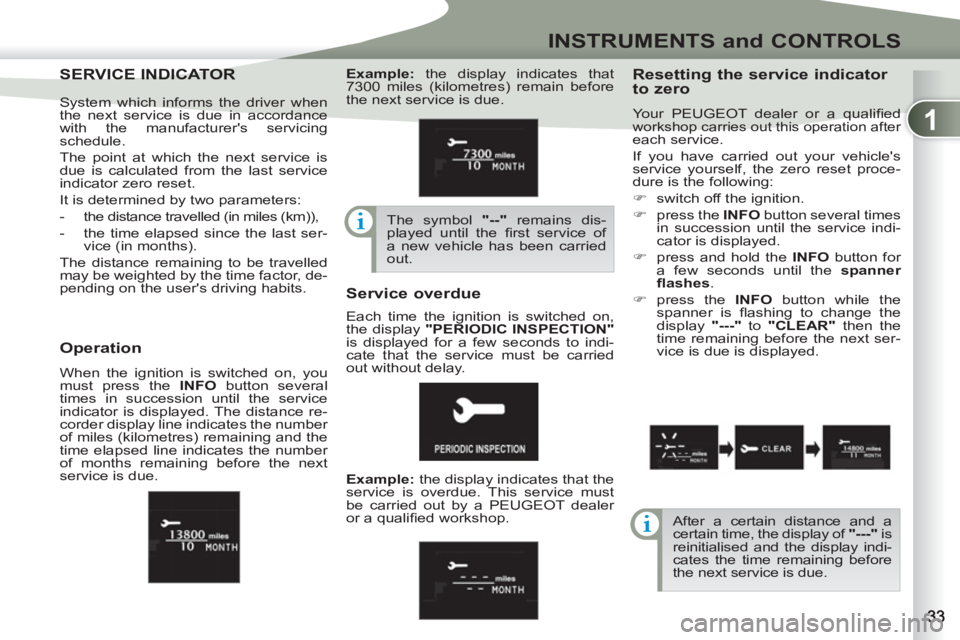
Resetting the service indicator
to zero
Your PEUGEOT dealer or a qualifi ed workshop carries out this operation after
each service.
If you have carried out your vehicle's
service yourself, the zero reset proce-
dure is the following:
)
switch off the ignition.
)
press the INFO
button several times
in succession until the service indi-
cator is displayed.
)
press and hold the INFO
button for
a few seconds until the spanner
fl ashes
.
)
press the INFO
button while the
spanner is fl ashing to change the
display "---"
to "CLEAR"
then the
time remaining before the next ser-
vice is due is displayed.
Service overdue
Operation
When the ignition is switched on, you
must press the INFO
button several
times in succession until the service
indicator is displayed. The distance re-
corder display line indicates the number
of miles (kilometres) remaining and the
time elapsed line indicates the number
of months remaining before the next
service is due.
After a certain distance and a
certain time, the display of "---"
is
reinitialised and the display indi-
cates the time remaining before
the next service is due. System which informs the driver when
the next service is due in accordance
with the manufacturer's servicing
schedule.
The point at which the next service is
due is calculated from the last service
indicator zero reset.
It is determined by two parameters:
- the distance travelled (in miles (km)),
- the time elapsed since the last ser-
vice (in months).
The distance remaining to be travelled
may be weighted by the time factor, de-
pending on the user's driving habits.
Example:
the display indicates that
7300 miles (kilometres) remain before
the next service is due.
The symbol "--"
remains dis-
played until the fi rst service of
a new vehicle has been carried
out.
Example:
the display indicates that the
service is overdue. This service must
be carried out by a PEUGEOT dealer
or a qualifi ed workshop. Each time the ignition is switched on,
the display "PERIODIC INSPECTION"
is displayed for a few seconds to indi-
cate that the service must be carried
out without delay.
Page 36 of 236
1
INSTRUMENTS and CONTROLS
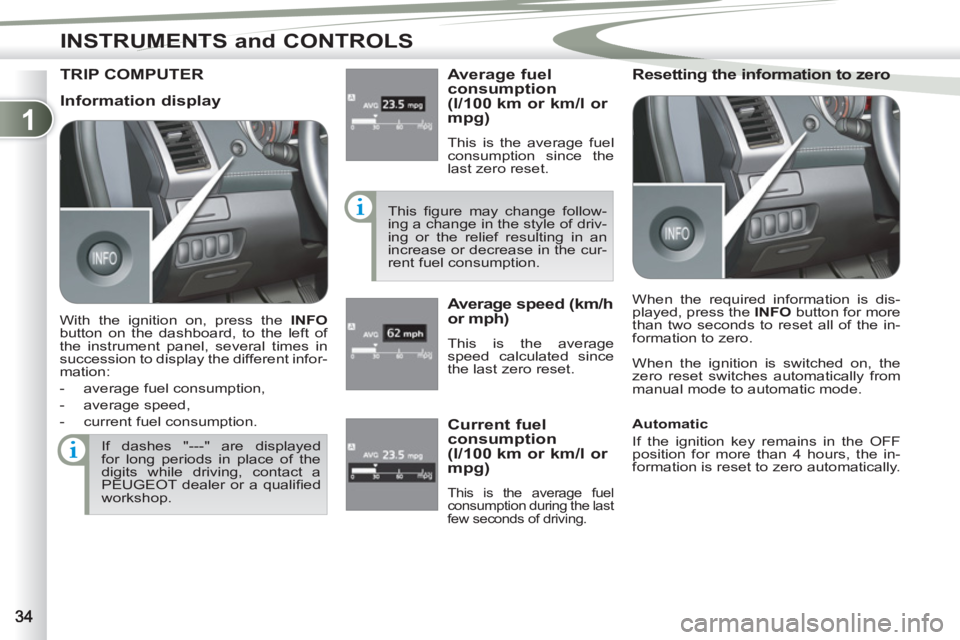
TRIP COMPUTER
Average fuel
consumption
(l/100 km or km/l or
mpg)
This is the average fuel
consumption since the
last zero reset.
This fi gure may change follow-
ing a change in the style of driv-
ing or the relief resulting in an
increase or decrease in the cur-
rent fuel consumption.
Average speed (km/h
or mph)
This is the average
speed calculated since
the last zero reset.
Resetting the information to zero
When the ignition is switched on, the
zero reset switches automatically from
manual mode to automatic mode.
If dashes "---" are displayed
for long periods in place of the
digits while driving, contact a
PEUGEOT dealer or a qualifi ed
workshop.
Current fuel
consumption
(l/100 km or km/l or
mpg)
This is the average fuel
consumption during the last
few seconds of driving.
Information display
With the ignition on, press the INFO
button on the dashboard, to the left of
the instrument panel, several times in
succession to display the different infor-
mation:
- average fuel consumption,
- average speed,
- current fuel consumption. When the required information is dis-
played, press the INFO
button for more
than two seconds to reset all of the in-
formation to zero.
Automatic
If the ignition key remains in the OFF
position for more than 4 hours, the in-
formation is reset to zero automatically.
Page 37 of 236
1
INSTRUMENTS and CONTROLS
When the vehicle is
stationary
, it allows the
user to change the fol-
lowing settings:
- the choice of the reini-
tialisation of the aver-
age fuel consumption
and average speed,
- the fuel consumption units,
- the temperature display unit,
- the display language,
- activation/deactivation of the INFO
button sound,
- the break (rest) reminder display in-
terval,
- restore the factory settings.
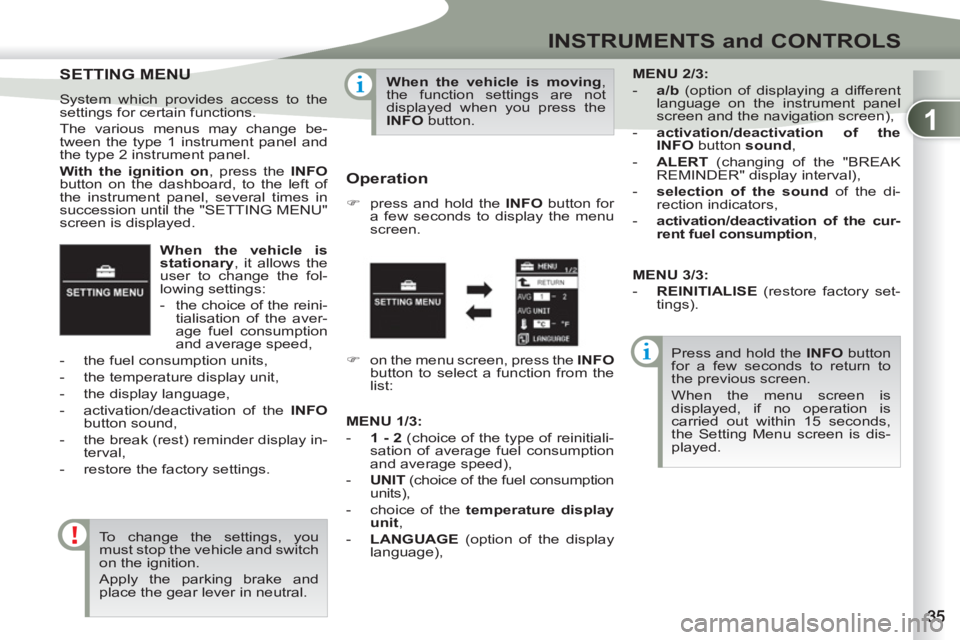
SETTING MENU
SETTING MENU
System which provides access to the
settings for certain functions.
The various menus may change be-
tween the type 1 instrument panel and
the type 2 instrument panel.
With the ignition on
, press the INFO
button on the dashboard, to the left of
the instrument panel, several times in
succession until the "SETTING MENU"
screen is displayed.
To change the settings, you
must stop the vehicle and switch
on the ignition.
Apply the parking brake and
place the gear lever in neutral.
When the vehicle is moving
,
the function settings are not
displayed when you press the
INFO
button.
Operation
)
press and hold the INFO
button for
a few seconds to display the menu
screen.
Press and hold the INFO
button
for a few seconds to return to
the previous screen.
When the menu screen is
displayed, if no operation is
carried out within 15 seconds,
the Setting Menu screen is dis-
played.
)
on the menu screen, press the INFO
button to select a function from the
list:
MENU
2/3:
- a/b
(option of displaying a different
language on the instrument panel
screen and the navigation screen),
- activation/deactivation of the
INFO
button sound
,
- ALERT
(changing of the "BREAK
REMINDER" display interval),
- selection of the sound
of the di-
rection indicators,
- activation/deactivation of the cur-
rent fuel consumption
,
MENU
1/3
:
- 1 - 2
(choice of the type of reinitiali-
sation of average fuel consumption
and average speed),
- UNIT
(choice of the fuel consumption
units),
- choice of the temperature display
unit
,
- LANGUAGE
(option of the display
language),
MENU 3/3:
- REINITIALISE
(restore factory set-
tings).
Page 42 of 236
1
INSTRUMENTS and CONTROLS
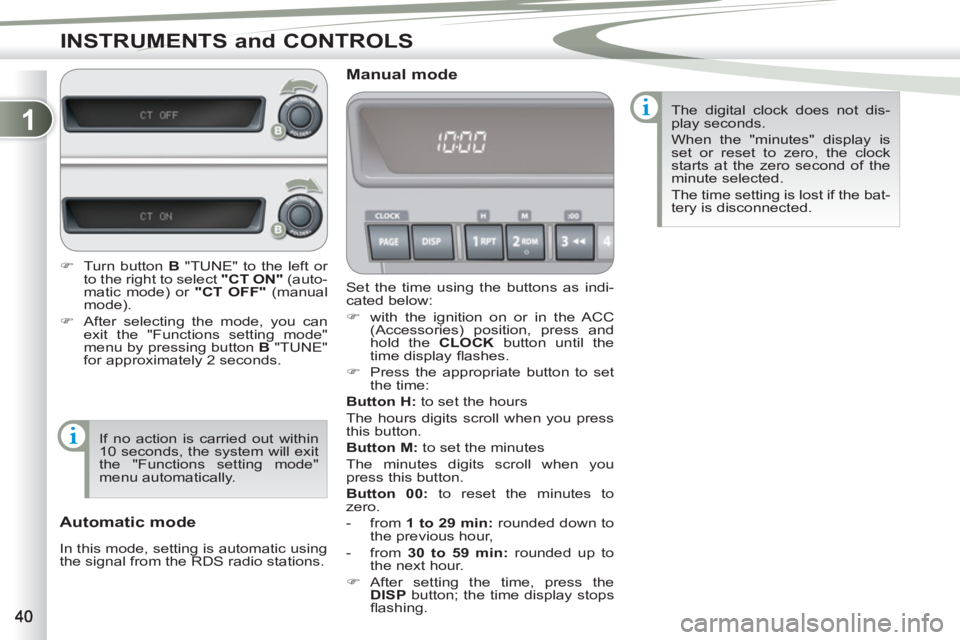
Set the time using the buttons as indi-
cated below:
)
with the ignition on or in the ACC
(Accessories) position, press and
hold the CLOCK
button until the
time display fl ashes.
)
Press the appropriate button to set
the time:
Button
H:
to set the hours
The hours digits scroll when you press
this button.
Button M:
to set the minutes
The minutes digits scroll when you
press this button.
Button 00:
to reset the minutes to
zero.
- from 1 to 29 min
:
rounded down to
the previous hour,
- from 30 to 59 min:
rounded up to
the next hour.
)
After setting the time, press the
DISP
button; the time display stops
fl ashing.
Manual mode
Automatic mode
In this mode, setting is automatic using
the signal from the RDS radio stations. The digital clock does not dis-
play seconds.
When the "minutes" display is
set or reset to zero, the clock
starts at the zero second of the
minute selected.
The time setting is lost if the bat-
tery is disconnected.
)
Turn button B
"TUNE" to the left or
to the right to select "CT ON"
(auto-
matic mode) or "CT OFF"
(manual
mode).
)
After selecting the mode, you can
exit the "Functions setting mode"
menu by pressing button B
"TUNE"
for approximately 2 seconds.
If no action is carried out within
10 seconds, the system will exit
the "Functions setting mode"
menu automatically.
Page 45 of 236
1
INSTRUMENTS and CONTROLS
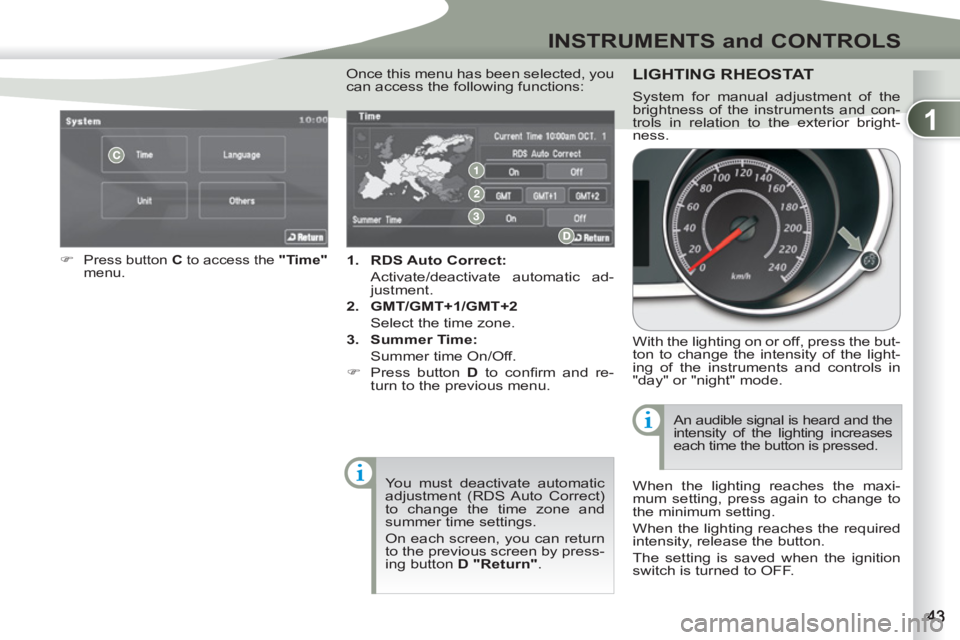
1.
RDS Auto Correct:
Activate/deactivate automatic ad-
justment.
2.
GMT/GMT+1/GMT+2
Select the time zone.
3.
Summer Time:
Summer time On/Off.
)
Press button D
to confi rm and re-
turn to the previous menu.
)
Press button C
to access the "Time"
menu .
You must deactivate automatic
adjustment (RDS Auto Correct)
to change the time zone and
summer time settings.
On each screen, you can return
to the previous screen by press-
ing button D "Return"
.
Once this menu has been selected, you
can access the following functions: LIGHTING RHEOSTAT
With the lighting on or off, press the but-
ton to change the intensity of the light-
ing of the instruments and controls in
"day" or "night" mode.
When the lighting reaches the maxi-
mum setting, press again to change to
the minimum setting.
When the lighting reaches the required
intensity, release the button.
The setting is saved when the ignition
switch is turned to OFF. An audible signal is heard and the
intensity of the lighting increases
each time the button is pressed.
System for manual adjustment of the
brightness of the instruments and con-
trols in relation to the exterior bright-
ness.
Page 50 of 236
2
COMFORT
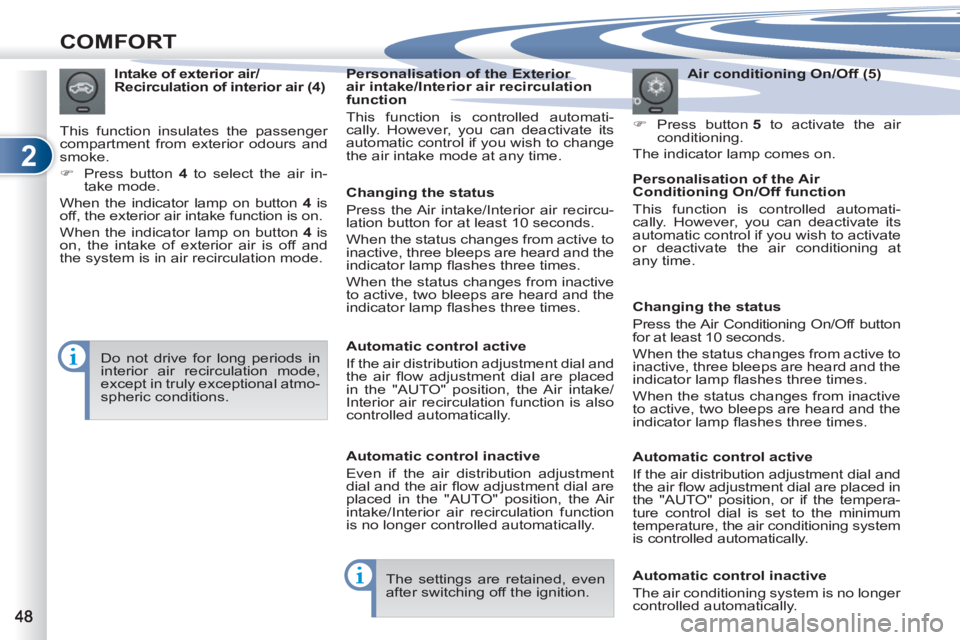
Air conditioning On/Off (5)
)
Press button 5
to activate the air
conditioning.
The indicator lamp comes on.
Intake of exterior air/
Recirculation of interior air (4)
This function insulates the passenger
compartment from exterior odours and
smoke.
)
Press button 4
to select the air in-
take mode.
When the indicator lamp on button 4
is
off, the exterior air intake function is on.
When the indicator lamp on button 4
is
on, the intake of exterior air is off and
the system is in air recirculation mode.
Do not drive for long periods in
interior air recirculation mode,
except in truly exceptional atmo-
spheric conditions.
Personalisation of the Exterior
air intake/Interior air recirculation
function
This function is controlled automati-
cally. However, you can deactivate its
automatic control if you wish to change
the air intake mode at any time.
Personalisation of the Air
Conditioning On/Off function
This function is controlled automati-
cally. However, you can deactivate its
automatic control if you wish to activate
or deactivate the air conditioning at
any time.
The settings are retained, even
after switching off the ignition.
Changing the status
Press the Air intake/Interior air recircu-
lation button for at least 10 seconds.
When the status changes from active to
inactive, three bleeps are heard and the
indicator lamp fl ashes three times.
When the status changes from inactive
to active, two bleeps are heard and the
indicator lamp fl ashes three times.
Automatic control active
If the air distribution adjustment dial and
the air fl ow adjustment dial are placed
in the "AUTO" position, the Air intake/
Interior air recirculation function is also
controlled automatically.
Automatic control inactive
Even if the air distribution adjustment
dial and the air fl ow adjustment dial are
placed in the "AUTO" position, the Air
intake/Interior air recirculation function
is no longer controlled automatically.
Changing the status
Press the Air Conditioning On/Off button
for at least 10 seconds.
When the status changes from active to
inactive, three bleeps are heard and the
indicator lamp fl ashes three times.
When the status changes from inactive
to active, two bleeps are heard and the
indicator lamp fl ashes three times.
Automatic control active
If the air distribution adjustment dial and
the air fl ow adjustment dial are placed in
the "AUTO" position, or if the tempera-
ture control dial is set to the minimum
temperature, the air conditioning system
is controlled automatically.
Automatic control inactive
The air conditioning system is no longer
controlled automatically.
Page 63 of 236
2
COMFORT
OOR MIRRORSDOOR MIRRORS
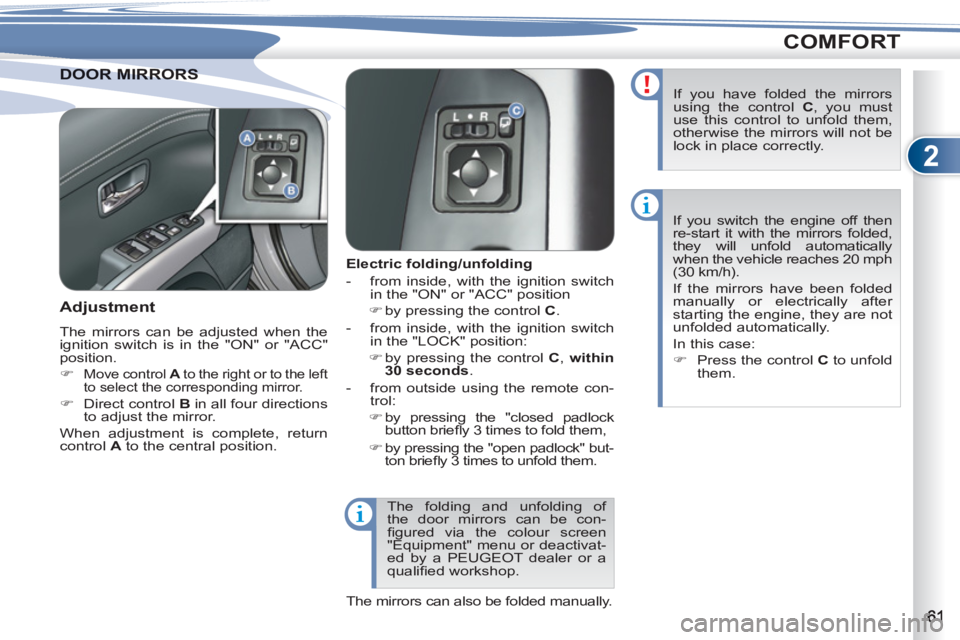
Electric folding/unfolding
- from inside, with the ignition switch
in the "ON" or "ACC" position
)
by pressing the control C
.
- from inside, with the ignition switch
in the "LOCK" position:
)
by pressing the control C, within
30 seconds.
- from outside using the remote con-
trol:
)
by pressing the "closed padlock
button briefl y 3 times to fold them,
)
by pressing the "open padlock" but-
ton briefl y 3 times to unfold them.
Adjustment
The mirrors can be adjusted when the
ignition switch is in the "ON" or "ACC"
position.
)
Move control A
to the right or to the left
to select the corresponding mirror.
)
Direct control B
in all four directions
to adjust the mirror.
When adjustment is complete, return
control A
to the central position. If you switch the engine off then
re-start it with the mirrors folded,
they will unfold automatically
when the vehicle reaches 20 mph
(30 km/h).
If the mirrors have been folded
manually or electrically after
starting the engine, they are not
unfolded automatically.
In this case:
)
Press the control C
to unfold
them.
If you have folded the mirrors
using the control C
, you must
use this control to unfold them,
otherwise the mirrors will not be
lock in place correctly.
The folding and unfolding of
the door mirrors can be con-
fi gured via the colour screen
"Equipment" menu or deactivat-
ed by a PEUGEOT dealer or a
qualifi ed workshop.
The mirrors can also be folded manually.
Page 68 of 236
2
COMFORT
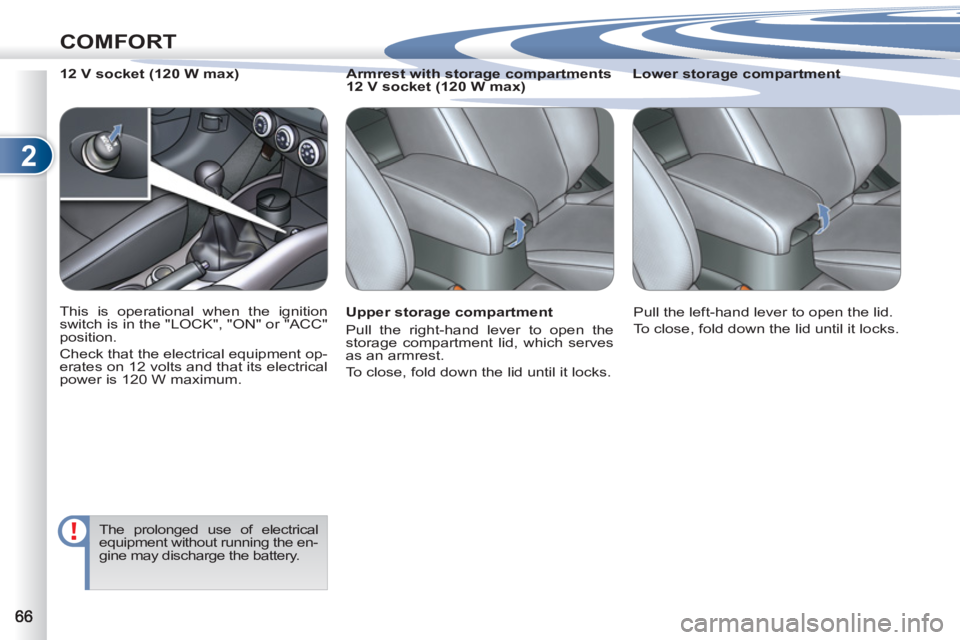
Upper storage compartment
Pull the right-hand lever to open the
storage compartment lid, which serves
as an armrest.
To close, fold down the lid until it locks.
Lower storage compartment
12 V socket (120 W max)
Armrest with storage compartments
12 V socket (120 W max)
This is operational when the ignition
switch is in the "LOCK", "ON" or "ACC"
position.
Check that the electrical equipment op-
erates on 12 volts and that its electrical
power is 120 W maximum.
The prolonged use of electrical
equipment without running the en-
gine may discharge the battery.
Pull the left-hand lever to open the lid.
To close, fold down the lid until it locks.
Page 69 of 236
2
COMFORT
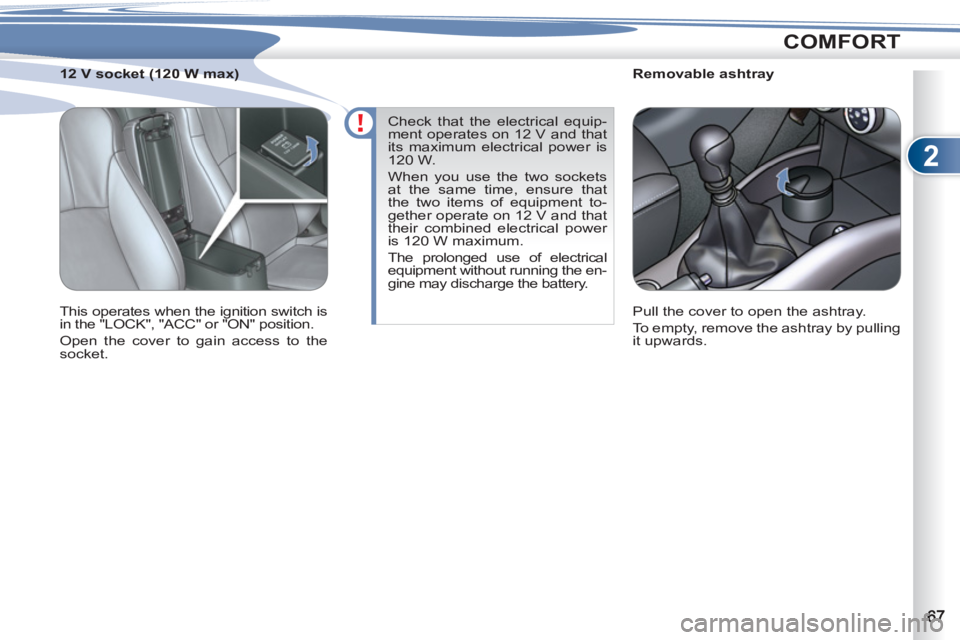
Removable ashtray
Pull the cover to open the ashtray.
To empty, remove the ashtray by pulling
it upwards.
12 V socket (120 W max)
This operates when the ignition switch is
in the "LOCK", "ACC" or "ON" position.
Open the cover to gain access to the
socket. Check that the electrical equip-
ment operates on 12 V and that
its maximum electrical power is
120 W.
When you use the two sockets
at the same time, ensure that
the two items of equipment to-
gether operate on 12 V and that
their combined electrical power
is 120 W maximum.
The prolonged use of electrical
equipment without running the en-
gine may discharge the battery.
Page 73 of 236
2
COMFORT
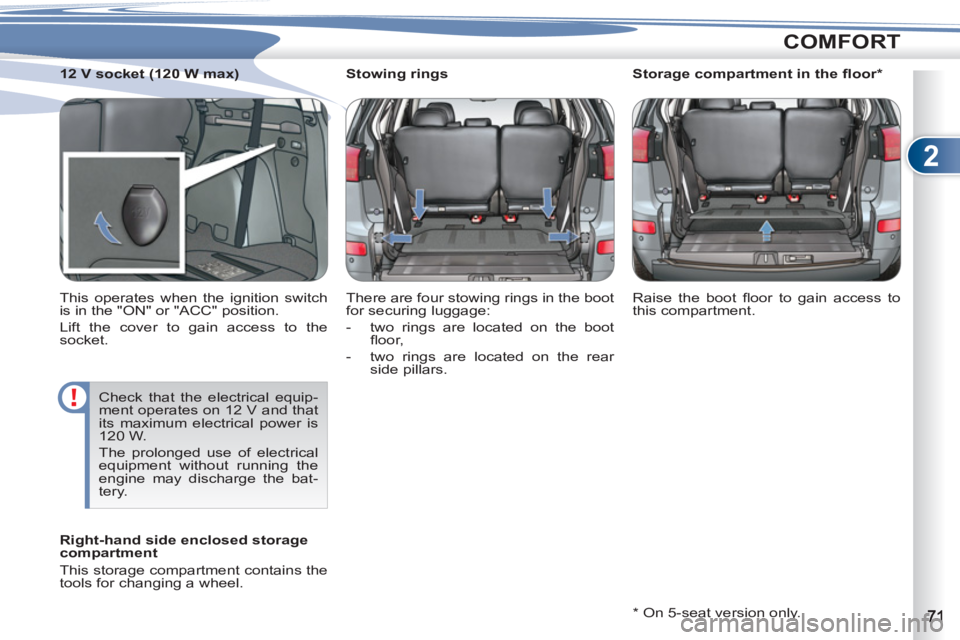
Stowing rings
There are four stowing rings in the boot
for securing luggage:
- two rings are located on the boot
fl oor,
- two rings are located on the rear
side pillars.
* On 5-seat version only. Raise the boot fl oor to gain access to
this compartment.
Right-hand side enclosed storage
compartment
This storage compartment contains the
tools for changing a wheel.
Storage compartment in the fl oor *
12 V socket (120 W max)
This operates when the ignition switch
is in the "ON" or "ACC" position.
Lift the cover to gain access to the
socket.
Check that the electrical equip-
ment operates on 12 V and that
its maximum electrical power is
120 W.
The prolonged use of electrical
equipment without running the
engine may discharge the bat-
tery.