buttons PEUGEOT 4008 2015 User Guide
[x] Cancel search | Manufacturer: PEUGEOT, Model Year: 2015, Model line: 4008, Model: PEUGEOT 4008 2015Pages: 389, PDF Size: 15.89 MB
Page 269 of 389
04
267
4008_en_Chap10b_Mitsu6_ed01-2014
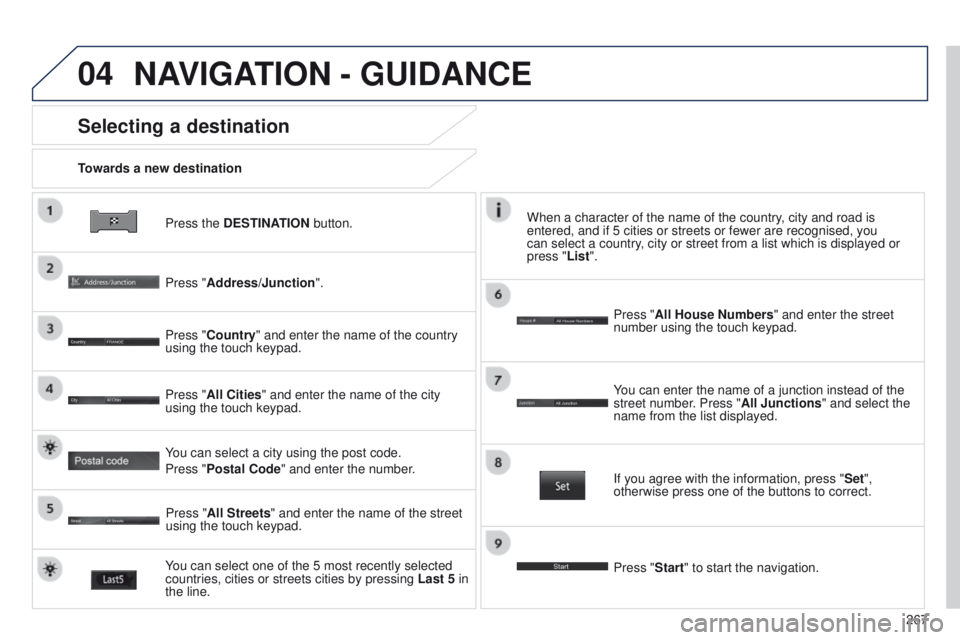
Press the DESTINATION button.
Towards a new destination
Selecting a destination
Press "Address/Junction".
Press "Country" and enter the name of the country
using the touch keypad.
You can select one of the 5 most recently selected
countries, cities or streets cities by pressing
Last 5 in
the line. Press "All Cities" and enter the name of the city
using the touch keypad.
Press "All Streets" and enter the name of the street
using the touch keypad. Press "All House Numbers" and enter the street
number using the touch keypad.
If you agree with the information, press "
Set",
otherwise press one of the buttons to correct.
Press "Start" to start the navigation. You can enter the name of a junction instead of the
street number. Press "All Junctions " and select the
name from the list displayed.
When a character of the name of the country, city and road is
entered, and if 5 cities or streets or fewer are recognised, you
can select a country, city or street from a list which is displayed or
press
"List".
You can select a city using the post code.
Press "Postal Code" and enter the number.
NAVIGATION - GUIDANCE
Page 279 of 389
05
277
4008_en_Chap10b_Mitsu6_ed01-2014
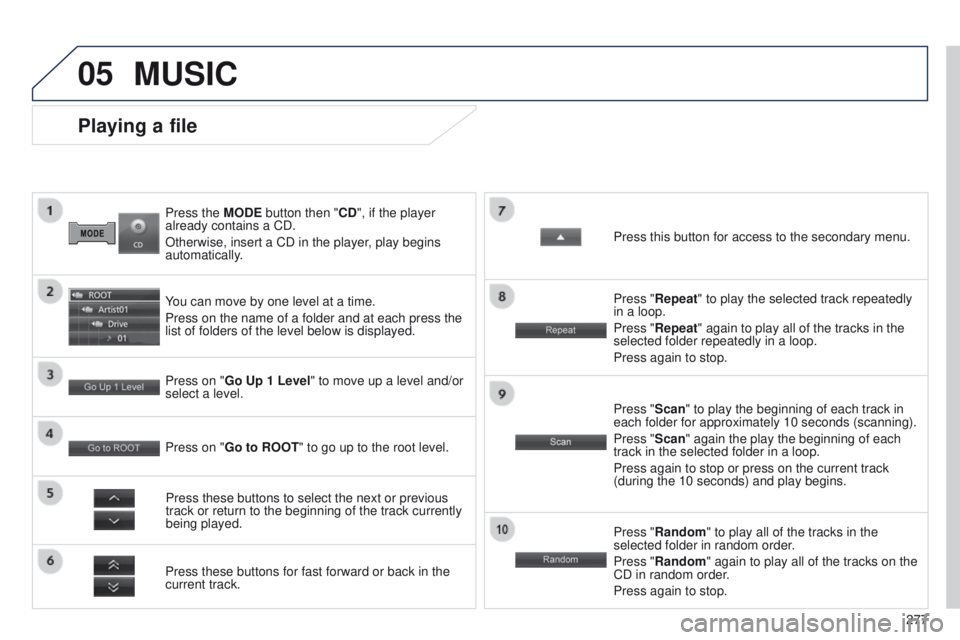
Press the MODE button then "CD", if the player
already contains a CD.
Otherwise, insert a CD in the player, play begins
automatically.
Playing a file
You can move by one level at a time.
Press on the name of a folder and at each press the
list of folders of the level below is displayed.
Press these buttons for fast forward or back in the
current track. Press on "Go Up 1 Level" to move up a level and/or
select a level.Press these buttons to select the next or previous
track or return to the beginning of the track currently
being played. Press "Random" to play all of the tracks in the
selected folder in random order.
Press "Random" again to play all of the tracks on the
CD in random order.
Press again to stop.
Press on "Go to ROOT
" to go up to the root level. Press "Scan" to play the beginning of each track in
each folder for approximately 10 seconds (scanning).
Press "Scan" again the play the beginning of each
track in the selected folder in a loop.
Press again to stop or press on the current track
(during the 10 seconds) and play begins. Press "Repeat" to play the selected track repeatedly
in a loop.
Press "Repeat" again to play all of the tracks in the
selected folder repeatedly in a loop.
Press again to stop. Press this button for access to the secondary menu.
MUSIC
Page 282 of 389
05
280
4008_en_Chap10b_Mitsu6_ed01-2014
USB, iPod and SD player - Playing a track
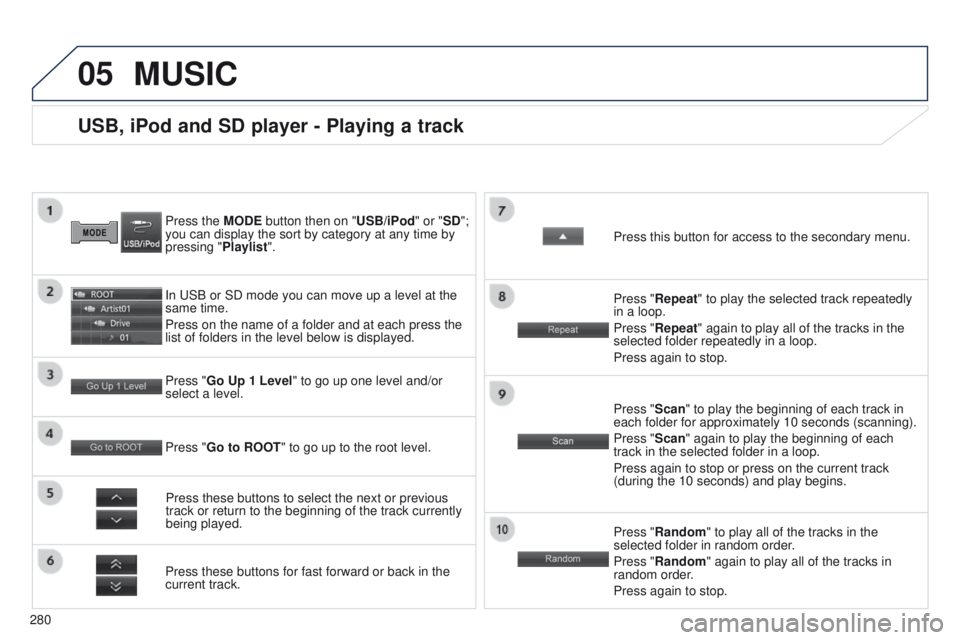
Press the MODE button then on "USB/iPod" or "SD";
you can display the sort by category at any time by
pressing "Playlist".
In
u SB or SD mode you can move up a level at the
same time.
Press on the name of a folder and at each press the
list of folders in the level below is displayed.
Press these buttons for fast forward or back in the
current track. Press "Go Up 1 Level " to go up one level and/or
select a level.
Press these buttons to select the next or previous
track or return to the beginning of the track currently
being played. Press "Random" to play all of the tracks in the
selected folder in random order.
Press "Random" again to play all of the tracks in
random order.
Press again to stop.
Press "Go to ROOT
" to go up to the root level. Press "Scan" to play the beginning of each track in
each folder for approximately 10 seconds (scanning).
Press "Scan" again to play the beginning of each
track in the selected folder in a loop.
Press again to stop or press on the current track
(during the 10 seconds) and play begins. Press "Repeat" to play the selected track repeatedly
in a loop.
Press "Repeat" again to play all of the tracks in the
selected folder repeatedly in a loop.
Press again to stop. Press this button for access to the secondary menu.
MUSIC
Page 292 of 389
01
290
FIRST STEPS
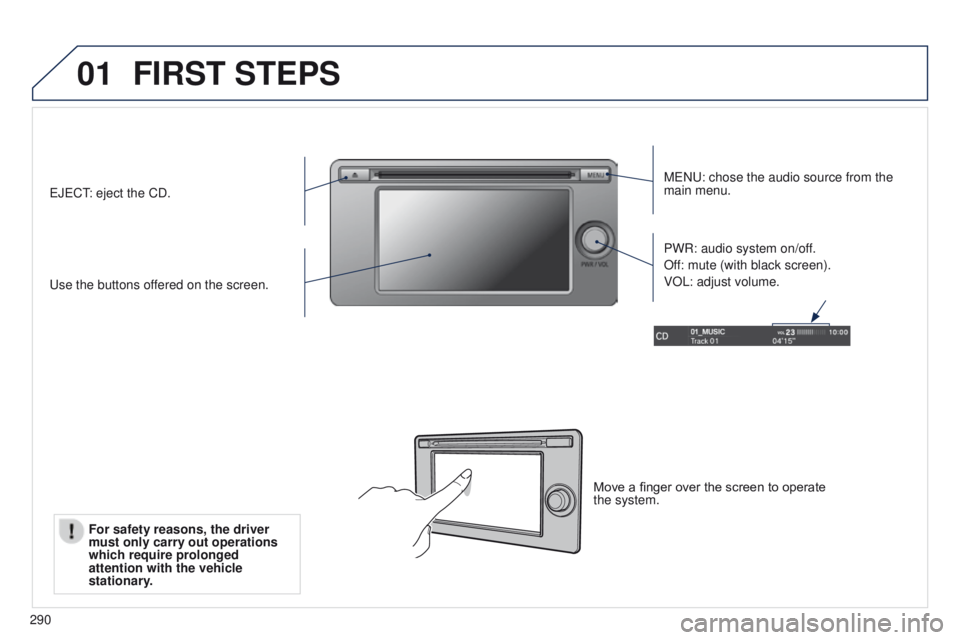
MeNu: chose the audio source from the
main menu.
u
se the buttons offered on the screen. PWR: audio system on/off.
Off: mute (with black screen).
VOL: adjust volume.e
J
e
C
t: eject the CD.
Move a finger over the screen to operate
the system.
For safety reasons, the driver
must only carry out operations
which require prolonged
attention with the vehicle
stationary
.
Page 302 of 389
 may prevent reception, even in RDS station tracking mode. this phenomenon is n")
04
300
Selecting an FM / MW / LW station
the exterior environment (hills, buildings, tunnel, car park, below grou\
nd...) may prevent reception, even in RDS station tracking mode. this phenomenon is normal in the propagation of radio waves and is in no \
way indicative of a fault with the audio system. Select "FM" or "MW" or "LW
".
Press MENU to display the choice of source.
Select a radio station in the list or press "
Tune"
to change the frequency.
Maintain pressure on " Tune" until a beep is
heard, for an automatic search for the next
station.
RADIO
Press the arrow to adjust the RDS or the audio
settings (balance, equaliser, ...). Press "Station list " to display the list of radio
stations received locally.
A long press on one of the numbered buttons
presets the current station.
Preset up to 12 stations between FM1 and
FM2.
Page 314 of 389
01
312
4008_en_Chap10d_Mitsu4_ed01-2014
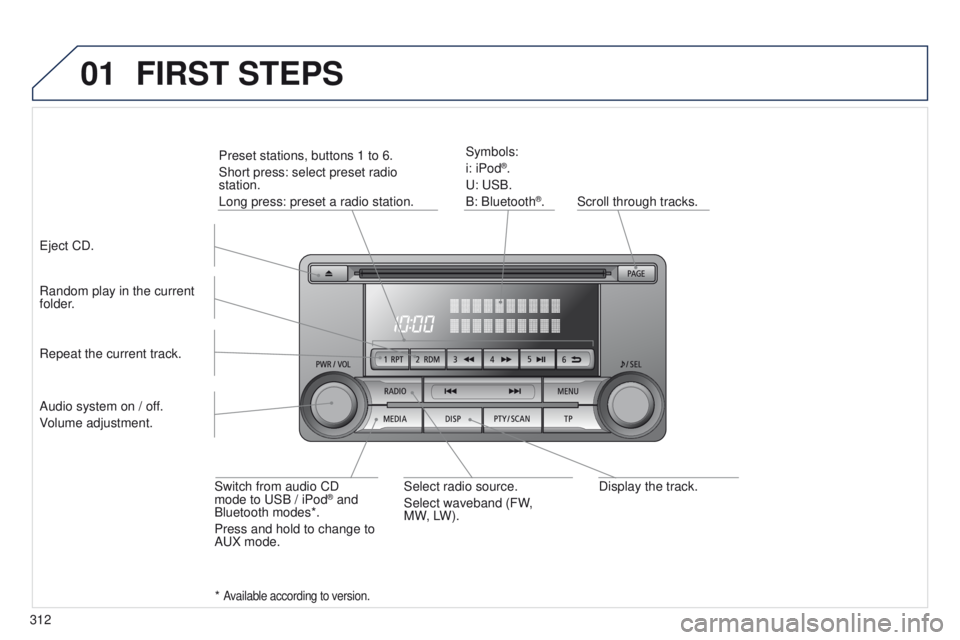
Display the track.
Scroll through tracks.
Symbols:
i: iPod
®.
u
:
u
SB.
B: Bluetooth
®.
Random play in the current
folder.
Switch from audio CD
mode to
u
SB / iPod
® and
Bluetooth modes*.
Press and hold to change to
A
u
X mode.
Repeat the current track.
FIRST STEPS
Audio system on / off.
Volume adjustment.
Select radio source.
Select waveband (FW,
MW,
LW).
*
Available according to version.
eject CD. Preset stations, buttons 1 to 6.
Short press: select preset radio
station.
Long press: preset a radio station.
Page 320 of 389
04
318
4008_en_Chap10d_Mitsu4_ed01-2014
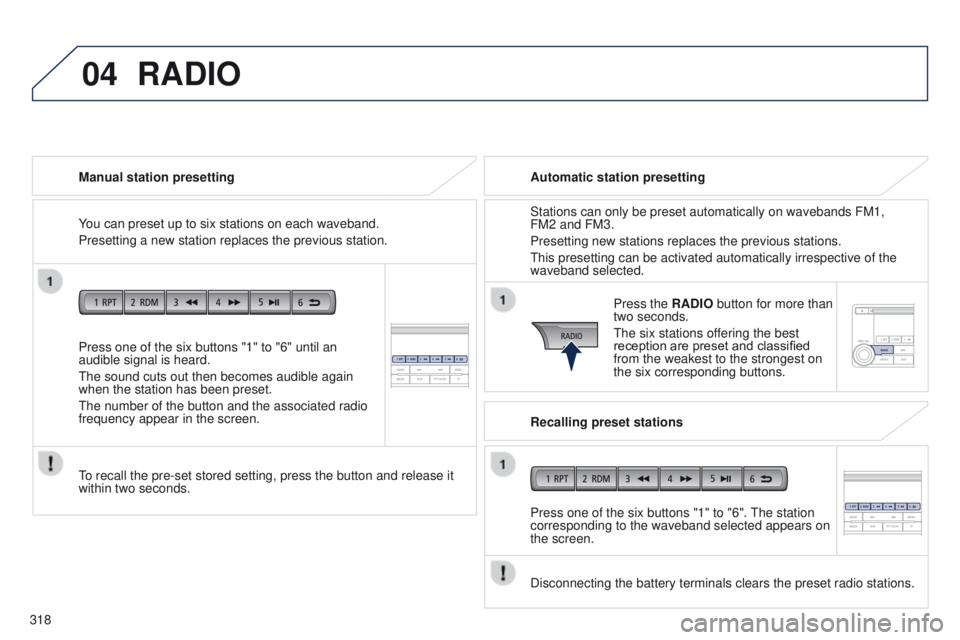
Press one of the six buttons "1" to "6" until an
audible signal is heard.
t
he sound cuts out then becomes audible again
when the station has been preset.
t
he number of the button and the associated radio
frequency appear in the screen. Manual station presetting
to recall the pre-set stored setting, press the button and release it
within two seconds.
RADIO
You can preset up to six stations on each waveband.
Presetting a new station replaces the previous station. Automatic station presetting
Disconnecting the battery terminals clears the preset radio stations. Stations can only be preset automatically on wavebands FM1,
FM2 and FM3.
Presetting new stations replaces the previous stations.
t
his presetting can be activated automatically irrespective of the
waveband selected.
Press the RADIO button for more than
two seconds.
t
he six stations offering the best
reception are preset and classified
from the weakest to the strongest on
the six corresponding buttons.
Recalling preset stations
Press one of the six buttons "1" to "6".
t
he station
corresponding to the waveband selected appears on
the screen.
Page 323 of 389
04
321
4008_en_Chap10d_Mitsu4_ed01-2014
RADIO
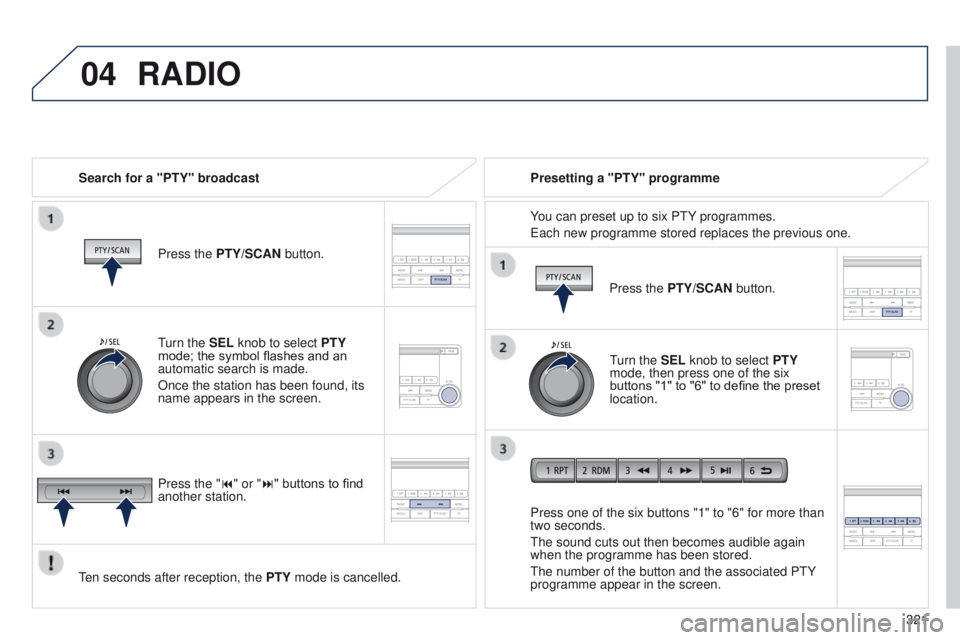
Search for a "PTY" broadcastPress the PTY/SCAN button.
ten seconds after reception, the PTY
mode is cancelled. Press one of the six buttons "1" to "6" for more than
two seconds.
t
he sound cuts out then becomes audible again
when the programme has been stored.
t
he number of the button and the associated P t Y
programme appear in the screen. Presetting a "PTY" programme
You can preset up to six P
t Y programmes.
e
ach new programme stored replaces the previous one.
turn the
SEL knob to select PTY
mode; the symbol flashes and an
automatic search is made.
Once the station has been found, its
name appears in the screen.
Press the "9" or ":" buttons to find
another station. Press the PTY/SCAN button.
turn the
SEL knob to select PTY
mode, then press one of the six
buttons "1" to "6" to define the preset
location.