language PEUGEOT 4008 2015 User Guide
[x] Cancel search | Manufacturer: PEUGEOT, Model Year: 2015, Model line: 4008, Model: PEUGEOT 4008 2015Pages: 389, PDF Size: 15.89 MB
Page 249 of 389
247
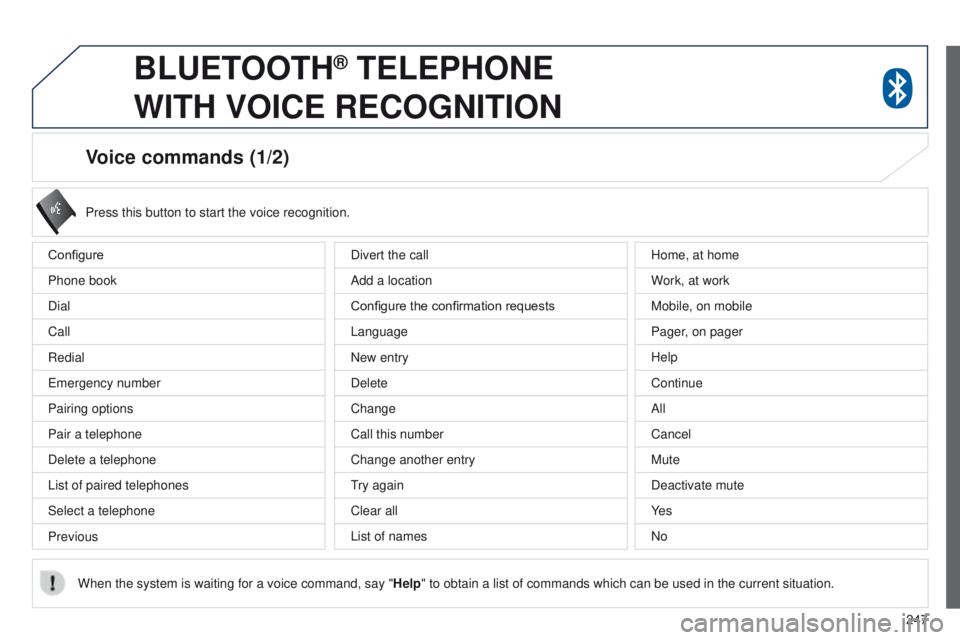
Voice commands (1/2)
Configure
Phone book
Dial
Call
Redial
e
mergency number
Pairing options
Pair a telephone
Delete a telephone
List of paired telephones
Select a telephone
Previous Press this button to start the voice recognition.
When the system is waiting for a voice command, say " Help" to obtain a list of commands which can be used in the current situatio\
n.
Divert the call
Add a location
Configure the confirmation requests
Language
New entry
Delete
Change
Call this number
Change another entry
try again
Clear all
List of names Home, at home
W
ork, at work
Mobile, on mobile
Pager, on pager
Help
Continue
All
Cancel
Mute
Deactivate mute
Ye s
No
BLUETOOTH® TELEPHONE
WITH
VOICE
RECOGNITION
Page 250 of 389
248
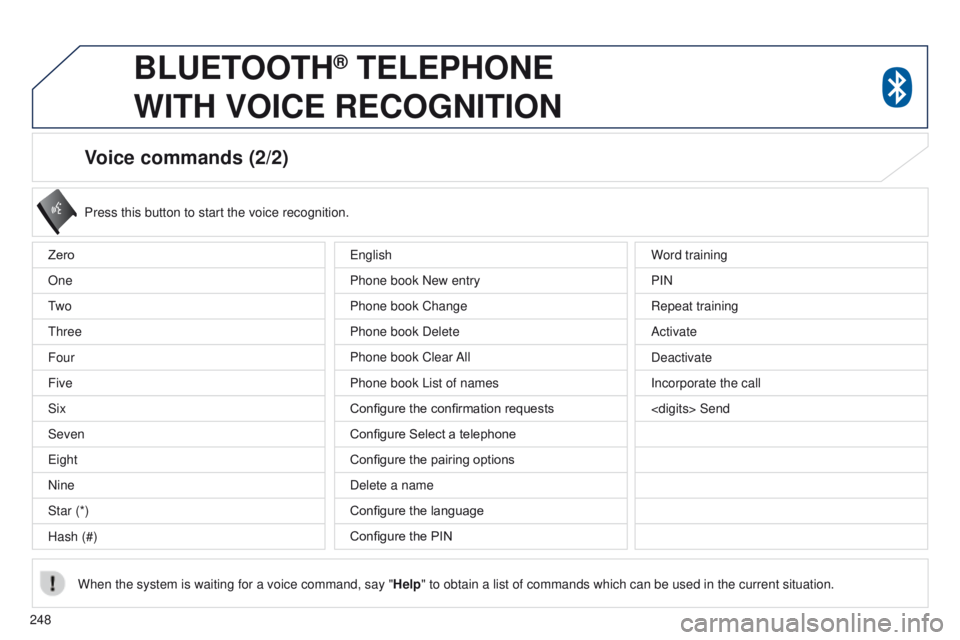
Voice commands (2/2)
Press this button to start the voice recognition.
When the system is waiting for a voice command, say " Help" to obtain a list of commands which can be used in the current situatio\
n.
Zero
One
t
w o
t
hree
Four
Five
Six
Seven
e
ight
Nine
Star (*)
Hash (#) Word training
PIN
Repeat training
Activate
Deactivate
Incorporate the call
e
nglish
Phone book New entry
Phone book Change
Phone book Delete
Phone book Clear All
Phone book List of names
Configure the confirmation requests
Configure Select a telephone
Configure the pairing options
Delete a name
Configure the language
Configure the PIN
BLUETOOTH® TELEPHONE
WITH
VOICE
RECOGNITION
Page 285 of 389
283
4008_en_Chap10b_Mitsu6_ed01-2014
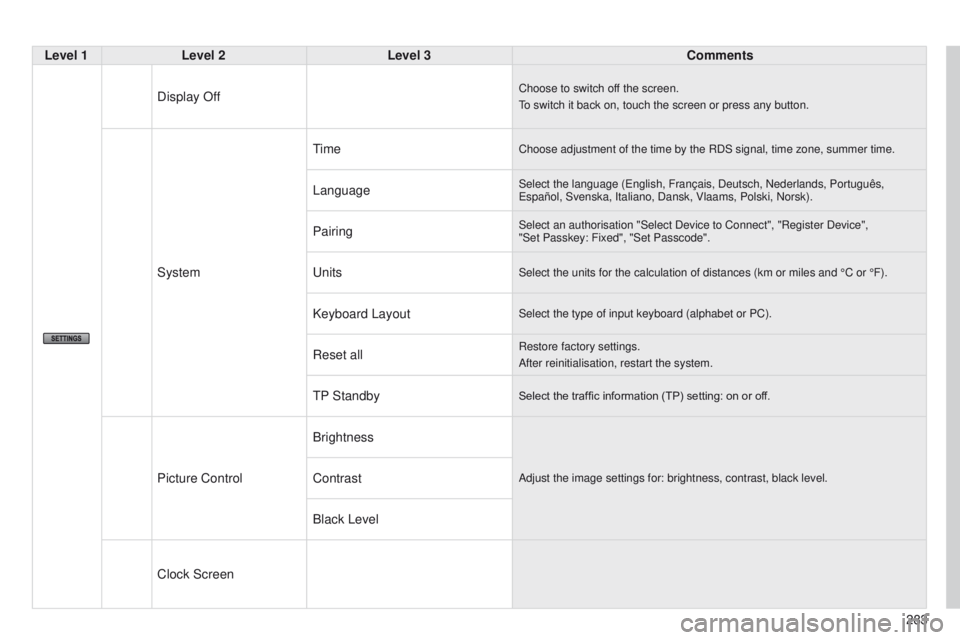
Level 1Level 2 Level 3 Comments
Display Off
Choose to switch off the screen.
to switch it back on, touch the screen or press any button.
System
timeChoose adjustment of the time by the RDS signal, time zone, summer time.\
LanguageSelect the language (english, Français, Deutsch, Nederlands, Português, e spañol, Svenska, Italiano, Dansk, Vlaams, Polski, Norsk).
PairingSelect an authorisation "Select Device to Connect", "Register Device",
"Set Passkey: Fixed", "Set Passcode".
unitsSelect the units for the calculation of distances (km or miles and °\
C or °F).
Keyboard LayoutSelect the type of input keyboard (alphabet or PC).
Reset allRestore factory settings.
After reinitialisation, restart the system.
tP StandbySelect the traffic information (TP) setting: on or off.
Picture Control BrightnessAdjust the image settings for: brightness, contrast, black level.Contrast
Black Level
Clock Screen
Page 301 of 389
299
4008_en_Chap10c_Mitsu5_ed01-2014
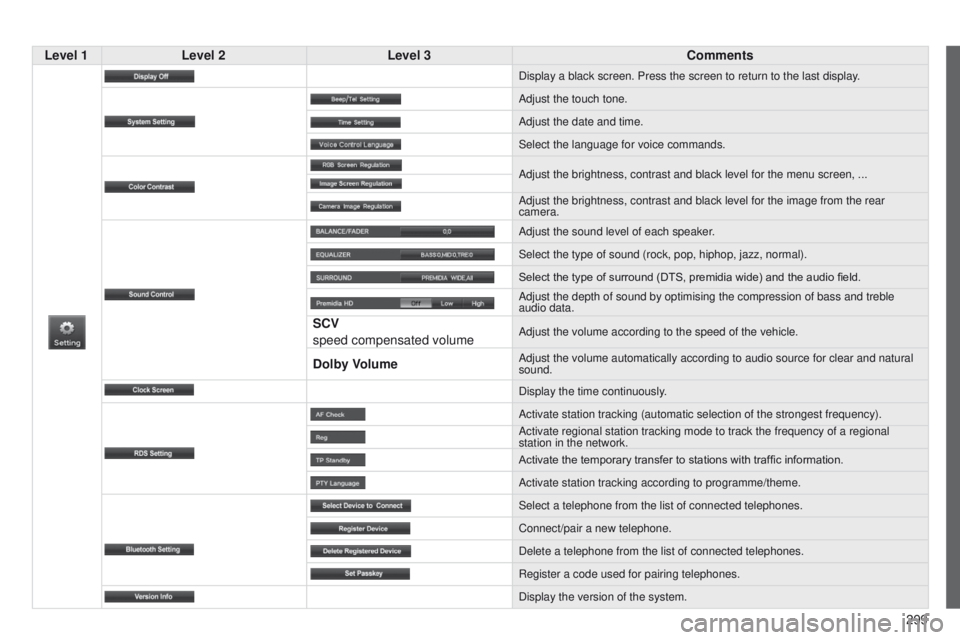
Level 1Level 2 Level 3 Comments
Display a black screen. Press the screen to return to the last display.
Adjust the touch tone.
Adjust the date and time.
Select the language for voice commands.
Adjust the brightness, contrast and black level for the menu screen, ...\
Adjust the brightness, contrast and black level for the image from the r\
ear
camera.
Adjust the sound level of each speaker.
Select the type of sound (rock, pop, hiphop, jazz, normal).
Select the type of surround (DTS, premidia wide) and the audio field.
Adjust the depth of sound by optimising the compression of bass and treb\
le
audio data.
SCV
speed compensated volumeAdjust the volume according to the speed of the vehicle.
Dolby VolumeAdjust the volume automatically according to audio source for clear and \
natural
sound.
Display the time continuously.
Activate station tracking (automatic selection of the strongest frequen\
cy).
Activate regional station tracking mode to track the frequency of a regi\
onal
station in the network.
Activate the temporary transfer to stations with traffic information.
Activate station tracking according to programme/theme.
Select a telephone from the list of connected telephones.
Connect/pair a new telephone.
Delete a telephone from the list of connected telephones.
Register a code used for pairing telephones.
Display the version of the system.
Page 324 of 389
04
322
4008_en_Chap10d_Mitsu4_ed01-2014
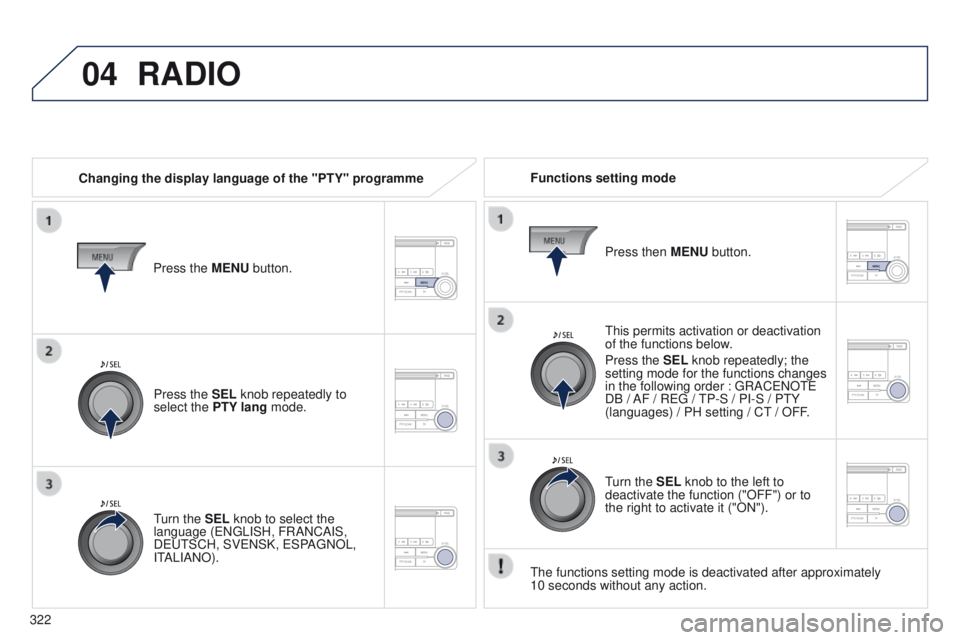
RADIO
Changing the display language of the "PTY" programmeFunctions setting mode
t
his permits activation or deactivation
of the functions below.
Press the SEL knob repeatedly; the
setting mode for the functions changes
in the following order
: g RAC e NO te
DB / AF / R
eg /
t
P-S / PI-S / P t Y
(languages) / PH setting / C
t / OFF.
t
he functions setting mode is deactivated after approximately
10
seconds without any action.
Press the MENU button.
Press the SEL knob repeatedly to
select the PTY lang mode.
turn the
SEL knob to select the
language (
e N g LISH, FRANCAIS,
D
eut SCH, SV e NSK, e SPA g NOL,
I
t
ALIANO). Press then
MENU button.
turn the
SEL knob to the left to
deactivate the function ("OFF") or to
the right to activate it ("ON").