ECO mode PEUGEOT 4008 2015 Repair Manual
[x] Cancel search | Manufacturer: PEUGEOT, Model Year: 2015, Model line: 4008, Model: PEUGEOT 4008 2015Pages: 389, PDF Size: 15.89 MB
Page 328 of 389
05
326
4008_en_Chap10d_Mitsu4_ed01-2014
MUSIC MEDIA PLAYERS
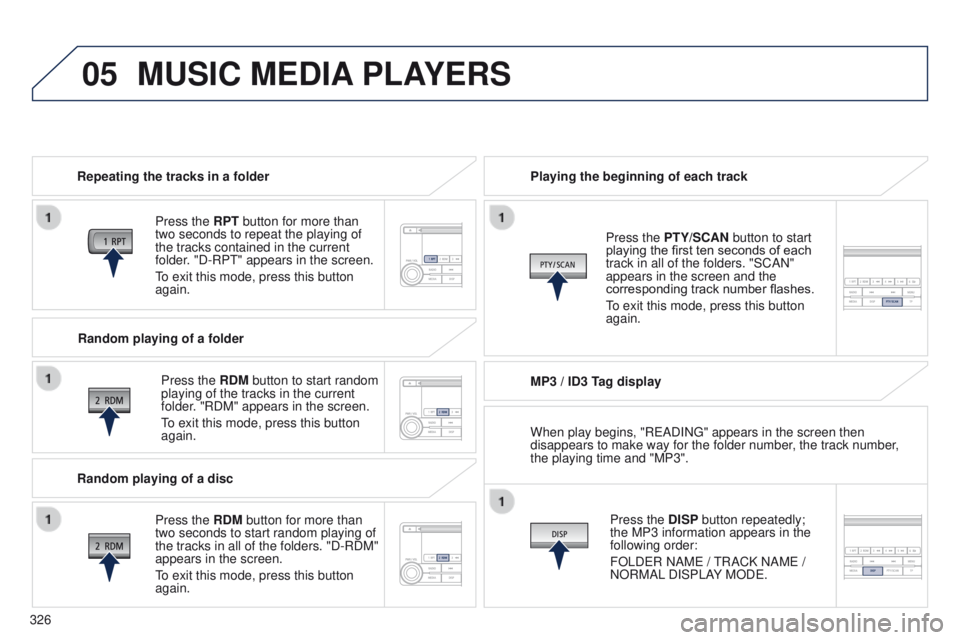
Repeating the tracks in a folder
Press the RPT button for more than
two seconds to repeat the playing of
the tracks contained in the current
folder. "D-RP
t " appears in the screen.
to exit this mode, press this button
again.
Press the
RDM button to start random
playing of the tracks in the current
folder. "RDM" appears in the screen.
to exit this mode, press this button
again. Playing the beginning of each track
MP3 / ID3 T
ag displayPress the DISP button repeatedly;
the MP3 information appears in the
following order:
FOLD
e R NAM e /
t
RACK NAM e /
NORMAL DISPLAY MOD
e .
Press the PTY/SCAN button to start
playing the first ten seconds of each
track in all of the folders. "SCAN"
appears in the screen and the
corresponding track number flashes.
to exit this mode, press this button
again.
Random playing of a folder
Random playing of a disc Press the
RDM button for more than
two seconds to start random playing of
the tracks in all of the folders. "D-RDM"
appears in the screen.
to exit this mode, press this button
again. When play begins, "R
e ADIN g " appears in the screen then
disappears to make way for the folder number, the track number,
the playing time and "MP3".
Page 329 of 389
05
327
4008_en_Chap10d_Mitsu4_ed01-2014
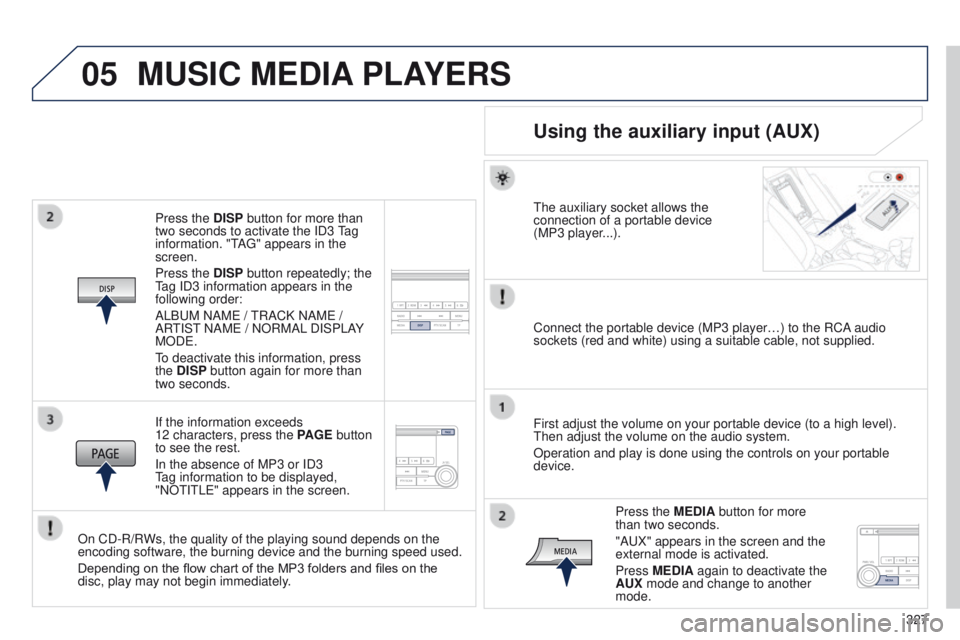
Press the DISP button for more than
two seconds to activate the ID3 tag
information. "
t
A
g " appears in the
screen.
Press the DISP button repeatedly; the
tag ID3 information appears in the
following order:
ALB
u M NAM e /
t
RACK NAM e /
AR
t
IS t
NAM
e / NORMAL DISPLAY
MOD
e .
to deactivate this information, press
the
DISP button again for more than
two seconds.
If the information exceeds
12 characters, press the PAGE button
to see the rest.
In the absence of MP3 or ID3
tag information to be displayed,
"NO
t I t L e " appears in the screen.
On CD-R/RWs, the quality of the playing sound depends on the
encoding software, the burning device and the burning speed used.
Depending on the flow chart of the MP3 folders and files on the
disc, play may not begin immediately.
MUSIC MEDIA PLAYERS
Using the auxiliary input (AUX)
the auxiliary socket allows the
connection of a portable device
(MP3 player
...).
Connect the portable device (MP3 player…) to the RCA audio
sockets (red and white) using a suitable cable, not supplied.
First adjust the volume on your portable device (to a high level).
t
hen adjust the volume on the audio system.
Operation and play is done using the controls on your portable
device.
Press the MEDIA button for more
than two seconds.
"A
u X" appears in the screen and the
external mode is activated.
Press MEDIA again to deactivate the
AUX mode and change to another
mode.
Page 331 of 389
06
329
4008_en_Chap10d_Mitsu4_ed01-2014
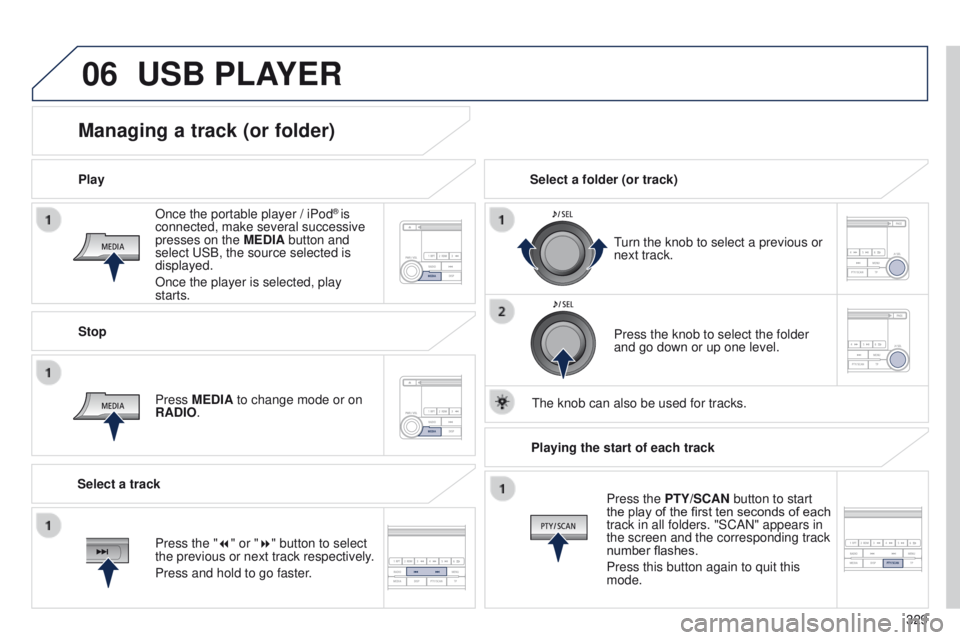
Once the portable player / iPod® is
connected, make several successive
presses on the MEDIA button and
select
u
SB, the source selected is
displayed.
Once the player is selected, play
starts.
Play
Managing a track (or folder)
Stop
Press MEDIA to change mode or on
RADIO.
turn the knob to select a previous or
next track.
Select a folder (or track)
Select a track Press the knob to select the folder
and go down or up one level.
t
he knob can also be used for tracks.
USB PLAYER
Press the "7" or "8" button to select
the previous or next track respectively.
Press and hold to go faster.Playing the start of each track
Press the PTY/SCAN button to start
the play of the first ten seconds of each
track in all folders. "SCAN" appears in
the screen and the corresponding track
number flashes.
Press this button again to quit this
mode.
Page 333 of 389
07
331
4008_en_Chap10d_Mitsu4_ed01-2014
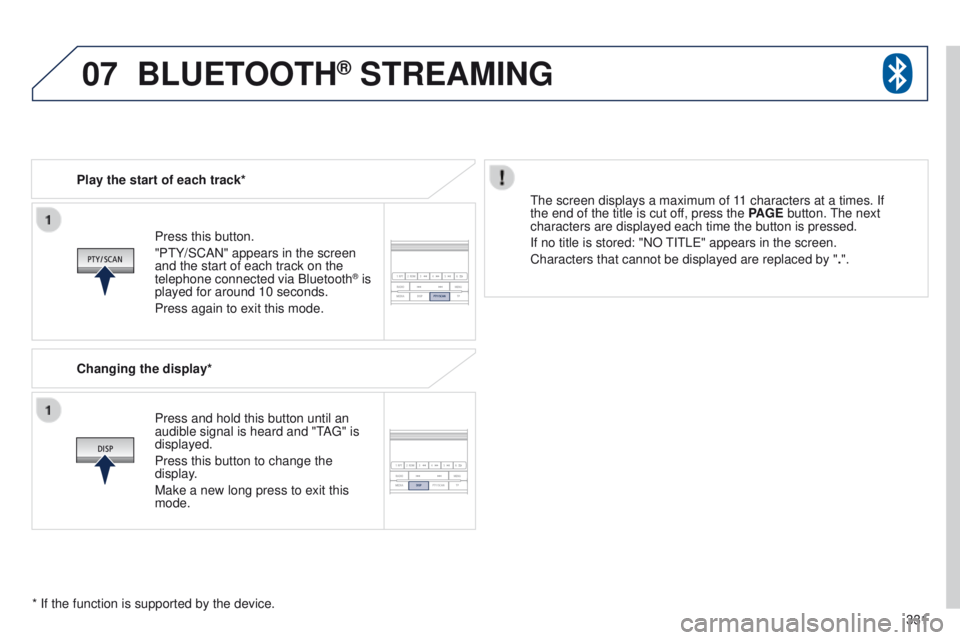
Press this button.
"Pt Y/SCAN" appears in the screen
and the start of each track on the
telephone connected via Bluetooth
® is
played for around 10 seconds.
Press again to exit this mode.
Play the start of each track*
Changing the display*
Press and hold this button until an
audible signal is heard and "
t
A
g
" is
displayed.
Press this button to change the
display.
Make a new long press to exit this
mode.
t
he screen displays a maximum of 11 characters at a times. If
the end of the title is cut off, press the PAGE button.
t
he next
characters are displayed each time the button is pressed.
If no title is stored: "NO
t
I t L e " appears in the screen.
Characters that cannot be displayed are replaced by " .".
* If the function is supported by the device.
BLUETOOTH® STREAMING
Page 365 of 389
1
17
Monitoring
4008-add_en_Chap01_controle-de-marche_ed01-2015
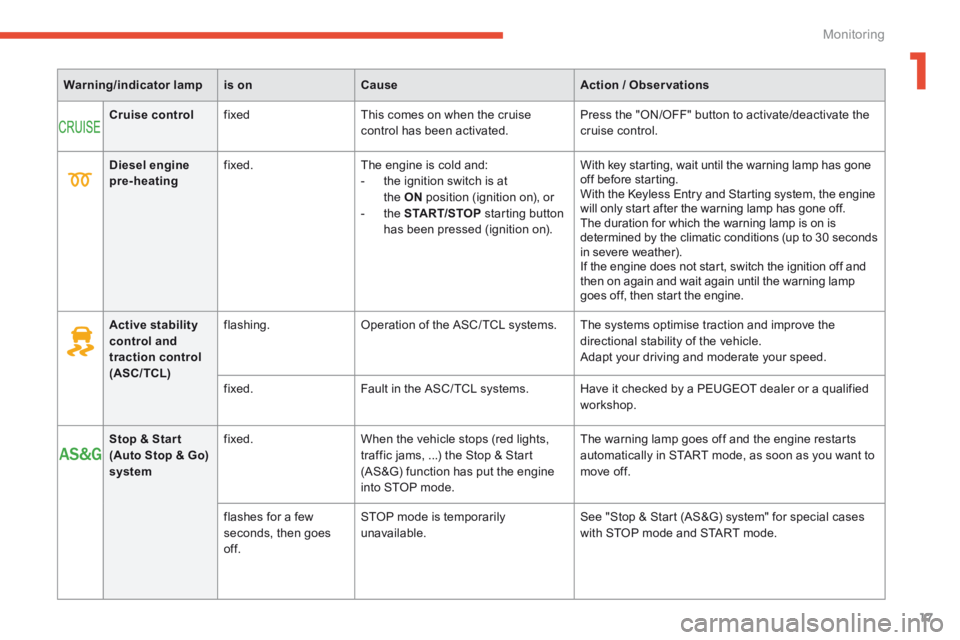
Warning/indicator lampis onCauseAction / Observations
Cruise control fixed This comes on when the cruise control has been activated. Press the "ON/OFF" button to activate/deactivate the cruise control.
Active stability control and traction control (ASC/TCL)
flashing. Operation of the ASC/ TCL systems. The systems optimise traction and improve the directional stability of the vehicle. Adapt your driving and moderate your speed.
fixed. Fault in the ASC/ TCL systems. Have it checked by a PEUGEOT dealer or a qualified workshop.
Stop & Star t (Auto Stop & Go) system
fixed. When the vehicle stops (red lights, traffic jams, ...) the Stop & Start (AS&G) function has put the engine into STOP mode.
The warning lamp goes off and the engine restarts automatically in START mode, as soon as you want to move off.
flashes for a few seconds, then goes of f.
STOP mode is temporarily unavailable. See "Stop & Start (AS&G) system" for special cases with STOP mode and START mode.
Diesel engine pre-heating fixed. The engine is cold and: - the ignition switch is at the ON position (ignition on), or - the START/STOP starting button has been pressed (ignition on).
With key starting, wait until the warning lamp has gone off before starting. With the Keyless Entry and Starting system, the engine will only start after the warning lamp has gone off. The duration for which the warning lamp is on is determined by the climatic conditions (up to 30 seconds in severe weather). If the engine does not start, switch the ignition off and then on again and wait again until the warning lamp goes off, then start the engine.
Page 367 of 389
111
4
Driving
4008-add_en_Chap04_conduite_ed01-2015
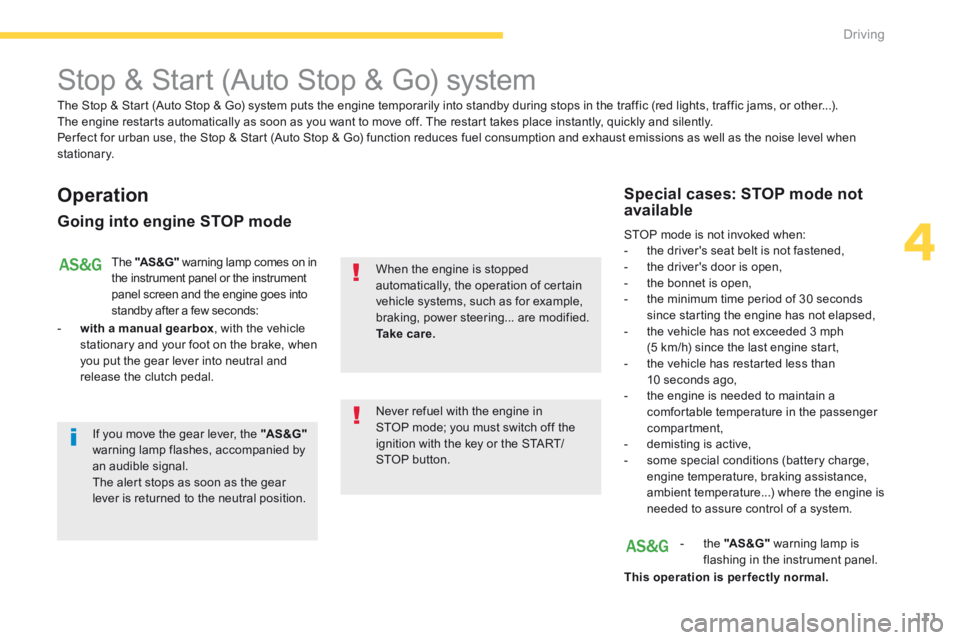
Stop & Start (Auto Stop & Go) system
Operation
Going into engine STOP mode
The "AS &G" warning lamp comes on in the instrument panel or the instrument panel screen and the engine goes into standby after a few seconds:
- with a manual gearbox , with the vehicle stationary and your foot on the brake, when you put the gear lever into neutral and release the clutch pedal.
Never refuel with the engine in STOP mode; you must switch off the ignition with the key or the START/STOP button.
When the engine is stopped automatically, the operation of certain vehicle systems, such as for example, braking, power steering... are modified. Ta k e c a r e.
Special cases: STOP mode not available
STOP mode is not invoked when: - the driver's seat belt is not fastened, - the driver's door is open, - the bonnet is open, - the minimum time period of 30 seconds since starting the engine has not elapsed, - the vehicle has not exceeded 3 mph (5 km/h) since the last engine start, - the vehicle has restarted less than 10 seconds ago, - the engine is needed to maintain a comfortable temperature in the passenger compartment, - demisting is active, - some special conditions (battery charge, engine temperature, braking assistance, ambient temperature...) where the engine is needed to assure control of a system.
- the "AS &G" warning lamp is flashing in the instrument panel.
This operation is perfectly normal.
The Stop & Start (Auto Stop & Go) system puts the engine temporarily into standby during stops in the traffic (red lights, traffic jams, or other...). The engine restarts automatically as soon as you want to move off. The restart takes place instantly, quickly and silently. Per fect for urban use, the Stop & Start (Auto Stop & Go) function reduces fuel consumption and exhaust emissions as well as the noise level when stationary.
If you move the gear lever, the "AS &G"warning lamp flashes, accompanied by an audible signal. The alert stops as soon as the gear lever is returned to the neutral position.
Page 368 of 389
112
Driving
4008-add_en_Chap04_conduite_ed01-2015
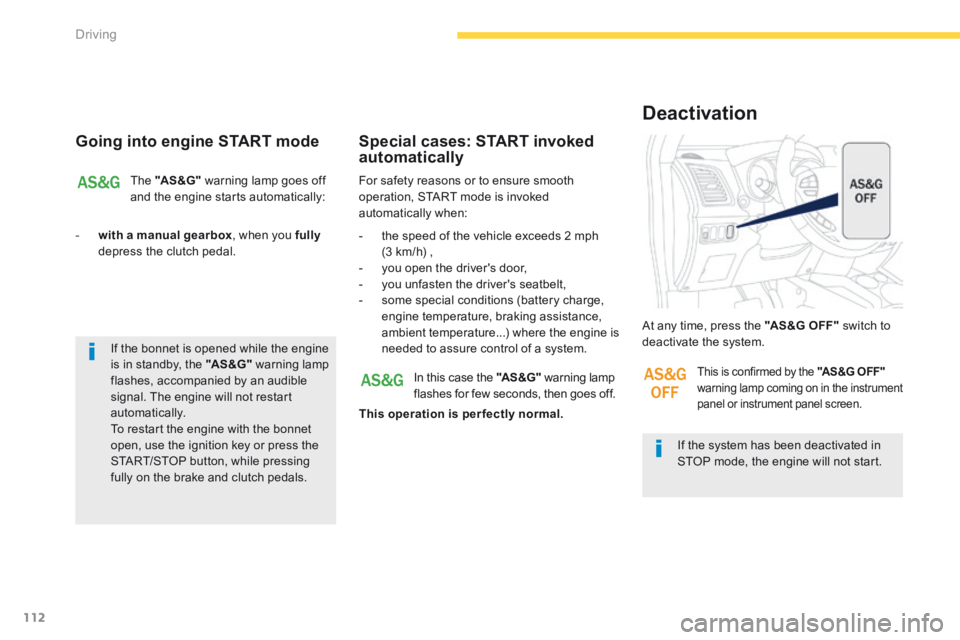
Going into engine START mode
The "AS &G" warning lamp goes off and the engine starts automatically:
- with a manual gearbox , when you fullydepress the clutch pedal.
For safety reasons or to ensure smooth operation, START mode is invoked automatically when:
Special cases: START invoked automatically
- the speed of the vehicle exceeds 2 mph (3 km/h) , - you open the driver's door, - you unfasten the driver's seatbelt, - some special conditions (battery charge, engine temperature, braking assistance, ambient temperature...) where the engine is needed to assure control of a system.
If the system has been deactivated in STOP mode, the engine will not start.
At any time, press the "AS &G O FF " switch to deactivate the system.
Deactivation
In this case the "AS &G" warning lamp flashes for few seconds, then goes off.
This operation is perfectly normal.
This is confirmed by the "AS &G O FF " warning lamp coming on in the instrument panel or instrument panel screen.
If the bonnet is opened while the engine is in standby, the "AS &G" warning lamp flashes, accompanied by an audible signal. The engine will not restart automatically. To restart the engine with the bonnet
open, use the ignition key or press the START/STOP button, while pressing fully on the brake and clutch pedals.
Page 376 of 389
9
221
Technical data
4008-add_en_Chap09_caracteristiques-techniques_ed01-2015
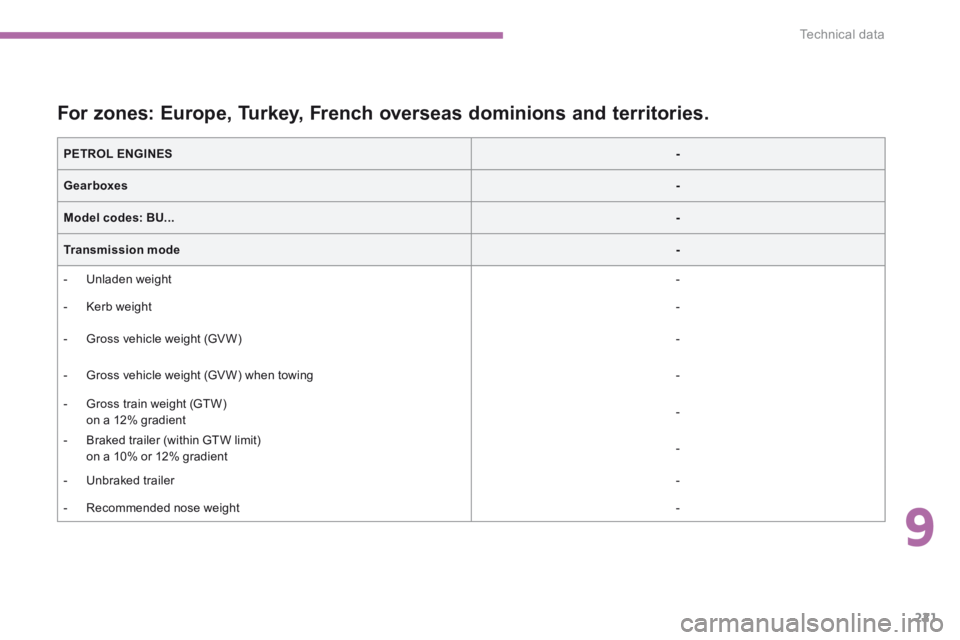
For zones: Europe, Turkey, French overseas dominions and territories.
PETROL ENGINES -
Gearboxes-
Model codes: BU...-
Transmission mode -
- Unladen weight -
- Kerb weight -
- Gross vehicle weight (GV W) -
- Gross vehicle weight (GV W) when towing -
- Gross train weight (GTW) on a 12% gradient -
- Braked trailer (within GTW limit) on a 10% or 12% gradient -
- Unbraked trailer -
- Recommended nose weight -
Page 377 of 389
222
Technical data
4008-add_en_Chap09_caracteristiques-techniques_ed01-2015
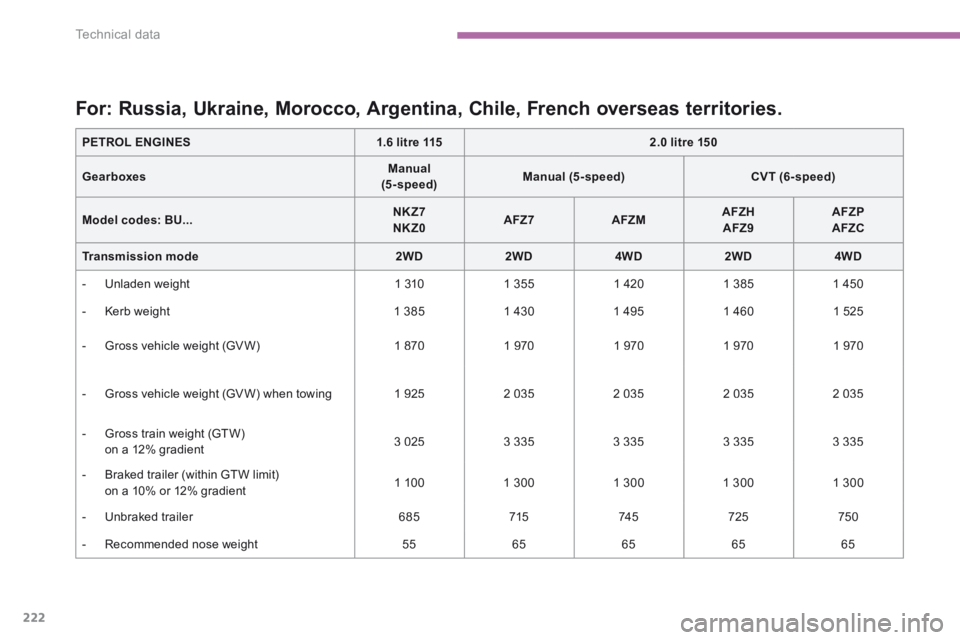
For: Russia, Ukraine, Morocco, Argentina, Chile, French overseas territories.
PETROL ENGINES1.6 litre 1152.0 litre 150
GearboxesManual (5 - speed)Manual (5-speed)CVT (6- speed)
Model codes: BU...NKZ7 NKZ0AFZ7AFZMAFZH AFZ9AFZP AFZC
Transmission mode2WD2WD4WD2WD4WD
- Unladen weight 1 310 1 355 1 420 1 385 1 450
- Kerb weight 1 385 1 430 1 495 1 460 1 525
- Gross vehicle weight (GV W) 1 870 1 970 1 970 1 970 1 970
- Gross vehicle weight (GV W) when towing 1 925 2 035 2 035 2 035 2 035
- Gross train weight (GTW) on a 12% gradient 3 025 3 335 3 335 3 335 3 335
- Braked trailer (within GTW limit) on a 10% or 12% gradient 1 100 1 300 1 300 1 300 1 300
- Unbraked trailer 685 715 74 5 725 750
- Recommended nose weight 55 65 65 65 65
Page 378 of 389
9
223
Technical data
4008-add_en_Chap09_caracteristiques-techniques_ed01-2015
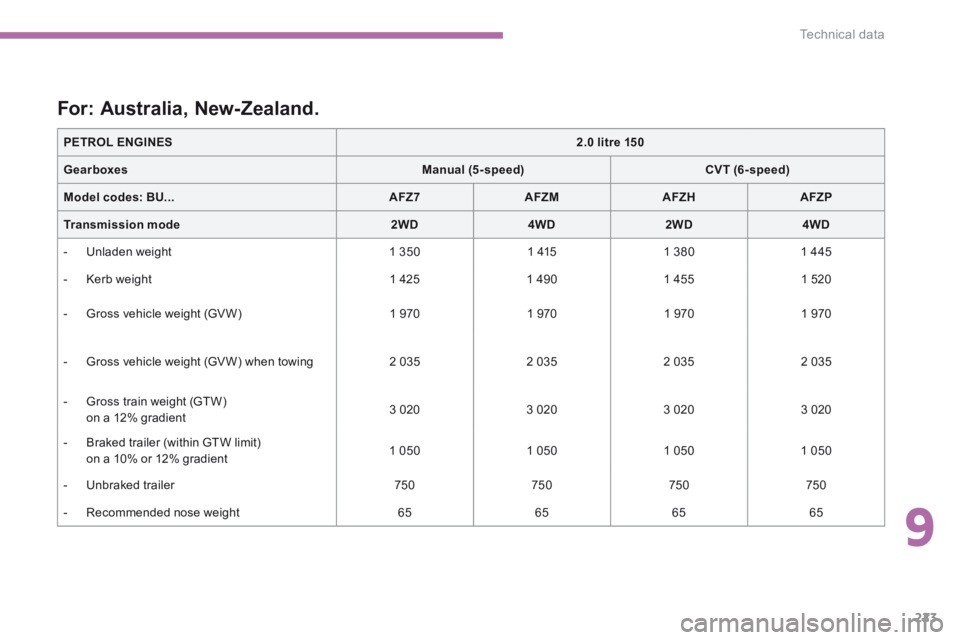
For: Australia, New-Zealand.
PETROL ENGINES2.0 litre 150
GearboxesManual (5-speed)CVT (6- speed)
Model codes: BU...AFZ7AFZMAFZHAFZP
Transmission mode2WD4WD2WD4WD
- Unladen weight 1 350 1 415 1 380 1 445
- Kerb weight 1 425 1 490 1 455 1 520
- Gross vehicle weight (GV W) 1 970 1 970 1 970 1 970
- Gross vehicle weight (GV W) when towing 2 035 2 035 2 035 2 035
- Gross train weight (GTW) on a 12% gradient 3 020 3 020 3 020 3 020
- Braked trailer (within GTW limit) on a 10% or 12% gradient 1 050 1 050 1 050 1 050
- Unbraked trailer 750 750 750 750
- Recommended nose weight 65 65 65 65