service Peugeot 406 Dag 2003 User Guide
[x] Cancel search | Manufacturer: PEUGEOT, Model Year: 2003, Model line: 406 Dag, Model: Peugeot 406 Dag 2003Pages: 177, PDF Size: 2.19 MB
Page 25 of 177
17-02-2003
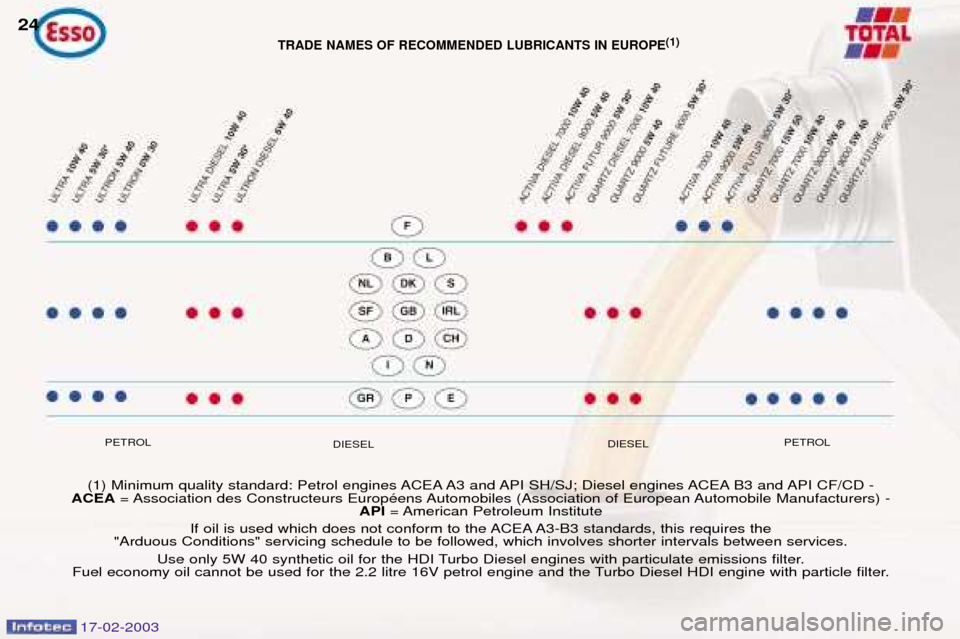
TRADE NAMES OF RECOMMENDED LUBRICANTS IN EUROPE(1)
PETROL
PETROL
24
(1) Minimum quality standard: Petrol engines ACEA A3 and API SH/SJ; Diesel engines ACEA B3 and API CF/CD -
ACEA = Association des Constructeurs EuropŽens Automobiles (Association of European Automobile Manufacturers) -
API= American Petroleum Institute
If oil is used which does not conform to the ACEA A3-B3 standards, this requires the
"Arduous Conditions" servicing schedule to be followed, which involves shorter intervals between services.
Use only 5W 40 synthetic oil for the HDI Turbo Diesel engines with particulate emissions filter.
Fuel economy oil cannot be used for the 2.2 litre 16V petrol engine and the Turbo Diesel HDI engine with particle filter. DIESEL
DIESEL
Page 26 of 177
17-02-2003
25
MAINTENANCE OF YOUR 406
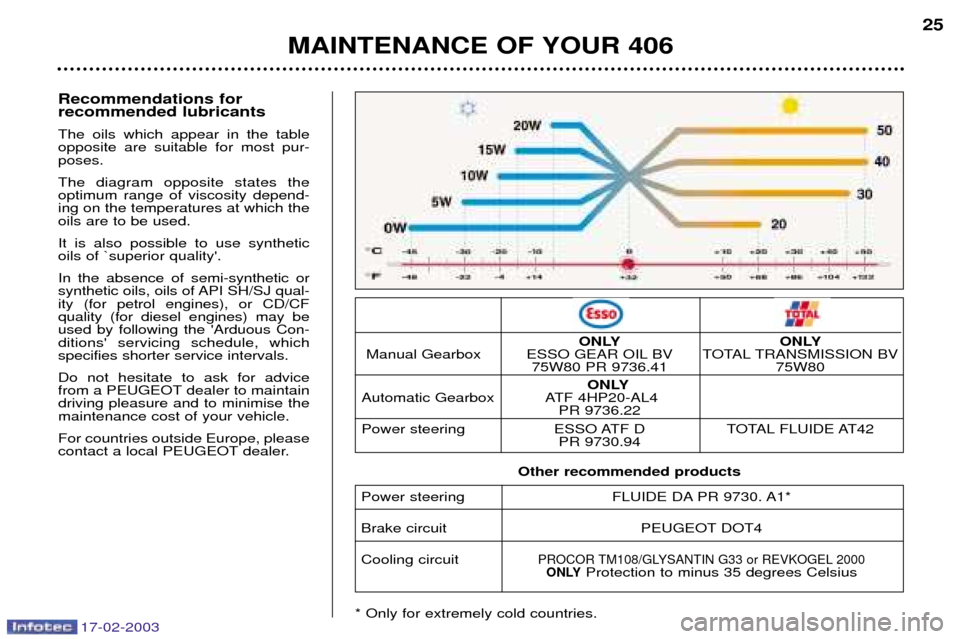
Recommendations for recommended lubricants The oils which appear in the table opposite are suitable for most pur-poses. The diagram opposite states the optimum range of viscosity depend-ing on the temperatures at which theoils are to be used. It is also possible to use synthetic oils of `superior quality'. In the absence of semi-synthetic or
synthetic oils, oils of API SH/SJ qual-ity (for petrol engines), or CD/CFquality (for diesel engines) may beused by following the 'Arduous Con-ditions' servicing schedule, whichspecifies shorter service intervals. Do not hesitate to ask for advice
from a PEUGEOT dealer to maintaindriving pleasure and to minimise themaintenance cost of your vehicle. For countries outside Europe, please
contact a local PEUGEOT dealer.
ONLY ONLY
Manual Gearbox ESSO GEAR OIL BV TOTAL TRANSMISSION BV 75W80 PR 9736.41 75W80
ONLY
Automatic Gearbox ATF 4HP20-AL4 PR 9736.22
Power steering ESSO ATF D TOTAL FLUIDE AT42 PR 9730.94
Power steering FLUIDE DA PR 9730. A1*
Brake circuit PEUGEOT DOT4Cooling circuit
PROCOR TM108/GLYSANTIN G33 or REVKOGEL 2000ONLYProtection to minus 35 degrees Celsius
* Only for extremely cold countries. Other recommended products
Page 27 of 177
17-02-2003
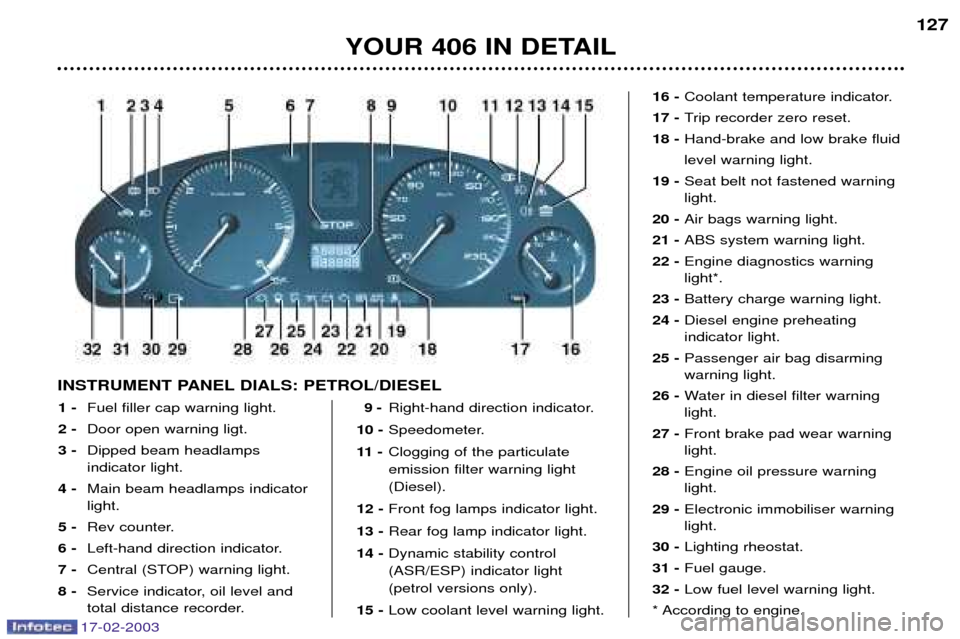
INSTRUMENT PANEL DIALS: PETROL/DIESEL1 - Fuel filler cap warning light.
2 - Door open warning ligt.
3 - Dipped beam headlamps indicator light.
4 - Main beam headlamps indicatorlight.
5 - Rev counter.
6 - Left-hand direction indicator.
7 - Central (STOP) warning light.
8 - Service indicator, oil level and
total distance recorder.
19-Right-hand direction indicator.
10 - Speedometer.
11 - Clogging of the particulate emission filter warning light(Diesel).
12 - Front fog lamps indicator light.
13 - Rear fog lamp indicator light.
14 - Dynamic stability control(ASR/ESP) indicator light(petrol versions only).
15 - Low coolant level warning light.
YOUR 406 IN DETAIL 127
16 -
Coolant temperature indicator.
17 - Trip recorder zero reset.
18 - Hand-brake and low brake fluid level warning light.
19 - Seat belt not fastened warning light.
20 - Air bags warning light.
21 - ABS system warning light.
22 - Engine diagnostics warninglight*.
23 - Battery charge warning light.
24 - Diesel engine preheating indicator light.
25 - Passenger air bag disarmingwarning light.
26 - Water in diesel filter warninglight.
27 - Front brake pad wear warninglight.
28 - Engine oil pressure warninglight.
29 - Electronic immobiliser warninglight.
30 - Lighting rheostat.
31 - Fuel gauge.
32 - Low fuel level warning light.
* According to engine.
Page 28 of 177
17-02-2003
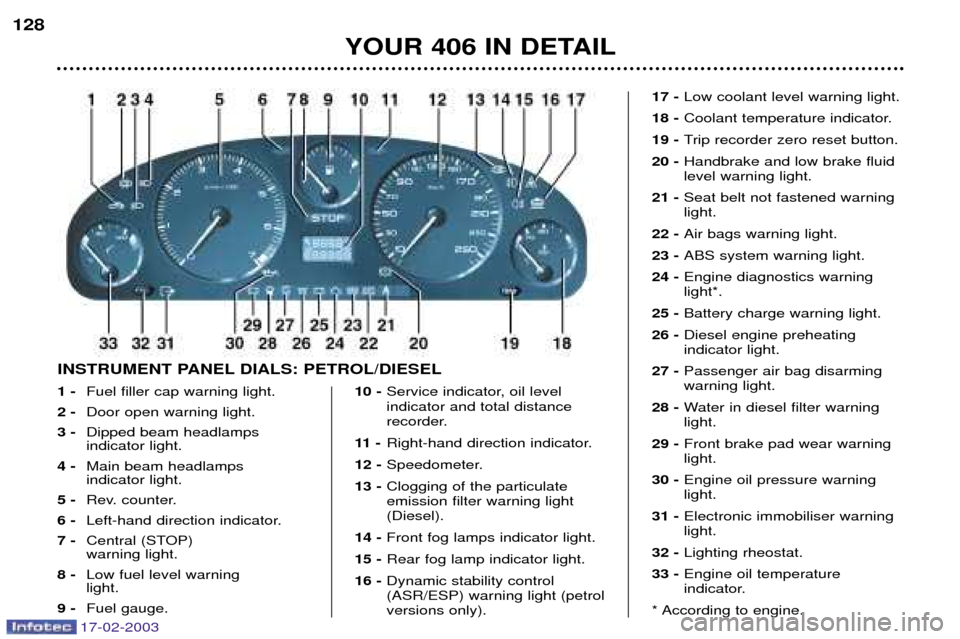
1 -Fuel filler cap warning light.
2 - Door open warning light.
3 - Dipped beam headlamps indicator light.
4 - Main beam headlamps indicator light.
5 - Rev. counter.
6 - Left-hand direction indicator.
7 - Central (STOP) warning light.
8 - Low fuel level warning light.
9 - Fuel gauge. 10 -
Service indicator, oil level indicator and total distance
recorder.
11 - Right-hand direction indicator.
12 - Speedometer.
13 - Clogging of the particulateemission filter warning light(Diesel).
14 - Front fog lamps indicator light.
15 - Rear fog lamp indicator light.
16 - Dynamic stability control(ASR/ESP) warning light (petrolversions only). 17 -
Low coolant level warning light.
18 - Coolant temperature indicator.
19 - Trip recorder zero reset button.
20 - Handbrake and low brake fluid level warning light.
21 - Seat belt not fastened warninglight.
22 - Air bags warning light.
23 - ABS system warning light.
24 - Engine diagnostics warninglight*.
25 - Battery charge warning light.
26 - Diesel engine preheating indicator light.
27 - Passenger air bag disarmingwarning light.
28 - Water in diesel filter warninglight.
29 - Front brake pad wear warninglight.
30 - Engine oil pressure warninglight.
31 - Electronic immobiliser warning light.
32 - Lighting rheostat.
33 - Engine oil temperature
indicator.
* According to engine.
YOUR 406 IN DETAIL
128
INSTRUMENT PANEL DIALS: PETROL/DIESEL
Page 29 of 177
17-02-2003
YOUR 406 IN DETAIL129
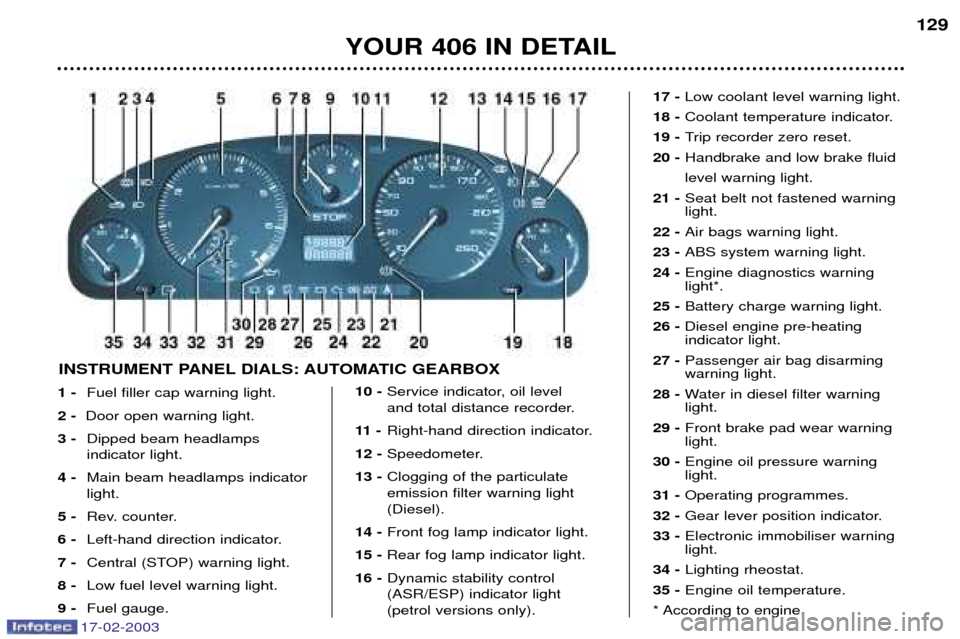
1 -
Fuel filler cap warning light.
2 - Door open warning light.
3 - Dipped beam headlamps indicator light.
4 - Main beam headlamps indicatorlight.
5 - Rev. counter.
6 - Left-hand direction indicator.
7 - Central (STOP) warning light.
8 - Low fuel level warning light.
9 - Fuel gauge. 10 -
Service indicator, oil level
and total distance recorder.
11 - Right-hand direction indicator.
12 - Speedometer.
13 - Clogging of the particulateemission filter warning light(Diesel).
14 - Front fog lamp indicator light.
15 - Rear fog lamp indicator light.
16 - Dynamic stability control(ASR/ESP) indicator light(petrol versions only). 17 -
Low coolant level warning light.
18 - Coolant temperature indicator.
19 - Trip recorder zero reset.
20 - Handbrake and low brake fluid level warning light.
21 - Seat belt not fastened warning light.
22 - Air bags warning light.
23 - ABS system warning light.
24 - Engine diagnostics warninglight*.
25 - Battery charge warning light.
26 - Diesel engine pre-heating
indicator light.
27 - Passenger air bag disarmingwarning light.
28 - Water in diesel filter warning
light.
29 - Front brake pad wear warninglight.
30 - Engine oil pressure warninglight.
31 - Operating programmes.
32 - Gear lever position indicator.
33 - Electronic immobiliser warninglight.
34 - Lighting rheostat.
35 - Engine oil temperature.
* According to engine.
INSTRUMENT PANEL DIALS: AUTOMATIC GEARBOX
Page 36 of 177
17-02-2003
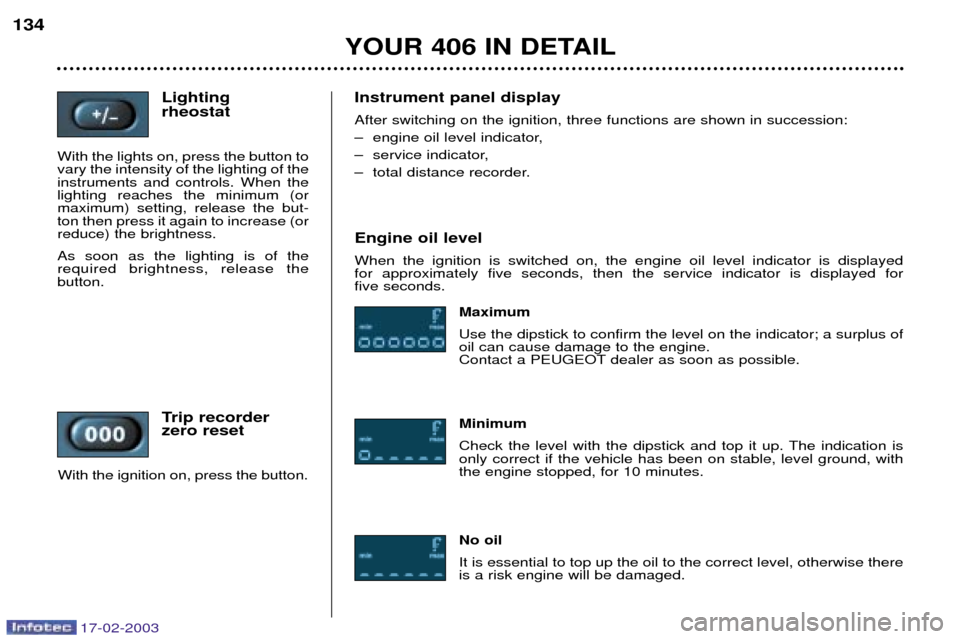
Lighting rheostat
With the lights on, press the button to vary the intensity of the lighting of theinstruments and controls. When thelighting reaches the minimum (ormaximum) setting, release the but-ton then press it again to increase (orreduce) the brightness. As soon as the lighting is of the required brightness, release the button.
Trip recorderzero reset
With the ignition on, press the button. Instrument panel display After switching on the ignition, three functions are shown in succession:
Ð engine oil level indicator,
Ð service indicator,
Ð total distance recorder. Engine oil level When the ignition is switched on, the engine oil level indicator is displayed for approximately five seconds, then the service indicator is displayed for five seconds.
Maximum Use the dipstick to confirm the level on the indicator; a surplus of oil can cause damage to the engine.
Contact a PEUGEOT dealer as soon as possible. Minimum
Check the level with the dipstick and top it up. The indication is only correct if the vehicle has been on stable, level ground, withthe engine stopped, for 10 minutes. No oil It is essential to top up the oil to the correct level, otherwise there is a risk engine will be damaged.
YOUR 406 IN DETAIL
134
Page 55 of 177
17-02-2003
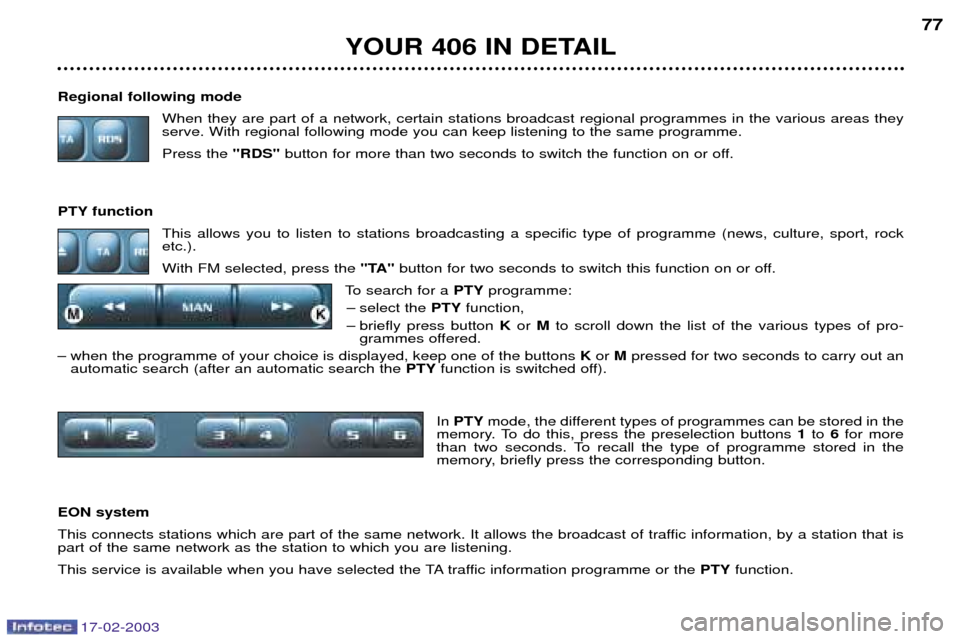
Regional following modeWhen they are part of a network, certain stations broadcast regional programmes in the various areas they serve. With regional following mode you can keep listening to the same programme. Press the "RDS"button for more than two seconds to switch the function on or off.
PTY function This allows you to listen to stations broadcasting a specific type of programme (news, culture, sport, rock etc.). With FM selected, press the "TA"button for two seconds to switch this function on or off.
To search for a PTYprogramme:
Ð select the PTYfunction,
Ð briefly press button Kor Mto scroll down the list of the various types of pro-
grammes offered.
Ð when the programme of your choice is displayed, keep one of the buttons Kor Mpressed for two seconds to carry out an
automatic search (after an automatic search the PTYfunction is switched off).
In PTY mode, the different types of programmes can be stored in the
memory. To do this, press the preselection buttons 1to 6for more
than two seconds. To recall the type of programme stored in the
memory, briefly press the corresponding button.
EON system
This connects stations which are part of the same network. It allows the broadcast of traffic information, by a station that is part of the same network as the station to which you are listening.
This service is available when you have selected the TA traffic information programme or the PTYfunction.
YOUR 406 IN DETAIL 77
Page 65 of 177

17-02-2003
PTY functionThis allows you to listen to stations broadcasting a specific type of programme (news, culture, sport, rock etc.). With FM selected, press the "TA"button for two seconds to switch this function on or off.
To search for a PTYprogramme:
Ð select the PTYfunction,
Ð briefly press button Kor Lto scroll down the list of the various types of pro-
grammes offered.
Ð when the programme of your choice is displayed, keep button Kor Lpressed for two seconds to carry out an automatic
search (after an automatic search the PTYfunction is switched off).
In PTY mode the different types of programmes can be stored in the
memory. To do this, press the preselection buttons 1to 6for more
than two seconds. To recall the type of programme stored in the
memory, briefly press the corresponding button.
EON system
This connects stations which are part of the same network. It enables the broadcast of traffic information by a station, which is part of the same network as the station to which you are listening.
This service is available when you have selected the TA traffic information programme or the PTYfunction.
YOUR 406 IN DETAIL 87
Page 71 of 177

17-02-2003
THE SATELLITE NAVIGATION SYSTEM IntroductionThe satellite navigation system guides you to the destination of your choiceby means of vocal and visual instruc-tions. The heart of the system lies in the use of a map database and GPS (Global
Positioning System). This enablesyour position to be located by meansof several satellites. The satellite navigation system con- sists of the following components:
Ð the remote control,
Ð the display,
Ð the control unit,
Ð the last voice message recall con-trol,
Ð the CD ROM.
Some functions or services
described in this guide may vary depending on the CD ROM version or the country.The remote control
There is a storage compartment for the remote control in front of the ashtray. Pointing the remote control at the screen enables the information contained in the various menus to be selected.
Direction arrows: These enable you to move around the screen and thus select a function.
On the welcome screen only, the Up and Down buttons enable the brightness of the screen to beadjusted.
menu : this button allows access to the main menu. It canbe used at any time.
esc : escape button "Short press": cancels the current operation and returns to the previous screen. "Press for more than 2 seconds": returns to the welcome screen. This button can be used in any menu. It is inactive during guidance.
mod : mode button "Short press": changes between date, navigation, radio and permanent locating.
val : Confirmation button Confirms the function selected.
YOUR 406 IN DETAIL 93
Page 74 of 177

17-02-2003
Main menu Switch on the ignition. Press the "Menu"button to access the main menu.
Select a function using the direction arrows, then confirm ( "VAL" button). The
"Navigation/guidance" menu offers the following
options:
Ð entering of the address of a new destination.
Ð selection of a service (Hotel, station, airport...) available in a town.
Ð selection of an address stored in one of the two directories.
Ð access to the "Navigation options" menu;
Ð radio functions are suspended when the system is in guidance mode.
YOUR 406 IN DETAIL
96
Navigation/Guidance Following selection of the "Navigation/guidance"menu,
a screen warns you about the use of the navigation sys- tem. Follow the regulations in force and do not use theremote control while driving. Press the "VAL"button to access the next screen.