ECO mode PEUGEOT 4C 2015 Owners Manual
[x] Cancel search | Manufacturer: PEUGEOT, Model Year: 2015, Model line: , Model:Pages: 348, PDF Size: 3.76 MB
Page 17 of 348
NOTE:Changes or modifications not expressly approved
by the party responsible for compliance could void the
user’s authority to operate the equipment.
VEHICLE SECURITY ALARM SYSTEM — IF
EQUIPPED
The Vehicle Security Alarm monitors the doors and
decklid for unauthorized entry and the ignition for
unauthorized operation. If something triggers the alarm,
the Vehicle Security Alarm will prevent the vehicle from
starting. It will also emit an acoustic signal and flash the
park lights, and taillights.
Operation
The alarm activates in the following cases:
1. Wrongful opening of one of the doors or the decklid
(perimeter protection);2. Wrongful operation of the ignition switch (key turned
to MAR-ON);
3. Cutting of the battery leads;
4. Movement inside the passenger compartment (volu-
metric protection);
5. Anomalous lifting/tilting of the car.
Operation of the alarm is indicated by an acoustic and
visual signal (flashing of the direction indicators for
several seconds). The alarm activation modes may vary
according to the market. There is a maximum number of
acoustic/visual cycles. When this is reached the system
returns to normal operation.
2
THINGS TO KNOW BEFORE STARTING YOUR VEHICLE 15
Page 70 of 348
1. Look behind the seating position where you plan to
install the child restraint to find the tether anchorage.
You may need to tilt the seatback forward to provide
better access to the tether anchorage.
2. Route the tether strap around the outboard side of the
head restraint to the tether anchorage.
3. Attach the tether strap hook of the child restraint to
the top tether anchorage.
4. Remove slack in the tether strap according to the child
restraint manufacturer ’s instructions.
WARNING!
An incorrectly anchored tether strap could lead to
increased head motion and possible injury to the
child. Use only the anchorage position directly be-
hind the child seat to secure a child restraint top
tether strap.
Transporting Pets
Deploying air bags could harm your pet. An unrestrained
pet will be thrown about and possibly injured, or injure a
passenger during panic braking or in an collision.
Pets should be restrained in pet harnesses or pet carriers
that are secured by seat belts.
ENGINE BREAK-IN RECOMMENDATIONS
A long break-in period is not required for the drivetrain
(engine, transmission, and rear axle) in your new vehicle.
Following these few simple guidelines is all that is
necessary for a good break-in.
For the first 200 miles (300 km):
•Driving your vehicle with new transmission requires
no special techniques but, to reach optimal shifting
quality, it’s preferred to use only Natural DNA mode
in the first 125 miles (200 km), avoiding in this phase
very aggressive driving.
68 THINGS TO KNOW BEFORE STARTING YOUR VEHICLE
Page 73 of 348
damaged, deteriorated, or mispositioned parts. Open
seams or loose connections could permit exhaust fumes
to seep into the passenger compartment. In addition,
inspect the exhaust system each time the vehicle is raised
for lubrication or oil change. Replace as required.
Safety Checks You Should Make Inside The
Vehicle
Seat Belts
Inspect the belt system periodically, checking for cuts,
frays, and loose parts. Damaged parts must be replaced
immediately. Do not disassemble or modify the system.
Front seat belt assemblies must be replaced after a
collision. Seat belt assemblies must be replaced after a
collision if they have been damaged (i.e., bent retractor,
torn webbing, etc.). If there is any question regarding belt
or retractor condition, replace the belt.
Air Bag Warning Light
The light should come on and remain on for four to eight
seconds as a bulb check when the ignition is first cycled
to ON. If the light is not lit during starting, see your
authorized dealer. If the light stays on, flickers, or comes
on while driving, have the system checked by an autho-
rized dealer.
Defroster
Check operation by selecting the defrost mode and place
the blower control on high speed. You should be able to
feel the air directed against the windshield. See your
authorized dealer for service if your defroster is inoper-
able.
2
THINGS TO KNOW BEFORE STARTING YOUR VEHICLE 71
Page 92 of 348
Interior Light Timing (Center Position)
There are four different modes of operation that can be
activated in this position:
•When one door is opened a three minute timer is
activated.
•When the key is removed from the ignition (within
two minutes of the ignition being turned off), a 10
second timer is activated.
•When the doors are unlocked with the Key Fob a 10
second timer is activated.
•When the doors are locked with the Key Fob the lights
will turn off.
WINDSHIELD WIPERS AND WASHERS
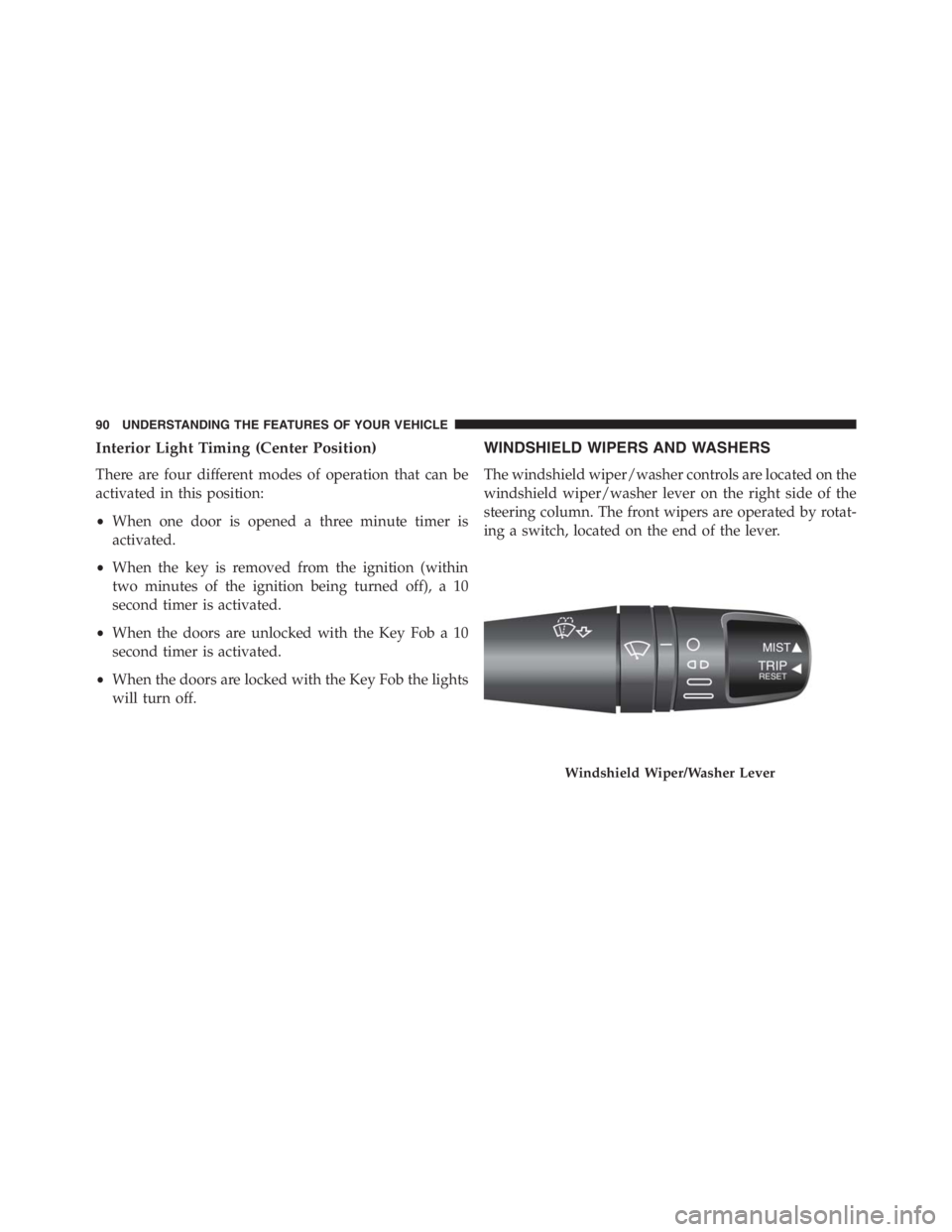
The windshield wiper/washer controls are located on the
windshield wiper/washer lever on the right side of the
steering column. The front wipers are operated by rotat-
ing a switch, located on the end of the lever.
Windshield Wiper/Washer Lever
90 UNDERSTANDING THE FEATURES OF YOUR VEHICLE
Page 132 of 348
2. Push and release the UPor DOWNbutton to
select the setting and once selected a beep will
occur to signal the setting is saved.
3. Briefly push theSET/BACKbutton to go back to the
menu screen, or push and hold theSET/BACKbutton
(approximately one second) to go back to the main
screen without storing the settings.
Set Time
This function may be used to set the clock through two
sub-menu items: “Time” and “Mode.”
Proceed as follows:
1. Briefly push theSET/BACKbutton. The display will
show the two sub-menu items “Time” and “Mode.”
2. Push and release the UP
or DOWNbutton to
navigate the two sub-menu items.
3. Select the required option and then prush theSET/
BACKbutton.
4. When accessing the “Time” sub-menu item, briefly
push theSET/BACKbutton and “hours” will flash on
the display.
5. Push and release the UP
or DOWNbutton for
setting.
6. Briefly push theSET/BACKbutton and “minutes”
will flash on the display.
7. Push and release the UP
or DOWNbutton for
setting.
130 UNDERSTANDING YOUR INSTRUMENT PANEL
Page 133 of 348
NOTE:
•The setting will increase or decrease by one unit each
time the UP
or DOWNbutton is pushed.
Push and hold the button to increase/decrease the
setting rapidly. Save the setting by briefly pushing
the button when you approach the required set-
ting.
•Briefly push theSET/BACKbutton to return to the
“Time” sub-function.
•When accessing the “Mode” submenu, briefly push
theSET/BACKbutton. The previously set display
format will flash on the display.
•Push and release the UP
or DOWNbutton to
select “24h” or “12h.”
When you have selected the required settings, briefly
push theSET/BACKbutton to go back to the Time, Modesub-menu screen, or push and hold theSET/BACK
button (approximately one second) to go back to the
main screen without storing the settings.
Set Date
This function may be used to set the date (day - month -
year).
To change the date proceed as follows:
1. Briefly push theSET/BACKbutton and “year” will
flash on the display.
2. Push and release the UP
or DOWNbutton for
setting.
3. Briefly push theSET/BACKbutton and “month” will
flash on the display.
4. Push and release the UP
or DOWNbutton for
setting.
4
UNDERSTANDING YOUR INSTRUMENT PANEL 131
Page 145 of 348
HEATING AND VENTILATION
Manual Climate Controls With A/C
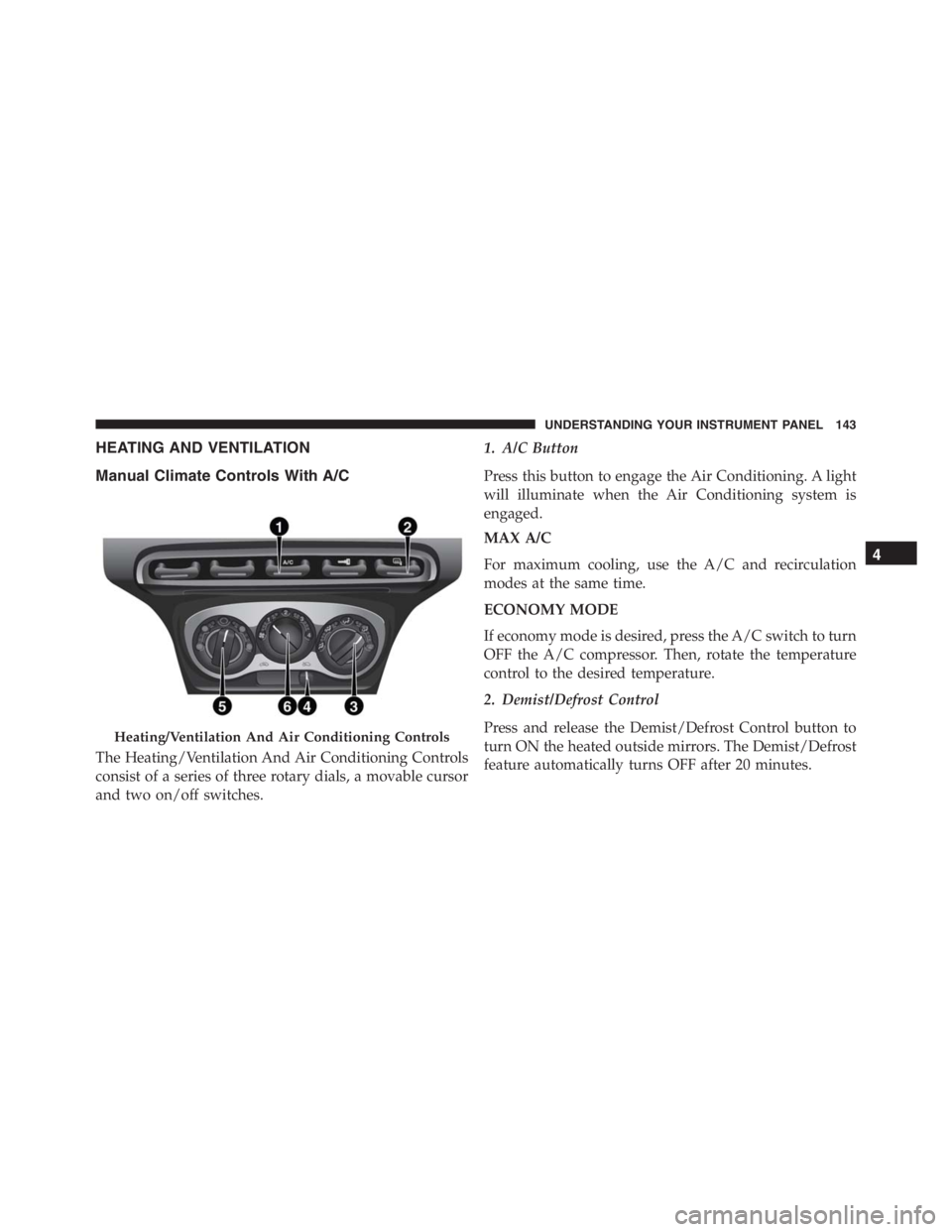
The Heating/Ventilation And Air Conditioning Controls
consist of a series of three rotary dials, a movable cursor
and two on/off switches.1. A/C Button
Press this button to engage the Air Conditioning. A light
will illuminate when the Air Conditioning system is
engaged.
MAX A/C
For maximum cooling, use the A/C and recirculation
modes at the same time.
ECONOMY MODE
If economy mode is desired, press the A/C switch to turn
OFF the A/C compressor. Then, rotate the temperature
control to the desired temperature.
2. Demist/Defrost Control
Press and release the Demist/Defrost Control button to
turn ON the heated outside mirrors. The Demist/Defrost
feature automatically turns OFF after 20 minutes.
Heating/Ventilation And Air Conditioning Controls
4
UNDERSTANDING YOUR INSTRUMENT PANEL 143
Page 147 of 348
NOTE:
•Continuous use of the Recirculation mode may make
the inside air stuffy and window fogging may occur.
Extended use of this mode is not recommended.
•The use of the Recirculation mode in cold or damp
weather could cause windows to fog on the inside,
because of moisture buildup inside the vehicle. Se-
lect the outside air position for maximum defogging.
5. Temperature Control
Rotate this control to regulate the temperature of the air
inside the passenger compartment. Rotating the dial
counterclockwise into the blue area of the scale indicates
cooler temperatures, while rotating clockwise into the red
area indicates warmer temperatures.
6. Blower Control
Rotate this control to regulate the amount of air forced
through the ventilation system in any mode. The blowerspeed increases as you move the control clockwise from
the “0” (OFF) position. There are four blower speeds.
Heating
To heat the passenger compartment, proceed as follows:
1. Rotate the Temperature Control to the red section.
2. Turn the Blower Control to the desired speed.
3. Turn the Mode Control to
.
4. Then operate the controls to maintain the desired
comfort conditions.
NOTE:
•This air distribution allows the passenger compart-
ment to be heated quickly.
•When the engine is cold, it takes a few minutes to
achieve optimum passenger compartment heating.
4
UNDERSTANDING YOUR INSTRUMENT PANEL 145
Page 162 of 348
Accelerating From A Stop
FIRST (1st) and REVERSE (R) can only be engaged (at a
stop) by pressing “1” or “R” when the brake pedal is
pressed.
To drive, press the brake pedal, and select 1 (One) or R
(Reverse) by pressing “1” or “R” using the transmission
gear selector buttons on the center console. Then release
the brake pedal and smoothly press the accelerator pedal.
NOTE:When starting on a fairly steep incline, it may be
advisable to engage the parking brake.
The vehicle can only be launched (from a stop) in FIRST
(1st) or REVERSE (R). SECOND (2nd) gear (or higher)
cannot be engaged when the vehicle is stationary.
FIRST (1st) and REVERSE (R) gears can only be engaged
at vehicle speeds below 2 mph (3 km/h). At speeds
below 6 mph (10 km/h), attempts to shift from 1st to R
(or R to 1st) will only be allowed if the vehicle speeddrops below the 2 mph (3 km/h) threshold within three
seconds of the request; otherwise, the transmission will
shift to NEUTRAL (N). The driver should then repeat the
request for 1st or R once the vehicle has come to a stop.
Shift Paddles
In MANUAL mode, the steering wheel mounted shift
paddles (labeled + and -) control the transmission shift-
ing.
Tapping the (+) paddle will upshift the transmission to
the next higher gear, while tapping the (-) paddle will
downshift to the next lower gear. The current gear is
displayed in the instrument cluster. If a requested shift
would cause engine lugging or overspeed, that request
will be ignored.
In AUTO mode, tapping a shift paddle will temporarily
place the transmission in MANUAL mode, and execute
the requested upshift or downshift (if allowable). The
160 STARTING AND OPERATING
Page 165 of 348
During prolonged stops with the engine running, it is
advisable to keep the transmission in NEUTRAL (N).
When stopped on an incline, always hold the vehicle in
place using the brakes. On steep inclines, Hill Start Assist
(HSA) will temporarily hold the car in position when the
brake pedal is released. If the accelerator pedal is not
applied after a short time, the car will roll back. Either
reapply the brake (to hold the vehicle) or press the
accelerator to climb the hill.
Only shift between FIRST (1st) and REVERSE (R) when
completely stopped, with the brake pedal pressed.
When necessary, it is possible to engage FIRST (1st),
REVERSE (R) or NEUTRAL (N) with the engine off, the
key at MAR-ON and the brake pressed. In this case, wait
at least five seconds between one gear change and the
next, in order to safeguard the operation of the hydraulic
system, and the pump in particular.For uphill departures, it is advisable to accelerate gradu-
ally but fully immediately after releasing the parking
brake or the brake pedal; this allows the engine to
temporarily increase the number of revs and tackle the
steepest gradients with more torque at the wheels.
ALFA DNA SYSTEM (DYNAMIC CAR CONTROL
SYSTEM)
This vehicle is equipped with a “Alfa DNA” system lever
(located on the center console). There are four modes of
operation to be selected according to driving style and
road conditions:
Dynamic (This mode alters the transmission’s automatic
shift schedule for sportier driving [D]).
Natural (mode for driving in normal conditions [N]).
All Weather (mode for driving in poor grip conditions,
such as rain and snow [A]).5
STARTING AND OPERATING 163