reset PEUGEOT 5008 2010.5 User Guide
[x] Cancel search | Manufacturer: PEUGEOT, Model Year: 2010.5, Model line: 5008, Model: PEUGEOT 5008 2010.5Pages: 345, PDF Size: 22.77 MB
Page 316 of 345
10
1
284
TRIP COMPUTER
TRIP COMPUTER
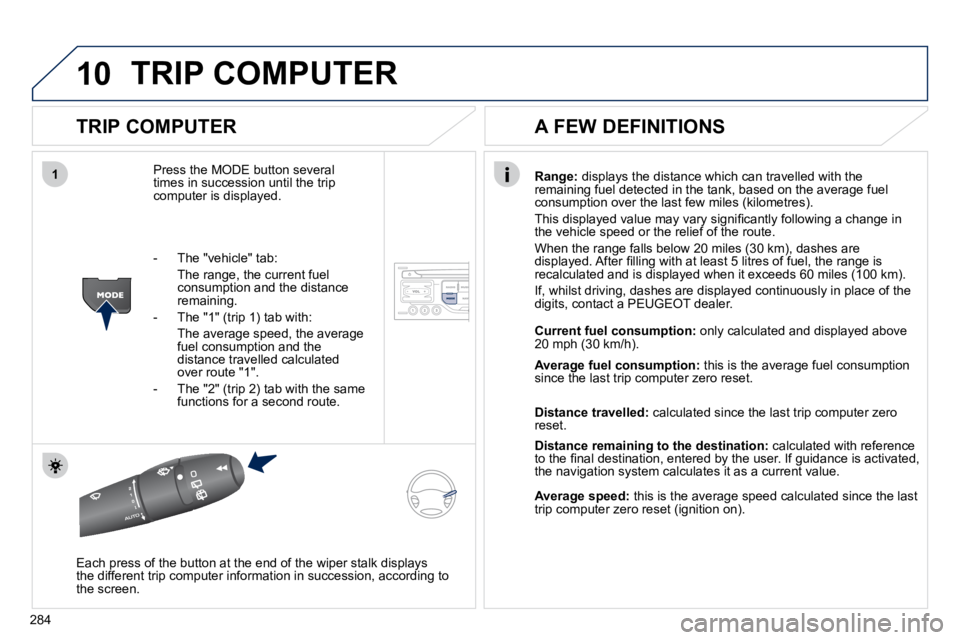
Press the MODE button several times in succession until the trip computer is displayed.
Range: displays the distance which can travelled with the remaining fuel detected in the tank, based on the average fuel consumption over the last few miles (kilometres).
This displayed value may vary signifi cantly following a change in the vehicle speed or the relief of the route.
When the range falls below 20 miles (30 km), dashes are displayed. After fi lling with at least 5 litres of fuel, the range is recalculated and is displayed when it exceeds 60 miles (100 km).
If, whilst driving, dashes are displayed continuously in place of the digits, contact a PEUGEOT dealer.
Each press of the button at the end of the wiper stalk displays the different trip computer information in succession, according t o the screen.
A FEW DEFINITIONS
- The "vehicle" tab:
The range, the current fuel consumption and the distance remaining.
- The "1" (trip 1) tab with:
The average speed, the average fuel consumption and the distance travelled calculated over route "1".
- The "2" (trip 2) tab with the same functions for a second route.
Current fuel consumption: only calculated and displayed above 20 mph (30 km/h).
Average fuel consumption: this is the average fuel consumption since the last trip computer zero reset.
Distance travelled: calculated since the last trip computer zero reset.
Distance remaining to the destination: calculated with reference to the fi nal destination, entered by the user. If guidance is activated, the navigation system calculates it as a current value.
Average speed: this is the average speed calculated since the last trip computer zero reset (ignition on).
Page 317 of 345
11
RADIO
285
SCREEN MENU MAP
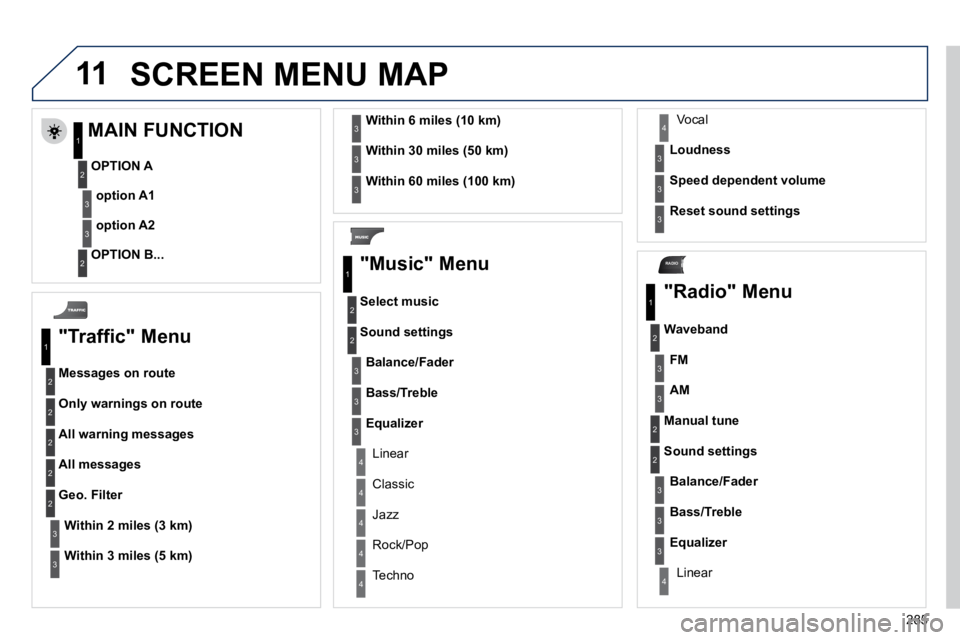
"Traffic" Menu
Messages on route
Only warnings on route
All warning messages
All messages
Within 2 miles (3 km)
Geo. Filter
Within 3 miles (5 km)
Within 6 miles (10 km)
Within 30 miles (50 km)
Within 60 miles (100 km)
"Music" Menu
Select music
Sound settings
Balance/Fader
Bass/Treble
Linear
Equalizer
Classic
Jazz
Rock/Pop
Techno
Vocal
Loudness
Speed dependent volume
Reset sound settings
"Radio" Menu
Waveband
AM
Linear
FM
Manual tune
Sound settings
Balance/Fader
Bass/Treble
Equalizer
MAIN FUNCTION
OPTION A
option A1
option A2
OPTION B...
1
2
3
1
2
4
1
2
3
4
3
3
3
3
2
2
2
2
4
4
4
4
4
3
3
3
3
3
2
3
2
2
3
3
3
3
1
2
3
2
3
Page 318 of 345
286
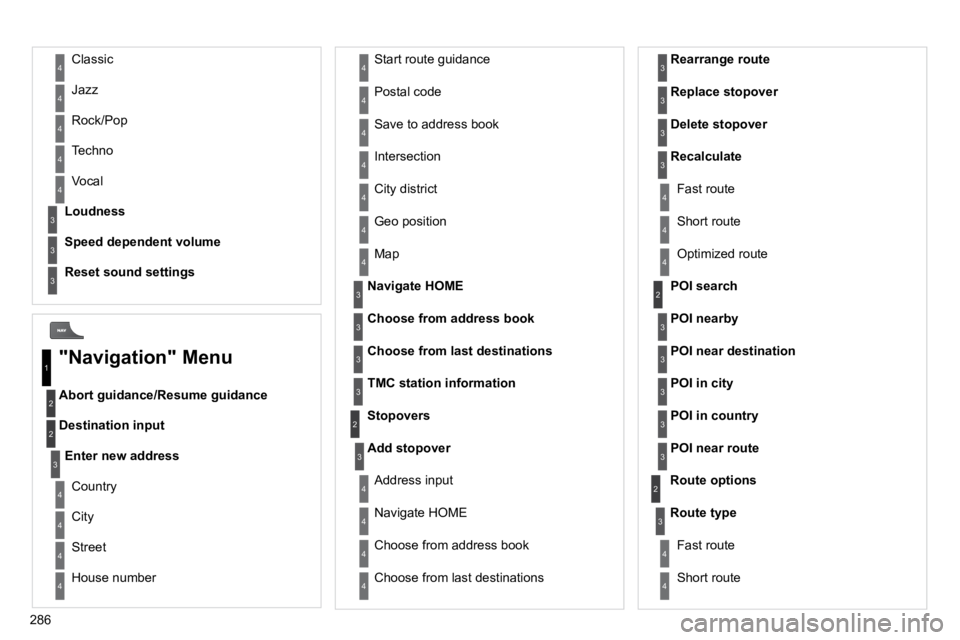
Abort guidance/Resume guidance
Destination input
Geo position
Map
Stopovers
Add stopover
Navigate HOME
Choose from address book
Rearrange route
Choose from last destinations
Replace stopover
Delete stopover
Recalculate
Fast route
Short route
Optimized route
POI search
POI nearby
Route options
Route type
Short route
Fast route
"Navigation" Menu
City
Street
Enter new address
Country
Navigate HOME
City district
House number
Start route guidance
Postal code
Save to address book
Intersection
Address input
POI near destination
POI in city
POI in country
POI near route
Choose from address book
3
3
Choose from last destinations
TMC station information
Loudness
Speed dependent volume
Reset sound settings
3
3
3
1
2
4
4
4
4
4
4
4
4
4
4
4
3
2
3
3
2
3
4
4
4
4
3
3
3
3
4
4
4
2
4
2
3
3
3
3
3
3
4
Classic
Jazz
Rock/Pop
Techno
Vocal
4
4
4
4
4
Page 320 of 345
288
* Available according to model.
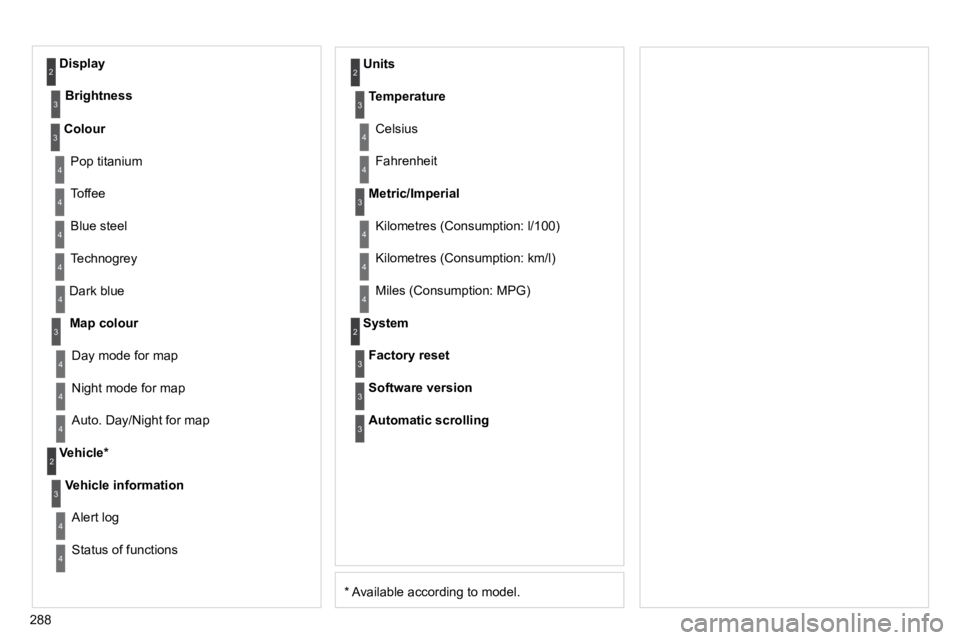
Dark blue
Map colour
Night mode for map
Units
Day mode for map
Vehicle *
Vehicle information
Alert log
Status of functions
Temperature
Celsius
Fahrenheit
Metric/Imperial
Kilometres (Consumption: l/100)
Kilometres (Consumption: km/l)
Miles (Consumption: MPG)
System
Auto. Day/Night for map
Factory reset
Software version
Automatic scrolling
3
4
4
2
4
3
4
4
2
3
4
4
3
4
4
4
2
4
3
3
3
Colour
Pop titanium
Toffee
Blue steel
Technogrey
3
4
4
4
4
Display
Brightness
2
3