sat nav PEUGEOT 5008 2010.5 User Guide
[x] Cancel search | Manufacturer: PEUGEOT, Model Year: 2010.5, Model line: 5008, Model: PEUGEOT 5008 2010.5Pages: 345, PDF Size: 22.77 MB
Page 293 of 345
261
The Peugeot Connect Navigation is protected in such a way that it will only operate in your vehicle. If it is to be installed in another vehicle, contact a PEUGEOT dealer for confi guration of the system.
Certain functions described in this handbook will become available during the year.
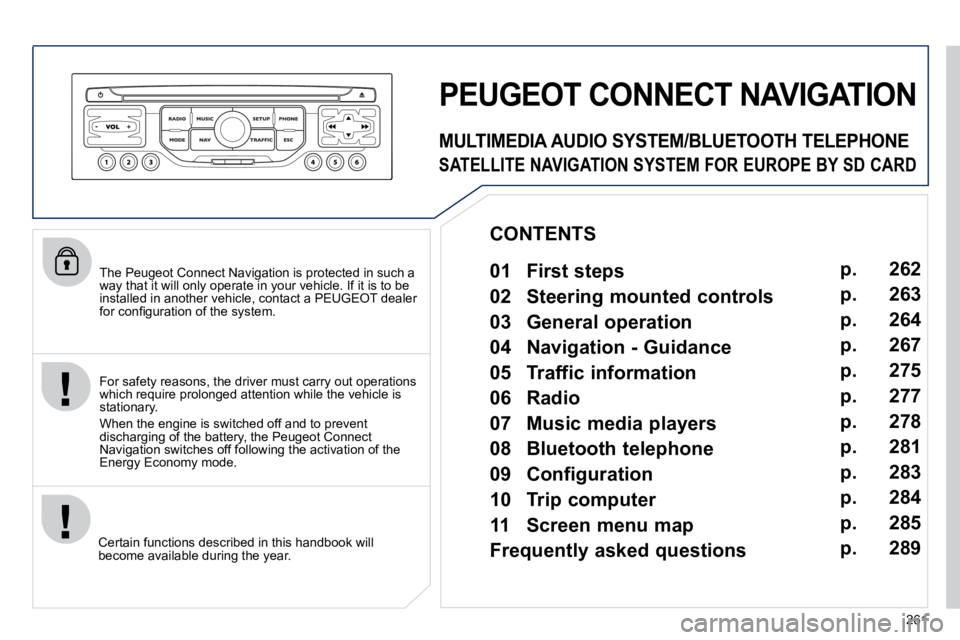
PEUGEOT CONNECT NAVIGATION
For safety reasons, the driver must carry out operations which require prolonged attention while the vehicle is stationary.
When the engine is switched off and to prevent discharging of the battery, the Peugeot Connect Navigation switches off following the activation of the Energy Economy mode.
MULTIMEDIA AUDIO SYSTEM/BLUETOOTH TELEPHONE
SATELLITE NAVIGATION SYSTEM FOR EUROPE BY SD CARD
01 First steps
CONTENTS
02 Steering mounted controls
03 General operation
04 Navigation - Guidance
05 Traffic information
06 Radio
07 Music media players
08 Bluetooth telephone
09 Configuration
10 Trip computer p.
p.
p.
p.
p.
p.
p.
p.
p.
p.
11 Screen menu map
Frequently asked questions p.
p. 262
263
264
267
275
277
278
281
283
284
285
289
Page 294 of 345
01
11
55
1010
22
334466
1313
1111
99
14141515
778812121616
262
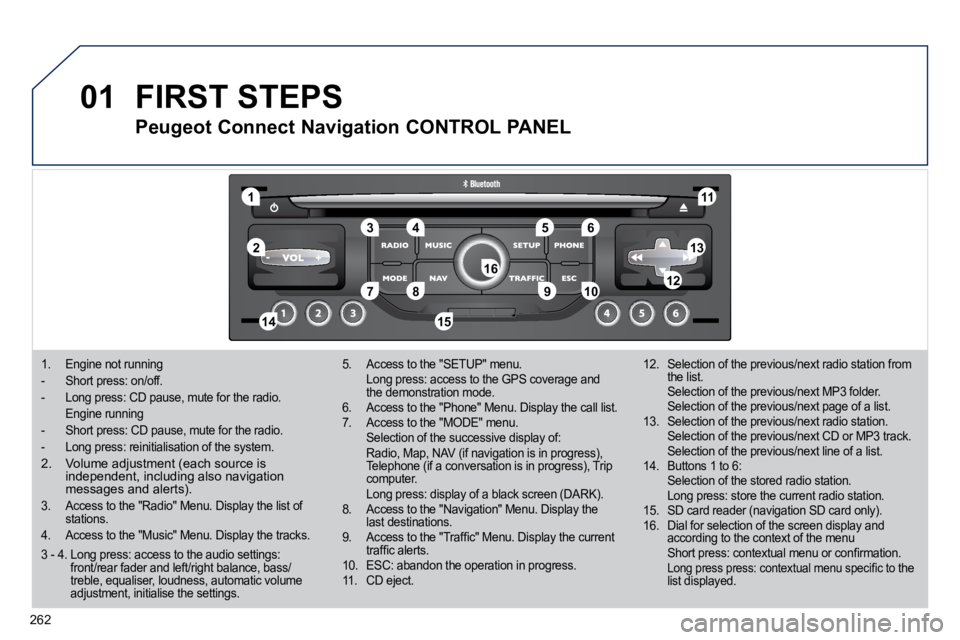
1. Engine not running
- Short press: on/off.
- Long press: CD pause, mute for the radio.
Engine running
- Short press: CD pause, mute for the radio.
- Long press: reinitialisation of the system.
2. Volume adjustment (each source is independent, including also navigation messages and alerts).
3. Access to the "Radio" Menu. Display the list of stations.
4. Access to the "Music" Menu. Display the track s.
5. Access to the "SETUP" menu. Long press: access to the GPS coverage and the demonstration mode. 6. Access to the "Phone" Menu. Display the call list. 7. Access to the "MODE" menu. Selection of the successive display of: Radio, Map, NAV (if navigation is in progress), Telephone (if a conversation is in progress), Trip computer. Long press: display of a black screen (DARK). 8. Access to the "Navigation" Menu. Display the last destinations. 9. Access to the "Traffi c" Menu. Display the current traffi c alerts. 10. ESC: abandon the operation in progress. 11. CD eject.
12. Selection of the previous/next radio station from the list. Selection of the previous/next MP3 folder. Selection of the previous/next page of a list. 13. Selection of the previous/next radio station. Selection of the previous/next CD or MP3 track. Selection of the previous/next line of a list. 14. Buttons 1 to 6: Selection of the stored radio station. Long press: store the current radio station. 15. SD card reader (navigation SD card only). 16. Dial for selection of the screen display and according to the context of the menu Short press: contextual menu or confi rmation. Long press press: contextual menu specifi c to the list displayed.
FIRST STEPS
Peugeot Connect Navigation CONTROL PANEL
3 - 4. Long press: access to the audio settings: front/rear fader and left/right balance, bass/treble, equaliser, loudness, automatic volume adjustment, initialise the settings.
Page 296 of 345
03
264
GENERAL OPERATION
For a detailed global view of the menus available, refer to the "Screen menu map" section.
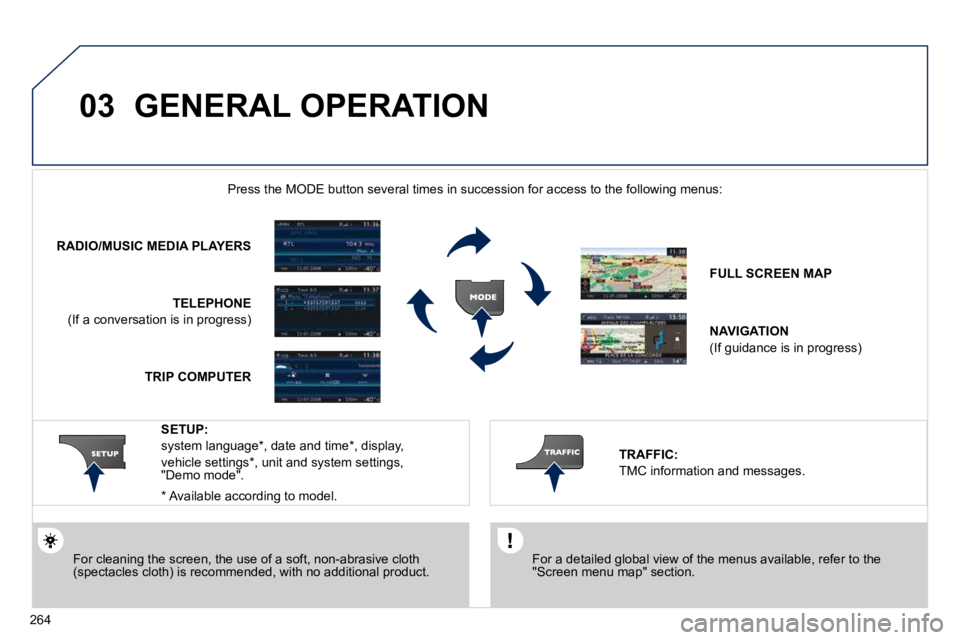
Press the MODE button several times in succession for access to the foll owing menus:
For cleaning the screen, the use of a soft, non-abrasive cloth (spectacles cloth) is recommended, with no additional product.
RADIO/MUSIC MEDIA PLAYERS
TELEPHONE
(If a conversation is in progress)
FULL SCREEN MAP
NAVIGATION
(If guidance is in progress)
SETUP:
system language * , date and time * , display,
vehicle settings * , unit and system settings, "Demo mode".
TRAFFIC:
TMC information and messages.
* Available according to model.
TRIP COMPUTER
Page 297 of 345
03
265
GENERAL OPERATION
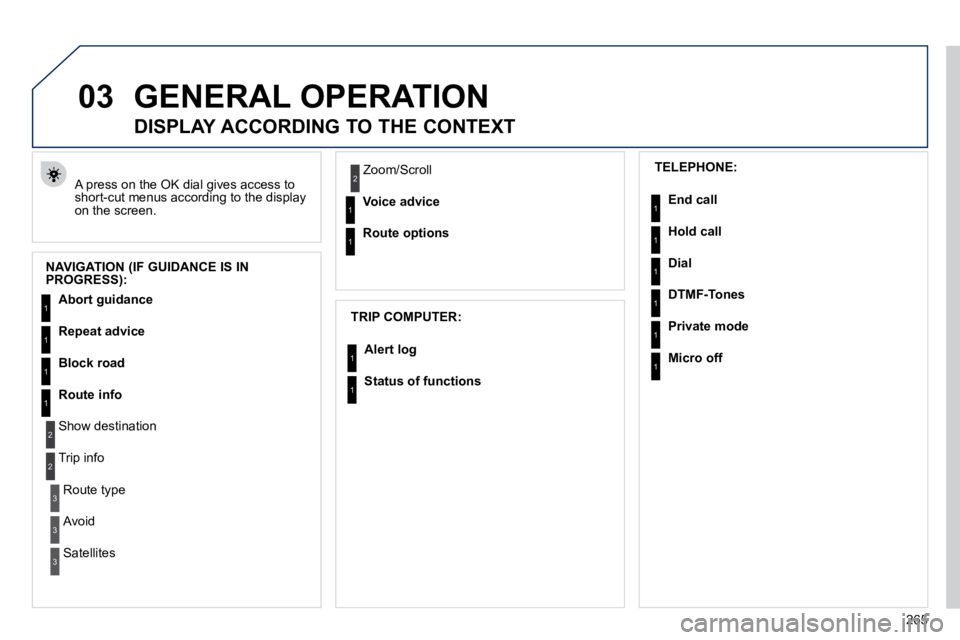
A press on the OK dial gives access to short-cut menus according to the display on the screen.
DISPLAY ACCORDING TO THE CONTEXT
NAVIGATION (IF GUIDANCE IS IN PROGRESS):
TRIP COMPUTER:
Abort guidance
Repeat advice
Block road
Route info
Show destination
Trip info
Route type
Avoid
Satellites
Zoom/Scroll
Voice advice
Route options
Alert log
Status of functions
1
2
3
3
2
1
1
1
3
1
1
1
1
2 TELEPHONE:
End call
Hold call
Dial
DTMF-Tones
Private mode
Micro off
1
1
1
1
1
1
Page 313 of 345
08
1
2
3
2
1
4
281
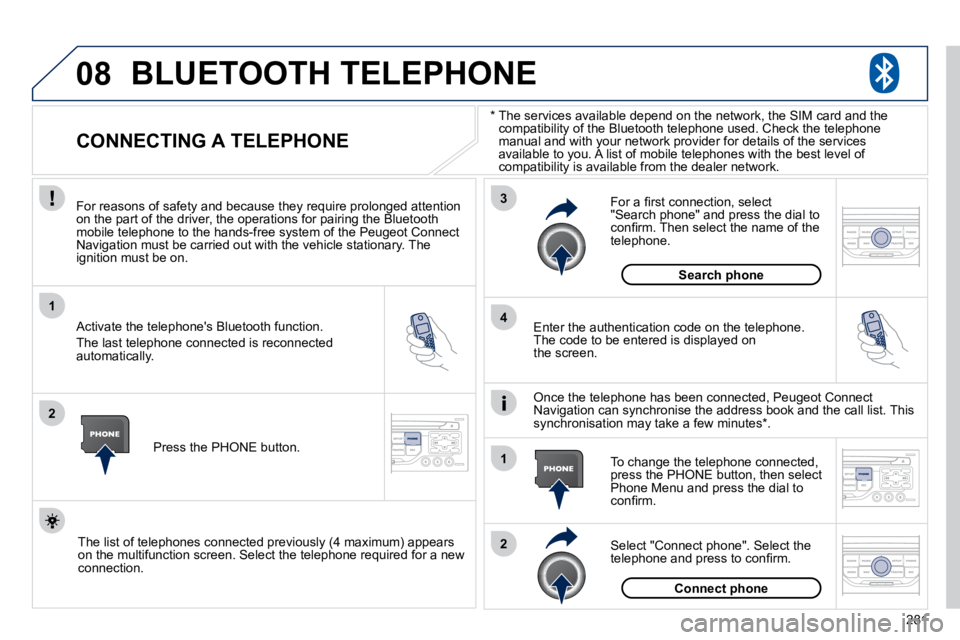
* The services available depend on the network, the SIM
card and the compatibility of the Bluetooth telephone used. Check the t elephone manual and with your network provider for details of the services available to you. A list of mobile telephones with the best level of compatibility is available from the dealer network.
BLUETOOTH TELEPHONE
CONNECTING A TELEPHONE
For reasons of safety and because they require prolonged atte ntion on the part of the driver, the operations for pairing the Bluetooth mobile telephone to the hands-free system of the Peugeot Con nect Navigation must be carried out with the vehicle stationary. The ignition must be on.
Activate the telephone's Bluetooth function.
The last telephone connected is reconnected automatically.
Enter the authentication code on the telephone. The code to be entered is displayed on the screen.
To change the telephone connected, press the PHONE button, then select Phone Menu and press the dial to confi rm.
Once the telephone has been connected, Peugeot Connect Navigation can synchronise the address book and the call list. T his synchronisation may take a few minutes * .
Select "Connect phone". Select the telephone and press to confi rm.
The list of telephones connected previously (4 maximum) appears on the multifunction screen. Select the telephone required for a new connection.
Press the PHONE button.
For a fi rst connection, select "Search phone" and press the dial to confi rm. Then select the name of the telephone.
Search phone
Connect phone
Page 323 of 345

291
QUESTIONANSWERSOLUTION
TA is selected. However, certain traffi c jams along the route are not indicated in real time.
On starting, it is several minutes before the system begins to receive the traffi c information. Wait until the traffi c information is being received correctly (displaying of the traffi c information symbols on the map).
In certain countries, only major routes (motorways...) are listed fo r the traffi c information. This phenomenon is normal. The system is dependent on the traffi c information available.
I receive a speed camera alert for a camera which is not on my route.
The system announces all speed cameras located in a conical zone forward of the vehicle. It may detect speed cameras on nearby or p arallel roads.
Zoom the map to view the exact position of the speed camera.
The audible speed camera alert is not working.
Audible alerts are not active. Activate audible alerts in Navigation Menu, Settings, Set parameters for risk areas.
The alert volume level is set to minimum. Increase the speed camera alert volume.
The altitude is not displayed. On starting, the initialisation of the GPS may take up to 3 minutes to receive more than 3 satellites correctly. Wait until the system has started up completely. Check that there is a GPS coverage of at least 3 satellites (long press on the SETUP button, then select GPS coverage).
Depending on the geographical environment (tunnel...) or t he weather, the conditions of reception of the GPS signal may vary. This phenomenon is normal. The system is dependent on the conditions of reception of the GPS signal.
The route is not calculated successfully. The exclusion criteria may confl ict with the current location (excl usion of toll roads on a motorway with tolls). Check the exclusion criteria.