key PEUGEOT 5008 2010.5 Owner's Guide
[x] Cancel search | Manufacturer: PEUGEOT, Model Year: 2010.5, Model line: 5008, Model: PEUGEOT 5008 2010.5Pages: 345, PDF Size: 22.77 MB
Page 266 of 345
233
04
2
ABC 3
DEF
5
JKL
4
GHI 6
MNO8
TUV
7
PQRS 9
WXYZ0
* #
1
RADIO MEDIA
NAVESC TRAFFIC
SETUP
ADDR
BOOK
2
ABC 3
DEF
5
JKL
4
GHI 6
MNO8
TUV
7
PQRS 9
WXYZ0
* #
1
RADIO MEDIA
NAV ESC TRAFFIC
SETUP
ADDR
BOOK
NAV1
3
4
6
7
8
2
ABC 3
DEF
5
JKL
4
GHI 6
MNO8
TUV
7
PQRS 9
WXYZ0
* #
1
RADIO MEDIA
NAV ESC TRAFFIC
SETUP
ADDR
BOOK
2
ABC 3
DEF
5
JKL
4
GHI 6
MNO8
TUV
7
PQRS 9
WXYZ0
* #
1
RADIO MEDIA
NAV ESC TRAFFIC
SETUP
ADDR
BOOK
2
ABC 3
DEF
5
JKL
4
GHI 6
MNO8
TUV
7
PQRS 9
WXYZ0
* #
1
RADIO MEDIA
NAV ESC TRAFFIC
SETUP
ADDR
BOOK
2
ABC 3
DEF
5
JKL
4
GHI 6
MNO8
TUV
7
PQRS 9
WXYZ0
* #
1
RADIO MEDIA
NAV ESC TRAFFIC
SETUP
ADDR
BOOK
22
ABC 3
DEF
5
JKL
4
GHI 6
MNO8
TUV
7
PQRS 9
WXYZ0
* #
1
RADIO MEDIA
NAV ESC TRAFFIC
SETUP
ADDR
BOOK
5
2
ABC 3
DEF
5
JKL
4
GHI 6
MNO8
TUV
7
PQRS 9
WXYZ0
* #
1
RADIO MEDIA
NAV ESC TRAFFIC
SETUP
ADDR
BOOK
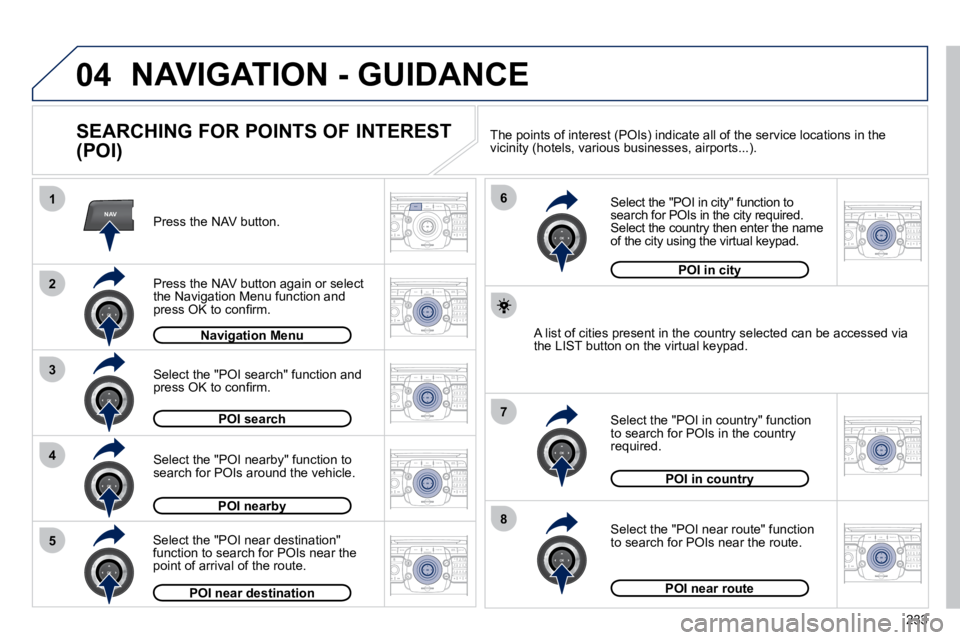
NAVIGATION - GUIDANCE
SEARCHING FOR POINTS OF INTEREST
(POI)
Press the NAV button.
Press the NAV button again or select the Navigation Menu function and press OK to confi rm.
Select the "POI nearby" function to search for POIs around the vehicle.
Select the "POI search" function and press OK to confi rm.
Navigation MenuNavigation Menu
POI search
POI nearbyPOI nearby
Select the "POI in city" function to search for POIs in the city required. Select the country then enter the name of the city using the virtual keypad.
Select the "POI near route" function to search for POIs near the route.
Select the "POI in country" function to search for POIs in the country required.
Select the "POI near destination" function to search for POIs near the point of arrival of the route.
POI near destination
POI in countryPOI in country
POI near route
A list of cities present in the country selected can be accessed
via the LIST button on the virtual keypad.
POI in cityPOI in city
The points of interest (POIs) indicate all of the service locations in the vicinity (hotels, various businesses, airports...).
Page 272 of 345
239
06
11
2
NAV ESC TRAFFICRADIOMEDIA
2
ABC 3
DEF
5
JKL
4
GHI 6
MNO8
TUV
7
PQRS 9
WXYZ0
* #
1
RADIO MEDIA
NAV ESC TRAFFIC
SETUP
ADDR
BOOK
RADIO
2
ABC 3
DEF
5
JKL
4
GHI 6
MNO8
TUV
7
PQRS 9
WXYZ0
* #
1
RADIO MEDIA
NAV ESC TRAFFIC
SETUP
ADDR
BOOK
2
ABC 3
DEF
5
JKL
4
GHI 6
MNO8
TUV
7
PQRS 9
WXYZ0
* #
1
RADIO MEDIA
NAV ESC TRAFFIC
SETUP
ADDR
BOOK
2
ABC 3
DEF
5
JKL
4
GHI 6
MNO8
TUV
7
PQRS 9
WXYZ0
* #
1
RADIO MEDIA
NAV ESC TRAFFIC
SETUP
ADDR
BOOK
2
ABC 3
DEF
5
JKL
4
GHI 6
MNO8
TUV
7
PQRS 9
WXYZ0
* #
1
RADIO MEDIA
NAV ESC TRAFFIC
SETUP
ADDR
BOOK
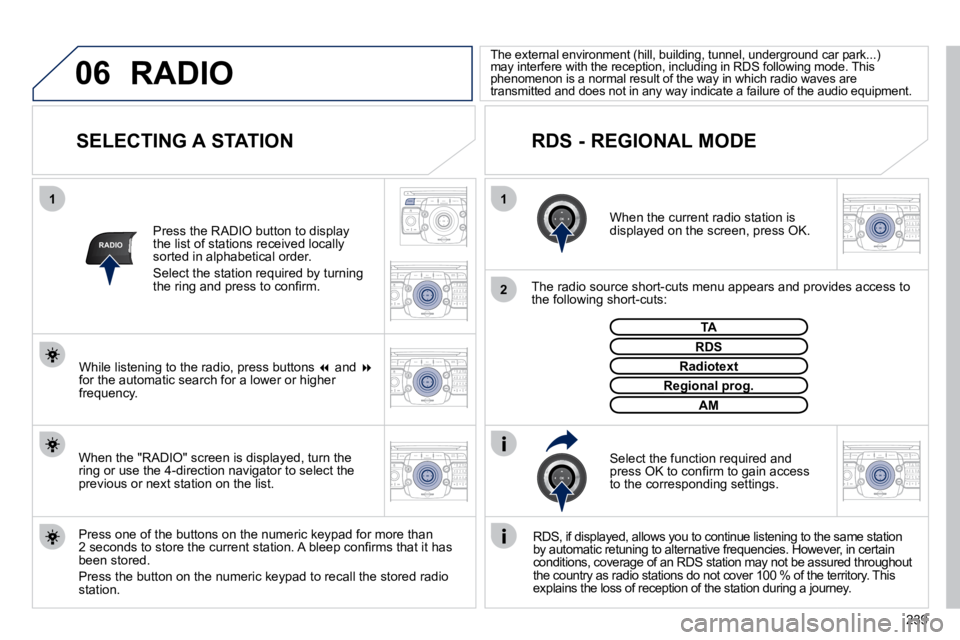
SELECTING A STATION
When the current radio station is displayed on the screen, press OK.
The radio source short-cuts menu appears and provides access to the following short-cuts:
Select the function required and press OK to confi rm to gain access to the corresponding settings.
TA
RDS, if displayed, allows you to continue listeni
ng to the same station by automatic retuning to alternative frequencies. H owever, in certain conditions, coverage of an RDS station may not be a ssured throughout the country as radio stations do not cover 100 % of the territory. This explains the loss of reception of the station during a journey.
The external environment (hill, building, tunnel, u nderground car park...) may interfere with the reception, including in RDS following mode. This phenomenon is a normal result of the way in which r adio waves are transmitted and does not in any way indicate a failure of the audio equipment.
RDS - REGIONAL MODE
Press the RADIO button to display the list of stations received locally sorted in alphabetical order.
Select the station required by turning the ring and press to confi rm.
Press one of the buttons on the numeric keypad for more than 2 seconds to store the current station. A bleep confi rms that it has been stored.
Press the button on the numeric keypad to recall the stored radi o station.
RDS
Radiotext
Regional prog.Regional prog.
AM
RADIO
When the "RADIO" screen is displayed, turn the ring or use the 4-direction navigator to select the previous or next station on the list.
While listening to the radio, press buttons and for the automatic search for a lower or higher frequency.
Page 280 of 345
247
08
14
5
2
ABC 3
DEF
5
JKL
4
GHI 6
MNO
8
TUV
7
PQRS 9
WXYZ
0
* #
1
NAV ESC TRAFFIC
ADDR
BOOK2
ABC 3
DEF
5
JKL
4
GHI 6
MNO
8
TUV
7
PQRS 9
WXYZ
0
* #
1SETUP2
ABC 3
DEF
5
JKL
4
GHI 6
MNO
8
TUV
7
PQRS 9
WXYZ
0
* #
1
3
2
ABC 3
DEF
5
JKL
4
GHI 6
MNO8
TUV
7
PQRS 9
WXYZ0
* #
1
RADIO MEDIA
NAV ESC TRAFFIC
SETUP
ADDR
BOOK
2
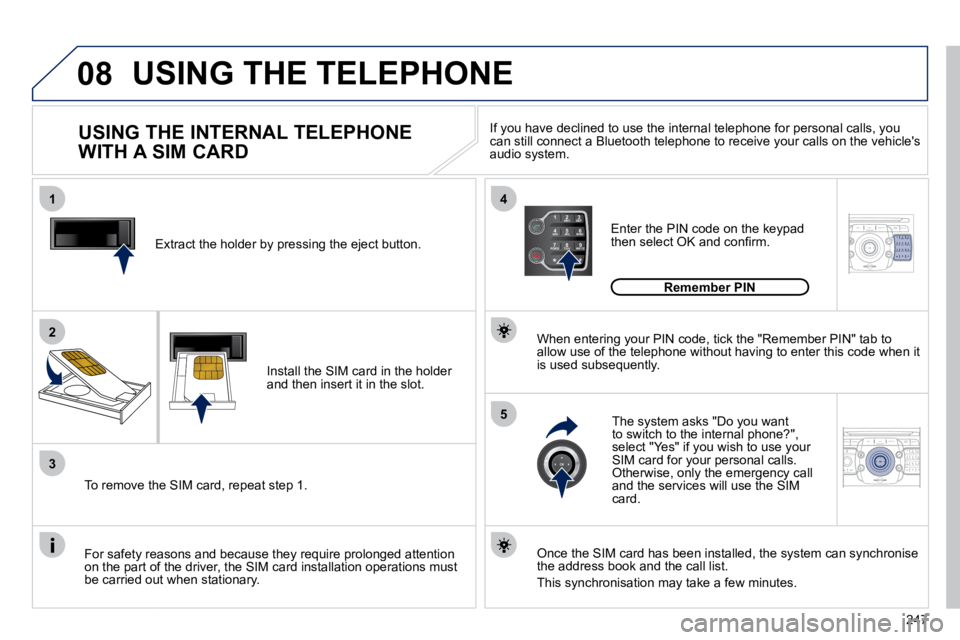
Extract the holder by pressing the eject button.
Install the SIM card in the holder and then insert it in the slot.
To remove the SIM card, repeat step 1.
For safety reasons and because they require prolonged attenti
on on the part of the driver, the SIM card installation operations must be carried out when stationary.
Enter the PIN code on the keypad then select OK and confi rm.
The system asks "Do you want to switch to the internal phone?", select "Yes" if you wish to use your SIM card for your personal calls. Otherwise, only the emergency call and the services will use the SIM card.
Remember PIN
When entering your PIN code, tick the "Remember PIN" tab to allow use of the telephone without having to enter this code when it is used subsequently.
USING THE INTERNAL TELEPHONE
WITH A SIM CARD
USING THE TELEPHONE
Once the SIM card has been installed, the system can synchronise the address book and the call list.
This synchronisation may take a few minutes.
If you have declined to use the internal telephone for p ersonal calls, you can still connect a Bluetooth telephone to receive your calls o n the vehicle's audio system.
Page 281 of 345
248
08
4
52
ABC 3
DEF
5
JKL
4
GHI 6
MNO8
TUV
7
PQRS 9
WXYZ0
* #
1
RADIO MEDIA
NAV ESC TRAFFIC
SETUP
ADDR
BOOK
2
ABC 3
DEF
5
JKL
4
GHI 6
MNO8
TUV
7
PQRS 9
WXYZ0
* #
1
RADIO MEDIA
NAV ESC TRAFFIC
SETUP
ADDR
BOOK
2
ABC 3
DEF
5
JKL
4
GHI 6
MNO8
TUV
7
PQRS 9
WXYZ0
* #
1
RADIO MEDIA
NAV ESC TRAFFIC
SETUP
ADDR
BOOK
6
1
3
2
ABC 3
DEF
5
JKL
4
GHI 6
MNO8
TUV
7
PQRS 9
WXYZ0
* #
1
RADIO MEDIA
NAV ESC TRAFFIC
SETUP
ADDR
BOOK
2
2
ABC 3
DEF
5
JKL
4
GHI 6
MNO8
TUV
7
PQRS 9
WXYZ0
* #
1
RADIO MEDIA
NAV ESC TRAFFIC
SETUP
ADDR
BOOK
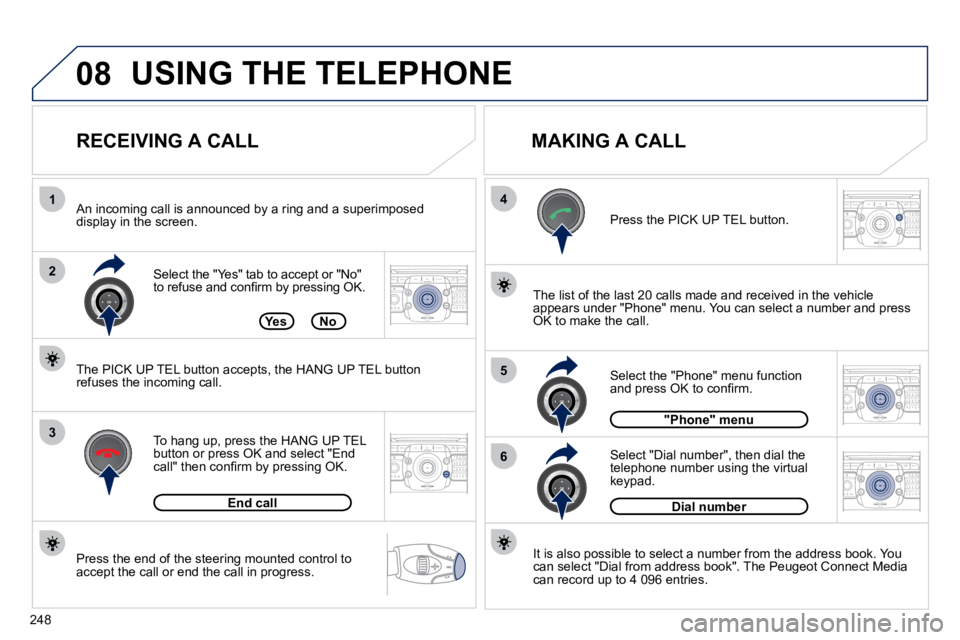
Press the end of the steering mounted control to accept the call or end the call in progress.
Select the "Yes" tab to accept or "No" to refuse and confi rm by pressing OK.
RECEIVING A CALL MAKING A CALL
An incoming call is announced by a ring and a superimposed display in the screen.
To hang up, press the HANG UP TEL button or press OK and select "End call" then confi rm by pressing OK.
End call
Press the PICK UP TEL button.
It is also possible to select a number from the address book. Yo
u can select "Dial from address book". The Peugeot Connect Media can record up to 4 096 entries.
Select "Dial number", then dial the telephone number using the virtual keypad.
Select the "Phone" menu function and press OK to confi rm.
Dial number
"Phone" menu
The list of the last 20 calls made and received in the vehicle appears under "Phone" menu. You can select a number and press OK to make the call. YesNo
The PICK UP TEL button accepts, the HANG UP TEL button refuses the incoming call.
USING THE TELEPHONE
Page 292 of 345
259
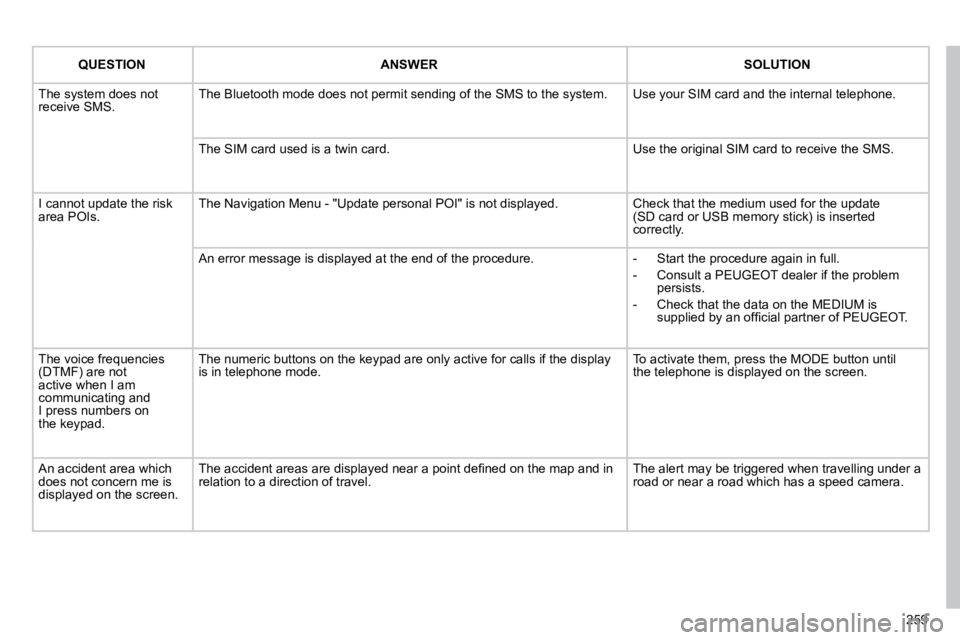
QUESTIONANSWERSOLUTION
The system does not receive SMS. The Bluetooth mode does not permit sending of the SMS to the system. Use your SIM card and the internal telephone.
The SIM card used is a twin card. Use the original SIM card to receive the SMS.
I cannot update the risk area POIs. The Navigation Menu - "Update personal POI" is not displayed. Check that the medium used for the update (SD card or USB memory stick) is inserted correctly.
An error message is displayed at the end of the procedure. - Start the procedure again in full.
- Consult a PEUGEOT dealer if the problem persists.
- Check that the data on the MEDIUM is supplied by an offi cial partner of PEUGEOT.
The voice frequencies (DTMF) are not active when I am communicating and I press numbers onthe keypad.
The numeric buttons on the keypad are only active for calls if the display is in telephone mode. To activate them, press the MODE button untilthe telephone is displayed on the screen.
An accident area which does not concern me is displayed on the screen.
The accident areas are displayed near a point defi ned on the map and in relation to a direction of travel. The alert may be triggered when travelling under a road or near a road which has a speed camera.
Page 299 of 345
04
1
2
3
5
6
4
NAVIGATION - GUIDANCE
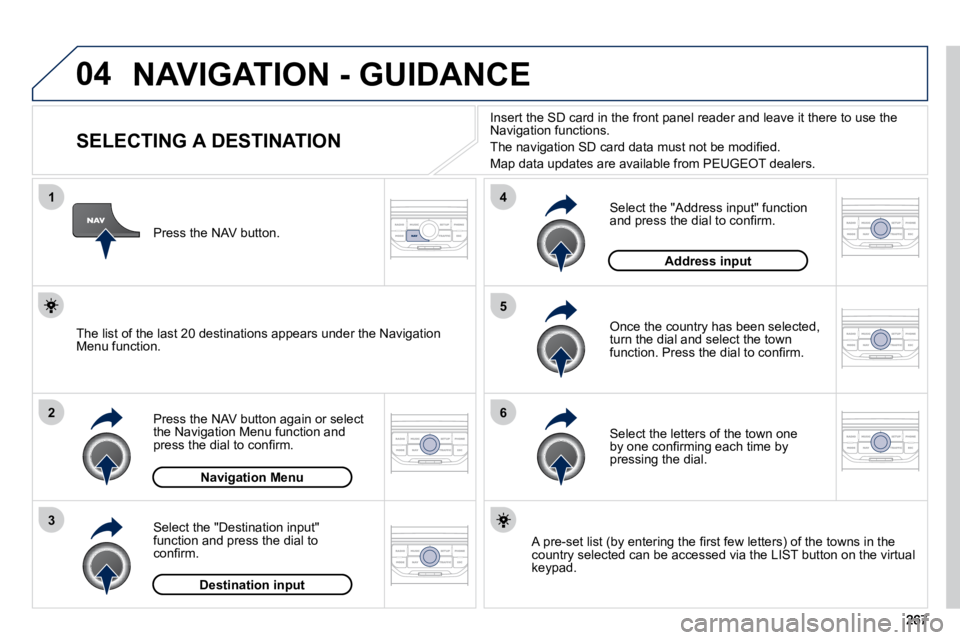
SELECTING A DESTINATION
Press the NAV button again or select the Navigation Menu function and press the dial to confi rm.
Select the "Destination input" function and press the dial to confi rm.
Press the NAV button.
Select the letters of the town one by one confi rming each time by pressing the dial.
Once the country has been selected, turn the dial and select the town function. Press the dial to confi rm.
Insert the SD card in the front panel reader and leave it there to use the Navigation functions.
The navigation SD card data must not be modifi ed.
Map data updates are available from PEUGEOT dealers.
A pre-set list (by entering the fi rst few letters) of the towns in the country selected can be accessed via the LIST button on the virtu al keypad.
Select the "Address input" function and press the dial to confi rm.
The list of the last 20 destinations appears under the Navigation Menu function.
Navigation Menu
Destination input
Address input
Page 300 of 345
04
7
8
9
268
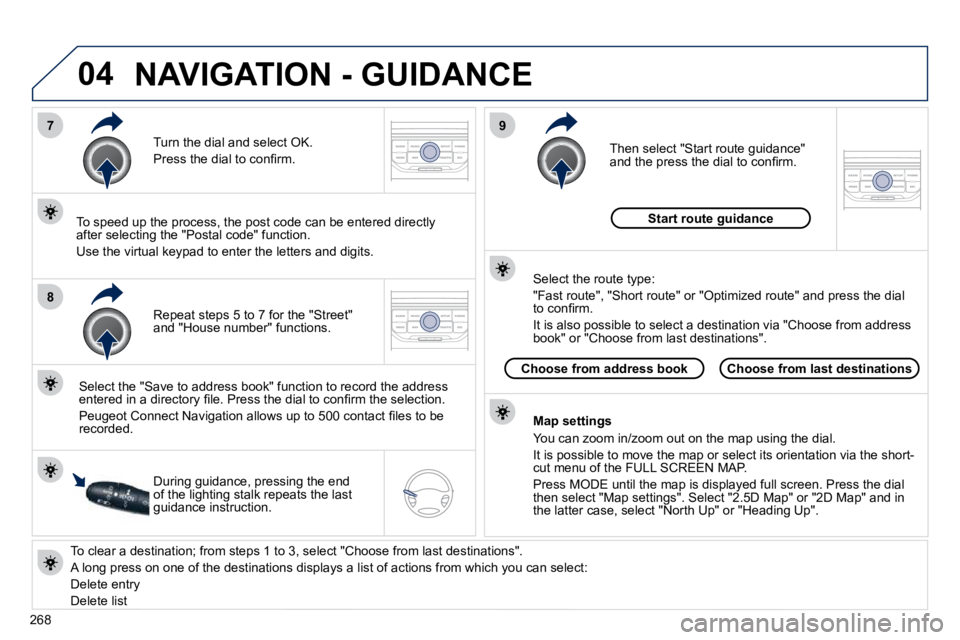
To clear a destination; from steps 1 to 3, select "Choose from last destinations".
A long press on one of the destinations displays a list of actions from which you can select:
Delete entry
Delete list
Repeat steps 5 to 7 for the "Street" and "House number" functions.
Turn the dial and select OK.
Press the dial to confi rm.
Select the "Save to address book" function to record the address entered in a directory fi le. Press the dial to confi rm the select ion.
Peugeot Connect Navigation allows up to 500 contact fi les to be recorded.
To speed up the process, the post code can be entered direct ly after selecting the "Postal code" function.
Use the virtual keypad to enter the letters and digits.
Then select "Start route guidance" and the press the dial to confi rm.
During guidance, pressing the end of the lighting stalk repeats the last guidance instruction.
Map settings
You can zoom in/zoom out on the map using the dial.
It is possible to move the map or select its orientation via the short-cut menu of the FULL SCREEN MAP.
Press MODE until the map is displayed full screen. Press the dial then select "Map settings". Select "2.5D Map" or "2D Map" and in the latter case, select "North Up" or "Heading Up".
Select the route type:
"Fast route", "Short route" or "Optimized route" and press the dial to confi rm.
It is also possible to select a destination via "Choose from a ddress book" or "Choose from last destinations".
Choose from last destinationsChoose from address book
Start route guidance
NAVIGATION - GUIDANCE
Page 304 of 345
04
8
6
7
4
3
5
2
1
NAVIGATION - GUIDANCE
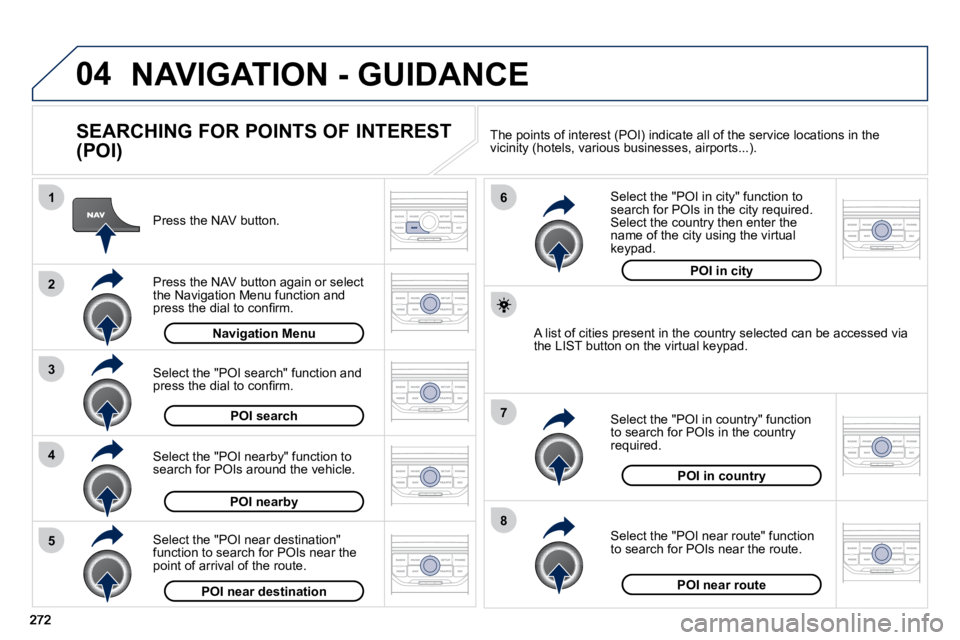
SEARCHING FOR POINTS OF INTEREST
(POI)
Press the NAV button.
Press the NAV button again or select the Navigation Menu function and press the dial to confi rm.
Select the "POI nearby" function to search for POIs around the vehicle.
Select the "POI search" function and press the dial to confi rm.
Navigation Menu
POI search
POI nearby
Select the "POI in city" function to search for POIs in the city required. Select the country then enter the name of the city using the virtual keypad.
Select the "POI near route" function to search for POIs near the route.
Select the "POI in country" function to search for POIs in the country required.
Select the "POI near destination" function to search for POIs near the point of arrival of the route.
POI near destinationPOI near route
POI in country
POI in city
A list of cities present in the country selected can be accessed via the LIST button on the virtual keypad.
The points of interest (POI) indicate all of the service locations in the vicinity (hotels, various businesses, airports...).
Page 309 of 345
06
3
2
1
1
277
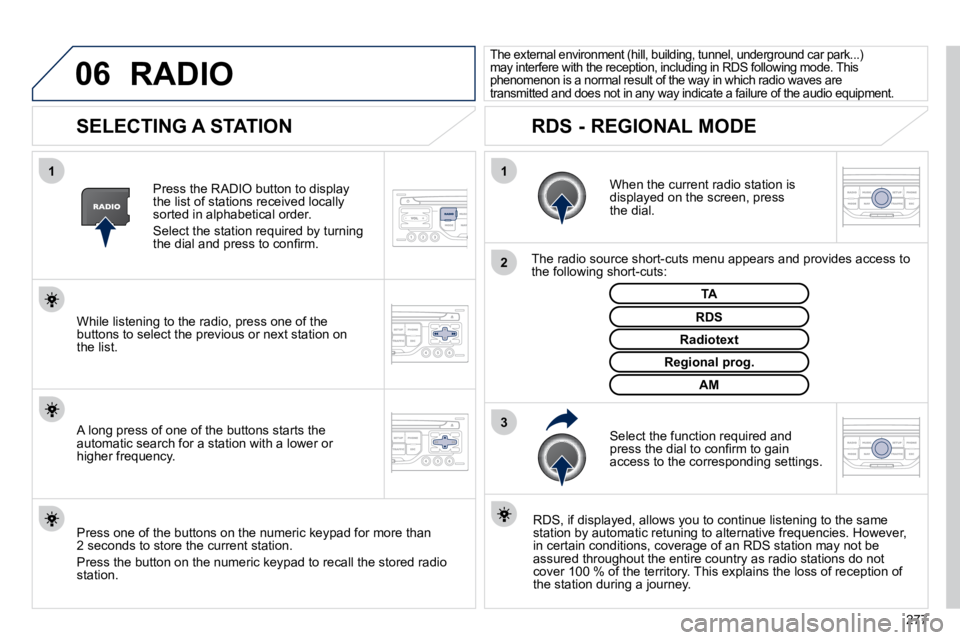
SELECTING A STATION
When the current radio station is displayed on the screen, press the dial.
The radio source short-cuts menu appears and provides access to the following short-cuts:
Select the function required and press the dial to confi rm to gain access to the corresponding settings.
TA
RDS, if displayed, allows you to continue listening to t he same station by automatic retuning to alternative frequencies. How ever, in certain conditions, coverage of an RDS station may not be assured throughout the entire country as radio stations do not cover 100 % of the territory. This explains the loss of receptio n of the station during a journey.
The external environment (hill, building, tunnel, underground car park...) may interfere with the reception, including in RDS following mode. This phenomenon is a normal result of the way in which r adio waves are transmitted and does not in any way indicate a failure of the audio equipment.
RDS - REGIONAL MODE
Press the RADIO button to display the list of stations received locally sorted in alphabetical order.
Select the station required by turning the dial and press to confi rm.
Regional prog.
Radiotext
RDS While listening to the radio, press one of the buttons to select the previous or next station on the list.
Press one of the buttons on the numeric keypad for more than 2 seconds to store the current station.
Press the button on the numeric keypad to recall the stored radi o station.
AM
A long press of one of the buttons starts the automatic search for a station with a lower or higher frequency.
RADIO
Page 314 of 345
08
1
3
2
2
1
282
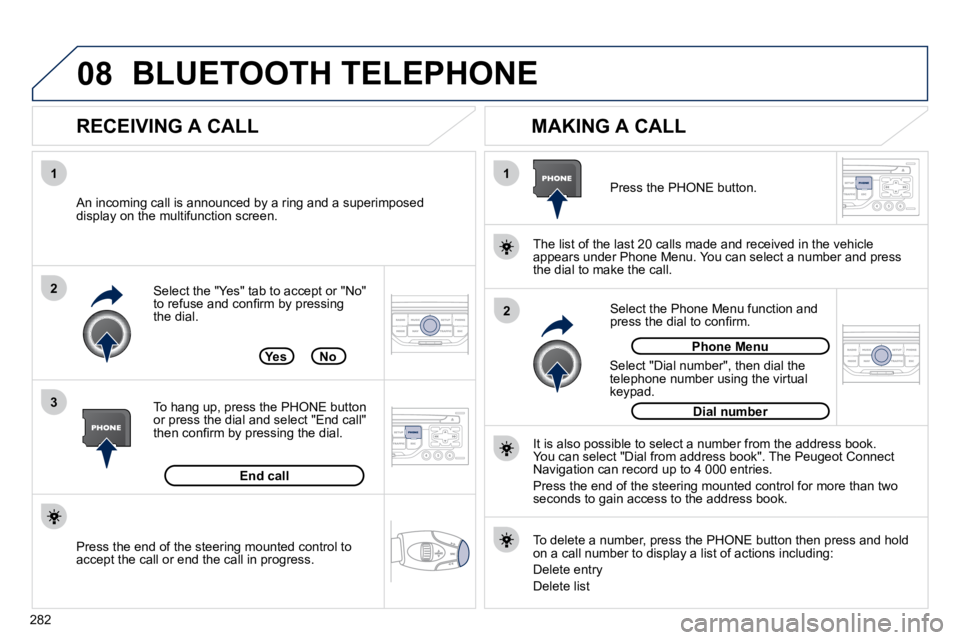
Select the "Yes" tab to accept or "No" to refuse and confi rm by pressing the dial.
RECEIVING A CALL MAKING A CALL
An incoming call is announced by a ring and a superimposed display on the multifunction screen.
Yes
To hang up, press the PHONE button or press the dial and select "End call" then confi rm by pressing the dial.
End call
Press the PHONE button.
Select "Dial number", then dial the telephone number using the virtual keypad.
Select the Phone Menu function and press the dial to confi rm.
The list of the last 20 calls made and received in the veh
icle appears under Phone Menu. You can select a number and press the dial to make the call.
No
It is also possible to select a number from the address book. You can select "Dial from address book". The Peugeot Connect Navigation can record up to 4 000 entries.
Press the end of the steering mounted control for more than tw o seconds to gain access to the address book.
Phone Menu
Dial number
To delete a number, press the PHONE button then press and hold on a call number to display a list of actions including:
Delete entry
Delete list
BLUETOOTH TELEPHONE
Press the end of the steering mounted control to accept the call or end the call in progress.