ignition PEUGEOT 5008 2010.5 Manual PDF
[x] Cancel search | Manufacturer: PEUGEOT, Model Year: 2010.5, Model line: 5008, Model: PEUGEOT 5008 2010.5Pages: 345, PDF Size: 22.77 MB
Page 231 of 345
PRACTICAL INFORMATION
197
Do not disconnect the terminals
while the engine is running.
Do not charge the batteries
without disconnecting the ter-
minals fi rst.
Do not push the vehicle to start the
engine if it is fi tted with a 6-speed
electronic gear control gearbox or an
automatic gearbox.
The batteries contain harmful
substances such as sulphuric
acid and lead. They must be
disposed of in accordance with regu-
lations and must not, in any circum-
stances, be discarded with household
waste.
Take used remote control batteries
and vehicle batteries to a special col-
lection point.
Charging the battery using a
battery charger
Disconnect the battery from the ve-
hicle.
Follow the instructions for use pro-
vided by the manufacturer of the
charger.
Reconnect starting with the nega-
tive terminal (-).
Check that the terminals and connec-
tors are clean. If they are covered with
sulphate (whitish or greenish deposit),
remove them and
clean them.
It is advisable to disconnect
the battery if the vehicle is to
be left unused for more than
one month. Before disconnecting the battery
Wait 2 minutes after switching off the ig-
nition before disconnecting the battery.
Close the windows and the doors be-
fore disconnecting the battery.
Following reconnection of the
battery
Following reconnection of the battery,
switch on the ignition and wait 1 minute
before starting to permit initialisation
of the electronic systems. However, if
problems remain following this opera-
tion, contact a PEUGEOT dealer.
Referring to the corresponding section,
you must yourself reinitialise:
- the remote control key,
- the panoramic sunroof blind,
- the satellite navigation system.
Disconnecting the cables
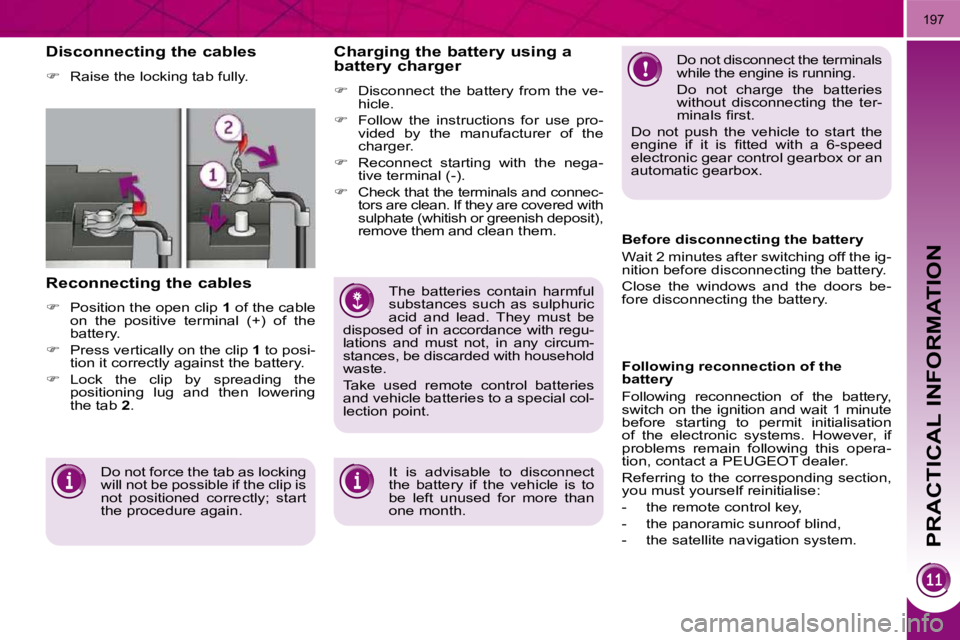
Raise the locking tab fully.
Reconnecting the cables
Position the open clip 1 of the cable
on the positive terminal (+) of the
battery.
Press vertically on the clip 1 to posi-
tion it correctly against the battery.
Lock the clip by spreading the
positioning lug and then lowering
the tab 2 .
Do not force the tab as locking
will not be possible if the clip is
not positioned correctly; start
the procedure again.
Page 232 of 345
PRACTICAL INFORMATION
198
Let the engine run for the
duration specifi ed to ensure
that the battery charge is suf-
fi cient.
Do not repeatedly and continuously
restart the engine in order to charge
the battery.
A fl at battery prevents the engine
from starting (refer to the "Battery"
paragraph). If the telephone is being used
at this time:
- it will be maintained for 5 min- utes with the hands-free kit of
your Peugeot Connect Sound or
Peugeot Connect Navigation,
- it will still be possible to fi nish the call with the Peugeot Connect
Media.
Exiting economy mode
These functions are reactivated auto-
matically next time the vehicle is driven.
In order to resume the use of these
functions immediately, start the en-
gine and let it run:
- for less than ten minutes, to use the equipment for approximately
fi ve minutes,
- for more than ten minutes, to use the equipment for up to approxi-
mately thirty minutes.
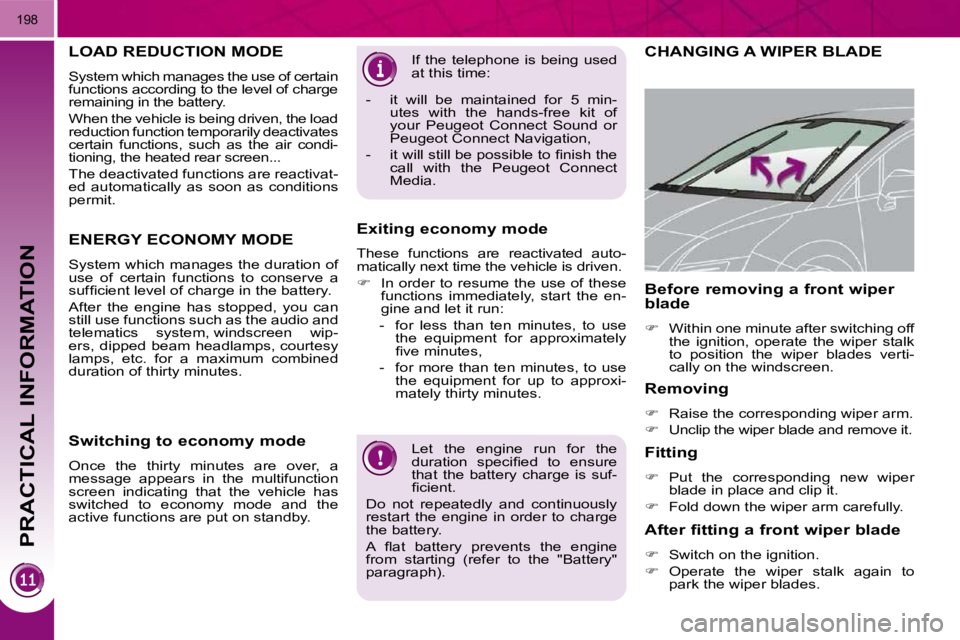
CHANGING A WIPER BLADE
Removing
Raise the corresponding wiper arm.
Unclip the wiper blade and remove it.
Fitting
Put the corresponding new wiper
blade in place and clip it.
Fold down the wiper arm carefully.
Before removing a front wiper
blade
Within one minute after switching off
the ignition, operate the wiper stalk
to position the wiper blades verti-
cally on the windscreen.
After fitting a front wiper blade
Switch on the ignition.
Operate the wiper stalk again to
park the wiper blades.
LOAD REDUCTION MODE
System which manages the use of certain
functions according to the level of charge
remaining in the battery.
When the vehicle is being driven, the load
reduction function temporarily deactivates
certain functions, such as the air condi-
tioning, the heated rear screen...
The deactivated functions are reactivat-
ed automatically as soon as conditions
permit.
ENERGY ECONOMY MODE
System which manages the duration of
use of certain functions to conserve a
suffi cient level of charge in the battery.
After the engine has stopped, you can
still use functions such as the audio and
telematics system, windscreen wip-
ers, dipped beam headlamps, courtesy
lamps, etc. for a maximum combined
duration of thirty minutes.
Switching to economy mode
Once the thirty minutes are over, a
message appears in the multifunction
screen indicating that the vehicle has
switched to economy mode and the
active functions are put on standby.
Page 248 of 345
214
EMERGENCY OR ASSISTANCE CALL
EMERGENCY CALL
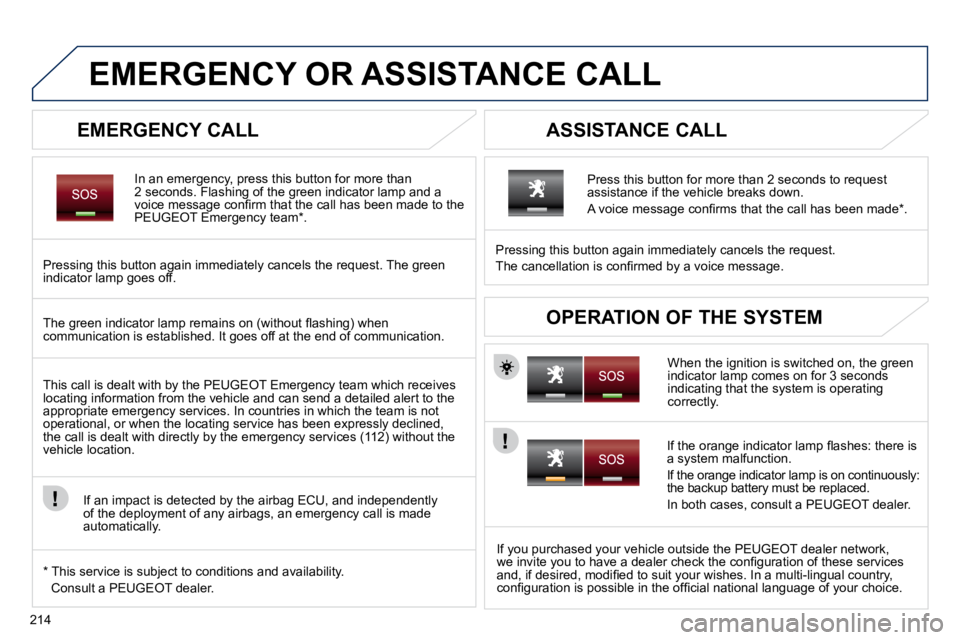
In an emergency, press this button for more than 2 seconds. Flashing of the green indicator lamp and a voice message confi rm that the call has been made to the PEUGEOT Emergency team * .
Pressing this button again immediately cancels the request. The green indicator lamp goes off.
ASSISTANCE CALL
If you purchased your vehicle outside the PEUGEOT dealer netwo rk, we invite you to have a dealer check the confi guration of these services and, if desired, modifi ed to suit your wishes. In a multi-lingual country, confi guration is possible in the offi cial national language of your choice.
When the ignition is switched on, the green indicator lamp comes on for 3 seconds indicating that the system is operating correctly.
Pressing this button again immediately cancels the request.
The cancellation is confi rmed by a voice message.
Press this button for more than 2 seconds to request assistance if the vehicle breaks down.
A voice message confi rms that the call has been made * .
OPERATION OF THE SYSTEM The green indicator lamp remains on (without fl ashing) when communication is established. It goes off at the end of commun ication.
This call is dealt with by the PEUGEOT Emergency team which recei ves locating information from the vehicle and can send a detailed alert to the appropriate emergency services. In countries in which the team is no t operational, or when the locating service has been expressly declined, the call is dealt with directly by the emergency services (112) without the vehicle location.
If an impact is detected by the airbag ECU, and independently of the deployment of any airbags, an emergency call is made automatically.
* This service is subject to conditions and availability.
Consult a PEUGEOT dealer.
If the orange indicator lamp fl ashes: there is a system malfunction.
If the orange indicator lamp is on continuously: the backup battery must be replaced.
In both cases, consult a PEUGEOT dealer.
Page 275 of 345
242
07
1
3
42
ABC 3
DEF
5
JKL
4
GHI 6
MNO8
TUV
7
PQRS 9
WXYZ0
* #
1
RADIO MEDIA
NAV ESC TRAFFIC
SETUP
ADDR
BOOK
2
ABC 3
DEF
5
JKL
4
GHI 6
MNO8
TUV
7
PQRS 9
WXYZ0
* #
1
RADIO MEDIA
NAV ESC TRAFFIC
SETUP
ADDR
BOOK
2
ABC 3
DEF
5
JKL
4
GHI 6
MNO8
TUV
7
PQRS 9
WXYZ0
* #
1
RADIO MEDIA
NAV ESC TRAFFIC
SETUP
ADDR
BOOK
2
ABC 3
DEF
5
JKL
4
GHI 6
MNO8
TUV
7
PQRS 9
WXYZ0
* #
1
RADIO MEDIA
NAV ESC TRAFFIC
SETUP
ADDR
BOOK
2
2
ABC 3
DEF
5
JKL
4
GHI 6
MNO8
TUV
7
PQRS 9
WXYZ0
* #
1
RADIO MEDIA
NAV ESC TRAFFIC
SETUP
ADDR
BOOK
5
7
8
6
9
RADIO
NAV ESC TRAFFICMEDIAMEDIA
2
ABC 3
DEF
5
JKL
4
GHI 6
MNO
8
TUV
7
PQRS 9
WXYZ
0
* #
1
RADIO MEDIA
NAV ESC TRAFFIC
SETUP
ADDR BOOKRADIO
NAV ESC TRAFFICMEDIA
2
ABC 3
DEF
5
JKL
4
GHI 6
MNO8
TUV
7
PQRS 9
WXYZ0
* #
1
RADIO MEDIA
NAV ESC TRAFFIC
SETUP
ADDR
BOOK
2
ABC 3
DEF
5
JKL
4
GHI 6
MNO8
TUV
7
PQRS 9
WXYZ0
* #
1
RADIO MEDIA
NAV ESC TRAFFIC
SETUP
ADDR
BOOK
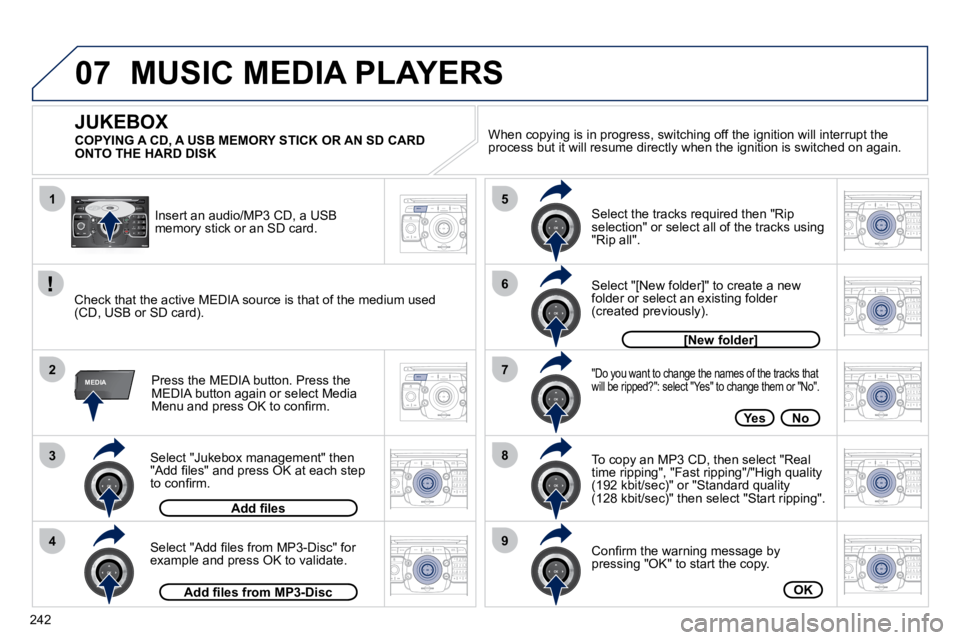
Select "Jukebox management" then "Add fi les" and press OK at each step to confi rm.
Press the MEDIA button. Press the MEDIA button again or select Media Menu and press OK to confi rm.
Insert an audio/MP3 CD, a USB memory stick or an SD card.
JUKEBOX
Add fi les
Check that the active MEDIA source is that of the medium used (CD, USB or SD card).
Select "Add fi les from MP3-Disc" for example and press OK to validate.
Select the tracks required then "Rip selection" or select all of the tracks using "Rip all".
Select "[New folder]" to create a new folder or select an existing folder (created previously).
Add fi les from MP3-Disc
[New folder][New folder]
"Do you want to change the names of the tracks th
at will be ripped?": select "Yes" to change them or "No".
To copy an MP3 CD, then select "Real time ripping", "Fast ripping"/"High quality (192 kbit/sec)" or "Standard quality(128 kbit/sec)" then select "Start ripping".
Confi rm the warning message by pressing "OK" to start the copy.
OK
YesNo
When copying is in progress, switching off the ignition wil l interrupt the process but it will resume directly when the ignition is switche d on again.
MUSIC MEDIA PLAYERS
COPYING A CD, A USB MEMORY STICK OR AN SD CARD ONTO THE HARD DISK
Page 279 of 345
246
08
1
4
5
2
ABC 3
DEF
5
JKL
4
GHI 6
MNO8
TUV
7
PQRS 9
WXYZ0
* #
1
RADIO MEDIA
NAV ESC TRAFFIC
SETUP
ADDR
BOOK
2
ABC 3
DEF
5
JKL
4
GHI 6
MNO8
TUV
7
PQRS 9
WXYZ0
* #
1
RADIO MEDIA
NAV ESC TRAFFIC
SETUP
ADDR
BOOK
32
ABC 3
DEF
5
JKL
4
GHI 6
MNO8
TUV
7
PQRS 9
WXYZ0
* #
1
RADIO MEDIA
NAV ESC TRAFFIC
SETUP
ADDR
BOOK
22
ABC 3
DEF
5
JKL
4
GHI 6
MNO8
TUV
7
PQRS 9
WXYZ0
* #
1
RADIO MEDIA
NAV ESC TRAFFIC
SETUP
ADDR
BOOK
2
ABC 3
DEF
5
JKL
4
GHI 6
MNO8
TUV
7
PQRS 9
WXYZ0
* #
1
RADIO MEDIA
NAV ESC TRAFFIC
SETUP
ADDR
BOOK
2
ABC 3
DEF
5
JKL
4
GHI 6
MNO8
TUV
7
PQRS 9
WXYZ0
* #
1
RADIO MEDIA
NAV ESC TRAFFIC
SETUP
ADDR
BOOK
* The services available via the telephone depend on
the network, the SIM card and the compatibility of the Bluetooth equipment use d. Refer to your telephone's manual and your operator to check which services you have access to. A list of mobile telephones which offer the best range of services is available from dealers.
USING THE TELEPHONE
CONNECTING A BLUETOOTH
TELEPHONE
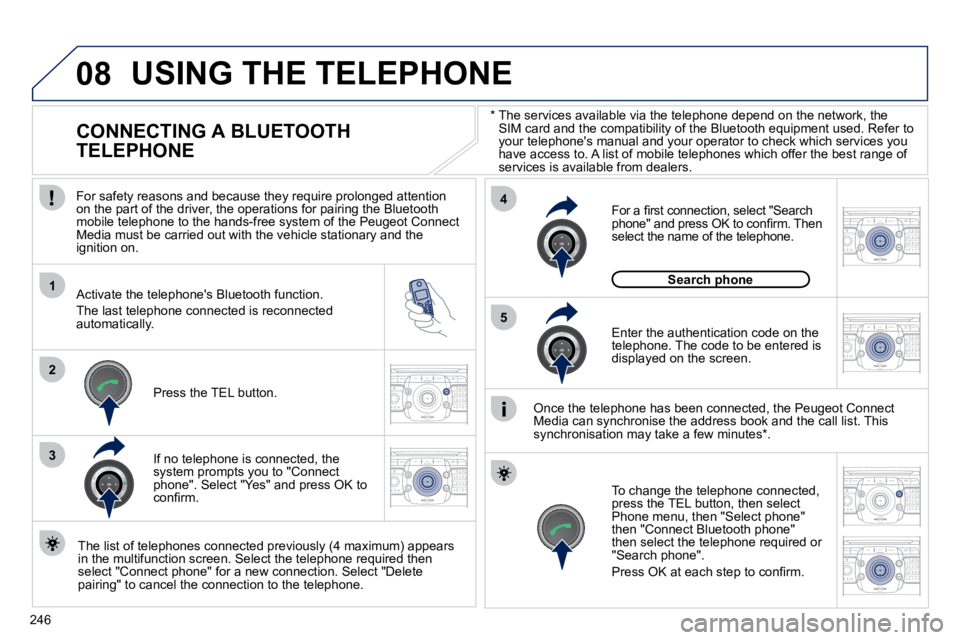
For safety reasons and because they require prolonged attenti on on the part of the driver, the operations for pairing the Bluetooth mobile telephone to the hands-free system of the Peugeot Con nect Media must be carried out with the vehicle stationary and the ignition on.
Activate the telephone's Bluetooth function.
The last telephone connected is reconnected automatically.
If no telephone is connected, the system prompts you to "Connect phone". Select "Yes" and press OK to confi rm.
Enter the authentication code on the telephone. The code to be entered is displayed on the screen.
To change the telephone connected, press the TEL button, then select Phone menu, then "Select phone" then "Connect Bluetooth phone" then select the telephone required or "Search phone".
Press OK at each step to confi rm.
Once the telephone has been connected, the Peugeot Connect Media can synchronise the address book and the call list. This synchronisation may take a few minutes * .
The list of telephones connected previously (4 maximum) appears in the multifunction screen. Select the telephone required then select "Connect phone" for a new connection. Select "Delete pairing" to cancel the connection to the telephone.
Press the TEL button.
For a fi rst connection, select "Search phone" and press OK to confi rm. Then select the name of the telephone.
Search phoneSearch phone
Page 313 of 345
08
1
2
3
2
1
4
281
* The services available depend on the network, the SIM
card and the compatibility of the Bluetooth telephone used. Check the t elephone manual and with your network provider for details of the services available to you. A list of mobile telephones with the best level of compatibility is available from the dealer network.
BLUETOOTH TELEPHONE
CONNECTING A TELEPHONE
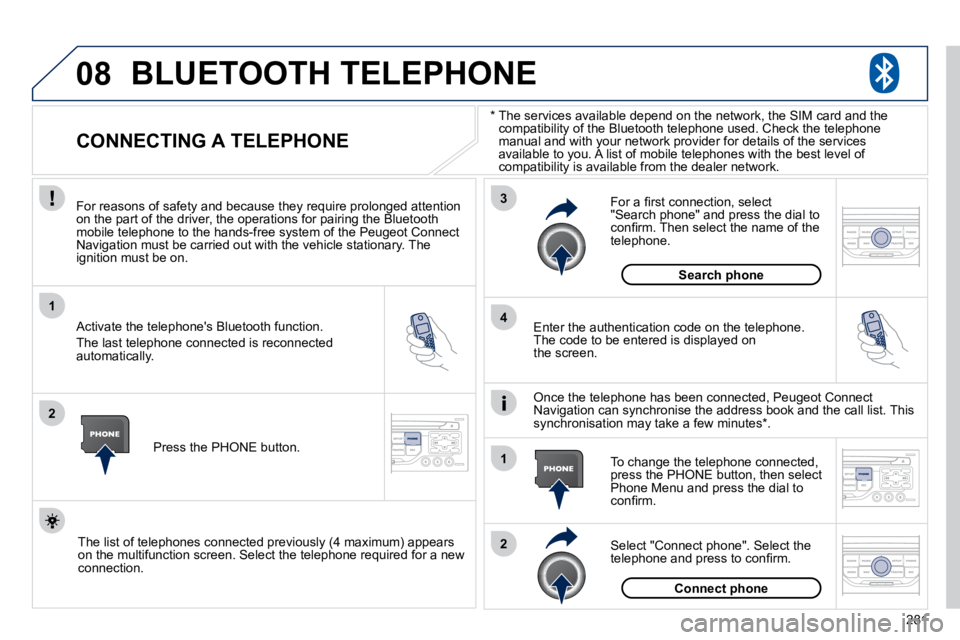
For reasons of safety and because they require prolonged atte ntion on the part of the driver, the operations for pairing the Bluetooth mobile telephone to the hands-free system of the Peugeot Con nect Navigation must be carried out with the vehicle stationary. The ignition must be on.
Activate the telephone's Bluetooth function.
The last telephone connected is reconnected automatically.
Enter the authentication code on the telephone. The code to be entered is displayed on the screen.
To change the telephone connected, press the PHONE button, then select Phone Menu and press the dial to confi rm.
Once the telephone has been connected, Peugeot Connect Navigation can synchronise the address book and the call list. T his synchronisation may take a few minutes * .
Select "Connect phone". Select the telephone and press to confi rm.
The list of telephones connected previously (4 maximum) appears on the multifunction screen. Select the telephone required for a new connection.
Press the PHONE button.
For a fi rst connection, select "Search phone" and press the dial to confi rm. Then select the name of the telephone.
Search phone
Connect phone
Page 316 of 345
10
1
284
TRIP COMPUTER
TRIP COMPUTER
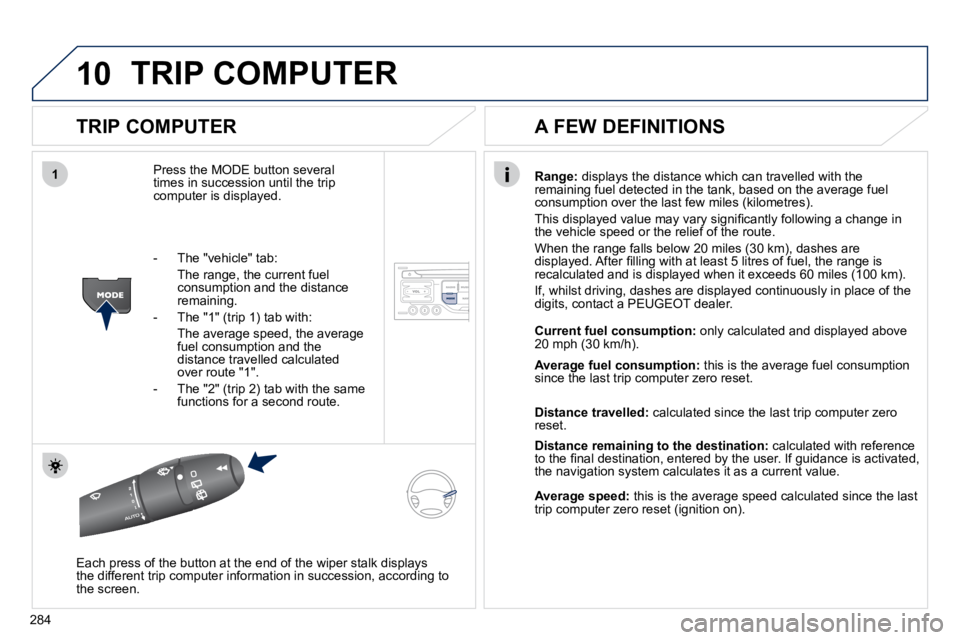
Press the MODE button several times in succession until the trip computer is displayed.
Range: displays the distance which can travelled with the remaining fuel detected in the tank, based on the average fuel consumption over the last few miles (kilometres).
This displayed value may vary signifi cantly following a change in the vehicle speed or the relief of the route.
When the range falls below 20 miles (30 km), dashes are displayed. After fi lling with at least 5 litres of fuel, the range is recalculated and is displayed when it exceeds 60 miles (100 km).
If, whilst driving, dashes are displayed continuously in place of the digits, contact a PEUGEOT dealer.
Each press of the button at the end of the wiper stalk displays the different trip computer information in succession, according t o the screen.
A FEW DEFINITIONS
- The "vehicle" tab:
The range, the current fuel consumption and the distance remaining.
- The "1" (trip 1) tab with:
The average speed, the average fuel consumption and the distance travelled calculated over route "1".
- The "2" (trip 2) tab with the same functions for a second route.
Current fuel consumption: only calculated and displayed above 20 mph (30 km/h).
Average fuel consumption: this is the average fuel consumption since the last trip computer zero reset.
Distance travelled: calculated since the last trip computer zero reset.
Distance remaining to the destination: calculated with reference to the fi nal destination, entered by the user. If guidance is activated, the navigation system calculates it as a current value.
Average speed: this is the average speed calculated since the last trip computer zero reset (ignition on).
Page 335 of 345
303
06
1
2
3
4
5
6
7
8
9
10
BLUETOOTH
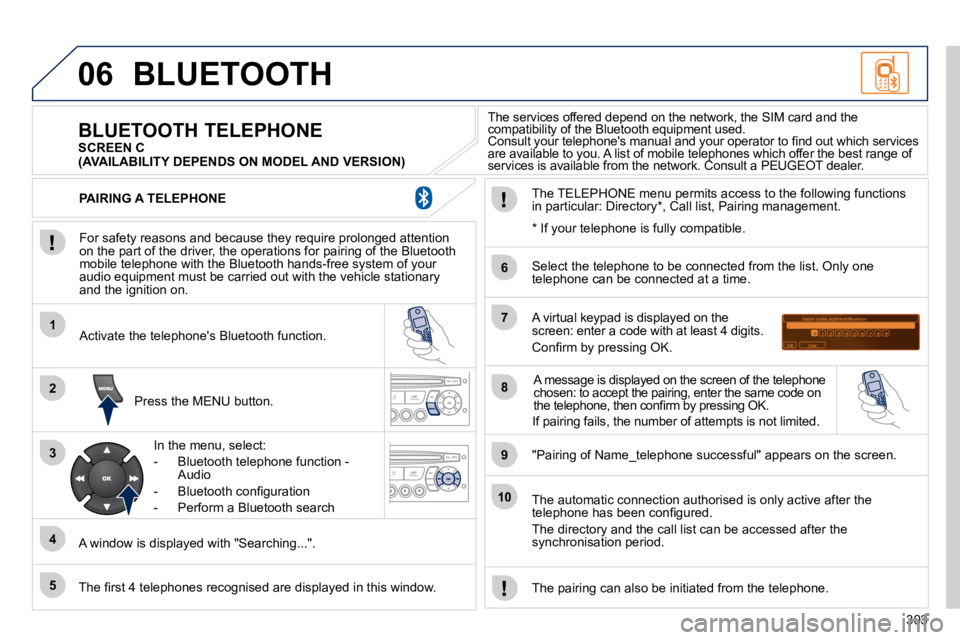
For safety reasons and because they require prolonged attention on the part of the driver, the operations for pairing of the Bluetooth mobile telephone with the Bluetooth hands-free system of your audio equipment must be carried out with the vehicle station ary and the ignition on.
Press the MENU button.
A window is displayed with "Searching...".
Activate the telephone's Bluetooth function.
In the menu, select:
- Bluetooth telephone function - Audio
- Bluetooth confi guration
- Perform a Bluetooth search
The services offered depend on the network, the SIM card and the compatibility of the Bluetooth equipment used. Consult your telephone's manual and your operator to fi nd out which services compatibility of the Bluetooth equipment used. compatibility of the Bluetooth equipment used.
are available to you. A list of mobile telephones which offer the best range of Consult your telephone's manual and your operator to fi nd out which services Consult your telephone's manual and your operator to fi nd out which services
services is available from the network. Consult a PEUGEOT dealer. are available to you. A list of mobile telephones which offer the best range of are available to you. A list of mobile telephones which offer the best range of
BLUETOOTH TELEPHONE SCREEN C
The TELEPHONE menu permits access to the following functions in particular: Directory * , Call list, Pairing management.
The fi rst 4 telephones recognised are displayed in this win dow.
A virtual keypad is displayed on the screen: enter a code with at least 4 digits.
Confi rm by pressing OK.
"Pairing of Name_telephone successful" appears on the screen.
Select the telephone to be connected from the list. Only one telephone can be connected at a time.
A message is displayed on the screen of the telephone chosen: to accept the pairing, enter the same code on the telephone, then confi rm by pressing OK.
The automatic connection authorised is only active after the telephone has been confi gured.
The directory and the call list can be accessed after the synchronisation period.
PAIRING A TELEPHONE
The pairing can also be initiated from the telephone.
(AVAILABILITY DEPENDS ON MODEL AND VERSION)
* If your telephone is fully compatible.
If pairing fails, the number of attempts is not limited.