phone PEUGEOT 5008 2011.5 Owner's Guide
[x] Cancel search | Manufacturer: PEUGEOT, Model Year: 2011.5, Model line: 5008, Model: PEUGEOT 5008 2011.5Pages: 340, PDF Size: 16.4 MB
Page 276 of 340
274
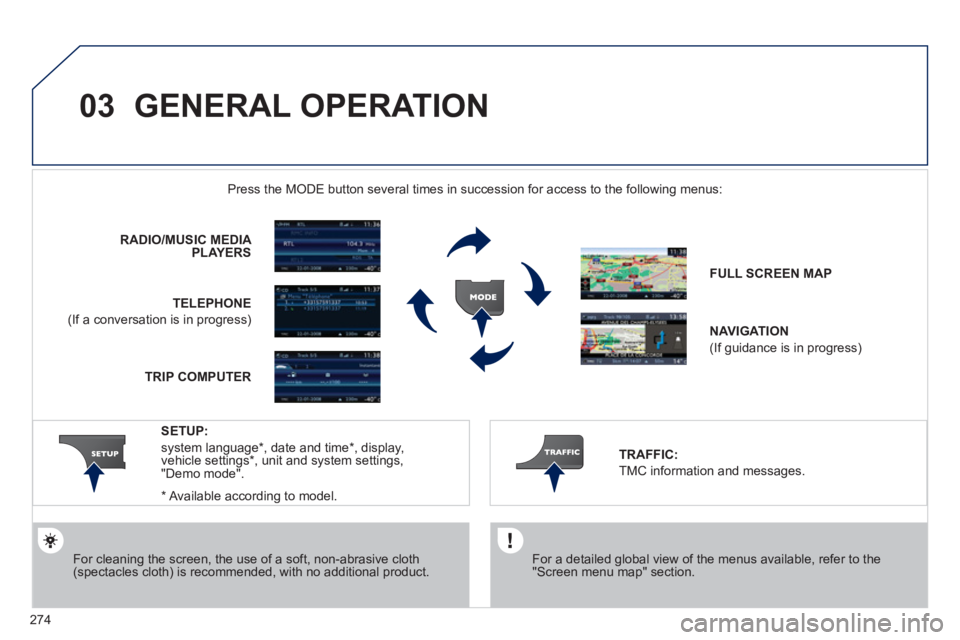
03 GENERAL OPERATION
For a detailed global view of the menus available, refer to the"Screen menu map" section.
Press the M
ODE button several times in succession for access to the following menus:
For cleaning the screen, the use of a soft, non-abrasive cloth (spectacles cloth) is recommended, with no additional product. RADIO / MUSIC MEDI
A PLAYERS
TELEPHONE
(If a conversation is in progress)
FULL SCREEN MA
P
NAVIGATION
(If guidance is in progress)
SETUP:
system language *
, date and time *
, display,
vehicle settings * , unit and system settings,
"Demo mode".
TRAFFIC:
TMC information and messages.
*
Available accordin
g to model. TRIP COMPUTE
R
Page 277 of 340
275
03GENERAL OPERATION
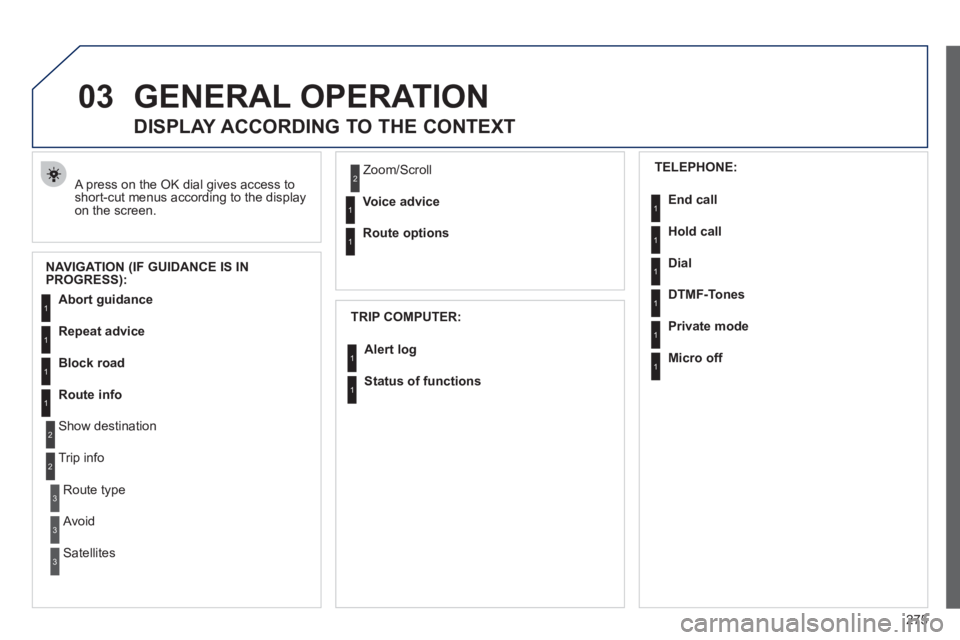
A press on the OK dial gives access to short-cut menus according to the displayon the screen.
DISPLAY ACCORDING TO THE CONTEXT
NAVIGATION (IF GUIDANCE IS IN
PROGRESS):
TRIP COMPUTER:
Abort guidance
Repeat advice
Block road
Route info
Show destination
Trip info
Route t
ype
Avoid
SatellitesZ
oom/Scroll
Voice advice
Route options
Alert log
Status of functions
1
2
3
3
2
1
1
1
3
1
1
1
1
2
TELEPHONE:
End call
Hold call
Dial
DTMF-Tones
Private mod
e
Micro off
1
1
1
1
1
1
Page 293 of 340
291
08
1
2
3
4
BLUETOOTH TELEPHONE
*
The services available depend on the network, the SIM card and thecompatibility of the Bluetooth telephone used. Check the telephone
manual and with your network provider for details of the servicesavailable to you.
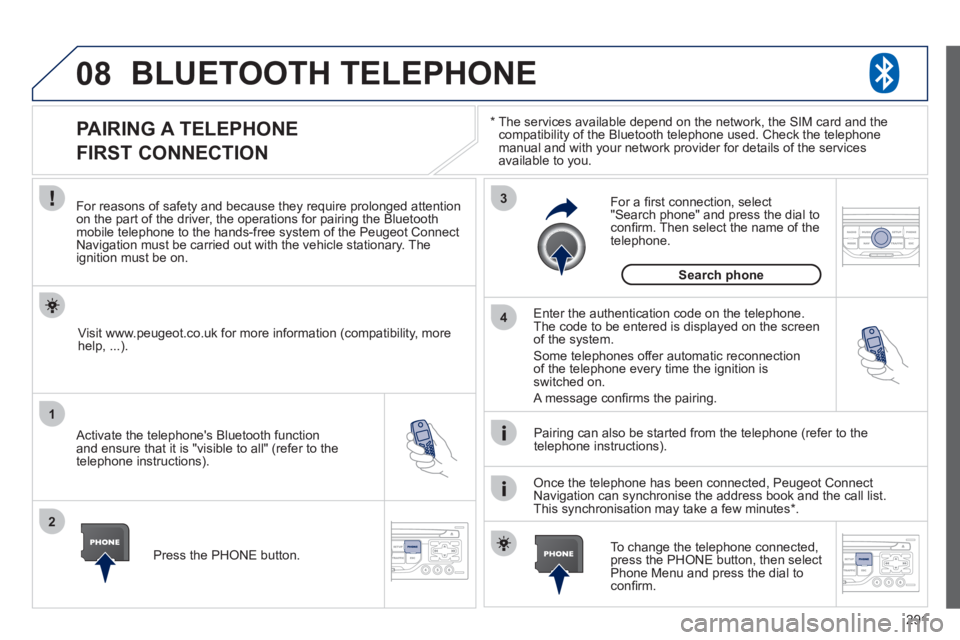
PAIRING A TELEPHONE
FIRST CONNECTION
For reasons of safety and because they require prolonged attentionon the part of the driver, the operations for pairing the Bluetooth mobile telephone to the hands-free system of the Peugeot ConnectNavigation must be carried out with the vehicle stationary. Theignition must be on.
Activate the telephone's Bluetooth
function
and ensure that it is "visible to all" (refer to the
telephone instructions).
Enter the authentication code on the telephone. The code to be entered is displayed on the screen
of the system.
Some telephones offer automatic reconnection
of the telephone every time the ignition is switched on.
A messa
ge confi rms the pairing.
To change the telephone connected, press the PHONE button, then select Phone Menu and press the dial toconfi rm.
Once the telephone has been connected, Peugeot Connect
Navigation can synchronise the address book and the call list.
This synchronisation may take a few minutes * . Pairin
g can also be started from the telephone (refer to the
telephone instructions). Visit www.peu
geot.co.uk for more information (compatibility, more
help, ...).
Press the PH
ONE button.
For a
fi rst connection, select"Search phone" and press the dial to confi rm. Then select the name of thetelephone.
Search
phone
Page 294 of 340
292
08
1
2
2
1
*
The services available depend on the network, the SIM card and the compatibility of the Bluetooth telephone used. Check the telephone manual and with your network provider for details of the services
available to you.
BLUETOOTH TELEPHONE
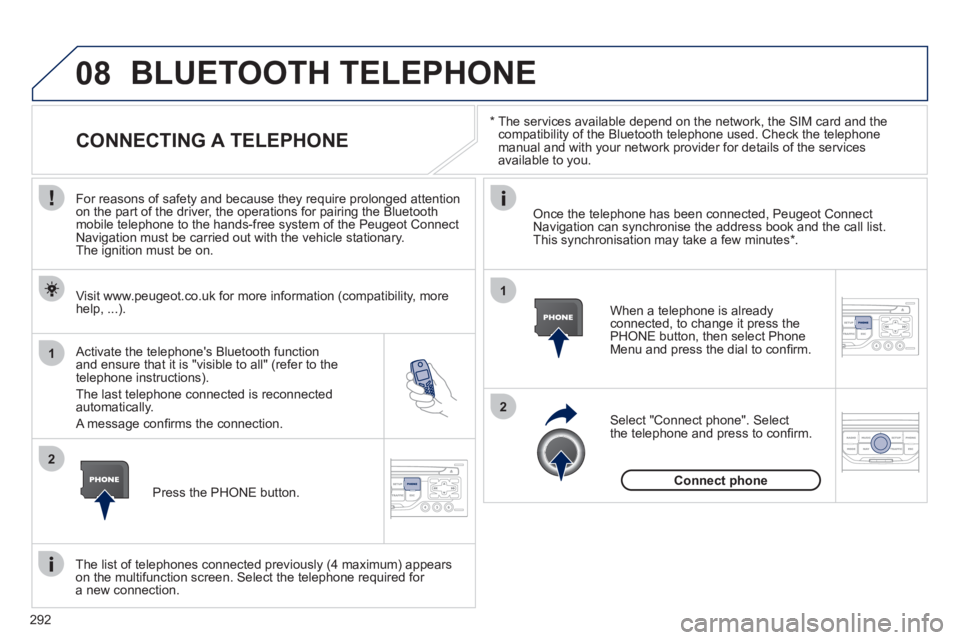
CONNECTING A TELEPHONE
For reasons of safety and because they require prolonged attention
on the part of the driver, the operations for pairing the Bluetooth
mobile telephone to the hands-free system of the Peugeot Connect
Navigation must be carried out with the vehicle stationary.
The ignition must be on.
Activate the tele
phone's Bluetooth function and ensure that it is "visible to all" (refer to the
telephone instructions).
The last telephone connected is reconnected automatically.
A messa
ge confi rms the connection. When a telephone is alread
yconnected, to change it press the
PHONE button, then select PhoneMenu and press the dial to confi rm.
Once the telephone has been connected, Peugeot Connect Navigation can synchronise the address book and the call list.This synchronisation may take a few minutes *
.
The list o
f telephones connected previously (4 maximum) appearson the multifunction screen. Select the telephone required for a new connection. Visit www.peu
geot.co.uk for more information (compatibility, more
help, ...).
Press the PH
ONE button.Select "Connect
phone". Select
the telephone and press to confi rm.
Connect
phone
Page 295 of 340
293
08
1
3 2
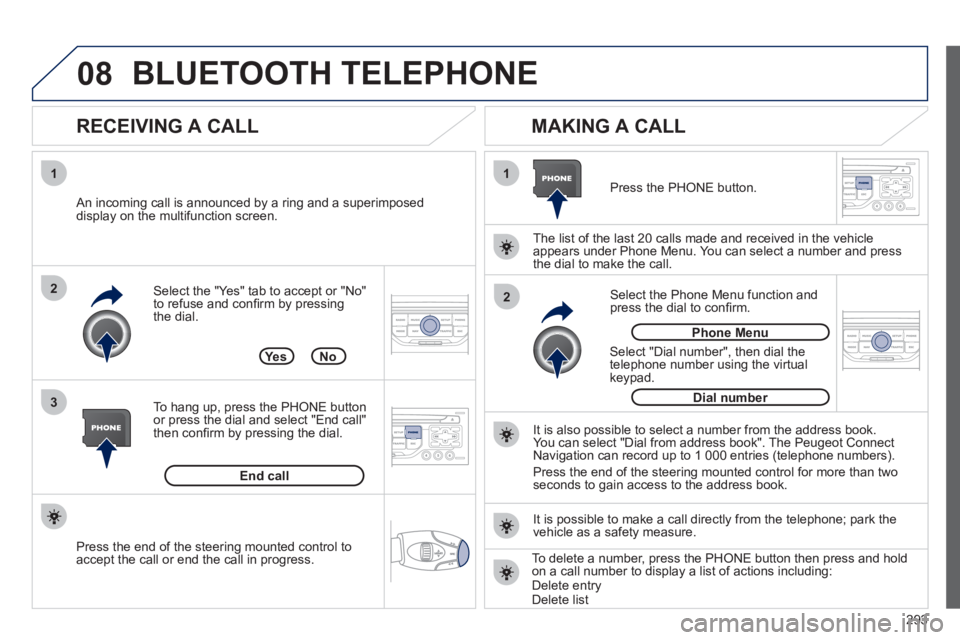
2 1Select the "Yes" tab to accept or "No"
to refuse and confi rm by pressing
the dial.
RECEIVING A CALL
MAKING A CALL
An incoming call is announced by a ring and a superimposed
display on the multifunction screen.
Yes
To han
g up, press the PHONE button
or press the dial and select "End call"then confi rm by pressing the dial.
End callPress the PH
ONE button.
Select "Dial number"
, then dial the
telephone number using the virtualkeypad.
Select the Phone Menu function and
press the dial to confi rm.
The list of the last 2
0 calls made and received in the vehicle
appears under Phone Menu. You can select a number and press
the dial to make the call.
No
It is also possible to select a number from the address book. You can select "Dial from address book". The Peugeot Connect
Navigation can record up to 1 000 entries (telephone numbers).
Press the end o
f the steering mounted control for more than twoseconds to gain access to the address book.
Phone Menu
Dial number
It is possible to make a call directl
y from the telephone; park the
vehicle as a safety measure.
BLUETOOTH TELEPHONE
Press the end of the steering mounted control to
accept the call or end the call in progress.To delete a number, press the PHONE button then press and hold
on a call number to display a list of actions including:Delete entryDelete list
Page 299 of 340
297
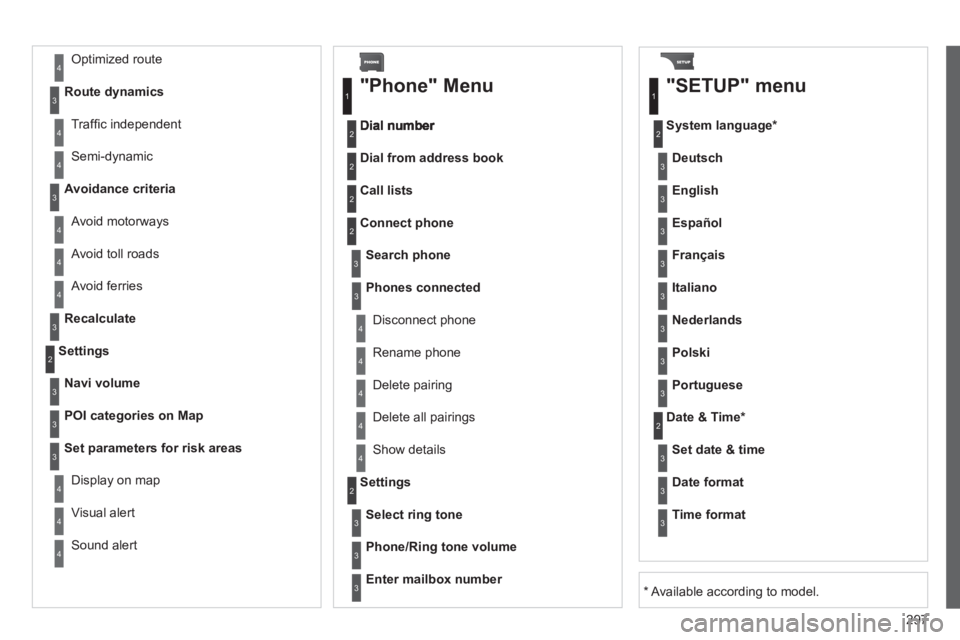
Avoid ferries
Recalculate
Settings
Navi volum
e
POI categories on Map
Set parameters for risk areas
Displa
y on map
Vi
sual alert
Sound alert
3
2
4
3
3
3
4
4
4
Dial from address book
"Phone" Menu
Search phone
Call lists
Connect phone
Select rin
g tone
Phone/Ring tone volume
Phones connected
Enter mailbox number
Settin
gs Disconnect phone
Rename phone
Delete pairing
Delete all pairings
Show details
"SETUP" menu
System language *
English
Español
Deutsch
Italiano
Français
Nederlands
Polski
Portuguese
Date & Time *
Set date & tim
e
Date format
Time format
1
2
2
2
2
3
3
4
4
4
4
4
2
3
3
3
1
2
3
3
3
3
3
3
3
3
3
3
3
2
Avoid motorways Route d
ynamics
Traffi c inde
pendent
Semi-d
ynamic
Avoidance criteria
Avoid toll roads
Optimized route
3
3
4
4
4
4
4
*
Available according to model.
Page 304 of 340
302
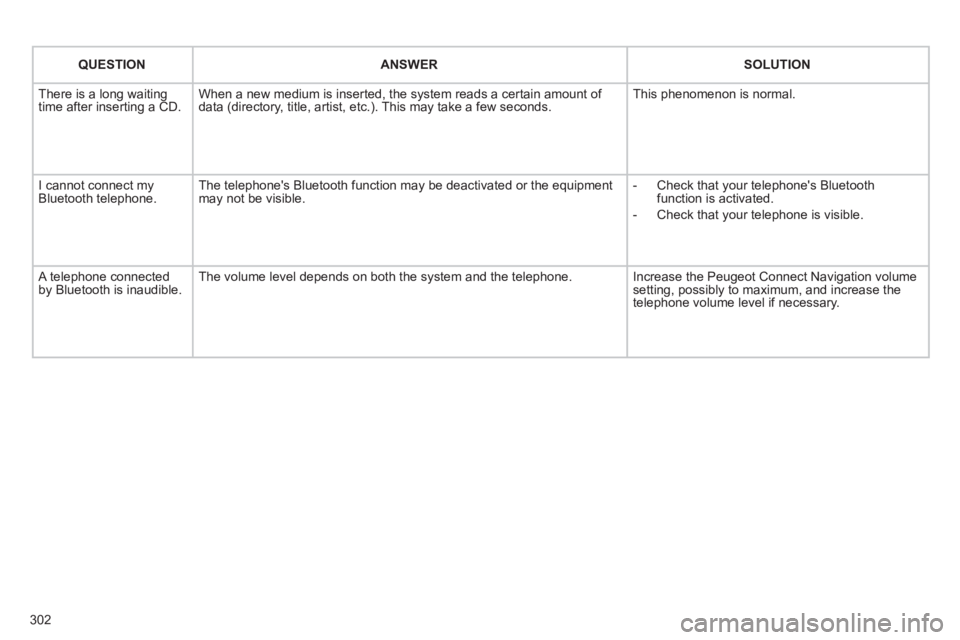
QUESTIONANSWER SOLUTION
There is a long waiting
time after inserting a CD. When a new medium is inserted, the system reads a certain amount of
data (directory, title, artist, etc.). This may take a few seconds. This phenomenon is normal.
I cannot connect myBluetooth telephone.The telephone's Bluetooth function may be deactivated or the equipment
may not be visible.
- Check that your telephone's Bluetoothfunction is activated.
-
Check that your telephone is visible.
A telephone connected by Bluetooth is inaudible.The volume level depends on both the system and the telephone. Increase the Peugeot Connect Navigation volume setting, possibly to maximum, and increase the
telephone volume level if necessary.
Page 306 of 340
304
01 FIRST STEPS
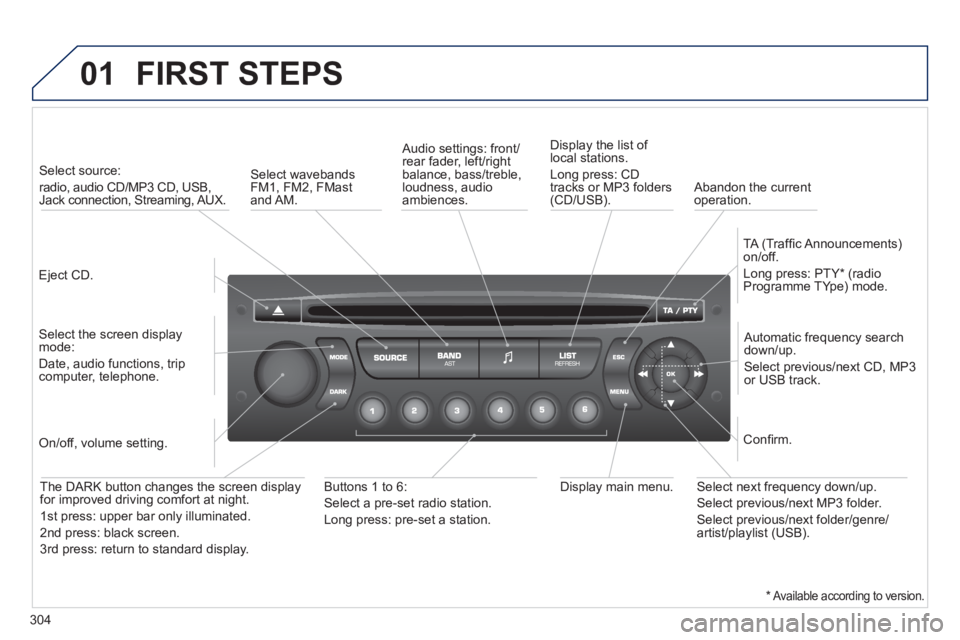
Eject CD.
Select source:
radio, audio CD/MP3 CD, USB,Jack connection, Streaming, AUX.
Select the screen displaymode:
Date, audio functions, tripcomputer, telephone.
Automatic frequency search
down/up.
Select previous/next CD, MP3
or USB track.
Audio settings: front/rear fader, left/right
balance, bass/treble, loudness, audio ambiences. Displa
y the list of local stations.
Lon
g press: CD
tracks or MP3 folders(CD/USB).
TA
(Traffi c Announcements)
on/off.
Lon
g press: PTY * (radio
Programme TYpe) mode.
Display main menu. The DARK button changes the screen display
for improved driving comfort at night.
1stpress: upper bar only illuminated.
2ndpress: black screen.
3rdpress: return to standard display.
On/off, volume setting.
Buttons 1 to 6:
Select a pre-set radio station.
Lon
g press: pre-set a station.
Select next frequency down/up.
Select previous/next MP3 folder.
Select previous/next folder/genre/artist/playlist (USB).
Confi rm.
Select wavebandsFM1, FM2, FMast and AM.
Abandon the current
operation.
*Available according to version.
Page 307 of 340
305
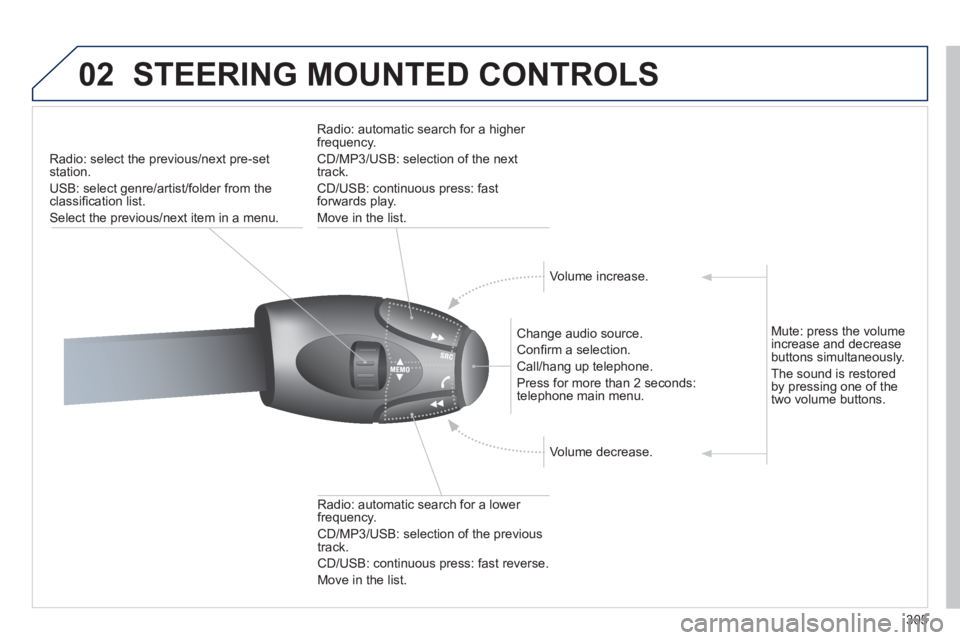
02STEERING MOUNTED CONTROLS
Radio: select the previous/next pre-setstation.
U
SB: select genre/artist/folder from the classifi cation list.
Select the previous/next item in a menu.
Chan
ge audio source.
Confi rm a selection.
Call/han
g up telephone.
Pr
ess for more than 2 seconds:
telephone main menu.
R
adio: automatic search for a lower
frequency.
CD/MP3/USB: selection of the previous
tr
ack.
CD/USB: continuous press: fast reverse.
Move in the list.
Radio: automatic search for a hi
gher
frequency.
CD/MP3/USB: selection of the next
track.
CD/USB: continuous press: fastforwards play.
M
ove in the list.
V
olume increase.
V
olume decrease.
Mute: press the volume increase and decrease buttons simultaneously.
Th
e sound is restoredby pressing one of the
two volume buttons.
Page 308 of 340
306
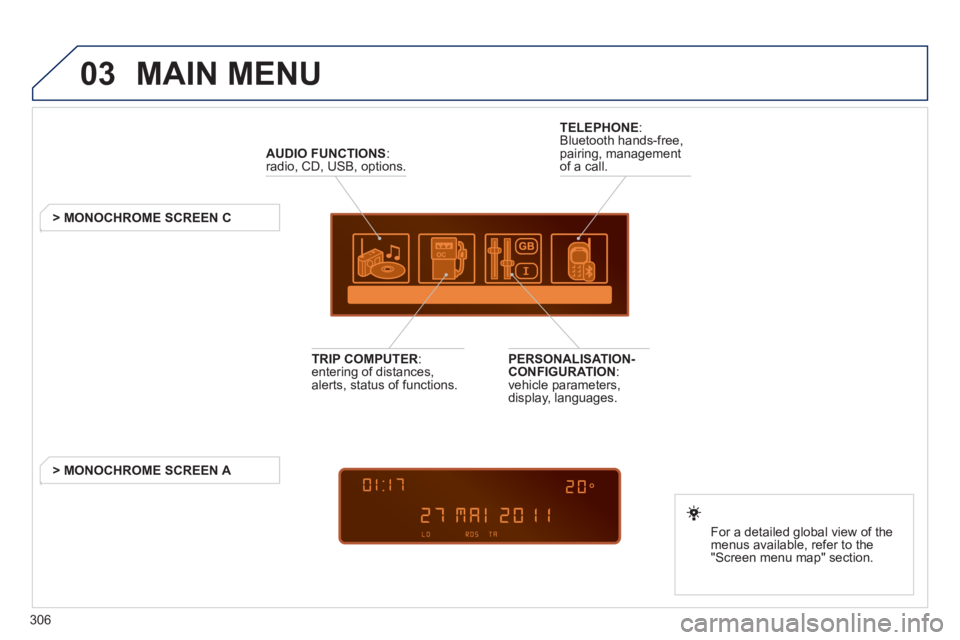
03 MAIN MENU
AUDIO FUNCTIONS
:radio, CD, USB, options.
> MONOCHROME SCREEN C
For a detailed
global view of the
menus available, refer to the
"Screen menu ma
p" section.
TELEPHONE
:
Bluetooth hands-free,
pairing, managementof a call.
PERSONALISATION-
CONFIGURATION:
vehicle parameters,
display, languages.
TRIP COMPUTER: entering of distances,alerts, status of functions.
> MONOCHROME
SCREEN A