light PEUGEOT 5008 2011.5 Workshop Manual
[x] Cancel search | Manufacturer: PEUGEOT, Model Year: 2011.5, Model line: 5008, Model: PEUGEOT 5008 2011.5Pages: 340, PDF Size: 16.4 MB
Page 222 of 340
TECHNICAL DATA
220
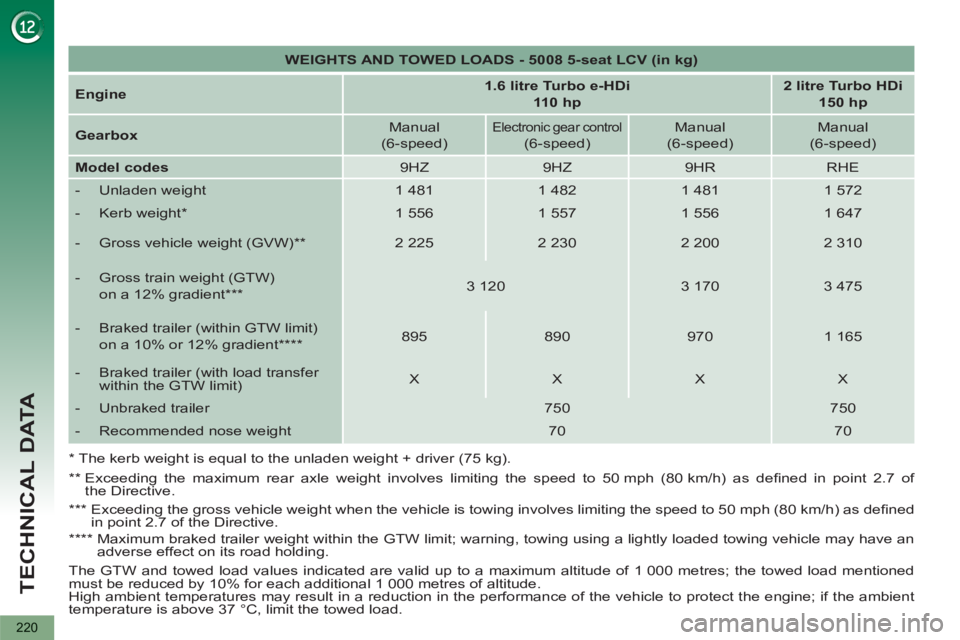
WEIGHTS AND TOWED LOADS - 5008 5-seat LCV (in kg)
Engine
1.6 litre Turbo e-HDi
110 hp
2 litre Turbo HDi
150 hp
Gearbox
Manual
(6-speed)
Electronic gear control
(6-speed)
Manual
(6-speed)
Manual
(6-speed)
Model codes
9HZ
9HZ
9HR
RHE
- Unladen weight
1 481
1 482
1 481
1 572
- Kerb weight *
1 556
1 557
1 556
1 647
- Gross vehicle weight (GVW) **
2 225
2 230
2 200
2 310
- Gross train weight (GTW)
on a 12% gradient ***
3 120
3 170
3 475
- Braked trailer (within GTW limit)
on a 10% or 12% gradient ****
895
890
970
1 165
- Braked trailer (with load transfer
within the GTW limit)
X
X
X
X
- Unbraked trailer
750
750
- Recommended nose weight
70
70
* The kerb weight is equal to the unladen weight + driver (75 kg).
**
Exceeding the maximum rear axle weight involves limiting the speed to 50 mph (80 km/h) as defi ned in point 2.7 of
the Directive.
***
Exceeding the gross vehicle weight when the vehicle is towing involves limiting the speed to 50 mph (80 km/h) as defi ned
in point 2.7 of the Directive.
****
Maximum braked trailer weight within the GTW limit; warning, towing using a lightly loaded towing vehicle may have an
adverse effect on its road holding.
The GTW and towed load values indicated are valid up to a maximum altitude of 1 000 metres; the towed load mentioned
must be reduced by 10% for each additional 1 000 metres of altitude.
High ambient temperatures may result in a reduction in the performance of the vehicle to protect the engine; if the ambient
temperature is above 37 °C, limit the towed load.
Page 231 of 340
229
01FIRST STEPS
Peugeot Connect Media Navigation (NG4 3D) NAVIGATOR
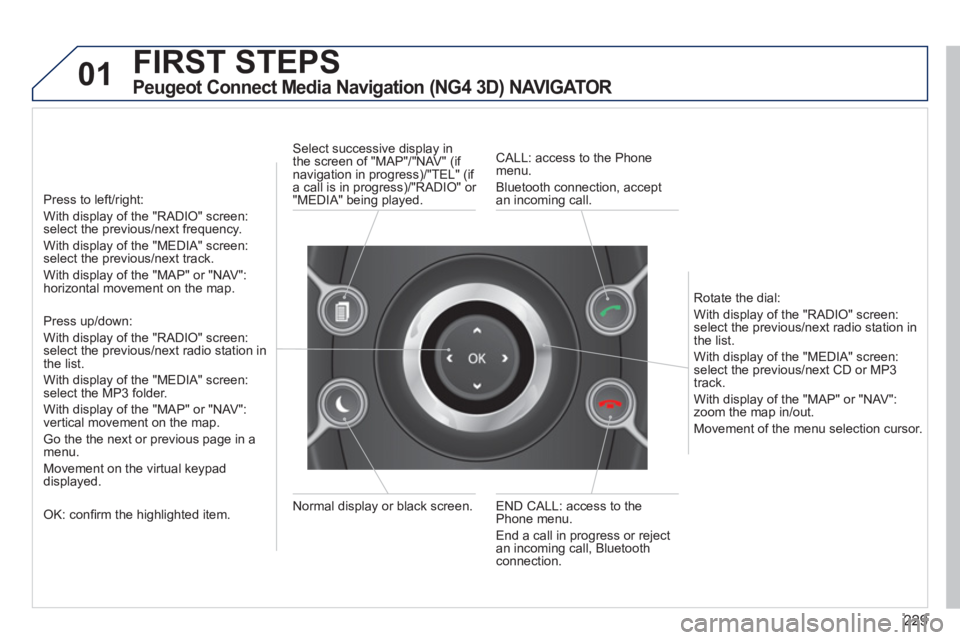
Press to left/right:
With display of the "RADIO" screen: select the previous/next frequency.
With display of the "MEDIA" screen: select the previous/next track.
With display of the "MAP" or "NAV":horizontal movement on the map.
Press up/down:
With display of the "RADIO" screen: select the previous/next radio station in
the list.
With display of the "MEDIA" screen: select the MP3 folder.
With display of the "MAP" or "NAV":
vertical movement on the map.
Go the the next or previous pa
ge in a menu.
Movement on the virtual keypad
displayed.
OK: confi rm the highlighted item.
END CALL: access to the Phone menu.
End a call in pro
gress or reject
an incoming call, Bluetooth connection. Normal displa
y or black screen. Select successive displa
y in
the screen of "MAP"/"NAV" (if
navigation in progress)/"TEL" (if a call is in progress)/"RADIO" or
"MEDIA" being played.
CALL: access to the Phonemenu.
Bluetooth connection, accept
an incomin
g call.
R
otate the dial:
With displa
y of the "RADIO" screen: select the previous/next radio station in
the list.
With displa
y of the "MEDIA" screen: select the previous/next CD or MP3
track.
With displa
y of the "MAP" or "NAV":zoom the map in/out.
M
ovement of the menu selection cursor.
Page 232 of 340
230
02
2
1
SETUP2ABC3DEF5JKL4GHI6MNO8TUV7PQRS9WXYZ0*#
1NAV ESC TRAFFICADDR
BOOKSETUP
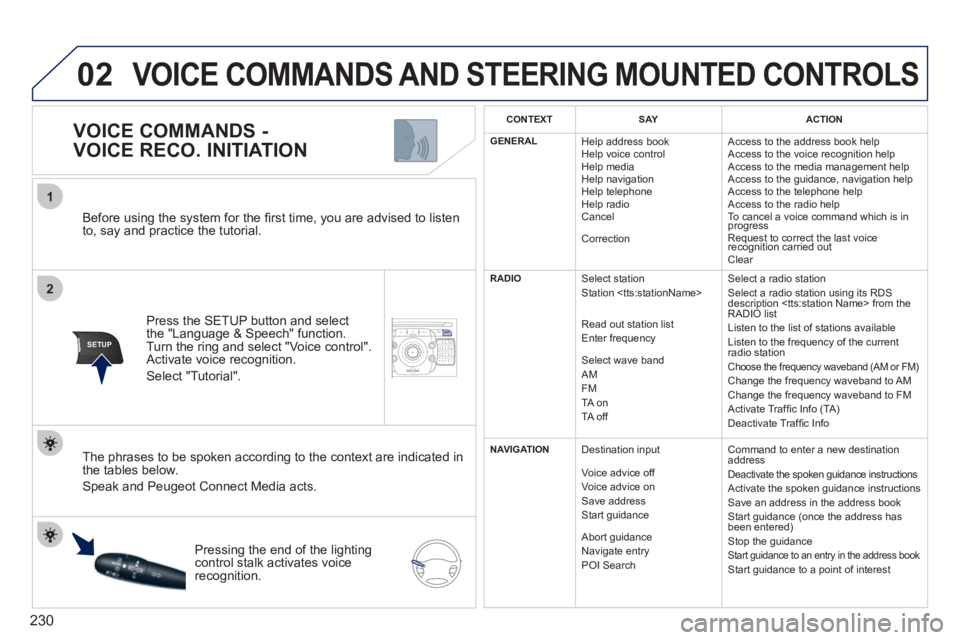
Before using the system for the fi rst time, you are advised to listen
to, say and practice the tutorial.
Press the
SETUP button and select
the "Language & Speech" function.Turn the ring and select "Voice control". Activate voice recognition.
Select "Tutorial".
VOICE COMMANDS -
VOICE RECO. INITIATION
The phrases to be spoken according to the context are indicated in
the tables below.
Speak and Peugeot Connect Media acts.
Pressing the end o
f the lightingcontrol stalk activates voice
recognition.
CONTEXTSAYACTION
GENERAL
Help address book
Help voice control
Help media
Help navi
gation
Help telephone
Help radio
Cancel
Correction Access to the address book help
Access to the voice reco
gnition help
Access to the media management help
Access to the guidance, navigation help
Access to the telephone help Access to the radio help To cancel a voice command which is inprogress
Request to correct the last voice recognition carried outq
Clear
RADIO
Select station
Station
R
ead out station list
Enter frequency
Select wave band AMFM TA on
TA off Select a radio station
Select a radio station usin
g its RDS
description
Listen to the list of stations available
Listen to the frequency of the current
radio station Choose the frequency waveband (AM or FM) Change the frequency waveband to AM
Change the frequency waveband to FM
Activate Traffi c Info (TA)
D
eactivate Traffi c Info
NAVIGATION
Destination input
V
oice advice off
Voice advice on
Save address
Start guidance
Abort guidance
Navigate entry POI Search Command to enter a new destination
address
Deactivate the spoken guidance instructions
Activate the spoken guidance instructions
Save an address in the address book
Start guidance (once the address has
been entered
)
Stop the guidance Start guidance to an entry in the address book Start guidance to a point of interest
VOICE COMMANDS AND STEERING MOUNTED CONTROLS
Page 240 of 340
238
04
NAV
1
2
3
4
5
6
2ABC3DEF5JKL4GHI6MNO8TUV7PQRS9WXYZ0*#
1RADIO MEDIANAV ESC TRAFFIC
SETUPADDR
BOOK
2ABC3DEF5JKL4GHI6MNO8TUV7PQRS9WXYZ0*#
1RADIO MEDIANAV ESC TRAFFIC
SETUPADDR
BOOK
2ABC3DEF5JKL4GHI6MNO8TUV7PQRS9WXYZ0*#
1RADIO MEDIANAV ESC TRAFFIC
SETUPADDR
BOOK
2ABC3DEF5JKL4GHI6MNO8TUV7PQRS9WXYZ0*#
1RADIO MEDIANAV ESC TRAFFIC
SETUPADDR
BOOK
2ABC3DEF5JKL4GHI6MNO8TUV7PQRS9WXYZ0*#
1RADIO MEDIANAV ESC TRAFFIC
SETUPADDR
BOOK
2ABC3DEF5JKL4GHI6MNO8TUV7PQRS9WXYZ0*#
1RADIO MEDIANAV ESC TRAFFIC
SETUPADDR
BOOK
NAVIGATION - GUIDANCE
SELECTING A DESTINATION
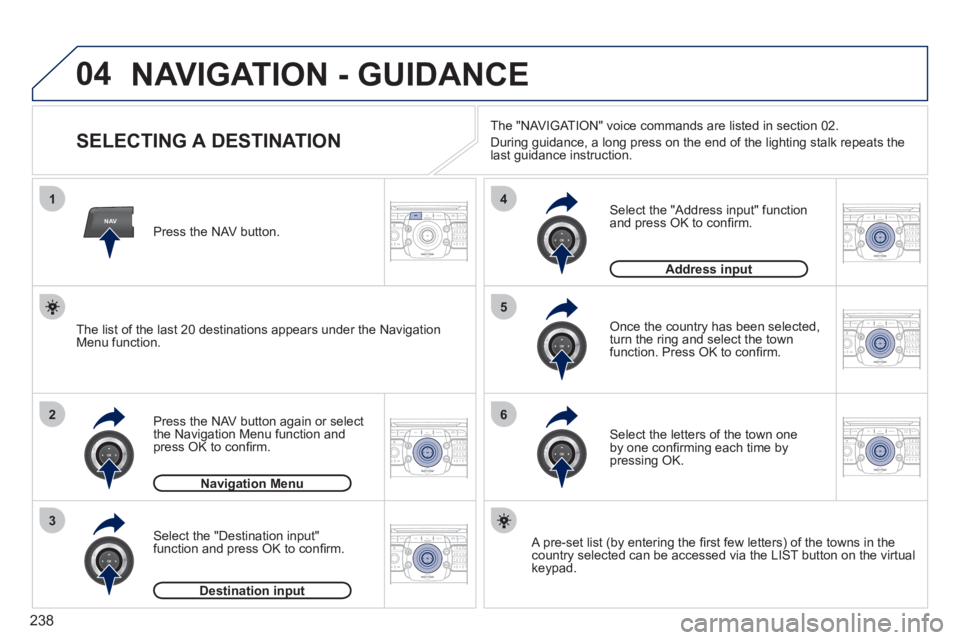
Press the NAV button again or select
the Navigation Menu function and
press OK to confi rm.
Select the "Destination input" function and press OK to confi rm. Pr
ess the NAV button.
Select the letters of the town oneby one confi rming each time by pressing OK.
Once the country has been selected,
turn the ring and select the town
function. Press OK to confi rm.
Navigation Menug
Destination inputp
A pre-set list (by entering the fi rst few letters) of the towns in thecountry selected can be accessed via the LIST button on the virtual
keypad.
Select the "Address input" function
and press OK to confi rm.
Address inputp
The list of the last 20 destinations appears under the NavigationMenu function.The "NAVI
GAT ION" voice commands are listed in section 02.
Durin
g guidance, a long press on the end of the lighting stalk repeats the last guidance instruction.
Page 267 of 340
265
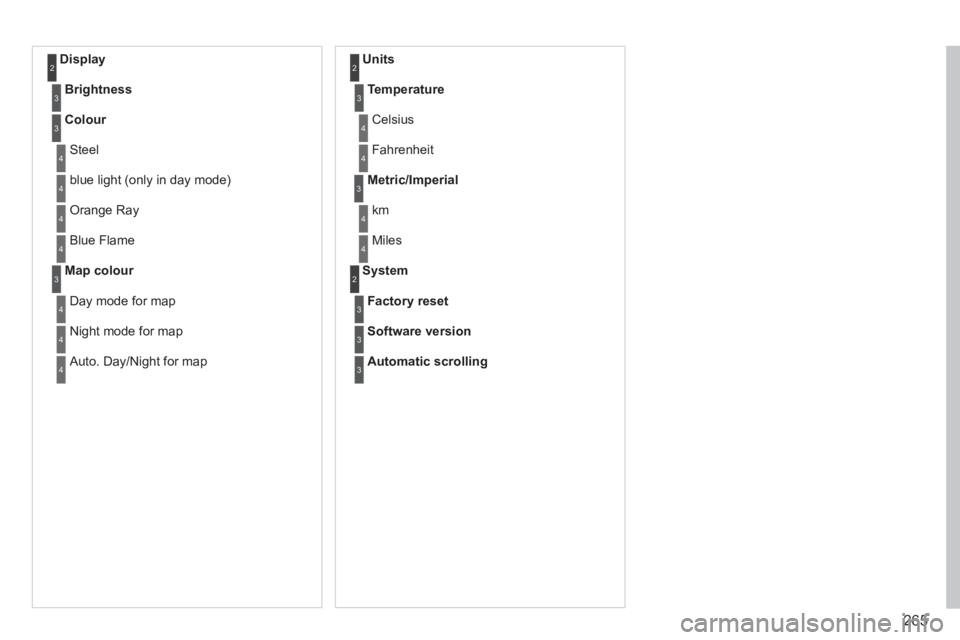
Display 2
Brightness3
Colour3
Steel4
blue light (only in day mode) 4
Orange Ray 4
Blue Flame4
Map colour3
Day mode for map4
Night mode for map4
Auto. Day/Night for map4
Units 2
Temperature3
Celsius 4
Fahrenheit 4
Metric/Imperial3
km4
Miles4
System 2
Factory reset3
Software version3
Automatic scrolling3
Page 280 of 340
278
04
7
8
9
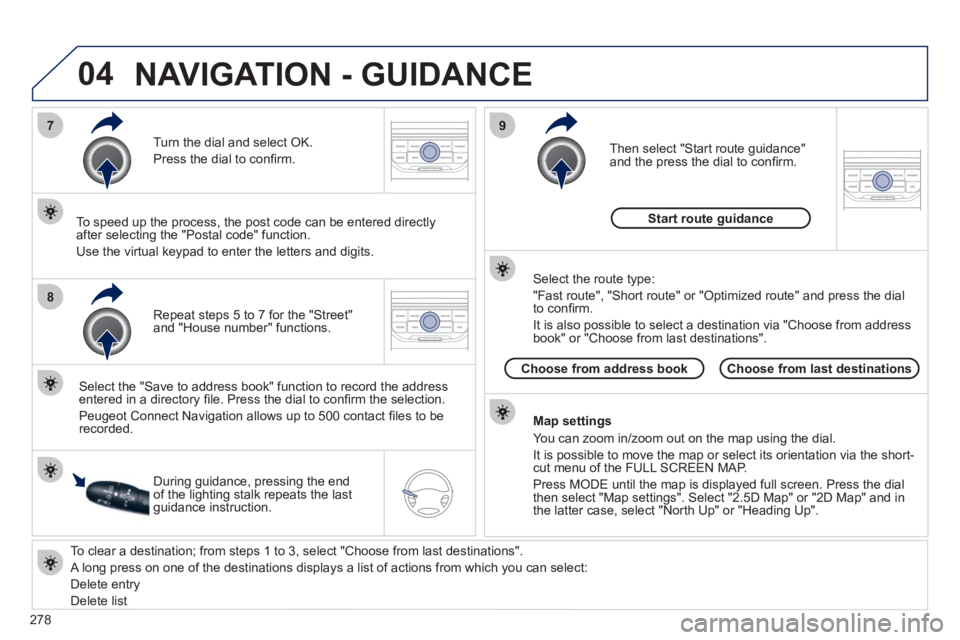
To clear a destination; from steps 1 to 3, select "Choose from last destinations".
A long press on one of the destinations displays a list of actions from which you can select:
Delete entr
y
D
elete listRepeat steps 5 to 7
for the "Street" and "House number" functions. Turn the dial and select
OK.
Pr
ess the dial to confi rm.
Select the "Save to address book" function to record the address
entered in a directory fi le. Press the dial to confi rm the selection.
Peu
geot Connect Navigation allows up to 500 contact fi les to be
recorded.
To speed up the process, the post code can be entered directl
y
after selecting the "Postal code" function.
Use the virtual ke
ypad to enter the letters and digits.
Then select "
Start route guidance"
and the press the dial to confi rm.
During guidance, pressing the endof the lighting stalk repeats the last guidance instruction.
Map settin
gs
You can zoom in/zoom out on the map usin
g the dial.
It is possible to move the map or select its orientation via the short-cut menu of the FULL SCREEN MAP.
Press M
ODE until the map is displayed full screen. Press the dial
then select "Map settings". Select "2.5D Map" or "2D Map" and in
the latter case, select "North Up" or "Heading Up".
Select the route type:
"Fast route", "
Short route" or "Optimized route" and press the dial
to confi rm.
It is also
possible to select a destination via "Choose from address
book" or "Choose from last destinations".
Choose from last destinations Choose from address bookStart route
guidance
NAVIGATION - GUIDANCE
Page 328 of 340
ALPHABETICAL INDEX
326
Eco-driving ..............................25
Economical driving .................25
Economy mode......................208
Electric window
controls .................................83
Electronic engine
immobiliser ......................78, 80
Electronic stability control
(ESC) ..................................130
Emergency boot
release ..................................88
Emergency call ..............224, 225
Emergency warning
lamps ..................................128
Energy economy
mode ...................................208
Engine, Diesel ........90, 173, 175,
214, 215, 216, 217, 220
Engine, petrol ..................90, 174
Engine compartment .....174, 175
Engine compartment
fusebox ...............................199
Engine oil level
indicator ........................40, 176
Engines..........................214, 216
Environment ......................25, 80
ESC/ASR ...............................130
ESP/ASR ...............................131
E
Halogen headlamps...............194
Hands-free kit ........291, 292, 313
Hazard warning lamps ...........128
Head-up display.....148, 152, 154
Headlamp adjustment........94, 95
Headlamps, directional ....95, 194
Headlamp wash .......................97
Headlamp wash reservoir ......176
Head restraints, front ...............67
Head restraints, rear ................69
Heated seats ...........................67
Heating ........................25, 59, 60
Height and reach adjustment,
steering wheel .......................75
High load retaining net........... 112
Hill start assist .......................145
Hooks ............................ 110, 114
Horn .......................................128
H
Filling with fuel ...................89, 90
Fitting a wheel .......................192
Fitting roof bars...................... 211
Fittings, boot .................. 109, 110
Flashing indicators.................128
Foglamps, rear ........................92
Folding the rear seats ...69, 71, 72
Front foglamps.........92, 194, 196
Front seats...................65, 66, 68
Fuel..............................25, 89, 90
Fuel consumption ....................25
Fuel fi ller cap ...........................89
Fuel fi ller fl ap .....................89, 90
Fuel gauge...............................89
Fuel tank ............................89, 90
Fusebox, dashboard ..............199
Fuses .....................................199
FDirectional lighting ...................95
Direction
indicators ............128, 194, 197
Distance alert.........................150
Doors .......................................85
Doors emergency
control ...................................87
Door trays ..............................102
Dynamic emergency
braking ................................143
G.P.S. ............................238, 277
Gearbox, automatic .......161, 178
Gearbox, electronic
gear control .........157, 164, 178
Gearbox,
manual ................156, 164, 178
Gear effi ciency
indicator ..............................156
Gear lever ................................25
Gear lever,
automatic gearbox ..............161
Gear lever, electronic gear
control gearbox ...................157
Gear lever,
manual gearbox ..................156
Glove box ......................102, 103
Grab handles .........................102
Guidance .......................238, 277
Guide-me-home.......................94
G
Identifi cation plates ................222
Indicator lamps, status.............30
Indicators, direction ...............128
Infl ating accessories
(using the kit) ......................179
Infl ating tyres ...........................25
Inputs for audio
system ........254, 290, 310, 312
Instrument panel lighting .........41
Instrument panels ..............27, 28
Instrument panel
screen ...........................27, 156
Intelligent Traction
Control ................................130
Interior fi ttings ........................102
Interior mood lighting .............100
ISOFIX child seats ......... 123-125
ISOFIX mountings .................123
I
Page 329 of 340
ALPHABETICAL INDEX
327
Main beam ............... 91, 194-196
Maintenance ............................25
Map reading lamps ..................99
Markings, identifi cation ..........222
Mat.........................................105
Menu, main ............................306
Mini fuel level ...........................89
Mirror, rear view .......................75
Mirrors, door ............................74
Misfuel prevention ...................90
Modularity, seats ......................73
Motorway function
(direction indicators) ...........128
Mountings for ISOFIX seats ....123
MP3 CD .........................289, 309
Multimedia, rear .............104, 107
Music media players ......250, 288
M
Navigation......................238, 277
Net ......................................... 111
Number plate lamps ..............198
N
Paint colour code ...................222
Panoramic glass
sunroof ................................108
Parking brake ........................178
Parking brake,
electric ........................140, 143
Parking sensors,
rear .....................................167
Parking space
sensor ................................169
Particle emission
fi lter .............................177, 178
Passenger compartment
fi lter .....................................177
PEUGEOT call
button ..................................225
PEUGEOT CONNECT
ASSISTANCE .....................224
Peugeot Connect Media
Navigation (NG4 3D) .....28, 51,
53, 55, 227, 230,
233, 261
Peugeot Connect
Navigation (RNEG) ........49, 53,
274, 295
PEUGEOT
CONNECT SOS ..........224, 225
Peugeot Connect
Sound (RD5) ................46, 303,
318, 320
PEUGEOT services ...............225
PIN code ................................258
Player, CD MP3 .............289, 309
POIs
(updating) ............................245
Port, USB...............104, 310, 312
Priming the fuel
system ................................173
Protecting children ........ 116, 120,
123-125, 136
Puncture ........................179, 185
P
Jack ...............................188, 190
JACK socket ..........104, 310, 312
Jukebox (copy) ......................252
Jukebox (playing) ..................253
J
Keeping children
safe ............. 116, 124, 125, 136
Key with remote
control ....................... 76-78, 80
K
Labels, identifi cation ..............222
Lamps, warning and
indicator ....................29, 32, 33
Level, brake fl uid ...................176
Level, headlamp wash .....97, 176
Level, power steering fl uid .....176
Levels and checks ......... 174-177
Lighting ..................................101
Lighting, guide-me home .....93, 94
Lighting, interior ...............99, 100
Lighting bulbs
(replacement) ......194, 197, 198
Lighting control stalk ................91
Lighting dimmer .......................41
Loading ...................... 25, 73, 211
Load reduction mode .............208
Load space cover ........... 109-111
Locating your vehicle ...............77
Locking from the inside............86
Long objects,
transporting .....................68, 73
Luggage retaining net ............ 113
L
Oil fi lter ..................................177
Oil level ............................40, 176
Opening the bonnet ...............172
Opening the boot ...............76, 87
Opening the doors .............76, 85
Opening the panoramic
sunroof blind .......................108
Opening the retractable screen ...53
Operation indicator
lamps ..................29, 30, 32, 34
O
Page 331 of 340
ALPHABETICAL INDEX
329
Warning lamps .............30, 33, 34
Wash-wipe, rear ......................97
Weights ..................215, 217, 220
Welcome lighting .............93, 100
Window controls ......................83
Wiper, rear ...............................97
Wiper control stalk ............. 96-98
Wipers ...............................96, 98
W
Xenon headlamps..................194
X
Vehicle
identifi cation ........................222
Ventilation .......................... 58-60
Voice commands ...................230
V
Under-infl ation
(detection) ...........................129
Under fl oor storage ................ 114
Unlocking .................................76
Unlocking from
the inside ..............................86
Update risk areas ..........245, 284
Updating POIs .......................245
Updating
the date ...............260, 316, 317
Updating
the time ...............260, 316, 317
USB
(Peugeot Connect) ......104, 310
U
Traffi c information
(TMC) ..........247, 248, 285, 286
Trip computer ..............54, 55, 57
Trip distance recorder ..............41
Tyre pressures .......................222
Tyres ........................................25
Tyre under-infl ation
detection .............................129
Page 332 of 340
VISUAL SEARCH
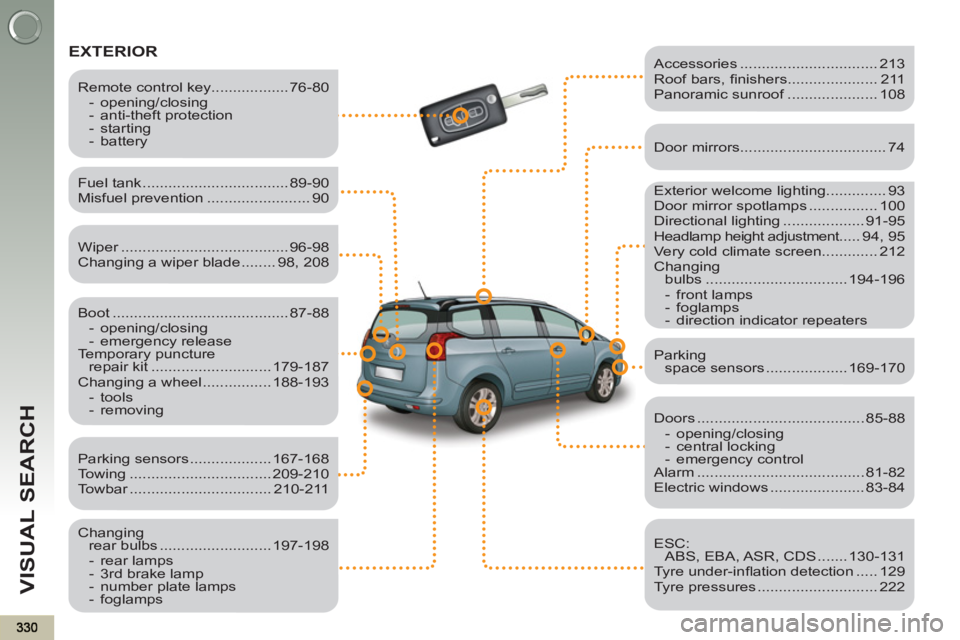
EXTERIOR
Exterior welcome lighting.............. 93
Door mirror spotlamps ................ 100
Directional lighting ................... 91-95
Headlamp height adjustment..... 94, 95
Very cold climate screen............. 212
Changing
bulbs ................................. 194-196
- front lamps
- foglamps
- direction indicator repeaters
Fuel tank .................................. 89-90
Misfuel prevention ........................ 90
Boot ......................................... 87-88
- opening/closing
- emergency release
Temporary puncture
repair kit ............................ 179-187
Changing a wheel ................ 188-193
- tools
- removing
Remote control key.................. 76-80
- opening/closing
- anti-theft protection
- starting
- battery
Parking sensors ................... 167-168
Towing ................................. 209-210
Towbar ................................. 210-211
Changing
rear bulbs .......................... 197-198
- rear lamps
- 3rd brake lamp
- number plate lamps
- foglamps
Accessories ................................ 213
Roof bars, fi nishers..................... 211
Panoramic sunroof ..................... 108
Door mirrors .................................. 74
Doors ....................................... 85-88
- opening/closing
- central locking
- emergency control
Alarm ....................................... 81-82
Electric windows ...................... 83-84
ESC:
ABS, EBA, ASR, CDS ....... 130-131
Tyre under-infl ation detection ..... 129
Tyre pressures ............................ 222
Parking
space sensors ................... 169-170
Wiper ....................................... 96-98
Changing a wiper blade ........ 98, 208