lock PEUGEOT 5008 2011.5 Workshop Manual
[x] Cancel search | Manufacturer: PEUGEOT, Model Year: 2011.5, Model line: 5008, Model: PEUGEOT 5008 2011.5Pages: 340, PDF Size: 16.4 MB
Page 165 of 340
D
R
163
Stopping the vehicle
Before switching off the engine, you
can engage position P
or N
to place the
gearbox in neutral.
In both cases, apply the parking brake
to immobilise the vehicle, unless it is
programmed to automatic mode.
Operating fault
When the ignition is on, the
lighting of this warning lamp,
accompanied by an audible
signal and a message in the
multifunction screen, indicates
a gearbox malfunction.
In this case, the gearbox switches to
back-up mode and is locked in 3rd gear.
You may feel a substantial knock when
changing from P
to R
and from N
to R
.
This will not cause any damage to the
gearbox.
Do not exceed 60 mph (100 km/h), local
speed restrictions permitting.
Have it checked by a PEUGEOT dealer
or a qualifi ed workshop.
This warning lamp may also come on if
a door is opened.
You risk damaging the gear-
box:
Manual operation
)
Select position M
for sequential
changing of the six gears.
)
Push the lever towards the +
sign to
change up a gear.
)
Pull the lever towards the -
sign to
change down a gear.
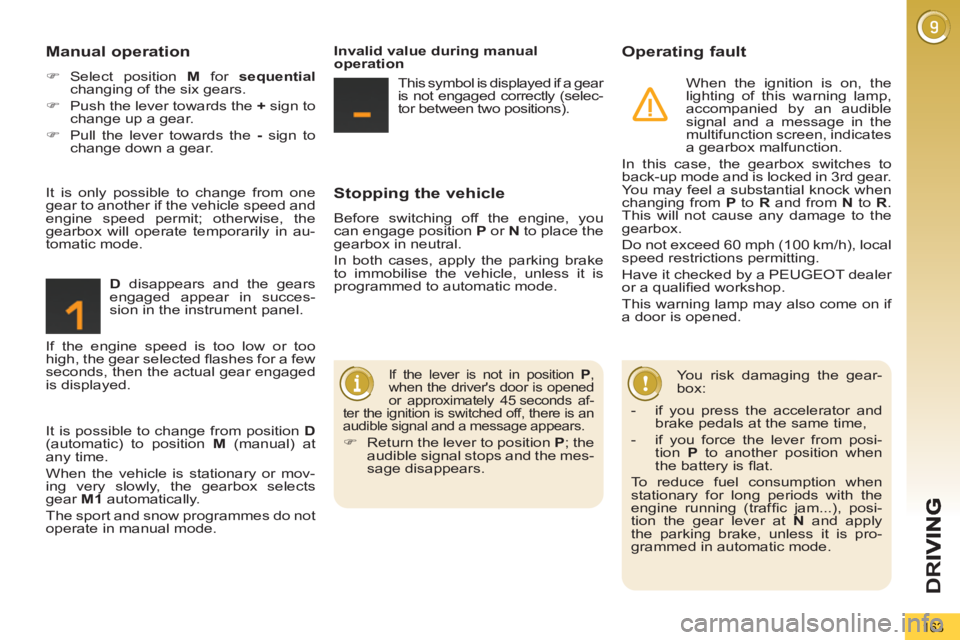
D
disappears and the gears
engaged appear in succes-
sion in the instrument panel.
If the lever is not in position P
,
when the driver's door is opened
or approximately 45 seconds af-
ter the ignition is switched off, there is an
audible signal and a message appears.
)
Return the lever to position P
; the
audible signal stops and the mes-
sage disappears.
It is only possible to change from one
gear to another if the vehicle speed and
engine speed permit; otherwise, the
gearbox will operate temporarily in au-
tomatic mode.
Invalid value during manual
operation
This symbol is displayed if a gear
is not engaged correctly (selec-
tor between two positions).
It is possible to change from position D
(automatic) to position M
(manual) at
any time.
When the vehicle is stationary or mov-
ing very slowly, the gearbox selects
gear M1
automatically.
The sport and snow programmes do not
operate in manual mode. If the engine speed is too low or too
high, the gear selected fl ashes for a few
seconds, then the actual gear engaged
is displayed.
- if you press the accelerator and
brake pedals at the same time,
- if you force the lever from posi-
tion P
to another position when
the battery is fl at.
To reduce fuel consumption when
stationary for long periods with the
engine running (traffi c jam...), posi-
tion the gear lever at N
and apply
the parking brake, unless it is pro-
grammed in automatic mode.
Page 169 of 340
D
R
167
VISUAL AND AUDIBLE FRONTAND/OR REAR PARKING
SENSORS
System consisting of four proximity sen-
sors, installed in the front and/or rear
bumper.
It detects any obstacle (person, vehicle,
tree, barrier...) located behind the vehi-
cle, however, it will not be able to detect
obstacles located immediately below
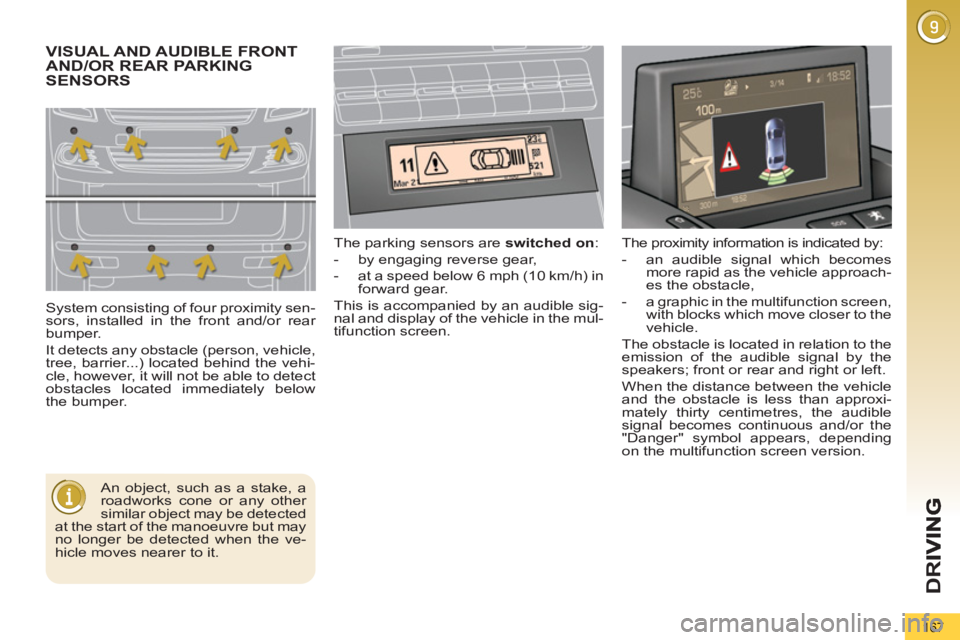
the bumper. The parking sensors are switched on
:
- by engaging reverse gear,
- at a speed below 6 mph (10 km/h) in
forward gear.
This is accompanied by an audible sig-
nal and display of the vehicle in the mul-
tifunction screen.
An object, such as a stake, a
roadworks cone or any other
similar object may be detected
at the start of the manoeuvre but may
no longer be detected when the ve-
hicle moves nearer to it. The proximity information is indicated by:
- an audible signal which becomes
more rapid as the vehicle approach-
es the obstacle,
- a graphic in the multifunction screen,
with blocks which move closer to the
vehicle.
The obstacle is located in relation to the
emission of the audible signal by the
speakers; front or rear and right or left.
When the distance between the vehicle
and the obstacle is less than approxi-
mately thirty centimetres, the audible
signal becomes continuous and/or the
"Danger" symbol appears, depending
on the multifunction screen version.
Page 192 of 340
PRACTICAL INFORMATION
Access to the spare wheel *
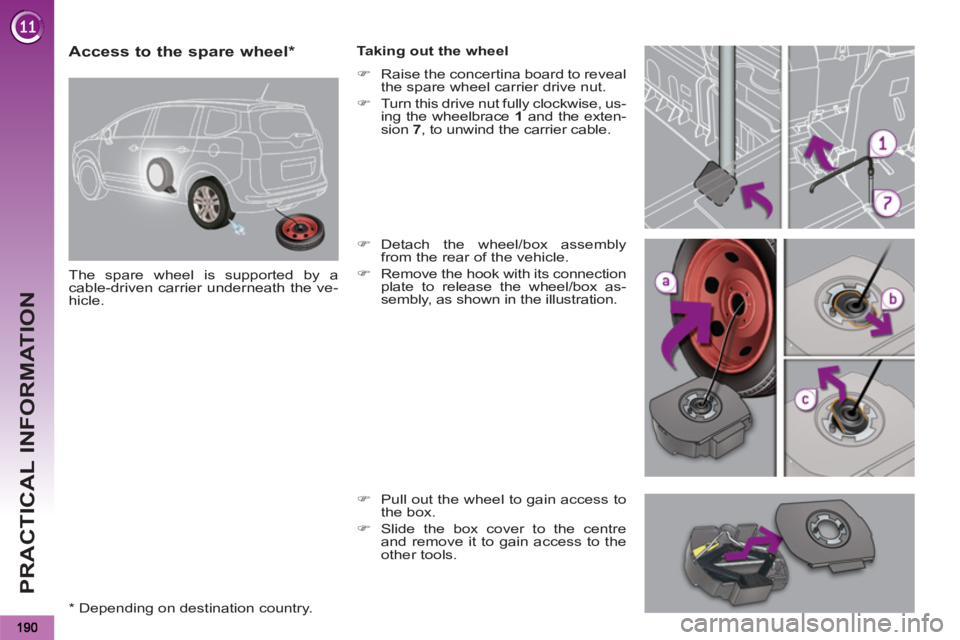
The spare wheel is supported by a
cable-driven carrier underneath the ve-
hicle.
Taking out the wheel
)
Raise the concertina board to reveal
the spare wheel carrier drive nut.
)
Turn this drive nut fully clockwise, us-
ing the wheelbrace 1
and the exten-
sion 7
, to unwind the carrier cable.
)
Detach the wheel/box assembly
from the rear of the vehicle.
)
Remove the hook with its connection
plate to release the wheel/box as-
sembly, as shown in the illustration.
)
Pull out the wheel to gain access to
the box.
)
Slide the box cover to the centre
and remove it to gain access to the
other tools.
*
Depending on destination country.
Page 193 of 340
PRACTICAL INFORMATION
191
Tyre under-infl ation
detection
The spare wheel is not fi tted
with a sensor. The punctured wheel
must be repaired by a PEUGEOT
dealer or a qualifi ed workshop.
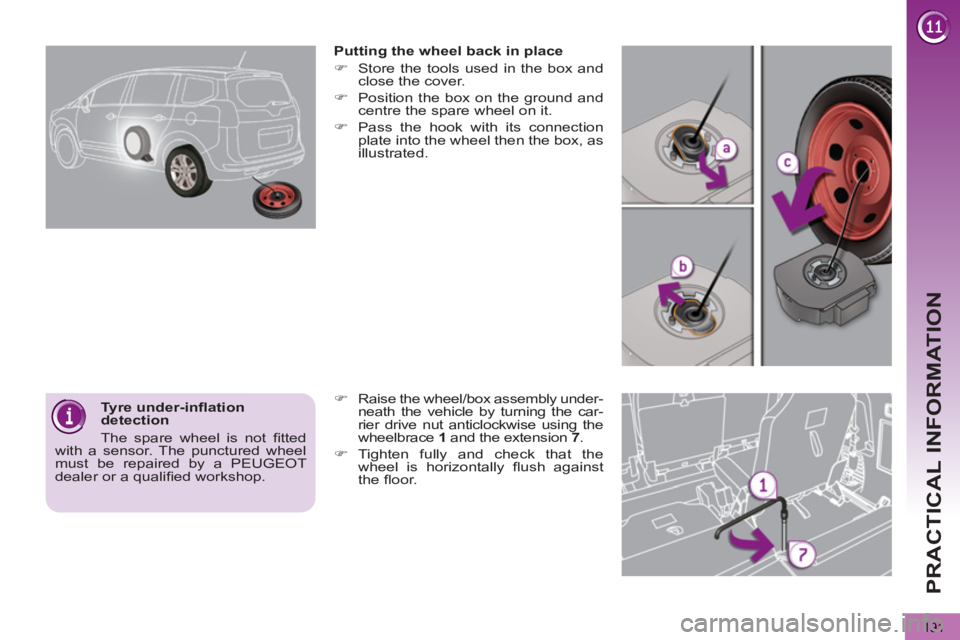
Putting the wheel back in place
)
Store the tools used in the box and
close the cover.
)
Position the box on the ground and
centre the spare wheel on it.
)
Pass the hook with its connection
plate into the wheel then the box, as
illustrated.
)
Raise the wheel/box assembly under-
neath the vehicle by turning the car-
rier drive nut anticlockwise using the
wheelbrace 1
and the extension 7
.
)
Tighten fully and check that the
wheel is horizontally fl ush against
the fl oor.
Page 194 of 340
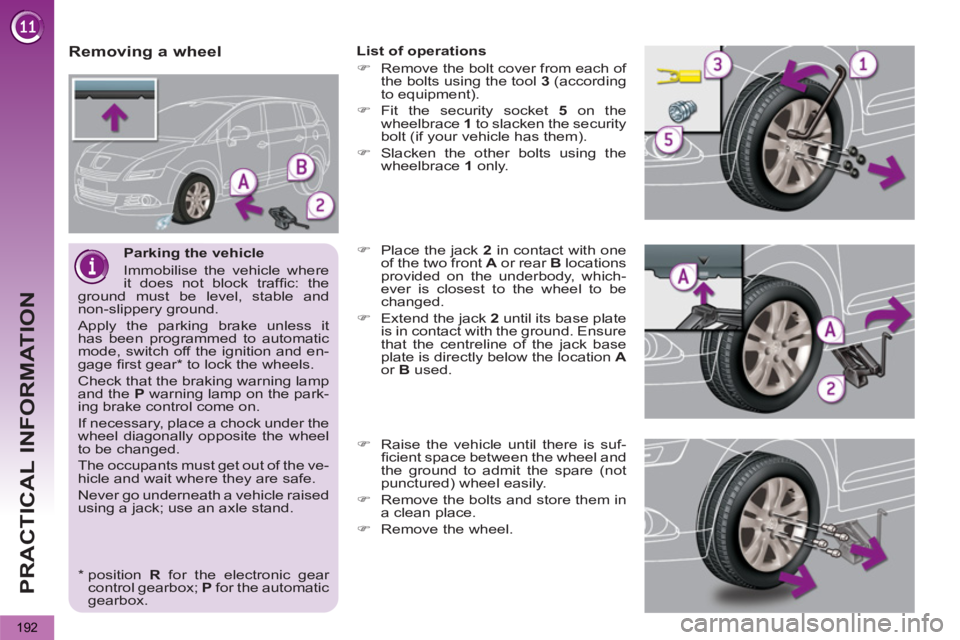
PRACTICAL INFORMATION
192
Parking the vehicle
Immobilise the vehicle where
it does not block traffi c: the
ground must be level, stable and
non-slippery ground.
Apply the parking brake unless it
has been programmed to automatic
mode, switch off the ignition and en-
gage fi rst gear * to lock the wheels.
Check that the braking warning lamp
and the P
warning lamp on the park-
ing brake control come on.
If necessary, place a chock under the
wheel diagonally opposite the wheel
to be changed.
The occupants must get out of the ve-
hicle and wait where they are safe.
Never go underneath a vehicle raised
using a jack; use an axle stand.
Removing a wheel
List of operations
)
Remove the bolt cover from each of
the bolts using the tool 3
(according
to equipment).
)
Fit the security socket 5
on the
wheelbrace 1
to slacken the security
bolt (if your vehicle has them).
)
Slacken the other bolts using the
wheelbrace 1
only.
)
Place the jack 2
in contact with one
of the two front A
or rear B
locations
provided on the underbody, which-
ever is closest to the wheel to be
changed.
)
Extend the jack 2
until its base plate
is in contact with the ground. Ensure
that the centreline of the jack base
plate is directly below the location A
or B
used.
)
Raise the vehicle until there is suf-
fi cient space between the wheel and
the ground to admit the spare (not
punctured) wheel easily.
)
Remove the bolts and store them in
a clean place.
)
Remove the wheel.
*
position R
for the electronic gear
control gearbox; P
for the automatic
gearbox.
Page 203 of 340
PRACTICAL INFORMATION
201
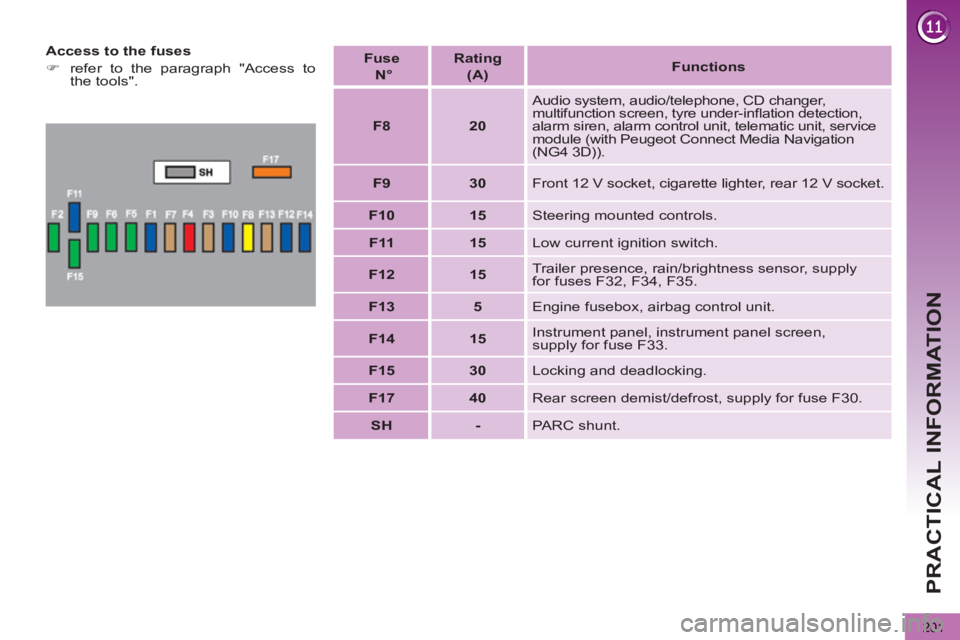
Access to the fuses
)
refer to the paragraph "Access to
the tools".
Fuse
N°
Rating
(A)
Functions
F8
20
Audio system, audio/telephone, CD changer,
multifunction screen, tyre under-infl ation detection,
alarm siren, alarm control unit, telematic unit, service
module (with Peugeot Connect Media Navigation
(NG4 3D)).
F9
30
Front 12 V socket, cigarette lighter, rear 12 V socket.
F10
15
Steering mounted controls.
F11
15
Low current ignition switch.
F12
15
Trailer presence, rain/brightness sensor, supply
for fuses F32, F34, F35.
F13
5
Engine fusebox, airbag control unit.
F14
15
Instrument panel, instrument panel screen,
supply for fuse F33.
F15
30
Locking and deadlocking.
F17
40
Rear screen demist/defrost, supply for fuse F30.
SH
-
PARC shunt.
Page 209 of 340
PRACTICAL INFORMATION
Do not disconnect the terminals
while the engine is running.
Do not charge the batteries
without disconnecting the ter-
minals fi rst.
Do not push the vehicle to start the
engine if it is fi tted with a 6-speed
electronic gear control gearbox or an
automatic gearbox.
The batteries contain harmful
substances such as sulphuric
acid and lead. They must be
disposed of in accordance with regu-
lations and must not, in any circum-
stances, be discarded with household
waste.
Take used remote control batteries
and vehicle batteries to a special col-
lection point.
Charging the battery using a
battery charger
)
Disconnect the battery from the vehicle.
)
Follow the instructions for use pro-
vided by the manufacturer of the
charger.
)
Reconnect starting with the nega-
tive terminal (-).
)
Check that the terminals and con-
nectors are clean. If they are
covered with sulphate (whitish or
greenish deposit), remove them and
clean them.
It is advisable to disconnect
the battery if the vehicle is to
be left unused for more than
one month.
Before disconnecting the battery
Wait 2 minutes after switching off the
ignition before disconnecting the battery.
Close the windows and the doors be-
fore disconnecting the battery.
Following reconnection of the
battery
Following reconnection of the battery,
switch on the ignition and wait 1 minute
before starting to permit initialisation
of the electronic systems. However, if
problems remain following this opera-
tion, contact a PEUGEOT dealer or a
qualifi ed workshop.
Referring to the corresponding section,
you must yourself reinitialise:
- the remote control key,
- the panoramic sunroof blind,
- the satellite navigation system.
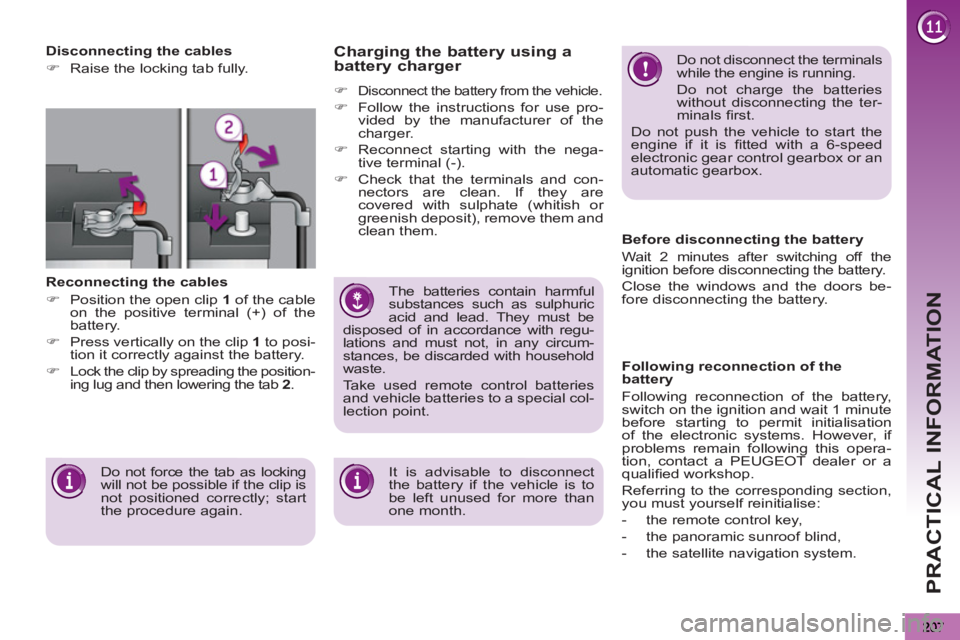
Disconnecting the cables
)
Raise the locking tab fully.
Reconnecting the cables
)
Position the open clip 1
of the cable
on the positive terminal (+) of the
battery.
)
Press vertically on the clip 1
to posi-
tion it correctly against the battery.
)
Lock the clip by spreading the position-
ing lug and then lowering the tab 2
.
Do not force the tab as locking
will not be possible if the clip is
not positioned correctly; start
the procedure again.
Page 212 of 340
PRACTICAL INFORMATION
210
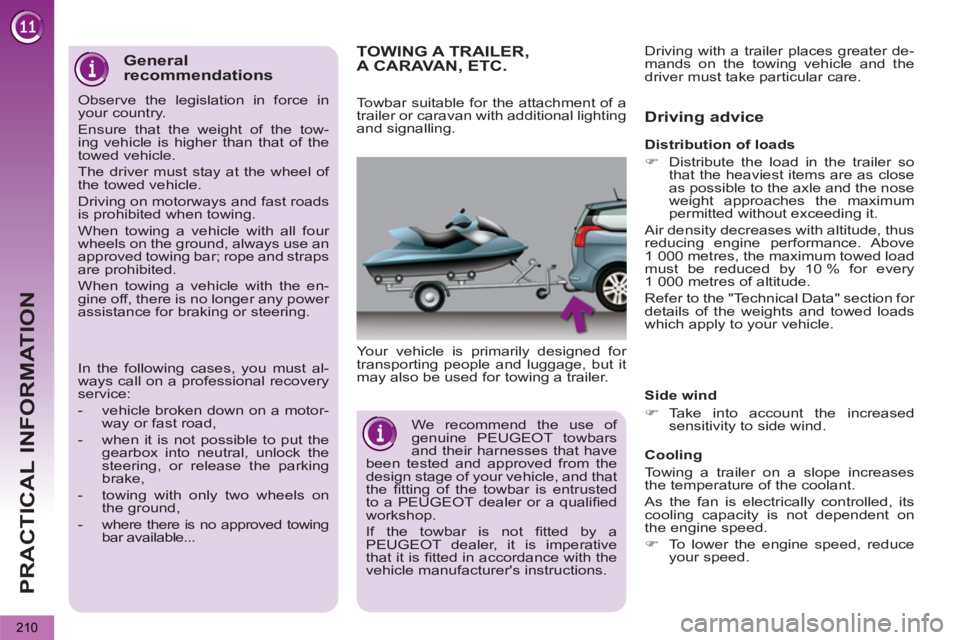
TOWING A TRAILER, A CARAVAN, ETC.
Your vehicle is primarily designed for
transporting people and luggage, but it
may also be used for towing a trailer.
Driving advice
Side wind
)
Take into account the increased
sensitivity to side wind.
Cooling
Towing a trailer on a slope increases
the temperature of the coolant.
As the fan is electrically controlled, its
cooling capacity is not dependent on
the engine speed.
)
To lower the engine speed, reduce
your speed.
Towbar suitable for the attachment of a
trailer or caravan with additional lighting
and signalling.
Distribution of loads
)
Distribute the load in the trailer so
that the heaviest items are as close
as possible to the axle and the nose
weight approaches the maximum
permitted without exceeding it.
Air density decreases with altitude, thus
reducing engine performance. Above
1 000 metres, the maximum towed load
must be reduced by 10 % for every
1 000 metres of altitude.
Refer to the "Technical Data" section for
details of the weights and towed loads
which apply to your vehicle. Driving with a trailer places greater de-
mands on the towing vehicle and the
driver must take particular care.
We recommend the use of
genuine PEUGEOT towbars
and their harnesses that have
been tested and approved from the
design stage of your vehicle, and that
the fi tting of the towbar is entrusted
to a PEUGEOT dealer or a qualifi ed
workshop.
If the towbar is not fi tted by a
PEUGEOT dealer, it is imperative
that it is fi tted in accordance with the
vehicle manufacturer's instructions.
General
recommendations
Observe the legislation in force in
your country.
Ensure that the weight of the tow-
ing vehicle is higher than that of the
towed vehicle.
The driver must stay at the wheel of
the towed vehicle.
Driving on motorways and fast roads
is prohibited when towing.
When towing a vehicle with all four
wheels on the ground, always use an
approved towing bar; rope and straps
are prohibited.
When towing a vehicle with the en-
gine off, there is no longer any power
assistance for braking or steering.
In the following cases, you must al-
ways call on a professional recovery
service:
- vehicle broken down on a motor-
way or fast road,
- when it is not possible to put the
gearbox into neutral, unlock the
steering, or release the parking
brake,
- towing with only two wheels on
the ground,
- where there is no approved towing
bar available...
Page 213 of 340
PRACTICAL INFORMATION
211
The maximum towed load on a long in-
cline depends on the gradient and the
ambient temperature.
In all cases, keep a check on the cool-
ant temperature.
Braking
Towing a trailer increases the braking
distance.
To avoid overheating of the brakes on a
long mountain type of descent, the use
of engine braking is recommended.
Tyres
)
Check the tyre pressures of the tow-
ing vehicle and of the trailer, observ-
ing the recommended pressures.
Lighting
)
Check the electrical lighting and sig-
nalling on the trailer.
The rear parking sensors will
be deactivated automatically if
a genuine PEUGEOT towbar
is used.
)
If the warning lamp and the
STOP
warning lamp come
on, stop the vehicle and
switch off the engine as
soon as possible.
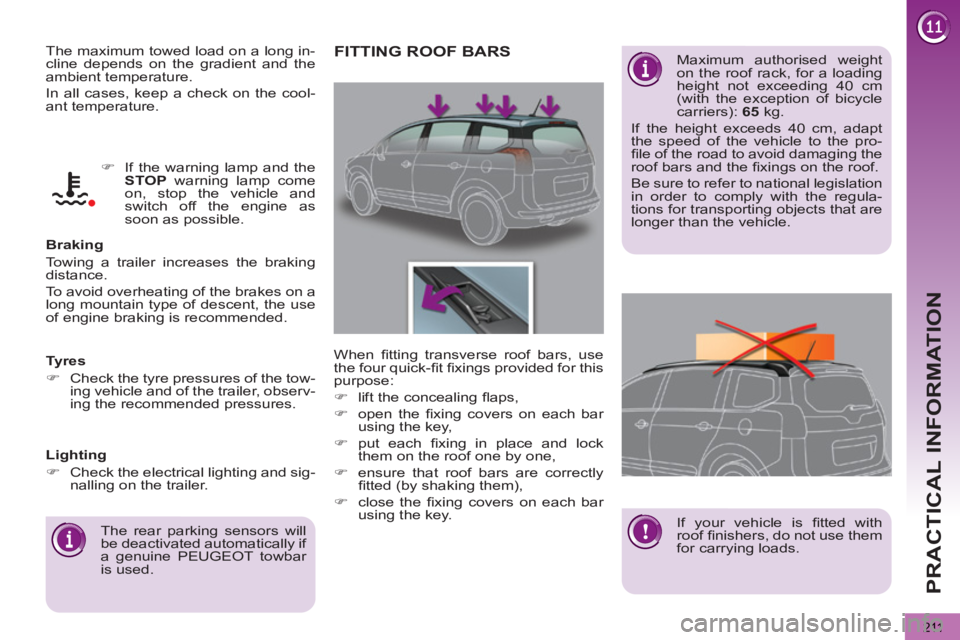
FITTING ROOF BARS
Maximum authorised weight
on the roof rack, for a loading
height not exceeding 40 cm
(with the exception of bicycle
carriers): 65
kg.
If the height exceeds 40 cm, adapt
the speed of the vehicle to the pro-
fi le of the road to avoid damaging the
roof bars and the fi xings on the roof.
Be sure to refer to national legislation
in order to comply with the regula-
tions for transporting objects that are
longer than the vehicle.
When fi tting transverse roof bars, use
the four quick-fi t fi xings provided for this
purpose:
)
lift the concealing fl aps,
)
open the fi xing covers on each bar
using the key,
)
put each fi xing in place and lock
them on the roof one by one,
)
ensure that roof bars are correctly
fi tted (by shaking them),
)
close the fi xing covers on each bar
using the key.
If your vehicle is fi tted with
roof fi nishers, do not use them
for carrying loads.
Page 236 of 340
234
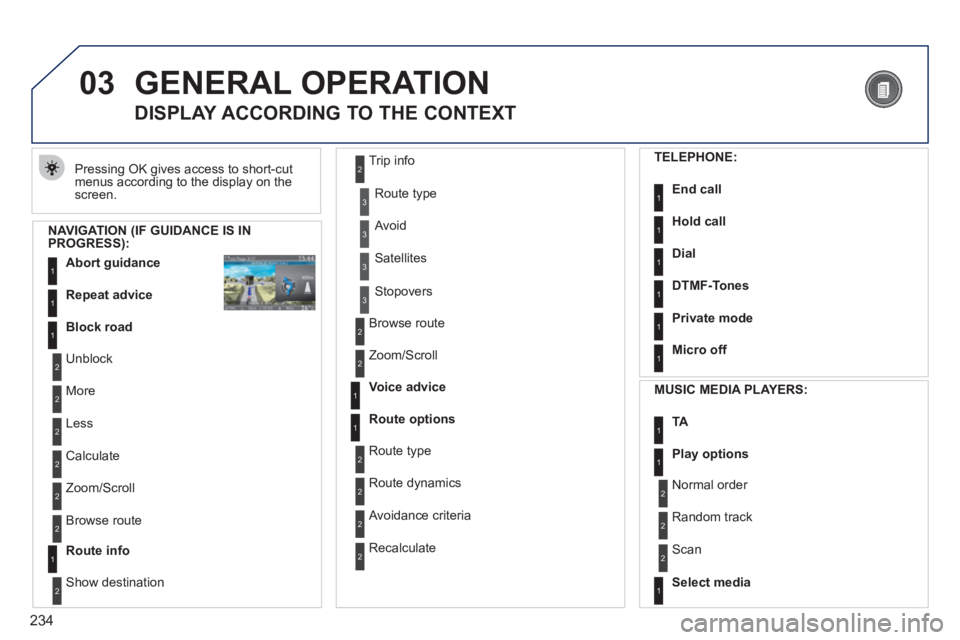
03 GENERAL OPERATION
Pressing OK gives access to short-cut
menus according to the display on the screen.
DISPLAY ACCORDING TO THE CONTEXT
NAVIGATION (IF GUIDANCE IS IN PROGRESS):
Abort guidanc
e1
1
1
Repeat advice
Block road
2
2
Unblock
M
ore
2
Less
3
3
Route type
Avoid
3 Satellites
2
2
Calculate
Z
oom/Scroll
2
Browse route
1Route info
2
2
Show destination Trip in
fo
3
Stopovers
2
2
Browse route
Zoom/Scroll
1
1
Voice advice
Route options
2
2
Route type
Route dynamics
2 Avoidance criteria
2
Recalculate
TELEPHONE:
End call1
1
1
1
Hold call
Dial
DTMF-Tones
1Private mode
1Micro off
MU
SIC MEDIA PLAYERS:
TA1
1Play options
1Select media
2
2
Normal order
R
andom track
2 Scan