ignition PEUGEOT 5008 2011.5 Manual PDF
[x] Cancel search | Manufacturer: PEUGEOT, Model Year: 2011.5, Model line: 5008, Model: PEUGEOT 5008 2011.5Pages: 340, PDF Size: 16.4 MB
Page 294 of 340
292
08
1
2
2
1
*
The services available depend on the network, the SIM card and the compatibility of the Bluetooth telephone used. Check the telephone manual and with your network provider for details of the services
available to you.
BLUETOOTH TELEPHONE
CONNECTING A TELEPHONE
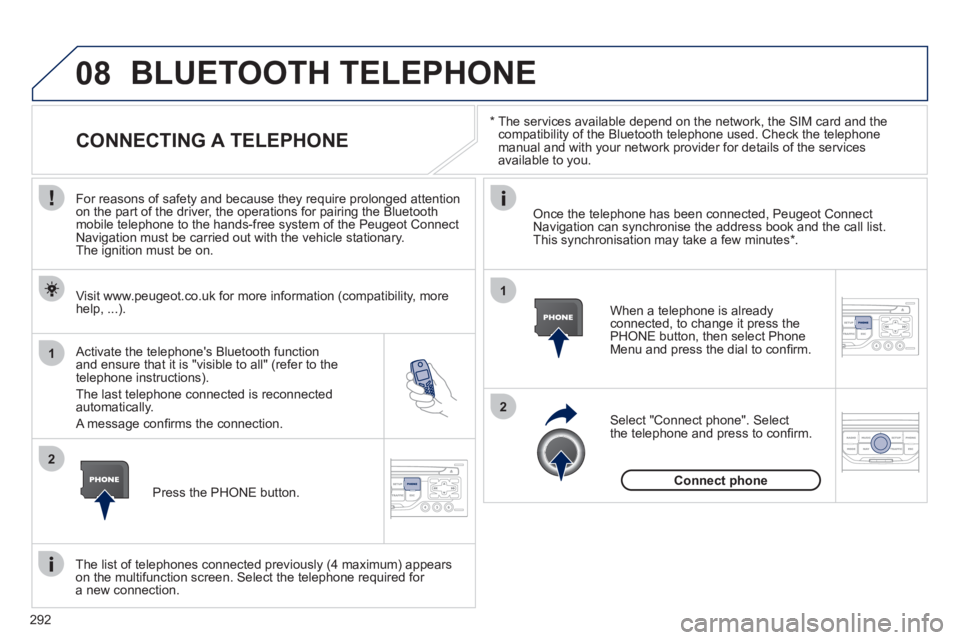
For reasons of safety and because they require prolonged attention
on the part of the driver, the operations for pairing the Bluetooth
mobile telephone to the hands-free system of the Peugeot Connect
Navigation must be carried out with the vehicle stationary.
The ignition must be on.
Activate the tele
phone's Bluetooth function and ensure that it is "visible to all" (refer to the
telephone instructions).
The last telephone connected is reconnected automatically.
A messa
ge confi rms the connection. When a telephone is alread
yconnected, to change it press the
PHONE button, then select PhoneMenu and press the dial to confi rm.
Once the telephone has been connected, Peugeot Connect Navigation can synchronise the address book and the call list.This synchronisation may take a few minutes *
.
The list o
f telephones connected previously (4 maximum) appearson the multifunction screen. Select the telephone required for a new connection. Visit www.peu
geot.co.uk for more information (compatibility, more
help, ...).
Press the PH
ONE button.Select "Connect
phone". Select
the telephone and press to confi rm.
Connect
phone
Page 312 of 340
310
05
1
1
2
3
The system puts together playlists (temporary memory) createdover a period which depends on the capacity of the USB device.
The other sources are available durin
g this time.
The pla
ylists are updated each time the ignition is switched off or each time a USB memory stick is connected.
When connectin
g for the fi rst time, the classifi cation suggested
is by folder. When you reconnect, the classifi cation selected
previously is retained.
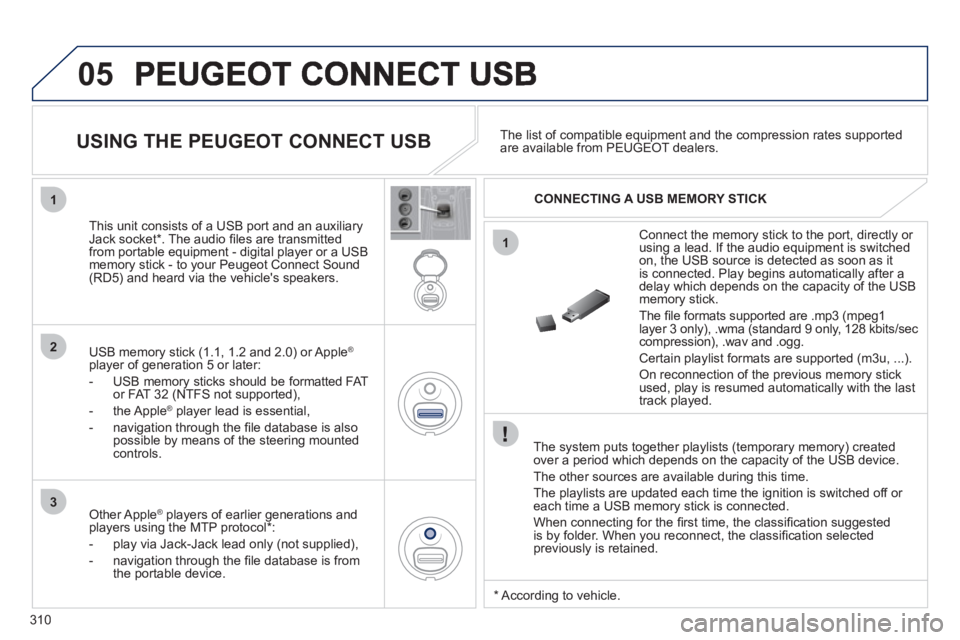
Connect the memory stick to the port, directly or using a lead. If the audio equipment is switched
on, the USB source is detected as soon as it
is connected. Pla
y begins automatically after a
delay which depends on the capacity of the USB memory stick.
The
fi le formats supported are .mp3 (mpeg1layer 3 only), .wma (standard 9 only, 128 kbits/seccompression), .wav and .ogg.
Certain playlist formats are supported (m3u, ...) .
On reconnection of the previous memory stickused, play is resumed automatically with the last
track played.
This unit consists o
f a USB port and an auxiliaryJack socket * . The audio fi les are transmitted
from portable equipment - digital player or a USBmemory stick - to your Peugeot Connect Sound (RD5) and heard via the vehicle's speakers.
USB memor
y stick (1.1, 1.2 and 2.0) or Apple®
player of generation 5 or later:
- U
SB memory sticks should be formatted FAT
or FAT 32 (NTFS not supported),
- the Apple ®player lead is essential,
- navi
gation through the fi le database is also
possible by means of the steering mountedcontrols.The list o
f compatible equipment and the compression rates supported are available from PEUGEOT dealers.
USING THE PEUGEOT CONNECT USB
CONNECTING A USB MEMORY STICK
Other Apple®
players of earlier generations and®
players using the MTP protocol * :
- pla
y via Jack-Jack lead only (not supplied),
- navi
gation through the fi le database is from
the portable device.
*
Accordin
g to vehicle.
Page 315 of 340
313
06
1
2
3
4
5
6
7
8
9
MENU
OK
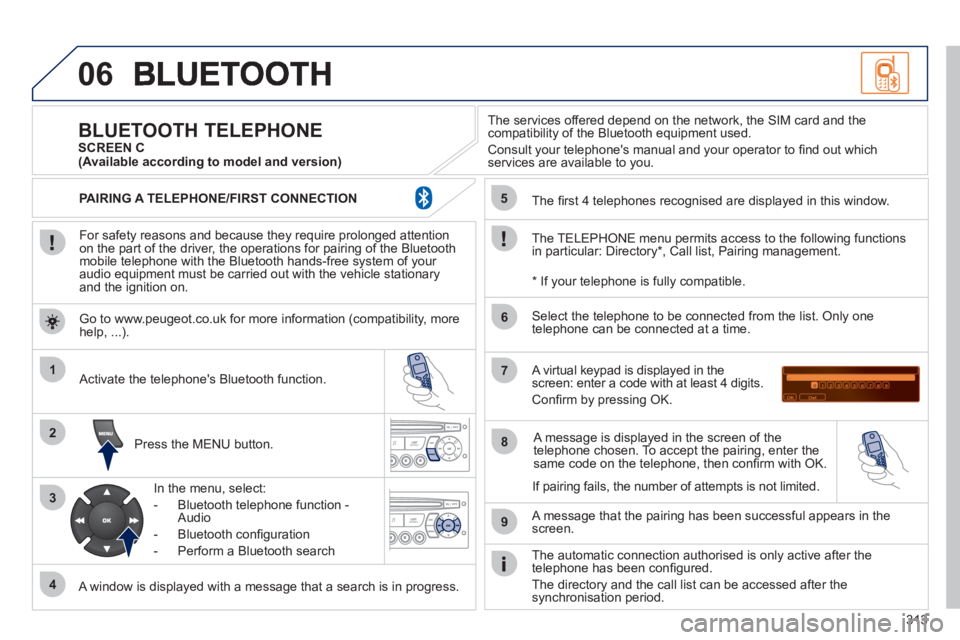
For safety reasons and because they require prolonged attentionon the part of the driver, the operations for pairing of the Bluetooth mobile telephone with the Bluetooth hands-free system of your
audio equipment must be carried out with the vehicle stationary
and the ignition on.
Pr
ess the MENU button.
A window is displayed with a message that a search is in progress.
Activate the telephone's Bluetooth
function.
In the menu, select:
- Bluetooth telephone
function -
Audio
- Bluetooth confi
guration
- P
erform a Bluetooth search
The services o
ffered depend on the network, the SIM card and thecompatibility of the Bluetooth equipment used.
Consult your telephone's manual and your operator to fi nd out which
services are available to you.
BLUETOOTH TELEPHONE SCREEN C
The TELEPH
ONE menu permits access to the following functions
in particular: Directory * , Call list, Pairing management.
The
fi rst 4 telephones recognised are displayed in this window.
A virtual ke
ypad is displayed in thescreen: enter a code with at least 4 digits.
Confi rm by pressing OK.
A messa
ge that the pairing has been successful appears in thescreen.
Select the telephone to be connected from the list. Only one
telephone can be connected at a time.
A messa
ge is displayed in the screen of the
telephone chosen. To accept the pairing, enter the same code on the telephone, then confi rm with OK.
The automatic connection authorised is onl
y active after the
telephone has been confi gured.
The directory and the call list can be accessed a
fter thesynchronisation period.
(Available according to model and version)
*
If your telephone is fully compatible.
I
f pairing fails, the number of attempts is not limited. Go to www.peu
geot.co.uk for more information (compatibility, more help, ...).
PAIRING A TELEPHONE/FIR
ST CONNECTION
Page 317 of 340
315
1
2
3
SOURCE
06
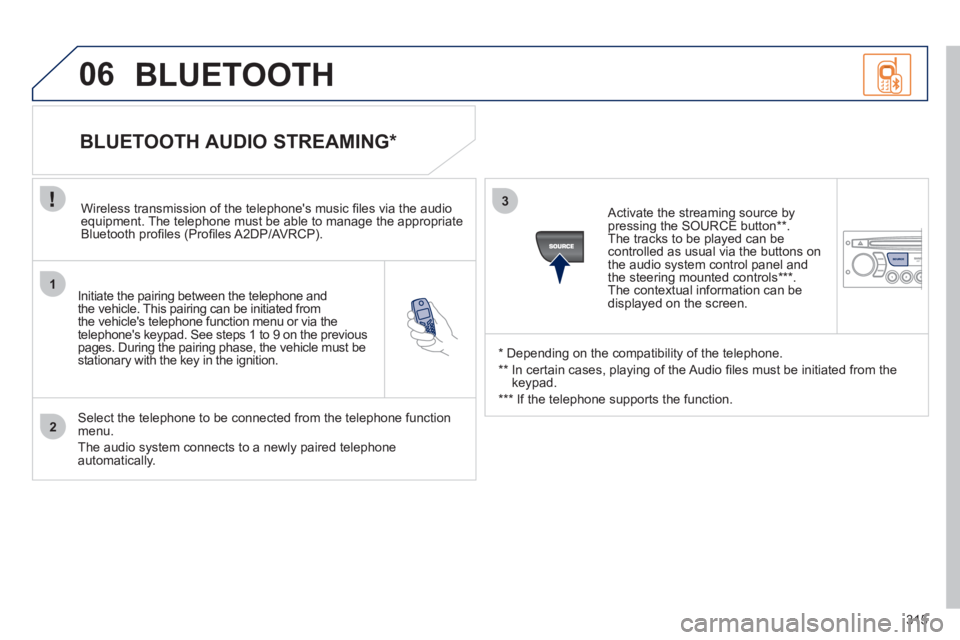
Initiate the pairing between the telephone and
the vehicle. This pairing can be initiated from
the vehicle's telephone function menu or via the
telephone's ke
ypad. See steps 1 to 9 on the previouspages. During the pairing phase, the vehicle must bestationary with the key in the ignition.
Select the telephone to be connected from the telephone function
menu.
The audio system connects to a newly paired telephone automatically.
BLUETOOTH AUDIO STREAMING *
Wireless transmission of the telephone's music fi les via the audioequipment. The telephone must be able to manage the appropriate
Bluetooth profi les (Profi les A2DP/AV RCP).
*
Depending on the compatibility of the telephone.
**
In certain cases, playing of the Audio fi les must be initiated from the
keypad.
***
If the tele
phone supports the function.
Activate the streamin
g source by
pressing the SOURCE button ** .The tracks to be played can becontrolled as usual via the buttons on
the audio system control panel andthe steering mounted controls *** .
The contextual information can bedisplayed on the screen.
BLUETOOTH
Page 335 of 340
VISUAL SEARCH
333
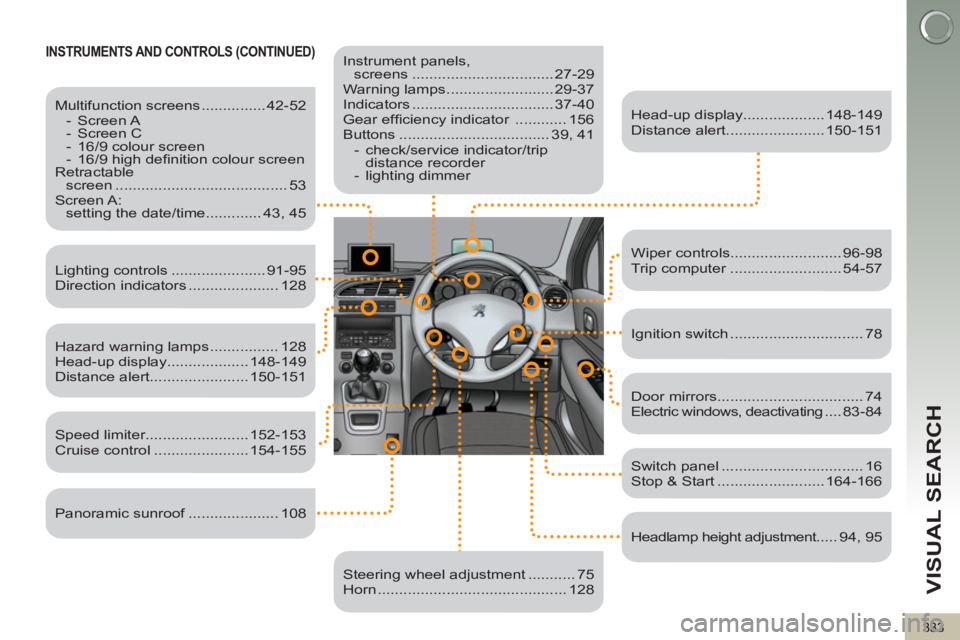
INSTRUMENTS AND CONTROLS (CONTINUED)
Instrument panels,
screens ................................. 27-29
Warning lamps ......................... 29-37
Indicators ................................. 37-40
Gear effi ciency indicator ............ 156
Buttons ................................... 39, 41
- check/service indicator/trip
distance recorder
- lighting dimmer
Head-up display................... 148-149
Distance alert....................... 150-151
Lighting controls ...................... 91-95
Direction indicators ..................... 128
Speed limiter........................ 152-153
Cruise control ...................... 154-155
Switch panel ................................. 16
Stop & Start ......................... 164-166
Door mirrors .................................. 74
Electric windows, deactivating .... 83-84
Headlamp height adjustment..... 94, 95
Steering wheel adjustment ........... 75
Horn ............................................ 128
Multifunction screens ............... 42-52
- Screen A
- Screen C
- 16/9 colour screen
- 16/9 high defi nition colour screen
Retractable
screen ........................................ 53
Screen A:
setting the date/time ............. 43, 45
Hazard warning lamps ................ 128
Head-up display................... 148-149
Distance alert....................... 150-151
Wiper controls.......................... 96-98
Trip computer .......................... 54-57
Ignition switch ............................... 78
Panoramic sunroof ..................... 108