bluetooth PEUGEOT 5008 2011 User Guide
[x] Cancel search | Manufacturer: PEUGEOT, Model Year: 2011, Model line: 5008, Model: PEUGEOT 5008 2011Pages: 340, PDF Size: 16.4 MB
Page 258 of 340
256
08
1
4
5
3
2
2ABC3DEF5JKL4GHI6MNO8TUV7PQRS9WXYZ0*#
1RADIO MEDIANAV ESC TRAFFIC
SETUPADDR
BOOK
2ABC3DEF5JKL4GHI6MNO8TUV7PQRS9WXYZ0*#
1RADIO MEDIANAV ESC TRAFFIC
SETUPADDR
BOOK
2ABC3DEF5JKL4GHI6MNO8TUV7PQRS9WXYZ0*#
1RADIO MEDIANAV ESC TRAFFIC
SETUPADDR
BOOK
2ABC3DEF5JKL4GHI6MNO8TUV7PQRS9WXYZ0*#
1RADIO MEDIANAV ESC TRAFFIC
SETUPADDR
BOOK
2ABC3DEF5JKL4GHI6MNO8TUV7PQRS9WXYZ0*#
1RADIO MEDIANAV ESC TRAFFIC
SETUPADDR
BOOK2ABC3DEF5JKL4GHI6MNO8TUV7PQRS9WXYZ0*#
1RADIO MEDIANAV ESC TRAFFIC
SETUPADDR
BOOK
*
The services available via the telephone depend on the network, the SIMcard and the compatibility of the Bluetooth equipment used. Refer to your
telephone's manual and your operator to check which services you haveaccess to.
USING THE TELEPHONE
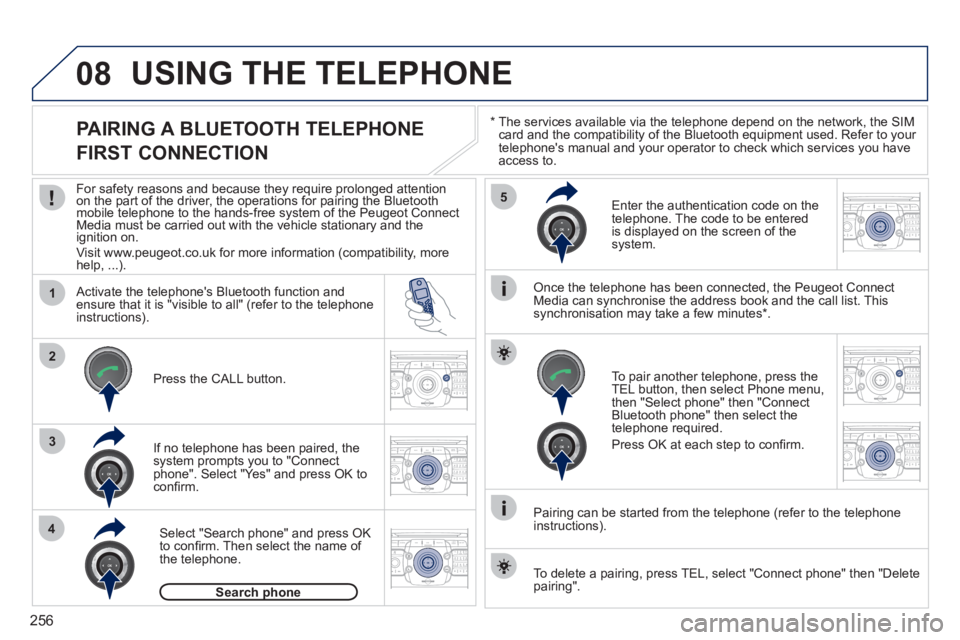
PAIRING A BLUETOOTH TELEPHONE
FIRST CONNECTION
For safety reasons and because they require prolonged attentionon the part of the driver, the operations for pairing the Bluetooth yygy
mobile telephone to the hands-free system of the Peugeot ConnectMedia must be carried out with the vehicle stationary and the
ignition on.
Visit www.peugeot.co.uk for more information (compatibility, morehelp, ...).
Activate the tele
phone's Bluetooth function andensure that it is "visible to all" (refer to the telephone
instructions).
If no tele
phone has been paired, the
system prompts you to "Connect
phone". Select "Yes" and press OK to confi rm.
Ent
er the authentication code on thetelephone. The code to be entered
is displayed on the screen of the system.
To pair another telephone, press the
TEL button, then select Phone menu,then "Select phone" then "Connect Bluetooth phone" then select the
telephone required.
Press
OK at each step to confi rm.
Once the telephone has been connected, the Peugeot ConnectMedia can synchronise the address book and the call list. This
synchronisation may take a few minutes * .
Pairin
g can be started from the telephone (refer to the telephone
instructions). Press the
CALL button.
Select "Search phone" and press OK
to confi rm. Then select the name of
the telephone.
Search phonep
To delete a pairing, press TEL, select "Connect phone" then "Delete
pairing".
Page 259 of 340
257
08
1
2
2ABC3DEF5JKL4GHI6MNO8TUV7PQRS9WXYZ0*#
1RADIO MEDIANAV ESC TRAFFIC
SETUPADDR
BOOK
*
The services available via the telephone depend on the network, the SIM card and the compatibility of the Bluetooth equipment used. Refer toyour telephone's manual and your operator to check which services you have access to. A list of mobile telephones which offer the best range of services is available from dealers.
USING THE TELEPHONE
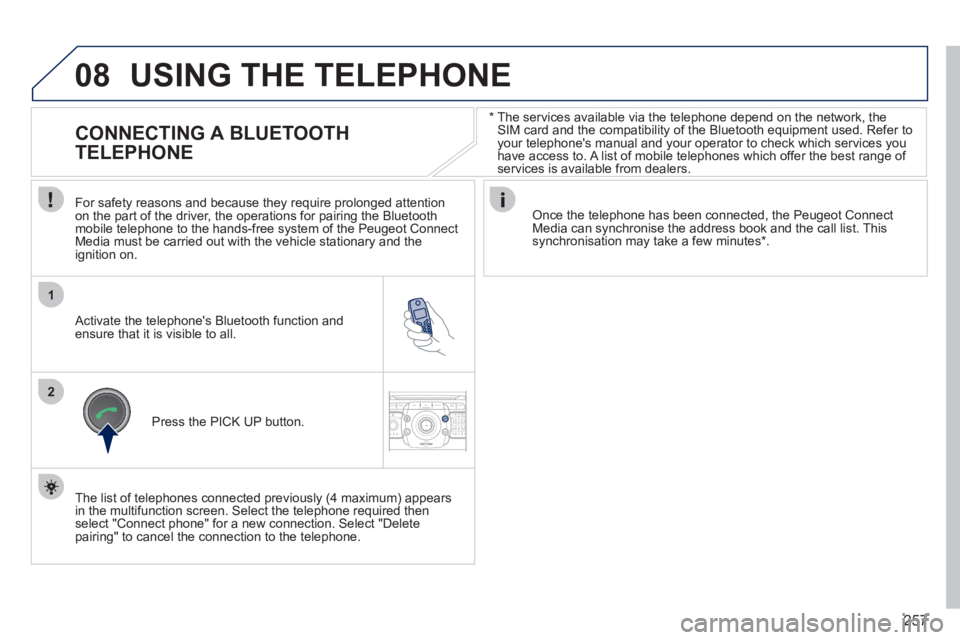
CONNECTING A BLUETOOTH
TELEPHONE
For safety reasons and because they require prolonged attention
on the part of the driver, the operations for pairing the Bluetoothmobile telephone to the hands-free system of the Peugeot ConnectMedia must be carried out with the vehicle stationary and the
ignition on.
Activate the telephone's Bluetooth function and ensure that it is visible to all.
Once the telephone has been connected, the Peugeot Connect Media can synchronise the address book and the call list. This synchronisation may take a few minutes * .
Press the PI
CK UP button.
The list of telephones connected previousl
y (4 maximum) appears
in the multifunction screen. Select the telephone required then
select "Connect phone" for a new connection. Select "Delete pairing" to cancel the connection to the telephone.
Page 260 of 340
258
08
14
5
2ABC3DEF5JKL4GHI6MNO8TUV7PQRS9WXYZ0*#
1
3
2
2ABC3DEF5JKL4GHI6MNO8TUV7PQRS9WXYZ0*#
1RADIO MEDIANAV ESC TRAFFIC
SETUPADDR
BOOK
2ABC3DEF5JKL4GHI6MNO8TUV7PQRS9WXYZ0*#
1NAV ESC TRAFFICADDR
BOOKSETUP2ABC3DEF5JKL4GHI6MNO8TUV7PQRS9WXYZ0*#
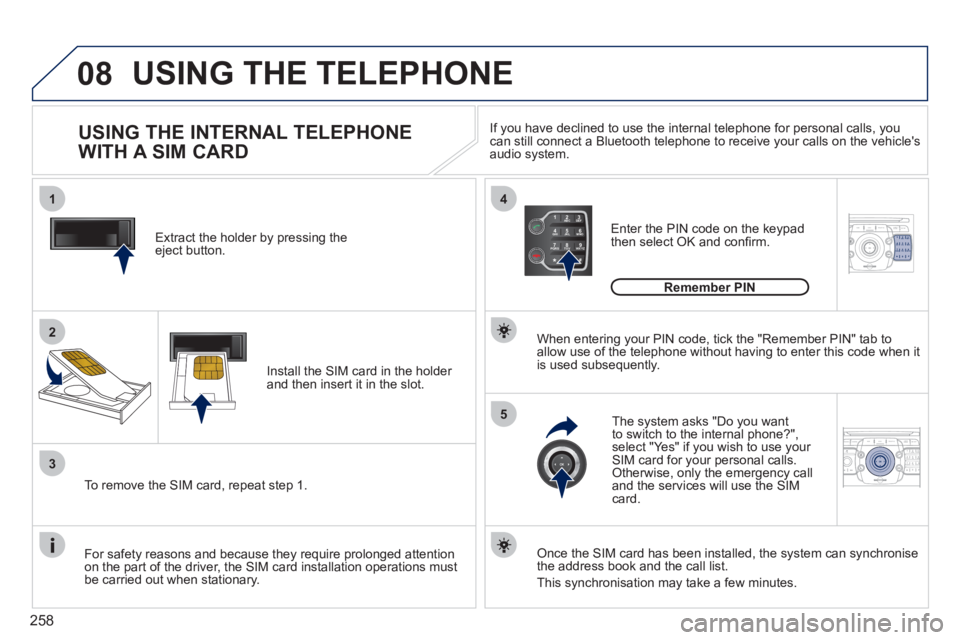
1Extract the holder by pressing theeject button.
Install the
SIM card in the holder and then insert it in the slot.
To remove the
SIM card, repeat step 1.
For safet
y reasons and because they require prolonged attention
on the part of the driver, the SIM card installation operations must
be carried out when stationary.
Enter the PIN code on the keypad
then select OK and confi rm.
The s
ystem asks "Do you want
to switch to the internal phone?", select "Yes" if you wish to use your SIM card for your personal calls. Otherwise, only the emergency call
and the services will use the SIMcard.
Remember PIN
When enterin
g your PIN code, tick the "Remember PIN" tab toallow use of the telephone without having to enter this code when itis used subsequently.
USING THE INTERNAL TELEPHONE
WITH A SIM CARD
USING THE TELEPHONE
Once the SIM card has been installed, the system can synchronise
the address book and the call list.
This synchronisation may take a
few minutes. I
f you have declined to use the internal telephone for personal calls, you can still connect a Bluetooth telephone to receive your calls on the vehicle's audio system.
Page 265 of 340
263
ADDR
BOOK
Recalculate3
Fast route4
Short route 4
Optimized route 4
POI nearby
POI search2
3
POI near destination3
POI in city3
POI in country3
POI near route3
Route type
Route options2
3
POI near destination4
Short route 4
Optimized route 4
Subscr. service4
Route dynamics
Settings2
3
Traffi c independent4
Semi-dynamic4
Dynamic 4
Avoidance criteria3
Avoid motorways4
Avoid toll roads 4
Avoid tunnels4
Avoid ferries 4
Recalculate3
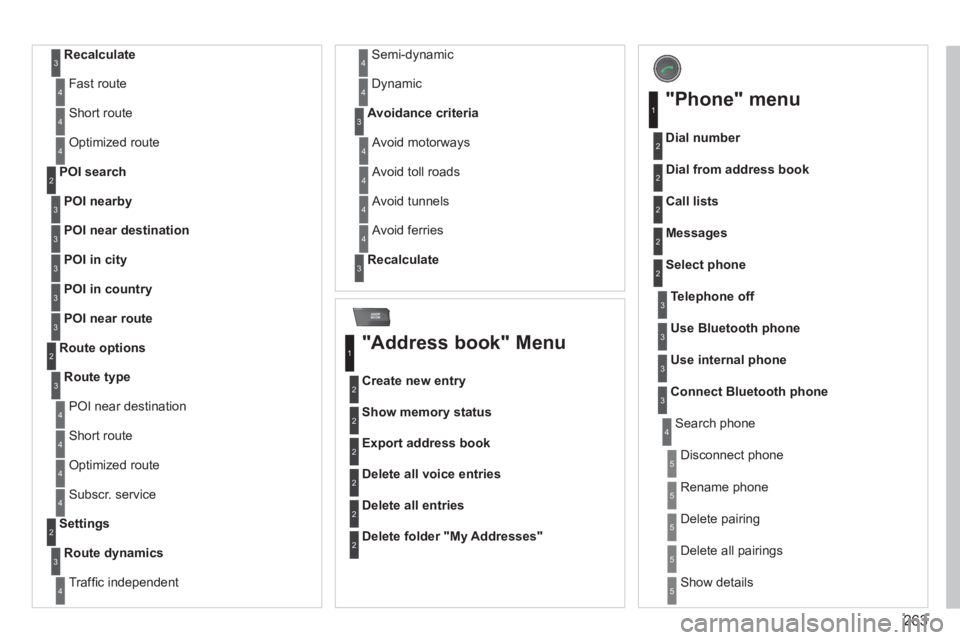
"Address book" Menu
Create new entry
1
2
Show memory status2
Export address book2
Delete all voice entries 2
Delete all entries 2
Delete folder "My Addresses"2
"Phone" menu
Dial number
1
2
Dial from address book2
Call lists2
Messages 2
Select phone2
Search phone4
Telephone off3
Use Bluetooth phone3
Use internal phone3
Connect Bluetooth phone3
Disconnect phone5
Rename phone 5
Delete pairing 5
Delete all pairings 5
Show details5
Page 271 of 340
269
QUESTIONANSWERSOLUTION
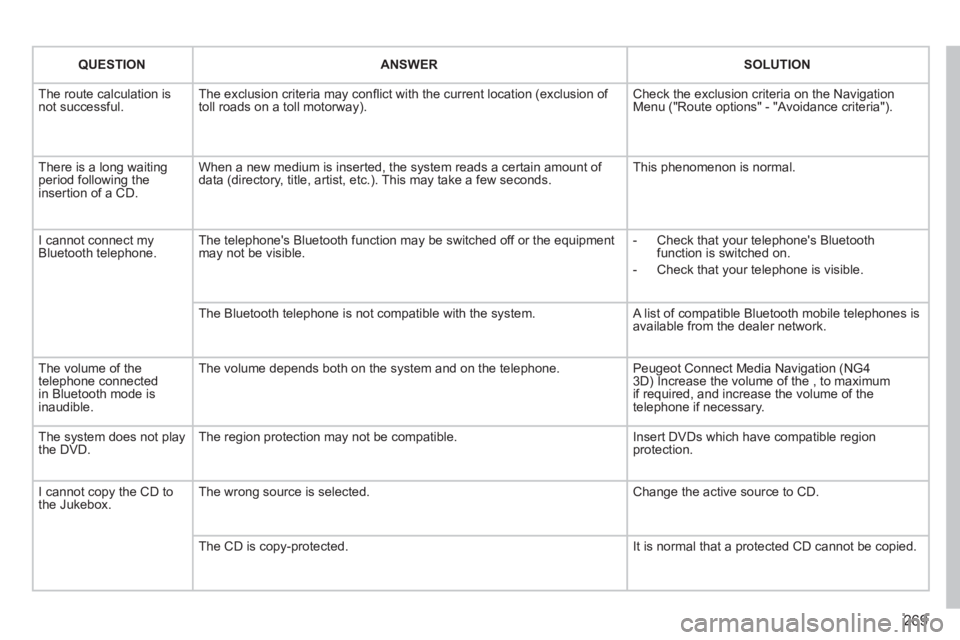
The route calculation is not successful. The exclusion criteria may confl ict with the current location (exclusion of toll roads on a toll motorway). Check the exclusion criteria on the NavigationMenu ("Route options" - "Avoidance criteria").
There is a long waiting period following theinsertion of a CD.
When a new medium is inserted, the system reads a certain amount of data (directory, title, artist, etc.). This may take a few seconds. This phenomenon is normal.
I cannot connect myBluetooth telephone.The telephone's Bluetooth function may be switched off or the equipmentmay not be visible.
- Check that your telephone's Bluetoothfunction is switched on.
- Check that your telephone is visible.
The Bluetooth telephone is not compatible with the system. A list of compatible Bluetooth mobile telephones is available from the dealer network.
The volume of thetelephone connectedin Bluetooth mode isinaudible.
The volume depends both on the system and on the telephone.
Peugeot Connect Media Navigation (NG43D) Increase the volume of the , to maximum if required, and increase the volume of thetelephone if necessary.
The system does not play the DVD. The region protection may not be compatible. Insert DVDs which have compatible region protection.
I cannot copy the CD tothe Jukebox. The wrong source is selected.
Change the active source to CD.
The CD is copy-protected.
It is normal that a protected CD cannot be copied.
Page 272 of 340
270
QUESTIONANSWERSOLUTION
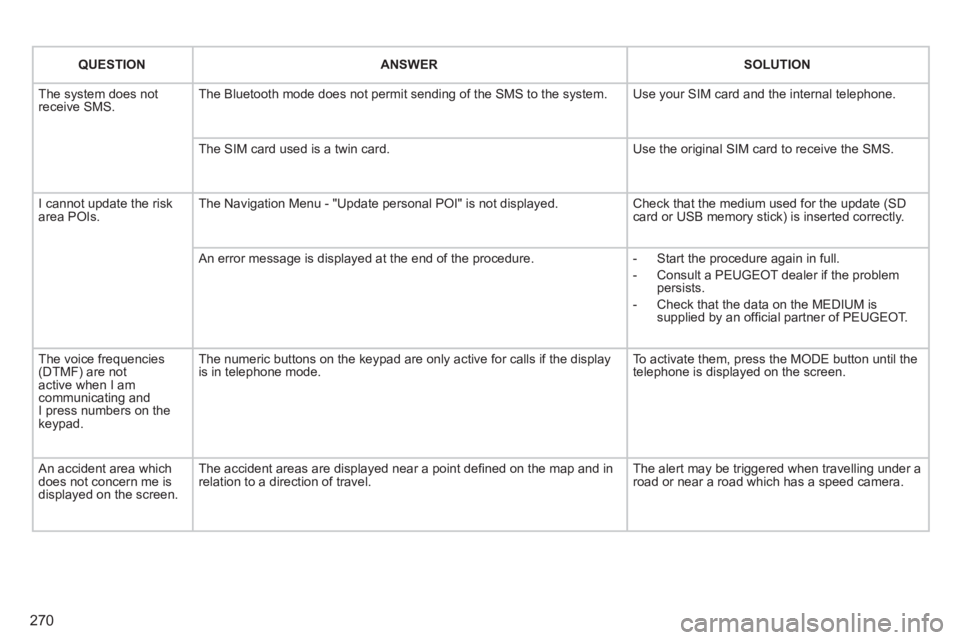
The system does notreceive SMS. The Bluetooth mode does not permit sending of the SMS to the system.
Use your SIM card and the internal telephone.
The SIM card used is a twin card.
Use the original SIM card to receive the SMS.
I cannot update the risk area POIs. The Navigation Menu - "Update personal POI" is not displayed. Check that the medium used for the update (SDcard or USB memory stick) is inserted correctly.
An error message is displayed at the end of the procedure.
- Start the procedure again in full.
- Consult a PEUGEOT dealer if the problempersists.
- Check that the data on the MEDIUM issupplied by an offi cial partner of PEUGEOT.
The voice frequencies(DTMF) are not active when I am communicating andI press numbers on thekeypad.
The numeric buttons on the keypad are only active for calls if the display is in telephone mode.
To activate them, press the MODE button until the telephone is displayed on the screen.
An accident area which does not concern me isdisplayed on the screen.
The accident areas are displayed near a point defi ned on the map and inrelation to a direction of travel.
The alert may be triggered when travelling under a road or near a road which has a speed camera.
Page 273 of 340
271
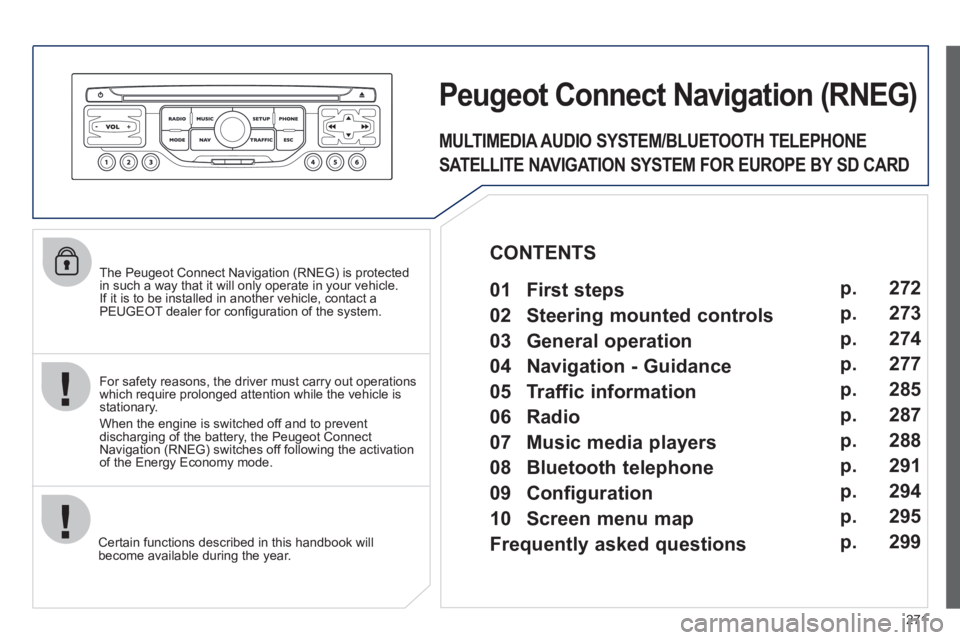
The Peugeot Connect Navigation (RNEG) is protected in such a way that it will only operate in your vehicle.
If it is to be installed in another vehicle, contact aPEUGEOT dealer for confi guration of the system.
Certain functions described in this handbook will
become available during the year.
Peugeot CtonnectNtavigation(RNEG)
For safety reasons, the driver must carry out operations which require prolonged attention while the vehicle is stationary.
When the en
gine is switched off and to prevent
discharging of the battery, the Peugeot Connect
Navigation (RNEG) switches off following the activation of the Energy Economy mode.
MULTIMEDIA AUDIO SYSTEM/BLUETOOTH TELEPHONE
SATELLITE NAVIGATION SYSTEM FOR EUROPE BY SD CARD
01 First steps
CONTENTS
02 Steering mounted controls
03 General operation
04 Navigation - Guidance
05 Traffic information
06 Radio
07 Music media players
08 Bluetooth telephone
09 Configuration
10 Screen menu map p.
p.
p.
p.
p.
p.
p.
p.
p.
p.
Frequently asked questions p. 272
273
274
277
285
287
288
291
294
295
299
Page 293 of 340
291
08
1
2
3
4
BLUETOOTH TELEPHONE
*
The services available depend on the network, the SIM card and thecompatibility of the Bluetooth telephone used. Check the telephone
manual and with your network provider for details of the servicesavailable to you.
PAIRING A TELEPHONE
FIRST CONNECTION
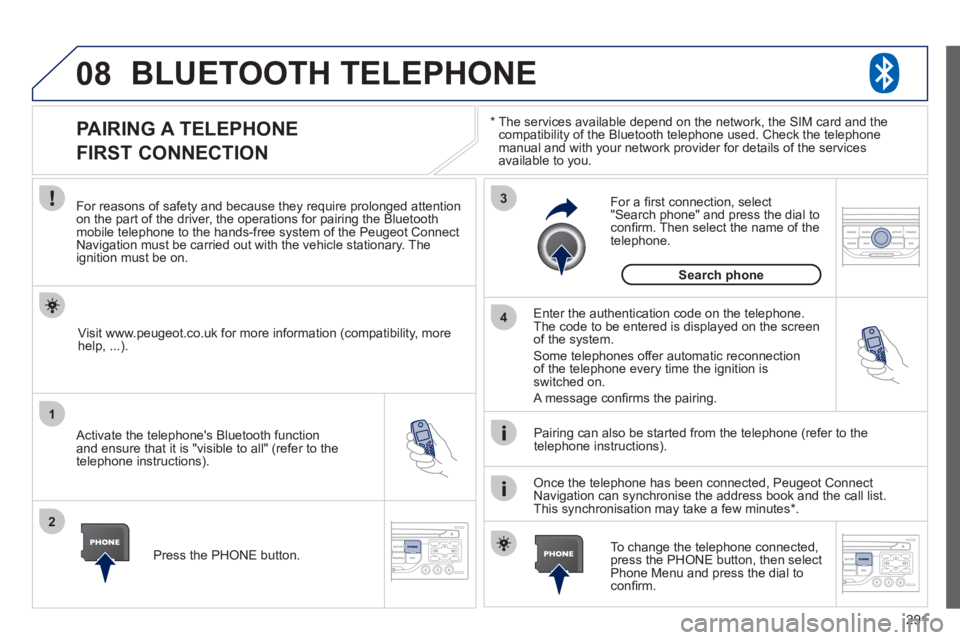
For reasons of safety and because they require prolonged attentionon the part of the driver, the operations for pairing the Bluetooth mobile telephone to the hands-free system of the Peugeot ConnectNavigation must be carried out with the vehicle stationary. Theignition must be on.
Activate the telephone's Bluetooth
function
and ensure that it is "visible to all" (refer to the
telephone instructions).
Enter the authentication code on the telephone. The code to be entered is displayed on the screen
of the system.
Some telephones offer automatic reconnection
of the telephone every time the ignition is switched on.
A messa
ge confi rms the pairing.
To change the telephone connected, press the PHONE button, then select Phone Menu and press the dial toconfi rm.
Once the telephone has been connected, Peugeot Connect
Navigation can synchronise the address book and the call list.
This synchronisation may take a few minutes * . Pairin
g can also be started from the telephone (refer to the
telephone instructions). Visit www.peu
geot.co.uk for more information (compatibility, more
help, ...).
Press the PH
ONE button.
For a
fi rst connection, select"Search phone" and press the dial to confi rm. Then select the name of thetelephone.
Search
phone
Page 294 of 340
292
08
1
2
2
1
*
The services available depend on the network, the SIM card and the compatibility of the Bluetooth telephone used. Check the telephone manual and with your network provider for details of the services
available to you.
BLUETOOTH TELEPHONE
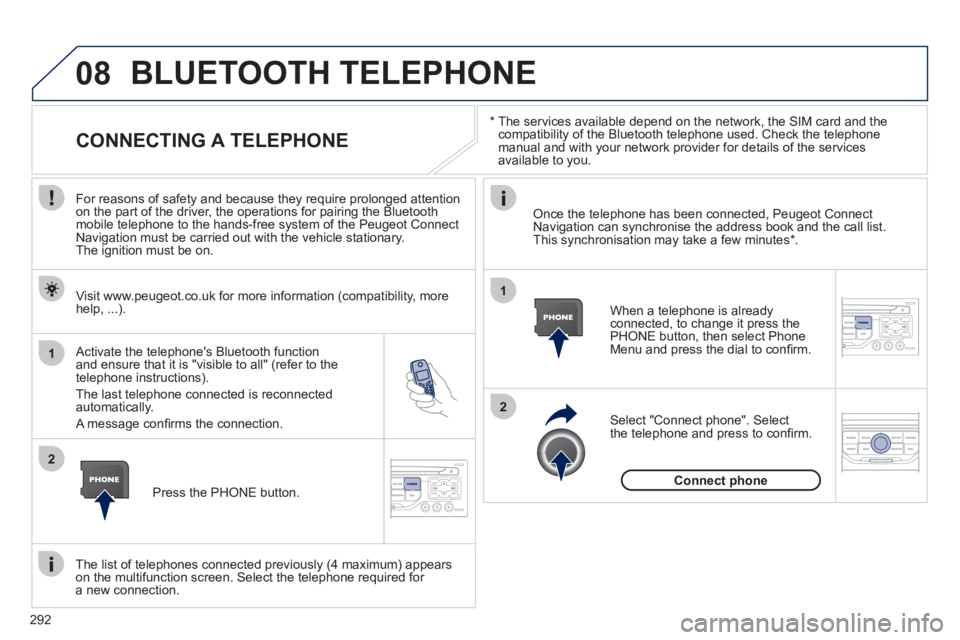
CONNECTING A TELEPHONE
For reasons of safety and because they require prolonged attention
on the part of the driver, the operations for pairing the Bluetooth
mobile telephone to the hands-free system of the Peugeot Connect
Navigation must be carried out with the vehicle stationary.
The ignition must be on.
Activate the tele
phone's Bluetooth function and ensure that it is "visible to all" (refer to the
telephone instructions).
The last telephone connected is reconnected automatically.
A messa
ge confi rms the connection. When a telephone is alread
yconnected, to change it press the
PHONE button, then select PhoneMenu and press the dial to confi rm.
Once the telephone has been connected, Peugeot Connect Navigation can synchronise the address book and the call list.This synchronisation may take a few minutes *
.
The list o
f telephones connected previously (4 maximum) appearson the multifunction screen. Select the telephone required for a new connection. Visit www.peu
geot.co.uk for more information (compatibility, more
help, ...).
Press the PH
ONE button.Select "Connect
phone". Select
the telephone and press to confi rm.
Connect
phone
Page 295 of 340
293
08
1
3 2
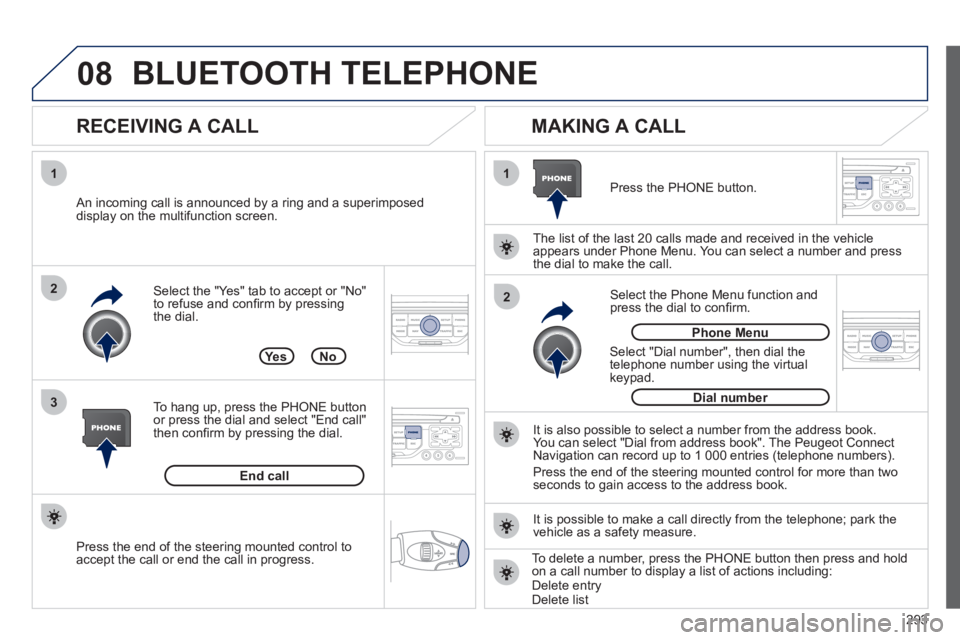
2 1Select the "Yes" tab to accept or "No"
to refuse and confi rm by pressing
the dial.
RECEIVING A CALL
MAKING A CALL
An incoming call is announced by a ring and a superimposed
display on the multifunction screen.
Yes
To han
g up, press the PHONE button
or press the dial and select "End call"then confi rm by pressing the dial.
End callPress the PH
ONE button.
Select "Dial number"
, then dial the
telephone number using the virtualkeypad.
Select the Phone Menu function and
press the dial to confi rm.
The list of the last 2
0 calls made and received in the vehicle
appears under Phone Menu. You can select a number and press
the dial to make the call.
No
It is also possible to select a number from the address book. You can select "Dial from address book". The Peugeot Connect
Navigation can record up to 1 000 entries (telephone numbers).
Press the end o
f the steering mounted control for more than twoseconds to gain access to the address book.
Phone Menu
Dial number
It is possible to make a call directl
y from the telephone; park the
vehicle as a safety measure.
BLUETOOTH TELEPHONE
Press the end of the steering mounted control to
accept the call or end the call in progress.To delete a number, press the PHONE button then press and hold
on a call number to display a list of actions including:Delete entryDelete list