trip computer PEUGEOT 5008 2013.5 User Guide
[x] Cancel search | Manufacturer: PEUGEOT, Model Year: 2013.5, Model line: 5008, Model: PEUGEOT 5008 2013.5Pages: 404, PDF Size: 23.45 MB
Page 57 of 404
2
Multifunction screens55
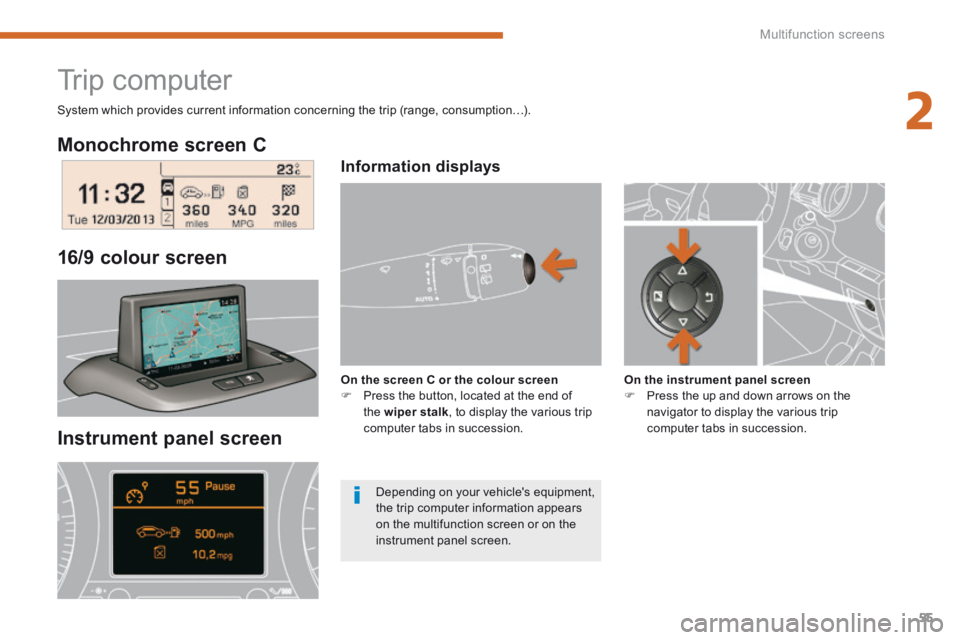
Monochrome screen C
Instrument panel screen
16/9 colour screen
Trip computer
Information displays
On the screen C or the colour screen Press the button, located at the end of the wiper stalk , to display the various trip computer tabs in succession.
On the instrument panel screen Press the up and down arrows on the navigator to display the various trip computer tabs in succession.
System which provides current information concerning the trip (range, consumption…).
Depending on your vehicle's equipment, the trip computer information appears on the multifunction screen or on the instrument panel screen.
Page 59 of 404
2
Multifunction screens57
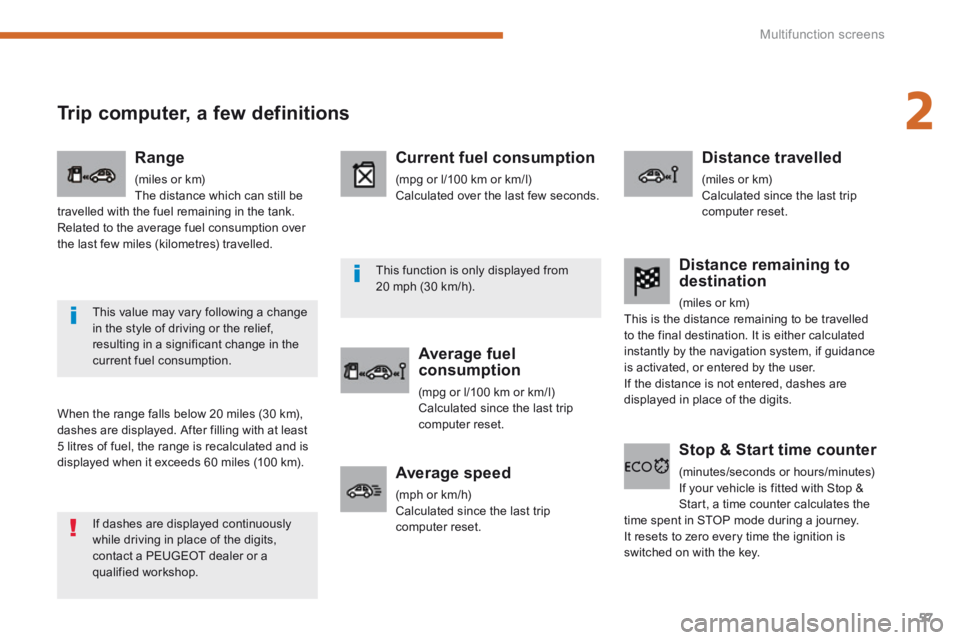
Trip computer, a few definitions
When the range falls below 20 miles (30 km), dashes are displayed. After filling with at least 5 litres of fuel, the range is recalculated and is displayed when it exceeds 60 miles (100 km).
Range
(miles or km) The distance which can still be travelled with the fuel remaining in the tank. Related to the average fuel consumption over the last few miles (kilometres) travelled.
Current fuel consumption
(mpg or l/100 km or km/l) Calculated over the last few seconds.
Average fuel consumption
(mpg or l/100 km or km/l) Calculated since the last trip computer reset.
Distance travelled
(miles or km) Calculated since the last trip computer reset.
Average speed
(mph or km/h) Calculated since the last trip computer reset.
Stop & Start time counter
(minutes/seconds or hours/minutes) If your vehicle is fitted with Stop & Start, a time counter calculates the time spent in STOP mode during a journey. It resets to zero every time the ignition is switched on with the key.
Distance remaining to destination
(miles or km) This is the distance remaining to be travelled to the final destination. It is either calculated instantly by the navigation system, if guidance is activated, or entered by the user. If the distance is not entered, dashes are displayed in place of the digits.
If dashes are displayed continuously while driving in place of the digits, contact a PEUGEOT dealer or a qualified workshop.
This value may vary following a change in the style of driving or the relief, resulting in a significant change in the current fuel consumption.
This function is only displayed from 20 mph (30 km/h).
Page 361 of 404
359
11
2
3
3
1
4
2
2
1
4
4
2
2
Night mode
Auto Day/Night
Adjust luminosity
Set date and time
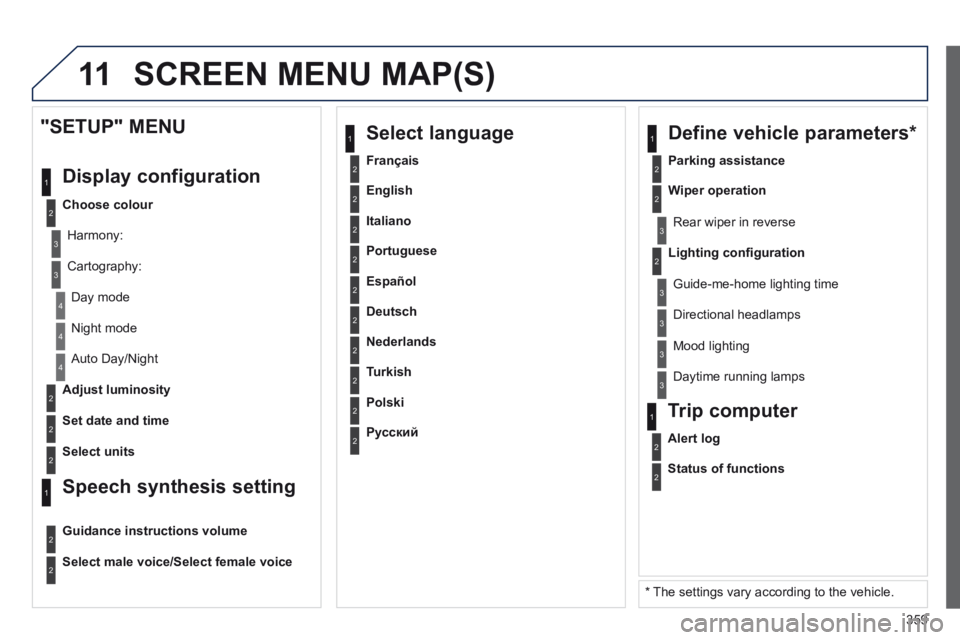
"SETUP" MENU
Display configuration
Choose colour
Harmony:
Cartography:
Day mode
Speech synthesis setting
Guidance instructions volume
Select male voice/Select female voice
2Select units
2
3
3
2Lighting confi guration
Parking assistance
Rear wiper in reverse
Guide-me-home lighting time
1 Define vehicle parameters *
2Wiper operation
3 Directional headlamps
3 Mood lighting
3 Daytime running lamps
* The settings vary according to the vehicle.
2Alert log
1 Trip computer
2Status of functions
2Français
1 Select language
2English
2Italiano
2Portuguese
2Español
2Deutsch
2Nederlands
2Turkish
2Polski
2Русский
SCREEN MENU MAP(S)
Page 370 of 404
368
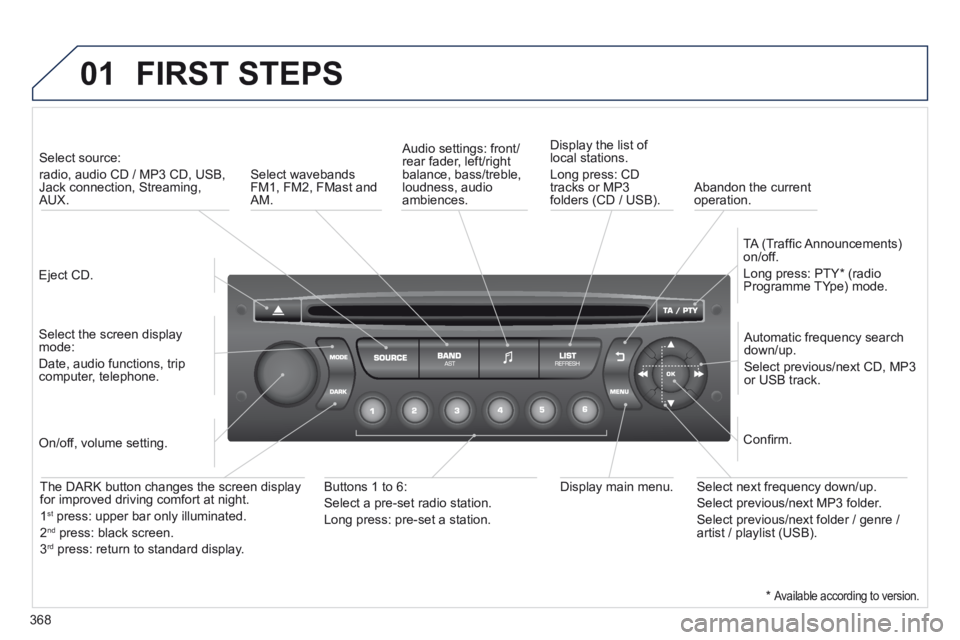
01 FIRST STEPS
Eject CD.
Select source:
radio, audio CD / MP3 CD, USB, Jack connection, Streaming, AUX.
Select the screen display mode:
Date, audio functions, trip computer, telephone.
Automatic frequency search down/up.
Select previous/next CD, MP3 or USB track.
Audio settings: front/rear fader, left/right balance, bass/treble, loudness, audio ambiences.
Display the list of local stations.
Long press: CD tracks or MP3 folders (CD / USB).
TA (Traffi c Announcements) on/off.
Long press: PTY * (radio Programme TYpe) mode.
Display main menu. The DARK button changes the screen display for improved driving comfort at night.
1 st press: upper bar only illuminated.
2 nd press: black screen.
3 rd press: return to standard display.
On/off, volume setting.
Buttons 1 to 6:
Select a pre-set radio station.
Long press: pre-set a station.
Select next frequency down/up.
Select previous/next MP3 folder.
Select previous/next folder / genre / artist / playlist (USB).
Confi rm.
Select wavebands FM1, FM2, FMast and AM. Abandon the current operation.
* Available according to version.
Page 372 of 404
370
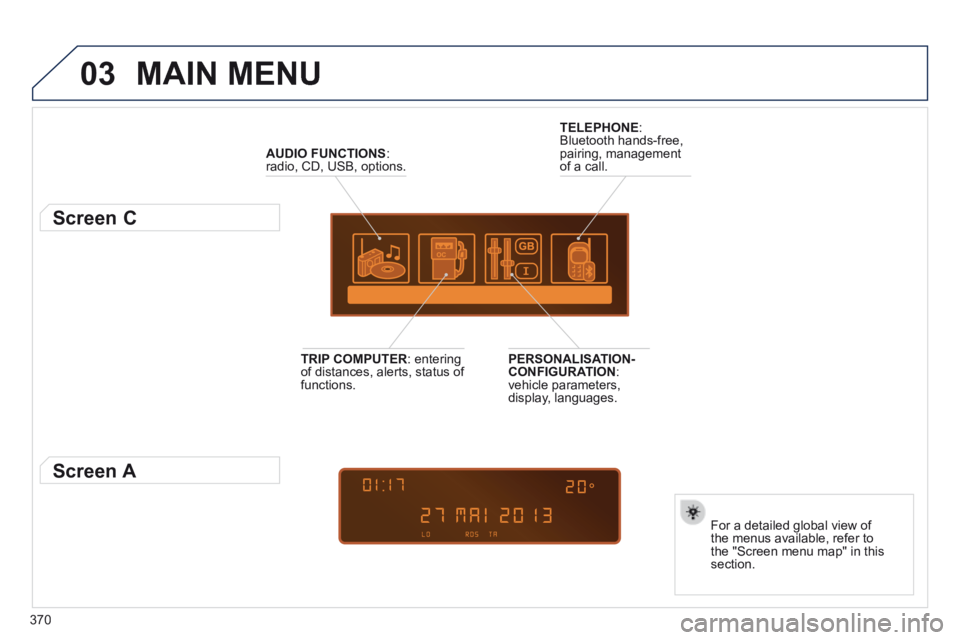
03 MAIN MENU
AUDIO FUNCTIONS : radio, CD, USB, options.
Screen C
For a detailed global view of the menus available, refer to the "Screen menu map" in this section.
TELEPHONE : Bluetooth hands-free, pairing, management of a call.
PERSONALISATION-CONFIGURATION : vehicle parameters, display, languages.
TRIP COMPUTER : entering of distances, alerts, status of functions.
Screen A
Page 385 of 404
383
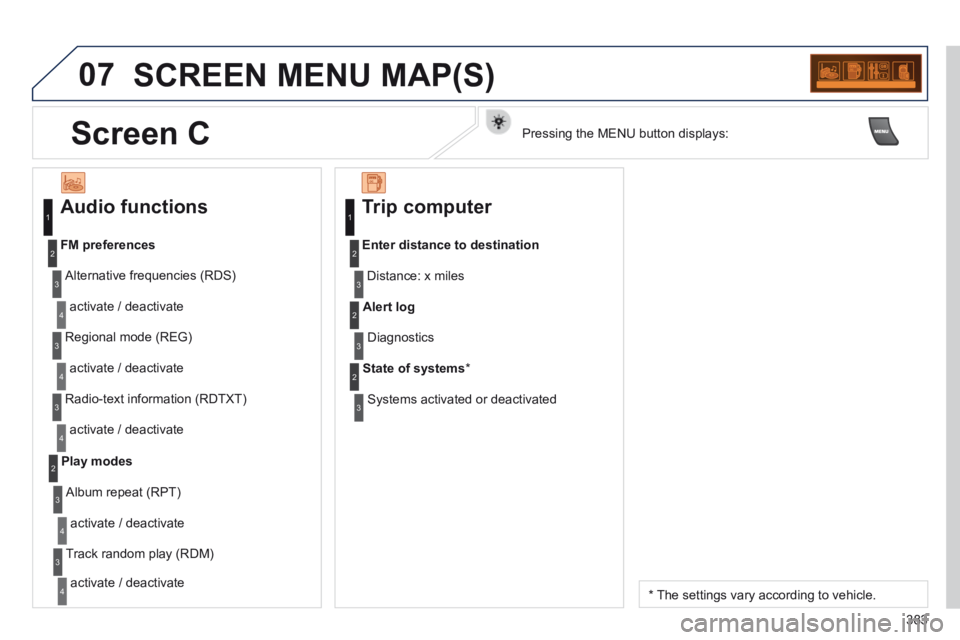
07 SCREEN MENU MAP(S)
Audio functions
Alternative frequencies (RDS)
activate / deactivate
FM preferences
Regional mode (REG)
activate / deactivate
Radio-text information (RDTXT)
activate / deactivate
1
2
3
4
3
4
3
4
Play modes
Album repeat (RPT)
activate / deactivate
Track random play (RDM)
activate / deactivate
2
3
4
3
4
Trip computer
Distance: x miles
Enter distance to destination
Diagnostics
Alert log
Systems activated or deactivated
State of systems *
1
2
3
3
2
3
2
* The settings vary according to vehicle.
Screen C Pressing the MENU button displays:
Page 394 of 404
Alphabetical index
392
Storage drawer .............................................Storage drawer .............................................Storage drawer121Storage wells ........................................125, 126Stowing rings ........................................125, 126Sun visor ........................................Sun visor ........................................Sun visor117, 118, 131Synchronising the remote control ...................85Synthesiser, voice .........................................330System, navigation................................280, 320
Table of weights ............................257, 259, 262Tables, aircraft ..............................................121Tables of engines .................................256, 258Tables of fuses ..............................................237Ta n k , f u e l .........................................................99Technical data ...............................256 -259, 262Telephone .....................267, 297-299, 336, 340Telephone, hands-free ..........................297-299Temperature control for heated seats ............69Temperature, coolant ......................................39Temporary tyre repair kit...............................213Third brake lamp ..................................235, 236TMC (Traffic info) .................................289, 333To o l s ..............................................213, 223, 225To r c h .....................................116, 125, 126, 131Total distance recorder ...................................Total distance recorder ...................................Total distance recorder43To w b a r ...........................................................To w b a r ...........................................................To w b a r250Towed loads ..................................257, 259, 262Towing another vehicle .........................248, 249Traction control (ASR) ....................................36Traffic information (TA) .........290, 334, 347, 372Traffic information (TMC) .....289, 290, 333, 334Tr a i l e r ............................................................Tr a i l e r ............................................................Tr a i l e r250
Under floor storage .......................................13 0Under-inflation (detection) ............................153Unlocking ........................................................81Unlocking from the inside ...............................92Update risk areas ..................................287, 324Updating POIs ...............................................287USB (PEUGEOT Connect) ...................119, 374
Vehicle configuration .............28, 44, 46, 48, 51Vehicle identification .....................................264Ventilation .................................................58-60Voice commands ..........................................272
U
V
T
Xenon headlamps .........................................231
X
W
Warning lamps ....................................31, 34, 35Washing (advice)...........................................200Wash-wipe, rear ............................................Wash-wipe, rear ............................................Wash-wipe, rear11 0Weights .........................................257, 259, 262Welcome lighting...................................105, 115Window controls .............................................89Wiper control stalk ........................109, 110, 112Wiper, rear.....................................................11 0Wipers ...................................................109, 112
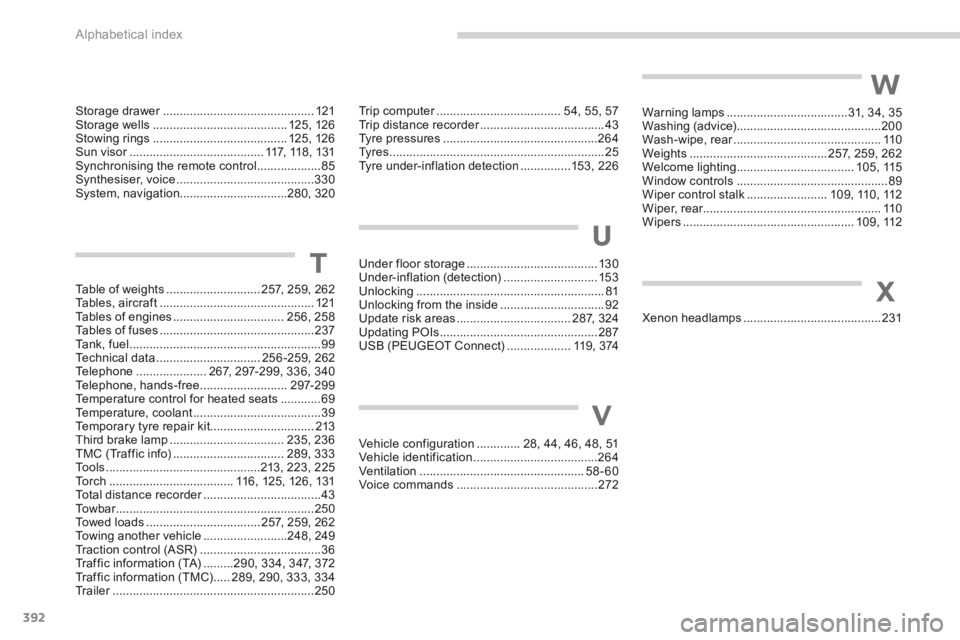
Trip computer .....................................Trip computer .....................................Trip computer54, 55, 57Trip distance recorder .....................................Trip distance recorder .....................................Trip distance recorder43Tyre pressures ..............................................264Ty r e s ................................................................25Tyre under-inflation detection ...............153, 226
Page 398 of 404
Visual search
396
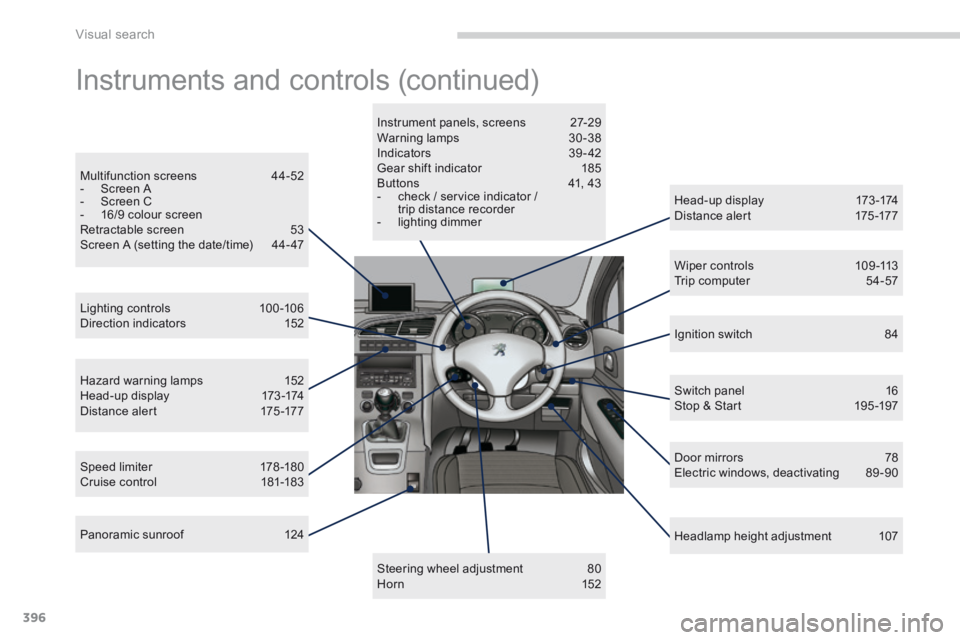
Instruments and controls (continued)
Head-up display 173 -174 Distance alert 175 -177
Lighting controls 100 -106 Direction indicators 152
Speed limiter 178 -180 Cruise control 181-183
Headlamp height adjustment 107
Instrument panels, screens 27-29 Warning lamps 30 -38 Indicators 39 - 42 Gear shift indicator 185 Buttons 41, 43 - check / service indicator / trip distance recorder - lighting dimmer
Steering wheel adjustment 80 H o r n 1 5 2
Multifunction screens 44-52 - Screen A - Screen C - 16/9 colour screen Retractable screen 53 Screen A (setting the date/time) 44- 47
Hazard warning lamps 152 Head-up display 173 -174 Distance alert 175 -177
Wiper controls 109 -113 Trip computer 54-57
P a n o r a m i c s u n r o o f 1 2 4
Ignition switch 84
Switch panel 16 Stop & Start 195 -197
Door mirrors 78 Electric windows, deactivating 89 -90