ECO mode PEUGEOT 5008 2013.5 Workshop Manual
[x] Cancel search | Manufacturer: PEUGEOT, Model Year: 2013.5, Model line: 5008, Model: PEUGEOT 5008 2013.5Pages: 404, PDF Size: 23.45 MB
Page 367 of 404
365
FREQUENTLY ASKED QUESTIONS
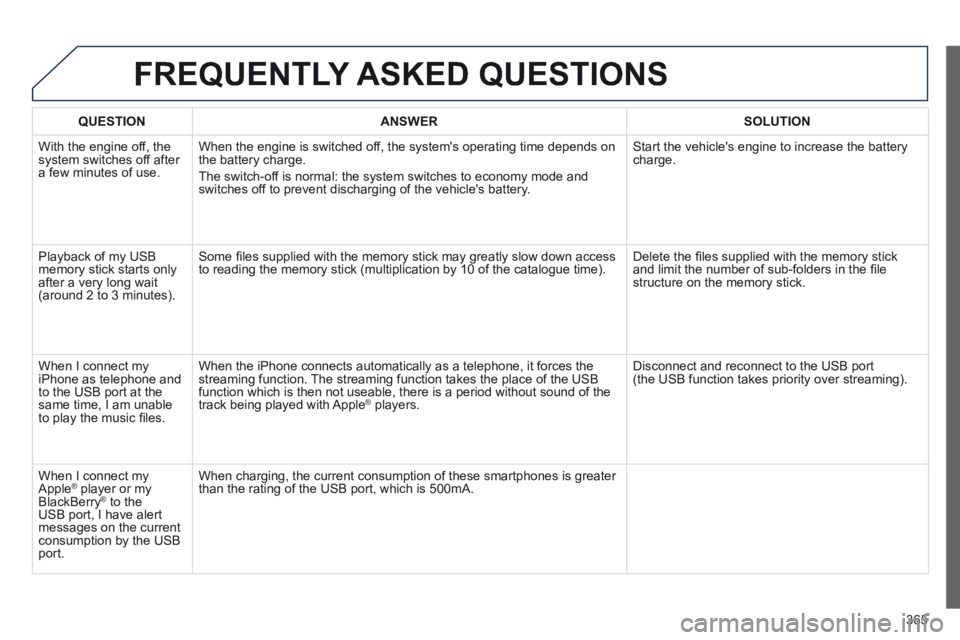
QUESTION ANSWER SOLUTION
With the engine off, the system switches off after a few minutes of use.
When the engine is switched off, the system's operating time depends on the battery charge.
The switch-off is normal: the system switches to economy mode and switches off to prevent discharging of the vehicle's battery.
Start the vehicle's engine to increase the battery charge.
Playback of my USB memory stick starts only after a very long wait (around 2 to 3 minutes).
Some fi les supplied with the memory stick may greatly slow down access to reading the memory stick (multiplication by 10 of the catalogue time). Delete the fi les supplied with the memory stick and limit the number of sub-folders in the fi le structure on the memory stick.
When I connect my iPhone as telephone and to the USB port at the same time, I am unable to play the music fi les.
When the iPhone connects automatically as a telephone, it forces the streaming function. The streaming function takes the place of the USB function which is then not useable, there is a period without sound of t\
he track being played with Apple ® players. ® players. ®
Disconnect and reconnect to the USB port (the USB function takes priority over streaming).
When I connect my Apple ® player or my ® player or my ®
BlackBerry ® to the ® to the ®
USB port, I have alert messages on the current consumption by the USB port.
When charging, the current consumption of these smartphones is greater than the rating of the USB port, which is 500mA.
Page 373 of 404
371
04 AUDIO
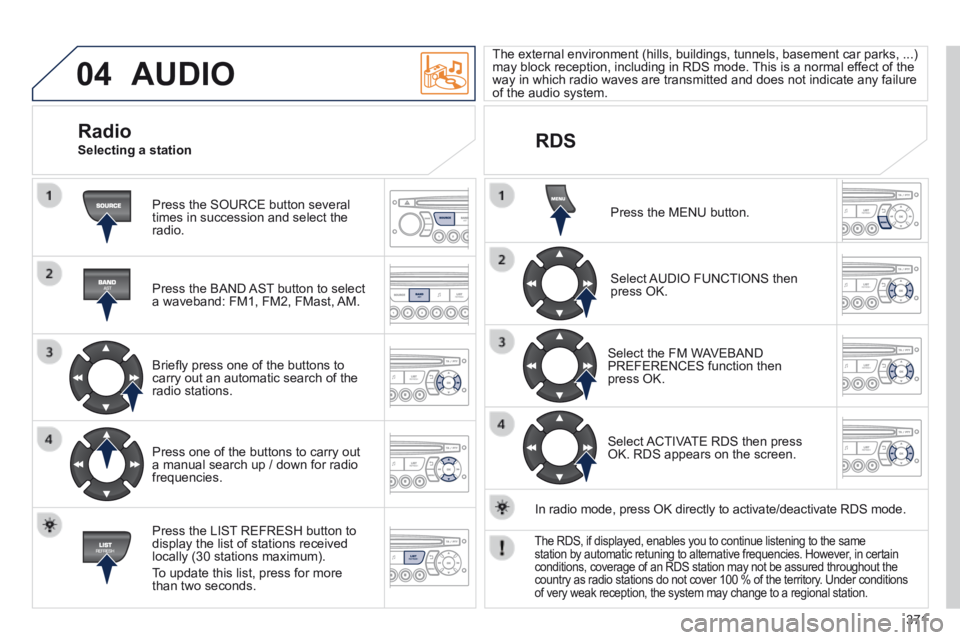
Press the SOURCE button several times in succession and select the radio.
Press the BAND AST button to select a waveband: FM1, FM2, FMast, AM.
Briefl y press one of the buttons to carry out an automatic search of the radio stations.
Press one of the buttons to carry out a manual search up / down for radio frequencies.
Press the LIST REFRESH button to display the list of stations received locally (30 stations maximum).
To update this list, press for more than two seconds.
The external environment (hills, buildings, tunnels, basement car parks, ...) may block reception, including in RDS mode. This is a normal effect of the way in which radio waves are transmitted and does not indicate any failu\
re of the audio system.
RDS
Radio Selecting a station
Press the MENU button.
Select AUDIO FUNCTIONS then press OK.
Select the FM WAVEBAND PREFERENCES function then press OK.
Select ACTIVATE RDS then press OK. RDS appears on the screen.
In radio mode, press OK directly to activate/deactivate RDS mode.
The RDS, if displayed, enables you to continue listening to the same station by automatic retuning to alternative frequencies. However, in certain conditions, coverage of an RDS station may not be assured throughout the\
country as radio stations do not cover 100 % of the territory. Under conditions of very weak reception, the system may change to a regional station.
Page 379 of 404
377
06 BLUETOOTH
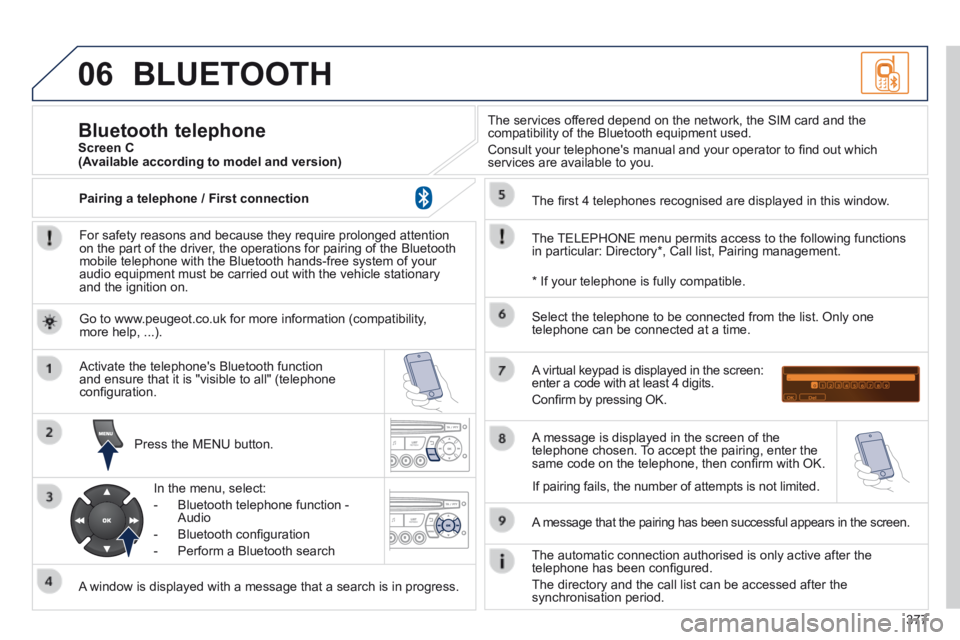
For safety reasons and because they require prolonged attention on the part of the driver, the operations for pairing of the Bluetooth mobile telephone with the Bluetooth hands-free system of your audio equipment must be carried out with the vehicle stationary and the ignition on.
Press the MENU button.
A window is displayed with a message that a search is in progress.
Activate the telephone's Bluetooth function and ensure that it is "visible to all" (telephone confi guration.
In the menu, select:
- Bluetooth telephone function - Audio
- Bluetooth confi guration
- Perform a Bluetooth search
The services offered depend on the network, the SIM card and the compatibility of the Bluetooth equipment used.
Consult your telephone's manual and your operator to fi nd out which services are available to you.
Bluetooth telephone Screen C
The TELEPHONE menu permits access to the following functions in particular: Directory * , Call list, Pairing management.
The fi rst 4 telephones recognised are displayed in this window.
A virtual keypad is displayed in the screen: enter a code with at least 4 digits.
Confi rm by pressing OK.
A message that the pairing has been successful appears in the screen.
Select the telephone to be connected from the list. Only one telephone can be connected at a time.
A message is displayed in the screen of the telephone chosen. To accept the pairing, enter the same code on the telephone, then confi rm with OK.
The automatic connection authorised is only active after the telephone has been confi gured.
The directory and the call list can be accessed after the synchronisation period.
(Available according to model and version)
* If your telephone is fully compatible.
If pairing fails, the number of attempts is not limited.
Go to www.peugeot.co.uk for more information (compatibility, more help, ...).
Pairing a telephone / First connection
Page 387 of 404
385
FREQUENTLY ASKED QUESTIONS
QUESTIONANSWERSOLUTION
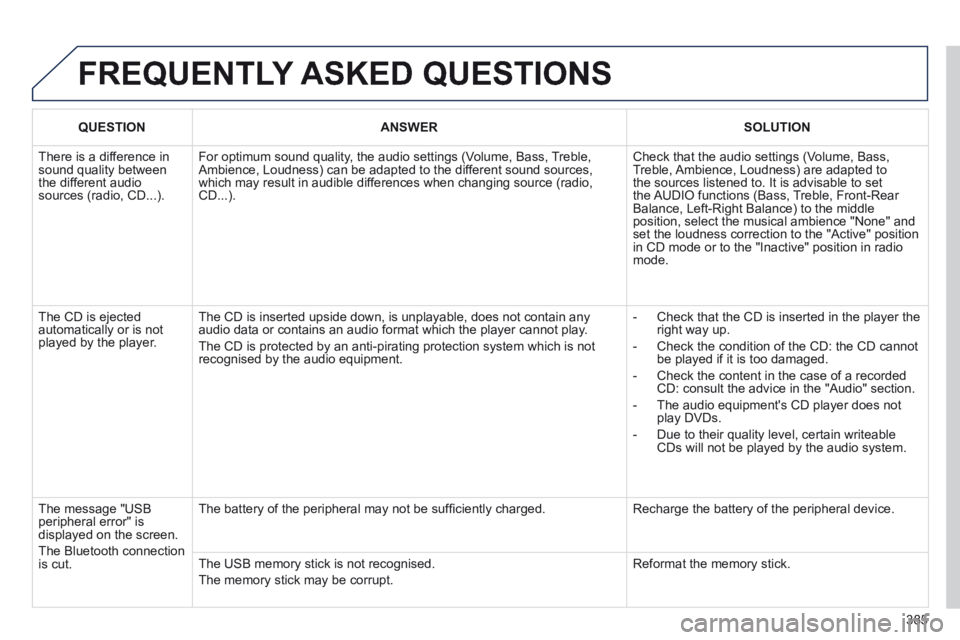
There is a difference in sound quality between the different audio sources (radio, CD...).
For optimum sound quality, the audio settings (Volume, Bass, Treble, Ambience, Loudness) can be adapted to the different sound sources, which may result in audible differences when changing source (radio, CD...).
Check that the audio settings (Volume, Bass, Treble, Ambience, Loudness) are adapted to the sources listened to. It is advisable to set the AUDIO functions (Bass, Treble, Front-Rear Balance, Left-Right Balance) to the middle position, select the musical ambience "None" and set the loudness correction to the "Active" position in CD mode or to the "Inactive" position in radio mode.
The CD is ejected automatically or is not played by the player.
The CD is inserted upside down, is unplayable, does not contain any audio data or contains an audio format which the player cannot play.
The CD is protected by an anti-pirating protection system which is not recognised by the audio equipment.
- Check that the CD is inserted in the player the right way up.
- Check the condition of the CD: the CD cannot be played if it is too damaged.
- Check the content in the case of a recorded CD: consult the advice in the "Audio" section.
- The audio equipment's CD player does not play DVDs.
- Due to their quality level, certain writeable CDs will not be played by the audio system.
The message "USB peripheral error" is displayed on the screen.
The Bluetooth connection is cut.
The battery of the peripheral may not be suffi ciently charged. Recharge the battery of the peripheral device.
The USB memory stick is not recognised.
The memory stick may be corrupt.
Reformat the memory stick.
Page 389 of 404
387
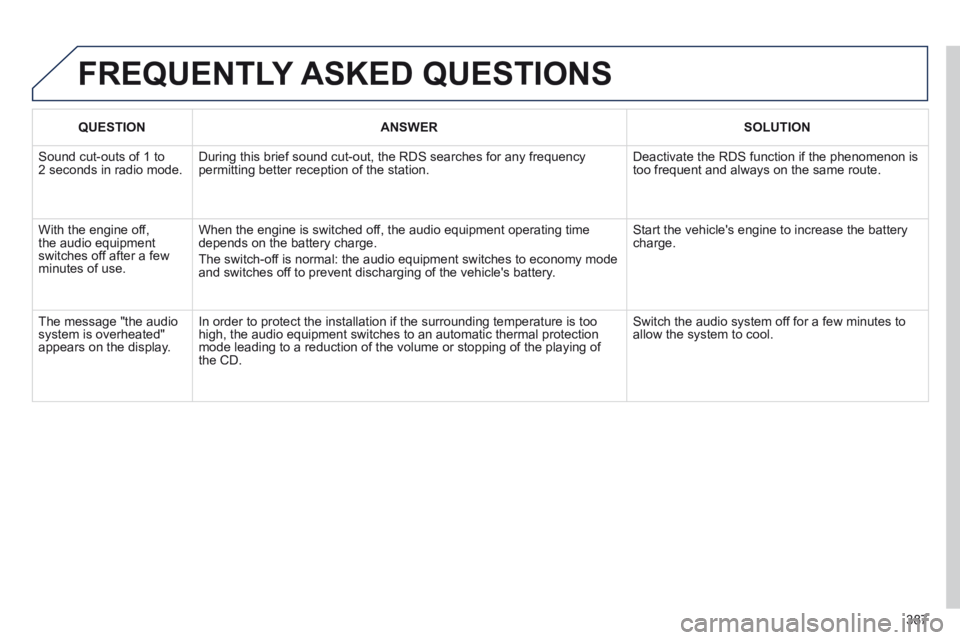
FREQUENTLY ASKED QUESTIONS
QUESTIONANSWERSOLUTION
Sound cut-outs of 1 to 2 seconds in radio mode. During this brief sound cut-out, the RDS searches for any frequency permitting better reception of the station. Deactivate the RDS function if the phenomenon is too frequent and always on the same route.
With the engine off, the audio equipment switches off after a few minutes of use.
When the engine is switched off, the audio equipment operating time depends on the battery charge.
The switch-off is normal: the audio equipment switches to economy mode and switches off to prevent discharging of the vehicle's battery.
Start the vehicle's engine to increase the battery charge.
The message "the audio system is overheated" appears on the display.
In order to protect the installation if the surrounding temperature is t\
oo high, the audio equipment switches to an automatic thermal protection mode leading to a reduction of the volume or stopping of the playing of \
the CD.
Switch the audio system off for a few minutes to allow the system to cool.
Page 391 of 404
.
Alphabetical index389
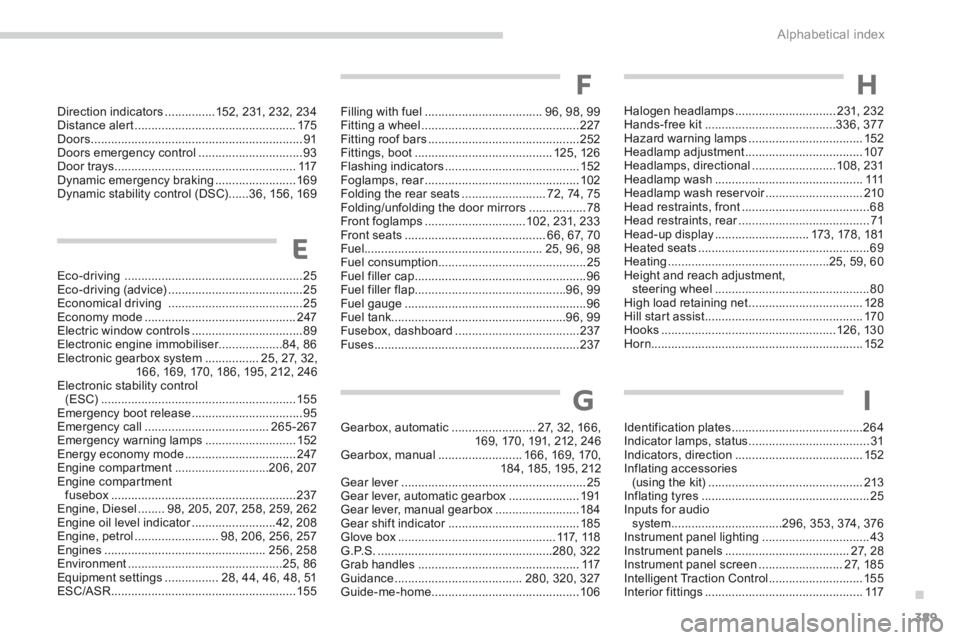
Eco-driving .....................................................25Eco-driving (advice) ........................................25Economical driving ........................................25Economy mode .............................................247Electric window controls .................................89Electronic engine immobiliser...................84, 86Electronic gearbox system ................25, 27, 32, 166, 169, 170, 186, 195, 212, 246Electronic stability control (ESC) ..........................................................155Emergency boot release .................................95Emergency call .....................................265 -267Emergency warning lamps ...........................152Energy economy mode .................................247Engine compartment ............................206, 207Engine compartment fusebox .......................................................237Engine, Diesel ........98, 205, 207, 258, 259, 262Engine oil level indicator .........................Engine oil level indicator .........................Engine oil level indicator42, 208Engine, petrol .........................98, 206, 256, 257Engines ................................................256, 258Environment ..............................................25, 86Equipment settings ................28, 44, 46, 48, 51ESC/ASR .......................................................155
Filling with fuel ...................................96, 98, 99Fitting a wheel ...............................................227Fitting roof bars .............................................252Fittings, boot .........................................125, 126Flashing indicators ........................................152Foglamps, rear ..............................................Foglamps, rear ..............................................Foglamps, rear102Folding the rear seats .........................72, 74, 75Folding/unfolding the door mirrors .................78Front foglamps ..............................102, 231, 233Front seats ..........................................66, 67, 70Fuel.....................................................25, 96, 98Fuel consumption ............................................25Fuel filler cap ...................................................96Fuel filler flap .............................................96, 99Fuel gauge ......................................................96Fuel tank....................................................96, 99Fusebox, dashboard .....................................237Fuses .............................................................237
Gearbox, automatic .........................27, 32, 166, 169, 170, 191, 212, 246Gearbox, manual .........................166, 169, 170, 184, 185, 195, 212Gear lever .......................................................Gear lever .......................................................Gear lever25Gear lever, automatic gearbox .....................191Gear lever, manual gearbox .........................18 4Gear shift indicator .......................................Gear shift indicator .......................................Gear shift indicator185Glove box ...............................................117, 118G . P. S . ....................................................280, 322Grab handles ................................................117Guidance ......................................280, 320, 327Guide-me-home ............................................10 6
Identification plates .......................................264Indicator lamps, status ....................................31Indicators, direction ......................................152Inflating accessories (using the kit) ..............................................213Inflating tyres ..................................................25Inputs for audio system .................................296, 353, 374, 376Instrument panel lighting ................................43Instrument panels .....................................27, 28Instrument panel screen .........................27, 185Intelligent Traction Control ............................155Interior fittings ...............................................117
E
F
GI
Direction indicators ...............152, 231, 232, 234Distance alert ................................................175Doors ...............................................................91Doors emergency control ...............................93Door trays ......................................................117Dynamic emergency braking ........................169Dynamic stability control (DSC) ......36, 156, 169
H
Halogen headlamps ..............................231, 232Hands-free kit .......................................336, 377Hazard warning lamps ..................................152Headlamp adjustment ...................................107Headlamps, directional .........................108, 231Headlamp wash ............................................111Headlamp wash reservoir .............................Headlamp wash reservoir .............................Headlamp wash reservoir210Head restraints, front ......................................68Head restraints, rear .......................................Head restraints, rear .......................................Head restraints, rear71Head-up display ............................173, 178, 181Heated seats ...................................................69Heating ................................................25, 59, 60Height and reach adjustment, steering wheel ..............................................80High load retaining net ..................................128Hill start assist ...............................................170Hooks ....................................................126, 130Horn...............................................................152
Page 399 of 404
.
Visual search397
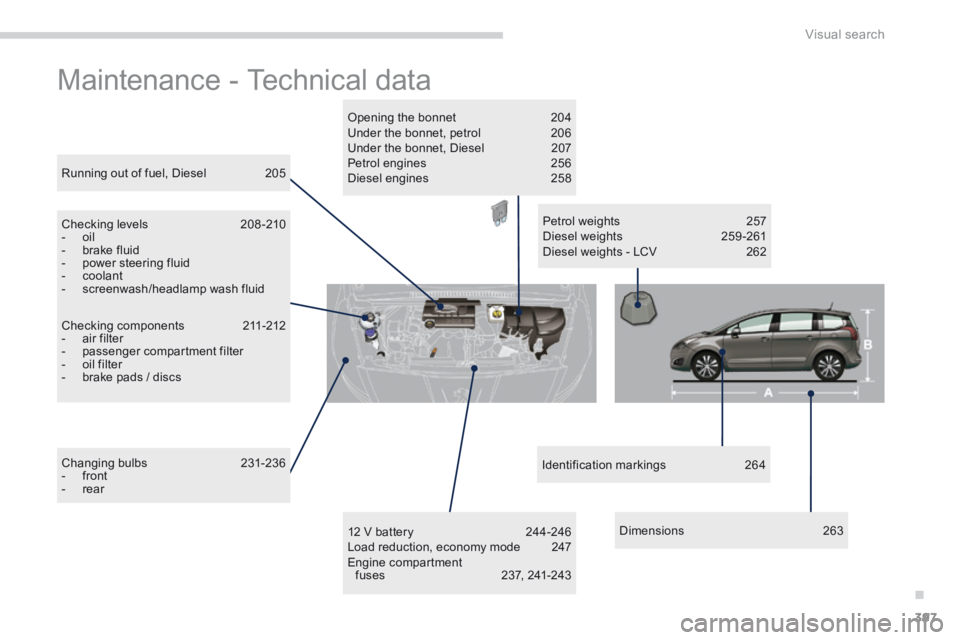
Maintenance - Technical data
Checking components 211-212 - air filter - passenger compartment filter - oil filter - brake pads / discs
Running out of fuel, Diesel 205
Checking levels 208 -210 - oil - brake fluid - power steering fluid - coolant - screenwash/headlamp wash fluid
Changing bulbs 231-236 - front - rear
Petrol weights 257 Diesel weights 259 -261 Diesel weights - LCV 262
Opening the bonnet 204 Under the bonnet, petrol 206 Under the bonnet, Diesel 207 Petrol engines 256 Diesel engines 258
12 V battery 244-246 Load reduction, economy mode 247 Engine compartment fuses 237, 241-243
Identification markings 264
D i m e n s i o n s 2 6 3