navigation PEUGEOT 5008 2013.5 Workshop Manual
[x] Cancel search | Manufacturer: PEUGEOT, Model Year: 2013.5, Model line: 5008, Model: PEUGEOT 5008 2013.5Pages: 404, PDF Size: 23.45 MB
Page 330 of 404
328
04
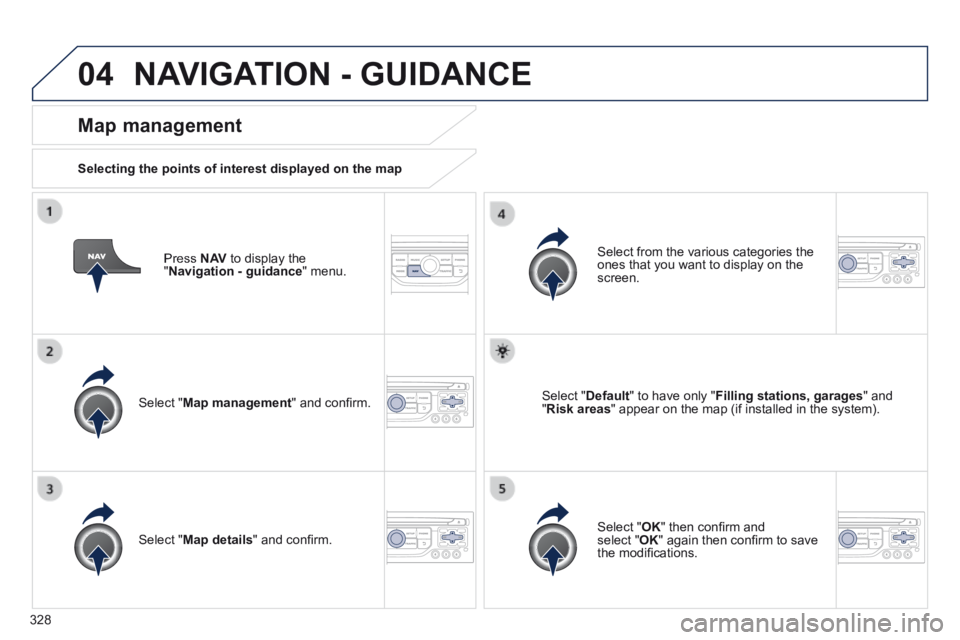
Press N AV to display the " Navigation - guidance " menu.
Map management
Selecting the points of interest displayed on the map
Select " Map management " and confi rm.
Select from the various categories the ones that you want to display on the screen.
Select " Map details " and confi rm.
Select " Default " to have only " Filling stations, garages " and " Risk areas " appear on the map (if installed in the system).
Select " OK " then confi rm and select " OK " again then confi rm to save the modifi cations.
NAVIGATION - GUIDANCE
Page 331 of 404
329
04
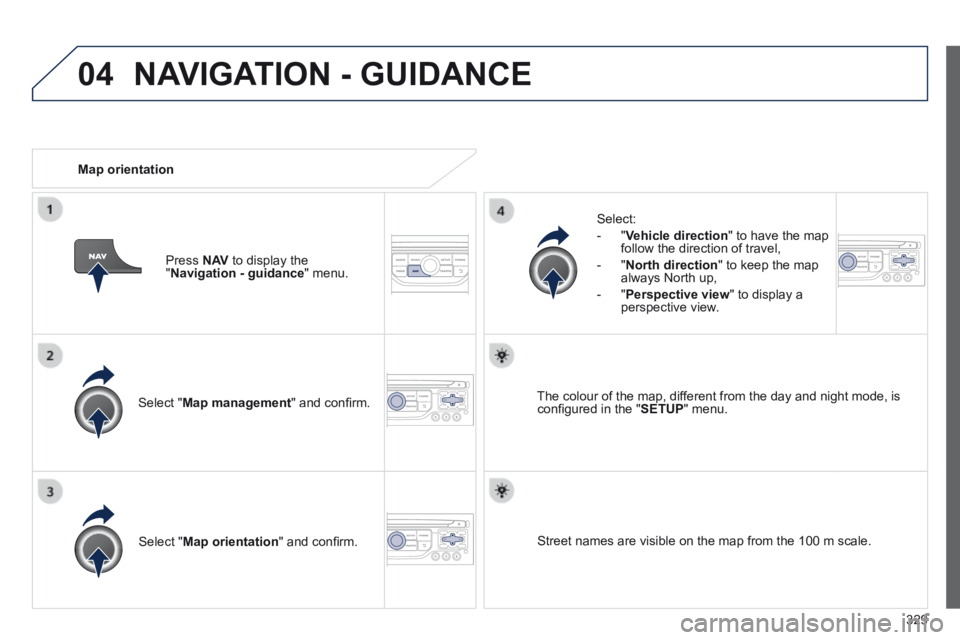
Select " Map management " and confi rm.
Select:
- " Vehicle direction " to have the map follow the direction of travel,
- " North direction " to keep the map always North up,
- " Perspective view " to display a perspective view.
Select " Map orientation " and confi rm.
The colour of the map, different from the day and night mode, is confi gured in the " SETUP " menu.
Map orientation
Press N AV to display the " Navigation - guidance " menu.
Street names are visible on the map from the 100 m scale.
NAVIGATION - GUIDANCE
Page 332 of 404
330
04
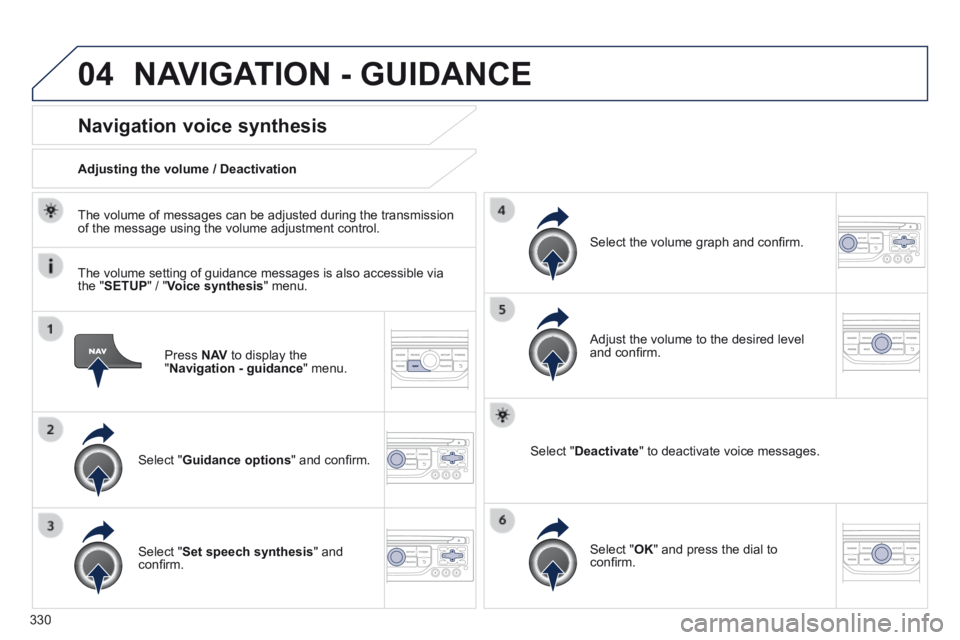
Press N AV to display the " Navigation - guidance " menu.
Navigation voice synthesis
Select " Guidance options " and confi rm.
Adjusting the volume / Deactivation
Select " Set speech synthesis " and confi rm.
Select the volume graph and confi rm.
Select " Deactivate " to deactivate voice messages.
Select " OK " and press the dial to confi rm.
Adjust the volume to the desired level and confi rm.
The volume of messages can be adjusted during the transmission of the message using the volume adjustment control.
The volume setting of guidance messages is also accessible via the " SETUP " / " Voice synthesis " menu.
NAVIGATION - GUIDANCE
Page 333 of 404
331
04
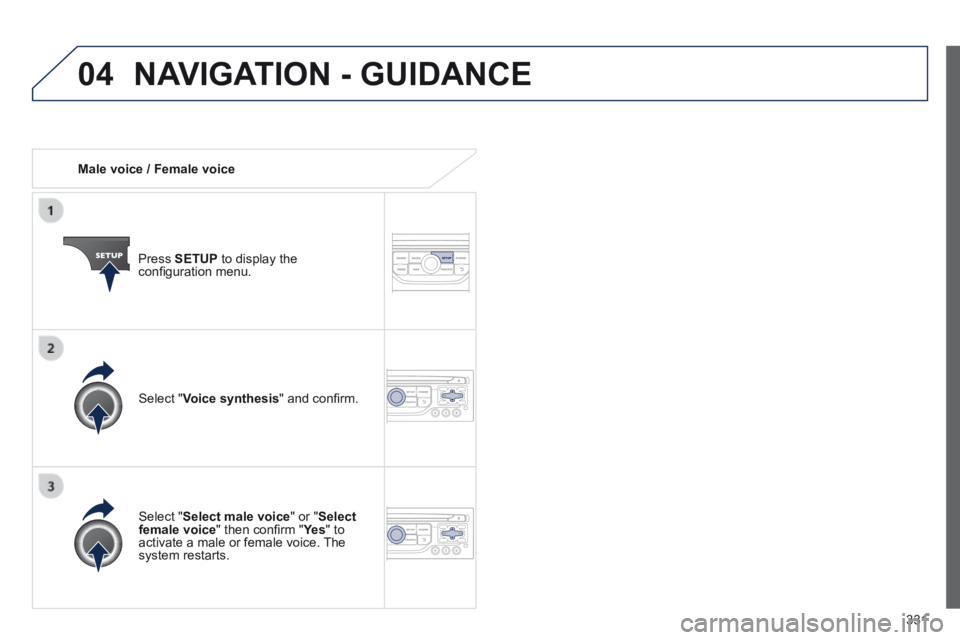
Male voice / Female voice
Press SETUP to display the confi guration menu.
Select " Select male voice " or " Select female voice " then confi rm " Ye s " then confi rm " Ye s " then confi rm " " to activate a male or female voice. The system restarts.
Select " Voice synthesis " and confi rm.
NAVIGATION - GUIDANCE
Page 335 of 404
333
05
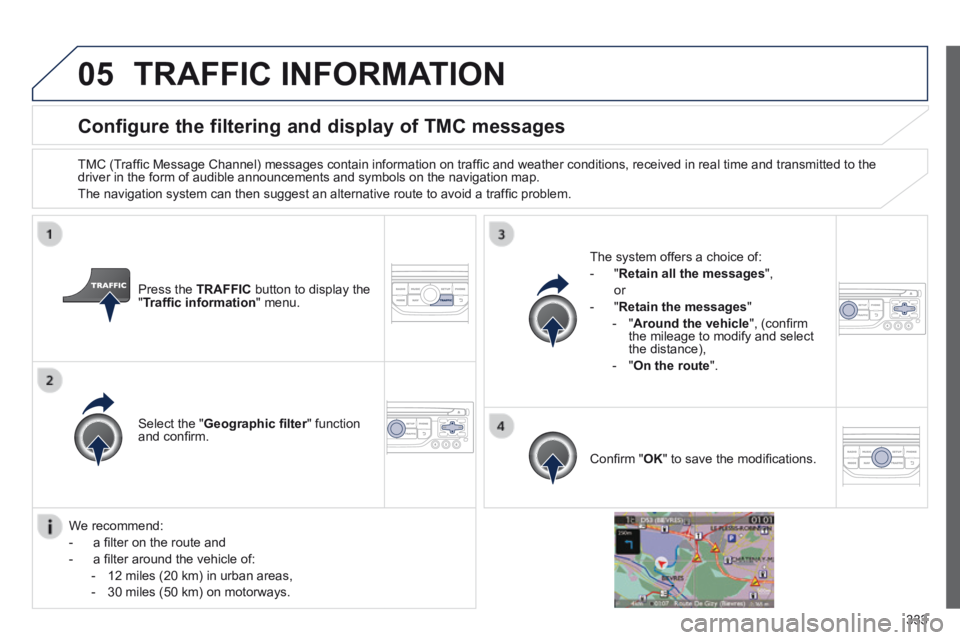
Configure the filtering and display of TMC messages
TMC (Traffi c Message Channel) messages contain information on traffi c and weather conditions, received in real time and transmitted to the driver in the form of audible announcements and symbols on the navigatio\
n map.
The navigation system can then suggest an alternative route to avoid a traffi c problem.
Press the TRAFFIC button to display the " Traffi c information " menu.
Select the " Geographic fi lter " function Geographic fi lter " function Geographic fi lterand confi rm.
The system offers a choice of:
- " Retain all the messages ",
or
- " Retain the messages "
- " Around the vehicle ", (confi rm the mileage to modify and select the distance),
- " On the route ".
Confi rm " OK " to save the modifi cations.
We recommend:
- a fi lter on the route and
- a fi lter around the vehicle of:
- 12 miles (20 km) in urban areas,
- 30 miles (50 km) on motorways.
TRAFFIC INFORMATION
Page 358 of 404
356
11 SCREEN MENU MAP(S)
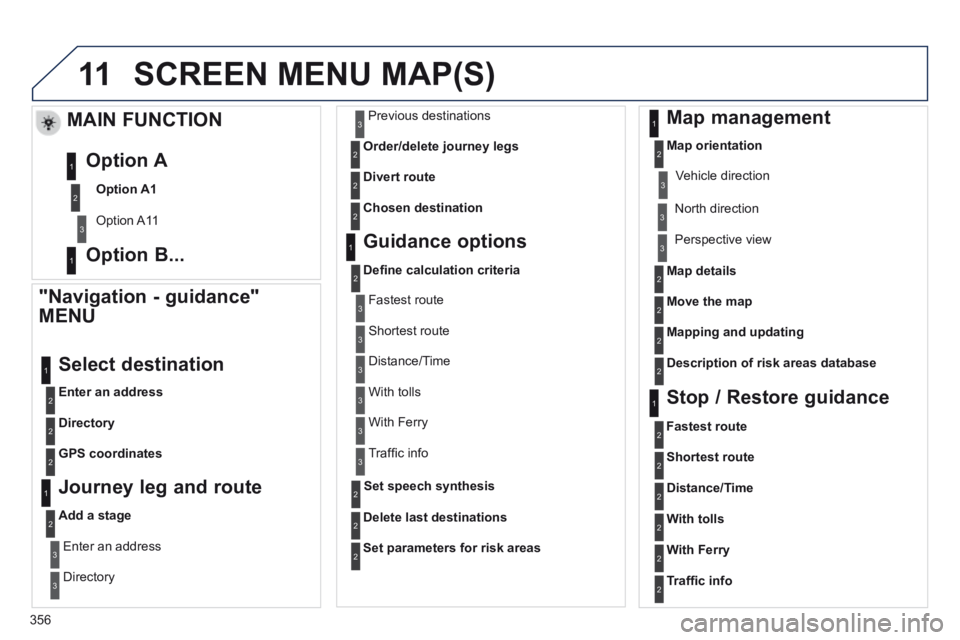
"Navigation - guidance"
MENU
Enter an address
Select destination
Directory
GPS coordinates
Journey leg and route
Add a stage
Enter an address
Directory
Previous destinations
Order/delete journey legs
Divert route
Chosen destination
Guidance options
Defi ne calculation criteria
Delete last destinations
Map management
Map orientation
MAIN FUNCTION
Option A1
Option A11
Option A
Option B... Map details
Move the map
Mapping and updating
Description of risk areas database
Stop / Restore guidance
1
2
3
1
3
3
2
2
2
2
1
3
1
1
2
2
2
2
2
2
2
2
2
2
1
1
Set parameters for risk areas2
Fastest route2
Shortest route
Distance/Time
With tolls
2
2
2
With Ferry2
Traffi c info2
Set speech synthesis
Fastest route
Shortest route
3
3
2
Distance/Time
With tolls
3
3
With Ferry
Traffi c info
3
3
3
3
3
North direction
Vehicle direction
Perspective view
Page 362 of 404

360
The following table groups together the answers to the most frequently a\
sked questions concerning your audio system.
FREQUENTLY ASKED QUESTIONS
QUESTION ANSWER SOLUTION
The route calculation is not successful. The guidance criteria may confl ict with the current location (exclusion of toll roads on a toll motorway). Check the guidance criteria on the Navigation Menu, "Guidance options"\ "Defi ne calculation criteria".
I am unable to enter my post code. The system only accepts post codes of up to 5 characters.
The POIs do not appear. The POIs have not been selected. Select the POIs in the list of POIs.
The risk areas audible warning does not work. The audible warning is not active. Activate audible warnings in the Guidance options menu, "Navigation - guidance", "Set parameters for risk areas".
The system does not suggest a detour around an incident on the route.
The guidance criteria do not take account of TMC messages. Select the "Traffi c info" function in the list of guidance criteria.
I receive a Risk area alert which is not on my route. Other than guidance, the system announces all Risk areas positioned in a\
cone located in front of the vehicle. It may provide an alert for a Risk\
area located on nearby or parallel roads.
Zoom in on the map to view the exact position of the Risk area. Select "On the route" to no longer receive alerts other than guidance or to reduce the time for the announcement.
Page 376 of 404
374
05 USB PLAYER - PLUG
The system puts together playlists (temporary memory) created over a period which depends on the capacity of the USB device.
The other sources are available during this time.
The playlists are updated each time the ignition is switched off or each time a USB memory stick is connected.
When connecting for the fi rst time, the classifi cation suggested is by folder. When you reconnect, the classifi cation selected previously is retained.
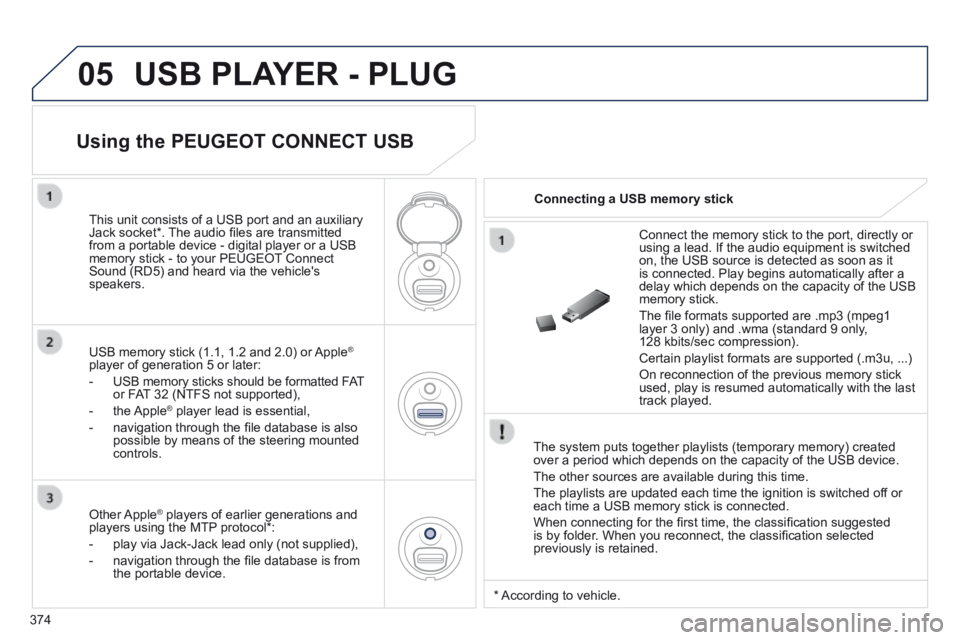
Connect the memory stick to the port, directly or using a lead. If the audio equipment is switched on, the USB source is detected as soon as it is connected. Play begins automatically after a delay which depends on the capacity of the USB memory stick.
The fi le formats supported are .mp3 (mpeg1 layer 3 only) and .wma (standard 9 only, 128 kbits/sec compression).
Certain playlist formats are supported (.m3u, ...)
On reconnection of the previous memory stick used, play is resumed automatically with the last track played.
This unit consists of a USB port and an auxiliary Jack socket * . The audio fi les are transmitted from a portable device - digital player or a USB memory stick - to your PEUGEOT Connect Sound (RD5) and heard via the vehicle's speakers.
USB memory stick (1.1, 1.2 and 2.0) or Apple ®
player of generation 5 or later:
- USB memory sticks should be formatted FAT or FAT 32 (NTFS not supported),
- the Apple ® player lead is essential, ® player lead is essential, ®
- navigation through the fi le database is also possible by means of the steering mounted controls.
Using the PEUGEOT CONNECT USB
Connecting a USB memory stick
Other Apple ® players of earlier generations and ® players of earlier generations and ®
players using the MTP protocol * :
- play via Jack-Jack lead only (not supplied),
- navigation through the fi le database is from the portable device.
* According to vehicle.
Page 377 of 404
375
05
Using the PEUGEOT CONNECT USB
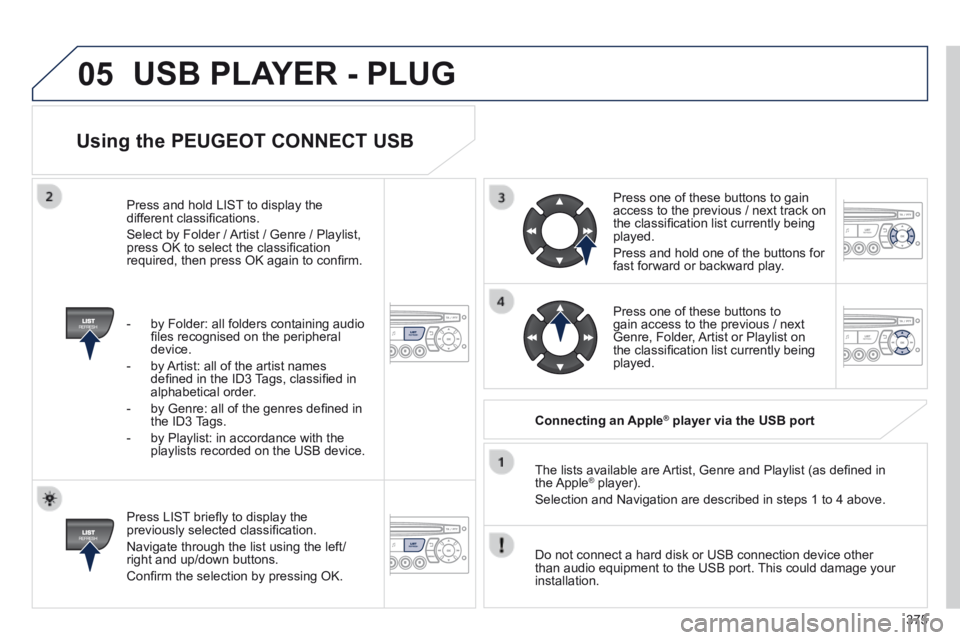
Press LIST briefl y to display the previously selected classifi cation.
Navigate through the list using the left/right and up/down buttons.
Confi rm the selection by pressing OK.
The lists available are Artist, Genre and Playlist (as defi ned in the Apple ® player). ® player). ®
Selection and Navigation are described in steps 1 to 4 above.
Do not connect a hard disk or USB connection device other than audio equipment to the USB port. This could damage your installation.
Connecting an Apple ® Connecting an Apple ® Connecting an Apple player via the USB port ® player via the USB port ®
Press one of these buttons to gain access to the previous / next track on the classifi cation list currently being played.
Press and hold one of the buttons for fast forward or backward play.
Press one of these buttons to gain access to the previous / next Genre, Folder, Artist or Playlist on the classifi cation list currently being played.
Press and hold LIST to display the different classifi cations.
Select by Folder / Artist / Genre / Playlist, press OK to select the classifi cation required, then press OK again to confi rm.
- by Folder: all folders containing audio fi les recognised on the peripheral device.
- by Artist: all of the artist names defi ned in the ID3 Tags, classifi ed in alphabetical order.
- by Genre: all of the genres defi ned in the ID3 Tags.
- by Playlist: in accordance with the playlists recorded on the USB device.
USB PLAYER - PLUG
Page 392 of 404
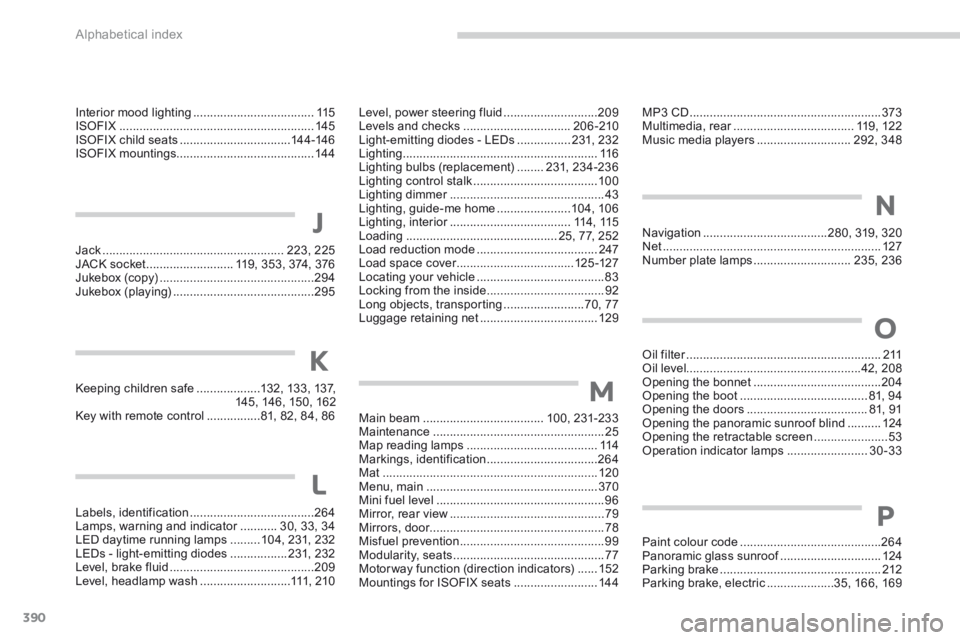
Alphabetical index
390
Jack ......................................................223, 225JACK socket ..........................119, 353, 374, 376Jukebox (c opy) ..............................................294Jukebox (playing) ..........................................295
Labels, identification .....................................264Lamps, warning and indicator ...........Lamps, warning and indicator ...........Lamps, warning and indicator30, 33, 34LED daytime running lamps .........104, 231, 232LEDs - light-emitting diodes .................231, 232Level, brake fluid ...........................................209Level, headlamp wash ...........................111, 2 1 0
Keeping children safe ...................132, 133, 137, 145, 146, 150, 162Key with remote control ................81, 82, 84, 86Main beam ....................................100, 231-233Maintenance ...................................................25Map reading lamps .......................................114Markings, identification .................................264Mat ................................................................120Menu, main ...................................................370Mini fuel level ..................................................96Mirror, rear view ..............................................79Mirrors, door....................................................78Misfuel prevention ...........................................99Modularity, seats .............................................77Motorway function (direction indicators) ......152Mountings for ISOFIX seats .........................14 4
K
J
L
M
MP3 CD .........................................................373Multimedia, rear ....................................Multimedia, rear ....................................Multimedia, rear119, 122Music media players ............................292, 348
Navigation .....................................280, 319, 320Net .................................................................127Number plate lamps .............................235, 236
N
Oil filter ..........................................................Oil filter ..........................................................Oil filter2 11Oil level....................................................42, 208Opening the bonnet ......................................204Opening the boot ......................................81, 94Opening the doors ....................................81, 91Opening the panoramic sunroof blind ..........124Opening the retractable screen ......................53Operation indicator lamps ........................30-33
Paint colour code ..........................................264Panoramic glass sunroof ..............................Panoramic glass sunroof ..............................Panoramic glass sunroof124Parking brake ................................................212Parking brake, electric ....................35, 166, 169
O
P
Interior mood lighting ....................................115ISOFIX ..........................................................145ISOFIX child seats .................................14 4 -146ISOFIX mountings.........................................14 4
Level, power steering fluid ............................209Levels and checks ................................20 6 -210Light-emitting diodes - LEDs ................231, 232Lighting ..........................................................11 6Lighting bulbs (replacement) ........231, 234-236Lighting control stalk .....................................10 0Lighting dimmer ..............................................Lighting dimmer ..............................................Lighting dimmer43Lighting, guide-me home ......................104, 10 6Lighting, interior ....................................Lighting, interior ....................................Lighting, interior114 , 115Loading .............................................25, 77, 252Load reduction mode ....................................247Load space cover ...................................Load space cover ...................................Load space cover125 -127Locating your vehicle ......................................83Locking from the inside ...................................92Long objects, transporting ........................70, 77Luggage retaining net ...................................129