warning PEUGEOT 5008 2015.5. Owner's Manual
[x] Cancel search | Manufacturer: PEUGEOT, Model Year: 2015.5., Model line: 5008, Model: PEUGEOT 5008 2015.5.Pages: 364, PDF Size: 12.82 MB
Page 29 of 364
27
Coolant temperature indicator
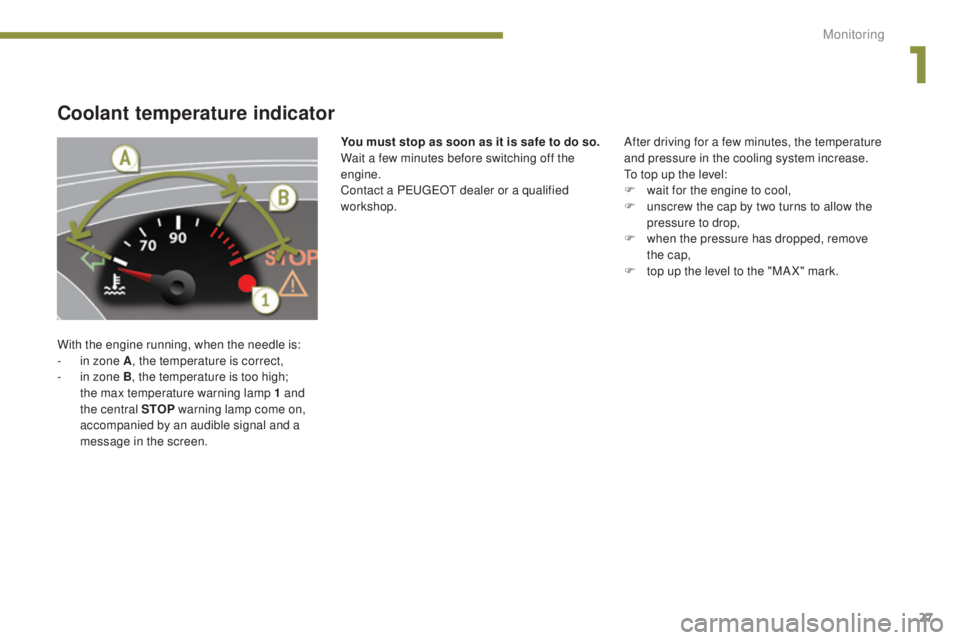
With the engine running, when the needle is:
- i n zone A , the temperature is correct,
-
i
n zone B, the temperature is too high;
the max temperature warning lamp 1 and
the central STOP warning lamp come on,
accompanied by an audible signal and a
message in the screen. After driving for a few minutes, the temperature
and pressure in the cooling system increase.
To top up the level:
F
w
ait for the engine to cool,
F
u
nscrew the cap by two turns to allow the
pressure to drop,
F
w
hen the pressure has dropped, remove
the cap,
F
t
op up the level to the "MA X" mark.
You must stop as soon as it is safe to do so.
Wait a few minutes before switching off the
engine.
Contact a PEUGEOT dealer or a qualified
workshop.
1
Monitoring
Page 31 of 364
29
Resetting the service indicator
If you have carried out the service on your
vehicle yourself:
F
s
witch off the ignition,
F
p
ress and hold the trip distance recorder
zero reset button,
F
s
witch on the ignition; the distance recorder
display begins a countdown,
F
w
hen the display indicates "=0" , release
the button; the spanner disappears.Service overdue
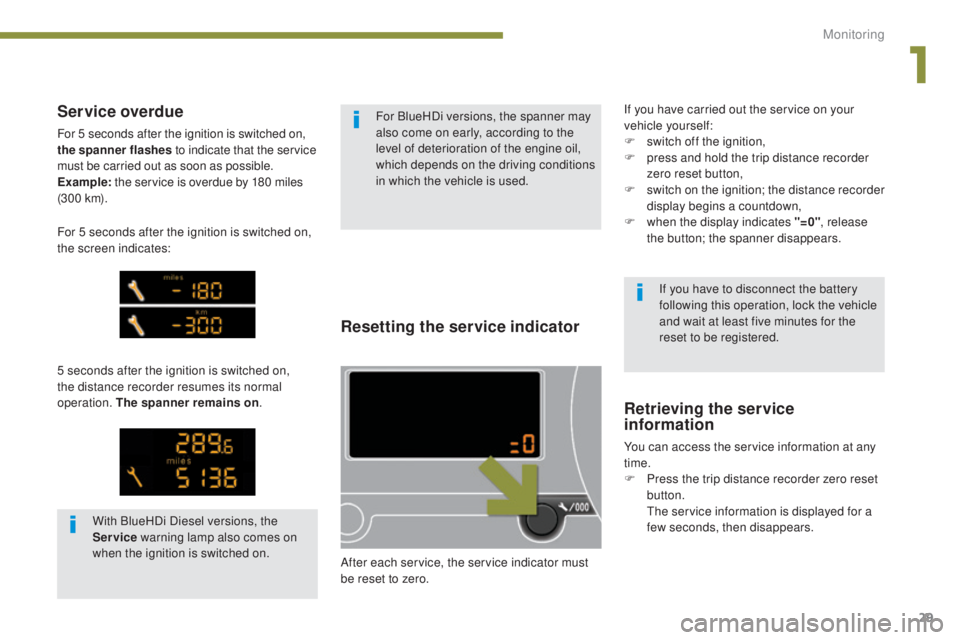
For 5 seconds after the ignition is switched on,
the spanner flashes to indicate that the service
must be carried out as soon as possible.
Example: the service is overdue by 180 miles
(3 0 0 k m).
5 seconds after the ignition is switched on,
the distance recorder resumes its normal
operation. The spanner remains on .
Retrieving the service
information
You can access the service information at any
time.
F
P
ress the trip distance recorder zero reset
button.
T
he service information is displayed for a
few seconds, then disappears. If you have to disconnect the battery
following this operation, lock the vehicle
and wait at least five minutes for the
reset to be registered.
After each service, the service indicator must
be reset to zero. For BlueHDi versions, the spanner may
also come on early, according to the
level of deterioration of the engine oil,
which depends on the driving conditions
in which the vehicle is used.
With BlueHDi Diesel versions, the
Service warning lamp also comes on
when the ignition is switched on.
For 5 seconds after the ignition is switched on,
the screen indicates:
1
Monitoring
Page 32 of 364
30
Engine oil level indicator*
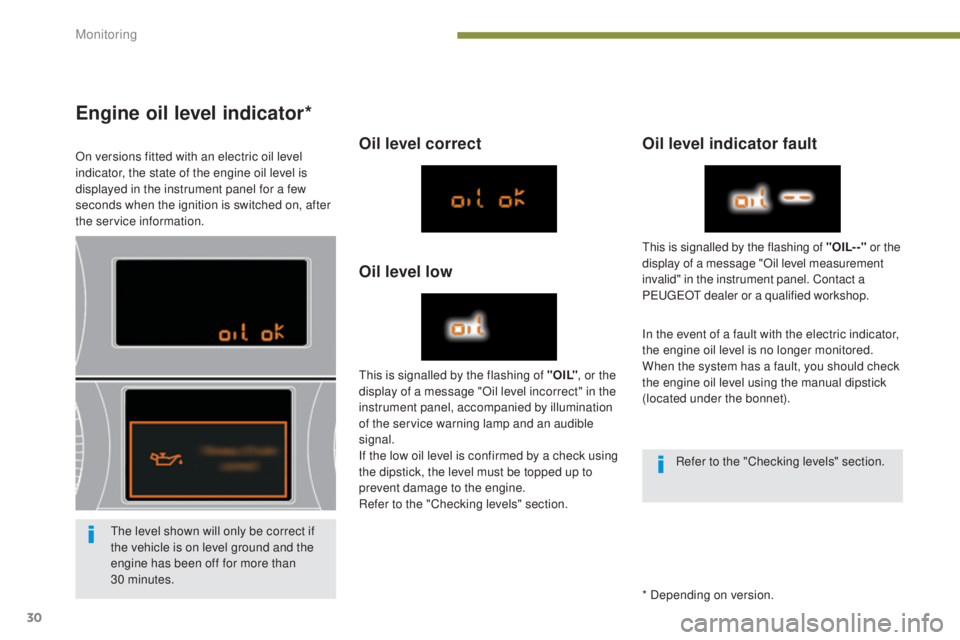
On versions fitted with an electric oil level
indicator, the state of the engine oil level is
displayed in the instrument panel for a few
seconds when the ignition is switched on, after
the service information.Oil level correct
Oil level lowOil level indicator fault
In the event of a fault with the electric indicator,
the engine oil level is no longer monitored.
When the system has a fault, you should check
the engine oil level using the manual dipstick
(located under the bonnet).
This is signalled by the flashing of " O I L"
, or the
display of a message "Oil level incorrect" in the
instrument panel, accompanied by illumination
of the service warning lamp and an audible
signal.
If the low oil level is confirmed by a check using
the dipstick, the level must be topped up to
prevent damage to the engine.
Refer to the "Checking levels" section. This is signalled by the flashing of "OIL- -"
or the
display of a message "Oil level measurement
invalid" in the instrument panel. Contact a
PEUGEOT dealer or a qualified workshop.
The level shown will only be correct if
the vehicle is on level ground and the
engine has been off for more than
30 minutes. * Depending on version.Refer to the "Checking levels" section.
Monitoring
Page 34 of 364
32
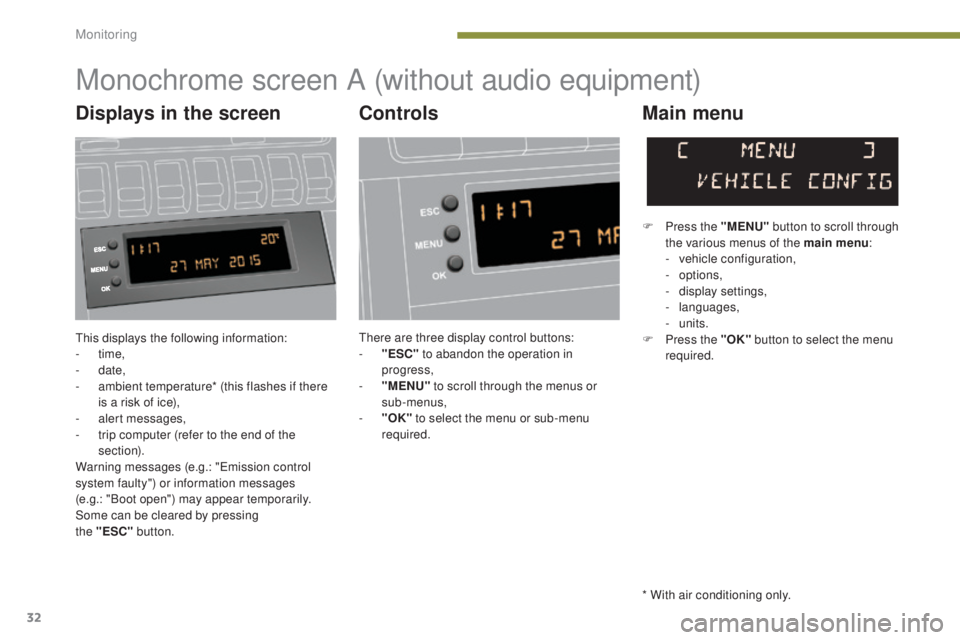
This displays the following information:
- time,
-
date,
-
a
mbient temperature* (this flashes if there
is a risk of ice),
-
a
lert messages,
-
t
rip computer (refer to the end of the
section).
Warning messages (e.g.: "Emission control
system faulty") or information messages
(e.g.: "Boot open") may appear temporarily.
Some can be cleared by pressing
the
"ESC"
button.
Monochrome screen A (without audio equipment)
Controls Main menu
There are three display control buttons:
-
" ESC" to abandon the operation in
progress,
-
"
MENU" to scroll through the menus or
sub-menus,
-
"O
K" to select the menu or sub-menu
required. F
P
ress the "MENU"
button to scroll through
the various menus of the main menu :
-
v
ehicle configuration,
-
options,
-
d
isplay settings,
-
languages,
- units.
F P ress the "OK" button to select the menu
required.
* With air conditioning only.
Displays in the screen
Monitoring
Page 36 of 364
34
Monochrome screen A (with audio equipment)
Controls
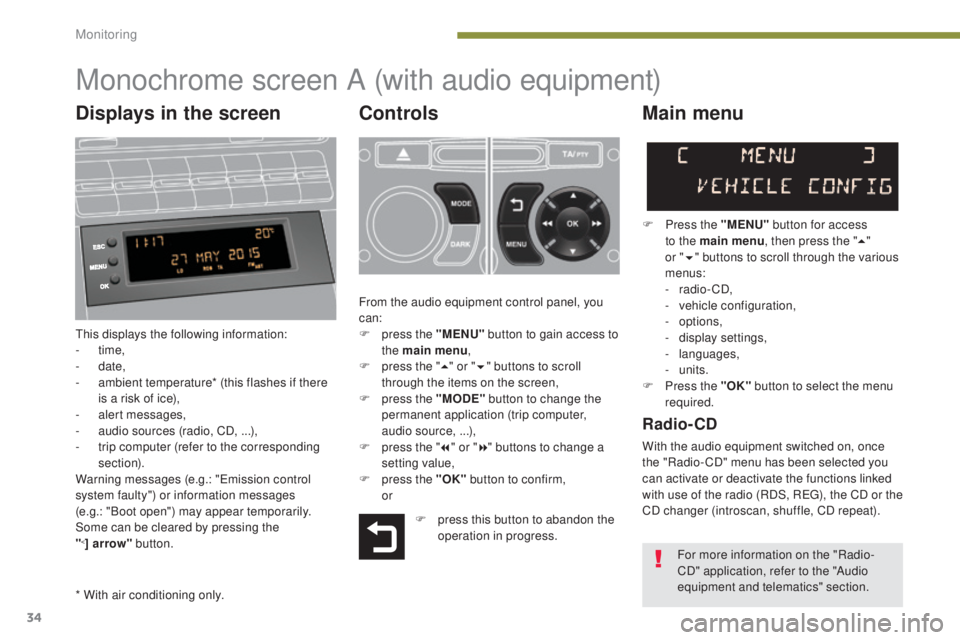
This displays the following information:
- time,
-
date,
-
a
mbient temperature* (this flashes if there
is a risk of ice),
-
a
lert messages,
-
a
udio sources (radio, CD, ...),
-
t
rip computer (refer to the corresponding
section).
Warning messages (e.g.: "Emission control
system faulty") or information messages
(e.g.: "Boot open") may appear temporarily.
Some can be cleared by pressing the
"
<] arrow" button.
Main menu
F Press the "MENU" button for access
to the main menu , then press the "5"
or
"6 "
buttons to scroll through the various
menus:
-
radio - CD,
-
v
ehicle configuration,
-
options,
-
d
isplay settings,
-
languages,
-
units.
F
P
ress the "OK" button to select the menu
required.
From the audio equipment control panel, you
can:
F
p
ress the "MENU" button to gain access to
the main menu ,
F
p
ress the " 5" or " 6" buttons to scroll
through the items on the screen,
F
p
ress the "MODE" button to change the
permanent application (trip computer,
audio source, ...),
F
p
ress the " 7" or " 8" buttons to change a
setting value,
F
p
ress the "OK" button to confirm,
or
Radio- CD
With the audio equipment switched on, once
the "Radio- CD" menu has been selected you
can activate or deactivate the functions linked
with use of the radio (RDS, REG), the CD or the
CD changer (introscan, shuffle, CD repeat).
F
p
ress this button to abandon the
operation in progress.
* With air conditioning only. For more information on the "Radio-
CD" application, refer to the "Audio
equipment and telematics" section.
Displays in the screen
Monitoring
Page 39 of 364
37
"Trip computer" menu
Alert log
This summarises the active warning messages,
displaying them in succession in the
multifunction screen
Status of functions
This summarises the status of the functions
present on the vehicle.
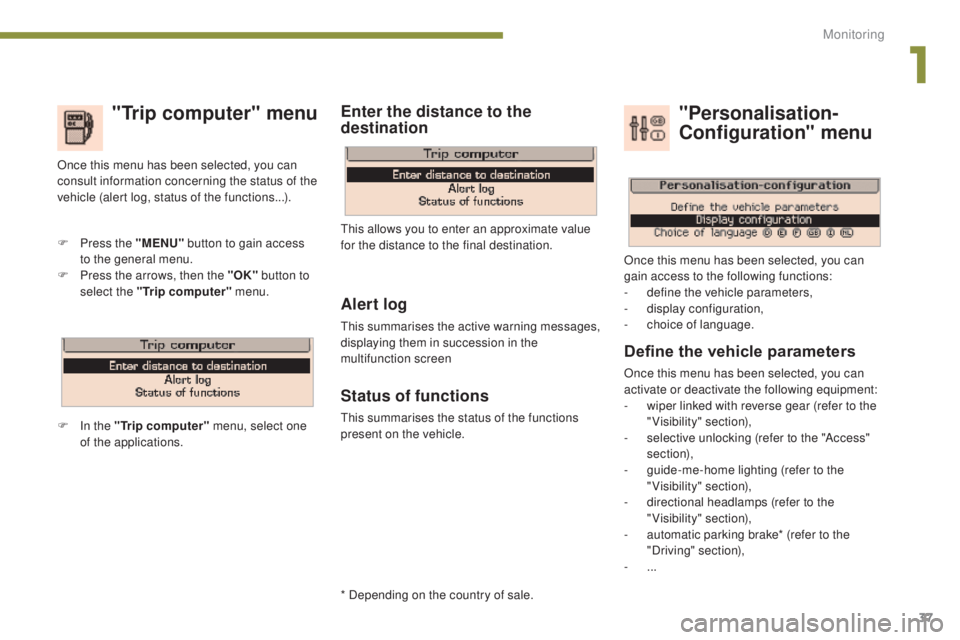
F
P
ress the "MENU"
button to gain access
to the general menu.
F
P
ress the arrows, then the "OK"
button to
select the "Trip computer" menu.
Once this menu has been selected, you can
consult information concerning the status of the
vehicle (alert log, status of the functions...).
Define the vehicle parameters
Once this menu has been selected, you can
activate or deactivate the following equipment:
-
w
iper linked with reverse gear (refer to the
"Visibility" section),
-
s
elective unlocking (refer to the "Access"
section),
-
g
uide-me-home lighting (refer to the
"Visibility" section),
-
d
irectional headlamps (refer to the
"Visibility" section),
-
a
utomatic parking brake* (refer to the
"Driving" section),
-
...
"Personalisation-
Configuration" menu
Once this menu has been selected, you can
gain access to the following functions:
-
d
efine the vehicle parameters,
-
d
isplay configuration,
-
c
hoice of language.
F In the "Trip computer" menu, select one
of the applications. This allows you to enter an approximate value
for the distance to the final destination.
Enter the distance to the
destination
* Depending on the country of sale.
1
Monitoring
Page 43 of 364
41
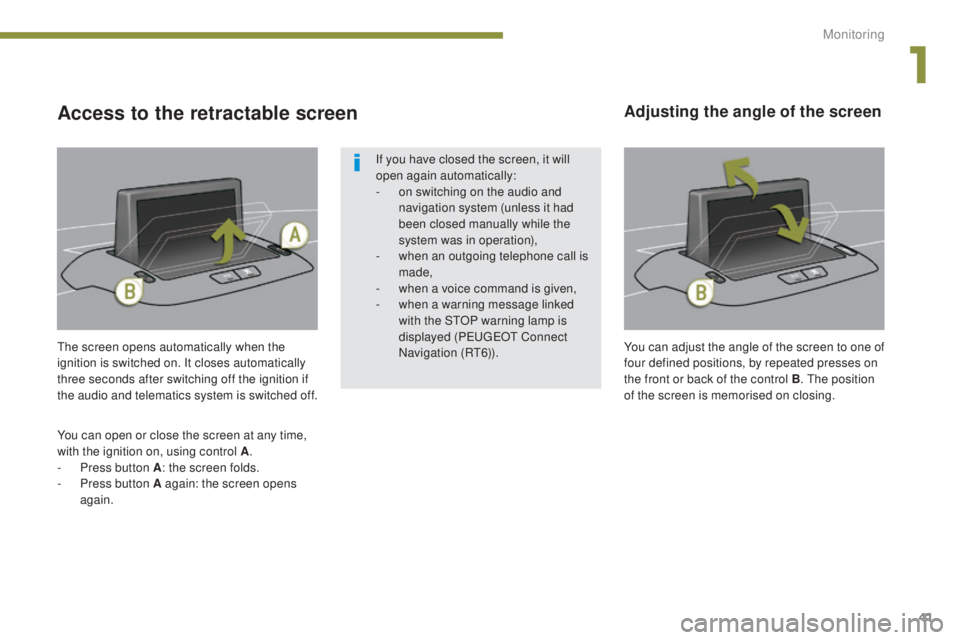
The screen opens automatically when the
ignition is switched on. It closes automatically
three seconds after switching off the ignition if
the audio and telematics system is switched off.
You can open or close the screen at any time,
with the ignition on, using control A .
-
P
ress button A : the screen folds.
-
P
ress button A again: the screen opens
again.
Adjusting the angle of the screen
If you have closed the screen, it will
open again automatically:
-
o
n switching on the audio and
navigation system (unless it had
been closed manually while the
system was in operation),
-
w
hen an outgoing telephone call is
made,
-
w
hen a voice command is given,
-
w
hen a warning message linked
with the STOP warning lamp is
displayed ( P
E
UGEOT
C
onnect
Navigation (RT6)).
Access to the retractable screen
You can adjust the angle of the screen to one of
four defined positions, by repeated presses on
the front or back of the control B . The position
of the screen is memorised on closing.
1
Monitoring
Page 51 of 364
49
Remote control problem
Following disconnection of the vehicle battery,
replacement of the remote control battery or in
the event of a remote control fault you can no
longer unlock, lock or locate your vehicle.
F
F
irst of all, use the key in the lock to unlock
or lock your vehicle.
F
T
hen, reinitialise the remote control.Changing the battery
Reinitialisation
F Switch off the ignition.
F
T urn the key to position 2 (Ignition on) .
F
P
ress the closed padlock immediately for a
few seconds.
F
S
witch off the ignition and remove the key
from the ignition switch.
The remote control is fully operational again.
If the battery is flat, you are informed
by illumination of this warning lamp,
an audible signal and a message.
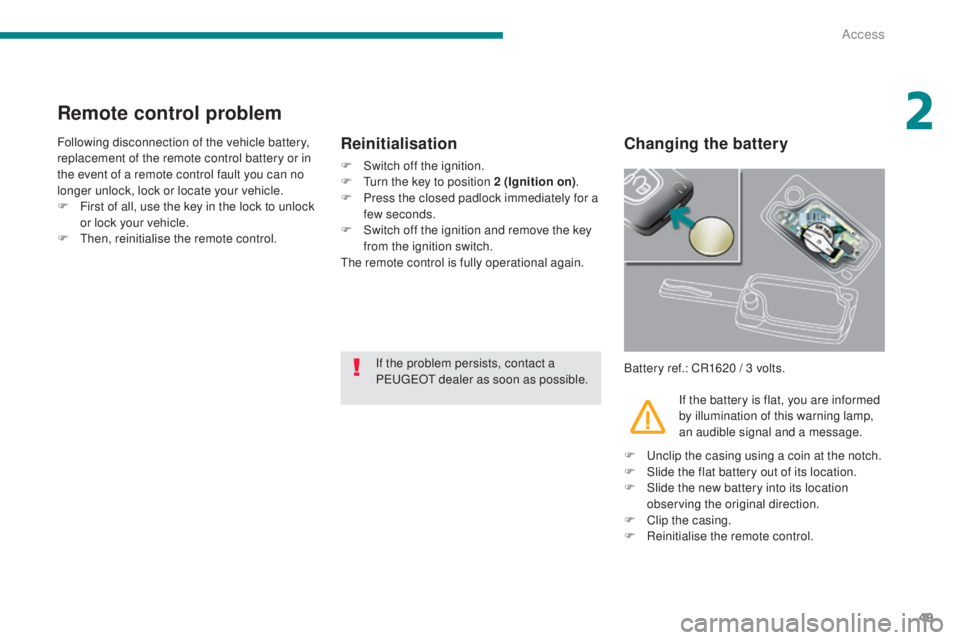
Battery ref.: CR1620 / 3 volts.
If the problem persists, contact a
PEUGEOT dealer as soon as possible.
F
U
nclip the casing using a coin at the notch.
F
S
lide the flat battery out of its location.
F
S
lide the new battery into its location
observing the original direction.
F
C
lip the casing.
F
R
einitialise the remote control.
2
Access
Page 57 of 364
55
Doors
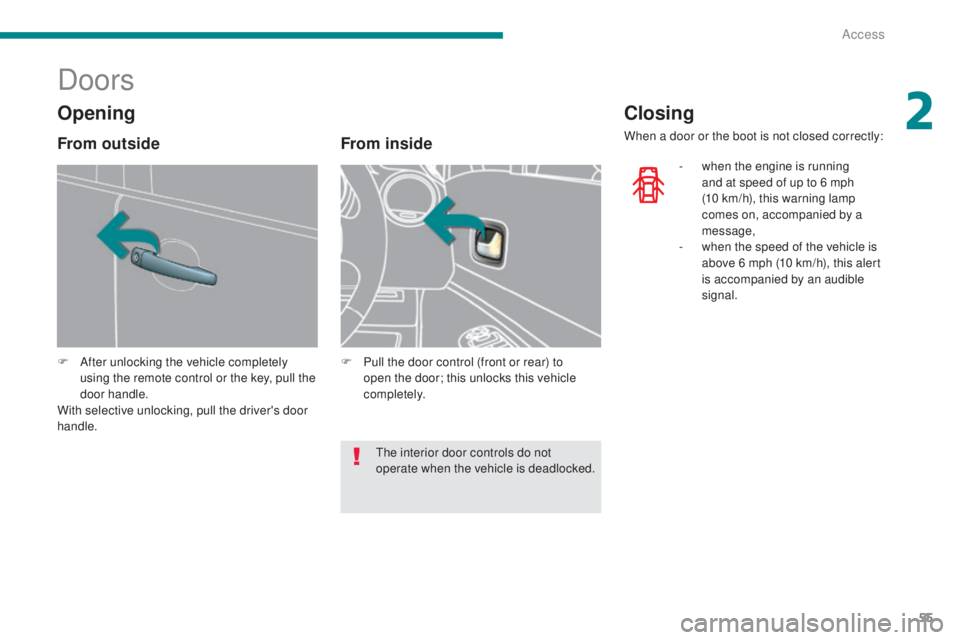
F After unlocking the vehicle completely using the remote control or the key, pull the
door handle.
With selective unlocking, pull the driver's door
handle.
From inside
F Pull the door control (front or rear) to open the door; this unlocks this vehicle
completely.
Closing
When a door or the boot is not closed correctly:
-
w
hen the engine is running
and at speed of up to 6 mph
(10
km/h), this warning lamp
comes on, accompanied by a
message,
-
w
hen the speed of the vehicle is
above 6 mph (10 km/h), this alert
is accompanied by an audible
signal.
Opening
From outside
The interior door controls do not
operate when the vehicle is deadlocked.
2
Access
Page 60 of 364
58
Boot
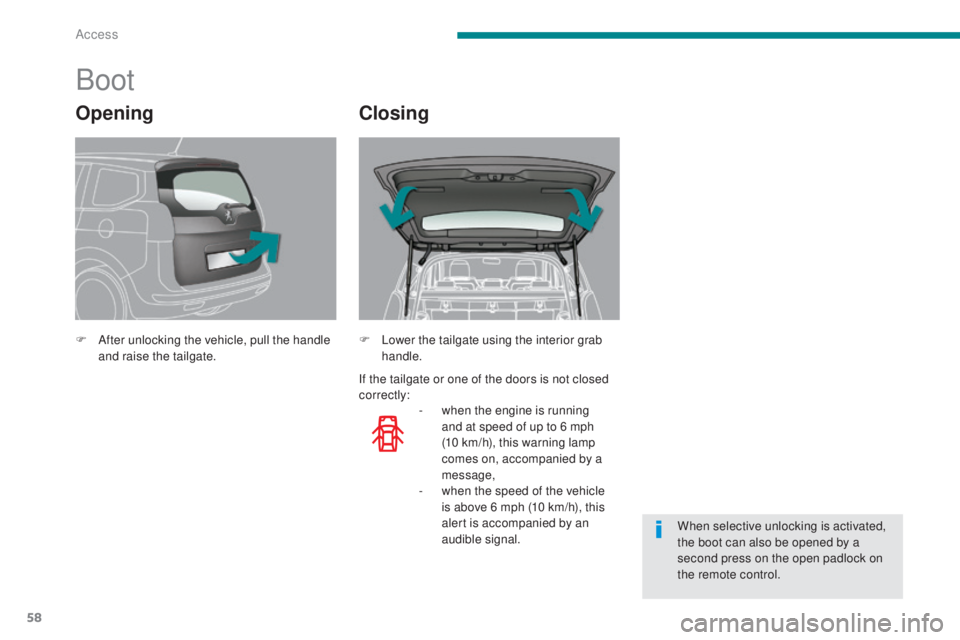
F After unlocking the vehicle, pull the handle and raise the tailgate.
-
w
hen the engine is running
and at speed of up to 6 mph
(10
km/h), this warning lamp
comes on, accompanied by a
message,
-
w
hen the speed of the vehicle
is above 6 mph (10 km/h), this
alert is accompanied by an
audible signal.
F
L ower the tailgate using the interior grab
handle.
When selective unlocking is activated,
the boot can also be opened by a
second press on the open padlock on
the remote control.
OpeningClosing
If the tailgate or one of the doors is not closed
correctly:
Access