ignition PEUGEOT 5008 2015.5. Manual Online
[x] Cancel search | Manufacturer: PEUGEOT, Model Year: 2015.5., Model line: 5008, Model: PEUGEOT 5008 2015.5.Pages: 364, PDF Size: 12.82 MB
Page 250 of 364
248
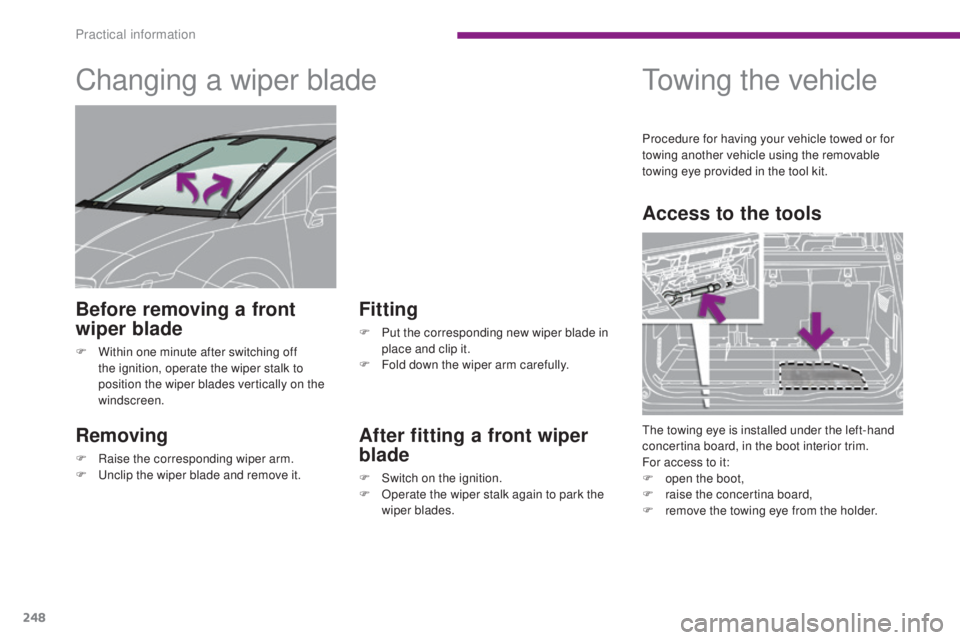
Changing a wiper blade
Removing
F Raise the corresponding wiper arm.
F U nclip the wiper blade and remove it.
Fitting
F Put the corresponding new wiper blade in place and clip it.
F
F
old down the wiper arm carefully.
Before removing a front
wiper blade
F Within one minute after switching off the ignition, operate the wiper stalk to
position the wiper blades vertically on the
windscreen.
After fitting a front wiper
blade
F Switch on the ignition.
F O perate the wiper stalk again to park the
wiper blades.
Towing the vehicle
Access to the tools
The towing eye is installed under the left-hand
concertina board, in the boot interior trim.
For access to it:
F
o
pen the boot,
F
r
aise the concertina board,
F
r
emove the towing eye from the holder.
Procedure for having your vehicle towed or for
towing another vehicle using the removable
towing eye provided in the tool kit.
Practical information
Page 273 of 364
271
PEUGEOT Connect Assistance
If you purchased your vehicle outside
the PEUGEOT dealer network, we
invite you to have a dealer check the
configuration of these services and, if
desired, modified to suit your wishes.
In a multi-lingual country, configuration
is possible in the official national
language of your choice.
For technical reasons and in particular
to improve the quality of "PEUGEOT
CONNECT services" services to
customers, the manufacturer reserves
the right to carry out updates to the
vehicle's on-board telematic system.
A fault with the system does not
prevent the vehicle being driven. Press this button for more than
2
seconds to request assistance
if the vehicle breaks down.
A voice message confirms that
the call has been made**.
Pressing this button again immediately cancels
the request.
The cancellation is confirmed by a voice
message.
The orange LED is on continuously: the backup
battery must be replaced.
In either case, the emergency and assistance
calls may not function.
Contact a qualified repairer as soon as
possible.
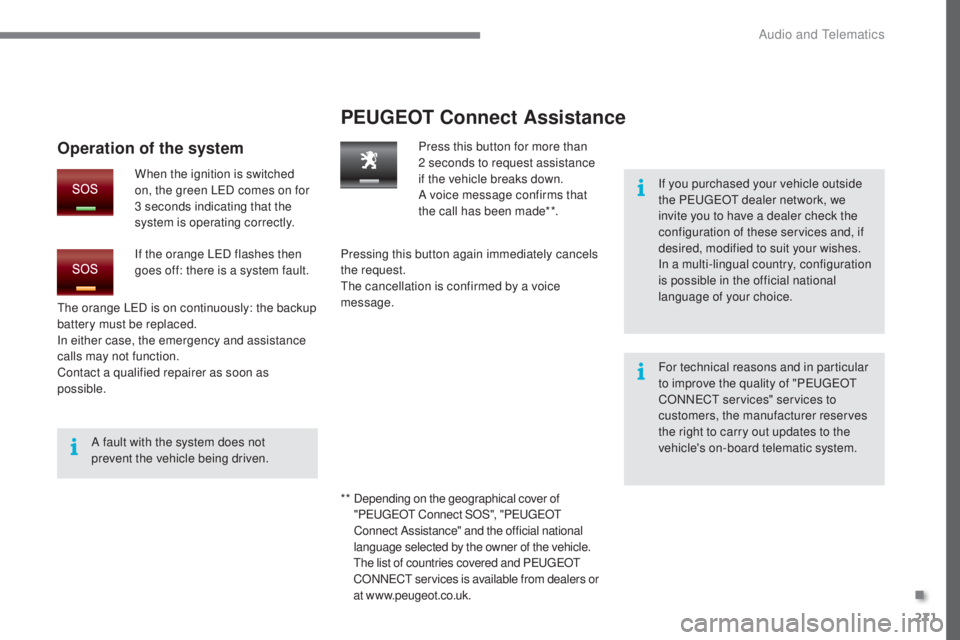
Operation of the system
When the ignition is switched
on, the green LED comes on for
3 seconds indicating that the
system is operating correctly.
If the orange LED flashes then
goes off: there is a system fault.
* *
D
epending on the geographical cover of
" P
E
UGEOT
C
onnect SOS", "P
E
UGEOT
C
onnect Assistance" and the official national
language selected by the owner of the vehicle.
The list of countries covered and PEUGEOT
CONNECT services is available from dealers or
at www.peugeot.co.uk.
.
Audio and Telematics
Page 299 of 364
06
297
USING THE TELEPHONE
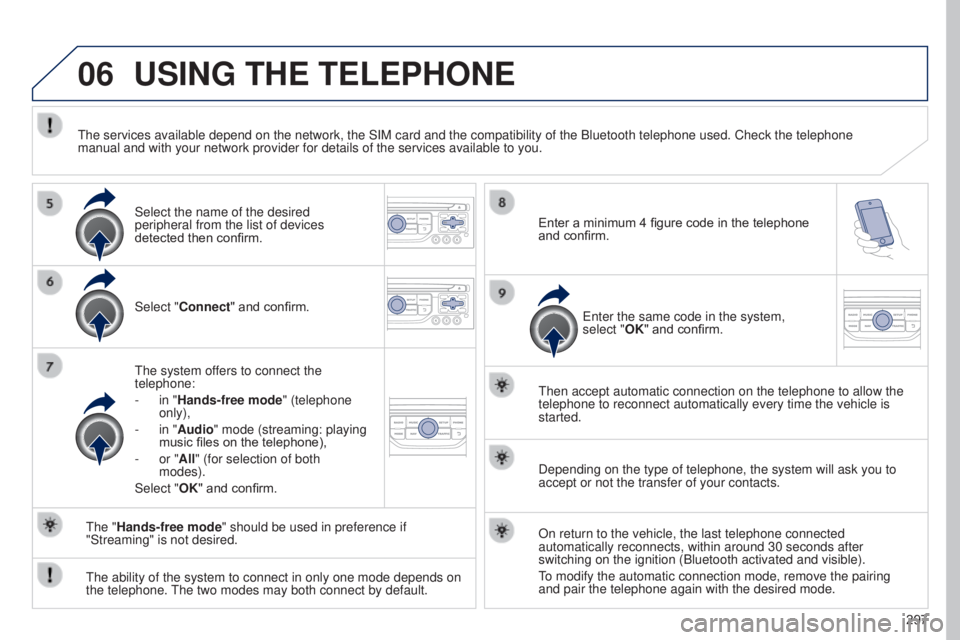
Select "Connect" and confirm.
The system offers to connect the
telephone:
-
in "
Hands-free mode" (telephone
only),
-
in "
Audio" mode (streaming: playing
music files on the telephone),
-
or "
All" (for selection of both
modes).
Select "OK" and confirm. Then accept automatic connection on the telephone to allow the
telephone to reconnect automatically every time the vehicle is
started.
The ability of the system to connect in only one mode depends on
the telephone. The two modes may both connect by default. The "Hands-free mode" should be used in preference if
"Streaming" is not desired.
The services available depend on the network, the SIM card and the compa\
tibility of the Bluetooth telephone used. Check the telephone
manual and with your network provider for details of the services availa\
ble to you.
Depending on the type of telephone, the system will ask you to
accept or not the transfer of your contacts.
On return to the vehicle, the last telephone connected
automatically reconnects, within around 30 seconds after
switching on the ignition (Bluetooth activated and visible).
To modify the automatic connection mode, remove the pairing
and pair the telephone again with the desired mode.
Enter a minimum 4 figure code in the telephone
and confirm.
Enter the same code in the system,
select "OK" and confirm.
Select the name of the desired
peripheral from the list of devices
detected then confirm.
Page 314 of 364
08
312Insert the CD in the player, insert the USB
memory stick in the USB player or connect the
USB peripheral to the USB port using a suitable
cable (not supplied).
The system builds playlists (in temporary
memory), an operation which can take from
a few seconds to several minutes at the first
connection.
Reduce the number of non-music files and the
number of folders to reduce the waiting time.
The playlists are updated every time the ignition
is switched off or connection of a USB memory
stick. However, the system memorises these
lists and if they are not modified, the loading
time will be shorter.
Play starts automatically after a period which
depends on the capacity of the USB memory
stick.
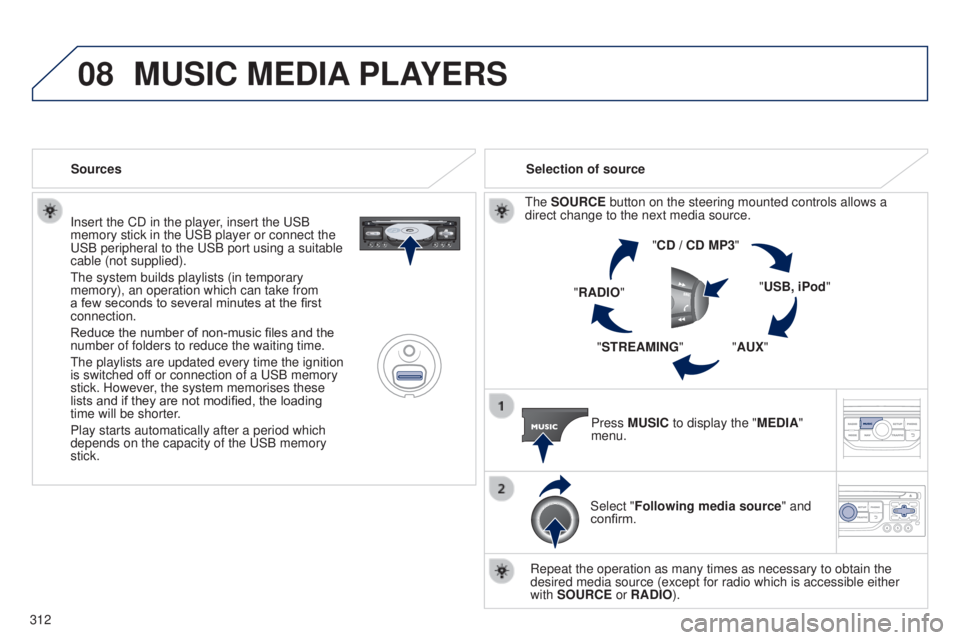
Selection of source
The SOURCE button on the steering mounted controls allows a
direct change to the next media source. "CD / CD MP3"
"USB, iPod"
"AUX"
"STREAMING"
"RADIO"
Press MUSIC to display the "MEDIA"
menu.
Select "Following media source " and
confirm.
Repeat the operation as many times as necessary to obtain the
desired media source (except for radio which is accessible either
with SOURCE or RADIO).
Sources
MUSIC MEDIA
PLAYERS
Page 338 of 364
05
336
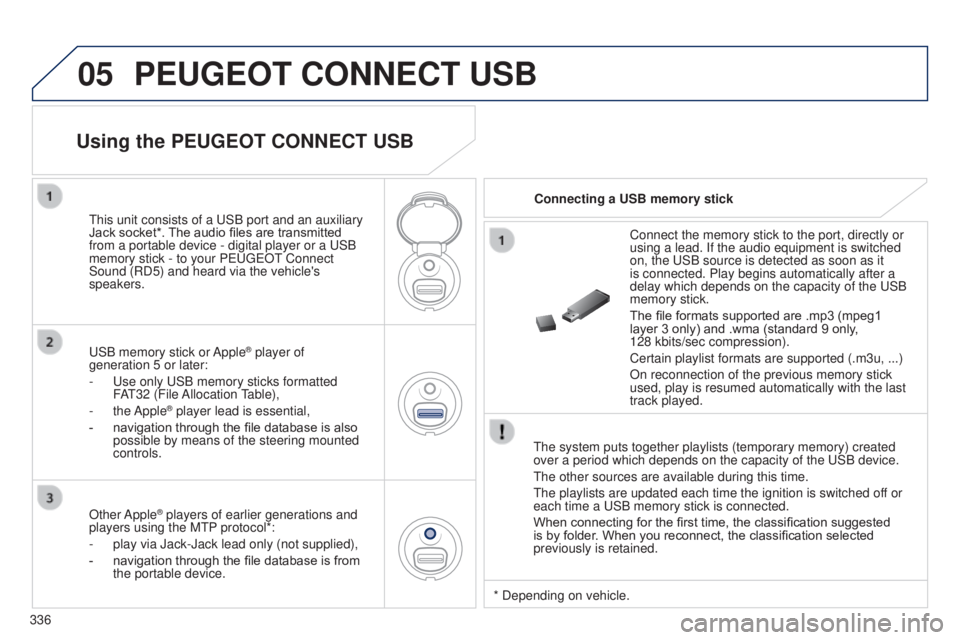
PEUGEOT CONNECT USB
The system puts together playlists (temporary memory) created
over a period which depends on the capacity of the USB device.
The other sources are available during this time.
The playlists are updated each time the ignition is switched off or
each time a USB memory stick is connected.
When connecting for the first time, the classification suggested
is by folder. When you reconnect, the classification selected
previously is retained.Connect the memory stick to the port, directly or
using a lead. If the audio equipment is switched
on, the USB source is detected as soon as it
is connected. Play begins automatically after a
delay which depends on the capacity of the USB
memory stick.
The file formats supported are .mp3 (mpeg1
layer
3 only) and .wma (standard 9 only,
128 kbits/sec compression).
Certain playlist formats are supported (.m3u, ...)
On reconnection of the previous memory stick
used, play is resumed automatically with the last
track played.
This unit consists of a USB port and an auxiliary
Jack socket*. The audio files are transmitted
from a portable device - digital player or a USB
memory stick - to your PEUGEOT Connect
Sound (RD5) and heard via the vehicle's
speakers.
USB memory stick or Apple
® player of
generation 5 or later:
-
Use only USB memory sticks formatted
F
AT32 (File Allocation Table),
-
the Apple® player lead is essential,
-
navigation through the file database is also
possible by means of the steering mounted
controls.
Using the PEUGEOT CONNECT USB
Connecting a USB memory stick
Other Apple
® players of earlier generations and
players using the MTP protocol*:
-
play via Jack-Jack lead only (not supplied),
-
navigation through the file database is from
the portable device. * Depending on vehicle.
Page 341 of 364
06
339
BLUETOOTH
As a safety measure and because they require prolonged attention
on the part of the driver, the operations for pairing of the Bluetooth
mobile telephone with the Bluetooth hands-free system of your
audio equipment must be carried out with the vehicle stationary
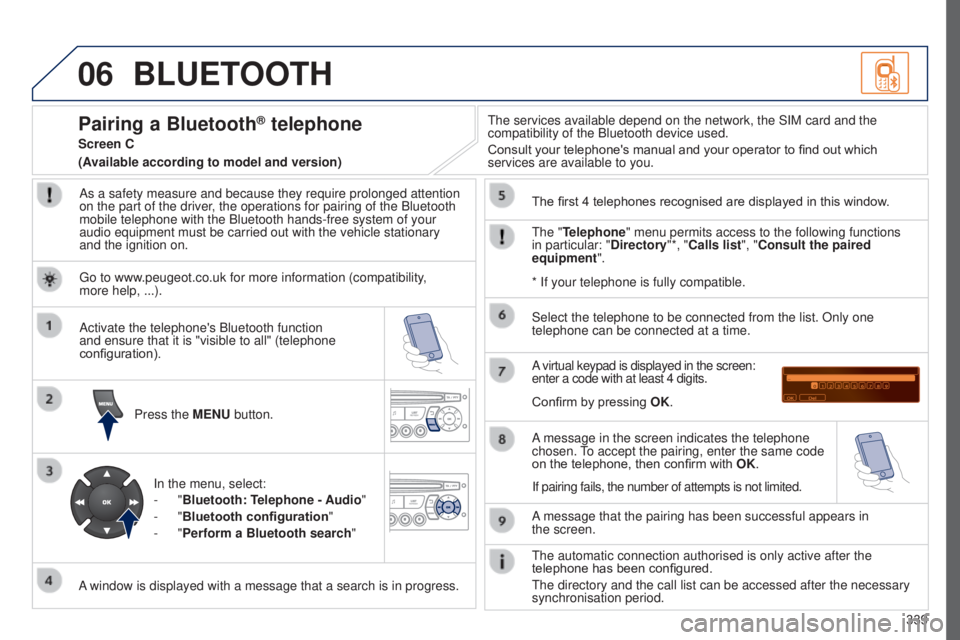
and the ignition on.Press the MENU button.
A window is displayed with a message that a search is in progress. Activate the telephone's Bluetooth function
and ensure that it is "visible to all" (telephone
configuration).
In the menu, select:
-
"Bluetooth: Telephone - Audio"
-
"Bluetooth configuration "
-
"Perform a Bluetooth search" The services available depend on the network, the SIM card and the
compatibility of the Bluetooth device used.
Consult your telephone's manual and your operator to find out which
services are available to you.
Pairing a Bluetooth® telephone
Screen C
The "Telephone" menu permits access to the following functions
in particular: "Directory"*, "Calls list", "Consult the paired
equipment". The first 4 telephones recognised are displayed in this window.
A virtual keypad is displayed in the screen:
enter a code with at least 4 digits.
Confirm by pressing OK.
A message that the pairing has been successful appears in
the
screen.
Select the telephone to be connected from the list. Only one
telephone can be connected at a time.
A message in the screen indicates the telephone
chosen. To accept the pairing, enter the same code
on the telephone, then confirm with
OK.
The automatic connection authorised is only active after the
telephone has been configured.
The directory and the call list can be accessed after the necessary
synchronisation period.
(Available according to model and version)
* If your telephone is fully compatible.
If pairing fails, the number of attempts is not limited.
Go to www.peugeot.co.uk for more information (compatibility,
more
help, ...).
Page 354 of 364
352
Inflating tyres and accessories (using the kit) .............................. ................219
Inputs for audio system
......................................... 101, 315, 338
Instrument panels
........................................... 14
Intelligent Traction Control
........................................................ 13
6
Interior mood lighting
.......................................................... 97
ISOFIX child seats
...............................
.........127
ISOFIX mountings ......................................... 127
Keeping children safe
...............
.......................115 -13 4, 142, 14 4
Key with remote control
............................................. 46-50 ,
148
Kit, hands-free
..................................... 296, 339
Kit, temporary puncture repair
........................................................... 214Labels, identification .....................................
26 8
Lamps, warning and indicator ..................16-26
LEDs - light-emitting diodes
.................231, 232
Level, AdBlue
® additive ................................. 204
Level, brake fluid ........................................... 20
0
Level, Diesel additive
............................ 201, 202
Level, engine coolant
...................................... 27
Level, engine oil
...............................
.......30, 19 9
Level, headlamp wash
............................ 93, 201
Level, power steering fluid
............................ 20
0
Levels and checks
................................. 197-2 01
Light-emitting diodes - LEDs
................231, 232
Lighting bulbs (replacement)
................ 2
31-236
Lighting dimmer
..............................
................31
Lighting, directional
......................................... 90
L
ighting, guide-me home
.......................... 86, 87
Lighting, interior
........................................ 96, 97
Lighting, welcome
..................................... 86, 88
Loading
............................................. 12, 78 , 254
Load reduction mode
.................................... 247
Load space cover
...............................
...........11 0
Locating your vehicle
...................................... 48
L
ocking from the inside
................................... 56
L
ocking the boot.............................................. 47
Locking the doors
........................................... 47
Long objects, transporting
........................ 72,
78
Low fuel level
................................................ 191
Jack
........
............................................... 212, 226
JACK socket
.................................. 101, 315, 338
Jump starting
..............................
.................. 245
J
K
L
Maintenance, routine ...................................... 12
Map reading lamps ......................................... 96
M
H
Halogen headlamps ...................................... 232
Hazard warning lamps ..................................13 5
Headlamp adjustment
..................................... 89
Headlamps, automatic illumination
................87
Headlamps, dipped beam
...............82, 231 , 233
Headlamps, directional
........................... 90,
231
Headlamps, halogen
..................................... 231
Headlamps, main beam
.................. 8
2, 231-233
Headlamps, Xenon
....................................... 231
Headlamp wash
.............................................. 93
Headlamp wash reservoir
.............................201
Head restraints, front
...................................... 70
Head restraints, rear
....................................... 77
Head-up display
............................ 15 8, 163 , 166
Heated seats
................................................... 71
Heating
................................................ 60, 62 , 65
Hill start assist
............................................... 15
5
Hooks
.................................................... 109, 113
Horn ............................................................... 13 5
Identification, vehicle
.................................... 26
8
Ignition
................
........................................... 148
Immobiliser, electronic
............................50, 148
Indicator, coolant temperature
.................................................. 27
Indicator, engine oil level
........................30, 199
Indicator lamps, operation
.................................................. 16-18
Indicators, direction
...................................... 13 5
Inflating tyres
.......................................... 12, 26 8
I
Alphabetical index
Page 355 of 364
353
Radio .................................................... 305, 333
Range .............................................................. 42
Range, AdBlue
.............................................. 206
Reading lamps, rear
........................................ 96
Rear foglamp .................................. 84, 234, 235
Rear screen (demisting)
............................64, 79
Recharging the battery
................................. 24
6
Reduction of electrical load
..........................247
Regeneration of the particle filter
.................2
02
Reinitialising the electric windows
.................. 54
R
einitialising the remote control
..................... 49
R
eminder, key in ignition ...............................150
Remote control
.......................................... 46-50
R
emovable screen (snow shield).................. 255
Removing a wheel
........................................ 226
Removing the mat
......................................... 102
Replacing bulbs
.................................... 231-236
Replacing fuses
..............................
.......2 37-24 3
Replacing the air filter
...................................202
Replacing the oil filter
................................... 2
02
Replacing the passenger compartment filter
...................................... 202
Replacing wiper blades ...........................95, 248
Resetting the service indicator
.......................29
Resetting the trip recorder
..............................31
Rev counter
..................................................... 14
R
Opening the boot .............................. ..............58
Opening the doors ............................... ...........55
Opening the panoramic sunroof blind
............................................... 10 6
Opening the retractable screen
...................... 41
O
peration indicator lamps
.........................16-18
Paint colour code
.......................................... 268
Panoramic glass sunroof
........................................................ 10 6
Parking brake, electric
.............21, 151-157 , 203
Parking sensors, audible and visual
.............185
Parking sensors, front
...................................185
Parking sensors, rear .................................... 185
Parking space sensor
..................................188
Particle filter
.......................................... 19 6, 201
P
E
UGEOT
C
onnect Assistance
...................270
P
E
UGEOT
C
onnect
Navigation (RT6)
.................................. 39, 273
P
E
UGEOT
C
onnect Packs
...........................270
P
E
UGEOT
C
onnect SOS
............................. 2
70
P
E
UGEOT
C
onnect Sound (RD5)
..........36,
329
Plates, identification ...................................... 268
Player, MP3 CD
............................. 311, 3 3 4, 335
Players, music media
.................................... 310
Port, USB
...................................... 10
1, 315 , 336
Pressures, tyres
............................................ 268
Pre-tensioning seat belts
..............................142
Priming the fuel system
................................195
P
Markings, identification .................................268
Mat ................................................................ 102
Menu, main
................................................... 332
Menu short cuts
............................................ 278
Mirror, rear view
.............................................. 80
Mirrors, door .................................................... 79
Mirror, vanity
..............................
...................10 0
Misfuel prevention
...............................
..........19 4
Modularity, seats
............................................. 78
Mountings for ISOFIX seats
.........................127
MP3 CD
................................................. 311, 335
Multimedia, rear
.................................... 101, 104
Navigation
..................................................... 279
Net
................................................................. 11 0
Net, high load retaining
.................................111
Net, luggage retaining ...................................112
Number plate lamps
............................. 23
5, 236
N
Protecting children .................115-13 4 , 142 , 14 4
Puncture ................................................ 214, 220
Oil change
..................................................... 19 9
Oil consumption
............................................ 19 9
Oil, engine
...............................
................ 30, 199
Opening the bonnet
...................................... 19
6
O
.
Alphabetical index