wheel PEUGEOT 508 2010 Owners Manual
[x] Cancel search | Manufacturer: PEUGEOT, Model Year: 2010, Model line: 508, Model: PEUGEOT 508 2010Pages: 330, PDF Size: 11.68 MB
Page 7 of 330
10
Familiarisation
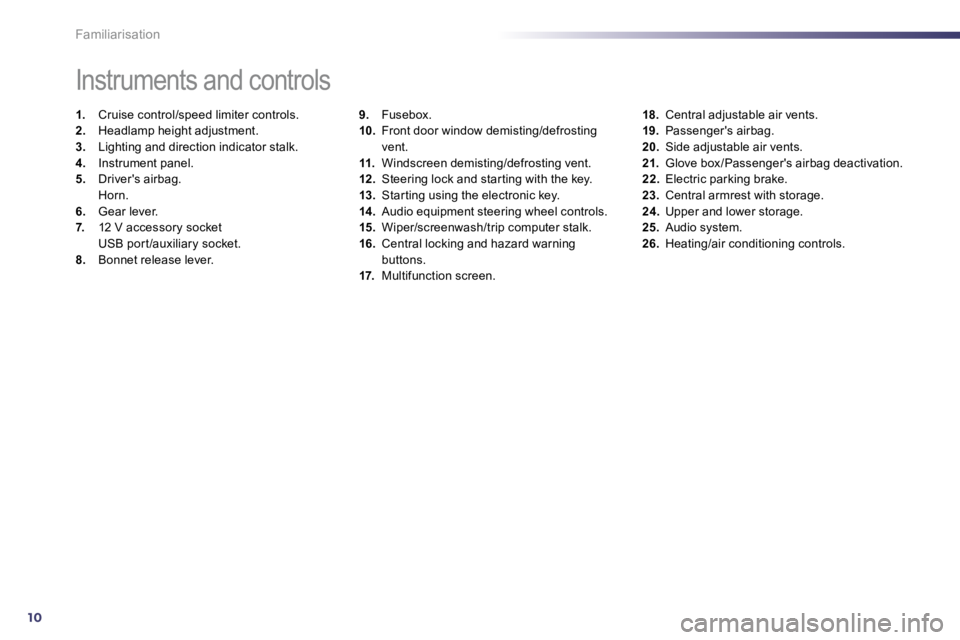
9. Fusebox. 10. Front door window demisting/defrosting vent. 11. Windscreen demisting/defrosting vent. 12. Steering lock and star ting with the key. 13. Star ting using the electronic key. 14. Audio equipment steering wheel controls. 15. Wiper/screenwash/trip computer stalk. 16. Central locking and hazard warning buttons. 17. Multifunction screen.
Instruments and controls
1. Cruise control/speed limiter controls. 2. Headlamp height adjustment. 3. Lighting and direction indicator stalk. 4. Instrument panel. 5. Driver's airbag. Horn. 6. Gear lever. 7. 12 V accessory socket USB por t /auxiliary socket. 8. Bonnet release lever.
18. Central adjustable air vents. 19. Passenger's airbag. 20. Side adjustable air vents. 21. Glove box /Passenger's airbag deactivation. 22. Electric parking brake. 23. Central armrest with storage. 24. Upper and lower storage. 25. Audio system. 26. Heating/air conditioning controls.
Page 9 of 330
12
!
Familiarisation
Sitting comfortably
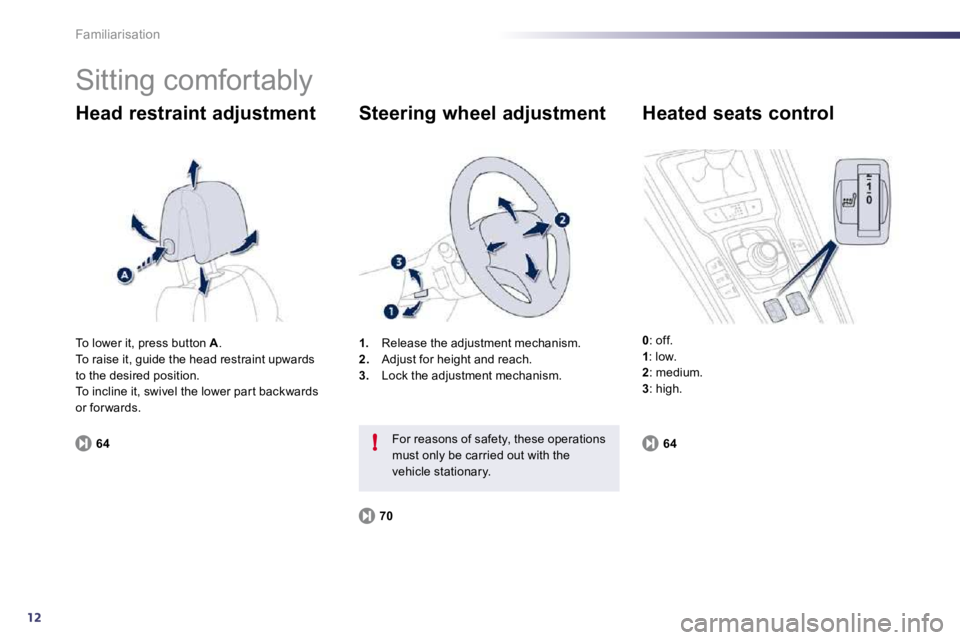
Head restraint adjustment
64
1. Release the adjustment mechanism. 2. Adjust for height and reach. 3. Lock the adjustment mechanism.
Steering wheel adjustment
70
For reasons of safety, these operations must only be carried out with the vehicle stationary.
Heated seats control
0 : off. 1 : low. 2 : medium. 3 : high.
To lower it, press button A . To raise it, guide the head restraint upwards to the desired position. To incline it, swivel the lower par t backwards or for wards.
64
Page 18 of 330
121
!
Instruments and controls
Indicator and warning lamps
Visual indicators informing the driver that a system is in operation, switched off or has a fault.
When the ignition is switched on
Cer tain warning lamps come on for a few
seconds in the instrument panel and/or instrument panel screen when the vehicle's ignition is switched on. When the engine is star ted, these same warning lamps should switch off. If they remain on, before moving off, refer to the information on the warning lamp concerned.
Associated warnings
The switching on of cer tain warning lamps may be accompanied by an audible signal and a message in the instrument panel screen. The warning lamps may come on continuously (fixed) or flash.
Cer tain warning lamps may come on in one of two modes. Only by relating the type of lighting to the operating status of the vehicle can it be ascer tained whether the situation is normal or whether a fault has occurred.
1
2
2
2
3
3
3
2
3
3
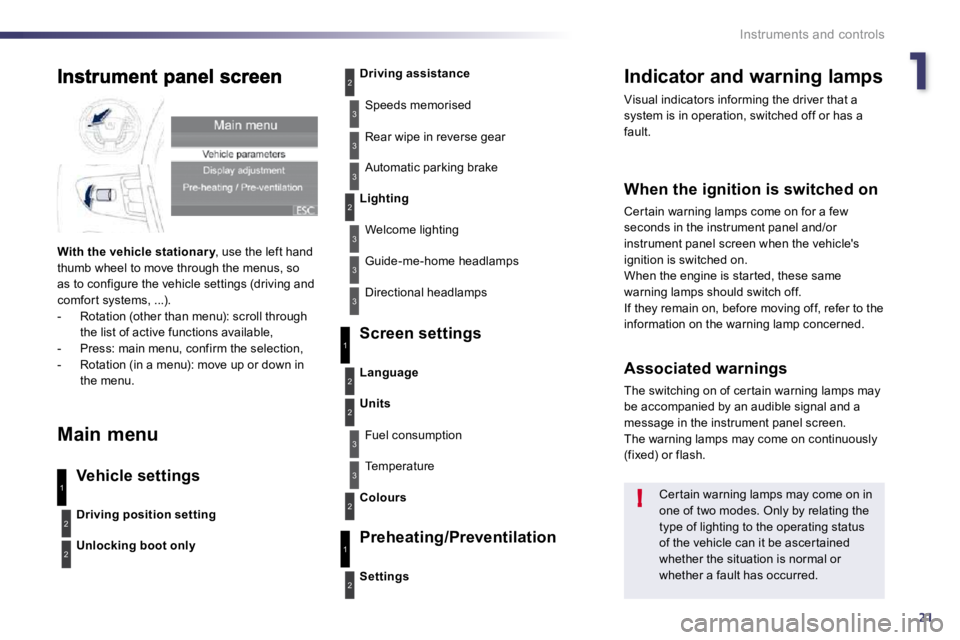
With the vehicle stationar y , use the left hand ar ythumb wheel to move through the menus, so as to configure the vehicle settings (driving and comfor t systems, ...). - Rotation (other than menu): scroll through the list of active functions available, - Press: main menu, confirm the selection, - Rotation (in a menu): move up or down in the menu.
Main menu
Vehicle settings
Screen settings
Preheating/Preventilation
Driving position setting
Unlocking boot only
Driving assistance
Speeds memorised
Rear wipe in reverse gear
Automatic parking brake
Lighting
Welcome lighting
Guide-me-home headlamps
Directional headlamps
Settings
Language
Units
Fuel consumption
Temperature
Colours
3
1
2
2
3
2
3
1
2
Page 19 of 330
121
!
Instruments and controls
Indicator and warning lamps
Visual indicators informing the driver that a system is in operation, switched off or has a fault.
When the ignition is switched on
Cer tain warning lamps come on for a few
seconds in the instrument panel and/or instrument panel screen when the vehicle's ignition is switched on. When the engine is star ted, these same warning lamps should switch off. If they remain on, before moving off, refer to the information on the warning lamp concerned.
Associated warnings
The switching on of cer tain warning lamps may be accompanied by an audible signal and a message in the instrument panel screen. The warning lamps may come on continuously (fixed) or flash.
Cer tain warning lamps may come on in one of two modes. Only by relating the type of lighting to the operating status of the vehicle can it be ascer tained whether the situation is normal or whether a fault has occurred.
1
2
2
2
3
3
3
2
3
3
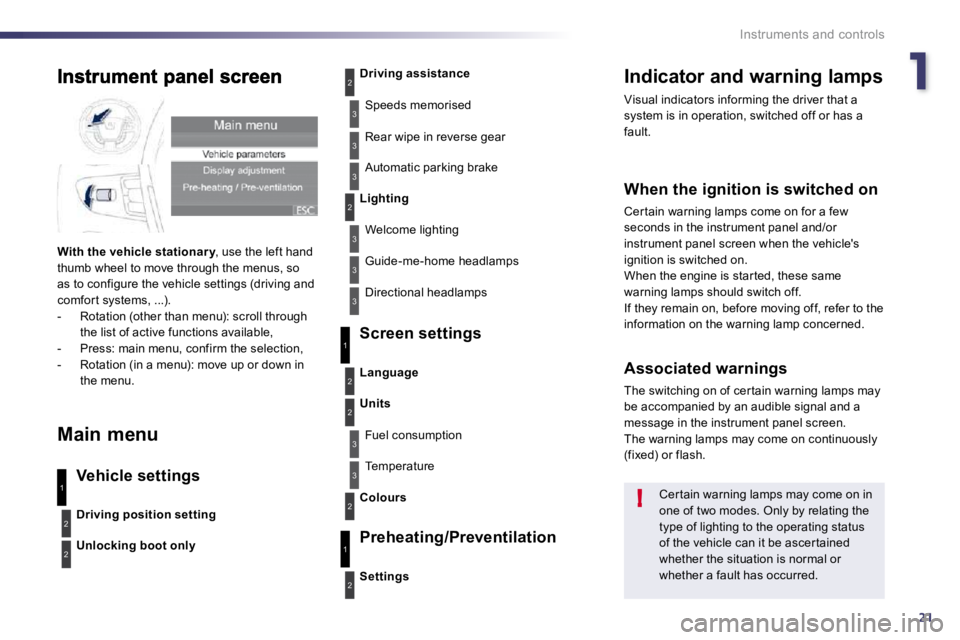
With the vehicle stationar y , use the left hand ar ythumb wheel to move through the menus, so as to configure the vehicle settings (driving and comfor t systems, ...). - Rotation (other than menu): scroll through the list of active functions available, - Press: main menu, confirm the selection, - Rotation (in a menu): move up or down in the menu.
Main menu
Vehicle settings
Screen settings
Preheating/Preventilation
Driving position setting
Unlocking boot only
Driving assistance
Speeds memorised
Rear wipe in reverse gear
Automatic parking brake
Lighting
Welcome lighting
Guide-me-home headlamps
Directional headlamps
Settings
Language
Units
Fuel consumption
Temperature
Colours
3
1
2
2
3
2
3
1
2
Page 23 of 330
121
!
Instruments and controls
Indicator and warning lamps
Visual indicators informing the driver that a system is in operation, switched off or has a fault.
When the ignition is switched on
Cer tain warning lamps come on for a few
seconds in the instrument panel and/or instrument panel screen when the vehicle's ignition is switched on. When the engine is star ted, these same warning lamps should switch off. If they remain on, before moving off, refer to the information on the warning lamp concerned.
Associated warnings
The switching on of cer tain warning lamps may be accompanied by an audible signal and a message in the instrument panel screen. The warning lamps may come on continuously (fixed) or flash.
Cer tain warning lamps may come on in one of two modes. Only by relating the type of lighting to the operating status of the vehicle can it be ascer tained whether the situation is normal or whether a fault has occurred.
1
2
2
2
3
3
3
2
3
3
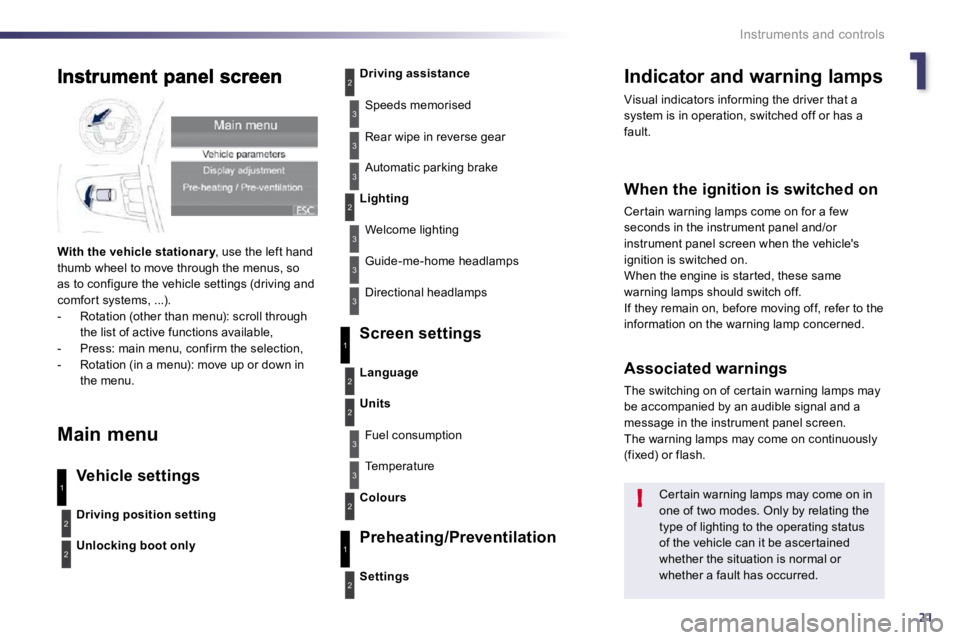
With the vehicle stationar y , use the left hand ar ythumb wheel to move through the menus, so as to configure the vehicle settings (driving and comfor t systems, ...). - Rotation (other than menu): scroll through the list of active functions available, - Press: main menu, confirm the selection, - Rotation (in a menu): move up or down in the menu.
Main menu
Vehicle settings
Screen settings
Preheating/Preventilation
Driving position setting
Unlocking boot only
Driving assistance
Speeds memorised
Rear wipe in reverse gear
Automatic parking brake
Lighting
Welcome lighting
Guide-me-home headlamps
Directional headlamps
Settings
Language
Units
Fuel consumption
Temperature
Colours
3
1
2
2
3
2
3
1
2
Page 25 of 330
121
!
Instruments and controls
Indicator and warning lamps
Visual indicators informing the driver that a system is in operation, switched off or has a fault.
When the ignition is switched on
Cer tain warning lamps come on for a few
seconds in the instrument panel and/or instrument panel screen when the vehicle's ignition is switched on. When the engine is star ted, these same warning lamps should switch off. If they remain on, before moving off, refer to the information on the warning lamp concerned.
Associated warnings
The switching on of cer tain warning lamps may be accompanied by an audible signal and a message in the instrument panel screen. The warning lamps may come on continuously (fixed) or flash.
Cer tain warning lamps may come on in one of two modes. Only by relating the type of lighting to the operating status of the vehicle can it be ascer tained whether the situation is normal or whether a fault has occurred.
1
2
2
2
3
3
3
2
3
3
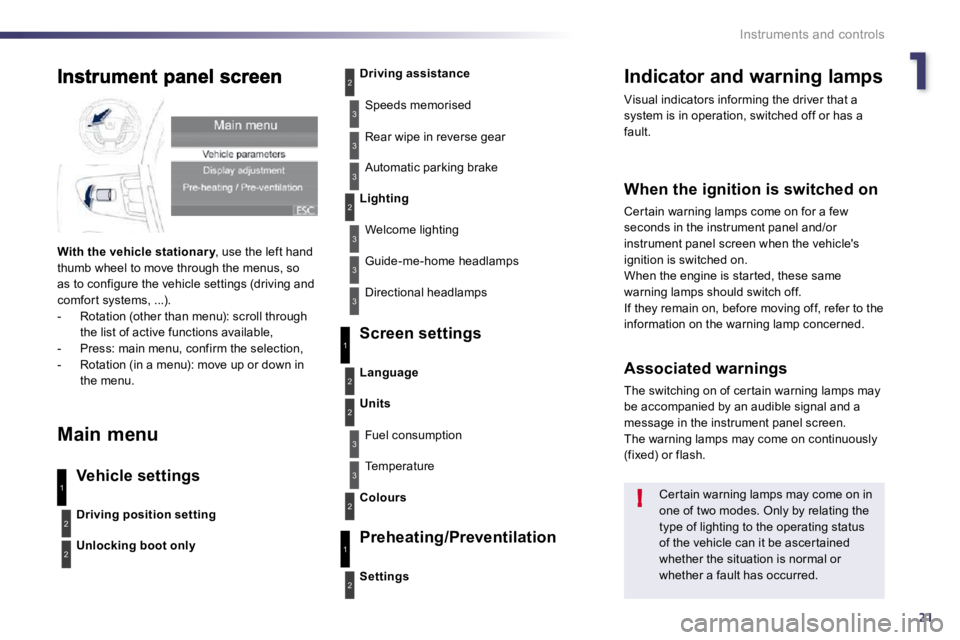
With the vehicle stationar y , use the left hand ar ythumb wheel to move through the menus, so as to configure the vehicle settings (driving and comfor t systems, ...). - Rotation (other than menu): scroll through the list of active functions available, - Press: main menu, confirm the selection, - Rotation (in a menu): move up or down in the menu.
Main menu
Vehicle settings
Screen settings
Preheating/Preventilation
Driving position setting
Unlocking boot only
Driving assistance
Speeds memorised
Rear wipe in reverse gear
Automatic parking brake
Lighting
Welcome lighting
Guide-me-home headlamps
Directional headlamps
Settings
Language
Units
Fuel consumption
Temperature
Colours
3
1
2
2
3
2
3
1
2
Page 26 of 330
26
Instruments and controls
Warning lamps
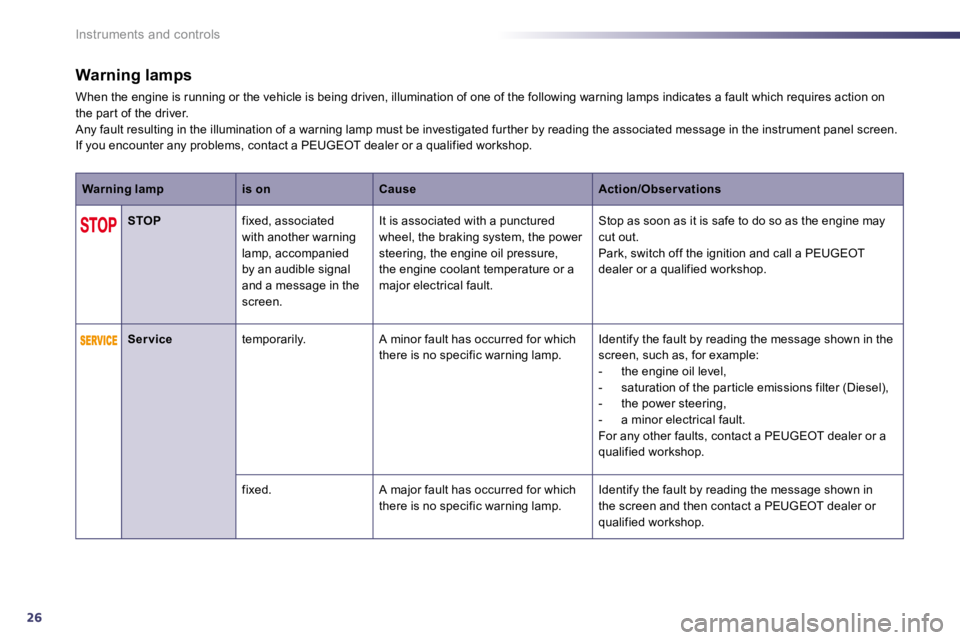
When the engine is running or the vehicle is being driven, illumination of one of the following warning lamps indicates a fault which requires action on the par t of the driver. Any fault resulting in the illumination of a warning lamp must be investigated fur ther by reading the as sociated message in the instrument panel screen. If you encounter any problems, contact a PEUGEOT dea ler or a qualified workshop.
Warning lampis onCauseAction/Obser vations
STOP fixed, associated with another warning lamp, accompanied by an audible signal and a message in the screen.
It is associated with a punctured wheel, the braking system, the power steering, the engine oil pressure, the engine coolant temperature or a major electrical fault.
Stop as soon as it is safe to do so as the engine may cut out. Park, switch off the ignition and call a PEUGEOT dealer or a qualified workshop.
Ser vice temporarily. A minor fault has occurred for which there is no specific warning lamp. Identify the fault by reading the message shown in the screen, such as, for example: - the engine oil level, - saturation of the par ticle emissions filter (Diesel), - the power steering, - a minor electrical fault. For any other faults, contact a PEUGEOT dealer or a qualified workshop.
fixed. A major fault has occurred for which there is no specific warning lamp. Identify the fault by reading the message shown in the screen and then contact a PEUGEOT dealer or qualified workshop.
Page 37 of 330
137
i
i
i
Instruments and controls
If dashes are displayed continuously
while driving in place of the digits, contact a PEUGEOT dealer or a qualified workshop.
This function is only displayed from 20 mph (30 km/h).
This value may vary following a change in the style of driving or the relief, resulting in a significant change in the current fuel consumption.
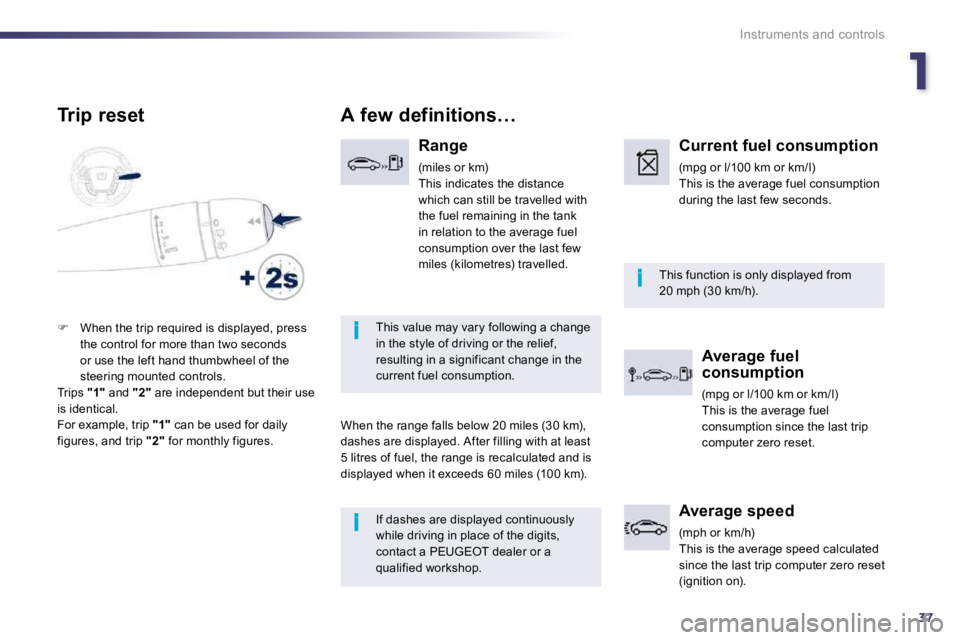
A few definitions…
Range
(miles or km) This indicates the distance which can still be travelled with the fuel remaining in the tank
in relation to the average fuel consumption over the last few miles (kilometres) travelled.
When the range falls below 20 miles (30 km),
dashes are displayed. After filling with at least 5 litres of fuel, the range is recalculated and is displayed when it exceeds 60 miles (100 km).
Current fuel consumption
(mpg or l/100 km or km/l) This is the average fuel consumption during the last few seconds.
Average fuel consumption
(mpg or l/100 km or km/l) This is the average fuel consumption since the last trip computer zero reset.
Average speed
(mph or km/h) This is the average speed calculated since the last trip computer zero reset (ignition on).
Trip reset
When the trip required is displayed, press the control for more than two seconds or use the left hand thumbwheel of the steering mounted controls. Trips "1" and "2" are independent but their use is identical. For example, trip "1" can be used for daily
figures, and trip "2" for monthly figures.
Page 57 of 330
249
Access
Locking the vehicle
with exterior perimeter
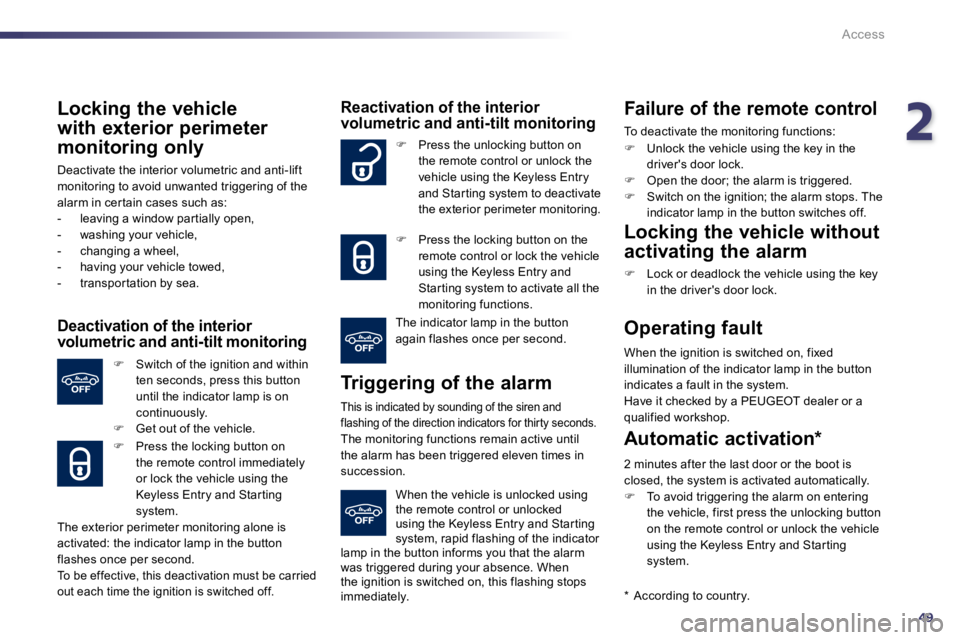
monitoring only
Deactivate the interior volumetric and anti-lift monitoring to avoid unwanted triggering of the alarm in cer tain cases such as: - leaving a window par tially open, - washing your vehicle, - changing a wheel, - having your vehicle towed, - transpor tation by sea.
Deactivation of the interior volumetric and anti-tilt monitoring
Switch of the ignition and within ten seconds, press this button until the indicator lamp is on continuously. Get out of the vehicle.
Press the locking button on the remote control immediately
or lock the vehicle using the Keyless Entry and Star ting system.
The exterior perimeter monitoring alone is activated: the indicator lamp in the button flashes once per second. To be effective, this deactivation must be carried out each time the ignition is switched off.
Reactivation of the interior volumetric and anti-tilt monitoring
Triggering of the alarm
This is indicated by sounding of the siren and flashing of the direction indicators for thirty sec onds. The monitoring functions remain active until the alarm has been triggered eleven times in succession.
Press the unlocking button on the remote control or unlock the vehicle using the Keyless Entry and Star ting system to deactivate the exterior perimeter monitoring.
Press the locking button on the remote control or lock the vehicle using the Keyless Entry and Star ting system to activate all the monitoring functions.
The indicator lamp in the button again flashes once per second.
When the vehicle is unlocked using the remote control or unlocked using the Keyless Entry and Star ting system, rapid flashing of the indicator lamp in the button informs you that the alarm was triggered during your absence. When the ignition is switched on, this flashing stops immediately.
Failure of the remote control
To deactivate the monitoring functions:
Unlock the vehicle using the key in the driver's door lock. Open the door; the alarm is triggered. Switch on the ignition; the alarm stops. The indicator lamp in the button switches off.
Locking the vehicle without
activating the alarm
Lock or deadlock the vehicle using the key in the driver's door lock.
Operating fault
When the ignition is switched on, fixed illumination of the indicator lamp in the button indicates a fault in the system. Have it checked by a PEUGEOT dealer or a qualified workshop.
* According to country.
Automatic activation *
2 minutes after the last door or the boot is closed, the system is activated automatically. To avoid triggering the alarm on entering the vehicle, first press the unlocking button on the remote control or unlock the vehicle using the Keyless Entry and Star ting system.
Page 78 of 330
70
!
i!
Comfort
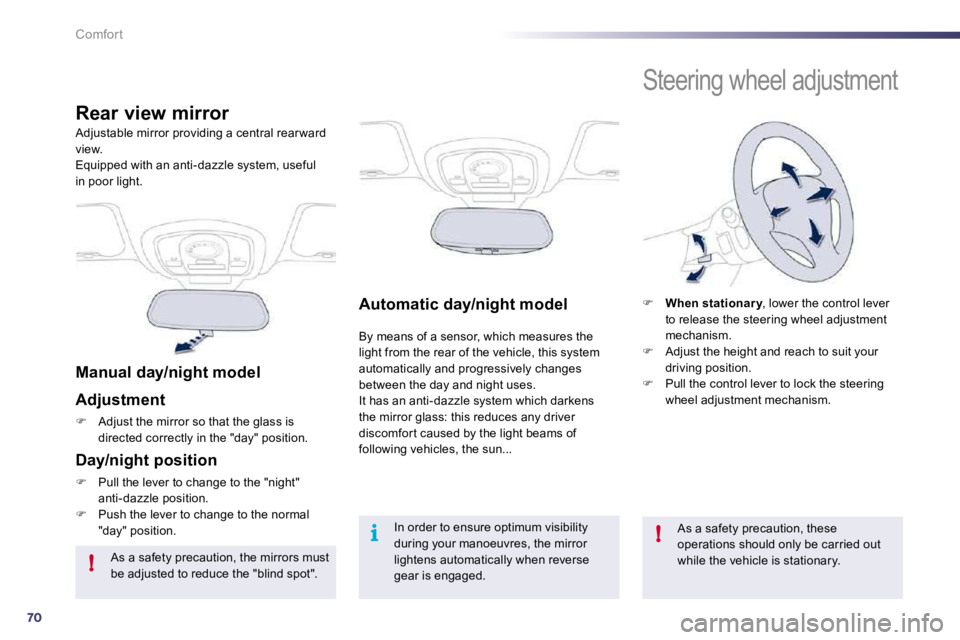
Automatic day/night model
By means of a sensor, which measures the light from the rear of the vehicle, this system automatically and progressively changes between the day and night uses. It has an anti-dazzle system which darkens the mirror glass: this reduces any driver discomfor t caused by the light beams of following vehicles, the sun...
Adjustable mirror providing a central rear ward view. Equipped with an anti-dazzle system, useful in poor light.
Rear view mirror
Manual day/night model
Adjustment
Adjust the mirror so that the glass is directed correctly in the "day" position.
Day/night position
Pull the lever to change to the "night" anti-dazzle position. Push the lever to change to the normal "day" position.
As a safety precaution, the mirrors must be adjusted to reduce the "blind spot".
In order to ensure optimum visibility during your manoeuvres, the mirror lightens automatically when reverse gear is engaged.
Steering wheel adjustment
When stationar y , lower the control lever ar yto release the steering wheel adjustment mechanism. Adjust the height and reach to suit your driving position. Pull the control lever to lock the steering wheel adjustment mechanism.
As a safety precaution, these operations should only be carried out while the vehicle is stationary.