service Peugeot 508 2011 User Guide
[x] Cancel search | Manufacturer: PEUGEOT, Model Year: 2011, Model line: 508, Model: Peugeot 508 2011Pages: 340, PDF Size: 25.72 MB
Page 232 of 340
230
EMERGENCY OR ASSISTANCE CALL
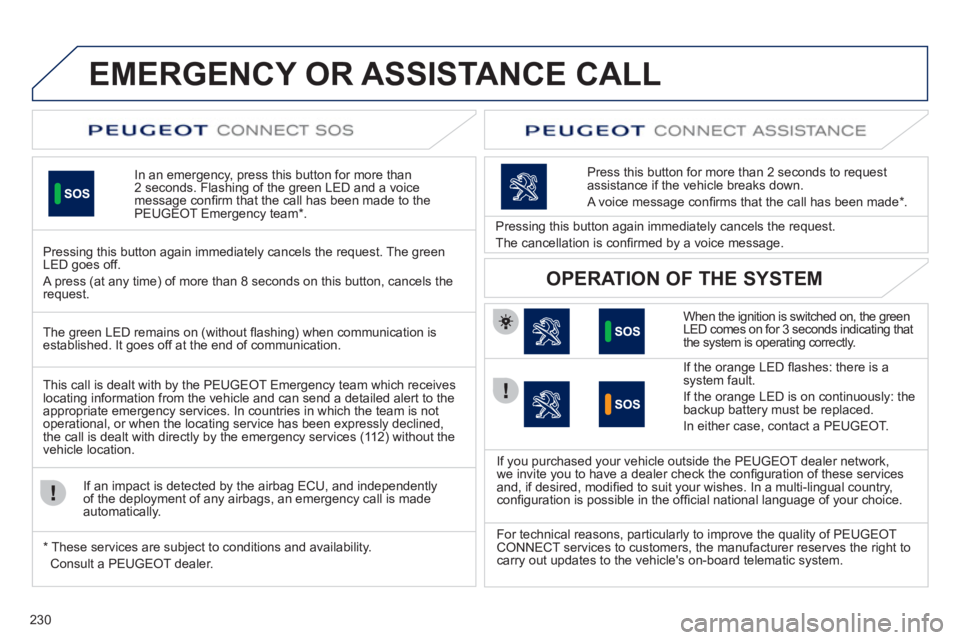
In an emergency, press this button for more than
2 seconds. Flashing of the green LED and a voice
message confi rm that the call has been made to the
PEUGEOT Emergency team * .
Pressing this button again immediately cancels the request. The green
LED goes off.
A press (at any time) of more than 8 seconds on this button, cancels the
request.
When the ignition is switched on, the green
LED comes on for 3 seconds indicating that
the system is operating correctly.
If the orange LED fl ashes: there is a
system fault.
If the orange LED is on continuously: the
backup battery must be replaced.
In either case, contact a PEUGEOT.
Pressing this button again immediately cancels the request.
The cancellation is confi rmed by a voice message.
Press this button for more than 2 seconds to request
assistance if the vehicle breaks down.
A voice message confi rms that the call has been made * .
OPERATION OF THE SYSTEM
The green LED remains on (without fl ashing) when communication is
established. It goes off at the end of communication.
This call is dealt with by the PEUGEOT Emergency team which receives
locating information from the vehicle and can send a detailed alert to the
appropriate emergency services. In countries in which the team is not
operational, or when the locating service has been expressly declined,
the call is dealt with directly by the emergency services (112) without the
vehicle location.
If an impact is detected by the airbag ECU, and independently
of the deployment of any airbags, an emergency call is made
automatically.
*
These services are subject to conditions and availability.
Consult a PEUGEOT dealer.
If you purchased your vehicle outside the PEUGEOT dealer network,
we invite you to have a dealer check the confi guration of these services
and, if desired, modifi ed to suit your wishes. In a multi-lingual country,
confi guration is possible in the offi cial national language of your choice.
For technical reasons, particularly to improve the quality of PEUGEOT
CONNECT services to customers, the manufacturer reserves the right to
carry out updates to the vehicle's on-board telematic system.
Page 245 of 340
243
04
1
3
4
5
2
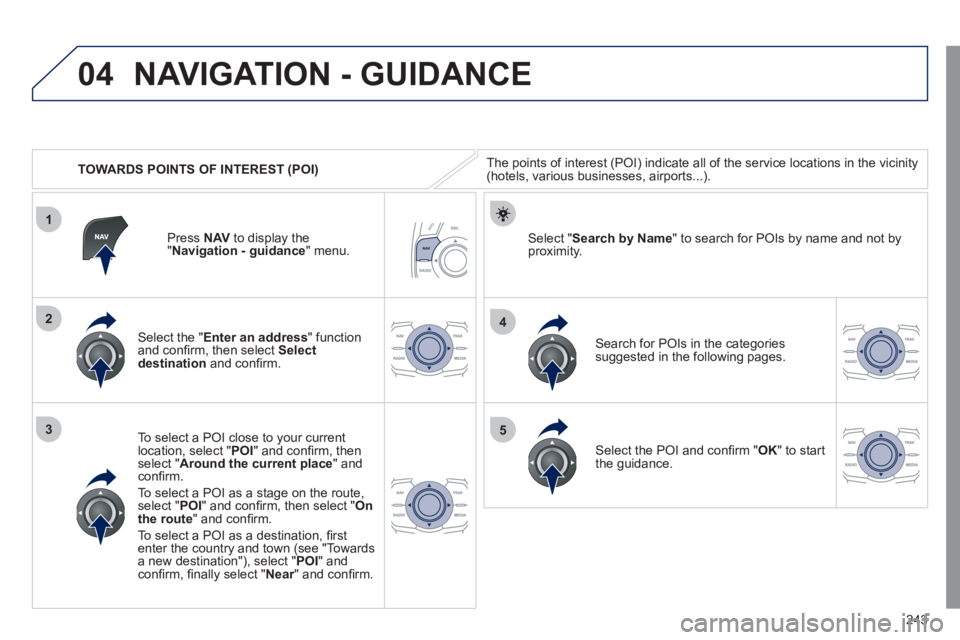
TOWARDS POINTS OF INTEREST (POI)
NAVIGATION - GUIDANCE
The points of interest (POI) indicate all of the service locations in the vicinity
(hotels, various businesses, airports...).
Select the " Enter an address
" function
and confi rm, then select Select
destination
and confi rm.
To select a POI close to your current
location, select " POI
" and confi rm, then
select " Around the current place
" and
confi rm.
To select a POI as a stage on the route,
select " POI
" and confi rm, then select " On
the route
" and confi rm.
To select a POI as a destination, fi rst
enter the country and town (see "Towards
a new destination"), select " POI
" and
confi rm, fi nally select " Near
" and confi rm.
Search for POIs in the categories
suggested in the following pages.
Select " Search by Name
" to search for POIs by name and not by
proximity.
Press NAV
to display the
" Navigation - guidance
" menu.
Select the POI and confi rm " OK
" to start
the guidance.
Page 246 of 340
244
04
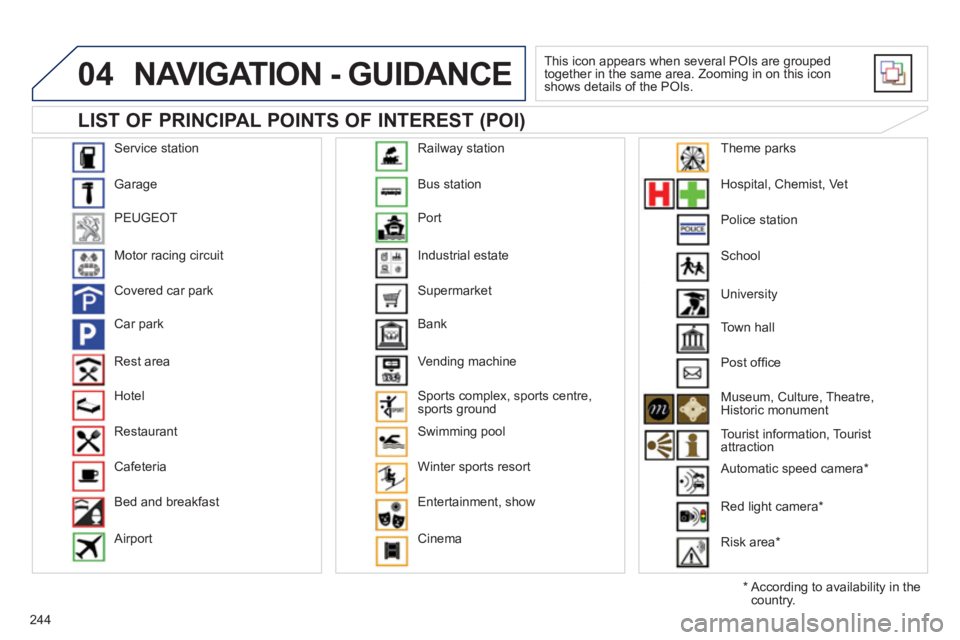
Service station
Garage
PEUGEOT
Motor racing circuit
Covered car park
Car park
Rest area
Hotel
Restaurant
Cafeteria
Bed and breakfast
Airport Bus station
Port
Industrial estate
Supermarket
Bank
Vending machine
Sports complex, sports centre,
sports ground
Swimming pool
Winter sports resort
Entertainment, show
Cinema Railway station
Hospital, Chemist, Vet
Police station
School
Town hall
Post offi ce
Museum, Culture, Theatre,
Historic monument
Tourist information, Tourist
attraction
Automatic speed camera *
Red light camera *
Risk area *
Theme parks
LIST OF PRINCIPAL POINTS OF INTEREST (POI)
NAVIGATION - GUIDANCE
This icon appears when several POIs are grouped
together in the same area. Zooming in on this icon
shows details of the POIs.
*
According to availability in the
country. University
Page 247 of 340
245
04
1
3
2
NAVIGATION - GUIDANCE
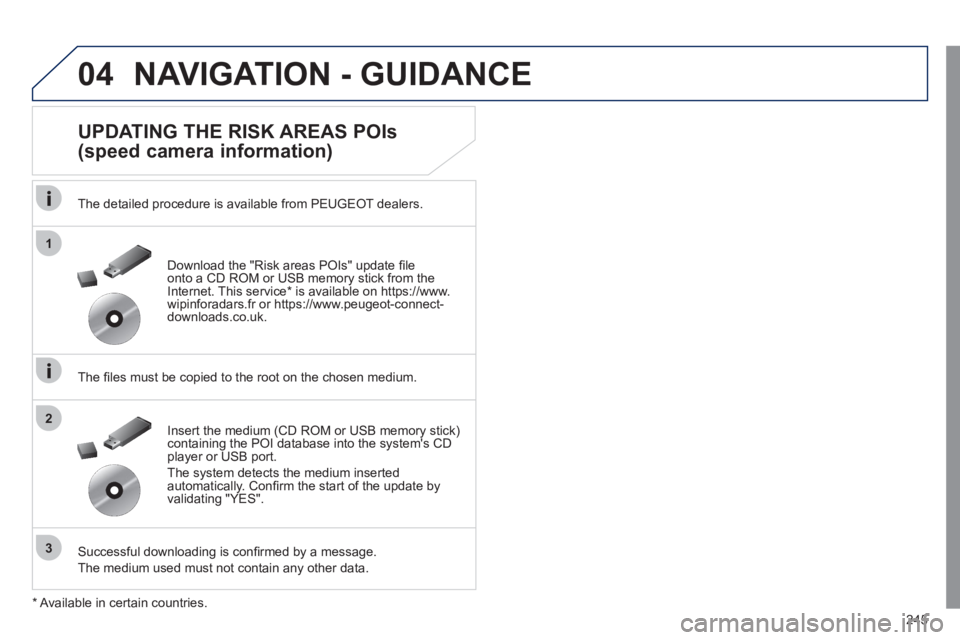
UPDATING THE RISK AREAS POIs
(speed camera information)
The detailed procedure is available from PEUGEOT dealers.
The fi les must be copied to the root on the chosen medium.
Successful downloading is confi rmed by a message.
The medium used must not contain any other data.
Insert the medium (CD ROM or USB memory stick)
containing the POI database into the system's CD
player or USB port.
The system detects the medium inserted
automatically. Confi rm the start of the update by
validating "YES".
Download the "Risk areas POIs" update fi le
onto a CD ROM or USB memory stick from the
Internet. This service * is available on https://www.
wipinforadars.fr or https://www.peugeot-connect-
downloads.co.uk.
* Available in certain countries.
Page 260 of 340
258
8
06
7
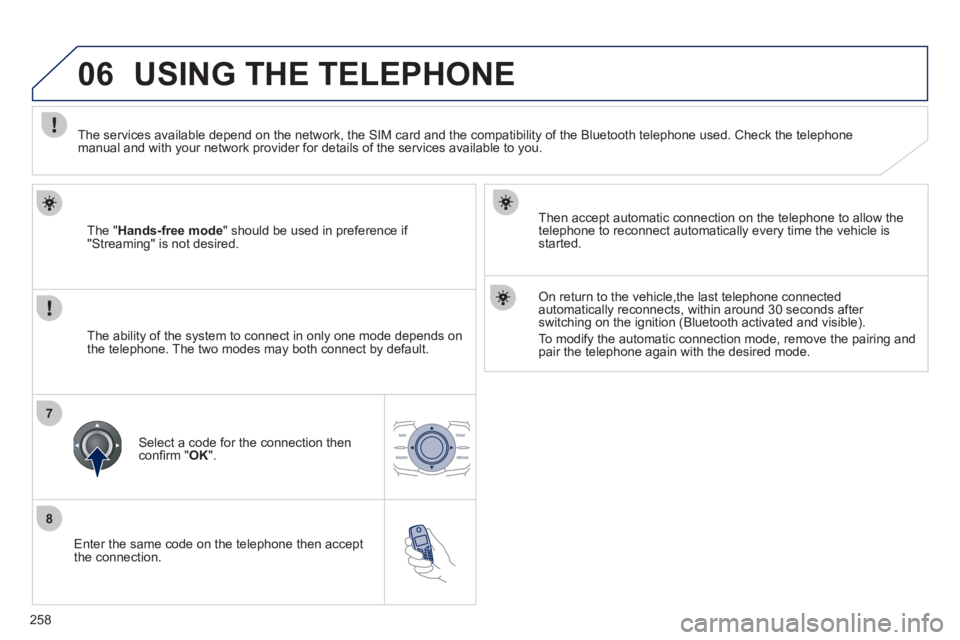
Enter the same code on the telephone then accept
the connection.
Then accept automatic connection on the telephone to allow the
telephone to reconnect automatically every time the vehicle is
started.
On return to the vehicle,the last telephone connected
automatically reconnects, within around 30 seconds after
switching on the ignition (Bluetooth activated and visible).
To modify the automatic connection mode, remove the pairing and
pair the telephone again with the desired mode.
USING THE TELEPHONE
The " Hands-free mode
" should be used in preference if
"Streaming" is not desired.
The services available depend on the network, the SIM card and the compatibility of the Bluetooth telephone used. Check the telephone
manual and with your network provider for details of the services available to you.
The ability of the system to connect in only one mode depends on
the telephone. The two modes may both connect by default.
Select a code for the connection then
confi rm " OK
".
Page 264 of 340
262
1
2a
2b
2c
2d
06 USING THE TELEPHONE
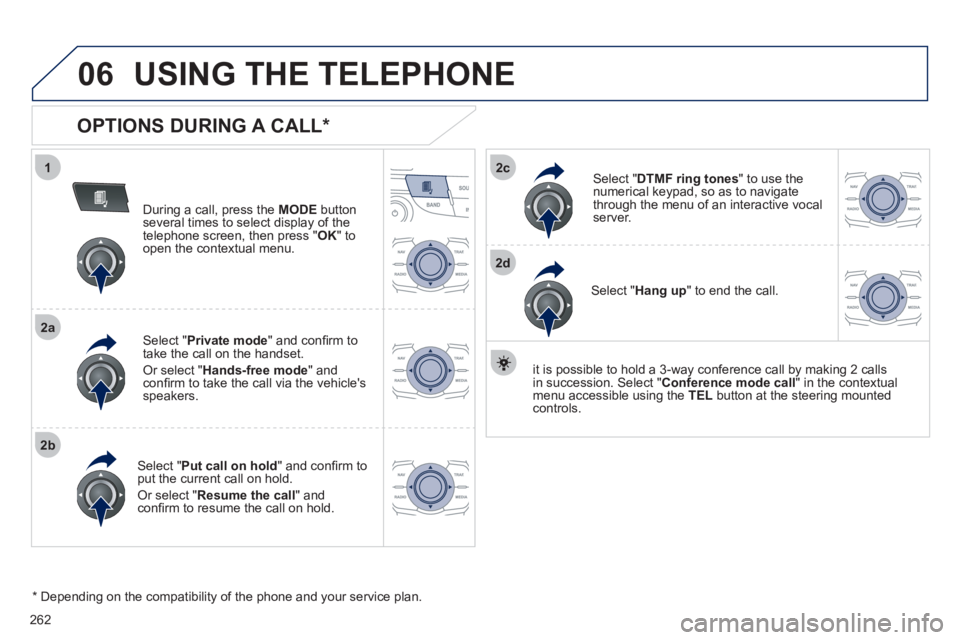
OPTIONS DURING A CALL *
During a call, press the MODE
button
several times to select display of the
telephone screen, then press " OK
" to
open the contextual menu.
Select " Private mode
" and confi rm to
take the call on the handset.
Or select " Hands-free mode
" and
confi rm to take the call via the vehicle's
speakers.
Select " Put call on hold
" and confi rm to
put the current call on hold.
Or select " Resume the call
" and
confi rm to resume the call on hold.
Select " DTMF ring tones
" to use the
numerical keypad, so as to navigate
through the menu of an interactive vocal
server.
Select " Hang up
" to end the call.
* Depending on the compatibility of the phone and your service plan.
it is possible to hold a 3-way conference call by making 2 calls
in succession. Select " Conference
mode call
" in the contextual
menu accessible using the TEL
button at the steering mounted
controls.
Page 303 of 340
301
05
1
25
3
4
6
USING THE TELEPHONE
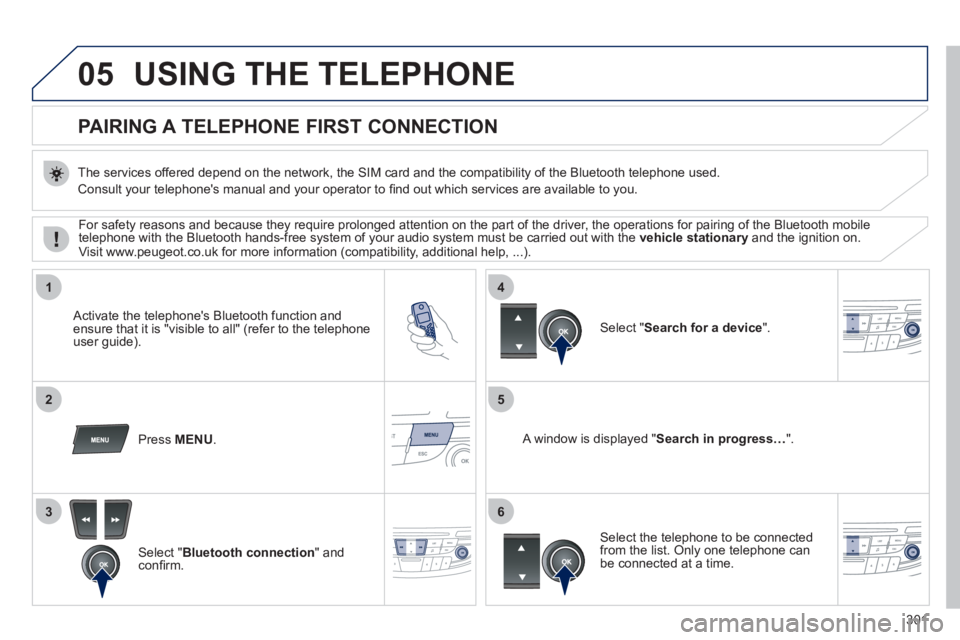
PAIRING A TELEPHONE
FIRST CONNECTION
The services offered depend on the network, the SIM card and the compatibility of the Bluetooth telephone used.
Consult your telephone's manual and your operator to fi nd out which services are available to you.
Activate the telephone's Bluetooth function and
ensure that it is "visible to all" (refer to the telephone
user guide).
Press MENU
.
A window is displayed " Search in progress…
".
Select the telephone to be connected
from the list. Only one telephone can
be connected at a time.
Select " Search for a device
".
For safety reasons and because they require prolonged attention on the part of the driver, the operations for pairing of the Bluetooth mobile
telephone with the Bluetooth hands-free system of your audio system must be carried out with the vehicle stationary
and the ignition on.
Visit www.peugeot.co.uk for more information (compatibility, additional help, ...).
Select " Bluetooth connection
" and
confi rm.
Page 329 of 340
.
327
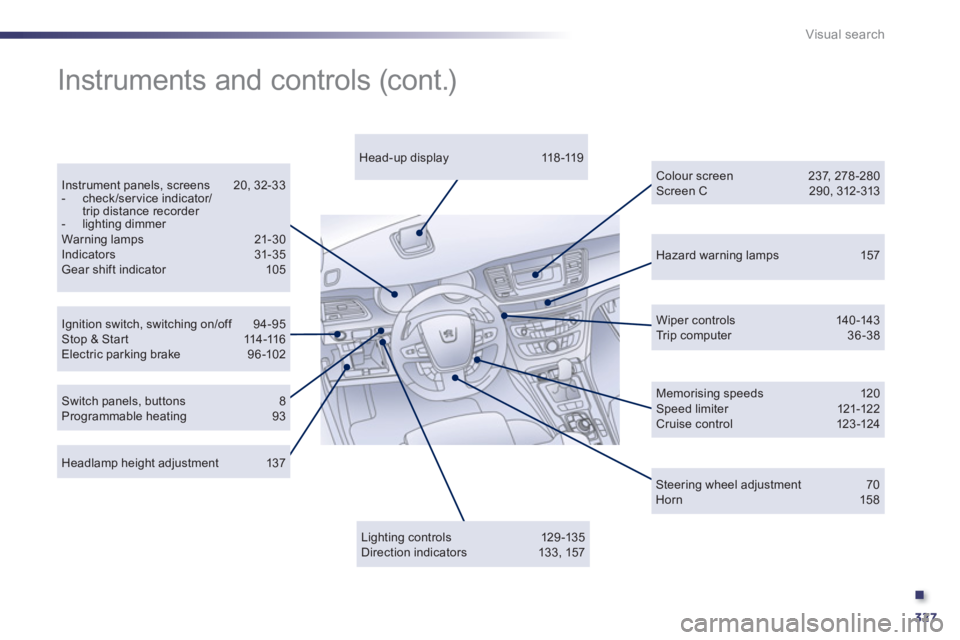
Visual search
Hazard warning lamps 157
Ignition switch, switching on/off 94-95
Stop & Star t 114-116
Electric parking brake 96 -102
Instrument panels, screens 20, 32-33
- check/service indicator/
trip distance recorder
- lighting dimmer
Warning lamps 21-30
Indicators 31-35
Gear shift indicator 105
Wiper controls 140-143
Trip computer 36 -38
Headlamp height adjustment 137
Head-up display 118 -119
Colour screen 237, 278 -280
Screen C 290, 312-313
Instruments and controls (cont.)
Lighting controls 129 -135
Direction indicators 133, 157
Switch panels, buttons 8
Programmable heating 93
Memorising speeds 120
Speed limiter 121-122
Cruise control 123 -124
Steering wheel adjustment 70
Horn 158