driver Peugeot 508 2011 Manual PDF
[x] Cancel search | Manufacturer: PEUGEOT, Model Year: 2011, Model line: 508, Model: Peugeot 508 2011Pages: 340, PDF Size: 25.72 MB
Page 230 of 340
228
i
Technical data
Identifi cation markings
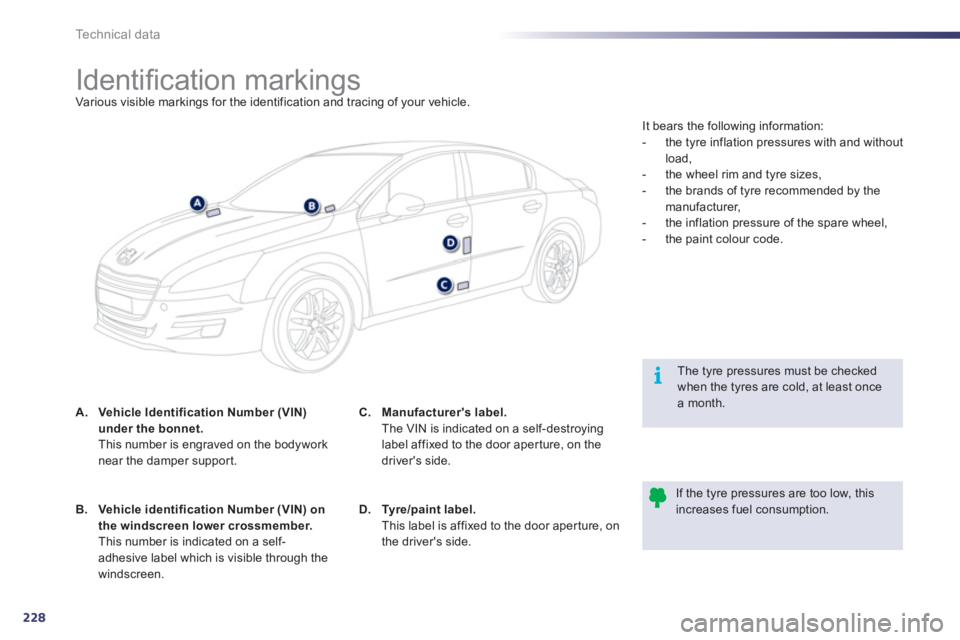
Various visible markings for the identification and tracing of your vehicle.
A.
Vehicle Identification Number (VIN)
under the bonnet.
This number is engraved on the bodywork
near the damper suppor t.
The tyre pressures must be checked
when the tyres are cold, at least once
a month.
If the tyre pressures are too low, this
increases fuel consumption.
B.
Vehicle identification Number (VIN) on
the windscreen lower crossmember.
This number is indicated on a self-
adhesive label which is visible through the
windscreen.
C.
Manufacturer's label.
The VIN is indicated on a self-destroying
label affixed to the door aper ture, on the
driver's side.
D.
Ty r e / p a i n t l a b e l .
This label is affixed to the door aper ture, on
the driver's side. It bears the following information:
- the tyre inflation pressures with and without
load,
- the wheel rim and tyre sizes,
- the brands of tyre recommended by the
manufacturer,
- the inflation pressure of the spare wheel,
- the paint colour code.
Page 233 of 340
231
JBL EQUIPMENT
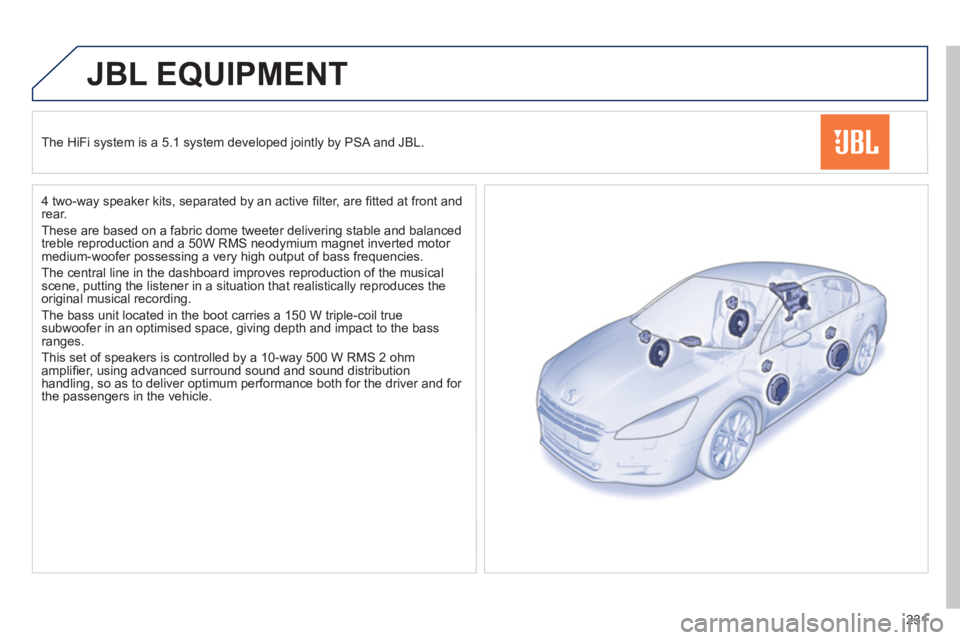
The HiFi system is a 5.1 system developed jointly by PSA and JBL.
4 two-way speaker kits, separated by an active fi lter, are fi tted at front and
rear.
These are based on a fabric dome tweeter delivering stable and balanced
treble reproduction and a 50W RMS neodymium magnet inverted motor
medium-woofer possessing a very high output of bass frequencies.
The central line in the dashboard improves reproduction of the musical
scene, putting the listener in a situation that realistically reproduces the
original musical recording.
The bass unit located in the boot carries a 150 W triple-coil true
subwoofer in an optimised space, giving depth and impact to the bass
ranges.
This set of speakers is controlled by a 10-way 500 W RMS 2 ohm
amplifi er, using advanced surround sound and sound distribution
handling, so as to deliver optimum performance both for the driver and for
the passengers in the vehicle.
Page 235 of 340
233
The system is protected in such a way that it will only
operate in your vehicle. If it is to be installed in another
vehicle, contact a PEUGEOT dealer for confi guration of
the system.
PEUGEOT CONNECT NAVIGATION (RT6)
01 First steps - Control panel
For safety reasons, the driver must carry out operations
which require prolonged attention while the vehicle is
stationary.
When the engine is switched off and to prevent
discharging of the battery, the system switches off
following the activation of the energy economy mode.
CONTENTS
02 Steering mounted controls
03 General operation
04 Navigation - Guidance
05 Traffic information
06 Using the telephone
07 Contacts - ADDR BOOK
08 Radio
09 Music media players
10 Audio settings
11 Configuration
12 Screen menu map p.
p.
p.
p.
p.
p.
p.
p.
p.
p.
p.
p.
234
236
237
239
253
256
264
267
270
276
277
278
Frequently asked questions p. 281
SATELLITE NAVIGATION SYSTEM
MULTIMEDIA BLUETOOTH TELEPHONE AUDIO
SYSTEM
Page 256 of 340
254
05
1
2
3
4
TRAFFIC INFORMATION
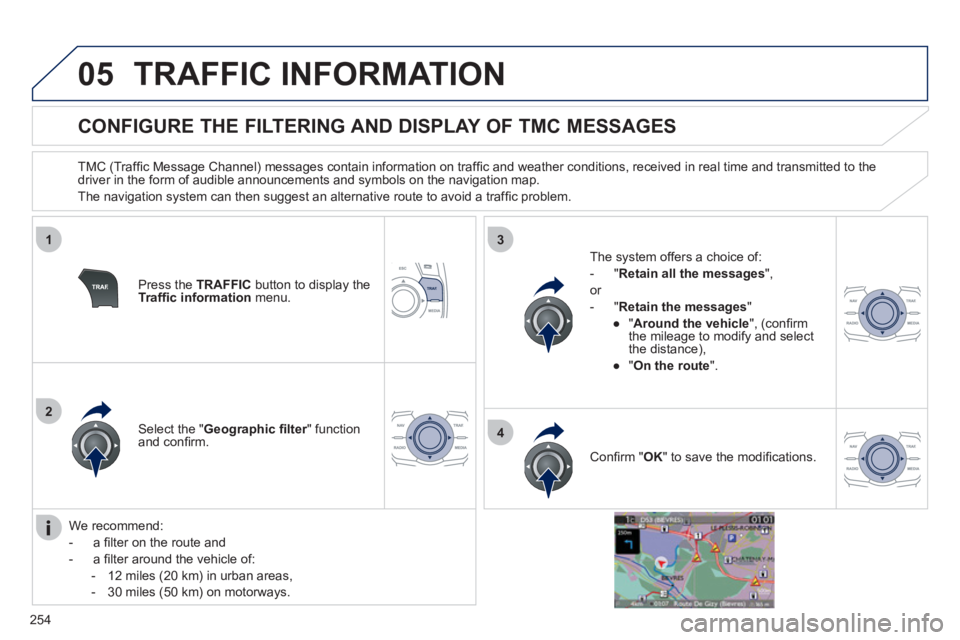
CONFIGURE THE FILTERING AND DISPLAY OF TMC MESSAGES
TMC (Traffi c Message Channel) messages contain information on traffi c and weather conditions, received in real time and transmitted to the
driver in the form of audible announcements and symbols on the navigation map.
The navigation system can then suggest an alternative route to avoid a traffi c problem.
Press the TRAFFIC
button to display the
Traffi c information
menu.
Select the " Geographic fi lter
" function
and confi rm.
The system offers a choice of:
- " Retain all the messages
",
or
- " Retain the messages
"
●
" Around the vehicle
", (confi rm
the mileage to modify and select
the distance),
●
" On the route
".
Confi rm " OK
" to save the modifi cations.
We recommend:
- a fi lter on the route and
- a fi lter around the vehicle of:
- 12 miles (20 km) in urban areas,
- 30 miles (50 km) on motorways.
Page 259 of 340
257
1
2
5
6
3
4
06
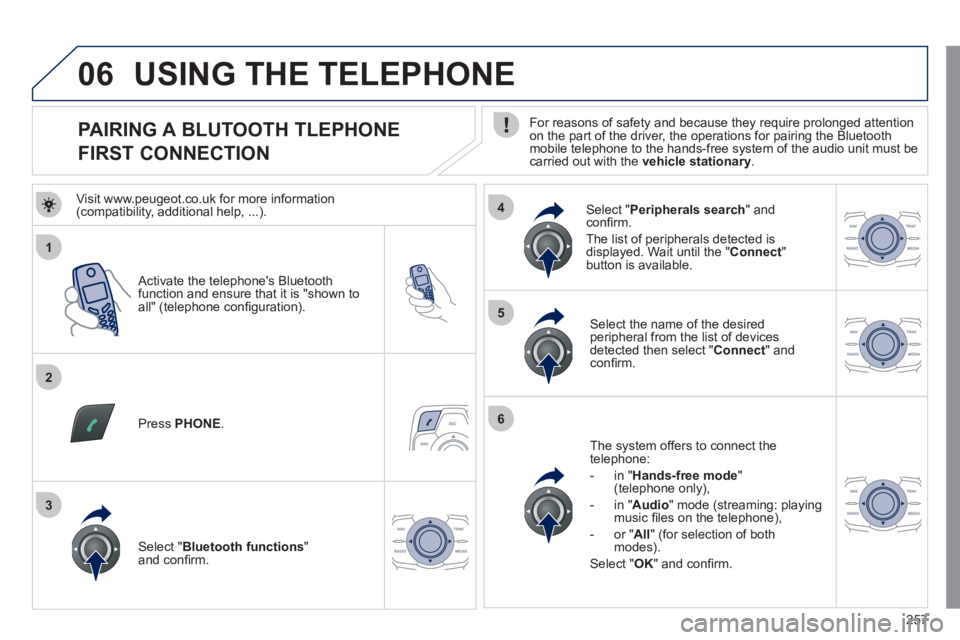
PAIRING A BLUTOOTH TLEPHONE
FIRST CONNECTION
For reasons of safety and because they require prolonged attention
on the part of the driver, the operations for pairing the Bluetooth
mobile telephone to the hands-free system of the audio unit must be
carried out with the vehicle stationary
.
Activate the telephone's Bluetooth
function and ensure that it is "shown to
all" (telephone confi guration).
Press PHONE
.
Select the name of the desired
peripheral from the list of devices
detected then select " Connect
" and
confi rm.
The system offers to connect the
telephone:
- in " Hands-free mode
"
(telephone only),
- in " Audio
" mode (streaming: playing
music fi les on the telephone),
- or " All
" (for selection of both
modes).
Select " OK
" and confi rm.
Select " Bluetooth functions
"
and confi rm.
Select " Peripherals search
" and
confi rm.
The list of peripherals detected is
displayed. Wait until the " Connect
"
button is available.
USING THE TELEPHONE
Visit www.peugeot.co.uk for more information
(compatibility, additional help, ...).
Page 278 of 340
276
10
1
2
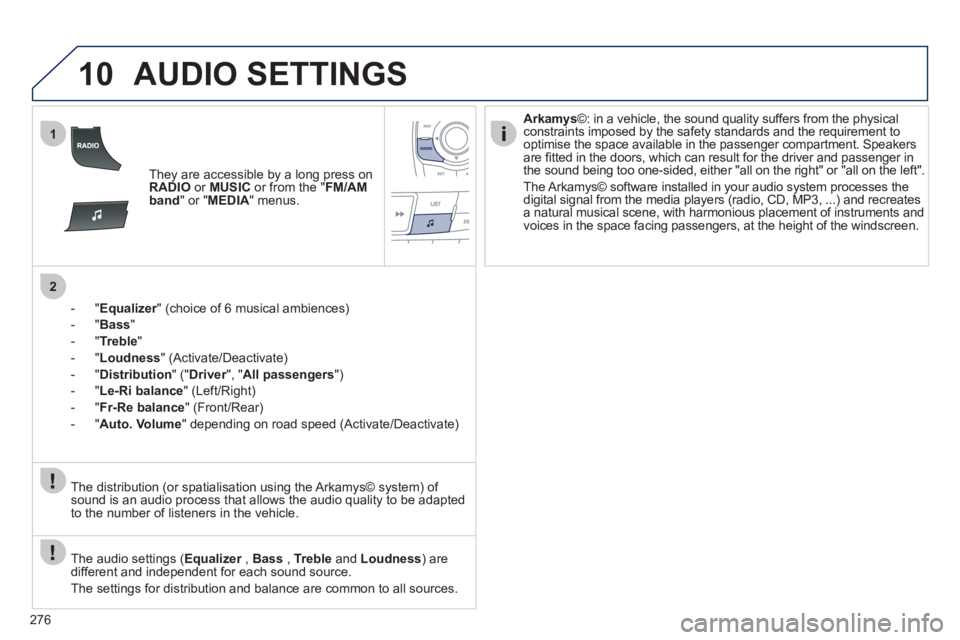
AUDIO SETTINGS
They are accessible by a long press on
RADIO
or MUSIC
or from the " FM/AM
band
" or " MEDIA
" menus.
- " Equalizer
" (choice of 6 musical ambiences)
- " Bass
"
- " Treble
"
- " Loudness
" (Activate/Deactivate)
- " Distribution
" (" Driver
", " All passengers
")
- " Le-Ri balance
" (Left/Right)
- " Fr-Re balance
" (Front/Rear)
- " Auto. Volume
" depending on road speed (Activate/Deactivate)
The audio settings ( Equalizer
, Bass
, Treble
and Loudness
) are
different and independent for each sound source.
The settings for distribution and balance are common to all sources.
The distribution (or spatialisation using the Arkamys© system) of
sound is an audio process that allows the audio quality to be adapted
to the number of listeners in the vehicle.
Arkamys
©: in a vehicle, the sound quality suffers from the physical
constraints imposed by the safety standards and the requirement to
optimise the space available in the passenger compartment. Speakers
are fi tted in the doors, which can result for the driver and passenger in
the sound being too one-sided, either "all on the right" or "all on the left".
The Arkamys© software installed in your audio system processes the
digital signal from the media players (radio, CD, MP3, ...) and recreates
a natural musical scene, with harmonious placement of instruments and
voices in the space facing passengers, at the height of the windscreen.
Page 282 of 340
280
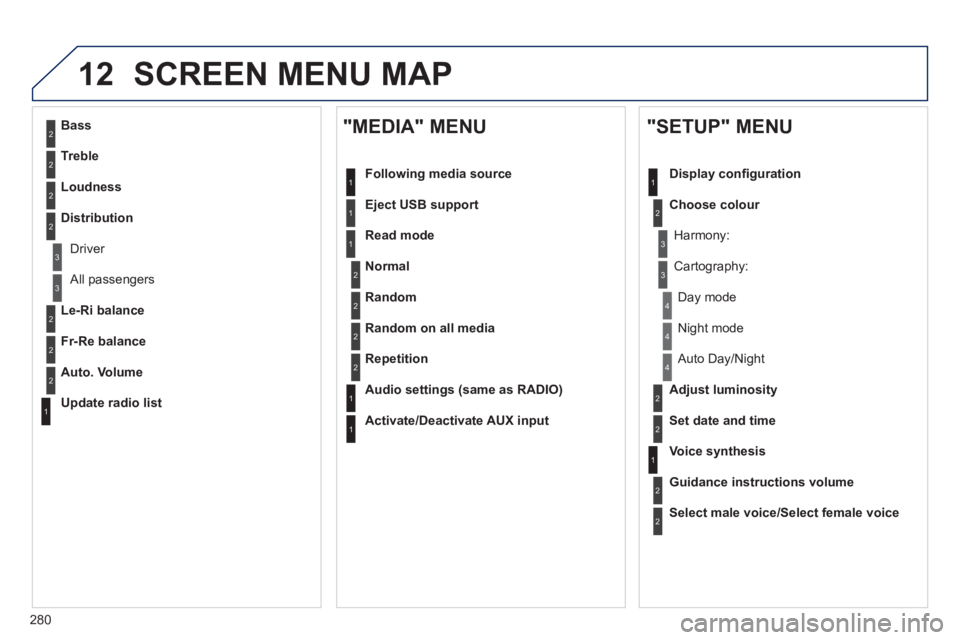
12 SCREEN MENU MAP
2
3
3
1
4
2
2
1
4
4
2
2
1
1
1
2
1
1
2
2
2
2
2
2
2
3
3
2
2
2
1
Random on all media
Repetition
Audio settings (same as RADIO)
Activate/Deactivate AUX input
"MEDIA" MENU
Following media source
Eject USB support
Read mode
Normal
Random
All passengers
Le-Ri balance
Fr-Re balance
Auto. Volume
Update radio list
Bass
Treble
Loudness
Distribution
Driver
Night mode
Auto Day/Night
Adjust luminosity
Set date and time
"SETUP" MENU
Display confi guration
Choose colour
Harmony:
Cartography:
Day mode
Voice synthesis
Guidance instructions volume
Select male voice/Select female voice
Page 289 of 340
287
The system is coded in such a way that it will only
operate in your vehicle. If it is to be installed in another
vehicle, contact your PEUGEOT dealer for confi guration
of the system.
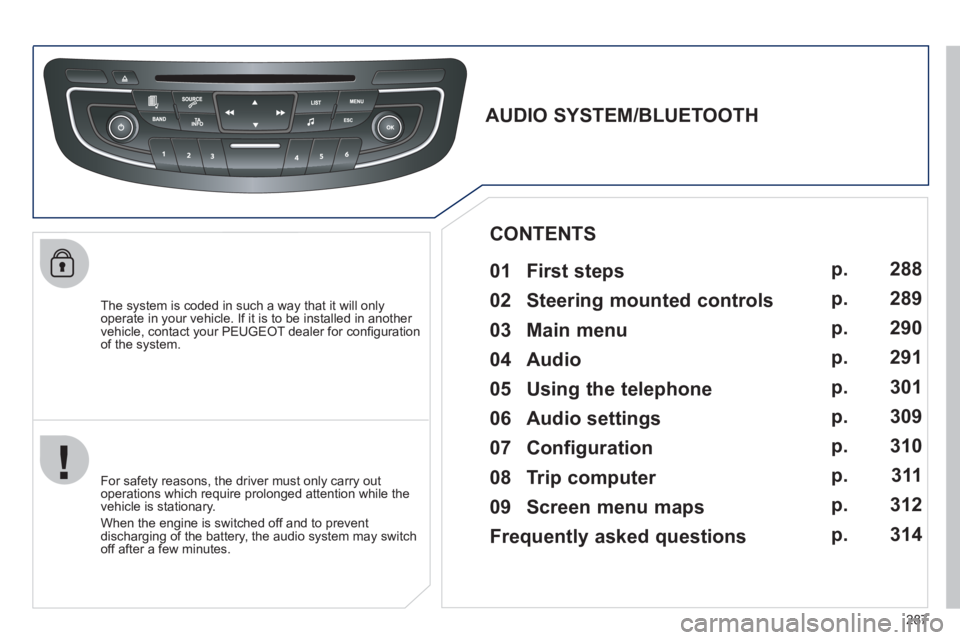
AUDIO SYSTEM/BLUETOOTH
01 First steps
For safety reasons, the driver must only carry out
operations which require prolonged attention while the
vehicle is stationary.
When the engine is switched off and to prevent
discharging of the battery, the audio system may switch
off after a few minutes.
CONTENTS
02 Steering mounted controls
03 Main menu
04 Audio
05 Using the telephone
06 Audio settings
07 Configuration
08 Trip computer
09 Screen menu maps
Frequently asked questions p.
p.
p.
p.
p.
p.
p.
p.
p.
p.
288
289
290
291
301
309
310
311
312
314
Page 303 of 340
301
05
1
25
3
4
6
USING THE TELEPHONE
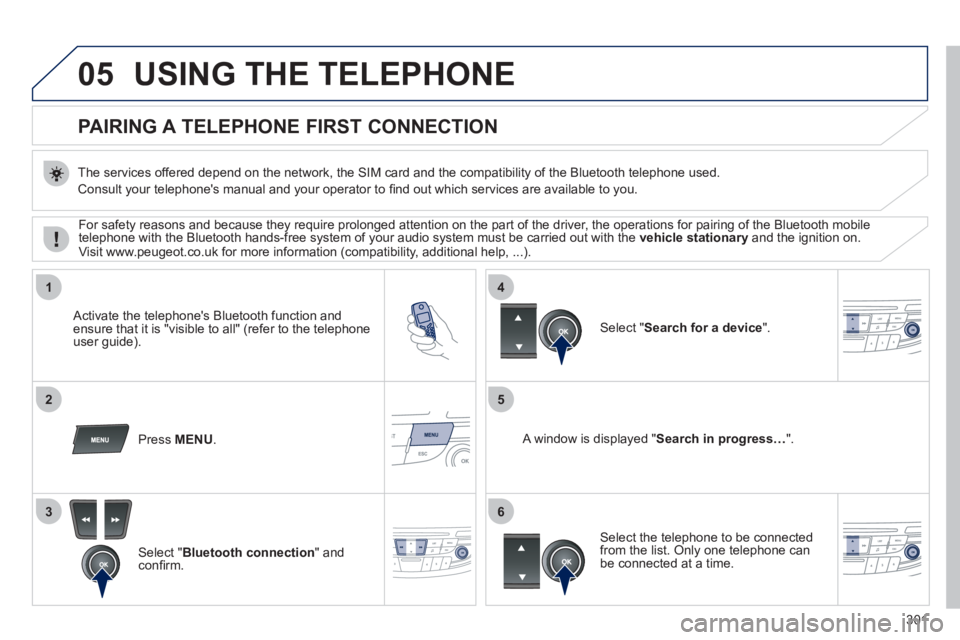
PAIRING A TELEPHONE
FIRST CONNECTION
The services offered depend on the network, the SIM card and the compatibility of the Bluetooth telephone used.
Consult your telephone's manual and your operator to fi nd out which services are available to you.
Activate the telephone's Bluetooth function and
ensure that it is "visible to all" (refer to the telephone
user guide).
Press MENU
.
A window is displayed " Search in progress…
".
Select the telephone to be connected
from the list. Only one telephone can
be connected at a time.
Select " Search for a device
".
For safety reasons and because they require prolonged attention on the part of the driver, the operations for pairing of the Bluetooth mobile
telephone with the Bluetooth hands-free system of your audio system must be carried out with the vehicle stationary
and the ignition on.
Visit www.peugeot.co.uk for more information (compatibility, additional help, ...).
Select " Bluetooth connection
" and
confi rm.