passenger Peugeot 508 2011 Owner's Manual
[x] Cancel search | Manufacturer: PEUGEOT, Model Year: 2011, Model line: 508, Model: Peugeot 508 2011Pages: 340, PDF Size: 25.72 MB
Page 9 of 340
.
7
Familiarisation
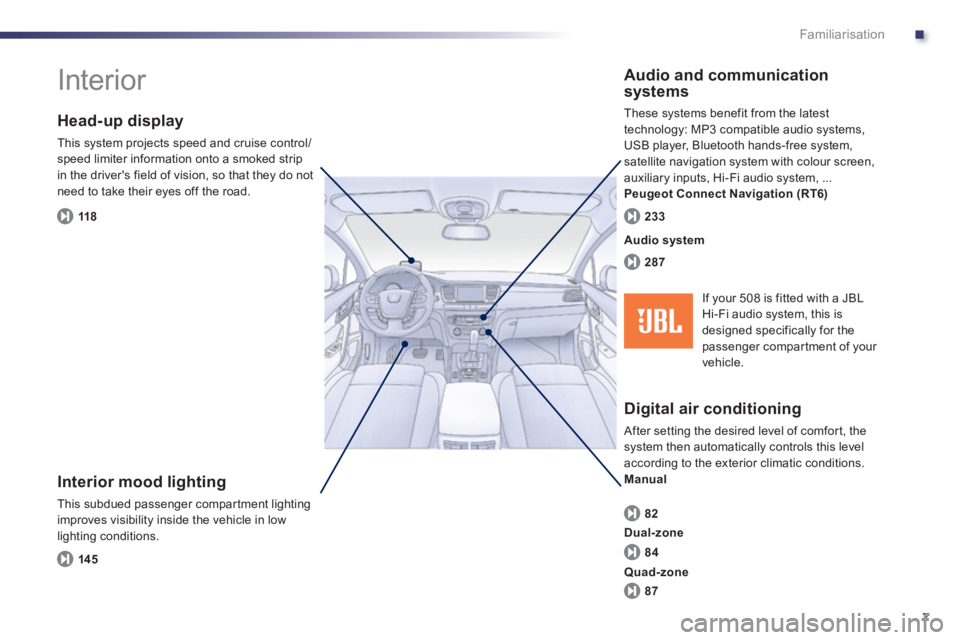
Interior
Interior mood lighting
This subdued passenger compar tment lighting
improves visibility inside the vehicle in low
lighting conditions.
Head-up display
This system projects speed and cruise control/
speed limiter information onto a smoked strip
in the driver's field of vision, so that they do not
need to take their eyes off the road.
Digital air conditioning
After setting the desired level of comfor t, the
system then automatically controls this level
according to the exterior climatic conditions.
Manual
Audio and communication
systems
These systems benefit from the latest
technology: MP3 compatible audio systems,
USB player, Bluetooth hands-free system,
satellite navigation system with colour screen,
auxiliary inputs, Hi-Fi audio system, ...
Peugeot Connect Navigation (RT6)
14 5
118
82
287
233
Audio system
84
87
Dual-zone
Quad-zone
If your 508 is fitted with a JBL
Hi-Fi audio system, this is
designed specifically for the
passenger compartment of your
vehicle.
Page 12 of 340
10
Familiarisation
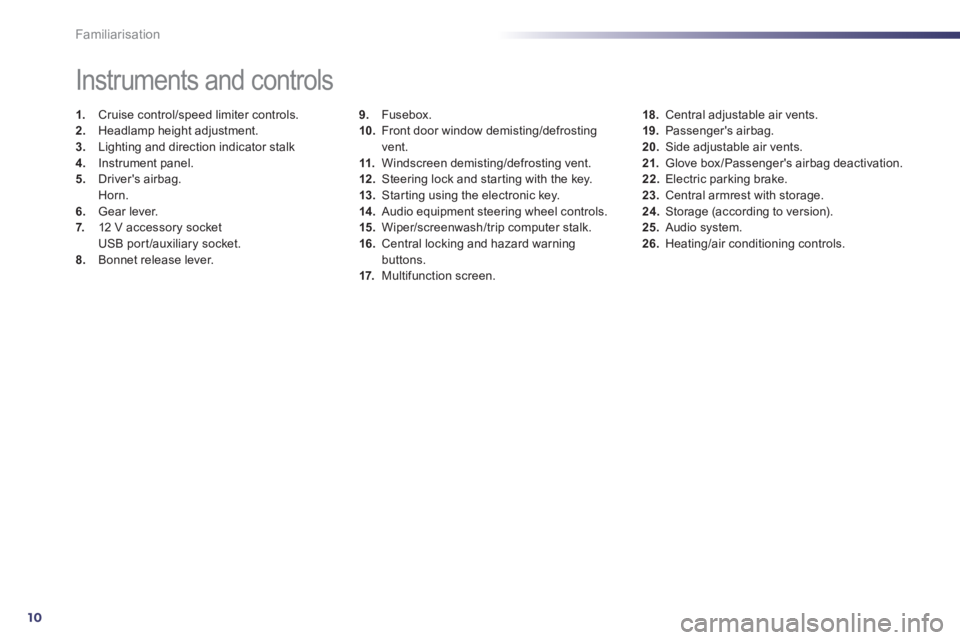
9.
Fusebox.
10.
Front door window demisting/defrosting
vent.
11.
Windscreen demisting/defrosting vent.
12 .
Steering lock and star ting with the key.
13.
Star ting using the electronic key.
14 .
Audio equipment steering wheel controls.
15.
Wiper/screenwash/trip computer stalk.
16.
Central locking and hazard warning
buttons.
17.
Multifunction screen.
Instruments and controls
1.
Cruise control/speed limiter controls.
2.
Headlamp height adjustment.
3.
Lighting and direction indicator stalk
4.
Instrument panel.
5.
Driver's airbag.
Horn.
6.
Gear lever.
7.
12 V accessory socket
USB port /auxiliary socket.
8.
Bonnet release lever.
18.
Central adjustable air vents.
19.
Passenger's airbag.
20.
Side adjustable air vents.
21.
Glove box /Passenger's airbag deactivation.
22.
Electric parking brake.
23.
Central armrest with storage.
24.
Storage (according to version).
25.
Audio system.
26.
Heating/air conditioning controls.
Page 19 of 340
.
17
Familiarisation
Passenger safety
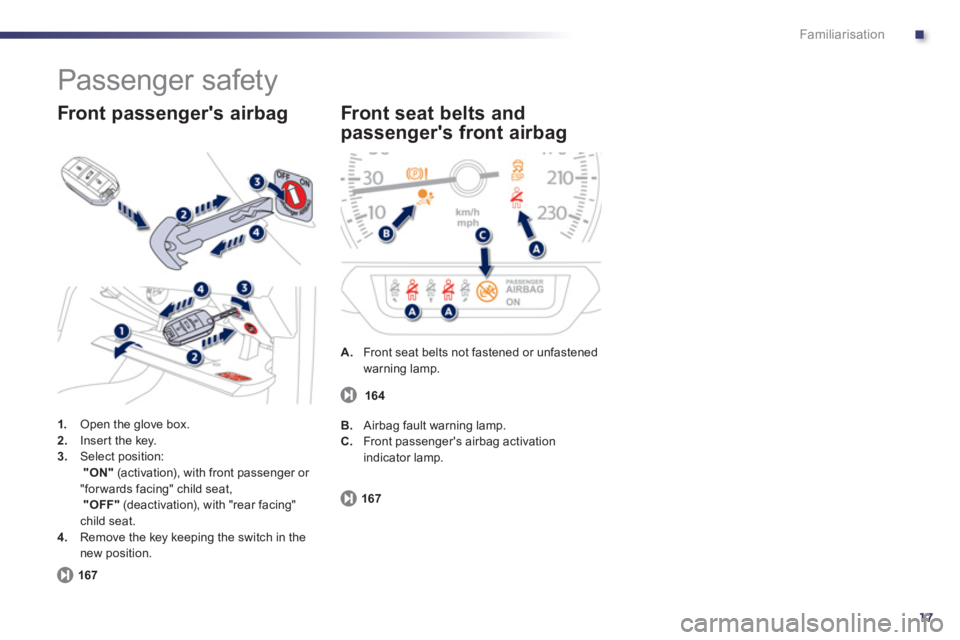
1.
Open the glove box.
2.
Inser t the key.
3.
Select position:
"ON"
(activation), with front passenger or
"for wards facing" child seat,
"OFF"
(deactivation), with "rear facing"
child seat.
4.
Remove the key keeping the switch in the
new position.
Front passenger's airbag
167
A.
Front seat belts not fastened or unfastened
warning lamp.
Front seat belts and
passenger's front airbag
167
B.
Airbag fault warning lamp.
C.
Front passenger's airbag activation
indicator lamp. 164
Page 26 of 340
24
Instruments and controls
Warning/indicator lamp
State
Cause
Action/Observations
Automatic
wiping
fixed. The wiper control is pushed
downwards. Automatic front wiping is activated.
Passenger's
airbag system
fixed in the seat belt
and passenger's front
airbag warning lamps
display.
The control switch, located in the glove
box, has been placed in the "ON"
position.
The passenger's front airbag is activated.
In this case, do not install a "rear facing"
child seat. Move the control switch to the "OFF"
position to
deactivate the passenger's front airbag.
In this case, you can install a "rear facing" child seat.
Stop & Start
fixed. The Stop & Star t system has put the
engine in STOP mode at a vehicle
stop (traffic lights, traffic jam, or
other...). The warning lamp goes off and the engine restar ts
automatically in START mode, as soon as you want to
move off.
flashes for a few
seconds, then goes
off. STOP mode is temporarily
unavailable.
or
START mode is invoked
automatically. Refer to "Driving - § Stop & Start" for special cases
with STOP mode and START mode.
Page 27 of 340
1
25
Instruments and controls
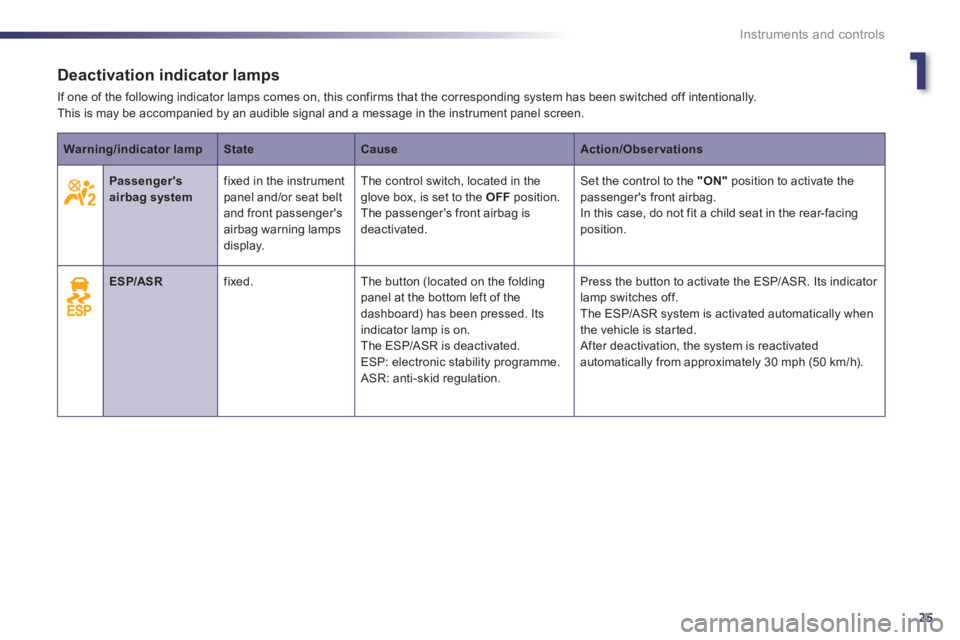
Deactivation indicator lamps
If one of the following indicator lamps comes on, this confirms that the corresponding system has been switched off intentionally.
This is may be accompanied by an audible signal and a message in the instrument panel screen.
Warning/indicator lamp
State
Cause
Action/Observations
Passenger's
airbag system
fixed in the instrument
panel and/or seat belt
and front passenger's
airbag warning lamps
display. The control switch, located in the
glove box, is set to the OFF
position.
The passenger's front airbag is
deactivated. Set the control to the "ON"
position to activate the
passenger's front airbag.
In this case, do not fit a child seat in the rear-facing
position.
ESP/ASR
fixed. The button (located on the folding
panel at the bottom left of the
dashboard) has been pressed. Its
indicator lamp is on.
The ESP/ASR is deactivated.
ESP: electronic stability programme.
ASR: anti-skid regulation. Press the button to activate the ESP/ASR. Its indicator
lamp switches off.
The ESP/ASR system is activated automatically when
the vehicle is star ted.
After deactivation, the system is reactivated
automatically from approximately 30 mph (50 km/h).
Page 34 of 340
32
i
Instruments and controls
* According to country.
CHECK (vehicle autotest)
Automatic CHECK
With the key in the ignition on position, all of the
warning lamps for the functions tested are displayed.
They are switched off after a few seconds.
At the same time, an automatic CHECK
(vehicle autotest) is carried out.
In the presence of a fault
A "minor" fault has been detected: the warning
lamp(s) are displayed then go off.
You can start your vehicle; however, contact a
PEUGEOT dealer or a qualified workshop as
soon as possible.
A "major" fault has been detected: the
associated warning lamps(s) remain on
accompanied by the STOP or SERVICE
warning lamp.
Do not start your vehicle.
Call a PEUGEOT dealer or a qualified
workshop without delay.
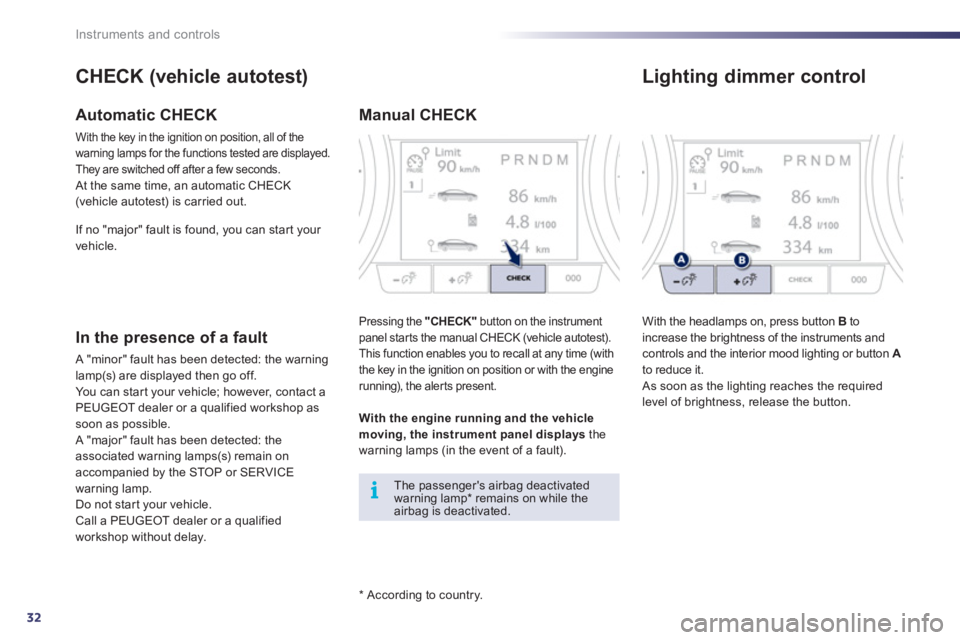
Manual CHECK
Pressing the "CHECK
"
button on the instrument
panel star ts the manual CHECK (vehicle autotest).
This function enables you to recall at any time (with
the key in the ignition on position or with the engine
running), the aler ts present.
The passenger's airbag deactivated
warning lamp * remains on while the
airbag is deactivated.
With the engine running and the vehicle
moving, the instrument panel displays
the
warning lamps (in the event of a fault). If no "major" fault is found, you can start your
vehicle.
Lighting dimmer control
With the headlamps on, press button B
to
increase the brightness of the instruments and
controls and the interior mood lighting or button A
to reduce it.
As soon as the lighting reaches the required
level of brightness, release the button.
Page 41 of 340
2
39
i
Access
System which permits central unlocking or locking of the vehicle using the lock or from a distance. It is also used to locate and start the vehicle, as well
as providing protection against theft.
Remote control key
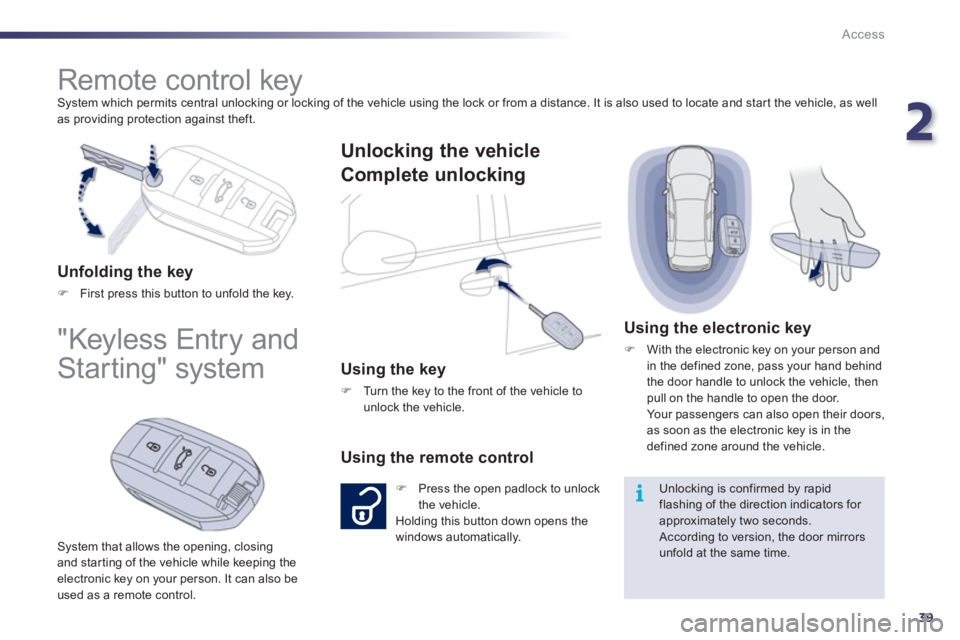
Unfolding the key
)
First press this button to unfold the key.
"Keyless Entry and
Starting" system
System that allows the opening, closing
and star ting of the vehicle while keeping the
electronic key on your person. It can also be
used as a remote control.
Unlocking the vehicle
Complete unlocking
Using the key
)
Turn the key to the front of the vehicle to
unlock the vehicle.
Using the remote control
)
Press the open padlock to unlock
the vehicle.
Holding this button down opens the
windows automatically.
Using the electronic key
)
With the electronic key on your person and
in the defined zone, pass your hand behind
the door handle to unlock the vehicle, then
pull on the handle to open the door.
Your passengers can also open their doors,
as soon as the electronic key is in the
defined zone around the vehicle.
Unlocking is confirmed by rapid
flashing of the direction indicators for
approximately two seconds.
According to version, the door mirrors
unfold at the same time.
Page 42 of 340
40
i
Access
Selective unlocking
)
To unlock the driver's door only
press the open padlock once.
Using the remote control
This is set via the instrument panel
screen configuration menu.
Complete unlocking is activated by
default.
Using the electronic key
)
To unlock only the driver's door with the
electronic key on your person, pass your
hand behind the driver's door handle then
pull the handle to open the door.
)
To unlock the vehicle completely, pass your
hand behind one of the passenger door
handles, on the side of the vehicle where
the electronic key is located, then pull the
door handle.
Each unlocking is confirmed by rapid
flashing of the direction indicators for
approximately two seconds.
According to version, the door mirrors
unfold at the same time as the first
unlocking action.
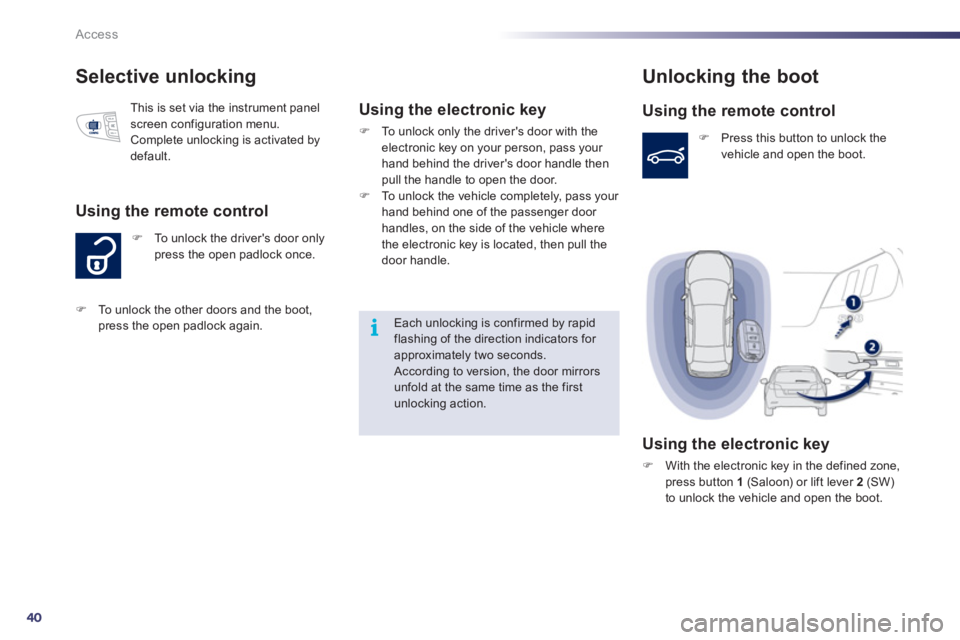
Unlocking the boot
Using the remote control
)
Press this button to unlock the
vehicle and open the boot.
Using the electronic key
)
With the electronic key in the defined zone,
press button 1
(Saloon) or lift lever 2
(SW)
to unlock the vehicle and open the boot.
)
To unlock the other doors and the boot,
press the open padlock again.
Page 46 of 340
![Peugeot 508 2011 Owners Manual 44
!
!
Access
Locking/unlocking from the inside
Automatic central locking of the
doors
The doors can lock automatically while driving
(speed above 6 mph [10 km/h]).
To activate or deact](/img/29/28215/w960_28215-45.png "Peugeot 508 2011 Owners Manual 44
!
!
Access
Locking/unlocking from the inside
Automatic central locking of the
doors
The doors can lock automatically while driving
(speed above 6 mph [10 km/h]).
To activate or deact")
44
!
!
Access
Locking/unlocking from the inside
Automatic central locking of the
doors
The doors can lock automatically while driving
(speed above 6 mph [10 km/h]).
To activate or deactivate this function,
press and hold the button until the message
"Automatic door locking activated or
deactivated" appears.
If the vehicle is deadlocked, the button
is not active. In this case, use the key or
the remote control to unlock.
Driving with the doors locked may make
access to the passenger compar tment
by the emergency services more
difficult in an emergency.
Folding the key
)
First press this button to fold the key.
)
Press the closed padlock to
locate your locked vehicle in a
car park.
Locating your vehicle
)
Press the button.
This allows the doors and the boot to be locked
or unlocked.
This is indicated by lighting of the cour tesy
lamps and flashing of the direction indicators
for a few seconds.
Page 47 of 340
2
45
Access
Emergency procedure
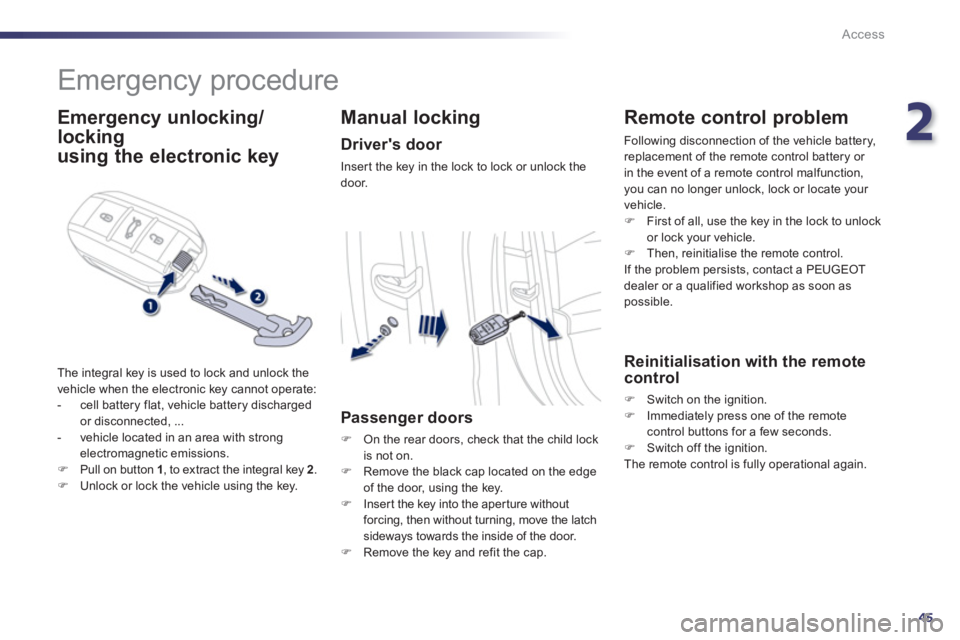
Emergency unlocking/
locking
using the electronic key
The integral key is used to lock and unlock the
vehicle when the electronic key cannot operate:
- cell battery flat, vehicle battery discharged
or disconnected, ...
- vehicle located in an area with strong
electromagnetic emissions.
)
Pull on button 1
, to extract the integral key 2
.
)
Unlock or lock the vehicle using the key.
Manual locking
Driver's door
Inser t the key in the lock to lock or unlock the
door.
Passenger doors
)
On the rear doors, check that the child lock
is not on.
)
Remove the black cap located on the edge
of the door, using the key.
)
Inser t the key into the aper ture without
forcing, then without turning, move the latch
sideways towards the inside of the door.
)
Remove the key and refit the cap.
Remote control problem
Following disconnection of the vehicle battery,
replacement of the remote control battery or
in the event of a remote control malfunction,
you can no longer unlock, lock or locate your
vehicle.
)
First of all, use the key in the lock to unlock
or lock your vehicle.
)
Then, reinitialise the remote control.
If the problem persists, contact a PEUGEOT
dealer or a qualified workshop as soon as
possible.
Reinitialisation with the remote
control
)
Switch on the ignition.
)
Immediately press one of the remote
control buttons for a few seconds.
)
Switch off the ignition.
The remote control is fully operational again.