display Peugeot 508 2012 Owner's Manual
[x] Cancel search | Manufacturer: PEUGEOT, Model Year: 2012, Model line: 508, Model: Peugeot 508 2012Pages: 340, PDF Size: 11.11 MB
Page 314 of 340
312
1
2a
2b
05USING THE TELEPHONE
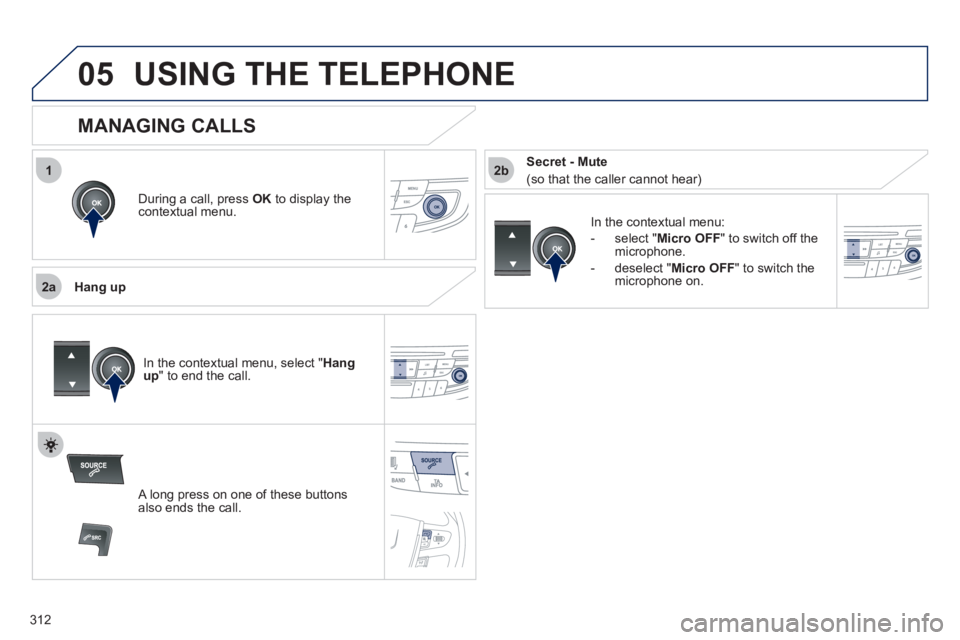
During a call, press OK
to display the contextual menu.
Han
g up
In the contextual menu:
-
select " Micro OFF
" to switch off themicrophone.
-
deselect " Micro OFF" to switch the
microphone on.
MANAGING CALLS
A long press on one of these buttons also ends the call.
In the contextual menu, select "Hangup " to end the call.
Secret - Mute
(so that the caller cannot hear)
Page 318 of 340
316
5
63
4
07
2
1
CONFIGURATION
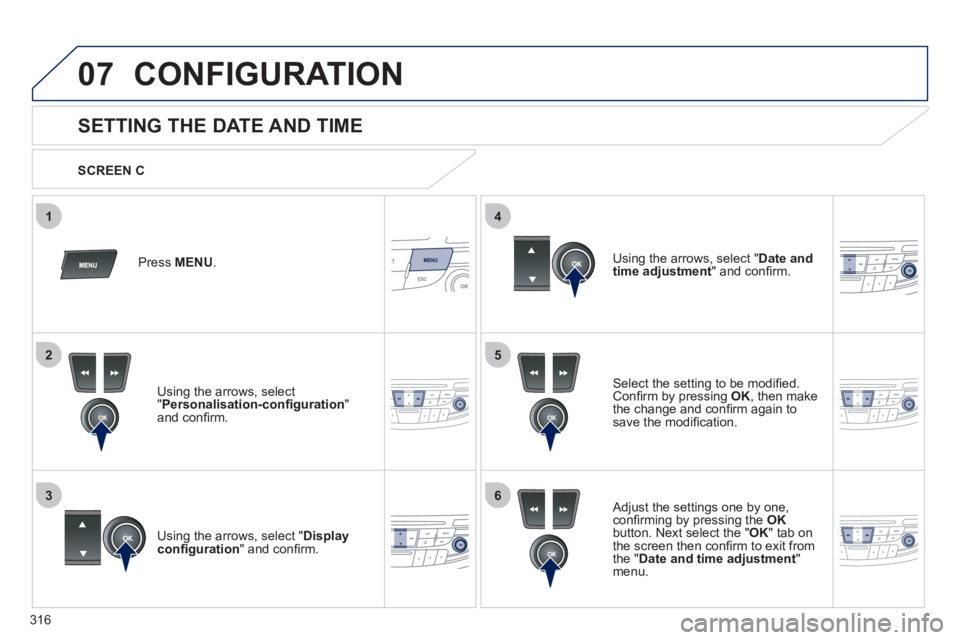
SETTING THE DATE AND TIME
Select the setting to be modifi ed.Confi rm by pressing OK
, then make
the change and confi rm again to save the modifi cation.
Using the arrows, select "Displayconfi guration
" and confi rm.
Press MENU.
Using the arrows, select "Personalisation-confi guration"and confi rm.
SCREEN C
Using the arrows, select "
Date and
time adjustment" and confi rm.
Ad
just the settings one by one,confi rming by pressing the OKbutton. Next select the "
OK " tab on
the screen then confi rm to exit from
the " Date and time adjustment"menu.
Page 320 of 340
318
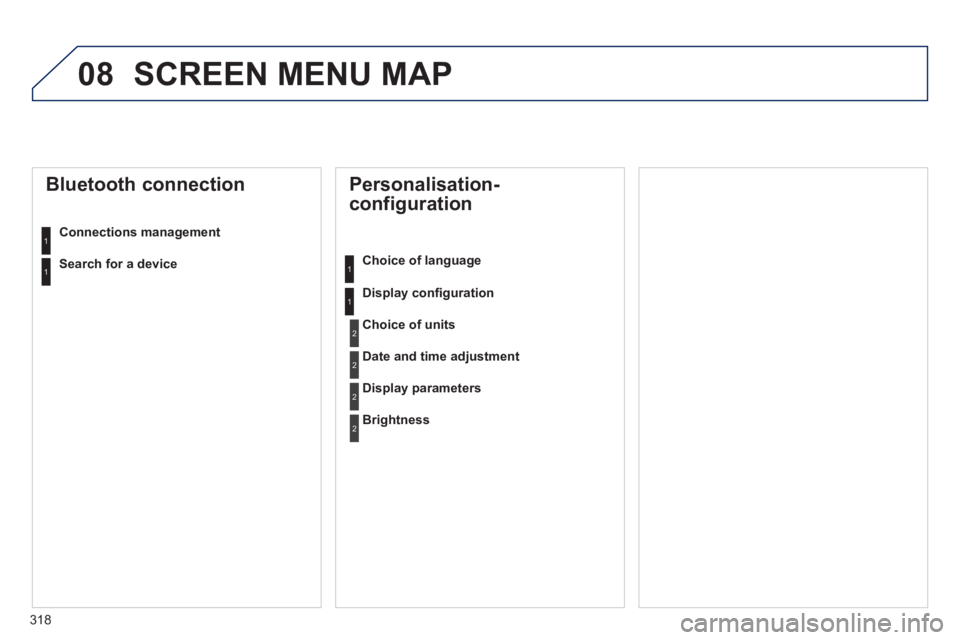
08 SCREEN MENU MAP
Personalisation-
configuration
Choice of language
Displa
y confi guration
Bluetooth connection
Connections management
Choice of units
Date and time adjustment
Display parameters
Brightness
1
1
2
2
2
2
1
1Search for a device
Page 322 of 340
320
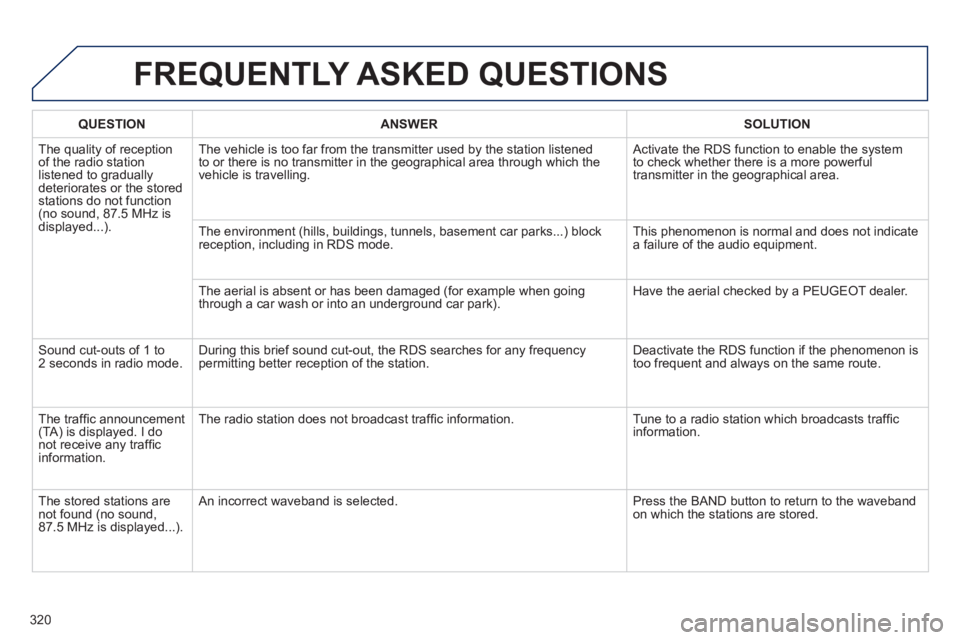
FREQUENTLY ASKED QUESTIONS
QUESTIONANSWERSOLUTION
The quality of receptionof the radio station listened to graduallydeteriorates or the stored stations do not function(no sound, 87.5 MHz is
displayed...). The vehicle is too far from the transmitter used b
y the station listened
to or there is no transmitter in the geographical area through which the
vehicle is travelling.
Activate the RDS function to enable the system
to check whether there is a more powerful
transmitter in the geographical area.
The environment
(hills, buildings, tunnels, basement car parks...) block reception, including in RDS mode. This phenomenon is normal and does not indicate
a failure of the audio equipment.
The aerial is absent or has been dama
ged (for example when goingthrough a car wash or into an underground car park). Have the aerial checked by a PEUGEOT dealer.
Sound cut-outs of 1 to
2 seconds in radio mode.During this brief sound cut-out, the RDS searches for any frequency
permitting better reception of the station. Deactivate the RDS function if the phenomenon is
too frequent and always on the same route.
Th
e traffi c announcement(TA) is displayed. I donot receive any traffi c
information.Th
e radio station does not broadcast traffi c information. Tune to a radio station which broadcasts traffi c
information.
The stored stations arenot found (no sound, 87.5 MHz is displayed...).
An incorrect waveband is selected. Press the BAND button to return to the wavebandon which the stations are stored.
Page 323 of 340
321
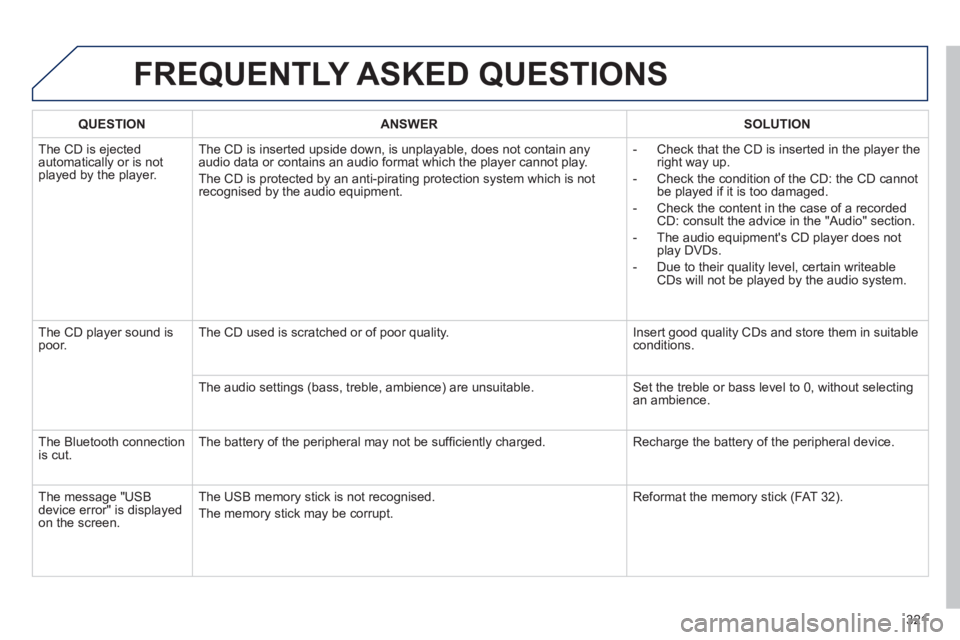
FREQUENTLY ASKED QUESTIONS
QUESTIONANSWERSOLUTION
The CD is ejected
automatically or is not played by the player. The CD is inserted upside down, is unpla
yable, does not contain any audio data or contains an audio format which the player cannot play.
The
CD is protected by an anti-pirating protection system which is not recognised by the audio equipment.
- Check that the CD is inserted in the pla
yer the
right way up.
-
Check the condition of the CD: the CD cannot
be played if it is too damaged.
-
Check the content in the case of a recordedCD: consult the advice in the "Audio" section.
- The audio equipment's CD pla
yer does not
play DVDs.
-
Due to their quality level, certain writeableCDs will not be played by the audio system.
The CD pla
yer sound ispoor.The CD used is scratched or of poor quality. Insert good quality CDs and store them in suitable conditions.
The audio settin
gs (bass, treble, ambience) are unsuitable. Set the treble or bass level to 0, without selectingan ambience.
Th
e Bluetooth connection
is cut. The battery of the peripheral may not be suffi ciently charged. Recharge the battery of the peripheral device.
The messa
ge "USB device error" is displayedon the screen.The USB memor
y stick is not recognised.
The memory stick may be corrupt. Reformat the memor
y stick (FAT 3 2).
Page 324 of 340
322
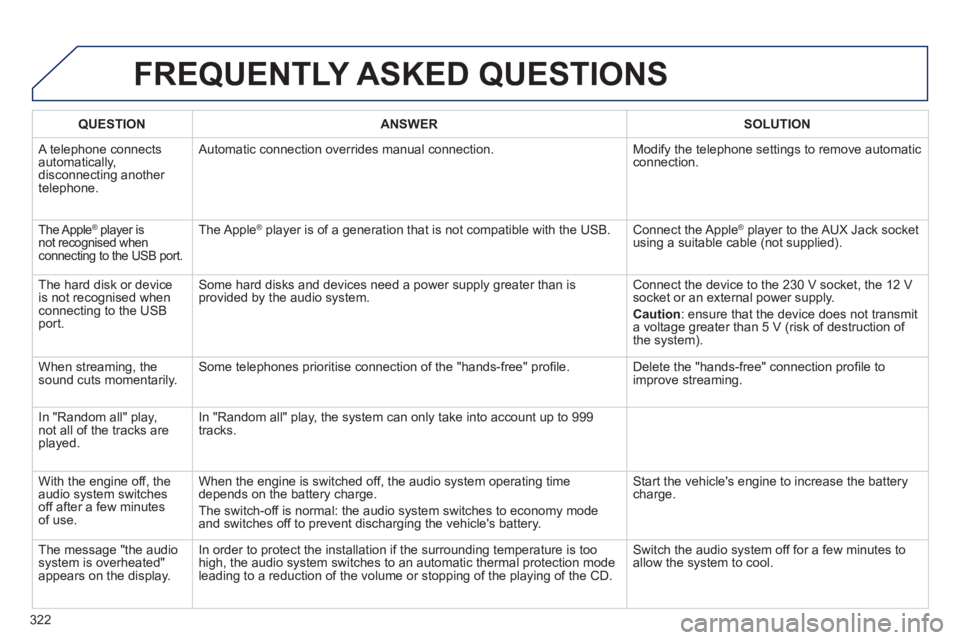
FREQUENTLY ASKED QUESTIONS
QUESTIONANSWERSOLUTION
A telephone connects
automatically, disconnecting another
telephone.
Automatic connection overrides manual connection. Modify the telephone settings to remove automatic connection.
The Apple ®
player is ®
not recognised when connecting to the USB port.
The Apple ®player is of a generation that is not compatible with the USB. Connect the Apple ®player to the AUX Jack socket using a suitable cable (not supplied).
Th
e hard disk or deviceis not recognised whenconnecting to the USBport. Some hard disks and devices need a power suppl
y greater than is
provided by the audio system. Connect the device to the 230 V socket, the 12 V socket or an external power supply.
Caution
:
ensure that the device does not transmit
a voltage greater than 5 V (risk of destruction of
the system).
When streamin
g, the sound cuts momentarily. Some telephones prioritise connection of the "hands-free" profi le. Delete the "hands-free" connection profi le to
improve streaming.
In "Random all" play,not all of the tracks areplayed.In "Random all" pla
y, the system can only take into account up to 999
tracks.
With the en
gine off, the
audio system switches off after a few minutes of use. When the en
gine is switched off, the audio system operating time
depends on the battery charge.
The switch-off is normal: the audio s
ystem switches to economy mode and switches off to prevent discharging the vehicle's battery.
Start the vehicle's engine to increase the batterycharge.
The message "the audio system is overheated"
appears on the display. In order to protect the installation if the surrounding temperature is toohigh, the audio system switches to an automatic thermal protection mode leading to a reduction of the volume or stopping of the playing of the CD.
Switch the audio system off for a few minutes to
allow the system to cool.
Page 327 of 340
.
325
Alphabetical index
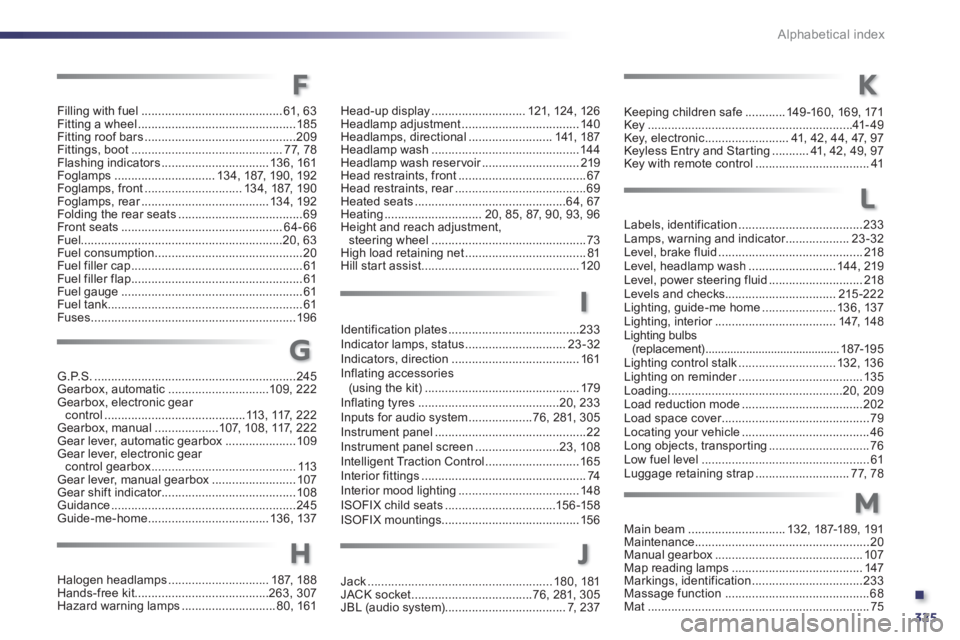
G.P.S.............................................................245Gearbox, automatic..............................109, 222Gearbox, electronic gear control ..........................................113, 117, 222Gearbox, manual ...................107,108, 117, 222Gear lever, automatic gearbox .....................109Gear lever, electronic gear control gearbox...........................................113Gear lever, manual gearbox.........................107Gear shift indicator........................................108Guidance.......................................................245Guide-me-home....................................13 6, 137
Halogen headlamps..............................187,188Hands-free kit........................................263,307Hazard warning lamps............................80,161
Identification plates .......................................233Indicator lamps, status ..............................23-32Indicators, direction......................................161Inflating accessories (using the kit) ..............................................179Inflating tyres..........................................20, 233
Inputs for audio system...................76, 281, 305Instrument panel.............................................22Instrument panel screen.........................23,108Intelligent Traction Control ............................165Interior fittings .................................................74Interior mood lighting....................................148ISOFIX child seats .................................156-158ISOFIX mountings.........................................156
Labels, identification .....................................233Lamps, warning and indicator...................r23-32Level, brake fluid ...........................................218Level, headlamp wash..........................144, 219Level, power steering fluid............................218Levels and checks.................................215-222Lighting, guide-me home......................136, 137Lighting, interior....................................r147,148Lighting bulbs (replacement) ...........................................187-195Lighting control stalk.............................132, 136Lighting on reminder.....................................r135Loading....................................................20,209Load reduction mode....................................202Load space cover............................................r79Locating your vehicle......................................46Long objects, transpor ting..............................76Low fuel level..................................................61Luggage retaining strap ............................77,78
Keeping children safe............149 -160, 169, 171Key.............................................................41-49Key, electronic.........................41, 42,44, 47, 97Keyless Entry and Star ting ...........41, 42,49,97Key with remote control..................................41
Main beam.............................132,187-189, 191Maintenance....................................................20Manual gearbox............................................107Map reading lamps.......................................147Markings, identification .................................233Massage function ...........................................68Mat ..................................................................75
G
H
K
I
L
M
Filling with fuel..........................................61, 63Fitting a wheel ...............................................185Fitting roof bars .............................................209Fittings, boot.............................................77,78Flashing indicators................................136,161Foglamps..............................13 4, 187, 19 0, 192
Foglamps, front.............................134,187, 190Foglamps, rear......................................r134, 192
Folding the rear seats .....................................69Front seats ................................................64-66Fuel............................................................20, 63Fuel consumption ............................................20Fuel filler cap...................................................61Fuel filler flap...................................................61Fuel gauge......................................................61Fuel tank..........................................................61Fuses.............................................................196
Head-up display ............................121,124, 126Headlamp adjustment...................................140Headlamps, directional .........................141,187Headlamp wash............................................144Headlamp wash reser voir.............................r219Head restraints, front......................................67Head restraints, rear.......................................r69Heated seats .............................................64, 67Heating.............................20, 85, 87, 90, 93, 96Height and reach adjustment, steering wheel..............................................73High load retaining net ....................................81Hill start assist...............................................120
F
Jack.......................................................180,181JACK socket....................................76, 281, 305JBL (audio system)....................................7,237
J
Page 333 of 340
.
331
Visual search
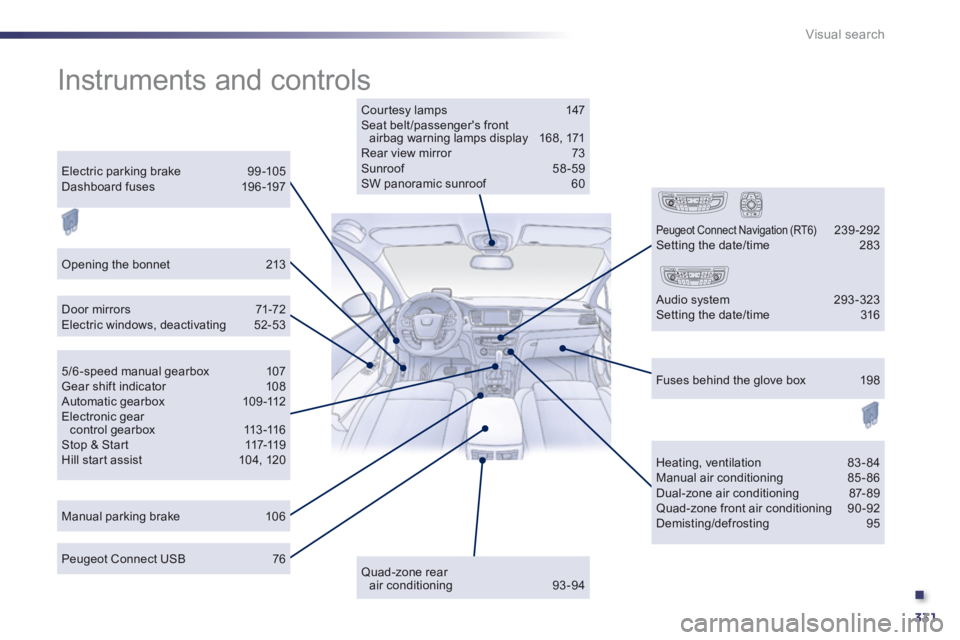
Instruments and controls
Courtesy lamps 147 Seat belt/passenger's frontairbag warning lamps display 168, 171 Rear view mirror 73Sunroof 58-59 SW panoramic sunroof 60
Door mirrors 71-72Electric windows, deactivating 52-53
Manual parking brake 106
Heating, ventilation 83-84 Manual air conditioning 85-86 Dual-zone air conditioning 87- 89 Quad-zone front air conditioning 90-92 Demisting/defrosting 95
Peugeot Connect USB 76
Electric parking brake 99 -105Dashboard fuses 196 -197
5/6 -speed manual gearbox 107 Gear shift indicator 108 Automatic gearbox 109-112Electronic gearcontrol gearbox 113-116Stop & Star t 117-119Hill start assist 104, 120
Fuses behind the glove box 198
Quad-zone rearair conditioning 93-94
Peugeot Connect Navigation (RT6) 239-292 Setting the date/time 283
Audio system 293-323 Setting the date/time 316
Opening the bonnet 213
Page 334 of 340
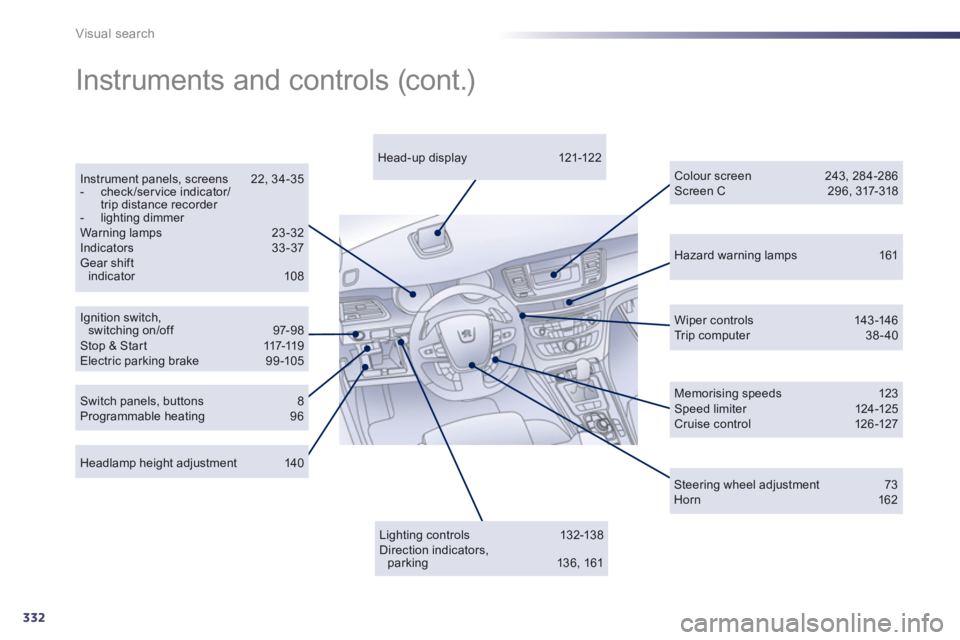
332
Visual search
Hazard warning lamps 161
Ignition switch,switching on/off 97-98 Stop & Start 117-119 Electric parking brake 99-105
Instrument panels, screens 22, 34-35 - check/ser vice indicator/trip distance recorder - lighting dimmer
Warning lamps 23-32 Indicators 33-37 Gear shift indicator 108
Wiper controls 143-146 Tr i p c o m p u t e r 38-40
Headlamp height adjustment 140
Head-up display 121-12 2
Colour screen 243, 284-286 Screen C 296, 317-318
Instruments and controls (cont.)
Lighting c ontrols 132-13 8 Direction indicators,parking 136, 161
Switch panels, buttons 8 Programmable heating 96
Memorising speeds 123 Speed limiter 124-125 Cruise control 126 -127
Steering wheel adjustment 73
Horn 162