Ad blue Peugeot 508 2012 User Guide
[x] Cancel search | Manufacturer: PEUGEOT, Model Year: 2012, Model line: 508, Model: Peugeot 508 2012Pages: 340, PDF Size: 11.11 MB
Page 271 of 340
269
1
2
3
1
2
3
4
5
06
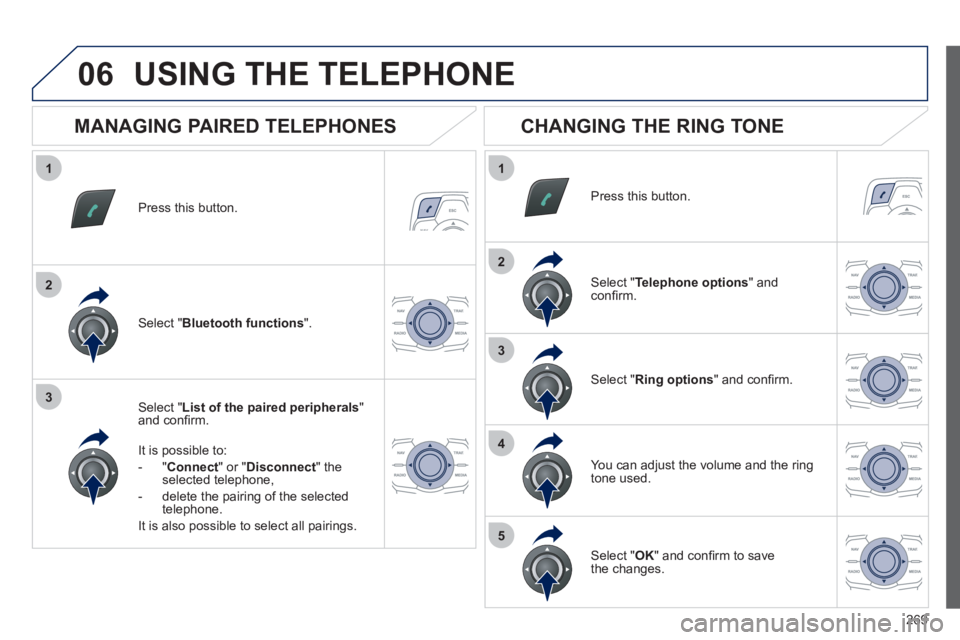
Press this button.
Select " List of the paired peripherals"and confi rm.
It is possible to:
-
"Connect" or " Disconnect " theselected telephone,
- delete the pairin
g of the selected
telephone.
It is also possible to select all pairin
gs.
USING THE TELEPHONE
MANAGING PAIRED TELEPHONES
CHANGING THE RING TONE
Press this button.
Select " Telephone options" andconfi rm.
Select " Ring options" and confi rm.
You can ad
just the volume and the ring
tone used.
Select " Bluetooth functions".
Select " OK
" and confi rm to save
the changes.
Page 272 of 340
270
07 DIRECTORY - ADDR BOOK
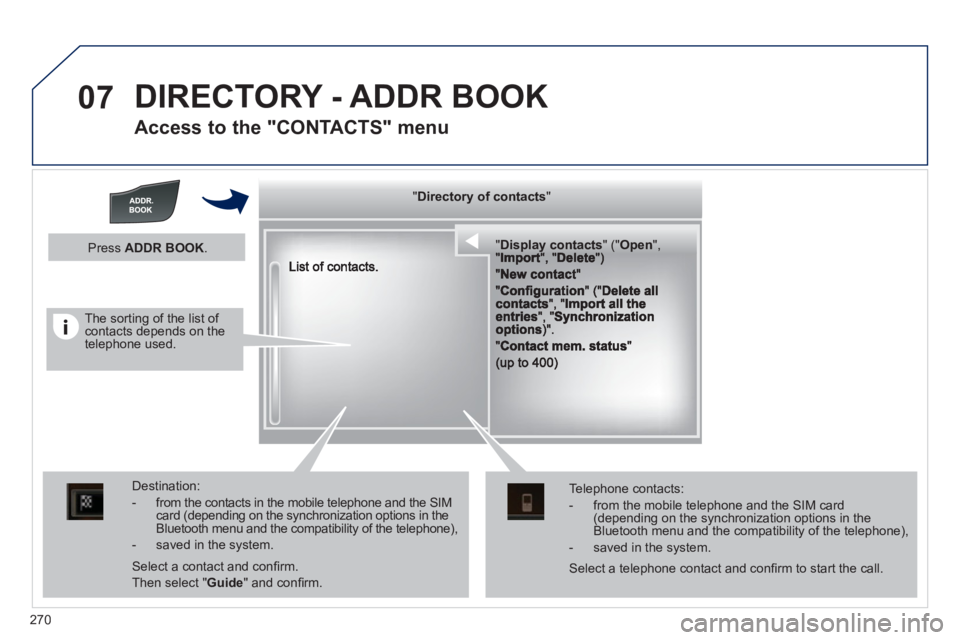
Access to the "CONTACTS" menu
""""""""yyyyyDirectory of contactsDirectory of contactsDirectory of contactsDirectory of contactsDirectory of contactsDirectory of contactsDirectory of contactsDirectory of contactsDirectory of contactsDirectory of contactsDirectory of contactsDirectory of contactsDirectory of contactsDirectory of contactsDi t f t tDi t f t tDi t f t tDi t f t tDi f """"""""
""""""""""pypypypypypypysp ay co tactsDisplay contactsDisplay contactsDisplay contactsDisplay contactsDisplay contactsDisplay contactsDisplay contactsDisplay contactsDisplay contactsDisplay contactsDisplay contactsDisplay contactsDisplay contactsDisplay contactsDisplay contactsDisplay contactsDisplay contactsDisplay contactsDisplay contactsDisplay contactsDi l t tDi l t tDi l t tDi l t tDi l t tDi l t tDi l(((((((( ( (((((((((((((((("(""(""(""(""(""(""(""(""(""("pppppppOpeOpenOpenOpenOpenOpenOpenOpenOpenOpenOpenOpenOpenOpenOpenOpenOpenOpenOpenOpenOpenOOOOOOO,,,,, , ,,,""""""""""""""ItItItIt""""""""DltDltDltDlt")")")"))
Destination:
- from the contacts in the mobile telephone and the SIMcard (depending on the synchronization options in the Bluetooth menu and the compatibility of the telephone),
- saved in the system.
Select a contact and confi rm.
Then select "Guide
" and confi rm.
Telephone contacts:
- from the mobile telephone and the SIM card(depending on the synchronization options in the Bluetooth menu and the compatibility of the telephone),
- saved in the system.
Press ADDR BOOK.
Select a telephone contact and confi rm to start the call.
The sorting of the list of contacts depends on the telephone used.
Page 274 of 340
272
1
2
3
4
5
6
07
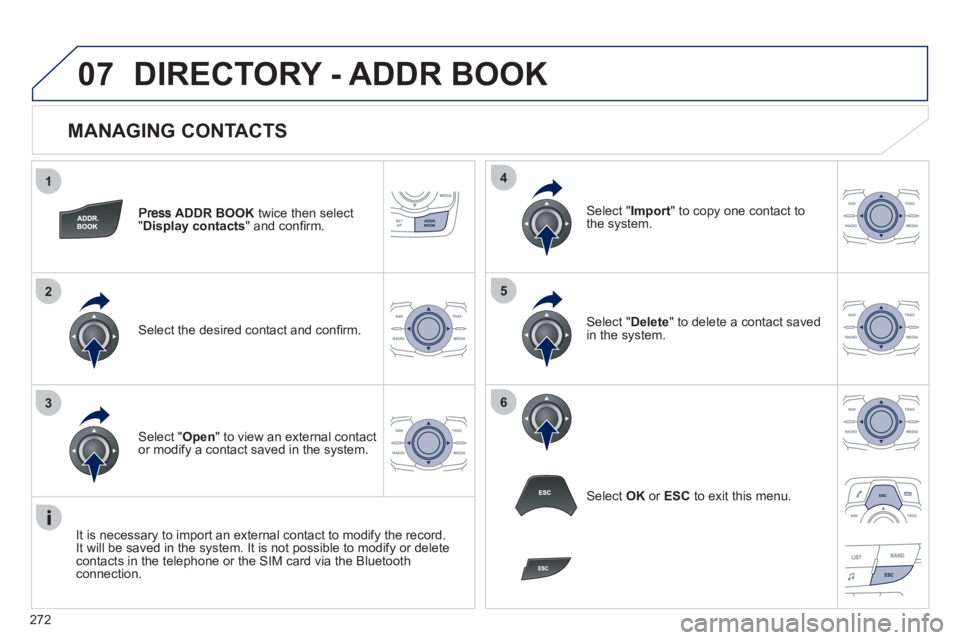
MANAGING CONTACTS
ADDR BOOK
twice then select
"Display contacts
" and confi rm.
Select the desired contact and confi rm.
Select " Import" to copy one contact to
the system.
Select " Open
" to view an external contact
or modify a contact saved in the system.
Select OK
or ESC
to exit this menu.
Select " Delete" to delete a contact savedin the system.
It is necessar
y to import an external contact to modify the record.
It will be saved in the system. It is not possible to modify or delete contacts in the telephone or the SIM card via the Bluetoothconnection.
DIRECTORY - ADDR BOOK
Page 282 of 340
280
1
2
1
2
09
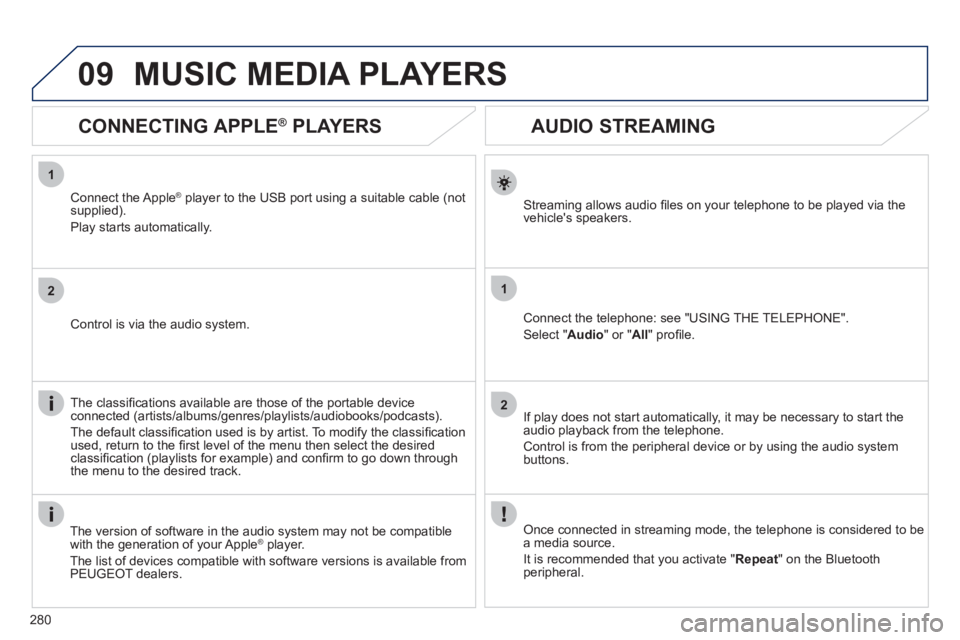
AUDIO STREAMING
Streaming allows audio fi les on your telephone to be played via the
vehicle's speakers.
Connect the telephone: see "USING THE TELEPHONE".
Select " Audio" or " All" profi le.
I
f play does not start automatically, it may be necessary to start the audio playback from the telephone.
Control is from the peripheral device or b
y using the audio system buttons.
Once connected in streaming mode, the telephone is considered to bea media source.
It is recommended that you activate "
Repeat" on the Bluetooth
peripheral.
MUSIC MEDIA PLAYERS
CONNECTING APPLE ®
PLAYERS
Connect the Apple ®player to the USB port using a suitable cable (not
supplied).
Pla
y starts automatically.
Control is via the audio system.
The classifi cations available are those of the portable device
connected (artists/albums/genres/playlists/audiobooks/podcasts).
The de
fault classifi cation used is by artist. To modify the classifi cationused, return to the fi rst level of the menu then select the desired classifi cation (playlists for example) and confi rm to go down through
the menu to the desired track.
The version o
f software in the audio system may not be compatible
with the generation of your AppleÆ player.Æ
The list of devices compatible with software versions is available fromPEUGEOT dealers.
Page 287 of 340
285
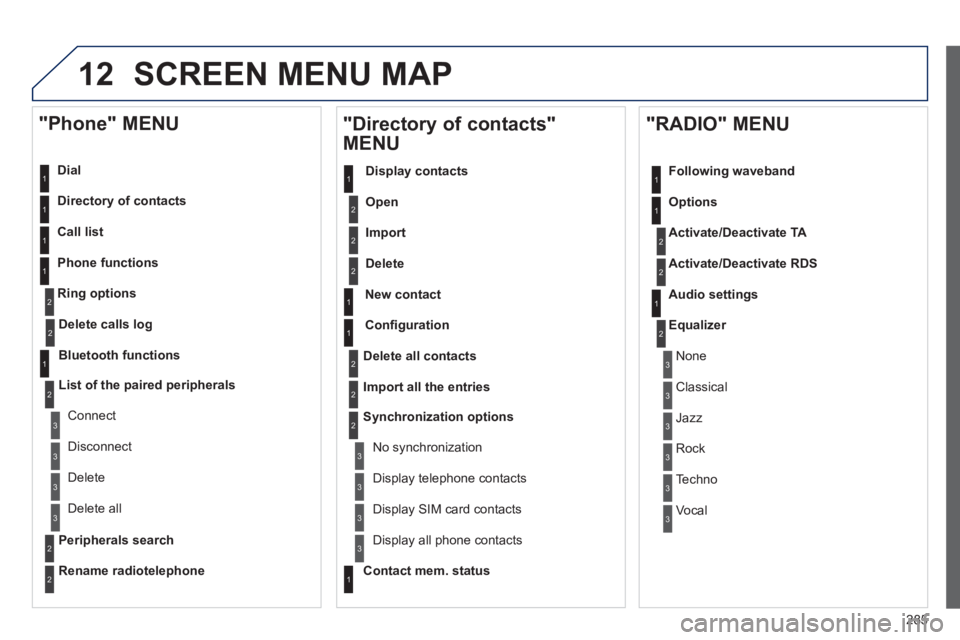
12 SCREEN MENU MAP
Dial
Director
y of contacts
Call list
Phone functions
Rin
g options
"Phone" MENU
1
1
2
1
1
2
3
3
2
1
3
3
2
2
1
2
2
2
1
1
2
2
2
1
3
3
3
3
1
2
2
1
1
3
3
3
3
3
3
2
Confi guration
Delete all contacts
Import all the entries
S
ynchronization options
No s
ynchronization
"Directory of contacts"
MENU
Display contacts
Open
Import
Delete
New contact
Equalizer
"RADIO" MENU
Following waveband
Options
Activate/Deactivate TA
Activate/Deactivate RD
S
Audio settings
Displa
y telephone contacts
Displa
y SIM card contacts
Contact mem. status
Displa
y all phone contacts
Delete calls log
Bluetooth functions
List of the paired peripherals
Connect
Di
sconnect
D
elete
Peripherals searchD
elete all
Rename radiotelephon
e
None
Classical
Jazz
Rock
Techno
Vocal
Page 290 of 340
288
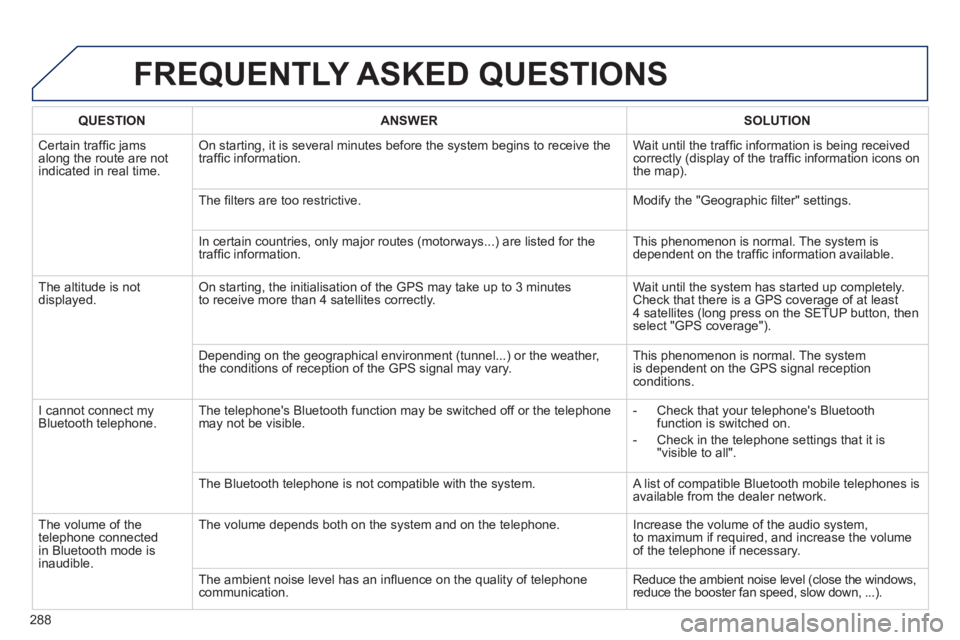
FREQUENTLY ASKED QUESTIONS
QUESTIONANSWER SOLUTION
Certain traffi c jams
along the route are notindicated in real time.
On starting, it is several minutes before the system begins to receive the
traffi c information. Wait until the traffi c information is being received correctly (display of the traffi c information icons on
the map).
Th
e fi lters are too restrictive. Modify the "Geographic fi lter" settings.
In certain countries, onl
y major routes (motorways...) are listed for the
traffi c information. This phenomenon is normal. The system is
dependent on the traffi c information available.
The altitude is not
displayed. On starting, the initialisation of the GPS may take up to 3 minutes
to receive more than 4 satellites correctly. Wait until the system has started up completely. Check that there is a GPS coverage of at least
4 satellites (long press on the SETUP button, then select "GPS coverage").
Dependin
g on the geographical environment (tunnel...) or the weather,
the conditions of reception of the GPS signal may vary. This phenomenon is normal. The system
is dependent on the GPS signal receptionconditions.
I cannot connect my
Bluetooth telephone.The telephone's Bluetooth
function may be switched off or the telephone
may not be visible.
- Check that your telephone's Bluetoothfunction is switched on.
-
Check in the telephone settings that it is "visible to all".
The Bluetooth telephone is not compatible with the system. A list of compatible Bluetooth mobile telephones is available from the dealer network.
Th
e volume of thetelephone connected
in Bluetooth mode isinaudible. The volume depends both on the system and on the telephone. Increase the volume o
f the audio system,
to maximum if required, and increase the volume
of the telephone if necessary.
The ambient noise level has an infl uence on the qualit
y of telephone communication. Reduce the ambient noise level (close the windows,reduce the booster fan speed, slow down, ...).
Page 291 of 340
289
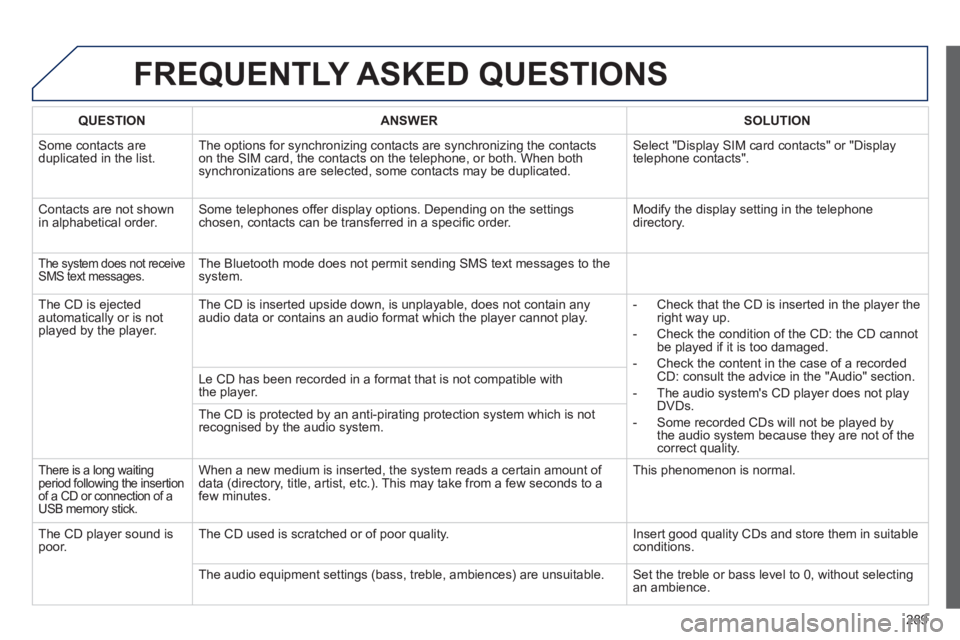
FREQUENTLY ASKED QUESTIONS
QUESTIONANSWER SOLUTION
Some contacts areduplicated in the list.The options for synchronizing contacts are synchronizing the contacts
on the SIM card, the contacts on the telephone, or both. When both
synchronizations are selected, some contacts may be duplicated. Select "Displa
y SIM card contacts" or "Displaytelephone contacts".
Contacts are not shown
in alphabetical order.Some telephones offer display options. Depending on the settingschosen, contacts can be transferred in a specifi c order. Modify the display setting in the telephone
directory.
The system does not receiveSMS text messages.The Bluetooth mode does not permit sending SMS text messages to the
system.
The CD is e
jected
automatically or is not played by the player. The CD is inserted upside down, is unpla
yable, does not contain any audio data or contains an audio format which the player cannot play.
- Check that the CD is inserted in the player the
right way up.
-
Check the condition of the CD: the CD cannot
be played if it is too damaged.
-
Check the content in the case of a recordedCD: consult the advice in the "Audio" section.
- The audio s
ystem's CD player does not play
DVDs.
- Some recorded CDs will not be pla
yed by
the audio system because they are not of thecorrect quality. Le CD has been recorded in a format that is not com
patible with
the player.
The CD is protected b
y an anti-pirating protection system which is not recognised by the audio system.
There is a long waitingperiod following the insertion of a CD or connection of a USB memory stick.
When a new medium is inserted, the system reads a certain amount of
data (directory, title, artist, etc.). This may take from a few seconds to afew minutes.
This phenomenon is normal.
The
CD player sound ispoor.The CD used is scratched or of poor quality. Insert good quality CDs and store them in suitable conditions.
The audio equipment settings
(bass, treble, ambiences) are unsuitable. Set the treble or bass level to 0, without selectingan ambience.
Page 292 of 340
290
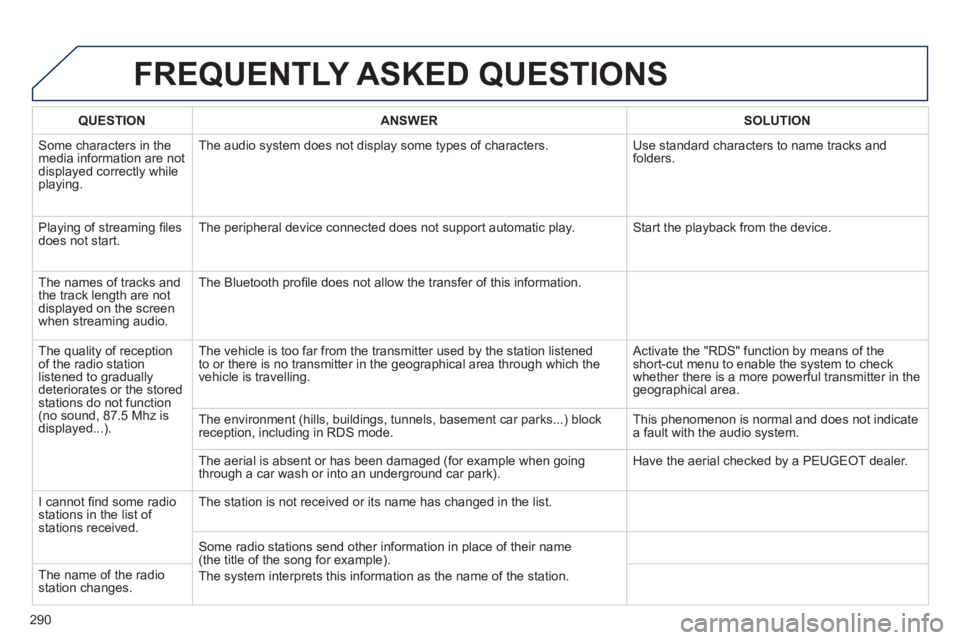
FREQUENTLY ASKED QUESTIONS
QUESTIONANSWER SOLUTION
Some characters in themedia information are not displayed correctly while playing. The audio s
ystem does not display some types of characters. Use standard characters to name tracks andfolders.
Pla
ying of streaming fi lesdoes not start. The peripheral device connected does not support automatic play. Start the playback from the device.
Th
e names of tracks and
the track length are not
displayed on the screen
when streamin
g audio. The Bluetooth pro
fi le does not allow the transfer of this information.
The qualit
y of receptionof the radio station
listened to graduallydeteriorates or the stored stations do not function(no sound, 87.5 Mhz is
displayed...). The vehicle is too far from the transmitter used b
y the station listened
to or there is no transmitter in the geographical area through which the
vehicle is travelling.
Activate the "RDS" function by means of theshort-cut menu to enable the system to check
whether there is a more powerful transmitter in the
geographical area.
The environment
(hills, buildings, tunnels, basement car parks...) block reception, including in RDS mode. This phenomenon is normal and does not indicate
a fault with the audio system.
The aerial is absent or has been dama
ged (for example when goingthrough a car wash or into an underground car park). Have the aerial checked by a PEUGEOT dealer.
I
cannot fi nd some radiostations in the list of stations received.
The station is not received or its name has changed in the list.
Some radio stations send other information in place of their name (the title of the song for example).
The s
ystem interprets this information as the name of the station. The name of the radio station changes.
Page 295 of 340
293
The system is coded in such a way that it will only
operate in your vehicle.
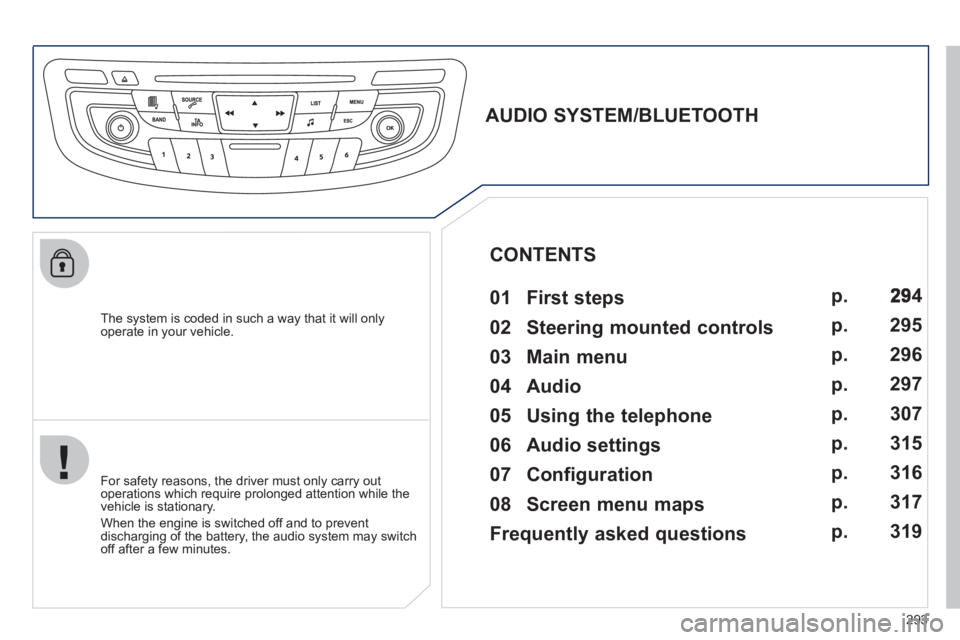
AUDIO SYSTEM/BLUETOOTH
01 First steps
For safety reasons, the driver must only carry out
operations which require prolonged attention while the
vehicle is stationary.
When the engine is switched o
ff and to prevent
discharging of the battery, the audio system may switch off after a few minutes.
CONTENTS
02 Steering mounted controls
03 Main menu
04 Audio
05 Using the telephone
06 Audio settings
07 Configuration
08 Screen menu maps
Frequently asked questions p.
p.
p.
p.
p.
p.
p.
p.
p.
4
295
296
297
3
07
315
316
317
3
19
Page 298 of 340
296
03
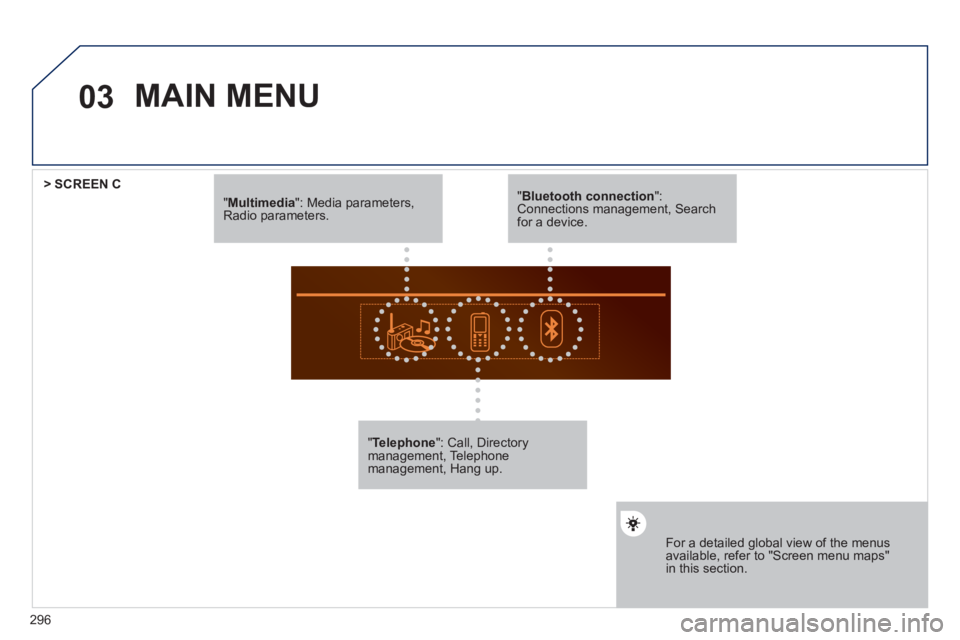
"Multimedia": Media parameters, Radio parameters.
"Telephone ": Call, Directory management, Telephonemanagement, Hang up.
For a detailed global view of the menus available, refer to "Screen menu maps"in this section.
> SCREEN C
"Bluetooth connection ": Connections management, Search for a device.
MAIN MENU