Service Peugeot 508 2012 User Guide
[x] Cancel search | Manufacturer: PEUGEOT, Model Year: 2012, Model line: 508, Model: Peugeot 508 2012Pages: 340, PDF Size: 11.11 MB
Page 224 of 340
222
!
Checks
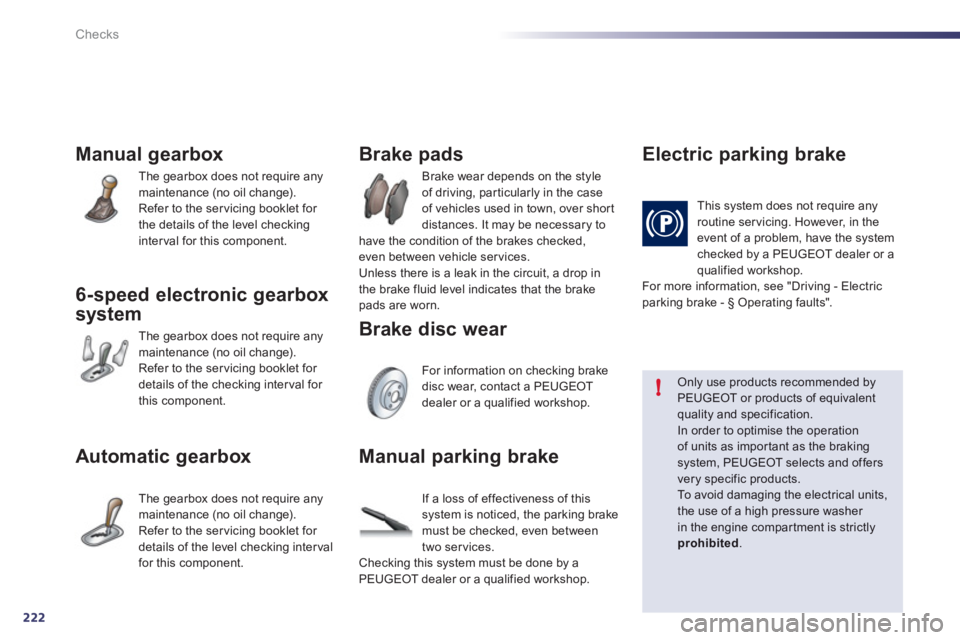
Manual gearbox
The gearbox does not require anymaintenance (no oil change).
Refer to the servicing booklet for
the details of the level checking
interval for this component.
6-speed electronic gearbox
s
ystem
The gearbox does not require anymaintenance (no oil change).
Refer to the servicing booklet for
details of the checking interval for
this component.
Automatic gearbox
The gearbox does not require anymaintenance (no oil change).
Refer to the ser vicing booklet for
details of the level checkin
g interval
for this component. Brake wear depends on the st
yle
of driving, par ticularly in the case
of vehicles used in town, over shor t
distances. It ma
y be necessary to
have the condition of the brakes checked,even between vehicle services.
Unless there is a leak in the circuit, a drop in
the brake fluid level indicates that the brake pads are worn.
Brake pads
For information on checking brake
disc wear, contact a PEUGEOT
dealer or a qualified workshop.
Brake disc wear
Electric parkin
g brake
This system does not require any routine servicing. However, in the
event of a problem, have the systemchecked by a PEUGEOT dealer or a qualified workshop.
For more information, see "Driving - Electric parking brake - § Operating faults".
Only use products recommended by PEUGEOT or products of equivalentquality and specification. In order to optimise the operationof units as impor tant as the braking system, PEUGEOT selects and offersvery specific products.
To a v o i d d a m aging the electrical units,the use of a high pressure washer in the engine compar tment is strictly
prohibited.
Manual parking brake
If a loss of effectiveness of this system is noticed, the parking brake
must be checked, even between
tw
o services.
Checking this system must be done by aPEUGEOT dealer or a qualified workshop.
Page 238 of 340
236
EMERGENCY OR ASSISTANCE CALL
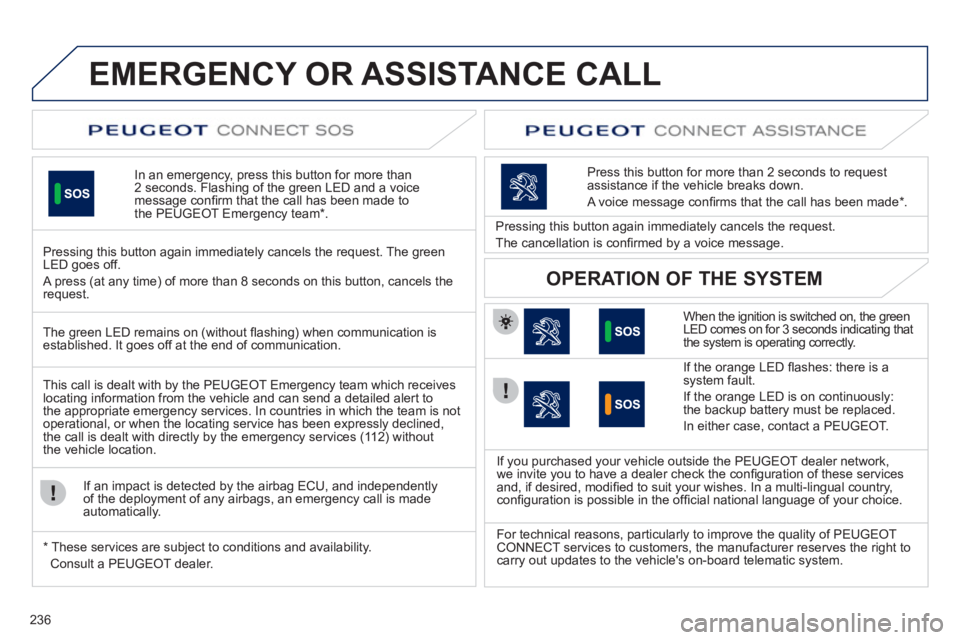
In an emergency, press this button for more than2 seconds. Flashing of the green LED and a voice
message confi rm that the call has been made to
the PEUGEOT Emergency team * .
Pressing this button again immediately cancels the request. The green LED goes off.
A press
(at any time) of more than 8 seconds on this button, cancels the
request.
When the ignition is switched on, the green
LED comes on for 3 seconds indicating that
the system is operating correctly.
I
f the orange LED fl ashes: there is asystem fault.
If the oran
ge LED is on continuously:the backup battery must be replaced.
In either case, contact a PEU
GEOT.
Pressing this button again immediately cancels the request.
The cancellation is con
fi rmed by a voice message.
Press this button
for more than 2 seconds to requestassistance if the vehicle breaks down.
A voice message confi rms that the call has been made *
.
OPERATION OF THE SYSTEM
The green LED remains on (without fl ashing) when communication is established. It goes off at the end of communication.
This call is dealt with b
y the PEUGEOT Emergency team which receiveslocating information from the vehicle and can send a detailed alert to
the appropriate emergency services. In countries in which the team is not
operational, or when the locating service has been expressly declined,
the call is dealt with directly by the emergency services (11 2) without
the vehicle location.
I
f an impact is detected by the airbag ECU, and independentlyof the deployment of any airbags, an emergency call is made
automatically.
*
These services are sub
ject to conditions and availability.
Consult a PEUGEOT dealer. If
you purchased your vehicle outside the PEUGEOT dealer network,
we invite you to have a dealer check the confi guration of these servicesand, if desired, modifi ed to suit your wishes. In a multi-lingual country, confi guration is possible in the offi cial national language of your choice.
For technical reasons, particularl
y to improve the quality of PEUGEOT
CONNECT services to customers, the manufacturer reserves the right to carry out updates to the vehicle's on-board telematic system.
Page 251 of 340
249
04
1
3
4
5
2
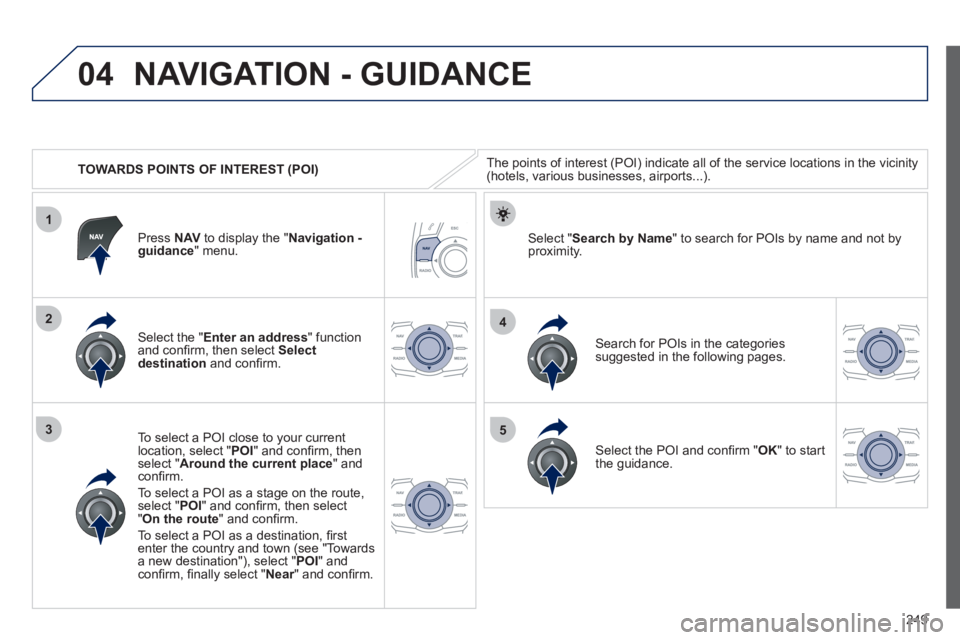
TOWARDS POINTS OF INTEREST (POI)
NAVIGATION - GUIDANCE
The points of interest (POI) indicate all of the service locations in the vicinity(hotels, various businesses, airports...).
Select the " Enter an address
" function
and confi rm, then select Select
destinationand confi rm.
To select a P
OI close to your currentlocation, select "POI" and confi rm, thenselect " Around the current place
" and confi rm.
To select a P
OI as a stage on the route,select " POI" and confi rm, then select"On the route
" and confi rm.
To select a P
OI as a destination, fi rst enter the country and town (see "Towards
a new destination"), select "POI" andconfi rm, fi nally select "Near" and confi rm.r
Search for POIs in the categories
suggested in the following pages.
Select " Search by Name
" to search for POIs by name and not byproximity. Press NAVto display the "Navigation -guidance" menu.
Select the POI and confi rm " OK" to start
the guidance.
Page 253 of 340
251
04
1
3
2
NAVIGATION - GUIDANCE
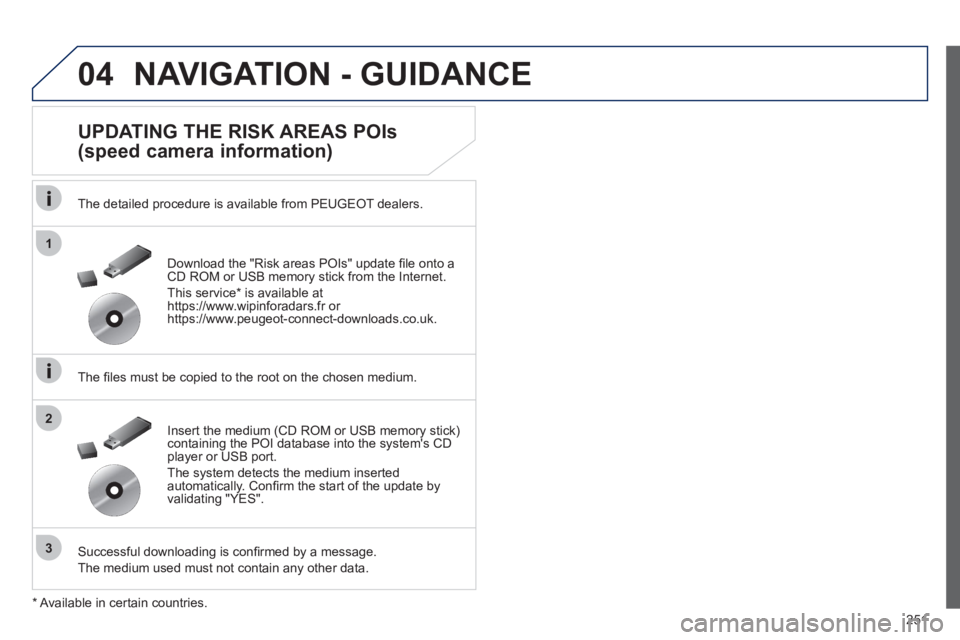
UPDATING THE RISK AREAS POIs
(speed camera information)
The detailed procedure is available from PEUGEOT dealers.
The fi les must be copied to the root on the chosen medium.
Successful downloadin
g is confi rmed by a message.
The medium used must not contain an
y other data. Insert the medium
(CD ROM or USB memory stick)containing the POI database into the system's CD
player or USB port.
The system detects the medium inserted automatically. Confi rm the start of the update byvalidating "YES". Download the "Risk areas P
OIs" update fi le onto aCD ROM or USB memory stick from the Internet.
Thi
s service * is available athttps://www.wipinforadars.fr orhttps://www.peugeot-connect-downloads.co.uk.
*
Av
ailable in certain countries.
Page 266 of 340
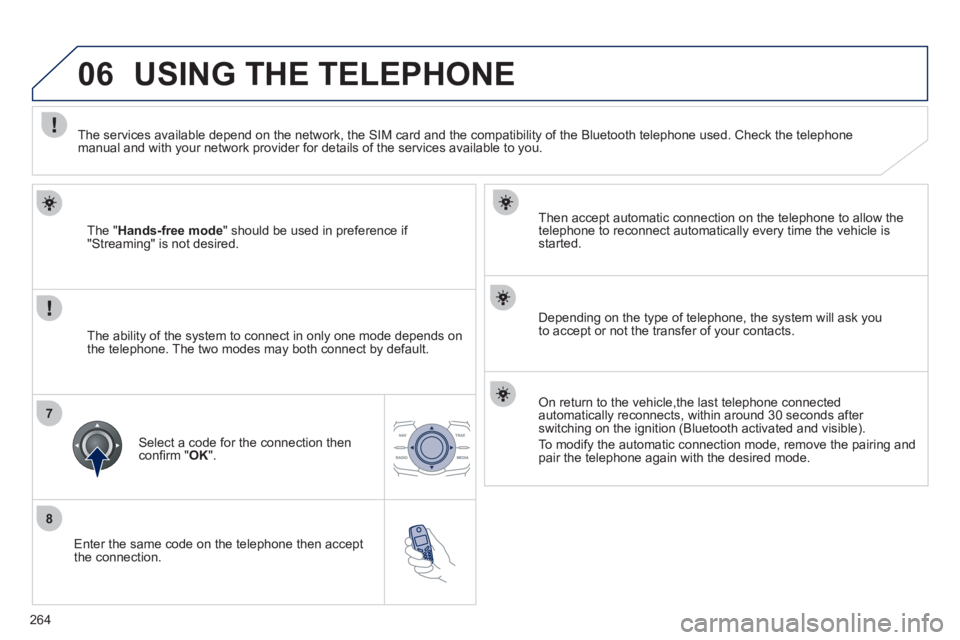
264
8
06
7
Enter the same code on the telephone then accept
the connection.
Then accept automatic connection on the telephone to allow the
telephone to reconnect automaticall
y every time the vehicle is started.
Dependin
g on the type of telephone, the system will ask you
to accept or not the transfer of your contacts.
USING THE TELEPHONE
The "Hands-free mode" should be used in preference if "Streaming" is not desired.
The services available depend on the network, the
SIM card and the compatibility of the Bluetooth telephone used. Check the telephone manual and with your network provider for details of the services available to you.
The ability o
f the system to connect in only one mode depends on
the telephone. The two modes may both connect by default.
Select a code for the connection then confi rm " OK
".
On return to the vehicle,the last telephone connected
automatically reconnects, within around 30 seconds after
switching on the ignition (Bluetooth activated and visible).
To modif
y the automatic connection mode, remove the pairing and pair the telephone again with the desired mode.
Page 270 of 340
268
1
2a
2b
2c
2d
06USING THE TELEPHONE
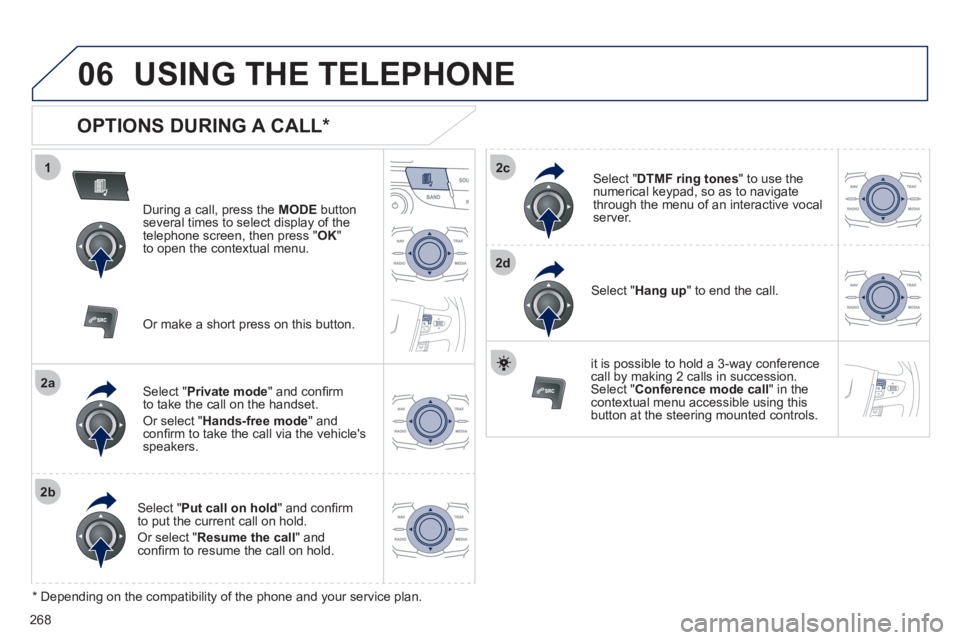
OPTIONS DURING A CALL *
During a call, press the MODE
button
several times to select display of the
telephone screen, then press " OK "
to open the contextual menu.
Select " Private mode
" and confi rm
to take the call on the handset.
Or select " Hands-free mode" andconfi rm to take the call via the vehicle's
speakers.
Select " Put call on hold" and confi rm
to put the current call on hold.
Or select " Resume the call" andconfi rm to resume the call on hold.
Select " DTMF ring tones
" to use thenumerical keypad, so as to navigate
through the menu of an interactive vocal server.
Select " Hang up " to end the call.
*
Depending on the compatibility of the phone and your service plan.
it is possible to hold a 3-wa
y conferencecall by making 2 calls in succession. Select "Conferencemode call" in the contextual menu accessible using this
button at the steering mounted controls.
Or make a short press on this button.
Page 309 of 340
307
05
1
25
3
4
6
USING THE TELEPHONE
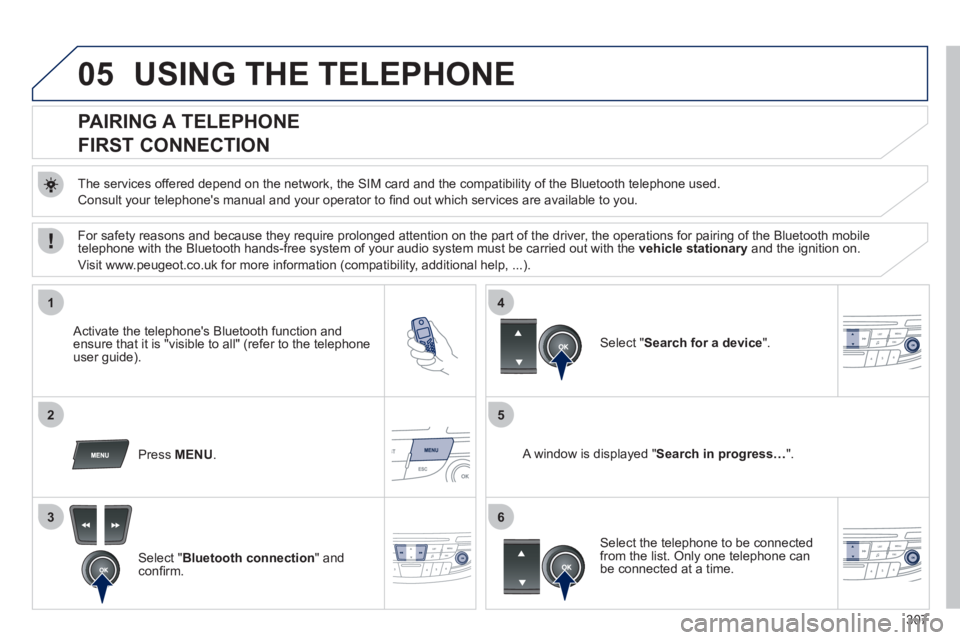
PAIRING A TELEPHONE
FIRST CONNECTION
The services offered depend on the network, the SIM card and the compatibility of the Bluetooth telephone used.
Consult
your telephone's manual and your operator to fi nd out which services are available to you.
Activate the telephone's Bluetooth function andensure that it is "visible to all" (refer to the telephone
user guide).
Press MENU. A window is displayed "Search in progress…".
Select the telephone to be connected from the list. Only one telephone can be connected at a time.
Select " Search for a device".
For safety reasons and because they require prolonged attention on the part of the driver, the operations for pairing of the Bluetooth mobile
telephone with the Bluetooth hands-free system of your audio system must be carried out with the vehicle stationaryand the ignition on.
Visit www.peu
geot.co.uk for more information (compatibility, additional help, ...).
Select " Bluetooth connection" andconfi rm.
Page 328 of 340
326
Alphabetical index
Menu, main...................................................296Mirror, rear view..............................................73Mirrors, door..............................................r71,72Motorised boot ..........................................55, 56Motorway function (direction indicators).......161Mountings for ISOFIX seats .........................156MP3 CD .........................................277, 301, 302Music media players.....................................276
Navigation.....................................................245Number plate lamps......................................195
Peugeot Connect Navigation (RT6)...........................................................239PEUGEOT CONNECT SOS.........................236Player, CD MP3 .............................227,301, 302Port, USB................................................76, 303Priming the fuel system ................................214Programmable heating(Webasto).....................................................96Protecting children.................149 -160, 169, 171Puncture........................................................174
Radio.....................................................273, 297Rear foglamp.................................13 4, 192, 193Rear screen (demisting)..................................95Recharging the battery .................................201Reduction of electrical load ..........................202Regeneration of the particleemissions filter............................................r221Reinitialising the remote control...............47, 48Remote control...........................................41-49Removing a wheel........................................183Removing the mat ...........................................75Repair kit, puncture.......................................174Replacing bulbs .....................................187-195Replacing fuses ....................................196-199Replacing the air filter...................................r221Replacing the oil filter...................................r221Replacing the passenger compartment filter......................................r221Replacing wiper blades.........................146, 204Resetting the service indicator.......................r36Reversing lamp .....................................192, 193Roof bars .......................................................209Roof blind ........................................................60Routine checks.....................................221,222Running out of fuel (Diesel)..........................214
Safety for children ..................149-160, 169, 171Screen, colour and
mapping ..............................................243, 284Screen, instrument panel..........................23,38Screen, monochrome...........................296,317Screen, multifunction(with audio equipment)...............................296Screen-wash reservoir..................................219Screen menu map .................................284,317Screenwash, front .........................................144Screenwash fluid level .......................... 144, 219Seat adjustment ........................................64,65Seat belts...............................................167-169Seats, rear.......................................................r69Serial number, vehicle..................................233Ser vice indicator.............................................r35Servicing .........................................................20Setting the clock ...................................283, 316Shor t-cut menus ...........................................244Sidelamps ..............132, 136, 187,189, 191-193Side repeater................................................. 191Ski flap............................................................76Spare wheel...........................................180-182Speed limiter.........................................r123,124Spotlamps, side....................................139, 191Starting the vehicle .........................97, 109,113Steering mounted controls,audio...................................................242, 295Stopping the vehicle.......................97, 109,113Stop & Start..................................40,61, 88, 91, 95,117,200,213, 221Storage..........................................74,75,77,78Storage wells.............................................77,78Storing driving positions.................................66Stowing rings ............................................77,78Sunroof............................................................f58Synchronising the remote control.............47,48Synthesiser, voice.........................................257System, navigation ........................................245
N
R
Oil filter..........................................................r221Oil level ....................................................37,218Opening the boot ................................ 41, 43,54Opening the doors .......................................... 41Opening the panoramic sunroof blind............60Operation indicator lamps.........................23-32
O
Paint colour code ..........................................233Panoramic glass sunroof................................f60Parking brake.................................99, 106, 222Parking brake, electric............................99, 222Parking lamps...............................................136Parking sensors, front...................................129Parking sensors, rear....................................r128Parking space sensor ..................................130Particle emission filter..........................r220, 221Passenger compartment filter......................r221PEUGEOT CONNECT ASSISTA NCE..........236
P
S