key Peugeot 508 2013 - RHD (UK, Australia) User Guide
[x] Cancel search | Manufacturer: PEUGEOT, Model Year: 2013, Model line: 508, Model: Peugeot 508 2013Pages: 340, PDF Size: 14.59 MB
Page 45 of 340
2
43
Access
System which permits central unlocking or locking of the vehicle using the lock or from a distance.
It is also used to locate and start the vehicle, as well as providing protection against theft.
Remote control key
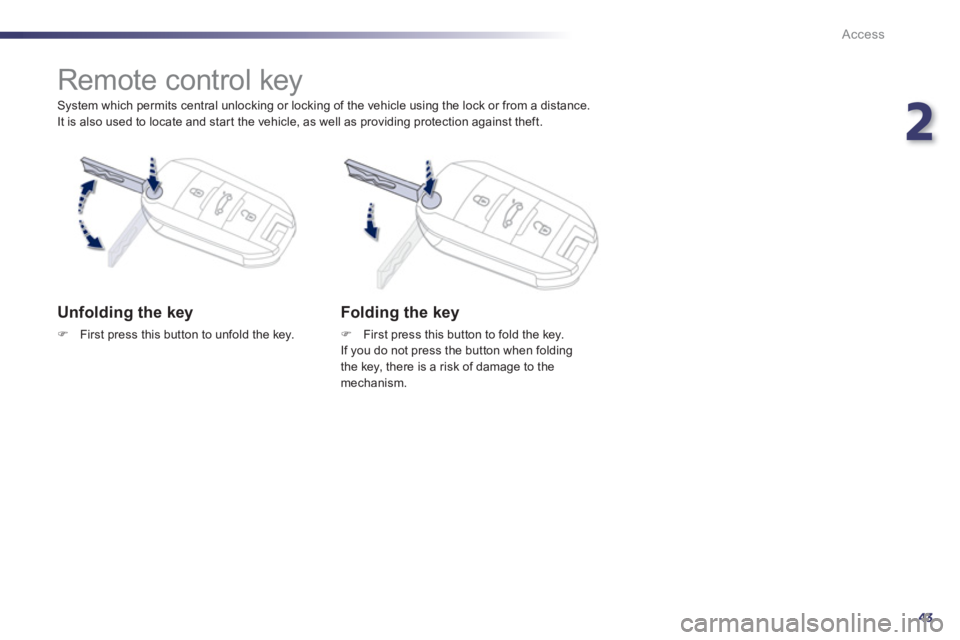
Unfolding the key
F
First press this button to unfold the key.
Folding the key
FFirst press this button to fold the key.
If you do not press the button when foldingthe key, there is a risk of damage to the
mechanism.
Page 46 of 340
44
Access
System that allows the opening, closingand starting of the vehicle while keeping theelectronic key on your person. It can also beused as a remote control.
"Keyless Entry and Starting" system
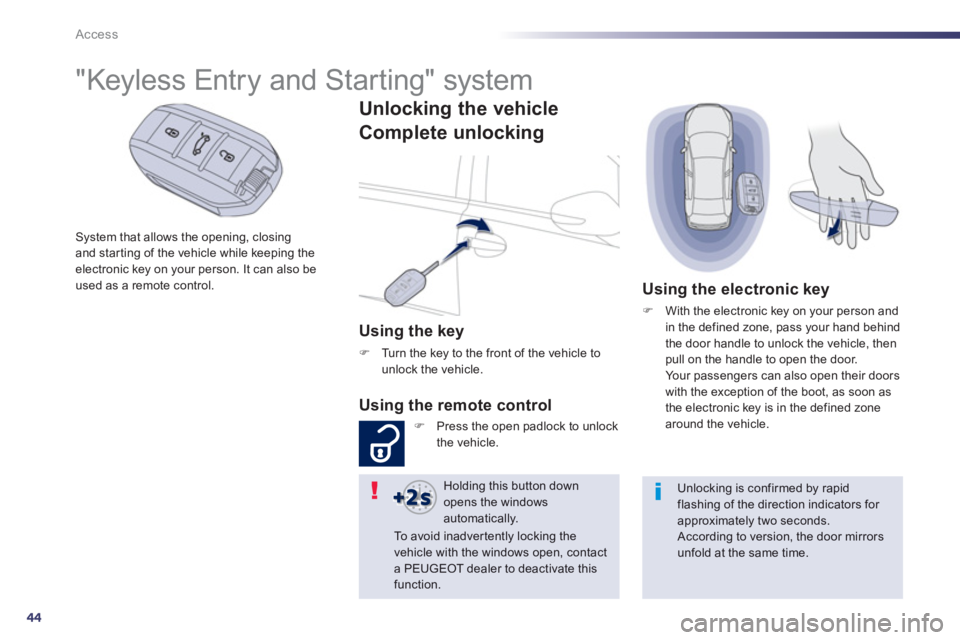
Unlocking the vehicle
Complete unlockin
g
Using the key
F
Turn the key to the front of the vehicle tounlock the vehicle.
Using the remote control
FPress the open padlock to unlockthe vehicle.
Using the electronic key
F
With the electronic key on your person and
in the defined zone, pass your hand behind
the door handle to unlock the vehicle, then
pull on the handle to open the door.
Yo u r p a s s e ngers can also open their doors
with the exception of the boot, as soon as
the electronic ke
y is in the defined zonearound the vehicle.
Holding this button down opens the windowsautomatically.
Unlocking is confirmed by rapid flashing of the direction indicators for approximately two seconds.
According to version, the door mirrors unfold at the same time.
To a v o i d i n a d v e r t e n t ly locking thevehicle with the windows open, contact a PEUGEOT dealer to deactivate this
function.
Page 47 of 340
2
45
Access
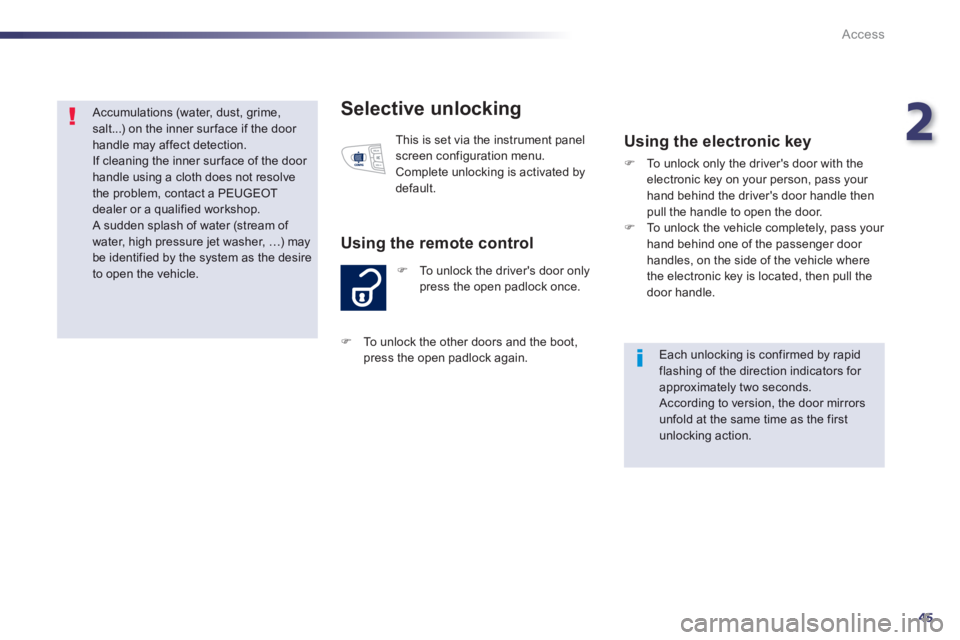
Selective unlocking
FTo unlock the driver's door onlypress the open padlock once.
Using the remote control
This is set via the instrument panelscreen configuration menu.
Complete unlocking is activated bydefault.
Using the electronic key
F
To unlock only the driver's door with theelectronic key on your person, pass your hand behind the driver's door handle thenpull the handle to open the door.F
To unlock the vehicle completely, pass your hand behind one of the passenger door handles, on the side of the vehicle where
the electronic key is located, then pull the door handle.
Each unlocking is confirmed by rapid flashing of the direction indicators for approximately two seconds. According to version, the door mirrorsunfold at the same time as the firstunlocking action.
FTo unlock the other doors and the boot,
press the open padlock a
gain
.
Accumulations (water, dust, grime,salt...) on the inner sur face if the door handle may affect detection.
If cleaning the inner surface of the door handle using a cloth does not resolvethe problem, contact a PEUGEOT dealer or a qualified workshop.
A sudden splash of water (stream of water, high pressure jet washer, …) may be identified by the system as the desireto open the vehicle.
Page 48 of 340
46
Access
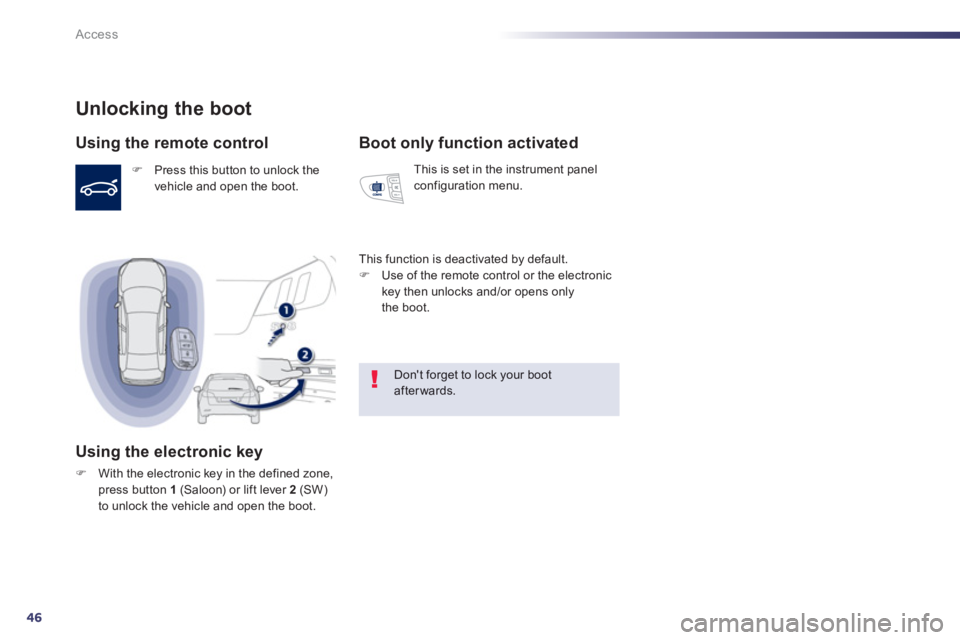
Unlocking the boot
Using the remote control
F Press this button to unlock thevehicle and open the boot.
Using the electronic key
FWith the electronic key in the defined zone, press button 1(Saloon) or lift lever 2
(SW)to unlock the vehicle and open the boot.
Boot only function activated
This is set in the instrument panel configuration menu.
This function is deactivated b
y default. F
Use of the remote control or the electronic key then unlocks and/or opens only
the boot.
Don't forget to lock your bootafterwards.
Page 49 of 340
2
47
Access
Locking the vehicle
Normal lockin
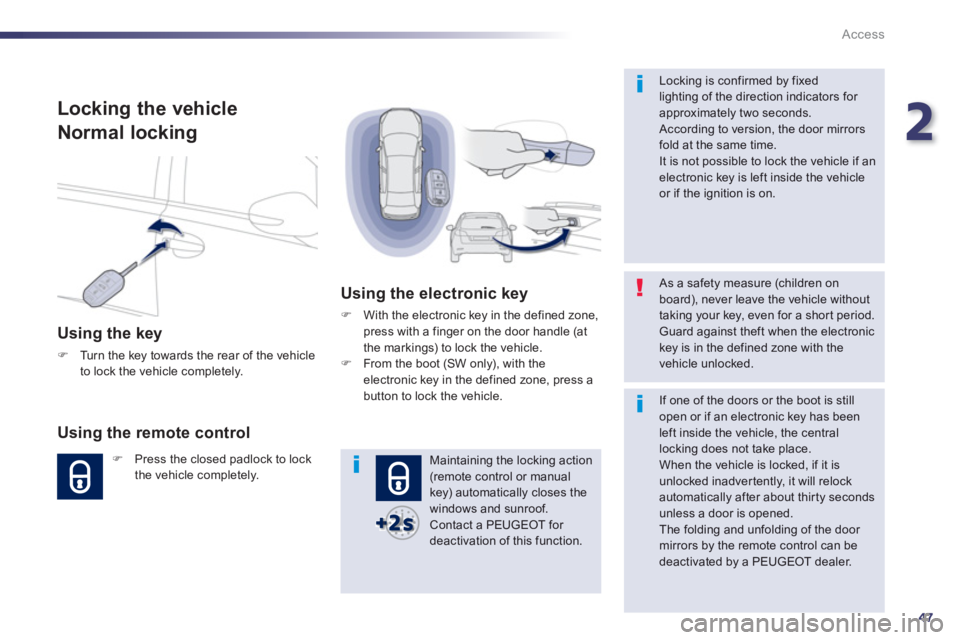
g
Using the key
F
Turn the key towards the rear of the vehicle
to lock the vehicle completely.
Using the remote control
FPress the closed padlock to lockthe vehicle completely.
Using the electronic key
FWith the electronic key in the defined zone,
press with a finger on the door handle (at
the markings) to lock the vehicle. FFrom the boot (SW only), with theelectronic key in the defined zone, press a button to lock the vehicle.
Maintaining the locking action (remote control or manual key) automatically closes the windows and sunroof.
Contact a PEUGEOT for deactivation of this function.
As a safety measure (children on board), never leave the vehicle withouttaking your key, even for a shor t period. Guard against theft when the electronickey is in the defined zone with the vehicle unlocked.
Locking is confirmed by fixedlighting of the direction indicators for approximately two seconds.
According to version, the door mirrorsfold at the same time.
It is not possible to lock the vehicle if an electronic key is left inside the vehicleor if the ignition is on.
If one of the doors or the boot is still open or if an electronic key has been left inside the vehicle, the centrallocking does not take place.
When the vehicle is locked, if it isunlocked inadvertently, it will relockautomatically after about thir ty secondsunless a door is opened.
The folding and unfolding of the door mirrors by the remote control can bedeactivated by a PEUGEOT dealer.
Page 50 of 340
48
Access
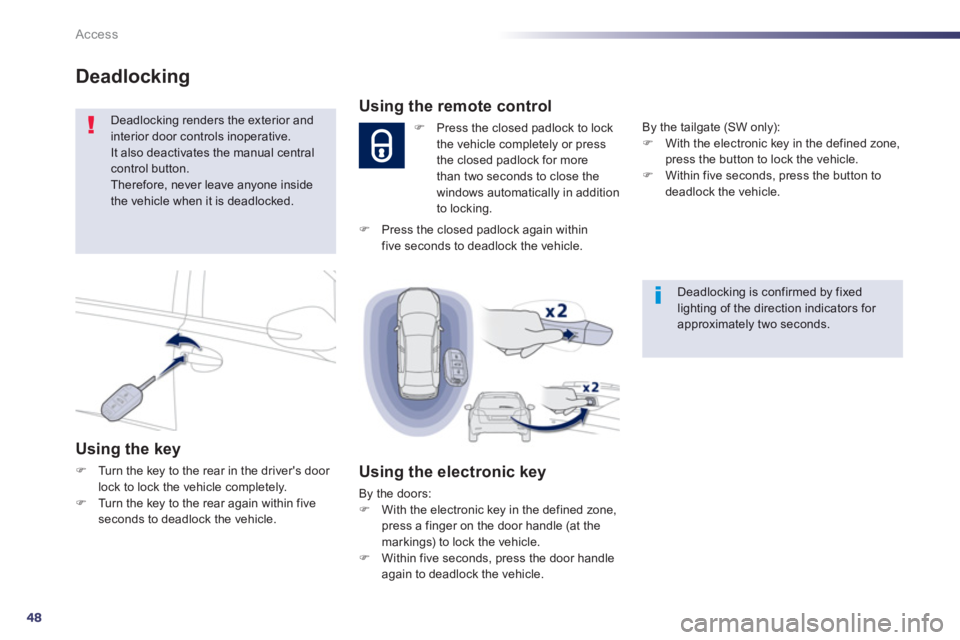
Deadlocking
Deadlocking renders the exterior and interior door controls inoperative. It also deactivates the manual central control button.
Therefore, never leave anyone insidethe vehicle when it is deadlocked.
Using the key
FTurn the key to the rear in the driver's door lock to lock the vehicle completely. FTurn the key to the rear again within fiveseconds to deadlock the vehicle.
Deadlocking is confirmed by fixedlighting of the direction indicators for approximately two seconds.
Using the remote control
F
Press the closed padlock to lock
the vehicle completely or press
the closed padlock for more
th
an two seconds to close the
windows automatically in addition
to locking.
Using the electronic key
By the doors: F
With the electronic key in the defined zone,
press a finger on the door handle (at the
markings) to lock the vehicle.F Within five seconds, press the door handle
again to deadlock the vehicle. B
y the tailgate (SW only):F
With the electronic key in the defined zone,
press the button to lock the vehicle. F
Within five seconds, press the button to deadlock the vehicle.
F
Press the closed padlock again within five seconds to deadlock the vehicle.
Page 51 of 340
2
49
Access
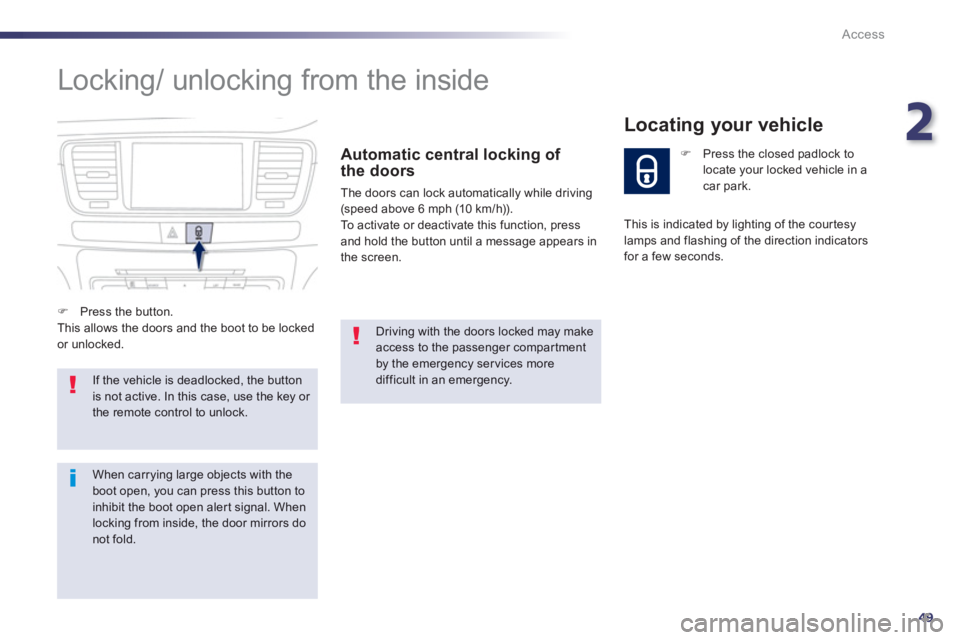
Locking/ unlocking from the inside
Automatic central locking of
the doors
The doors can lock automatically while driving(speed above 6 mph (10 km/h)).
To activate or deactivate this function, press
and hold the button until a message appears in
the screen.
If the vehicle is deadlocked, the buttonis not active. In this case, use the key or the remote control to unlock.
Driving with the doors locked may make access to the passenger compar tment by the emergency ser vices more difficult in an emergency.
F
Press the closed padlock to locate your locked vehicle in acar park.
Locating your vehicle
F
Press the button.
This allows the doors and the boot to be locked or unlocked. This is indicated b
y lighting of the cour tesy
lamps and flashing of the direction indicatorsfor a few seconds.
When carrying large objects with the boot open, you can press this button toinhibit the boot open aler t signal. Whenlocking from inside, the door mirrors do not fold.
Page 52 of 340
50
Access
Emergency procedure
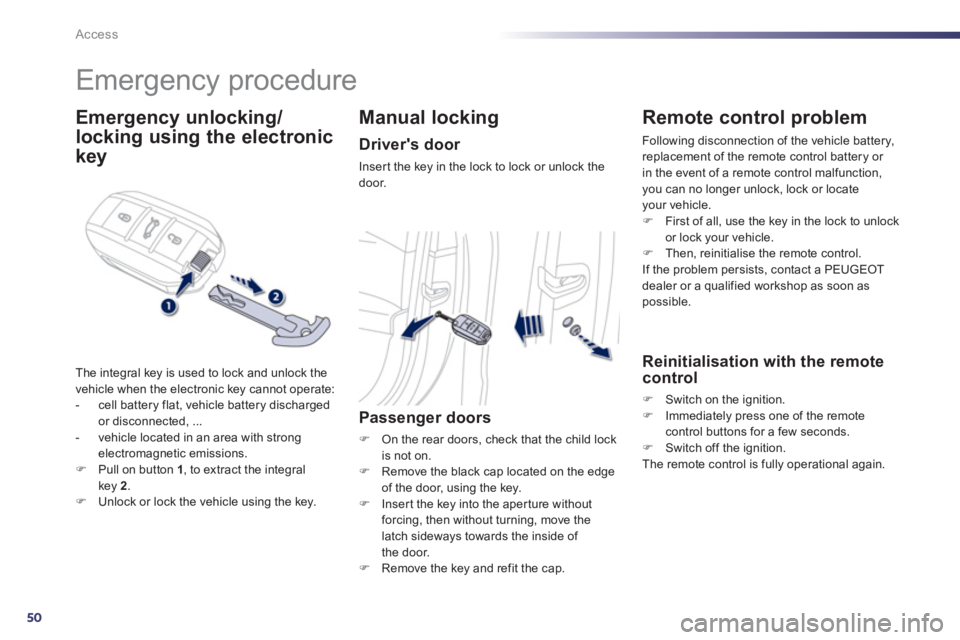
Emergency unlocking/
locking
using the electronic
ke
y
The integral key is used to lock and unlock the
vehicle when the electronic key cannot operate:
- cell battery flat, vehicle battery discharged
or disconnected, ...
- vehicle located in an area with strongelectromagnetic emissions.FPull on button 1, to extract the integralkey 2.FUnlock or lock the vehicle using the key.
Manual locking
Driver's door
Inser t the key in the lock to lock or unlock thedoor.
Passenger doors
F
On the rear doors, check that the child lock
is not on. F Remove the black cap located on the edgeof the door, using the key.F
Inser t the key into the aper ture withoutforcing, then without turning, move the
latch sideways towards the inside of
the door.F Remove the key and refit the cap.
Remote control problem
Following disconnection of the vehicle battery,
replacement of the remote control battery or
in the event of a remote control malfunction
, you can no longer unlock, lock or locateyour vehicle.F First of all, use the key in the lock to unlock
or lock your vehicle. F Then, reinitialise the remote control.
If the problem persists, contact a PEUGEOT
dealer or a qualified workshop as soon as
possible.
Reinitialisation with the remote control
F
Switch on the ignition.F
Immediately press one of the remotecontrol buttons for a few seconds. F
Switch off the ignition.
The remote control is fully operational again.
Page 53 of 340
2
51
Access
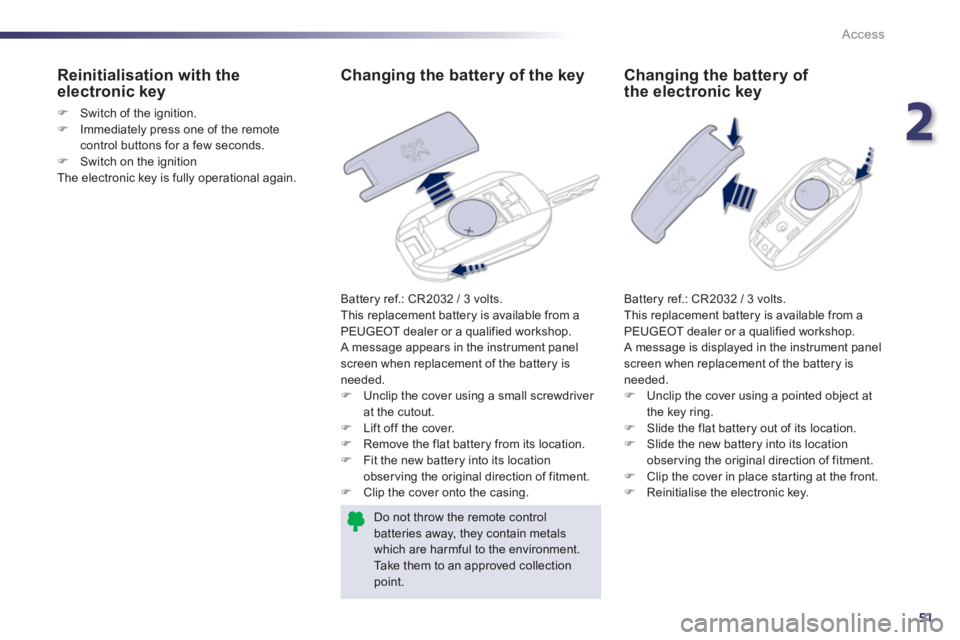
Changing the battery of the key
Battery ref.: CR2032 / 3 volts.
This replacement battery is available from a PEUGEOT dealer or a qualified workshop.
A message appears in the instrument panel
screen when replacement of the battery is needed. FUnclip the cover using a small screwdriver at the cutout.
FLift off the cover.
FRemove the
flat battery from its location.
FFit the new battery into its location
observing the original direction of fitment.FClip the cover onto the casing.
Do not throw the remote controlbatteries away, they contain metals which are harmful to the environment. Take them to an approved collection point.
Reinitialisation with the electronic key
F
Switch of the ignition. F
Immediately press one of the remotecontrol buttons for a few seconds.
F
Switch on the ignition
The electronic key is fully operational again.
Changing the battery of the electronic key
Battery ref.: CR2032 / 3 volts.
This replacement battery is available from a
PEUGEOT dealer or a qualified workshop.
A message is displayed in the instrument panel screen when replacement of the battery is
needed.F Unclip the cover using a pointed object at
the key ring. F Slide the flat battery out of its location.
F
Slide the new battery into its location
observing the original direction of fitment. F Clip the cover in place star ting at the front. F
Reinitialise the electronic key.
Page 54 of 340
52
Access
Lost keys, remote control, electronic key
Visit a PEUGEOT dealer with the vehicle's V5 registration document and your personal identification documents.
The PEUGEOT dealer will be able to retrieve the key code and the transponder code required to order a replacement.
Remote control
The high frequency remote control is a sensitive system; do not operate it while it is in your pocket as there is a possibility that it may unlockthe vehicle, without you being aware of it. Do not repeatedly press the buttons of your remote control out of range and out of sight of your vehicle. You run the risk of stopping it fromworking and the remote control would have to be reinitialised.The remote control does not operate when the key is in the ignition, even when the ignition is switched off.
Locking the vehicle
Driving with the doors locked may make access to the passenger compar tment by the emergency ser vices more difficult in an emergency.
As a safety precaution (with children on board), remove the key from the ignition or take the electronic key when you leave the vehicle, even for a short time.
Electrical interference
The Keyless Entry and Starting electronic key may not operate if close to certain electronic devices: telephone, laptop computer, strongmagnetic fields, ...
Anti-theft protection
Do not make any modifications to the electronic engine immobiliser system; this could cause malfunctions. Don't forget to turn the steering to engage the steering lock.
When purchasing a second-hand vehicle
Have the key codes memorised by a PEUGEOT dealer, to ensure that the keys in your possession are the only ones which can star t the vehicle.