phone Peugeot 508 2013 Owner's Manual - RHD (UK, Australia)
[x] Cancel search | Manufacturer: PEUGEOT, Model Year: 2013, Model line: 508, Model: Peugeot 508 2013Pages: 340, PDF Size: 14.59 MB
Page 54 of 340
52
Access
Lost keys, remote control, electronic key
Visit a PEUGEOT dealer with the vehicle's V5 registration document and your personal identification documents.
The PEUGEOT dealer will be able to retrieve the key code and the transponder code required to order a replacement.
Remote control
The high frequency remote control is a sensitive system; do not operate it while it is in your pocket as there is a possibility that it may unlockthe vehicle, without you being aware of it. Do not repeatedly press the buttons of your remote control out of range and out of sight of your vehicle. You run the risk of stopping it fromworking and the remote control would have to be reinitialised.The remote control does not operate when the key is in the ignition, even when the ignition is switched off.
Locking the vehicle
Driving with the doors locked may make access to the passenger compar tment by the emergency ser vices more difficult in an emergency.
As a safety precaution (with children on board), remove the key from the ignition or take the electronic key when you leave the vehicle, even for a short time.
Electrical interference
The Keyless Entry and Starting electronic key may not operate if close to certain electronic devices: telephone, laptop computer, strongmagnetic fields, ...
Anti-theft protection
Do not make any modifications to the electronic engine immobiliser system; this could cause malfunctions. Don't forget to turn the steering to engage the steering lock.
When purchasing a second-hand vehicle
Have the key codes memorised by a PEUGEOT dealer, to ensure that the keys in your possession are the only ones which can star t the vehicle.
Page 209 of 340
8
207
Practical information
System which manages the duration of use of certain functions to conserve a sufficient level
of charge in the battery.
After the engine has stopped, you can still use functions such as the audio andtelematics system, windscreen wipers, dipped
beam headlamps, cour tesy lamps, etc. for a maximum combined duration of aboutforty minutes.
Energy economy mode
Switching to economy mode
A message then appears in the instrument panel screen indicating that the vehicle has
switched to economy mode and the active
functions are put on standby.
If a telephone call is being made at this time, it
will be maintained for around 10 minutes with
the Bluetooth hands-free system of your audio
system.
Exiting economy mode
These functions are reactivated automatically
next time the vehicle is driven.
F In order to resume the use of thesefunctions immediately, star t the engine and let it run:
- for less than ten minutes, to use
the equipment for approximatelyfive minutes,
- for more than ten minutes, to use the
equipment for up to approximatelythirty minutes.
Let the engine run for the duration specified toensure that the battery charge is sufficient.
Do not repeatedly and continuously restar t theengine in order to charge the battery.
A flat battery prevents the engine from star ting (refer to the "Battery" section).
Page 245 of 340
243
The system is protected in such a way that it will onlyoperate in your vehicle.
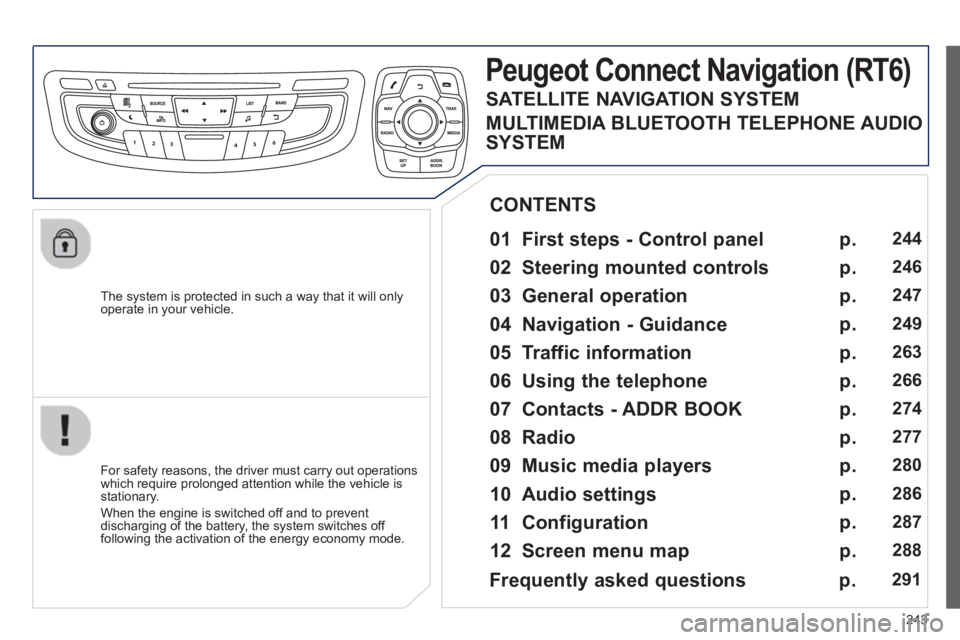
Peugeot Connect Navigation (RT6)
01 First steps - Control panel
For safety reasons, the driver must carry out operations
which require prolonged attention while the vehicle is stationary.
When the en
gine is switched off and to prevent
discharging of the battery, the system switches off following the activation of the energy economy mode.
CONTENTS
02 Steering mounted controls
03 General operation
04 Navigation - Guidance
05 Traffic information
06 Using the telephone
07 Contacts - ADDR BOOK
08 Radio
09 Music media players
10 Audio settings
11 Configuration
12 Screen menu map p.
p.
p.
p.
p.
p.
p.
p.
p.
p.
p.
p.
244
246
247
249
263
266
274
277
2
80
2
86
287
2
88
Frequently asked questions p. 291
SATELLITE NAVIGATION SYSTEM
MULTIMEDIA BLUETOOTH TELEPHONE AUDIO
SYSTEM
Page 247 of 340
245
01
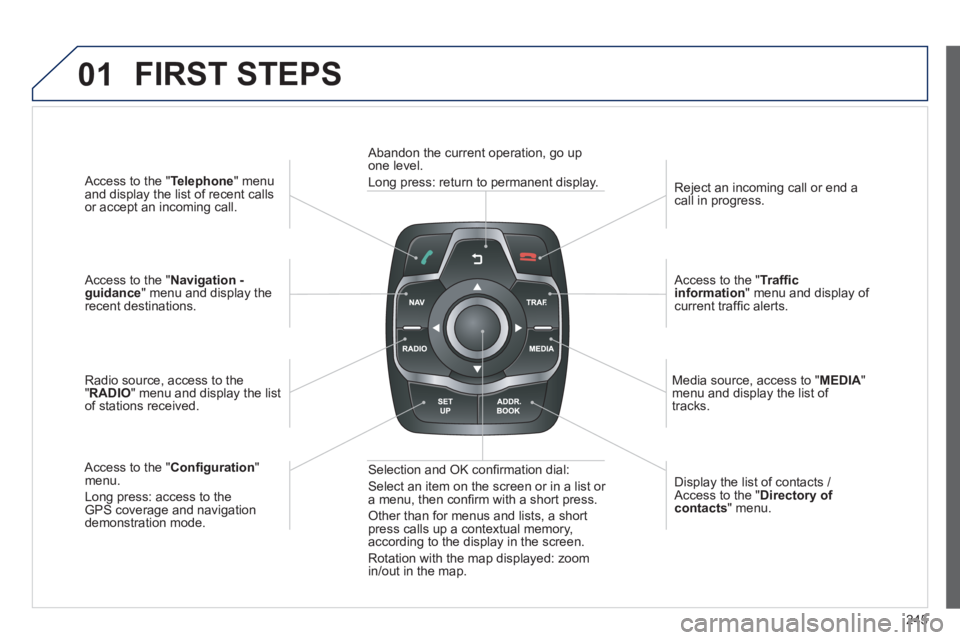
Access to the "Telephone " menuand display the list of recent calls
or accept an incoming call.
Access to the "Navigation -guidance" menu and display therecent destinations.
Radio source, access to the
"RADIO " menu and display the listof stations received.
A
ccess to the " Con fi guration "menu.
Long press: access to theGPS coverage and navigationdemonstration mode. Re
ject an incoming call or end a call in progress.
Access to the "Traf fi c information " menu and display of current traffi c alerts.
Media source, access to " MEDI
A" menu and display the list of
tracks.
Abandon the current operation, go upone level.
Long press: return to permanent display.
Selection and OK con fi rmation dial:
Select an item on the screen or in a list or
a menu, then con fi rm with a short press.
Other than for menus and lists, a short press calls up a contextual memory,
according to the display in the screen.
Rotation with the map displayed: zoom
in
/out in the map. Displa
y the list of contacts / Access to the "Directory of contacts " menu.
FIRST STEPS
Page 248 of 340
246
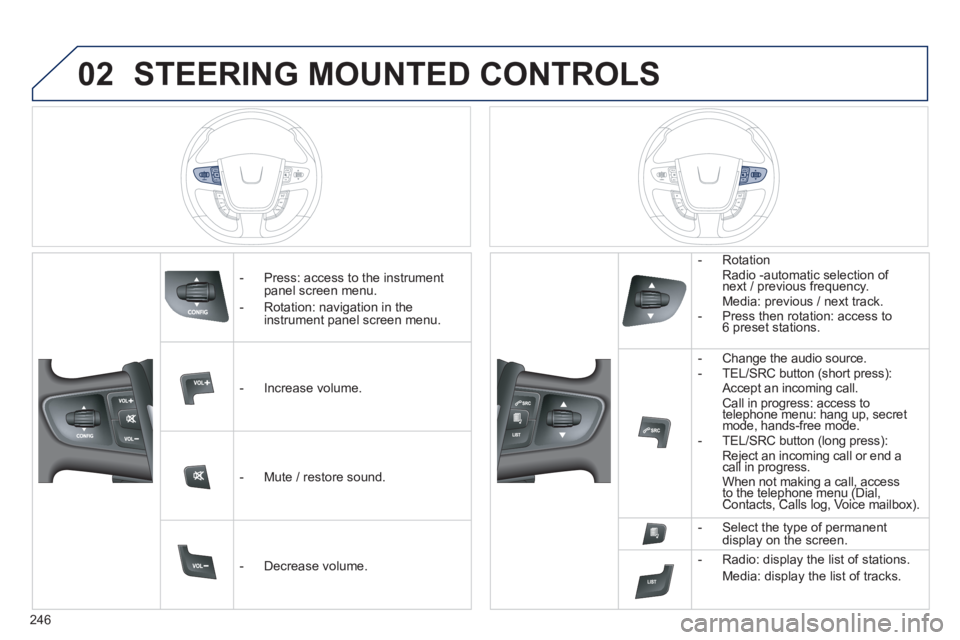
02STEERING MOUNTED CONTROLS
- Press: access to the instrumentpanel screen menu.
-
Rotation: navigation in the instrument panel screen menu.
- In
crease volume.
- Mute
/ restore sound.
-
Decrease volume. -
Rotation
Radio -automatic selection of next / previous frequency.
Media: previous / next track.
- Press then rotation: access to 6 preset stations.
-
Change the audio source.
- TEL/SRC button (short press):
Accept an incoming call . Call in progress: access to telephone menu: hang up, secretpgpg
mode, hands-free mode. pgppg
- TEL/SRC button (long press): Reject an incoming call or end acall in progress. jj
When not making a call, access to the telephone menu (Dial,gg
Contacts, Calls log, Voice mailbox). p(p
- Select the type of permanent
display on the screen.
- Radio: displa
y the list of stations.
Media: displa
y the list of tracks.
Page 249 of 340
247
03
For a detailed global view of the menus available, refer to the
"Screen menu map" section.
For cleaning the screen, the use of a soft, non-abrasive cloth (spectacles cloth) is recommended, with no additional product.
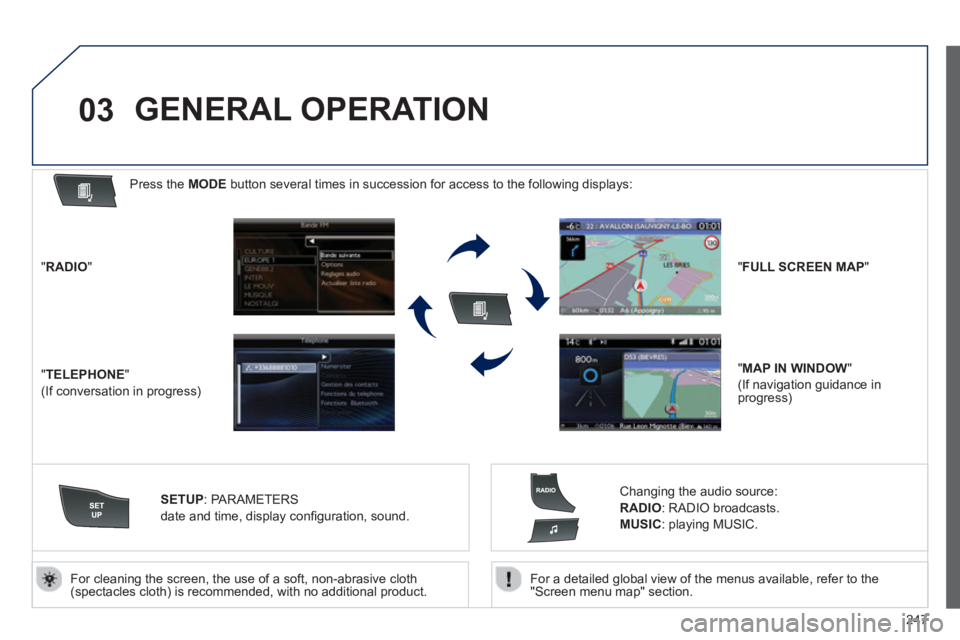
"RADIO"
"TELEPHONE"
(If conversation in progress)
SETUP: PARAMETERS
date and time, displa
y confi guration, sound.
Changing the audio source:
RADIO:
RADIO broadcasts.
MUSIC: playing MUSIC.
Press the MODE button several times in succession for access to the following displays:
GENERAL OPERATION
"FULL SCREEN MAP"
"MAP IN WINDOW"
(If navigation guidance in
progress)
Page 250 of 340
248
03
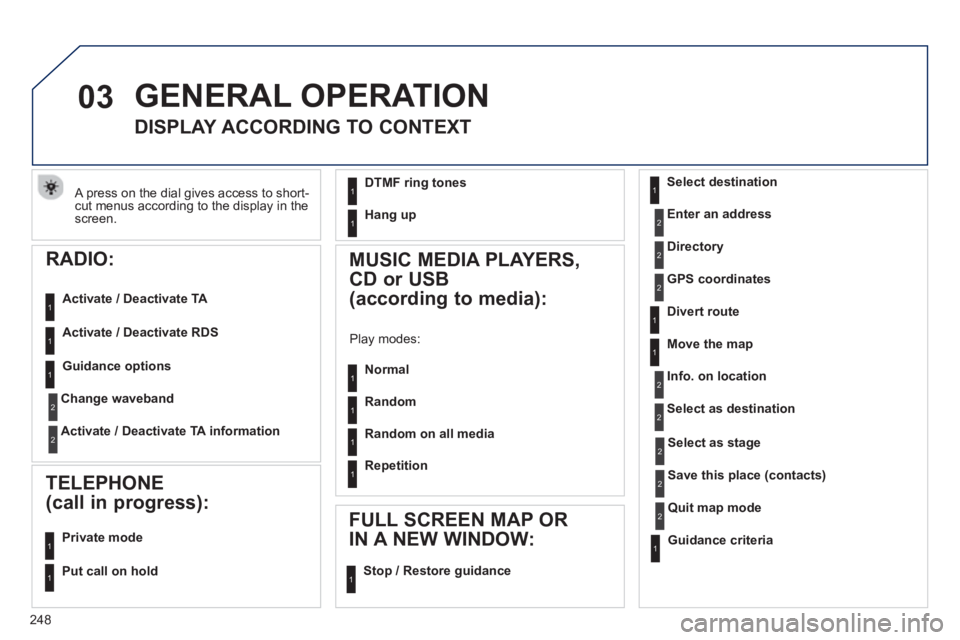
A press on the dial gives access to short-cut menus according to the display in the screen.
GENERAL OPERATION
DISPLAY ACCORDING TO CONTEXT
Select destination
Enter an address
Directory
GPS coordinates
Divert route
Move the map
Info. on location
Select as destination
Select as sta
ge
Save this place (contacts)
Quit map mode
Guidance criteria
2
2
2
2
2
1
2
2
2
1
1
1
RADIO:
Activate / Deactivate TA
Activate / Deactivate RD
S
MUSIC MEDIA PLAYERS,
CD or USB
(according to media):
Play modes:
Normal
Random
Random on all media
Re
petition
TELEPHONE
(call in progress):
Private mode FULL SCREEN MAP OR
IN A NEW WINDOW:
Stop / Restore guidance
Put call on hold
1
1
1
1
1
1
1
11
DTMF ring tones
Han
g up1
1
Guidance options 1
Change waveband
Activate / Deactivate TA information
2
2
Page 253 of 340
251
04
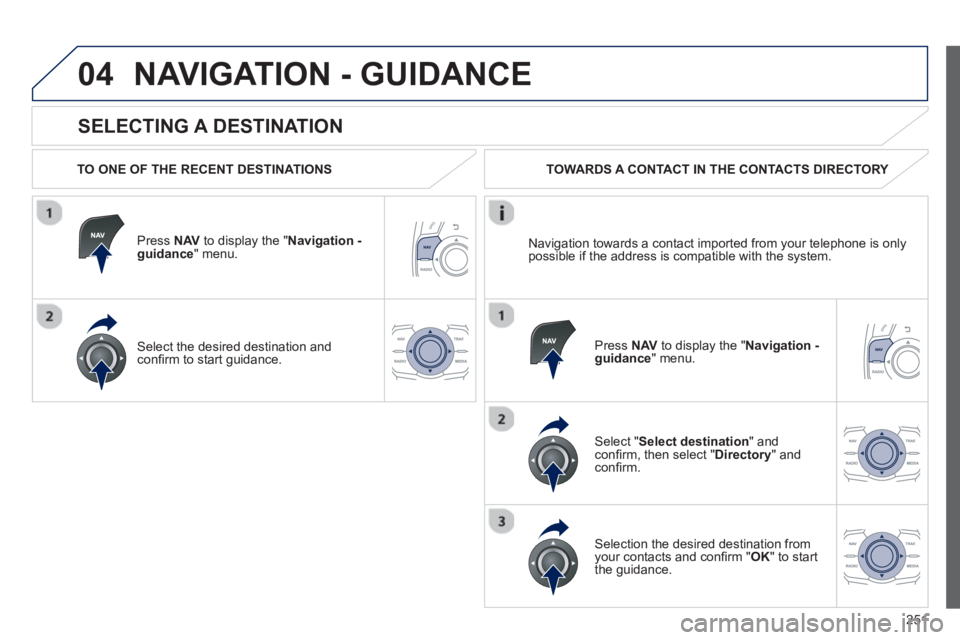
SELECTING A DESTINATION
NAVIGATION - GUIDANCE
TO ONE OF THE RECENT DESTINATIONS
Press NAVto display the "Navigation - guidance" menu.
Select the desired destination and con fi rm to start guidance. TOWARDS A CONTACT IN THE CONTACTS DIRECTORY
Select "Select destination " and confi rm, then select " Directory" andconfi rm.
Selection the desired destination fromyour contacts and con fi rm " OK" to start
the guidance.
Press NAV to display the " Navigation -guidance
" menu.
Navi
gation towards a contact imported from your telephone is only
possible if the address is compatible with the system.
Page 268 of 340
266
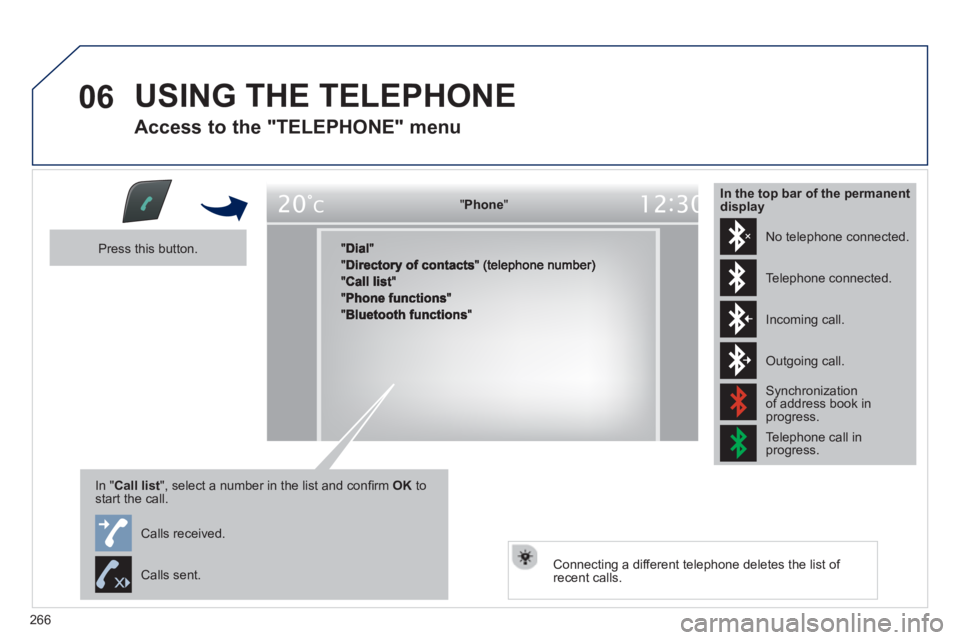
06 USING THE TELEPHONE
Access to the "TELEPHONE" menu
"""""""oePhonePhonePhonePhonePhonePhonePhonePhonePhonePhonePhonePhonePhonePhonePhPhPhPh"""""""
Press this button.
In "Call list ", select a number in the list and confi rm OK tostart the call.
Connecting a different telephone deletes the list of recent calls.
No telephone connected.
Telephone connected.
Incoming call.
Outgoing call.
Synchronization of address book in progress.
Telephone call in progress.
In the top bar of the permanentdisplay
Calls received.
Calls sent.
Page 269 of 340
267
06
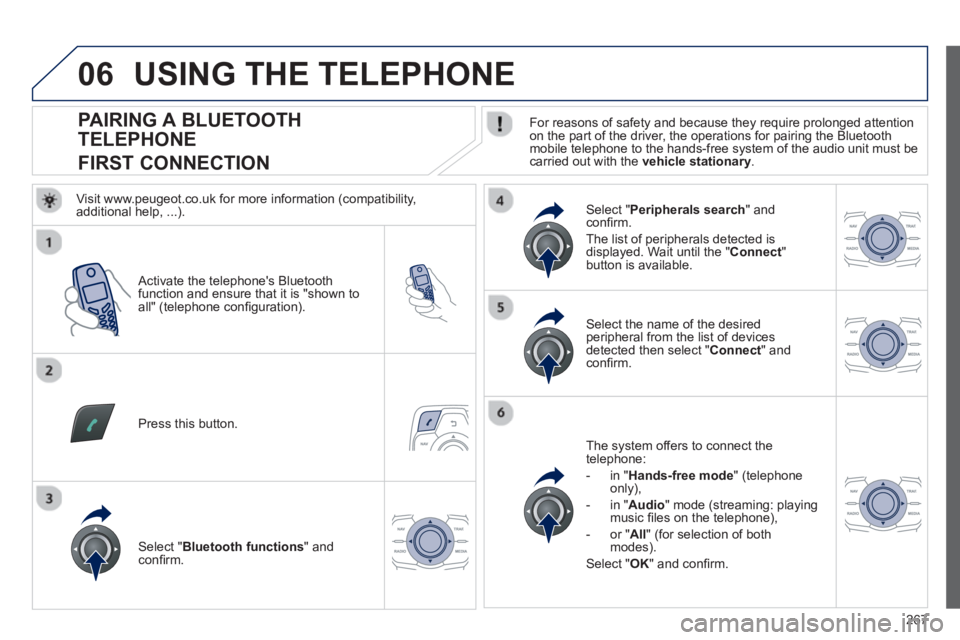
PAIRING A BLUETOOTH
TELEPHONE
FIRST CONNECTION For reasons of safety and because they require prolonged attention on the part of the driver, the operations for pairing the Bluetooth
mobile telephone to the hands-free system of the audio unit must becarried out with the vehicle stationary.
Activate the telephone's Bluetooth
function and ensure that it is "shown to all" (telephone con fi guration).
Pr
ess this button.
Select the name of the desired
peripheral from the list of devicesdetected then select " Connect" andconfi rm.
The s
ystem offers to connect the
telephone:
- in " Hands-free mod
e " (telephone
only),
- in "
Audio " mode (streaming: playing music fi les on the telephone),
-
or "All" (for selection of bothmodes).
Select " OK" and confi rm.
Select " Bluetooth functions " and confi rm.
Select "Peripherals search " andconfi rm.
The list of
peripherals detected is
displayed. Wait until the " Connect"button is available.
USING THE TELEPHONE
Visit www.peugeot.co.uk for more information (compatibility,
additional help, ...).