display Peugeot 508 2018 Owner's Manual
[x] Cancel search | Manufacturer: PEUGEOT, Model Year: 2018, Model line: 508, Model: Peugeot 508 2018Pages: 320, PDF Size: 10.09 MB
Page 300 of 320
32
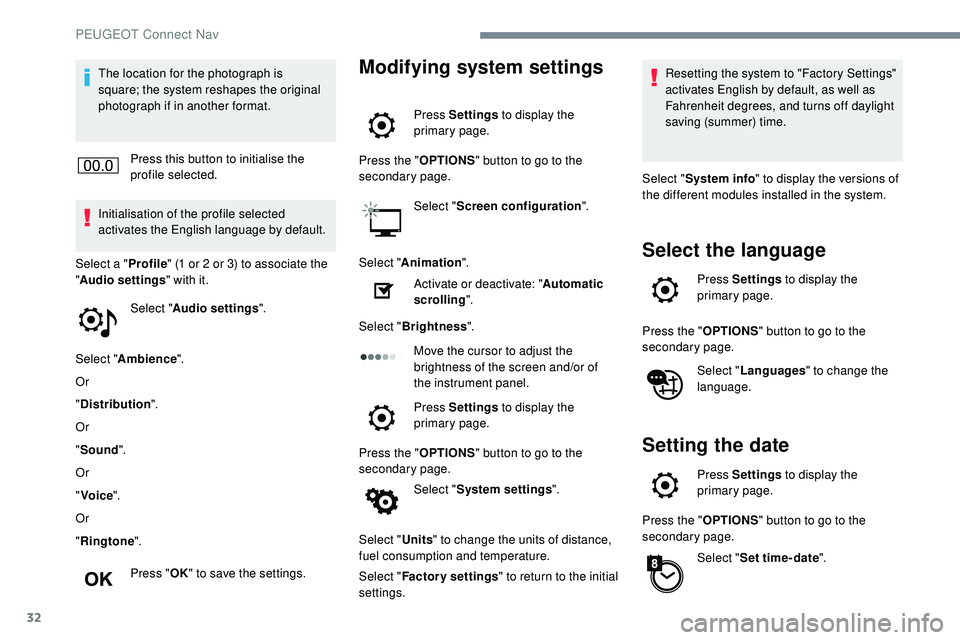
The location for the photograph is
square; the system reshapes the original
photograph if in another format.Press this button to initialise the
profile selected.
Initialisation of the profile selected
activates the English language by default.
Select a " Profile" (1 or 2 or 3) to associate the
" Audio settings " with it.
Select " Audio settings ".
Select " Ambience ".
Or
" Distribution ".
Or
" Sound ".
Or
" Voice ".
Or
" Ringtone ".
Press " OK" to save the settings.Modifying system settings
Press Settings to display the
primary page.
Press the " OPTIONS" button to go to the
secondary page.
Select "Screen configuration ".
Select " Animation ".
Activate or deactivate: " Automatic
scrolling ".
Select " Brightness ".
Move the cursor to adjust the
brightness of the screen and/or of
the instrument panel.
Press Settings to display the
primary page.
Press the " OPTIONS" button to go to the
secondary page.
Select "System settings ".
Select " Units" to change the units of distance,
fuel consumption and temperature.
Select " Factory settings " to return to the initial
settings. Resetting the system to "Factory Settings"
activates English by default, as well as
Fahrenheit degrees, and turns off daylight
saving (summer) time.
Select " System info " to display the versions of
the different modules installed in the system.
Select the language
Press Settings to display the
primary page.
Press the " OPTIONS" button to go to the
secondary page.
Select "Languages " to change the
language.
Setting the date
Press Settings to display the
primary page.
Press the " OPTIONS" button to go to the
secondary page.
Select "Set time-date ".
PEUGEOT Connect Nav
Page 301 of 320
33
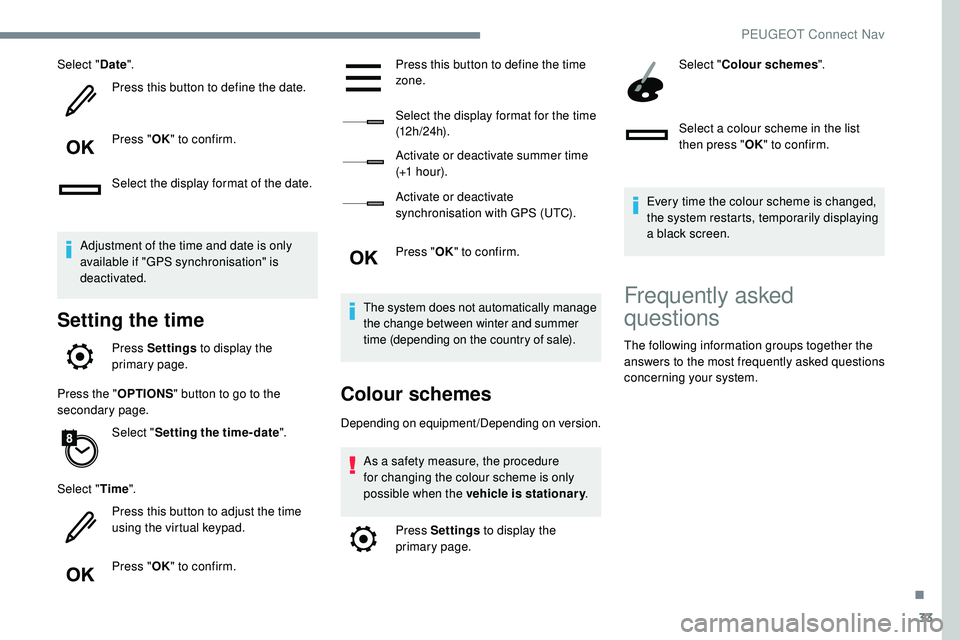
Select "Date".
Press this button to define the date.
Press " OK" to confirm.
Select the display format of the date.
Adjustment of the time and date is only
available if "GPS synchronisation" is
deactivated.
Setting the time
Press Settings to display the
primary page.
Press the " OPTIONS" button to go to the
secondary page.
Select "Setting the time- date".
Select " Time".
Press this button to adjust the time
using the virtual keypad.
Press " OK" to confirm. Press this button to define the time
zone.
Select the display format for the time
(12 h / 24 h).
Activate or deactivate summer time
(+1 h o ur).
Activate or deactivate
synchronisation with GPS (UTC).
Press "
OK" to confirm.
The system does not automatically manage
the change between winter and summer
time (depending on the country of sale).
Colour schemes
Depending on equipment/Depending on version. As a safety measure, the procedure
for changing the colour scheme is only
possible when the vehicle is stationary .
Press Settings to display the
primary page. Select "
Colour schemes ".
Select a colour scheme in the list
then press " OK" to confirm.
Every time the colour scheme is changed,
the system restarts, temporarily displaying
a black screen.
Frequently asked
questions
The following information groups together the
answers to the most frequently asked questions
concerning your system.
.
PEUGEOT Connect Nav
Page 302 of 320
34
Navigation
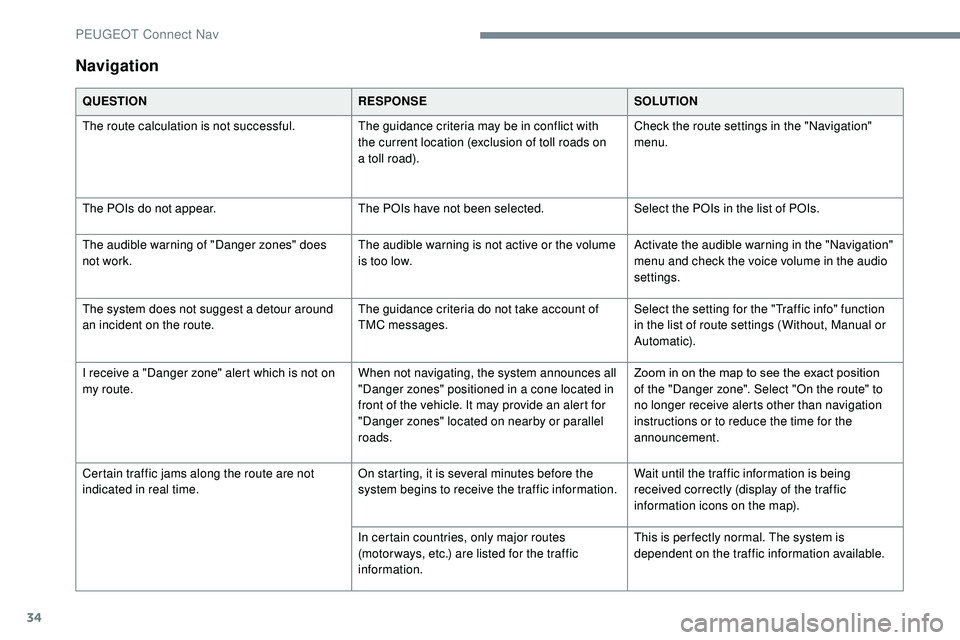
QUESTIONRESPONSESOLUTION
The route calculation is not successful. The guidance criteria may be in conflict with
the current location (exclusion of toll roads on
a toll road).Check the route settings in the "Navigation"
menu.
The POIs do not appear. The POIs have not been selected.Select the POIs in the list of POIs.
The audible warning of "Danger zones" does
not work. The audible warning is not active or the volume
is too low.Activate the audible warning in the "Navigation"
menu and check the voice volume in the audio
settings.
The system does not suggest a detour around
an incident on the route. The guidance criteria do not take account of
TMC messages.Select the setting for the "Traffic info" function
in the list of route settings (Without, Manual or
Automatic).
I receive a "Danger zone" alert which is not on
my route. When not navigating, the system announces all
"Danger zones" positioned in a cone located in
front of the vehicle. It may provide an alert for
"Danger zones" located on nearby or parallel
roads.Zoom in on the map to see the exact position
of the "Danger zone". Select "On the route" to
no longer receive alerts other than navigation
instructions or to reduce the time for the
announcement.
Certain traffic jams along the route are not
indicated in real time. On starting, it is several minutes before the
system begins to receive the traffic information.Wait until the traffic information is being
received correctly (display of the traffic
information icons on the map).
In certain countries, only major routes
(motor ways, etc.) are listed for the traffic
information. This is per fectly normal. The system is
dependent on the traffic information available.
PEUGEOT Connect Nav
Page 303 of 320
35
Radio
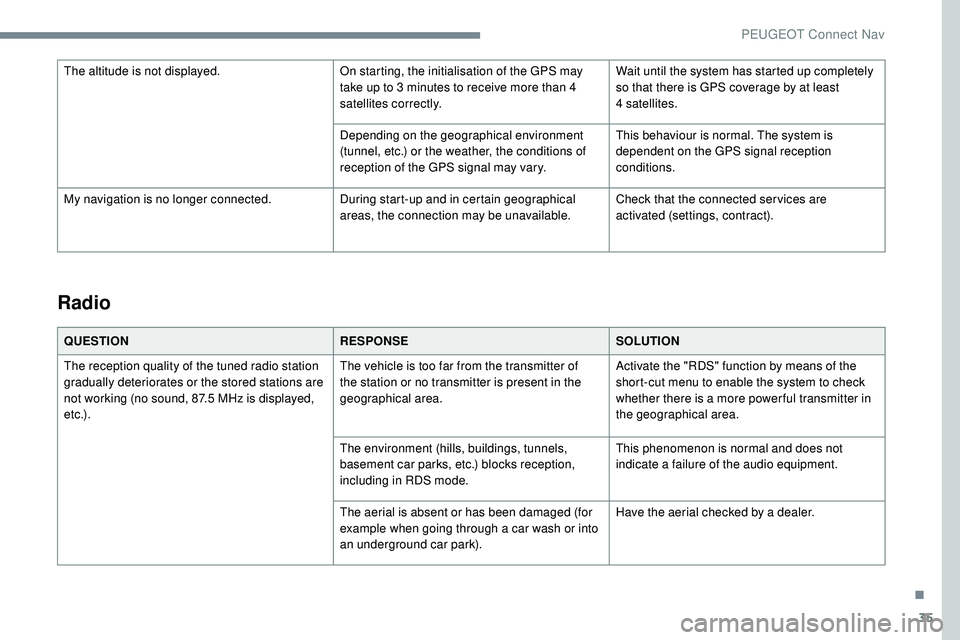
QUESTIONRESPONSESOLUTION
The reception quality of the tuned radio station
gradually deteriorates or the stored stations are
not working (no sound, 87.5 MHz is displayed,
e t c .) . The vehicle is too far from the transmitter of
the station or no transmitter is present in the
geographical area.
Activate the "RDS" function by means of the
short-cut menu to enable the system to check
whether there is a more power ful transmitter in
the geographical area.
The environment (hills, buildings, tunnels,
basement car parks, etc.) blocks reception,
including in RDS mode. This phenomenon is normal and does not
indicate a failure of the audio equipment.
The aerial is absent or has been damaged (for
example when going through a car wash or into
an underground car park). Have the aerial checked by a dealer.
The altitude is not displayed.
On starting, the initialisation of the GPS may
take up to 3 minutes to receive more than 4
satellites correctly.Wait until the system has started up completely
so that there is GPS coverage by at least
4
satellites.
Depending on the geographical environment
(tunnel, etc.) or the weather, the conditions of
reception of the GPS signal may vary. This behaviour is normal. The system is
dependent on the GPS signal reception
conditions.
My navigation is no longer connected. During start-up and in certain geographical
areas, the connection may be unavailable.Check that the connected ser vices are
activated (settings, contract).
.
PEUGEOT Connect Nav
Page 305 of 320
37
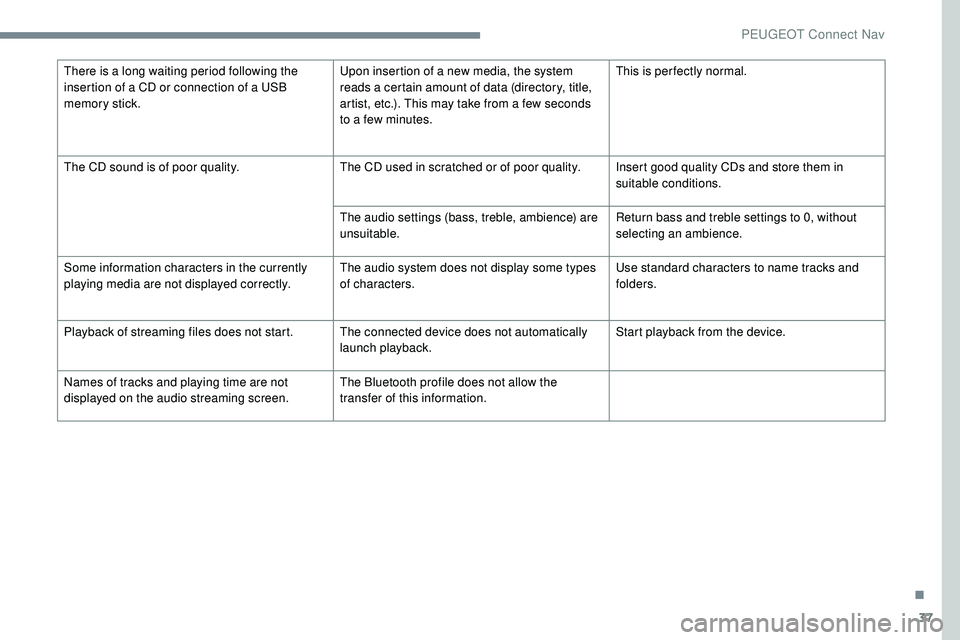
There is a long waiting period following the
insertion of a CD or connection of a USB
memory stick.Upon insertion of a new media, the system
reads a certain amount of data (directory, title,
artist, etc.). This may take from a few seconds
to a few minutes.This is per fectly normal.
The CD sound is of poor quality. The CD used in scratched or of poor quality. Insert good quality CDs and store them in
suitable conditions.
The audio settings (bass, treble, ambience) are
unsuitable. Return bass and treble settings to 0, without
selecting an ambience.
Some information characters in the currently
playing media are not displayed correctly. The audio system does not display some types
of characters.Use standard characters to name tracks and
folders.
Playback of streaming files does not start. The connected device does not automatically launch playback.Start playback from the device.
Names of tracks and playing time are not
displayed on the audio streaming screen. The Bluetooth profile does not allow the
transfer of this information.
.
PEUGEOT Connect Nav
Page 306 of 320
38
Telephone
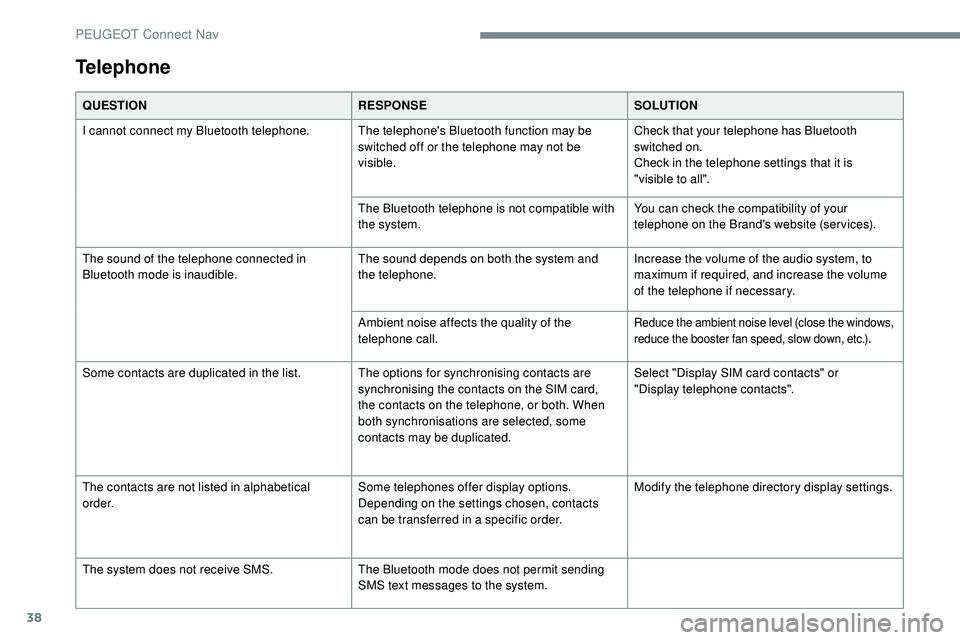
QUESTIONRESPONSESOLUTION
I cannot connect my Bluetooth telephone. The telephone's Bluetooth function may be switched off or the telephone may not be
visible.Check that your telephone has Bluetooth
switched on.
Check in the telephone settings that it is
"visible to all".
The Bluetooth telephone is not compatible with
the system. You can check the compatibility of your
telephone on the Brand's website (services).
The sound of the telephone connected in
Bluetooth mode is inaudible. The sound depends on both the system and
the telephone.Increase the volume of the audio system, to
maximum if required, and increase the volume
of the telephone if necessary.
Ambient noise affects the quality of the
telephone call.
Reduce the ambient noise level (close the windows,
reduce the booster fan speed, slow down, etc.).
Some contacts are duplicated in the list. The options for synchronising contacts are synchronising the contacts on the SIM card,
the contacts on the telephone, or both. When
both synchronisations are selected, some
contacts may be duplicated.Select "Display SIM card contacts" or
"Display
telephone contacts".
The contacts are not listed in alphabetical
o r d e r. Some telephones offer display options.
Depending on the settings chosen, contacts
can be transferred in a specific order.Modify the telephone directory display settings.
The system does not receive SMS. The Bluetooth mode does not permit sending
SMS text messages to the system.
PEUGEOT Connect Nav
Page 310 of 320
246
D
DAB (Digital Audio Broadcasting) – Digital radio ............................................... 8, 24
Date (setting)
....................................... 34, 17, 32
Deactivating the passenger airbag
10
6 -107, 112
Deadlocking
.............................................. 36, 39
Defrosting
................................................... 70 -71
Defrosting, front
.............................................. 70
Demisting
........................................................ 70
Demisting, front
............................................... 70
D
emisting, rear
................................................ 71
Demisting, rear screen
...................................71
Dials and gauges
...............................
...............8
Dimensions
..............................
.....................242
Dipstick
................
............................24, 206-207
Display screen, instrument panel
.................13 8
Distance Alert
.................................. 18, 165 -167
Door pockets
...............................
....................74
Doors
............................................................... 46
Doors, rear
.................................................... 123
Drive Assist Plus
........................................... 151
Driver’s attention warning
.............................169
Driving
....................................................... 56-57
Driving modes
............................................... 13 6
Driving positions (storing)
...............................59
Dynamic stability control (DSC)
......18, 10 0 -102
E
ECO mode ..................................................... 13 6
Economy mode ............................................. 2
02
Electronic brake force distribution (EBFD)
................................................. 10 0 -101
Emergency braking assistance (EBA)
...10 0 -101
Emergency call
....................................... 9 9 -10 0
Emergency switching off
...............................127
Emissions control system, SCR
...................210
Energy economy mode
................................. 2
02
Engine compartment
.................................... 20
5
Engine, Diesel
..................14, 197, 205, 240 -241
H
Hands-free access .......................................... 50
Hands-free tailgate ................................... 48, 50
Hazard warning lamps
....................................98
Headlamps, automatic dipping
.......................22
Headlamps, dipped beam
...............................22
Headlamps, main beam
..................................22
Head restraints, front
...................................... 57
Head restraints, rear
.................................63-64
Heating
................................................. 6
5, 71-73
Heating, additional
..................................... 71-73
Heating, programmable
.............................71-73
Hi-Fi system
.................................................... 76
H
ill start assist ........................................ 13 5 -13 6
Horn ................................................................. 99
I
i-Cockpit® amplify function ................60, 64- 65
Ignition ................ ..................................... 1 2 7, 2 9
Ignition on ...................................................... 127
Immobiliser, electronic
..................................125
Indicator, AdBlue® range
.........................24-25
Indicator, coolant temperature
........................24
Indicator, engine oil level
..........................24, 26
Inflating tyres
................................................ 209
Instrument panel
................................ 8 -9, 26 -28
Internet browser
.............................................. 21
I
SOFIX
.......................................................... 11 9
ISOFIX mountings ......................................... 11 8
J
Jack .................................................................25
Engine, petrol ............................... .197, 205, 239
Engines ................................................. 2 3 8 - 2 41
Environment
.............................................. 40, 73
ESC (electronic stability control)
..................10
0
Extended traffic sign recognition
...........145 -14 6
F
Fatigue detection .......................................... 169
Filling the AdBlue® tank ................................ 2 11
Filling the fuel tank ................................. 197-19 9
Filter, air
........................................................ 208
Filter, oil
................
......................................... 208
Filter, particle
......................................... 207-208
Filter, passenger compartment
..............66, 208
Fitting roof bars
..................................... 203-204
Fittings, boot
................................................... 81
Fittings, interior
.......................................... 74
-75
Fittings, rear
.................................................... 80
Flap, fuel filler
........................................ 198 -19 9
Foglamps, rear
................................................ 21
F
olding the rear seats
............................... 63-64
Frequency (radio)
...................................... 23 -24
Fuel ................................................................ 197
Fuel tank ................................................ 198 -19 9
Full Park Assist
............................................. 188
G
Gauge, fuel.................................................... 198
Gearbox, automatic ........131-13 6, 13 8 -13 9, 20 9
Gearbox, manual
...131, 13 5 -13 6, 13 8 -13 9, 20 9
Gear lever, automatic gearbox
.............131, 13 3
Gear lever, manual gearbox
.........................131
Gear shift indicator
....................................... 13 8
Glove box
........................................................ 75
G . P. S .
.............................................................. 14
Grab handles
............................................ 5 7, 74
Alphabetical index