wheel Peugeot 508 2018 Service Manual
[x] Cancel search | Manufacturer: PEUGEOT, Model Year: 2018, Model line: 508, Model: Peugeot 508 2018Pages: 320, PDF Size: 10.09 MB
Page 155 of 320
153
Steering mounted control
For more information on Speed Limit
recognition and recommendation,
refer
to
the corresponding section.
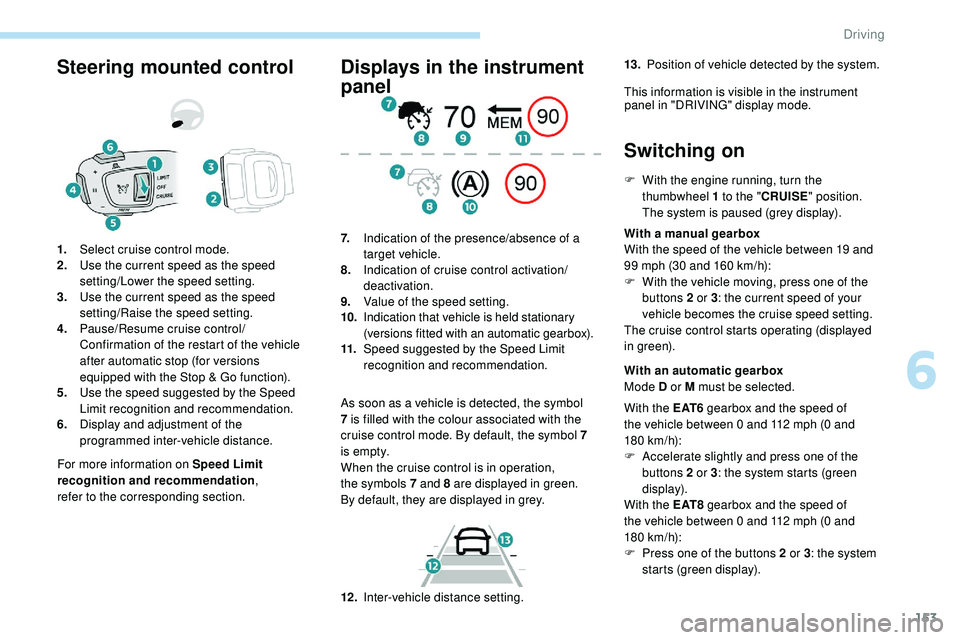
1.
Select cruise control mode.
2. Use the current speed as the speed
setting/Lower the speed setting.
3. Use the current speed as the speed
setting/Raise the speed setting.
4. Pause/Resume cruise control/
Confirmation of the restart of the vehicle
after automatic stop (for versions
equipped with the Stop & Go function).
5. Use the speed suggested by the Speed
Limit recognition and recommendation.
6. Display and adjustment of the
programmed inter-vehicle distance.
Displays in the instrument
panel
As soon as a vehicle is detected, the symbol
7
is filled with the colour associated with the
cruise control mode. By default, the symbol 7
i s e m pt y.
When the cruise control is in operation,
the
symbols 7 and 8 are displayed in green.
By
default, they are displayed in grey.
7.
Indication of the presence/absence of a
target vehicle.
8. Indication of cruise control activation/
deactivation.
9. Value of the speed setting.
10. Indication that vehicle is held stationary
(versions fitted with an automatic gearbox).
11. Speed suggested by the Speed Limit
recognition and recommendation.
Switching on
F With the engine running, turn the
thumbwheel 1 to the "CRUISE" position.
The system is paused (grey display).
With a manual gearbox
With the speed of the vehicle between 19 and
99 mph (30 and 160
km/h):
F
W
ith the vehicle moving, press one of the
buttons 2 or 3 : the current speed of your
vehicle becomes the cruise speed setting.
The cruise control starts operating (displayed
in green).
12 . Inter-vehicle distance setting. With an automatic gearbox
Mode D or M must be selected.
With the E AT 6 gearbox and the speed of
the vehicle between 0 and 112 mph (0
and
180
km/h):
F
A
ccelerate slightly and press one of the
buttons 2 or 3 : the system starts (green
display).
With the E AT 8 gearbox and the speed of
the vehicle between 0 and 112 mph (0
and
180
km/h):
F
P
ress one of the buttons 2 or 3 : the system
starts (green display).
13.
Position of vehicle detected by the system.
This information is visible in the instrument panel in "DRIVING" display mode.
6
Driving
Page 157 of 320
155
Take care: pressing and holding button 2
or 3 results in a rapid change in the speed
of your vehicle.
From the Speed Limit recognition
and recommendation system
F The suggested speed is displayed in the instrument panel.
F
M
ake an initial press on button 5 ; a
message is displayed to confirm the
memorisation request.
F
P
ress button 5 again to save the suggested
speed.
The speed displays immediately in the
instrument panel as the new speed setting.
For more information on the Speed Limit
recognition and recommendation , refer to
the corresponding section.
As a precaution, it is recommended
that you select a cruise speed close to
the current speed of your vehicle, so
as to avoid any sudden acceleration or
deceleration of the vehicle.
Modification of the programmed
inter-vehicle distance
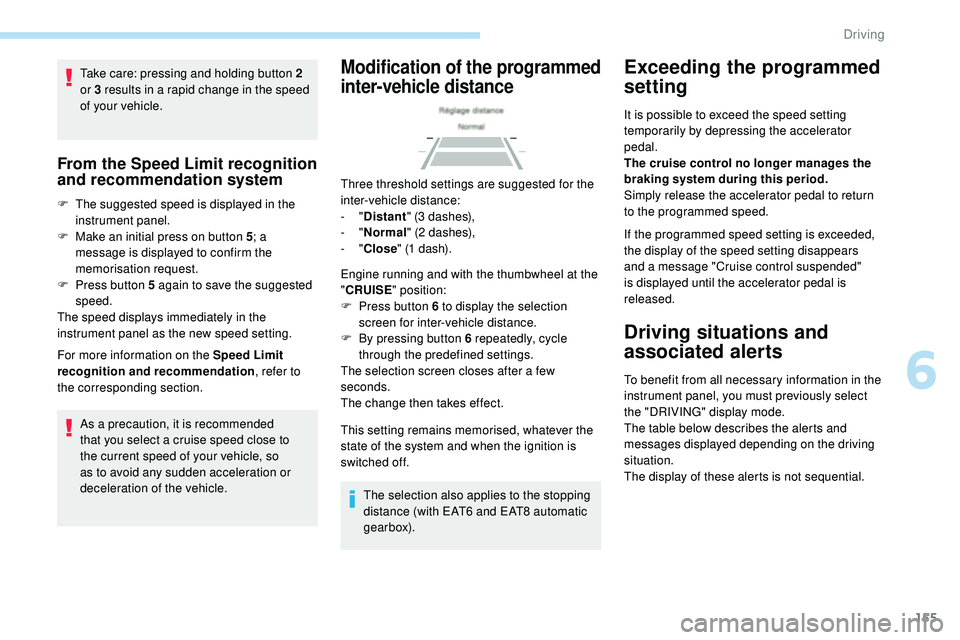
Three threshold settings are suggested for the
inter-vehicle distance:
- "Distant " (3 dashes),
-
"Normal " (2 dashes),
-
"Close " (1 dash).
Engine running and with the thumbwheel at the
" CRUISE " position:
F
P
ress button 6 to display the selection
screen for inter-vehicle distance.
F
B
y pressing button 6 repeatedly, cycle
through the predefined settings.
The selection screen closes after a few
seconds.
The change then takes effect.
This setting remains memorised, whatever the
state of the system and when the ignition is
switched off.
The selection also applies to the stopping
distance (with EAT6 and EAT8 automatic
gearbox).
Exceeding the programmed
setting
It is possible to exceed the speed setting
temporarily by depressing the accelerator
pedal.
The cruise control no longer manages the
braking system during this period.
Simply release the accelerator pedal to return
to the programmed speed.
If the programmed speed setting is exceeded,
the display of the speed setting disappears
and a message "Cruise control suspended"
is displayed until the accelerator pedal is
released.
Driving situations and
associated alerts
To benefit from all necessary information in the
instrument panel, you must previously select
the "DRIVING" display mode.
The table below describes the alerts and
messages displayed depending on the driving
situation.
The display of these alerts is not sequential.
6
Driving
Page 161 of 320
159
During the vehicle immobilisation phase,
it is recommended:
-
N
ot to open the doors.
-
N
ot to drop off or pick up passengers.
-
N
ot to engage reverse gear.
When the vehicle restarts, watch out for
cyclists, pedestrians or animals which may
not be detected properly.
Operating limits
The system cannot exceed the limits of the
laws of physics.
Certain situations cannot be managed by the
system and require the driver to take back
control of the vehicle.
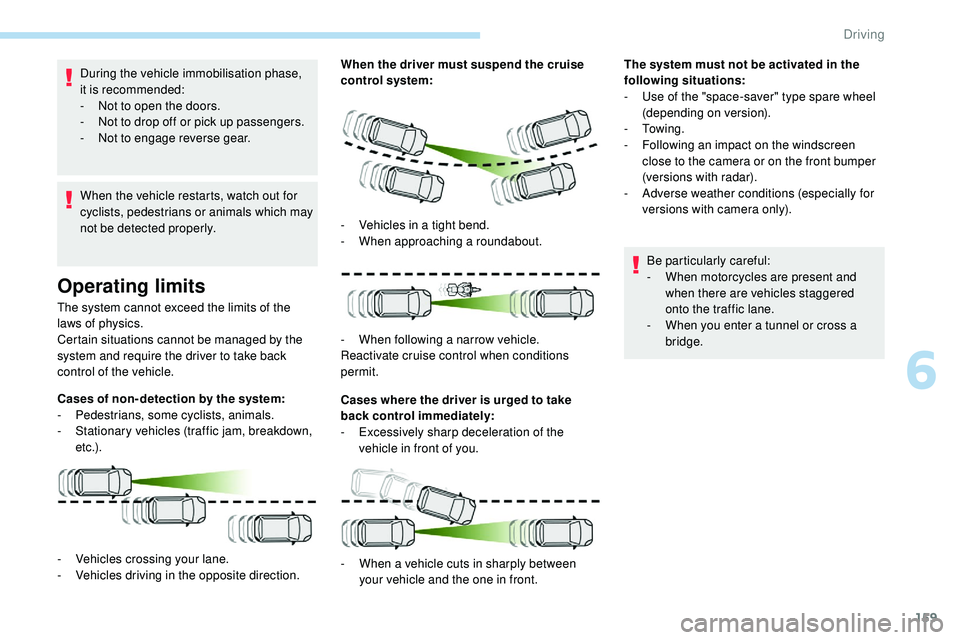
Cases of non- detection by the system:
-
Pe
destrians, some cyclists, animals.
-
S
tationary vehicles (traffic jam, breakdown,
e t c .) . When the driver must suspend the cruise
control system:
Cases where the driver is urged to take
back control immediately:
-
E
xcessively sharp deceleration of the
vehicle in front of you.
-
V
ehicles crossing your lane.
-
V
ehicles driving in the opposite direction. -
V
ehicles in a tight bend.
-
W
hen approaching a roundabout.
-
W
hen following a narrow vehicle.
Reactivate cruise control when conditions
permit.
-
W
hen a vehicle cuts in sharply between
your vehicle and the one in front. The system must not be activated in the
following situations:
-
U
se of the "space-saver" type spare wheel
(depending on version).
-
To w i n g .
-
F
ollowing an impact on the windscreen
close to the camera or on the front bumper
(versions with radar).
-
A
dverse weather conditions (especially for
versions with camera only).
Be particularly careful:
-
W
hen motorcycles are present and
when there are vehicles staggered
onto the traffic lane.
-
W
hen you enter a tunnel or cross a
bridge.
6
Driving
Page 163 of 320
161
If the front bumper is to be repainted or
retouched, contact a PEUGEOT dealer
or a qualified workshop. Certain types of
paint could inter fere with the operation of
the radar.
Malfunction
If the cruise control
malfunctions, dashes are
displayed instead of the
cruise control speed setting.
If this warning lamp comes
on, accompanied by an alert
message and an audible
signal, this confirms a
malfunction.
The adaptive cruise control deactivates
automatically if the use of a "space-saver"
type spare wheel is detected or if there is
a malfunction on the lateral brake lamps or
trailer brake lamps (for approved trailers).
Lane Positioning Assist
Have the system checked by a PEUGEOT
dealer or a qualified workshop. Using a camera located at the top of the
windscreen, the system identifies lane
markings and steers the vehicle inside this lane
to keep it in the lateral position chosen by the
driver.
This function is primarily suitable for driving on
motor ways and main roads.
This system is a driving aid that cannot,
under any circumstances, replace driver
vigilance and respect of the speed limits
and safety distances.
The system does not assess the
behaviour of other vehicles. Therefore,
the
driver must be ready at all times
to retake control of their vehicle by
permanently holding the steering wheel
with both hands and keeping their feet
near the brake and accelerator pedals.
The function cannot be used to
compensate for loss of vigilance caused
by driver inattention or fatigue. It is
recommended to take a break every two
hours.
Conditions for operation
- The adaptive cruise control with Stop & Go function must be active.
-
T
he vehicle must be travelling in a traffic
lane clearly delimited on both sides.
-
T
he ESC system must be operating.
-
T
he ASR must not be deactivated.
-
N
o trailer detected.
-
S
mall-diameter, "space-saver" type spare
wheel not being used.
-
T
he vehicle must not be subjected to strong
lateral accelerations.
-
T
he direction indicators must not be
activated.
Activation/Deactivation
The state of the system stays in memory
when the ignition is switched off.
F
W
ith the adaptive cruise control with Stop &
Go function activated, press this button.
6
Driving
Page 164 of 320
162
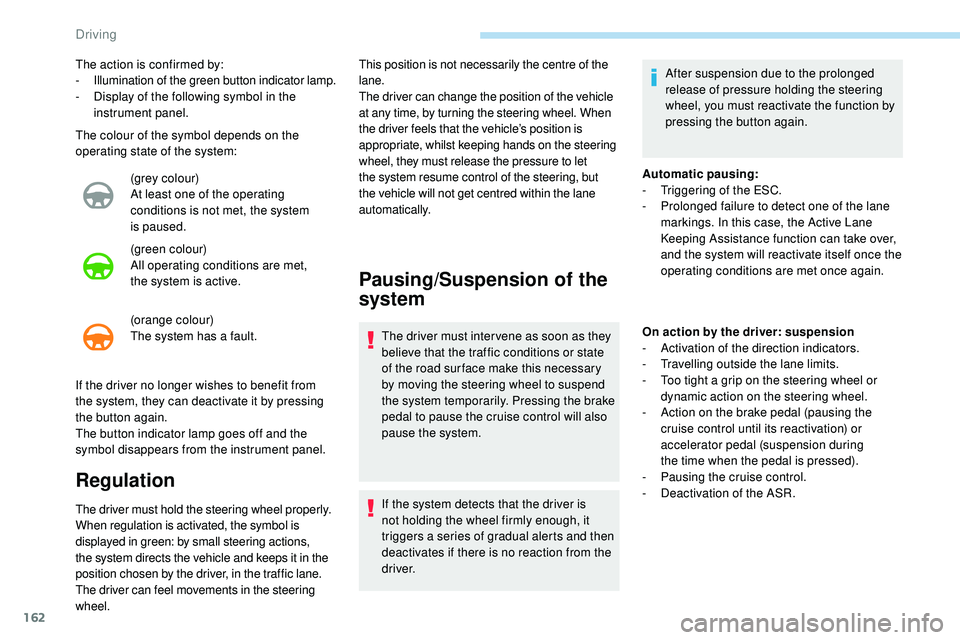
The colour of the symbol depends on the
operating state of the system:(grey colour)
At least one of the operating
conditions is not met, the system
is
paused.
(green colour)
All operating conditions are met,
the
system is active.
(orange colour)
The system has a fault.
The action is confirmed by:
-
I
llumination of the green button indicator lamp.
-
D
isplay of the following symbol in the
instrument panel.
If the driver no longer wishes to benefit from
the system, they can deactivate it by pressing
the
button again.
The button indicator lamp goes off and the
symbol disappears from the instrument panel.
Regulation
The driver must hold the steering wheel properly.
When regulation is activated, the symbol is
displayed in green: by small steering actions,
the system directs the vehicle and keeps it in the
position chosen by the driver, in the traffic lane.
The driver can feel movements in the steering
wheel. This position is not necessarily the centre of the
lane.
The driver can change the position of the vehicle
at any time, by turning the steering wheel. When
the driver feels that the vehicle’s position is
appropriate, whilst keeping hands on the steering
wheel, they must release the pressure to let
the system resume control of the steering, but
the vehicle will not get centred within the lane
automatically.
Pausing/Suspension of the
system
The driver must inter vene as soon as they
believe that the traffic conditions or state
of the road sur face make this necessary
by moving the steering wheel to suspend
the system temporarily. Pressing the brake
pedal to pause the cruise control will also
pause the system.
If the system detects that the driver is
not holding the wheel firmly enough, it
triggers a series of gradual alerts and then
deactivates if there is no reaction from the
driver.
Automatic pausing:
-
T
riggering of the ESC.
-
P
rolonged failure to detect one of the lane
markings. In this case, the Active Lane
Keeping Assistance function can take over,
and the system will reactivate itself once the
operating conditions are met once again.
On action by the driver: suspension
- A ctivation of the direction indicators.
-
T
ravelling outside the lane limits.
-
T
oo tight a grip on the steering wheel or
dynamic action on the steering wheel.
-
A
ction on the brake pedal (pausing the
cruise control until its reactivation) or
accelerator pedal (suspension during
the
time when the pedal is pressed).
-
P
ausing the cruise control.
-
D
eactivation of the ASR.
After suspension due to the prolonged
release of pressure holding the steering
wheel, you must reactivate the function by
pressing the button again.
Driving
Page 165 of 320
163
70
70
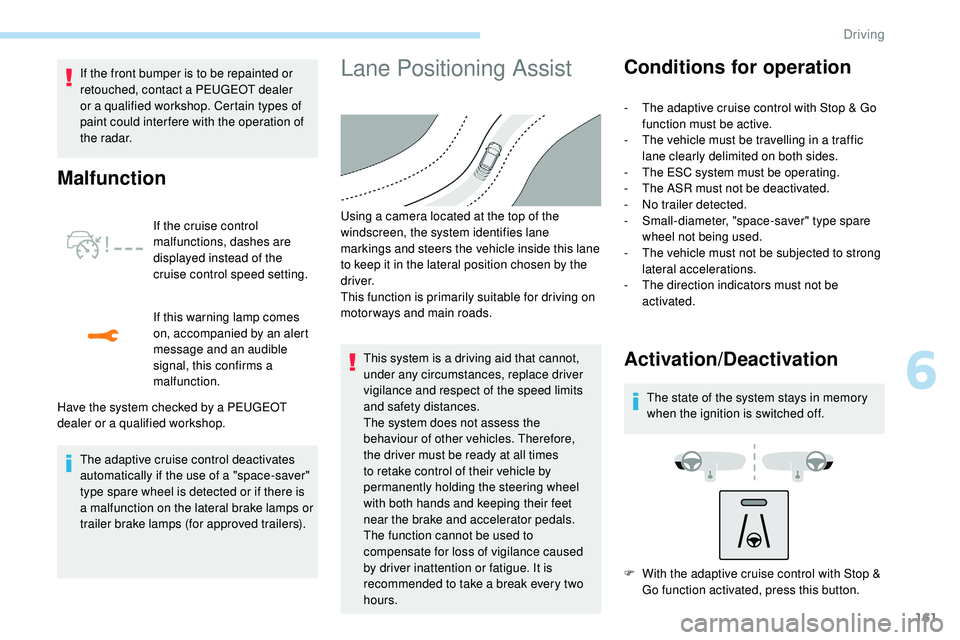
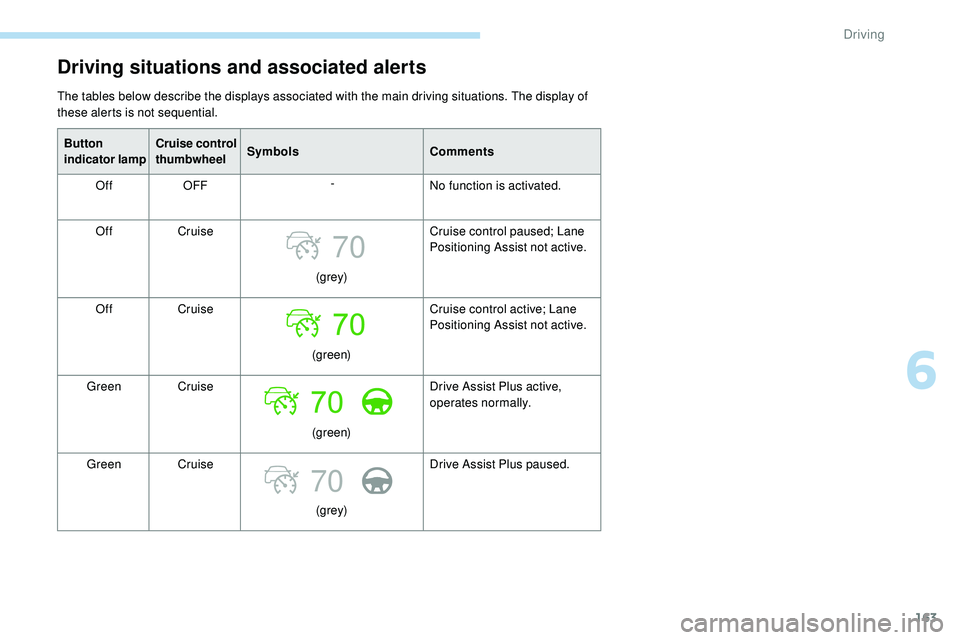
Driving situations and associated alerts
The tables below describe the displays associated with the main driving situations. The display of
these alerts is not sequential.Button
indicator lamp Cruise control
thumbwheel
Symbols
Comments
Off OFF -
No function is activated.
Off Cruise
(grey)Cruise control paused; Lane
Positioning Assist not active.
Off Cruise
(green)Cruise control active; Lane
Positioning Assist not active.
Green Cruise
(green)Drive Assist Plus active,
operates normally.
Green Cruise
(grey)Drive Assist Plus paused.
6
Driving
Page 166 of 320
164
70
--
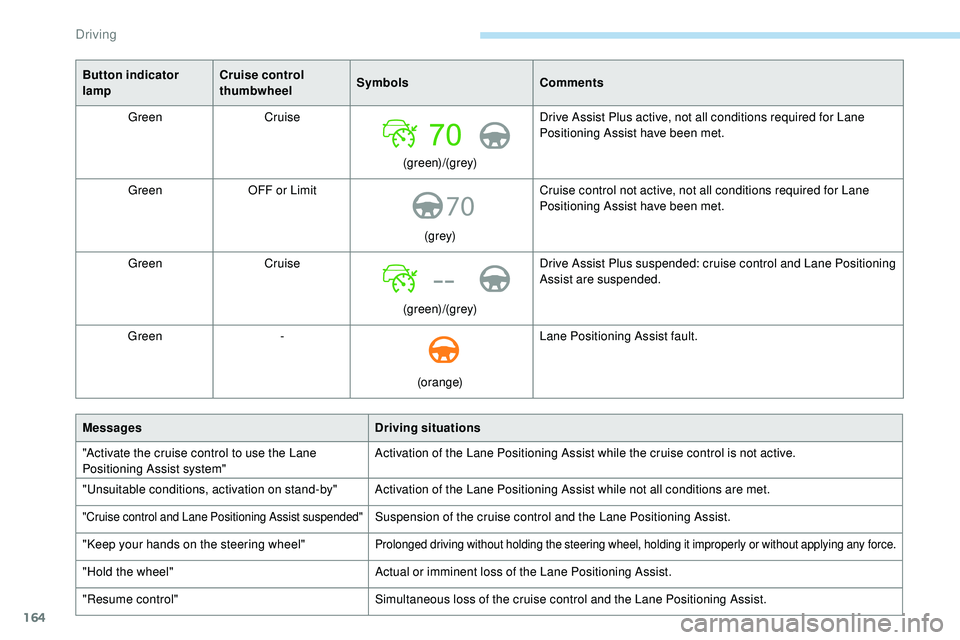
Button indicator
lampCruise control
thumbwheel
Symbols
Comments
Green Cruise
(green)/(grey)Drive Assist Plus active, not all conditions required for Lane
Positioning Assist have been met.
Green OFF or Limit
(grey)Cruise control not active, not all conditions required for Lane
Positioning Assist have been met.
Green Cruise
(green)/(grey)Drive Assist Plus suspended: cruise control and Lane Positioning
Assist are suspended.
Green -
(orange)Lane Positioning Assist fault.
Messages Driving situations
"Activate the cruise control to use the Lane
Positioning Assist system" Activation of the Lane Positioning Assist while the cruise control is not active.
"Unsuitable conditions, activation on stand-by" Activation of the Lane Positioning Assist while not all conditions are met.
"Cruise control and Lane Positioning Assist suspended"Suspension of the cruise control and the Lane Positioning Assist.
"Keep your hands on the steering wheel"
Prolonged driving without holding the steering wheel, holding it improperly or without applying any force.
"Hold the wheel" Actual or imminent loss of the Lane Positioning Assist.
"Resume control" Simultaneous loss of the cruise control and the Lane Positioning Assist.
Driving
Page 167 of 320
165
Operating limits
The Lane Positioning Assist system may
emit an alert when the vehicle is travelling
in a long straight lane on a smooth road
sur face even if the driver is holding the
steering wheel properly.
The following situations may interfere with
the operation of the system or prevent it from
working:
-
P
oor visibility (inadequate street lighting,
snowfall, rain, fog).
-
D
azzle (headlamps of an oncoming vehicle,
low sun, reflections on a wet road sur face,
leaving a tunnel, alternating light and
shade).
-
W
indscreen area in front of the camera
being dirty, misted up, frost-covered, snow-
covered, damaged or masked by a sticker.
-
L
ane markings damaged, partially hidden
(snow, mud) or multiple (roadworks,
pavement seams).
-
T
ravelling in a tight bend.
-
W
inding roads.
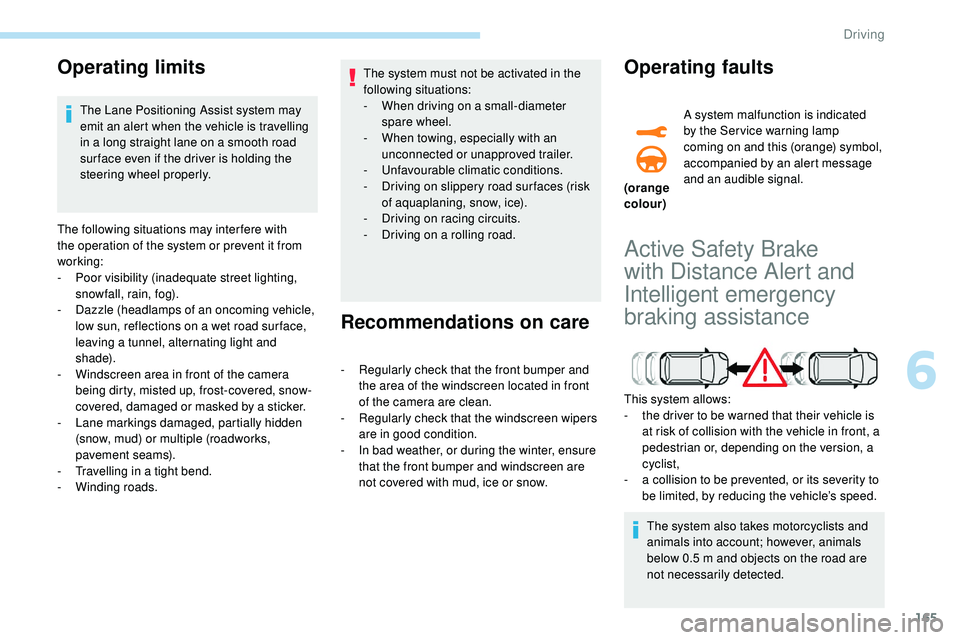
Active Safety Brake
with Distance Alert and
Intelligent emergency
braking assistance
This system allows:
- t he driver to be warned that their vehicle is
at risk of collision with the vehicle in front, a
pedestrian or, depending on the version, a
cyclist,
-
a c
ollision to be prevented, or its severity to
be limited, by reducing the vehicle’s speed.
The system also takes motorcyclists and
animals into account; however, animals
below 0.5
m and objects on the road are
not necessarily detected.
The system must not be activated in the
following situations:
-
W
hen driving on a small-diameter
spare wheel.
-
W
hen towing, especially with an
unconnected or unapproved trailer.
-
Un
favourable climatic conditions.
-
D
riving on slippery road sur faces (risk
of aquaplaning, snow, ice).
-
D
riving on racing circuits.
-
D
riving on a rolling road.
Recommendations on care
- Regularly check that the front bumper and
the area of the windscreen located in front
of the camera are clean.
-
R
egularly check that the windscreen wipers
are in good condition.
-
I
n bad weather, or during the winter, ensure
that the front bumper and windscreen are
not covered with mud, ice or snow.
Operating faults
(orange
colour) A system malfunction is indicated
by the Ser vice warning lamp
coming on and this (orange) symbol,
accompanied by an alert message
and an audible signal.
6
Driving
Page 169 of 320
167
In the following cases, deactivating the system
via the vehicle's configuration menu is advised:
-
t
owing a trailer,
-
c
arrying long objects on roof bars or roof
rack,
-
w
ith snow chains fitted,
-
b
efore using an automatic car wash, with
the engine running,
-
b
efore placing the vehicle on a rolling road
in a workshop,
-
t
owed vehicle, engine running,
-
f
ollowing impact to the windscreen close to
the detection camera.
The system is automatically deactivated
after detecting the use of certain "space-
saver" type spare wheels (smaller
diameter).
The system is automatically deactivated
after detecting a fault with the brake pedal
switch or with at least two brake lamps.
It is possible that warnings are not given,
are given too late or seem unjustified.
Consequently, always stay in control of
your vehicle and be prepared to react at
any time to avoid an accident. After an impact, the function automatically
stops operating. Contact a PEUGEOT
dealer or a qualified workshop to have the
system checked.
If the front bumper is to be repainted or
retouched, contact a PEUGEOT dealer
or a qualified workshop. Certain types of
paint could inter fere with the operation of
the radar.
Distance Alert
It warns the driver if their vehicle is at risk of
collision with the vehicle in front, a pedestrian
or a cyclist present in their traffic lane.
Modifying the alert trigger
threshold
This threshold determines how you wish to
be alerted of the presence of a moving or
stationary vehicle in front of you, a pedestrian
or a cyclist present in your traffic lane.
The current threshold can be
modified via the touch screen’s
Driving/Vehicle menu. You can select one of three predefined
thresholds:
-
"
Distant ",
- "
Normal ",
- "
Close ".
The last threshold selected is memorised when
the ignition is switched off.
Operation
Depending on the degree of risk of collision
detected by the system and the alert threshold
chosen by the driver, different levels of
alert can be triggered and displayed in the
instrument panel.
They take account of the vehicle dynamics, the
speed of your vehicle and the one in front, the
environmental conditions, the operation of the
vehicle (cornering, actions on the pedals, etc.)
to trigger the alert at the best moment.
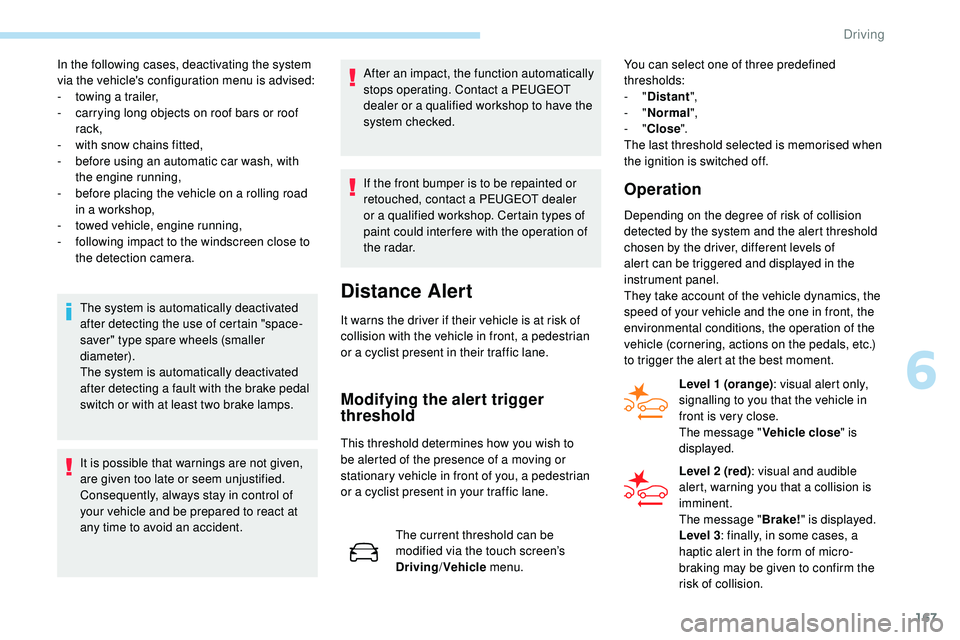
Level 1 (orange) : visual alert only,
signalling to you that the vehicle in
front is very close.
The message " Vehicle close" is
displayed.
Level 2 (red) : visual and audible
alert, warning you that a collision is
imminent.
The message " Brake!" is displayed.
Level 3 : finally, in some cases, a
haptic alert in the form of micro-
braking may be given to confirm the
risk of collision.
6
Driving
Page 170 of 320
168
Intelligent emergency
braking assistance
If the driver brakes, but not sufficiently to avoid
a collision, this system will supplement the
braking, within the limits of the laws of physics.
This assistance will only be provided if you
press the brake pedal.
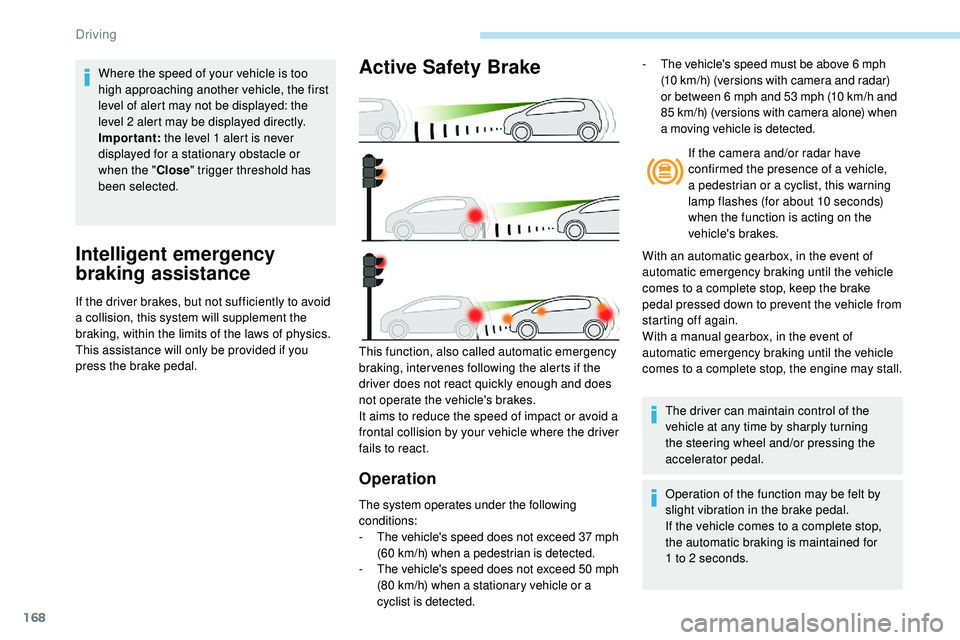
Active Safety Brake
Operation
The system operates under the following
conditions:
-
T
he vehicle's speed does not exceed 37 mph
(60 km/h) when a pedestrian is detected.
-
T
he vehicle's speed does not exceed 50 mph
(80 km/h) when a stationary vehicle or a
cyclist is detected. If the camera and/or radar have
confirmed the presence of a vehicle,
a pedestrian or a cyclist, this warning
lamp flashes (for about 10 seconds)
when the function is acting on the
vehicle's brakes.
With an automatic gearbox, in the event of
automatic emergency braking until the vehicle
comes to a complete stop, keep the brake
pedal pressed down to prevent the vehicle from
starting off again.
With a manual gearbox, in the event of
automatic emergency braking until the vehicle
comes to a complete stop, the engine may stall.
This function, also called automatic emergency
braking, inter venes following the alerts if the
driver does not react quickly enough and does
not operate the vehicle's brakes.
It aims to reduce the speed of impact or avoid a
frontal collision by your vehicle where the driver
fails to react. The driver can maintain control of the
vehicle at any time by sharply turning
the steering wheel and/or pressing the
accelerator pedal.
Operation of the function may be felt by
slight vibration in the brake pedal.
If the vehicle comes to a complete stop,
the automatic braking is maintained for
1
to 2 seconds.
-
T
he vehicle's speed must be above 6 mph
(10 km/h) (versions with camera and radar)
or between 6 mph and 53 mph (10 km/h and
85 km/h) (versions with camera alone) when
a moving vehicle is detected.
Where the speed of your vehicle is too
high approaching another vehicle, the first
level of alert may not be displayed: the
level 2 alert may be displayed directly.
Important:
the level 1 alert is never
displayed for a stationary obstacle or
when the " Close" trigger threshold has
been selected.
Driving