camera Peugeot 508 2019 Owner's Guide
[x] Cancel search | Manufacturer: PEUGEOT, Model Year: 2019, Model line: 508, Model: Peugeot 508 2019Pages: 320, PDF Size: 10.09 MB
Page 171 of 320
169
Malfunction
In the event of a fault with the system,
you are alerted by the continuous
illumination of this warning lamp,
accompanied by the display of a
message and an audible signal.
Fatigue detection system
Take a break as soon as you feel tired or at
least every two hours.
The function comprises the "Driver Attention
Warning" system combined with the "Driver
Attention Alert".These systems cannot in any circumstances
replace the need for vigilance on the part of
the driver who must remain in control of their
decisions. In no case can these systems
keep the driver awake or prevent them from
falling asleep at the wheel.
It is the driver’s responsibility to stop if they
feel tired.
Activation/Deactivation
These functions are activated and
deactivated in the Driving /Vehicle
menu of the touch screen.
The state of the system is memorised when the
ignition is switched off.
Driver Attention Warning
The system triggers an alert once it
detects that the driver has not taken
a break after two hours of driving at
a speed above 40 mph (65
km/h).
This alert is issued via the display of a
message encouraging you to take a break,
accompanied by an audible signal.
If the driver does not follow this advice, the
alert is repeated hourly until the vehicle is
stopped.
The system resets itself if one of the following
conditions is met:
-
e
ngine running, the vehicle has been
stationary for more than 15 minutes,
-
t
he ignition has been switched off for a few
minutes,
-
t
he driver's seat belt is unfastened and their
door is open. As soon as the speed of the vehicle drops
below 40 mph (65
km/h), the system goes
into standby.
The driving time is counted again once the
speed is above 40 mph (65 km/h).
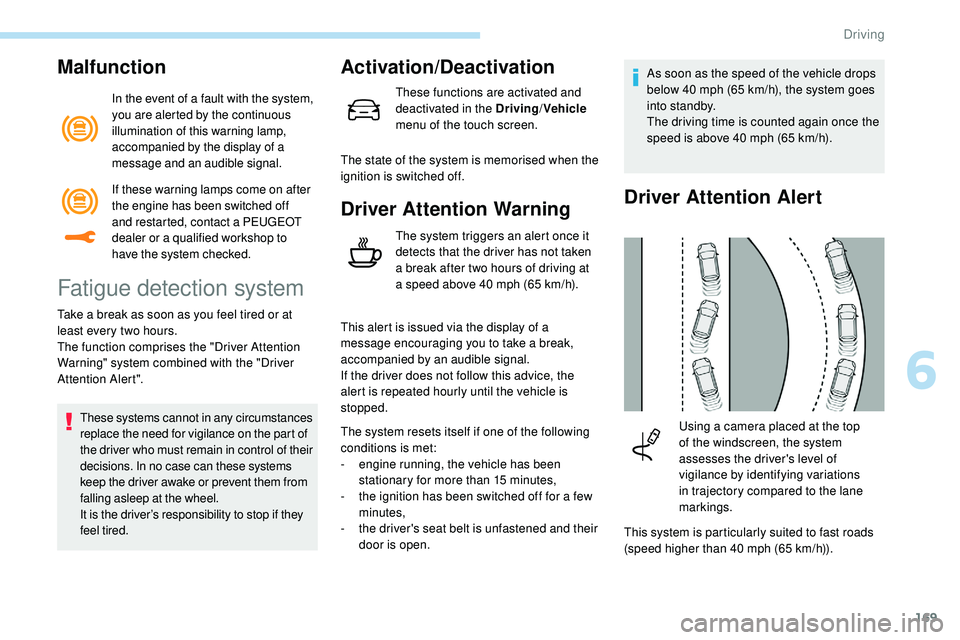
Driver Attention Alert
This system is particularly suited to fast roads
(speed higher than 40 mph (65
km/h)).
Using a camera placed at the top
of the windscreen, the system
assesses the driver's level of
vigilance by identifying variations
in trajectory compared to the lane
markings.
If these warning lamps come on after
the engine has been switched off
and restarted, contact a PEUGEOT
dealer or a qualified workshop to
have the system checked.
6
Driving
Page 172 of 320
170
After three first level alerts, the system triggers
a new alert with the message "Take a break!",
accompanied by a more pronounced audible
signal. When the system interprets the behaviour of
the vehicle as indicating a certain fatigue or
inattention threshold on the part of the driver,
it triggers the first level of alert.
The driver is then alerted by the message
" Ta k e c a r e ! ", accompanied by an audible
signal.
Active Blind Spot
Monitoring System
In addition to the fixed warning lamp in the door
mirror on the side in question, a correction of
trajectory will be felt if you attempt to cross a
lane marking with the direction indicators on,
to
help you avoid a collision.
This system is the combination of the Active
Lane Keeping Assistance and Blind Spot
Detection.
These two functions must be activated and in
operation.
The speed of the vehicle must be between
40
and 87 mph (65 and 140 km/h) inclusive.
These functions are especially suitable for
driving on motor ways and main roads.
For more information on the Active Lane
Keeping Assistance and Blind Spot
Detection , refer to the corresponding sections.
This system is a driving aid which cannot,
in any circumstances, replace the need for
vigilance on the part of the driver.
In certain driving conditions (poor road
sur face or strong winds), the system may
give alerts independent of the driver's
level of vigilance. The following situations may interfere with
the operation of the system or prevent it
from working:
-
p
oor visibility (inadequate lighting of
the roadway, falling snow, heavy rain,
dense fog, etc.),
-
d
azzle (headlamps of an oncoming
vehicle, low sun, reflections on a damp
road, leaving a tunnel, alternating
shade and light, etc.),
-
w
indscreen area located in front of the
camera: dirty, misted up, frost-covered,
snow-covered, damaged or covered by
a s t i c ke r,
-
l
ane markings absent, worn, hidden
(snow, mud) or multiple (roadworks,
e t c .),
-
c
lose to the vehicle ahead (lane
markings not detected),
-
r
oads that are narrow, winding, etc.
Clean the windscreen regularly,
particularly the area in front of the camera.
The internal sur face of the windscreen can
also become misted around the camera.
In humid and cold weather, demist the
windscreen regularly.
Do not allow snow to accumulate on the
bonnet or roof of the vehicle as this could
conceal the detection camera.
Driving
Page 173 of 320
171
Active Lane Keeping
Assistance
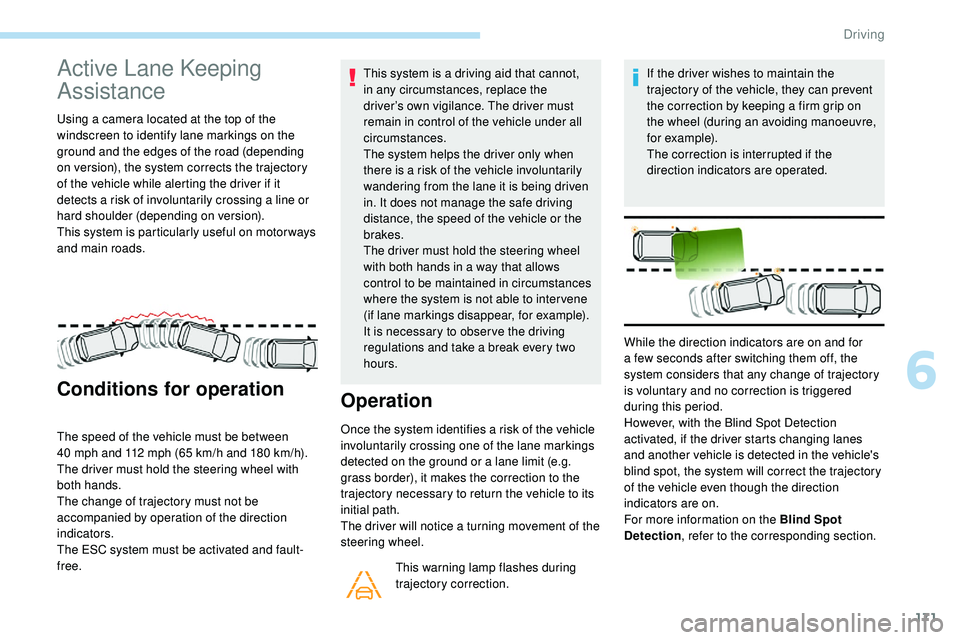
Using a camera located at the top of the
windscreen to identify lane markings on the
ground and the edges of the road (depending
on version), the system corrects the trajectory
of the vehicle while alerting the driver if it
detects a risk of involuntarily crossing a line or
hard shoulder (depending on version).
This system is particularly useful on motor ways
and main roads.
Conditions for operation
The speed of the vehicle must be between
40 mph and 112 mph (65 km/h and 180 km/h).
The driver must hold the steering wheel with
both hands.
The change of trajectory must not be
accompanied by operation of the direction
indicators.
The ESC system must be activated and fault-
free. This system is a driving aid that cannot,
in any circumstances, replace the
driver’s own vigilance. The driver must
remain in control of the vehicle under all
circumstances.
The system helps the driver only when
there is a risk of the vehicle involuntarily
wandering from the lane it is being driven
in. It does not manage the safe driving
distance, the speed of the vehicle or the
brakes.
The driver must hold the steering wheel
with both hands in a way that allows
control to be maintained in circumstances
where the system is not able to inter vene
(if lane markings disappear, for example).
It is necessary to obser ve the driving
regulations and take a break every two
hours.
Operation
Once the system identifies a risk of the vehicle
involuntarily crossing one of the lane markings
detected on the ground or a lane limit (e.g.
grass border), it makes the correction to the
trajectory necessary to return the vehicle to its
initial path.
The driver will notice a turning movement of the
steering wheel.
This warning lamp flashes during
trajectory correction. If the driver wishes to maintain the
trajectory of the vehicle, they can prevent
the correction by keeping a firm grip on
the wheel (during an avoiding manoeuvre,
for example).
The correction is interrupted if the
direction indicators are operated.
While the direction indicators are on and for
a few seconds after switching them off, the
system considers that any change of trajectory
is voluntary and no correction is triggered
during this period.
However, with the Blind Spot Detection
activated, if the driver starts changing lanes
and another vehicle is detected in the vehicle's
blind spot, the system will correct the trajectory
of the vehicle even though the direction
indicators are on.
For more information on the Blind Spot
Detection , refer to the corresponding section.
6
Driving
Page 176 of 320
174
The following situations may interfere with
the operation of the system or prevent it
working:
-
c
onditions of poor visibility (inadequate
street lighting, snowfall, rain, fog),
-
d
azzle (headlamps of an oncoming
vehicle, low sun, reflections on a damp
road, leaving a tunnel, alternating
shade and light),
-
w
indscreen area located in front of the
camera: dirty, misted, frost-covered,
snow-covered, damaged or covered by
a s t i c ke r,
-
l
ane markings worn, hidden (snow,
mud) or multiple (roadworks, etc.),
-
r
unning close to the vehicle in front
(the lane markings may not be
detected),
-
r
oads that are narrow, winding, etc.
Risk of undesirable operation
- driving with a trailer,
- d riving on a rolling stand,
-
d
riving on unstable sur faces.
Deactivation/Activation
Deactivation of the system is recommended in
the following situations:
-
d
riving on a road sur face in poor condition,
-
u
nfavourable climatic conditions,
-
d
riving on slippery sur faces (ice).
The system is not intended for driving in the
following situations:
-
d
riving on a speed circuit, F
P
ress and hold this button to deactivate the
system at any time.
Deactivation is signalled by the
illumination of the indicator lamp in
the button and of this warning lamp
in the instrument panel.
Reactivation is achieved by a short press.
The system is reactivated every time the
ignition is switched on.Malfunction
In the event of a fault with the system, you are
alerted by the illumination of these warning
lamps in the instrument panel, accompanied by
the display of a message and an audible signal.
Have the system checked by a PEUGEOT
dealer or a qualified workshop.
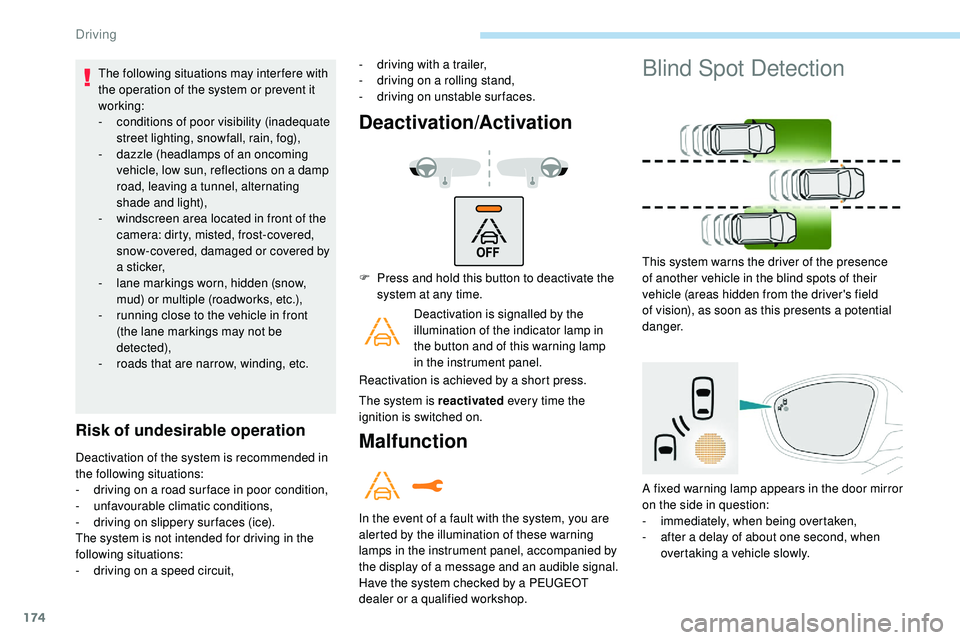
Blind Spot Detection
This system warns the driver of the presence
of another vehicle in the blind spots of their
vehicle (areas hidden from the driver's field
of vision), as soon as this presents a potential
danger.
A fixed warning lamp appears in the door mirror
on the side in question:
-
i
mmediately, when being overtaken,
-
a
fter a delay of about one second, when
overtaking a vehicle slowly.
Driving
Page 181 of 320
179
Operating fault
If a fault occurs when shifting
to reverse, this warning lamp
comes on in the instrument panel,
accompanied by a message and an
audible signal (short beep).
Contact a PEUGEOT dealer or a qualified
workshop to have the system checked.
Visiopark 1 – Visiopark 2
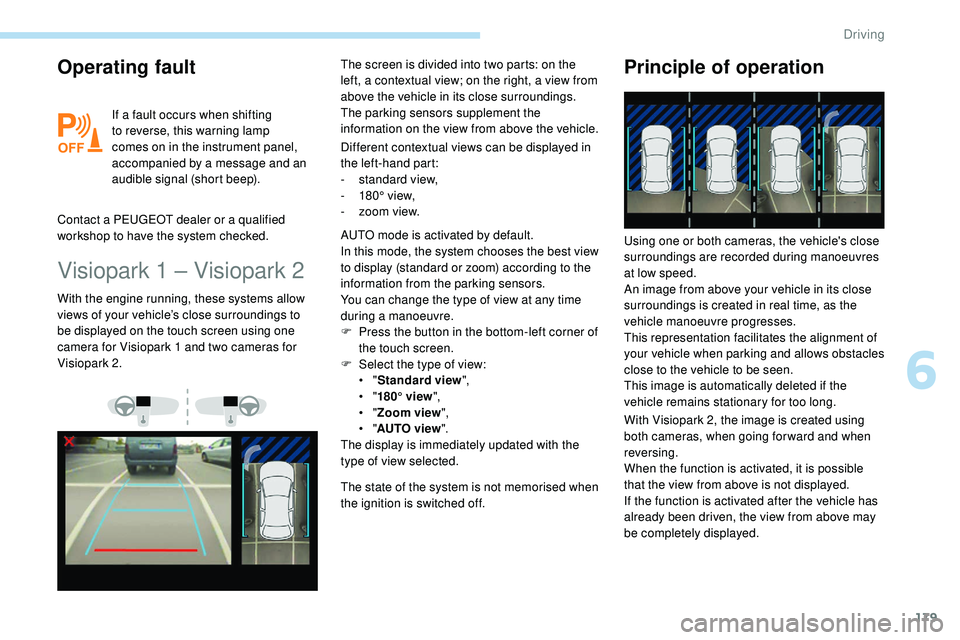
Different contextual views can be displayed in
the left-hand part:
-
s
tandard view,
-
1
80° view,
-
z
oom view.
With the engine running, these systems allow
views of your vehicle’s close surroundings to
be displayed on the touch screen using one
camera for Visiopark 1 and two cameras for
Visiopark 2. The screen is divided into two parts: on the
left, a contextual view; on the right, a view from
above the vehicle in its close surroundings.
The parking sensors supplement the
information on the view from above the vehicle.
AUTO mode is activated by default.
In this mode, the system chooses the best view
to display (standard or zoom) according to the
information from the parking sensors.
You can change the type of view at any time
during a manoeuvre.
F
P
ress the button in the bottom-left corner of
the touch screen.
F
Sel
ect the type of view:
•
"Standard view ",
•
"180° view ",
•
"Zoom view ",
•
"AUTO view ".
The display is immediately updated with the
type of view selected.
The state of the system is not memorised when
the ignition is switched off.
Principle of operation
With Visiopark 2, the image is created using
both cameras, when going for ward and when
reversing.
When the function is activated, it is possible
that the view from above is not displayed.
If
the function is activated after the vehicle has
already been driven, the view from above may
be completely displayed. Using one or both cameras, the vehicle's close
surroundings are recorded during manoeuvres
at low speed.
An image from above your vehicle in its close
surroundings is created in real time, as the
vehicle manoeuvre progresses.
This representation facilitates the alignment of
your vehicle when parking and allows obstacles
close to the vehicle to be seen.
This image is automatically deleted if the
vehicle remains stationary for too long.
6
Driving
Page 182 of 320
180
This system is a visual aid that cannot in
any circumstances replace the need for
vigilance on the part of the driver.
The images provided by the camera(s)
may be distorted by the relief.
In the presence of areas in shade, or in
conditions of bright sunlight or inadequate
lighting, the image may be darkened and
with lower contrast.
Recommendations on care
In bad or wintry weather, ensure that the
sensors and camera lenses are not covered
with mud, ice or snow.
Check the cleanliness of the camera lenses
regularly.
If necessary, clean the cameras with a soft,
dry cloth.
When washing your vehicle at high pressure,
direct the lance at least 30 cm away from the
cameras and parking aid sensors.
Visiopark 1
Rear vision
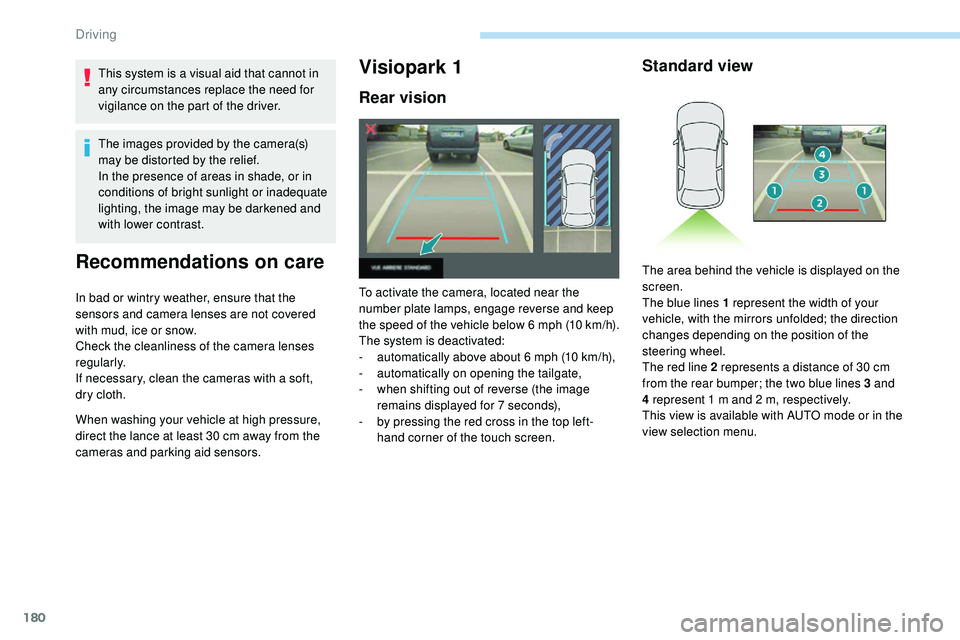
To activate the camera, located near the
number plate lamps, engage reverse and keep
the speed of the vehicle below 6 mph (10
k
m/h).
The system is deactivated:
-
a
utomatically above about 6 mph (10 km/h),
-
a
utomatically on opening the tailgate,
-
w
hen shifting out of reverse (the image
remains displayed for 7 seconds),
-
b
y pressing the red cross in the top left-
hand corner of the touch screen.
Standard view
The area behind the vehicle is displayed on the
screen.
The blue lines 1 represent the width of your
vehicle, with the mirrors unfolded; the direction
changes depending on the position of the
steering wheel.
The red line 2 represents a distance of 30 cm
from the rear bumper; the two blue lines 3 and
4 represent 1 m and 2 m, respectively.
This view is available with AUTO mode or in the
view selection menu.
Driving
Page 183 of 320
181
Zoom view
Obstacles may appear further away than
they actually are in reality.
It is important to check the sides of the
vehicle during the manoeuvre, using the
mirrors.
The rear parking sensors also provide
information on the vehicle's surroundings.
AUTO mode
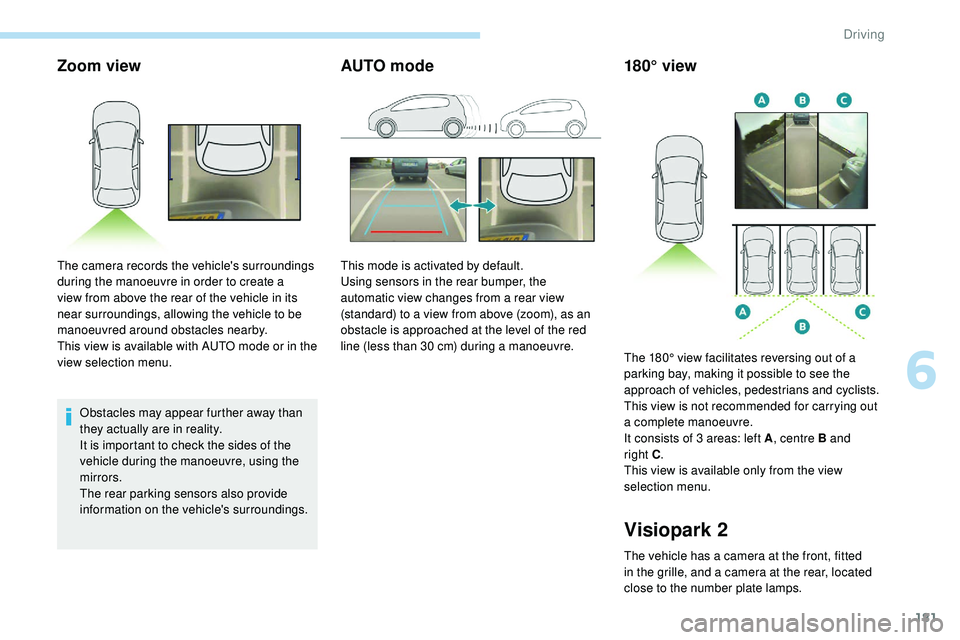
The camera records the vehicle's surroundings
during the manoeuvre in order to create a
view from above the rear of the vehicle in its
near surroundings, allowing the vehicle to be
manoeuvred around obstacles nearby.
This view is available with AUTO mode or in the
view selection menu.This mode is activated by default.
Using sensors in the rear bumper, the
automatic view changes from a rear view
(standard) to a view from above (zoom), as an
obstacle is approached at the level of the red
line (less than 30 cm) during a manoeuvre.
180° view
Visiopark 2
The vehicle has a camera at the front, fitted
in the grille, and a camera at the rear, located
close to the number plate lamps.The 180° view facilitates reversing out of a
parking bay, making it possible to see the
approach of vehicles, pedestrians and cyclists.
This view is not recommended for carrying out
a complete manoeuvre.
It consists of 3 areas: left A
, centre B and
right C
.
This view is available only from the view
selection menu.
6
Driving
Page 184 of 320
182
Rear vision
If a trailer or a bicycle carrier is fitted to
the towball, the zone behind the vehicle on
the view from above goes dark.
The surroundings are reconstructed by the
front camera only.
The system activates automatically when
reverse gear is engaged.
The system is deactivated:
-
a
utomatically above about 6 mph (10 km/h),
-
w
hen shifting out of reverse (the rear view
image is replaced by the front view image
for 7 seconds),
-
b
y pressing the red cross in the top left-
hand corner of the touch screen. The rear vision views are similar to those for
Visiopark 1.
For more information on Visiopark 1
, refer to
the corresponding section.
Front and rear vision
With the engine running and the
speed below 12 mph (20 km/h), the
system is activated via the Driving/
Vehicle menu of the touch screen:
Using these cameras, the system displays
the vehicle's near surroundings on the touch
screen, offering views from the rear of the
vehicle (rear vision), when reverse gear is
engaged and views from the front of the vehicle
(front vision), when the gearbox is in neutral or
a gear is engaged.
F Select "Panoramic visual aid ".The system is deactivated:
-
a
utomatically above about 19 mph (30 km/h)
(the image disappears temporarily from 12
mph (20 km/h)),
-
b
y pressing the red cross in the top left-
hand corner of the touch screen.
Standard view
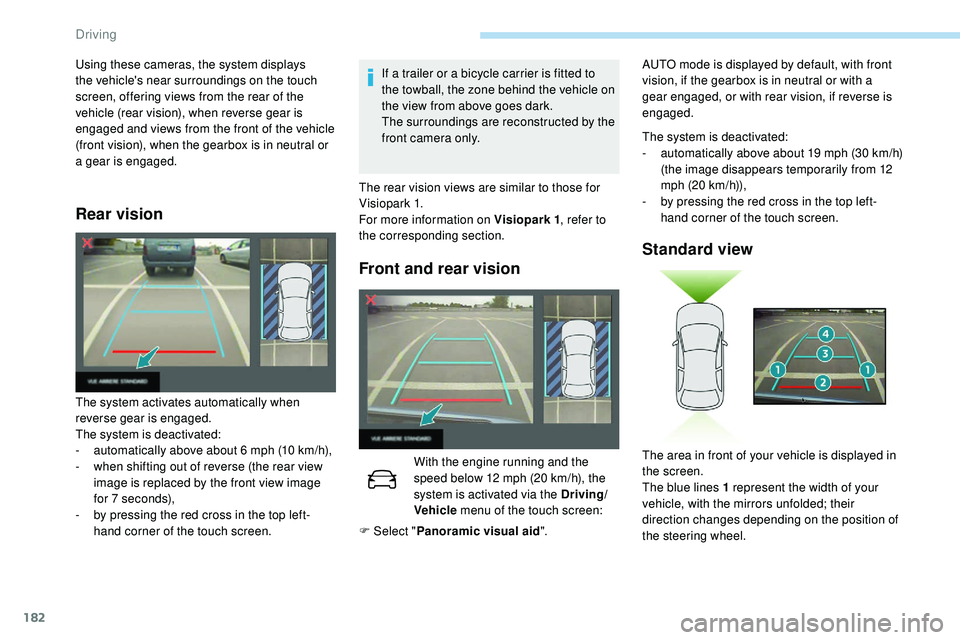
The area in front of your vehicle is displayed in
the screen.
The blue lines 1 represent the width of your
vehicle, with the mirrors unfolded; their
direction changes depending on the position of
the steering wheel.
AUTO mode is displayed by default, with front
vision, if the gearbox is in neutral or with a
gear engaged, or with rear vision, if reverse is
engaged.
Driving
Page 185 of 320
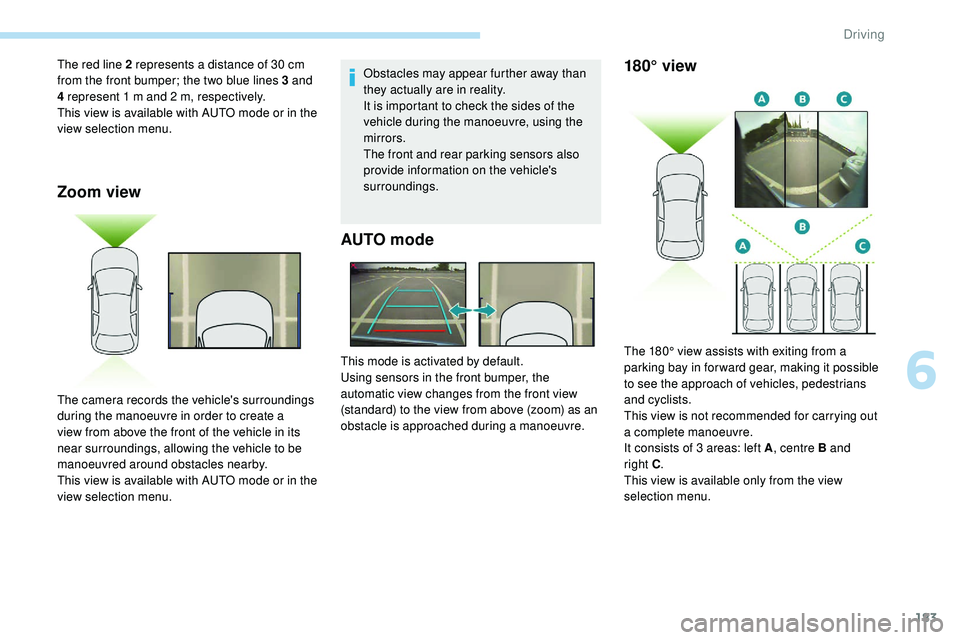
183
Zoom view
Obstacles may appear further away than
they actually are in reality.
It is important to check the sides of the
vehicle during the manoeuvre, using the
mirrors.
The front and rear parking sensors also
provide information on the vehicle's
surroundings.
AUTO mode
The red line 2 represents a distance of 30 cm
from the front bumper; the two blue lines 3 and
4 represent 1 m and 2 m, respectively.
This view is available with AUTO mode or in the
view selection menu.
The camera records the vehicle's surroundings
during the manoeuvre in order to create a
view from above the front of the vehicle in its
near surroundings, allowing the vehicle to be
manoeuvred around obstacles nearby.
This view is available with AUTO mode or in the
view selection menu.This mode is activated by default.
Using sensors in the front bumper, the
automatic view changes from the front view
(standard) to the view from above (zoom) as an
obstacle is approached during a manoeuvre.180° view
The 180° view assists with exiting from a
parking bay in forward gear, making it possible
to see the approach of vehicles, pedestrians
and cyclists.
This view is not recommended for carrying out
a complete manoeuvre.
It consists of 3 areas: left A
, centre B and
right
C.
This view is available only from the view
selection menu.
6
Driving
Page 188 of 320
186
7
5
Visiopark 1 or Visiopark 2 and the parking
sensors are automatically activated to help
you monitor the close surrounding area of your
vehicle during the manoeuvre.
During the manoeuvre
The system takes over the vehicle's steering. It
gives instructions on the manoeuvring direction
when starting the entry and exit parallel parking
manoeuvres and for all entry manoeuvres for
bay parking.
There instructions are displayed as a symbol
accompanied by a message:
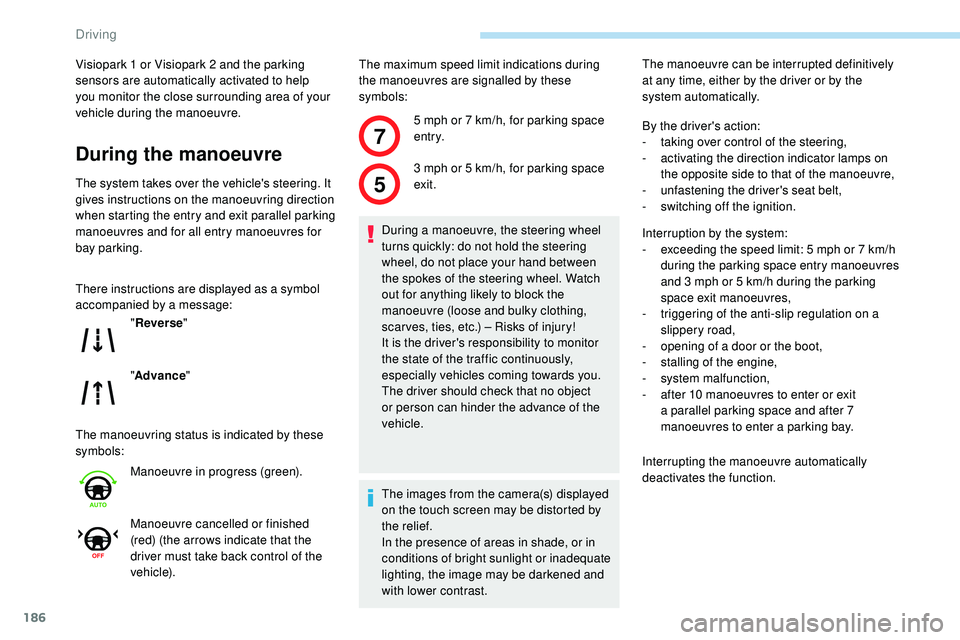
The manoeuvring status is indicated by these
symbols:The maximum speed limit indications during
the manoeuvres are signalled by these
symbols:
" Reverse "
" Advance "
Manoeuvre in progress (green).
Manoeuvre cancelled or finished
(red) (the arrows indicate that the
driver must take back control of the
vehicle). 5 mph or 7
km/h, for parking space
e nt r y.
3 mph or 5 km/h, for parking space
exit.
During a manoeuvre, the steering wheel
turns quickly: do not hold the steering
wheel, do not place your hand between
the spokes of the steering wheel. Watch
out for anything likely to block the
manoeuvre (loose and bulky clothing,
scar ves, ties, etc.) – Risks of injury!
It is the driver's responsibility to monitor
the state of the traffic continuously,
especially vehicles coming towards you.
The driver should check that no object
or person can hinder the advance of the
vehicle.
The images from the camera(s) displayed
on the touch screen may be distorted by
the relief.
In the presence of areas in shade, or in
conditions of bright sunlight or inadequate
lighting, the image may be darkened and
with lower contrast. The manoeuvre can be interrupted definitively
at any time, either by the driver or by the
system automatically.
By the driver's action:
-
t
aking over control of the steering,
-
a
ctivating the direction indicator lamps on
the opposite side to that of the manoeuvre,
- u nfastening the driver's seat belt,
-
s
witching off the ignition.
Interruption by the system:
-
e
xceeding the speed limit: 5 mph or 7 km/h
during the parking space entry manoeuvres
and 3 mph or 5 km/h during the parking
space exit manoeuvres,
-
t
riggering of the anti-slip regulation on a
slippery road,
-
o
pening of a door or the boot,
-
s
talling of the engine,
-
s
ystem malfunction,
-
a
fter 10 manoeuvres to enter or exit
a parallel parking space and after 7
manoeuvres to enter a parking bay.
Interrupting the manoeuvre automatically
deactivates the function.
Driving