Start stop Peugeot 508 2019 Service Manual
[x] Cancel search | Manufacturer: PEUGEOT, Model Year: 2019, Model line: 508, Model: Peugeot 508 2019Pages: 320, PDF Size: 10.09 MB
Page 155 of 320
153
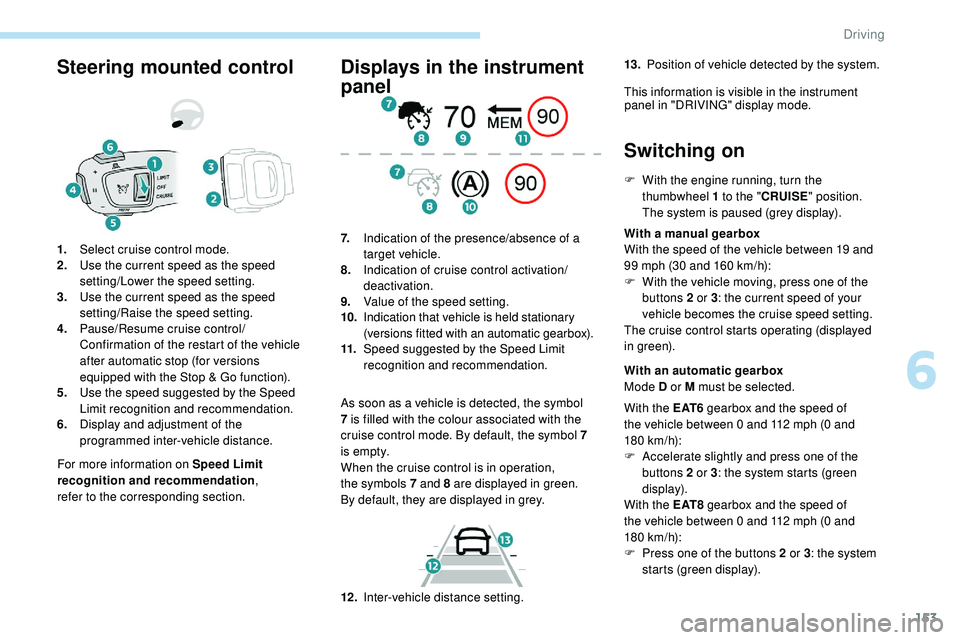
Steering mounted control
For more information on Speed Limit
recognition and recommendation,
refer
to
the corresponding section.
1.
Select cruise control mode.
2. Use the current speed as the speed
setting/Lower the speed setting.
3. Use the current speed as the speed
setting/Raise the speed setting.
4. Pause/Resume cruise control/
Confirmation of the restart of the vehicle
after automatic stop (for versions
equipped with the Stop & Go function).
5. Use the speed suggested by the Speed
Limit recognition and recommendation.
6. Display and adjustment of the
programmed inter-vehicle distance.
Displays in the instrument
panel
As soon as a vehicle is detected, the symbol
7
is filled with the colour associated with the
cruise control mode. By default, the symbol 7
i s e m pt y.
When the cruise control is in operation,
the
symbols 7 and 8 are displayed in green.
By
default, they are displayed in grey.
7.
Indication of the presence/absence of a
target vehicle.
8. Indication of cruise control activation/
deactivation.
9. Value of the speed setting.
10. Indication that vehicle is held stationary
(versions fitted with an automatic gearbox).
11. Speed suggested by the Speed Limit
recognition and recommendation.
Switching on
F With the engine running, turn the
thumbwheel 1 to the "CRUISE" position.
The system is paused (grey display).
With a manual gearbox
With the speed of the vehicle between 19 and
99 mph (30 and 160
km/h):
F
W
ith the vehicle moving, press one of the
buttons 2 or 3 : the current speed of your
vehicle becomes the cruise speed setting.
The cruise control starts operating (displayed
in green).
12 . Inter-vehicle distance setting. With an automatic gearbox
Mode D or M must be selected.
With the E AT 6 gearbox and the speed of
the vehicle between 0 and 112 mph (0
and
180
km/h):
F
A
ccelerate slightly and press one of the
buttons 2 or 3 : the system starts (green
display).
With the E AT 8 gearbox and the speed of
the vehicle between 0 and 112 mph (0
and
180
km/h):
F
P
ress one of the buttons 2 or 3 : the system
starts (green display).
13.
Position of vehicle detected by the system.
This information is visible in the instrument panel in "DRIVING" display mode.
6
Driving
Page 156 of 320
154
When the cruise control is paused, it
can only be reactivated when all of the
safety conditions are met. The "Activation
denied, conditions unsuitable" message is
displayed if reactivation is not possible.
Reactivating the function
With a manual gearbox
To reactivate the function, the driver must
accelerate to reach at least 19 mph (30 km/h),
then press one of the buttons 2, 3 or 4. the driver must confirm the vehicle restart by
pressing button 4 or the accelerator pedal.
If the driver takes no action following this
immobilisation, the electric parking brake is
applied automatically after a while (approx. five
minutes).
As a safety measure, wait until the current
speed approaches the speed setting
to reactivate the function by pressing
button 4 .
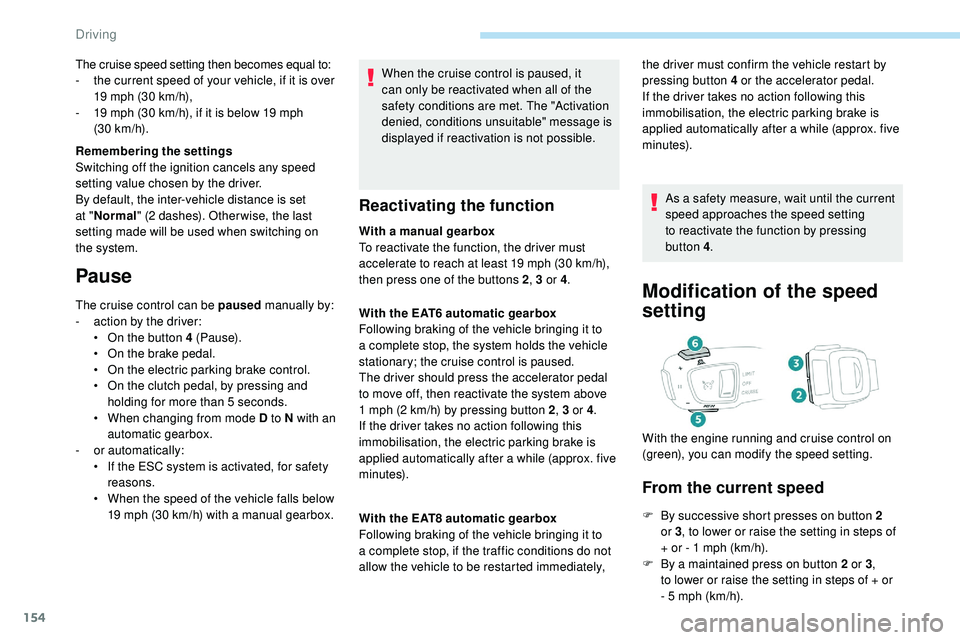
Modification of the speed
setting
From the current speed
F By successive short presses on button 2
or 3, to lower or raise the setting in steps of
+ or - 1 mph (km/h).
F
B
y a maintained press on button 2 or 3 ,
to
lower or raise the setting in steps of + or
-
5 mph (km/h).
With the EAT6 automatic gearbox
Following braking of the vehicle bringing it to
a complete stop, the system holds the vehicle
stationary; the cruise control is paused.
The driver should press the accelerator pedal
to move off, then reactivate the system above
1
mph (2
km/h) by pressing button 2
, 3 or 4.
If the driver takes no action following this
immobilisation, the electric parking brake is
applied automatically after a while (approx. five
minutes).
With the EAT8 automatic gearbox
Following braking of the vehicle bringing it to
a complete stop, if the traffic conditions do not
allow the vehicle to be restarted immediately, With the engine running and cruise control on
(green), you can modify the speed setting.
The cruise speed setting then becomes equal to:
-
t
he current speed of your vehicle, if it is over
19 mph (30 km/h),
-
1
9 mph (30
km/h), if it is below 19 mph
(30
km/h).
Remembering the settings
Switching off the ignition cancels any speed
setting value chosen by the driver.
By default, the inter-vehicle distance is set
at " Normal " (2 dashes). Other wise, the last
setting made will be used when switching on
the system.
Pause
The cruise control can be paused manually by:
- a ction by the driver:
•
O
n the button 4 (Pause).
•
O
n the brake pedal.
•
O
n the electric parking brake control.
•
O
n the clutch pedal, by pressing and
holding for more than 5
seconds.
•
W
hen changing from mode D to N with an
automatic gearbox.
-
o
r automatically:
•
I
f the ESC system is activated, for safety
reasons.
•
W
hen the speed of the vehicle falls below
19 mph (30 km/h) with a manual gearbox.
Driving
Page 160 of 320
158
After braking causing the vehicle to stop completely, if the vehicle in front restarts almost immediately, the system restarts the vehicle gradually,
keeping the safety distance as programmed up to the speed setting.
If the vehicle is immobilised for more than 3 seconds, simply press button 4 or the accelerator pedal to restart as soon as traffic conditions allow.
The vehicle will accelerate gradually up to the speed setting.
If the vehicle continues to be immobilised, the electric parking brake is applied automatically after a while (approx. five minutes). To restart the vehicle,
the driver must press the accelerator pedal. Following braking of the vehicle bringing it to a complete stop, the system holds the vehicle stationary; the cruise control is paused.
The driver should press the accelerator pedal to move off, then reactivate the system by pressing one of buttons 2 , 3 or 4. If the driver takes no action
following this immobilisation, the electric parking brake is applied automatically after a while (approximately 5 minutes).
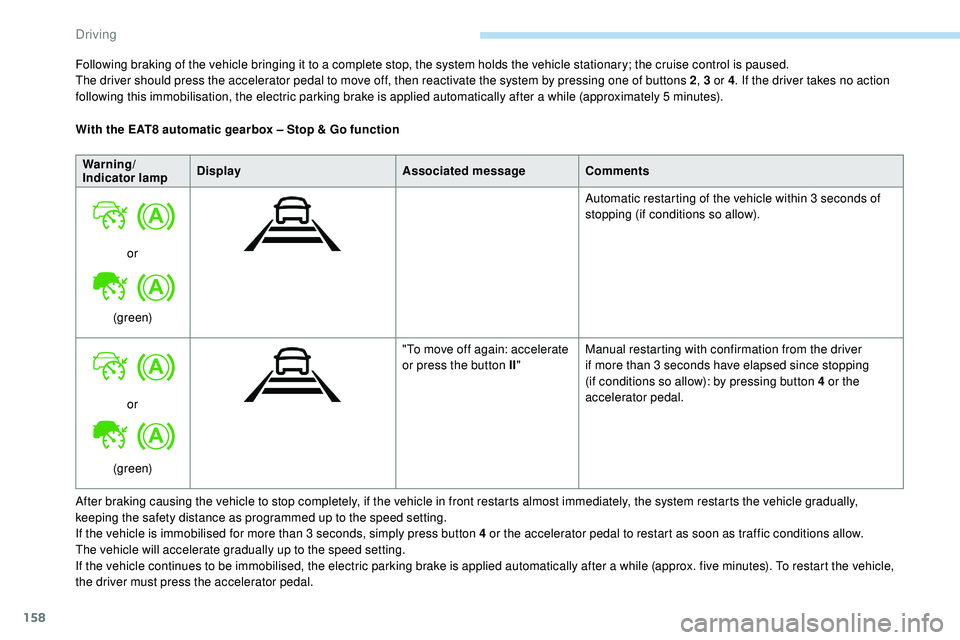
With the EAT8 automatic gearbox – Stop & Go function
Warning/
Indicator lamp Display
Associated messageComments
or
(green) Automatic restarting of the vehicle within 3 seconds of
stopping (if conditions so allow).
or
(green) "To move off again: accelerate
or press the button II
"Manual restarting with confirmation from the driver
if more than 3 seconds have elapsed since stopping
(if conditions so allow): by pressing button 4 or the
accelerator pedal.
Driving
Page 170 of 320
168
Intelligent emergency
braking assistance
If the driver brakes, but not sufficiently to avoid
a collision, this system will supplement the
braking, within the limits of the laws of physics.
This assistance will only be provided if you
press the brake pedal.
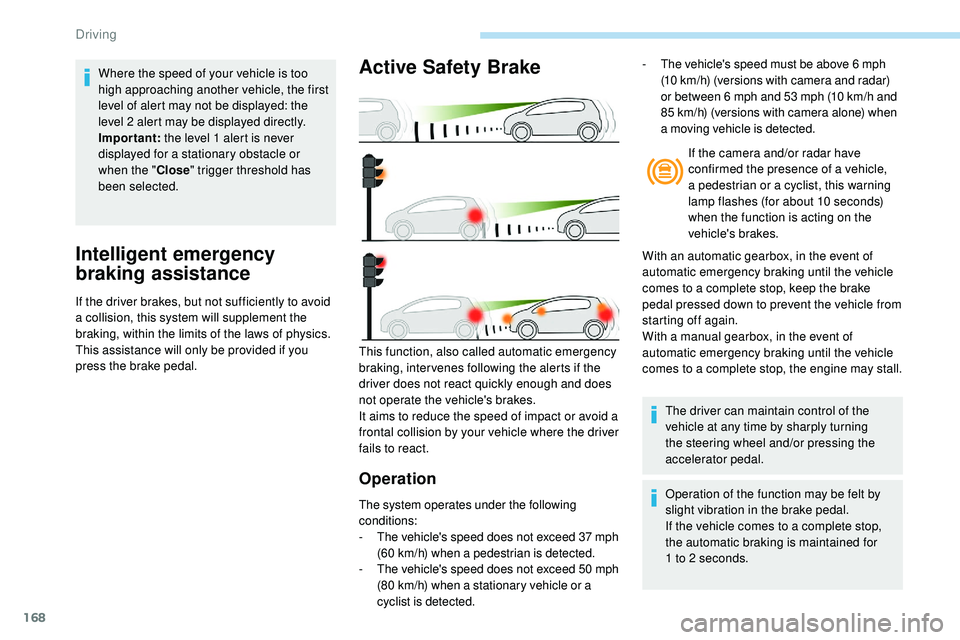
Active Safety Brake
Operation
The system operates under the following
conditions:
-
T
he vehicle's speed does not exceed 37 mph
(60 km/h) when a pedestrian is detected.
-
T
he vehicle's speed does not exceed 50 mph
(80 km/h) when a stationary vehicle or a
cyclist is detected. If the camera and/or radar have
confirmed the presence of a vehicle,
a pedestrian or a cyclist, this warning
lamp flashes (for about 10 seconds)
when the function is acting on the
vehicle's brakes.
With an automatic gearbox, in the event of
automatic emergency braking until the vehicle
comes to a complete stop, keep the brake
pedal pressed down to prevent the vehicle from
starting off again.
With a manual gearbox, in the event of
automatic emergency braking until the vehicle
comes to a complete stop, the engine may stall.
This function, also called automatic emergency
braking, inter venes following the alerts if the
driver does not react quickly enough and does
not operate the vehicle's brakes.
It aims to reduce the speed of impact or avoid a
frontal collision by your vehicle where the driver
fails to react. The driver can maintain control of the
vehicle at any time by sharply turning
the steering wheel and/or pressing the
accelerator pedal.
Operation of the function may be felt by
slight vibration in the brake pedal.
If the vehicle comes to a complete stop,
the automatic braking is maintained for
1
to 2 seconds.
-
T
he vehicle's speed must be above 6 mph
(10 km/h) (versions with camera and radar)
or between 6 mph and 53 mph (10 km/h and
85 km/h) (versions with camera alone) when
a moving vehicle is detected.
Where the speed of your vehicle is too
high approaching another vehicle, the first
level of alert may not be displayed: the
level 2 alert may be displayed directly.
Important:
the level 1 alert is never
displayed for a stationary obstacle or
when the " Close" trigger threshold has
been selected.
Driving
Page 171 of 320
169
Malfunction
In the event of a fault with the system,
you are alerted by the continuous
illumination of this warning lamp,
accompanied by the display of a
message and an audible signal.
Fatigue detection system
Take a break as soon as you feel tired or at
least every two hours.
The function comprises the "Driver Attention
Warning" system combined with the "Driver
Attention Alert".These systems cannot in any circumstances
replace the need for vigilance on the part of
the driver who must remain in control of their
decisions. In no case can these systems
keep the driver awake or prevent them from
falling asleep at the wheel.
It is the driver’s responsibility to stop if they
feel tired.
Activation/Deactivation
These functions are activated and
deactivated in the Driving /Vehicle
menu of the touch screen.
The state of the system is memorised when the
ignition is switched off.
Driver Attention Warning
The system triggers an alert once it
detects that the driver has not taken
a break after two hours of driving at
a speed above 40 mph (65
km/h).
This alert is issued via the display of a
message encouraging you to take a break,
accompanied by an audible signal.
If the driver does not follow this advice, the
alert is repeated hourly until the vehicle is
stopped.
The system resets itself if one of the following
conditions is met:
-
e
ngine running, the vehicle has been
stationary for more than 15 minutes,
-
t
he ignition has been switched off for a few
minutes,
-
t
he driver's seat belt is unfastened and their
door is open. As soon as the speed of the vehicle drops
below 40 mph (65
km/h), the system goes
into standby.
The driving time is counted again once the
speed is above 40 mph (65 km/h).
Driver Attention Alert
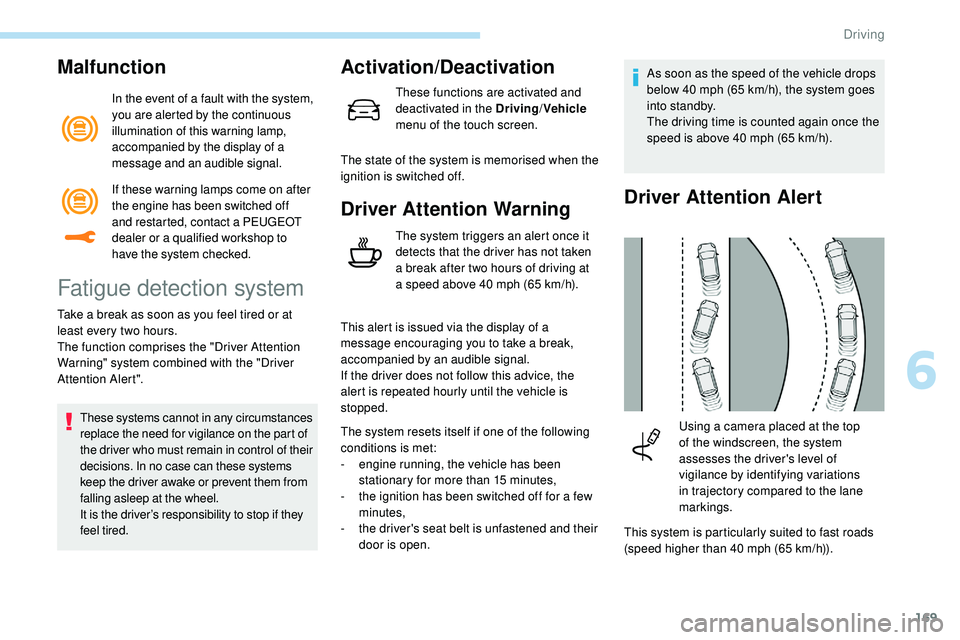
This system is particularly suited to fast roads
(speed higher than 40 mph (65
km/h)).
Using a camera placed at the top
of the windscreen, the system
assesses the driver's level of
vigilance by identifying variations
in trajectory compared to the lane
markings.
If these warning lamps come on after
the engine has been switched off
and restarted, contact a PEUGEOT
dealer or a qualified workshop to
have the system checked.
6
Driving
Page 187 of 320
185
The selection is accompanied by
this indicator lamp coming on.
Parking space search
F You should drive at a distance of between 0.50 m and 1.50 m from the row of parked
vehicles, without ever exceeding 19 mph
(30
km/h), until the system finds an available
space.
The parking space search stops over this limit.
The function automatically deactivates once
the vehicle speed exceeds 31 mph (50 km/h).
For "parallel" parking, the space must at
a minimum be equal to the length of your
vehicle plus 0.60 m.
For "bay" parking, the width of the space
must be equal to the width of your vehicle
plus 0.70 m.
If the parking sensors function has been
deactivated in the Driving/Vehicle menu
of the touch screen, it will be automatically
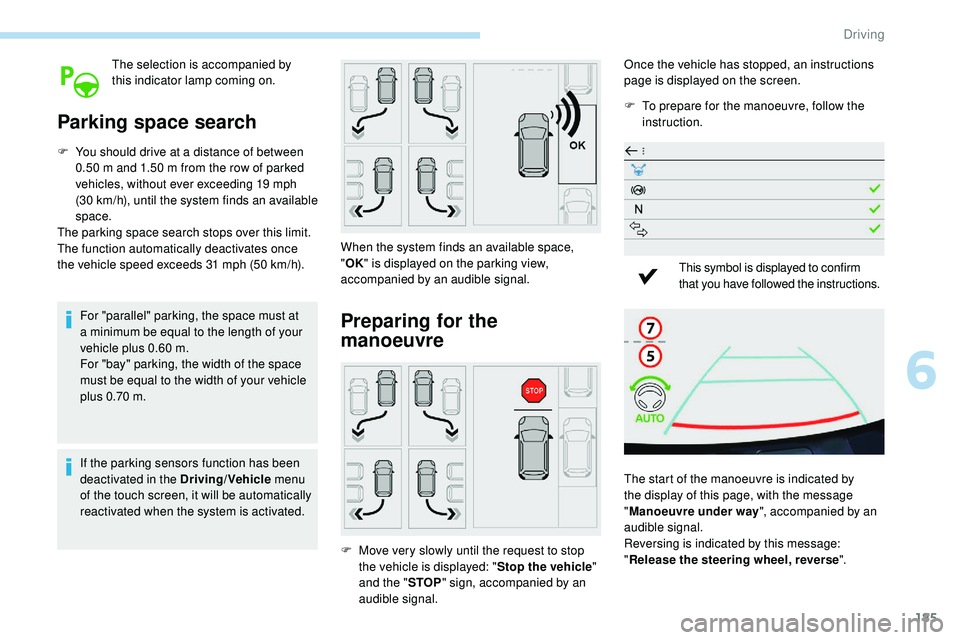
reactivated when the system is activated. When the system finds an available space,
"
OK " is displayed on the parking view,
accompanied by an audible signal.
Preparing for the
manoeuvre
F Move very slowly until the request to stop the vehicle is displayed: " Stop the vehicle"
and the " STOP" sign, accompanied by an
audible signal. Once the vehicle has stopped, an instructions
page is displayed on the screen.
F
T
o prepare for the manoeuvre, follow the
instruction.
This symbol is displayed to confirm
that you have followed the instructions.
The start of the manoeuvre is indicated by
the display of this page, with the message
" Manoeuvre under way ", accompanied by an
audible signal.
Reversing is indicated by this message:
" Release the steering wheel, reverse ".
6
Driving
Page 192 of 320
190
Operation
F When approaching a parking area, reduce the speed of your vehicle to a maximum of
19 mph (30
km/h).
Function activation
Activating the function can be done in two
ways:F
P
ress this button, located on the
gearbox selector.
or F
Sel
ect "Park Assist " in the
Driving/Vehicle menu of the
touch screen.
Activating the function deactivates Blind
Spot Detection.
At any time, up to starting the entry
manoeuvre or leaving the parking space,
pressing the red arrow located in the
top left-hand corner of the display page
deactivates the function.
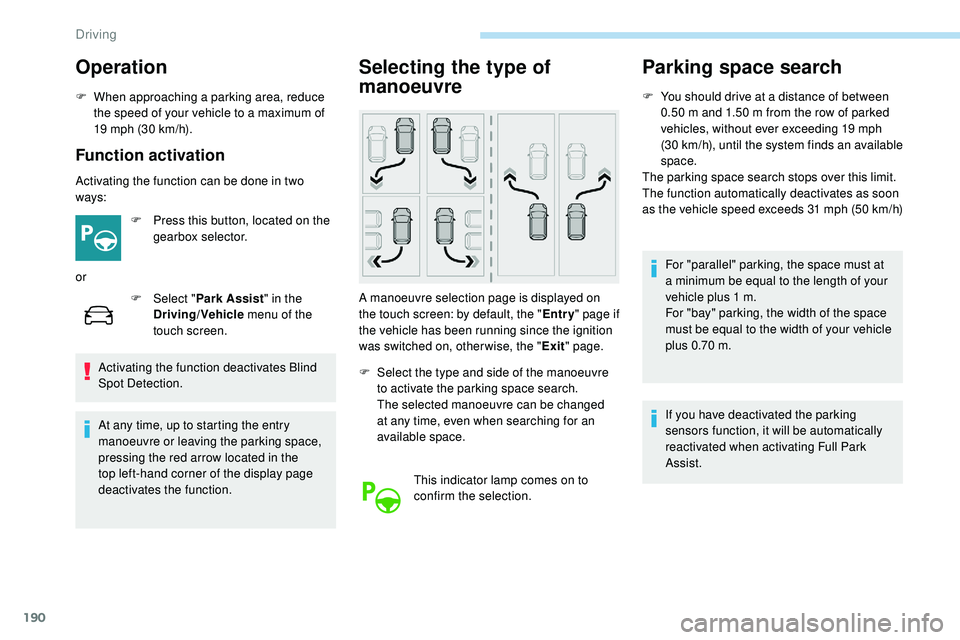
Selecting the type of
manoeuvre
A manoeuvre selection page is displayed on
the touch screen: by default, the " Entry" page if
the vehicle has been running since the ignition
was switched on, other wise, the " Exit" page.
F
S
elect the type and side of the manoeuvre
to activate the parking space search.
The selected manoeuvre can be changed
at any time, even when searching for an
available space.
This indicator lamp comes on to
confirm the selection.
Parking space search
F You should drive at a distance of between 0.50 m and 1.50 m from the row of parked
vehicles, without ever exceeding 19 mph
(30
km/h), until the system finds an available
space.
The parking space search stops over this limit.
The function automatically deactivates as soon
as the vehicle speed exceeds 31 mph (50
km/h)
For "parallel" parking, the space must at
a minimum be equal to the length of your
vehicle plus 1
m.
For "bay" parking, the width of the space
must be equal to the width of your vehicle
plus 0.70
m.
If you have deactivated the parking
sensors function, it will be automatically
reactivated when activating Full Park
Assist.
Driving
Page 193 of 320
191
Preparing for the
manoeuvre
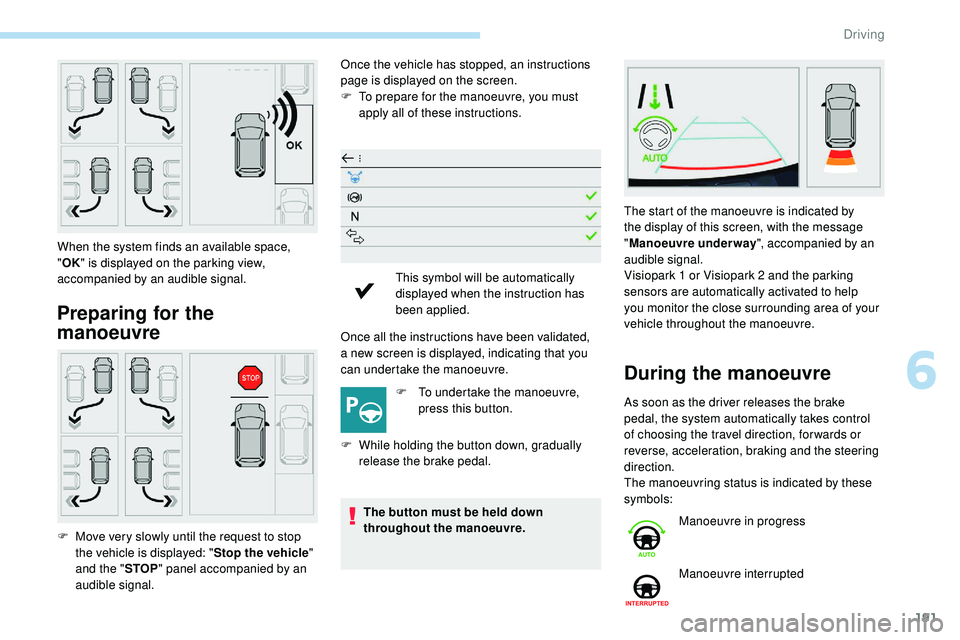
Once the vehicle has stopped, an instructions
page is displayed on the screen.
F
T
o prepare for the manoeuvre, you must
apply all of these instructions.
Once all the instructions have been validated,
a
new screen is displayed, indicating that you
can undertake the manoeuvre.
F
T
o undertake the manoeuvre,
press this button.
F
W
hile holding the button down, gradually
release the brake pedal.
The button must be held down
throughout the manoeuvre.
When the system finds an available space,
"
OK " is displayed on the parking view,
accompanied by an audible signal.
F
M
ove very slowly until the request to stop
the vehicle is displayed: " Stop the vehicle"
and the " STOP" panel accompanied by an
audible signal. This symbol will be automatically
displayed when the instruction has
been applied.
During the manoeuvre
As soon as the driver releases the brake
pedal, the system automatically takes control
of choosing the travel direction, for wards or
reverse, acceleration, braking and the steering
direction.
The manoeuvring status is indicated by these
symbols: The start of the manoeuvre is indicated by
the display of this screen, with the message
"
Manoeuvre underway ", accompanied by an
audible signal.
Visiopark 1 or Visiopark 2 and the parking
sensors are automatically activated to help
you monitor the close surrounding area of your
vehicle throughout the manoeuvre.
Manoeuvre in progress
Manoeuvre interrupted
6
Driving
Page 195 of 320
193
- Resuming the manoeuvre, after resolving the suspension conditions:
•
r
elease all controls (brake pedal, function
control button, steering wheel, etc.)
•
p
ress the function control button again.
-
P
ermanent interruption after suspending
the manoeuvre:
•
p
ress the brake pedal and engage a gear. -
s udden appearance in the field of the
manoeuvre of an obstacle not detected
by the system before the manoeuvre was
started, with the obstacle remaining for
more than 30 seconds,
-
a
fter ten manoeuvres to enter or exit a
parallel parking space and after seven
manoeuvres to enter a bay parking space,
-
s
ystem malfunction during the manoeuvre.
Abandoning the manoeuvre immediately
triggers the vehicle’s brakes and automatically
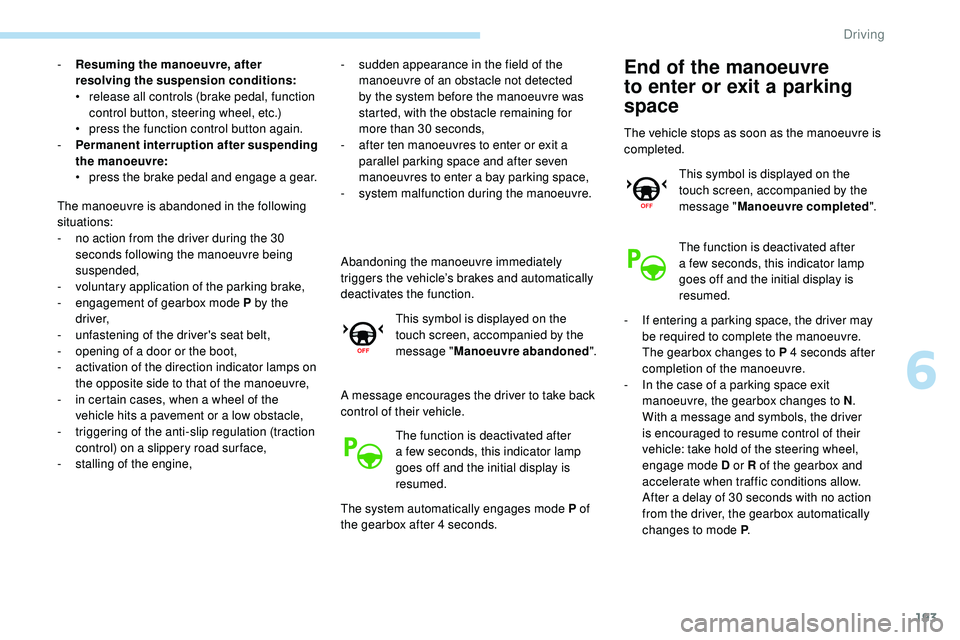
deactivates the function. This symbol is displayed on the
touch screen, accompanied by the
message " Manoeuvre abandoned ".
A message encourages the driver to take back
control of their vehicle. The function is deactivated after
a few seconds, this indicator lamp
goes off and the initial display is
resumed.
The system automatically engages mode P of
the gearbox after 4 seconds.
The manoeuvre is abandoned in the following
situations:
-
n
o action from the driver during the 30
seconds following the manoeuvre being
suspended,
-
v
oluntary application of the parking brake,
-
enga
gement of gearbox mode P by the
driver,
-
u
nfastening of the driver's seat belt,
-
o
pening of a door or the boot,
-
a
ctivation of the direction indicator lamps on
the opposite side to that of the manoeuvre,
-
i
n certain cases, when a wheel of the
vehicle hits a pavement or a low obstacle,
-
t
riggering of the anti-slip regulation (traction
control) on a slippery road sur face,
-
s
talling of the engine,End of the manoeuvre
to enter or exit a parking
space
The vehicle stops as soon as the manoeuvre is
completed. This symbol is displayed on the
touch screen, accompanied by the
message " Manoeuvre completed ".
The function is deactivated after
a few seconds, this indicator lamp
goes off and the initial display is
resumed.
-
I
f entering a parking space, the driver may
be required to complete the manoeuvre.
The gearbox changes to P 4 seconds after
completion of the manoeuvre.
-
I
n the case of a parking space exit
manoeuvre, the gearbox changes to N .
With a message and symbols, the driver
is encouraged to resume control of their
vehicle: take hold of the steering wheel,
engage mode D or R of the gearbox and
accelerate when traffic conditions allow.
After a delay of 30 seconds with no action
from the driver, the gearbox automatically
changes to mode P .
6
Driving
Page 200 of 320
198
Refuelling
Fuel tank capacity: approximately 62 litres
(Petrol) or 55 litres (Diesel).
Reser ve level: 6 litres.
Low fuel level
When the low fluid level is reached in
the tank, this warning lamp comes on
in the instrument panel, accompanied
by a message and an audible signal.
When it first comes on, about
6 litres of fuel is left in the tank.
If your vehicle is fitted with Stop & Start,
never refuel with the engine in STOP
mode; you must switch off the ignition.
Refilling
A self-adhesive label on the inner face of the
filler flap reminds you of the type of fuel to use,
depending on your engine.
Additions of fuel must be of at least 5 litres,
in order to be registered by the fuel gauge.
Opening the filler flap may create a noise
caused by an inrush of air. This is entirely
normal and results from the sealing of the fuel
system.
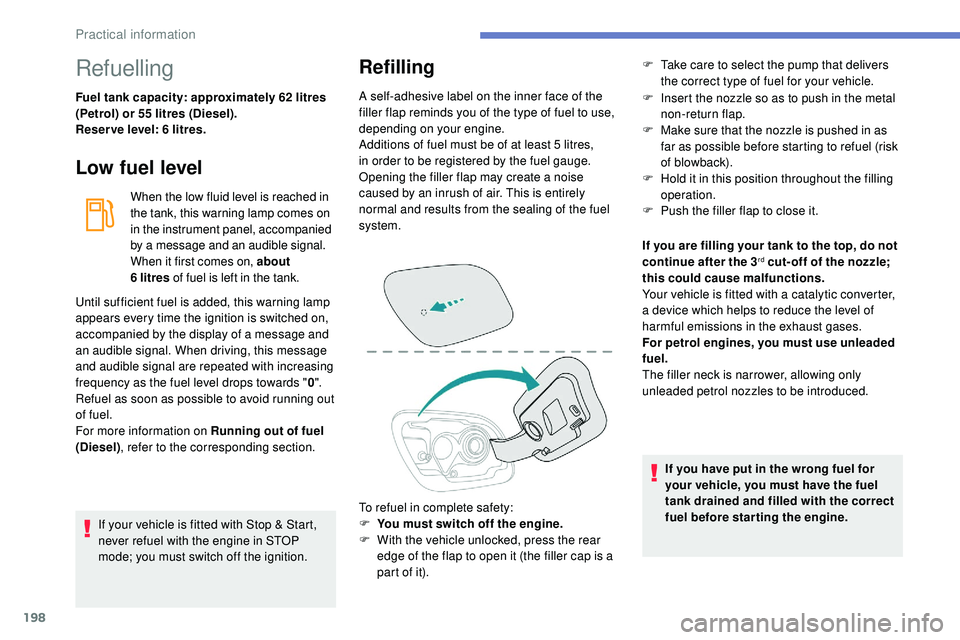
To refuel in complete safety:
F
Y
ou must switch off the engine.
F
W
ith the vehicle unlocked, press the rear
edge of the flap to open it (the filler cap is a
part of it). F
I nsert the nozzle so as to push in the metal
non-return flap.
F
M
ake sure that the nozzle is pushed in as
far as possible before starting to refuel (risk
of blowback).
F
H
old it in this position throughout the filling
operation.
F
P
ush the filler flap to close it.
Until sufficient fuel is added, this warning lamp
appears every time the ignition is switched on,
accompanied by the display of a message and
an audible signal. When driving, this message
and audible signal are repeated with increasing
frequency as the fuel level drops towards " 0".
Refuel as soon as possible to avoid running out
of fuel.
For more information on Running out of fuel
(Diesel) , refer to the corresponding section. If you are filling your tank to the top, do not
continue after the 3
rd cut- off of the nozzle;
this could cause malfunctions.
Your vehicle is fitted with a catalytic converter,
a device which helps to reduce the level of
harmful emissions in the exhaust gases.
For petrol engines, you must use unleaded
fuel.
The filler neck is narrower, allowing only
unleaded petrol nozzles to be introduced.
If you have put in the wrong fuel for
your vehicle, you must have the fuel
tank drained and filled with the correct
fuel before star ting the engine.
F
T
ake care to select the pump that delivers
the correct type of fuel for your vehicle.
Practical information